


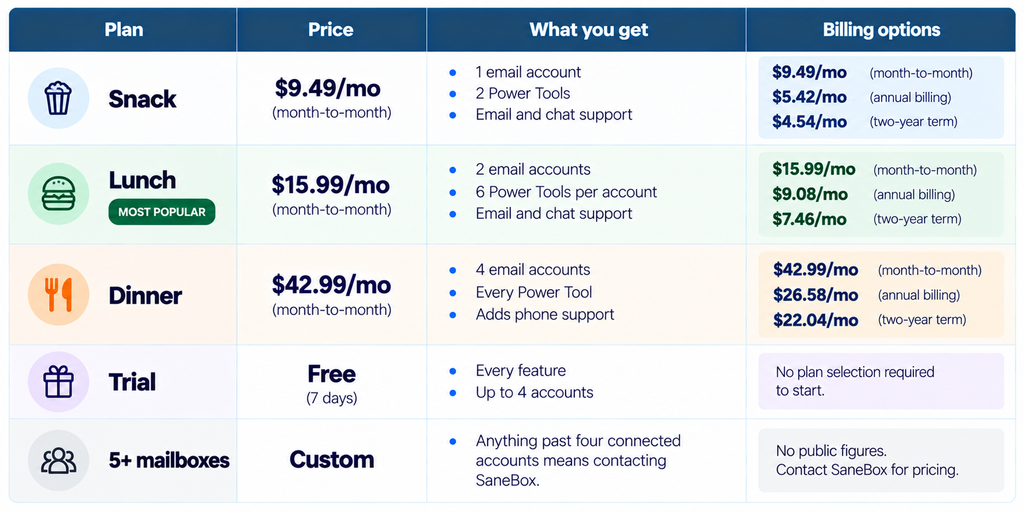
Quick answer: SaneBox costs $9.49 a month for one mailbox if you pay monthly, and $4.54 a month if you commit to two years. What decides whether you like it is not the price. The number to look at is 2. On the entry plan, you get two Power Tools, chosen from a list of eleven, for one email account. Most people who bounce off SaneBox bounce off that allowance, not the billing.
Disclosure: Stack99 earns a commission if you buy through links on this page. It costs you nothing extra and never changes our assessment.
What SaneBox actually does to your inbox
SaneBox is not an email client. You keep Gmail, Outlook, Apple Mail, or whatever you already open every morning. SaneBox connects to the mailbox over IMAP and moves messages between folders based on who sent them and how you have treated similar senders before. Unimportant mail lands in a folder called SaneLater instead of your inbox. A daily digest tells you what went there. You drag a message back to the inbox to train it, and drag one out to untrain it.

The part that matters for anyone nervous about handing a third party their mail: SaneBox says it reads headers, not bodies. Its security page describes analysing metadata to score importance, encrypting credentials with public-key cryptography, and keeping keys in hardware security modules. The same page points to an annual Cloud Application Security Assessment required by Google, an A+ grade from Qualys SSL Labs, and an invitation-only bug bounty on HackerOne.
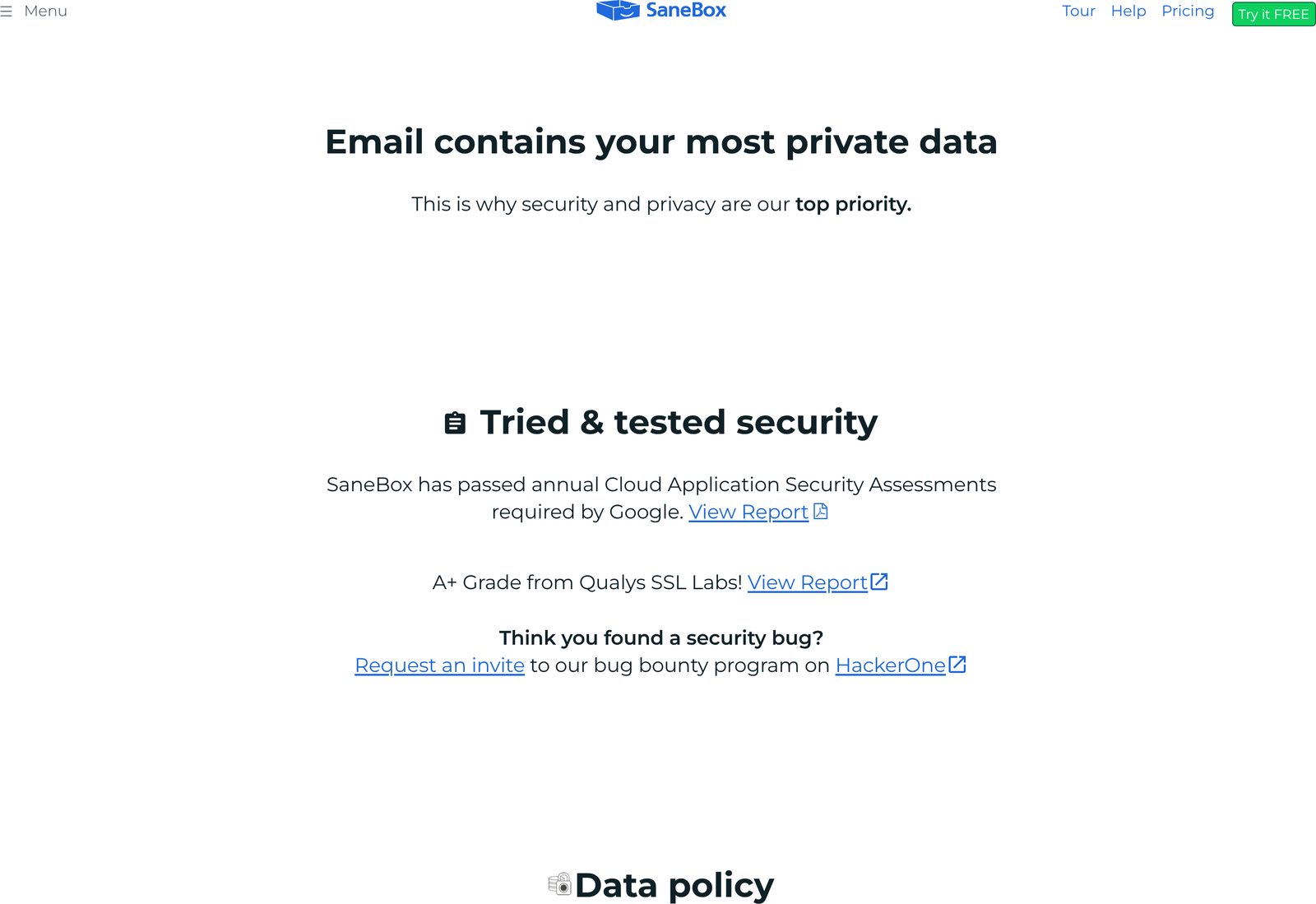
None of that is unusual for a mail add-on of this age, and none of it is a substitute for your own risk review. What it does mean: the questions a security lead will ask have published answers rather than a sales reply.
The feature allowance is the product
Here is where most reviews of this product go wrong. They read the plan cards, see “2 SaneBox Features” on the cheap plan and “All SaneBox Features” on the expensive one, and describe it as a normal capability ladder. Nothing about it works like a ladder. A “feature” is a slot.
SaneBox publishes eleven Power Tools: SaneLater, SaneNoReplies, SaneDoNotDisturb, SaneBlackHole, SaneNews, SaneScreener, SaneCC, Reminders, Attachments, Custom Snooze and SaneNotSpam. Your plan buys you a number of slots from that list, per connected account, and you choose which eleven-item subset fills them. Snack buys two. Lunch buys six per account. Dinner unlocks all of them.
So the real question before you subscribe is which two you would pick. For most people, the honest pair is SaneLater, which does the inbox filtering everyone comes here for, plus one of SaneBlackHole (drag a sender in once and never see them again) or SaneNoReplies (a folder tracking messages you sent that nobody answered). Pick SaneLater and SaneBlackHole, and you have spent your Snack allowance. Reminders, Custom Snooze, and the attachment handling are gone.
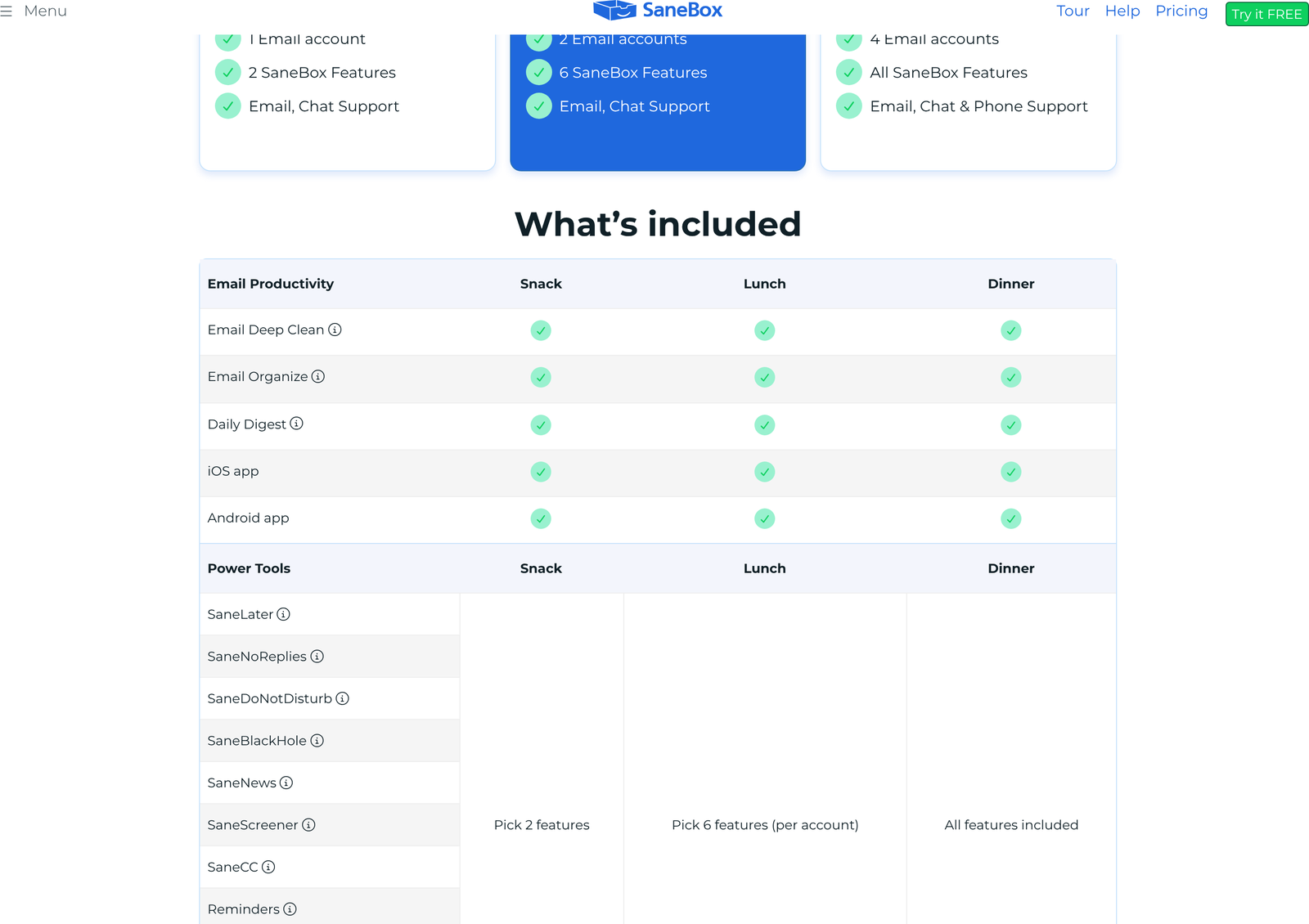
A handful of things sit outside the allowance and come with every plan. Email Deep Clean, Email Organize, the Daily Digest, the iOS app, and the Android app are included at Snack. So are subject filters, domain filters and advanced filtering, which sit in a Miscellaneous group on the comparison table. The slot system governs the Power Tools only.
The eleven tools, and how much SaneBox will tell you about them
If your plan buys slots, you need to know what fills them. SaneBox names all eleven Power Tools on the comparison table, then describes only some of them anywhere a prospective buyer can read before paying. Six get a plain description on the product tour. Five do not.
Documented on the tour page, in SaneBox’s own words:
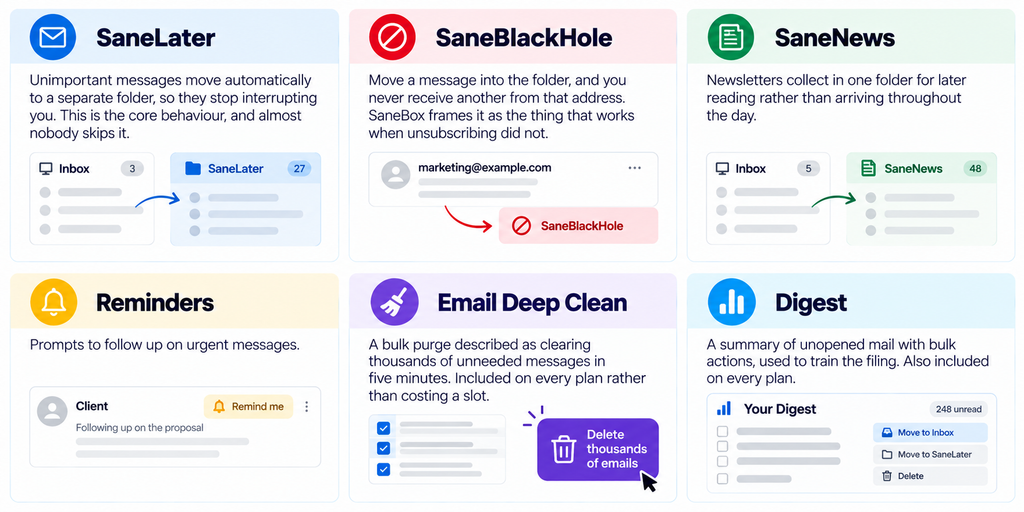
Named on the pricing table but not described in the public marketing pages we could reach: SaneNoReplies, SaneDoNotDisturb, SaneScreener, SaneCC, Attachments, Custom Snooze and SaneNotSpam. Their names are suggestive, and the help centre covers them, yet nothing on the pricing page or the tour tells a buyer what they do before the card goes in. We are not going to guess at behaviour we could not verify, so treat the trial week as the place to find out.
Why this matters more here than at most vendors: you are being asked to choose two of eleven, and five of the eleven are undescribed. Buy Snack blind, and you are picking from a menu with half the dishes unnamed. Running the free week first is not cautious; it is the only sensible order of operations.
What the first fortnight looks like
Setup is an OAuth or IMAP connection and then a wait. SaneBox builds its initial importance model from the history already in the mailbox, which means the first sort arrives within minutes rather than after weeks of observation. The initial pass is usually too aggressive in one direction or the other, and correcting it is manual: drag a message from SaneLater back to the inbox, and the sender gets promoted; drag one out and it gets demoted.
Two behaviours catch people out early. Mail you move on your phone trains the model exactly as it does on the desktop, because the whole thing operates on server-side folders rather than a plugin. And the daily digest is the training surface, not just a notification. Skim it, bulk-correct what landed wrong, and the model converges in days. Ignore it, and SaneBox stays about as accurate as it was on day one, at which point the subscription is paying for a folder you never read.
Deep Clean is worth running once, early, and then forgetting. Clearing a decade of newsletters makes the importance signal cleaner for everything that follows, and the feature costs no slot on any plan.
Cancellation leaves the folders behind. Because SaneBox works by moving messages between IMAP folders on your own server, stopping the subscription stops the sorting rather than deleting anything. Your SaneLater folder stays where it is, full, and new mail simply goes back to arriving in the inbox. Nothing is held hostage, which lowers the cost of trying it considerably.
Pricing, and the tab that is already selected when you arrive
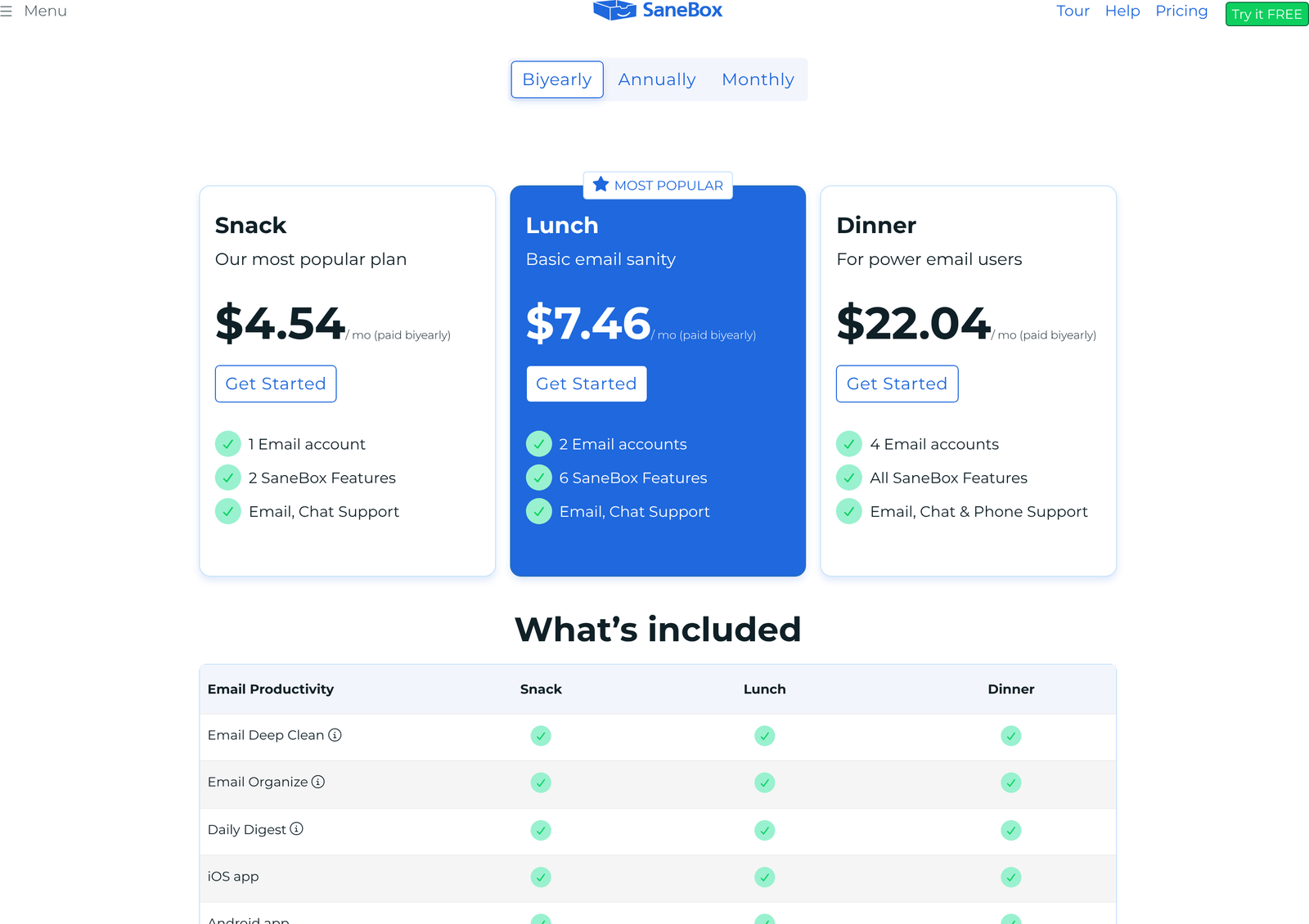
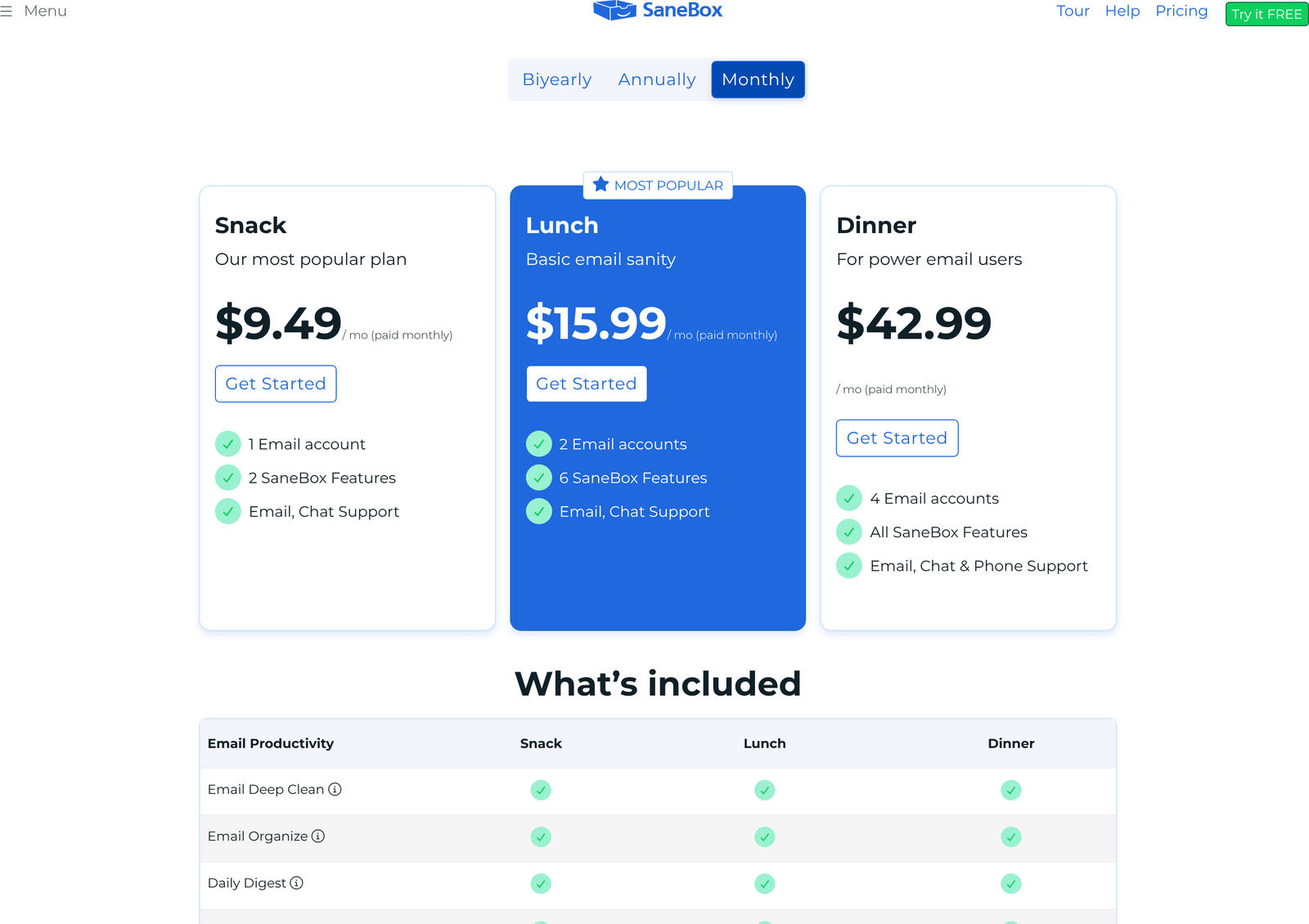
Open the SaneBox pricing page, and you are looking at two-year rates before you touch anything. Three tabs run across the top: Every 2 Years, Annually, Monthly. The first is preselected, and every card carries a small qualifier reading “/ mo (billed every 2 years)”. Miss that line, and you will quote a price that is less than half the month-to-month rate.
What the commitment actually saves
Multiply the figures out, and the discounts are large by subscription standards. Snack costs $113.88 for a year of month-to-month billing, $65.04 on the annual plan, and $108.96 for twenty-four months prepaid. That last number is the one to sit with. Two years of Snack costs less than one year of paying monthly.
Lunch runs $191.88 a year monthly, $108.96 a year annually, $179.04 for two years. Dinner runs $515.88, $318.96 and $528.96 on the same three bases. Expressed as a discount against month-to-month, annual billing saves 42.9% on Snack, 43.2% on Lunch and 38.2% on Dinner. The two-year commitment saves 52.2%, 53.3% and 48.7%.
A 7-day trial against a two-year commitment is a short runway. Email habits take longer than a week to shift, and the training loop is the whole product. Three months of monthly billing on Snack costs $28.47 against $13.62 at the two-year rate, so the information costs you about $15 and tells you far more than the trial will.
Cost per mailbox turns the ladder upside down
Divide the two-year rate by the number of accounts each plan allows and something odd appears. Snack is $4.54 for one mailbox. Lunch is $7.46 for two, so $3.73 each. Dinner is $22.04 for four, so $5.51 each. The middle plan is the cheapest per mailbox on the entire page, and the most expensive plan is the worst value per mailbox.
That only matters if you genuinely have a second mailbox you want managed. A personal address you check twice a week does not count. Two working addresses, say a company account and a freelance or board account, and Lunch is doing real work for $2.92 a month more than Snack while tripling your Power Tool allowance from two to six per account.
One label contradiction, still live
The Snack card carries the subtitle “Our most popular plan”. The MOST POPULAR ribbon sits on the Lunch card, one column over. Both statements are on screen at once. We checked again on 9 October 2026 and the contradiction is still there. Treat neither label as a signal and read the allowance column instead.
Do you need this at all?
Both major mail providers ship a version of this idea for nothing. Google documents five inbox layouts in Gmail Help, including Priority Inbox and Important first, which sort by learned importance much as SaneBox does. Microsoft’s Focused Inbox splits mail into two tabs on the same principle, also free.
Run one of those for a fortnight before paying anyone. If Priority Inbox gets your mail roughly right, you have saved $65 a year. SaneBox earns its money in three situations the built-in tools handle badly.
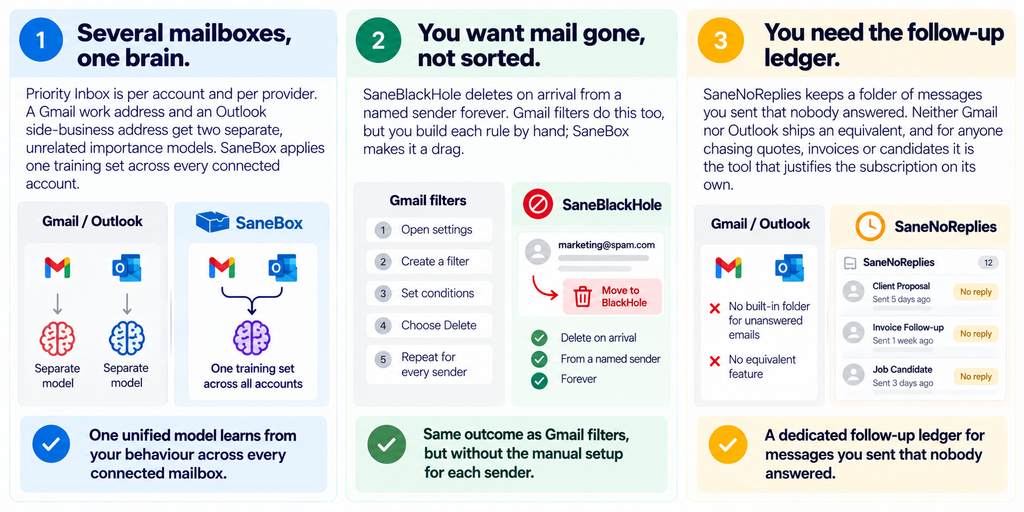
Notice that the third of those is a Power Tool. On Snack, choosing SaneNoReplies costs you half your allowance.
Claims we could not stand behind
The pricing page carries four marketing figures: more than 100,000 users worldwide, over 5,000 five-star reviews across G2, Trustpilot and Capterra, a 4.6 rating on the iOS App Store, and an average saving of more than 100 hours a year per user.
We cannot check three of those. G2, Trustpilot, and Capterra all refuse our declared crawler, so the aggregate review counts stay unverified here rather than being repeated as fact. The 100 hours figure has no published methodology attached to it anywhere we could find, which makes it a marketing number rather than a measurement. Our advice is to treat all four as vendor claims and let your own trial week decide.
One discount is concrete and easy to miss: SaneBox offers an extra 25% off for educational, non-profit, and government users, claimed through support during the trial rather than applied at checkout. On Snack biyearly, that takes the effective rate to about $3.41 a month.
Who should buy which plan?
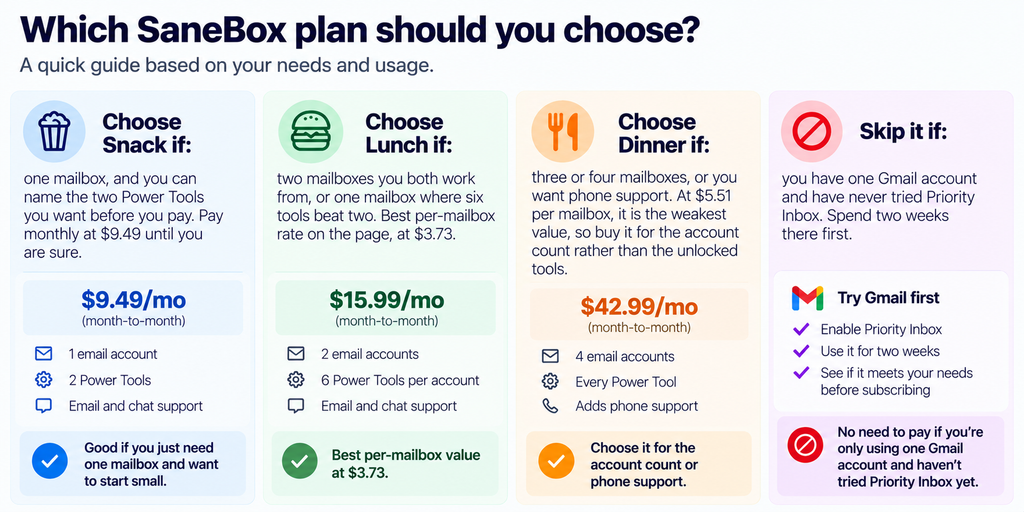
You can start a trial at SaneBox without picking a plan, which is the right way to test the slot allowance: the trial gives you everything for seven days, so note which tools you actually reach for and count them before the card is charged.
FAQ
Does SaneBox read my emails?
SaneBox states that it analyses headers rather than message bodies, and that mail stays on your own mail server. Its security page is the document to read before you decide, along with the Google Cloud Application Security Assessment report it links to.
What is the cheapest way to pay for SaneBox?
Two-year prepayment. Snack works out at $4.54 a month against $9.49 month-to-month, a saving of 52.2%. Two years prepaid costs $108.96, which is less than the $113.88 you would spend on twelve months of monthly billing.
How many email accounts can I connect?
One on Snack, two on Lunch, four on Dinner. Beyond four, you have to contact SaneBox, and no public pricing exists for that.
Can I change which Power Tools I use?
Yes. The allowance is a count, not a fixed set, so you can toggle tools on and off within your limit. Swapping is free; exceeding the count is what requires an upgrade.
Is there a free SaneBox plan?
No. There is a 7-day free trial with every feature unlocked and up to four accounts, and no permanently free tier after it ends.
Does SaneBox work with Outlook as well as Gmail?
Yes. The comparison table lists “All email clients” for every plan, and SaneBox documents Active Directory-managed delegation for Microsoft Exchange environments. Because it works over IMAP and folders, the client you read mail in barely matters.
Where this leaves you
SaneBox is a competent, long-lived tool with an unusually honest comparison table and a pricing page that leads with its best-looking number. Two things decide whether it suits you, and neither is the monthly rate: how many mailboxes you genuinely work from, and whether the two tools you would pick on the entry plan are enough. Answer those before the trial ends.
If deliverability rather than inbox clutter is your actual problem, a list hygiene tool solves a different half of it. Our Bouncer review covers verification pricing, and the InboxAlly beginner’s guide walks through sender reputation. For people running their inbox as a CRM, Streak CRM pricing sits in the same Gmail tab.
Sources
- SaneBox pricing page, all three billing tabs captured 9 October 2026.
- SaneBox security page, for the header-only analysis, Qualys grade and HackerOne programme.
- Google: change your Gmail inbox layout, for the free Priority Inbox comparison.
- Microsoft: Focused Inbox for Outlook, for the equivalent on the Microsoft side.