


Quick answer: SoftSync is a CRM that sells capacity rather than features. Pro and Business run the same product, down to the API, the AI assistant, and the automation workflows. What separates them is room: Pro caps your workspace at five people, Business at twenty-five. Pro costs $39 a seat a month, or $29 on a yearly commitment; Business is $79 and $59. The pricing page loads with Yearly already selected, so the first figures you see are the discounted ones. The sharpest edge is that five-person ceiling, because the sixth hire roughly doubles your bill.
Disclosure: Stack99 earns a commission if you buy through links on this page. It costs you nothing extra and never changes our assessment.
A pricing model that inverts the usual one
Almost every CRM you have priced works the same way. The cheap tier withholds something you need, usually automation or reporting or the API, and the upgrade buys the missing capability back. Tier comparison tables exist to show you the gaps.
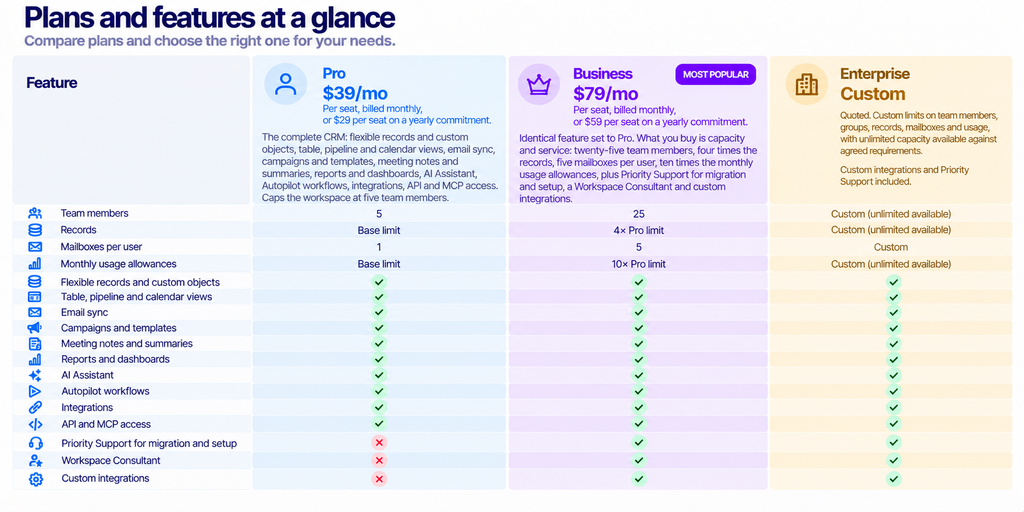
SoftSync publishes a comparison table where the feature rows are all ticked on both paid plans. Records and custom objects, table and pipeline and calendar views, team roles and group permissions, email sync, campaigns and templates, meeting notes and summaries, the desktop recorder, the Chrome extension, reports and dashboards, the AI Assistant, Autopilot workflows, contact enrichment, integrations, API access and MCP access. Every one of those is on Pro, the entry plan.
The vendor says so plainly at the top of the page: both paid plans run the full CRM, with the same core features from day one, and you choose the amount of room your workspace needs. Four rows at the bottom of the table carry the actual differences, and they are all numbers.
The page opens on the annual view
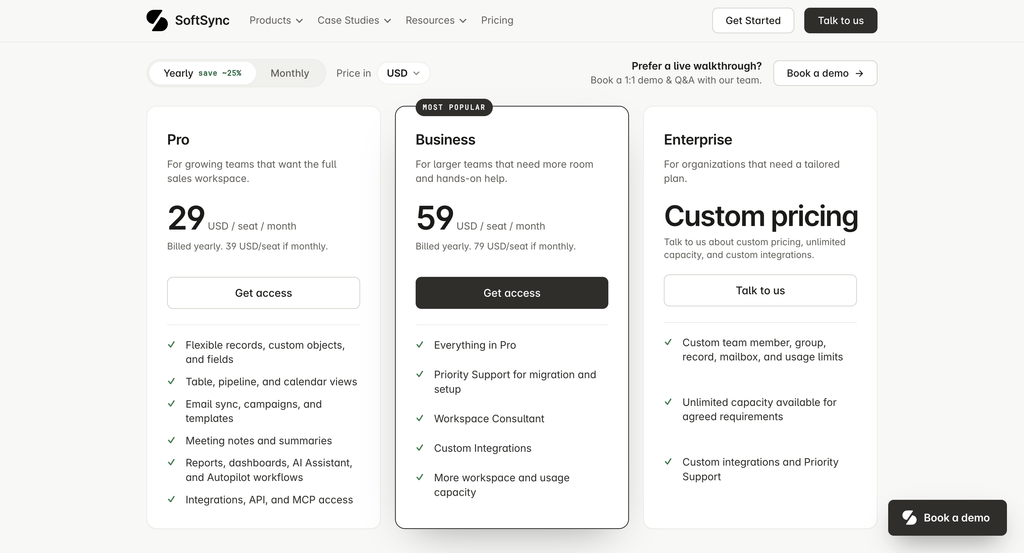
Load the pricing page and the Yearly pill is active, badged save ~25%. Pro reads 29 USD per seat per month, Business reads 59. Under each figure, in grey, sits the line that explains it: billed yearly, with the monthly alternative spelled out beside it.
Click Monthly, and the cards redraw to 39 and 79. Those are the month-to-month rates, and they are the ones to use when comparing against a competitor you would also pay monthly.
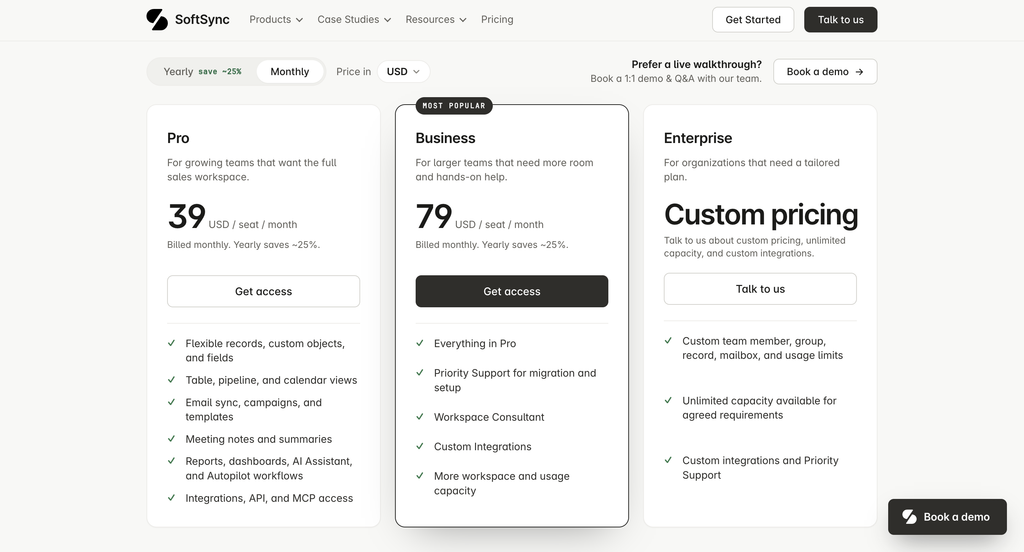
The badge is honest. Pro saves 25.6% on a yearly commitment and Business saves 25.3%, so the approximate 25% holds for both. Over a year, that is $348 a seat instead of $468 on Pro, and $708 instead of $948 on Business. Saving $120 or $240 per seat per year is real money on a ten-person team.
The two plans, priced
The five-person ceiling is the real decision
Pro allows a maximum of five team members per workspace. Business allows twenty-five. Nothing sits between them.
Run the arithmetic on a yearly commitment. Five seats on Pro costs $145 a month. Add a sixth person, and Pro is no longer available to you, so the whole team moves to Business at $59 a seat, which is $354 a month. One hire raises the bill by $209 a month, a 144% increase, and buys nobody any new functionality. On monthly billing, the same step goes from $195 to $474.
That cliff is worth planning around rather than discovering. A four-person sales team with a hiring plan should price Business from the start and treat Pro as a trial. A founder-led team that genuinely will not pass five people for two years gets an unusually complete CRM at $29 a seat, and the gap between that and a comparable product is wide.
Worth checking before you commit: whether a seat means a licensed user or any person with workspace access. The table says maximum team members per workspace, which reads as the latter. Ask, because an operations person who only reads reports still counts against five.
Where the usage limits stop scaling with your team
Three usage allowances reset each calendar month. Two of them are granted per user. One is not, and the difference matters more as you grow.
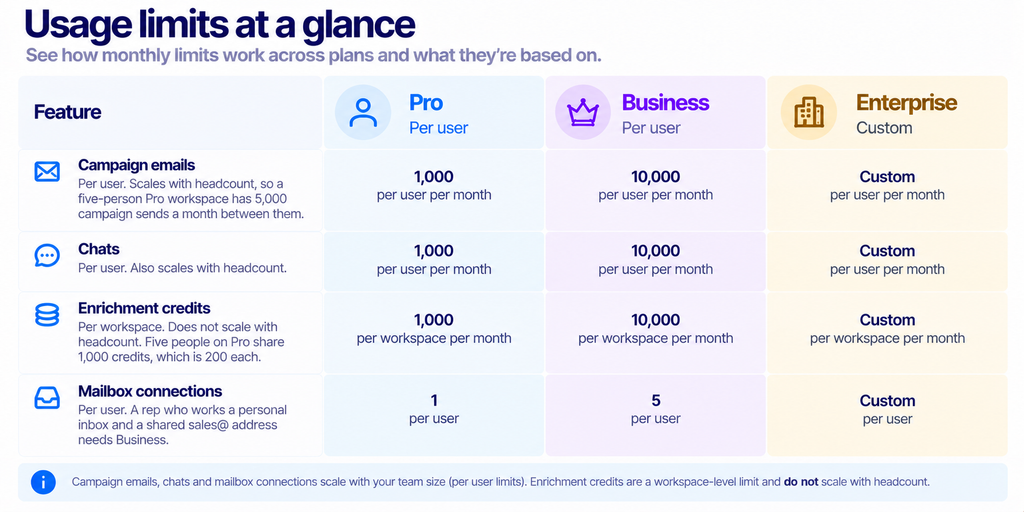
Enrichment being a workspace pool rather than a per-user grant is the one to watch. Grow from two people to five on Pro and your campaign capacity rises from 2,000 to 5,000 sends, while your enrichment budget stays at 1,000 and each person’s share drops by 60%. A team that leans on enrichment for prospecting will feel that long before it hits the seat cap.
The single mailbox connection on Pro is the other quiet constraint. Plenty of small sales teams run a shared inbox alongside personal addresses, and that pattern needs two connections per person.
Record ceilings and group limits
Pro holds up to 250,000 records per table and ten groups per workspace. Business raises those to a million records and a hundred groups. The record limit is generous for the team sizes each plan targets; five people are unlikely to generate a quarter of a million rows in one table through normal sales activity.
An imported list is a different matter. Bring in a purchased database or migrate a large historical CRM and you can meet that ceiling on day one. Check your largest table before you migrate rather than after.
Ten groups on Pro is the limit most likely to feel arbitrary. Groups carry permissions, so a company that wants separate visibility for sales, support, partnerships, and finance is already using four before anyone gets creative with regional or product splits.
Service is the other thing Business buys
Three rows in the support section separate the plans. Data Migration and Workspace Consultant both read self-served on Pro and Priority Support on Business. Custom Integration reads talk to us on all three tiers, which means it is a conversation rather than a plan entitlement.
Self-served migration is the line to take seriously. Moving a CRM is where implementations fail, and doing it without help is a genuine cost even when it is not a line item. If you are coming off a spreadsheet, self-served is fine. Coming off a configured Pipedrive or HubSpot with custom fields, automations, and years of history, the Business-tier migration help may be cheaper than the hours it replaces.
SoftSync also mentions startup pricing. The startup section invites early-stage teams to ask about a discount and states there is no separate setup fee. No figure is published, so treat it as a conversation worth having rather than a number you can plan with.
API and MCP access on the entry plan
Both developer rows are ticked on Pro, which is unusual at $29 a seat. API access on an entry CRM tier is uncommon enough; MCP access is rarer still.
The Model Context Protocol is an open standard for connecting AI applications to external systems, with its own specification, SDKs and client implementations. A CRM exposing an MCP server means an AI client can query and act on your records through a documented interface rather than a bespoke integration. For a team already running AI tooling against its own data, that removes a build step.
Two caveats. The comparison table confirms access exists but publishes no rate limits, and usage limits elsewhere on the page are specific about monthly ceilings. Ask what governs API and MCP calls before you design anything that depends on volume.
What the product actually covers
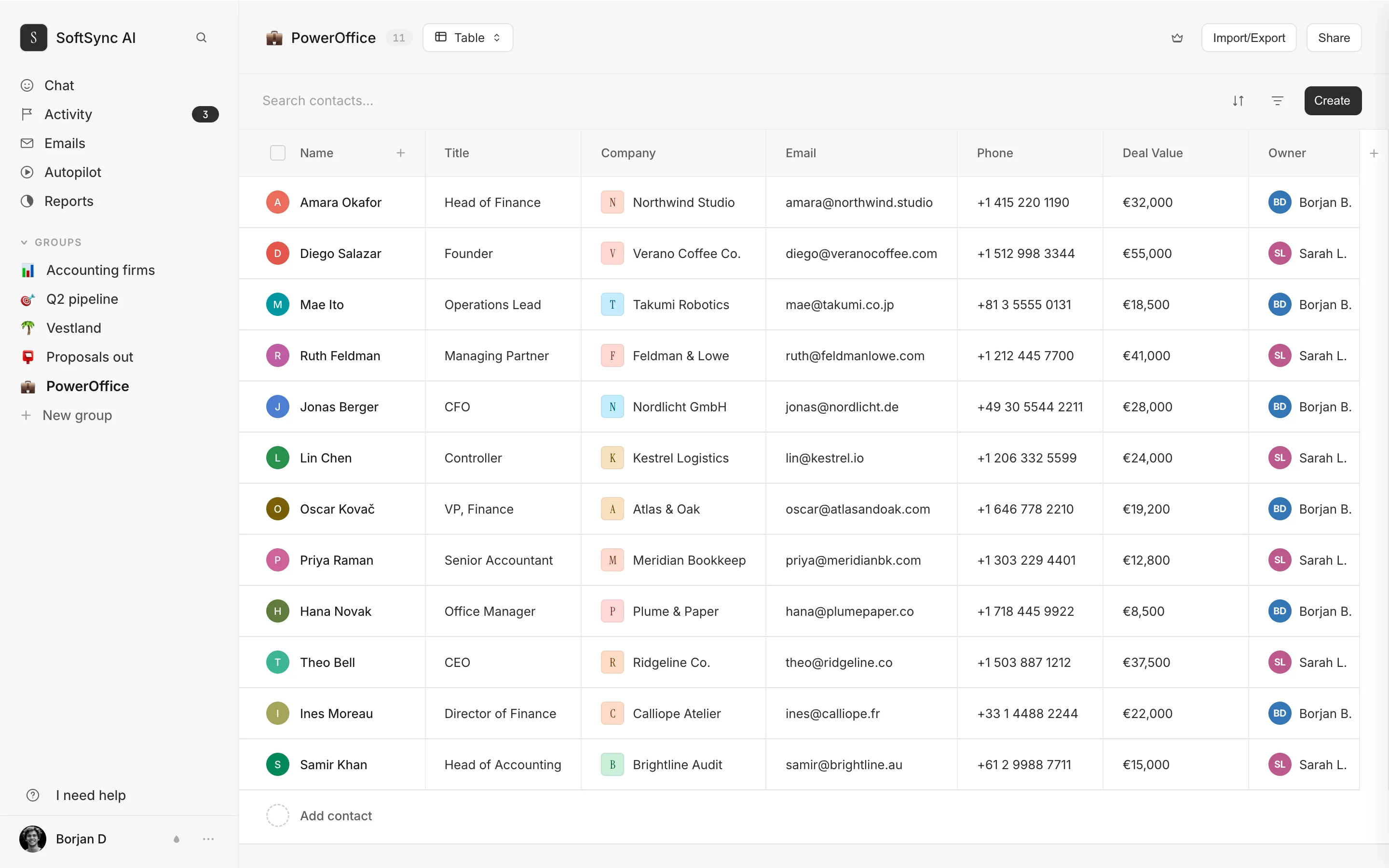
SoftSync’s product list runs wider than most CRMs at this price. Alongside the core sales workspace sit email campaigns, SMS from the record, reports, booking pages for meetings, a lead database, a Chrome extension for saving contacts while browsing, and a desktop Meeting Assistant that the vendor says records calls without a bot joining the meeting.
Past the deal there is more: documents and quotes filled from the deal record, e-signature, forms, a website chat agent that answers from your own articles, a customer portal, a knowledge base, website content management, a service desk with reply-by times, and a shared team inbox. SoftSync AI and SoftSync Autopilot sit on top of all of it.
Breadth of that kind cuts both ways. Buying one product instead of five saves money and removes integration work. Breadth also tends to mean each module is less deep than the specialist it replaces, and nothing on the pricing page lets you judge depth. We have not tested the product, so the honest position is that the list is verified and the quality is not.
One structural note. SoftSync points funds, investors, and private equity teams at a separate product called AnalystX rather than at a CRM configuration. If you run deal flow and LP relationships, the main product is not the one being recommended to you.
Currency and billing
The page prices in eleven currencies: USD, EUR, GBP, AUD, CAD, NZD, CHF, DKK, SEK, NOK and ISK. Unlike several vendors we have checked, there is no footnote saying the non-dollar figures are approximate or that invoices settle in dollars. Confirm it anyway if you are budgeting outside the US, because that footnote is common and its absence is not a guarantee.
Both billing periods are offered on both paid plans. Nothing on the page describes a free tier or a free trial, only a demo booking. Expect to talk to someone before you see the product.
Who it fits
Choose Pro if: your team is five people or fewer and will stay there for a while, you want the complete feature set rather than a stripped entry tier, and your enrichment use is light. At $29 a seat on a yearly commitment, you are getting API and MCP access, automation, and an AI assistant that most vendors reserve for higher tiers.
Choose Business if: you are above five people, you are hiring into that range this year, your reps need more than one mailbox each, or you are migrating from a configured CRM and want help doing it. Also choose it if enrichment is central to how you prospect, because 1,000 credits across a whole workspace runs out quickly.
Talk to Enterprise if: you need more than twenty-five people or more than a million records in a table. Both are hard ceilings rather than soft ones.
Look elsewhere if: you want to live inside Gmail rather than a separate application, where something like a Gmail-native CRM fits better, or if you need deep marketing automation, where a platform built around campaigns will go further. Our look at what Keap charges and covers is a useful comparison at the heavier end, and who Capsule CRM suits covers the lighter one.
What we could not verify
We have not used SoftSync. Everything above comes from the vendor’s own pricing and product pages, read on 29 October 2026, and describes what is published rather than how well it works.
No independent rating is cited here because none could be confirmed. The major review platforms refuse our crawler, so any score we quoted would be second-hand. We found no published customer count, no uptime commitment, and no security certification on the pricing page. Rate limits for the API and MCP access are not stated. The startup discount has no published figure.
Frequently asked questions
How much does SoftSync cost?
Pro is $39 a seat a month billed monthly, or $29 a seat on a yearly commitment. Business is $79 and $59 on the same basis. Enterprise is quoted.
What is the difference between Pro and Business?
Capacity and service, not features. Both plans include the same CRM, automation, AI assistant, API, and MCP access. Business raises the team cap from five to twenty-five, records from 250,000 to a million per table, mailboxes from one to five per user, and monthly usage allowances tenfold, and adds Priority Support for migration plus a Workspace Consultant.
What happens when my team passes five people?
Pro stops being an option, and the workspace moves to Business. On yearly billing, the bill goes from $145 a month for five seats to $354 for six, an increase of 144% for one hire.
Is the 25% yearly saving accurate?
Yes, for both plans. Pro saves 25.6%, and Business 25.3% against monthly billing, so the approximate figure on the toggle holds.
Are enrichment credits per person?
No, and this is the limit most often misread. Campaign emails and chats are granted per user, but enrichment credits are granted per workspace. Five people on Pro share 1,000 credits a month between them.
Does the entry plan include API access?
It does, along with MCP access and the integrations and connectors row. All three are ticked on Pro. Rate limits are not published.
Is there a free trial?
Nothing on the pricing page describes one. The calls to action are get access and book a demo, so plan on a conversation rather than a self-serve signup.
Can I connect more than one mailbox?
One per user on Pro and five per user on Business. Teams running a shared address alongside personal inboxes need the higher plan.
Sources
- SoftSync pricing, read 29 October 2026 in both billing states, including the full plan comparison table.
- Model Context Protocol, the open standard referenced by the MCP access row.
Count your team, count your mailboxes, then open SoftSync’s pricing page and click Monthly. Those three steps answer most of the question.