



Quick answer: Datarails suits finance teams who want to keep working in Excel while the consolidation, version control, and reporting happen underneath. The plan you need is decided by headcount and connector count, not by features: Professional carries 2 users and 1 integration, Premium 5 users and 2, Expert 15 users plus 50 viewers and 3. Almost every capability appears on all three tiers. No price is published anywhere; there is no free trial, and the only route in is a demo.
Disclosure: Stack99 earns a commission if you buy through links on this page. It costs you nothing extra and never changes our assessment.
The ladder is seats, not capability
Most finance platforms gate the interesting parts. Consolidation on the middle plan, multi-currency at enterprise, audit trails when you ask nicely. Datarails does the opposite, and that single fact decides who should buy it.
We read the full comparison table on the vendor’s pricing page on 8 November 2026. Reporting, Planning, Dashboards, Data Mapper, Lookups, Workflows, the Submit Button, File Boxes, Filters, Version Control, the AI Suite, the FinanceOS AI Connector, Permissions, Allocations, Custom Reports, Multiple Charts of Accounts, currency translation, intercompany eliminations and JV investment accounting all sit on every tier. Two rows differ. AI Storyboards and Premium Support are absent from Professional, and that is the entire feature gap across the range.
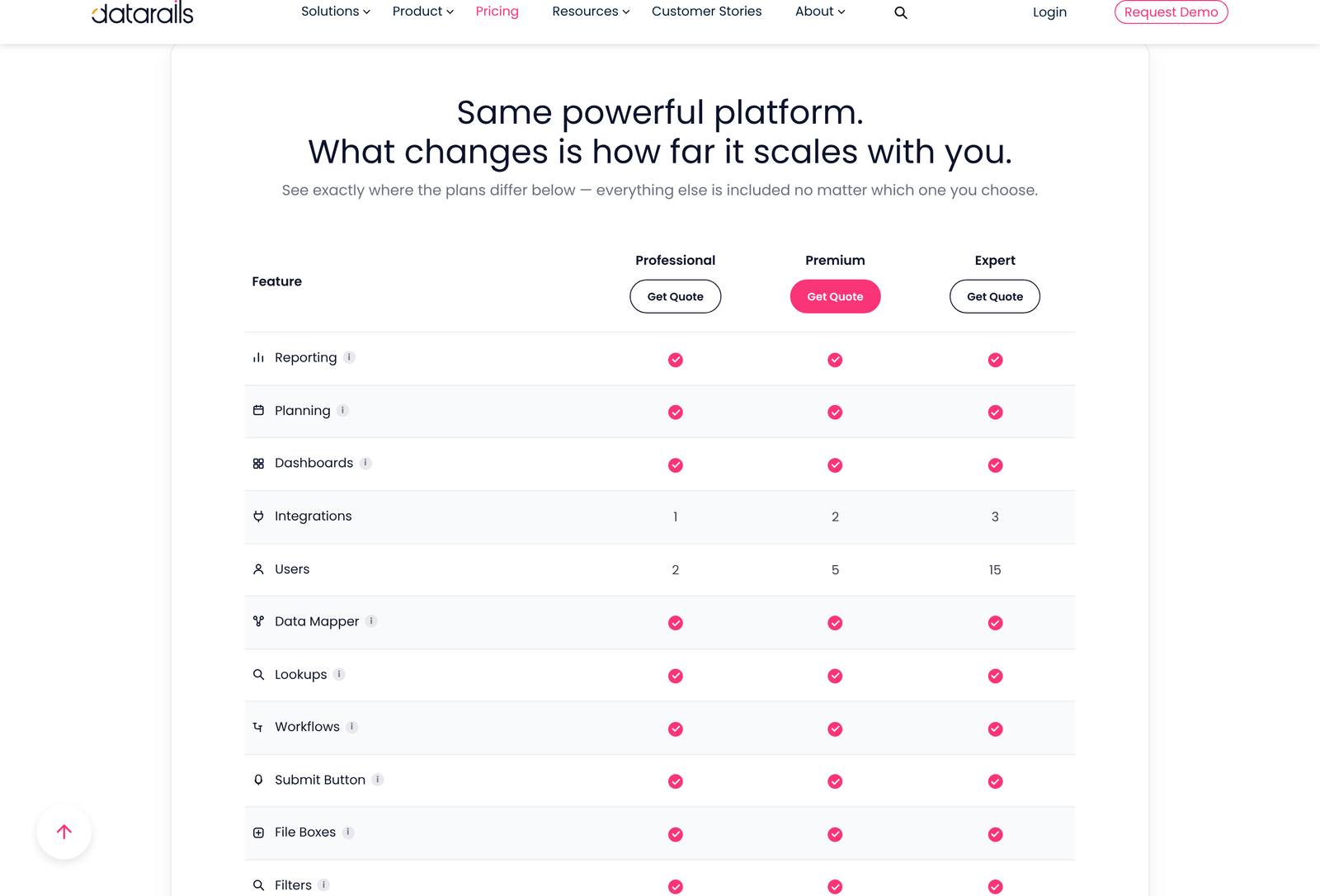
So the usual upgrade question does not apply here. You are not buying your way toward a feature. You are buying seats, connectors, and bundled modules.
What each tier actually gives you
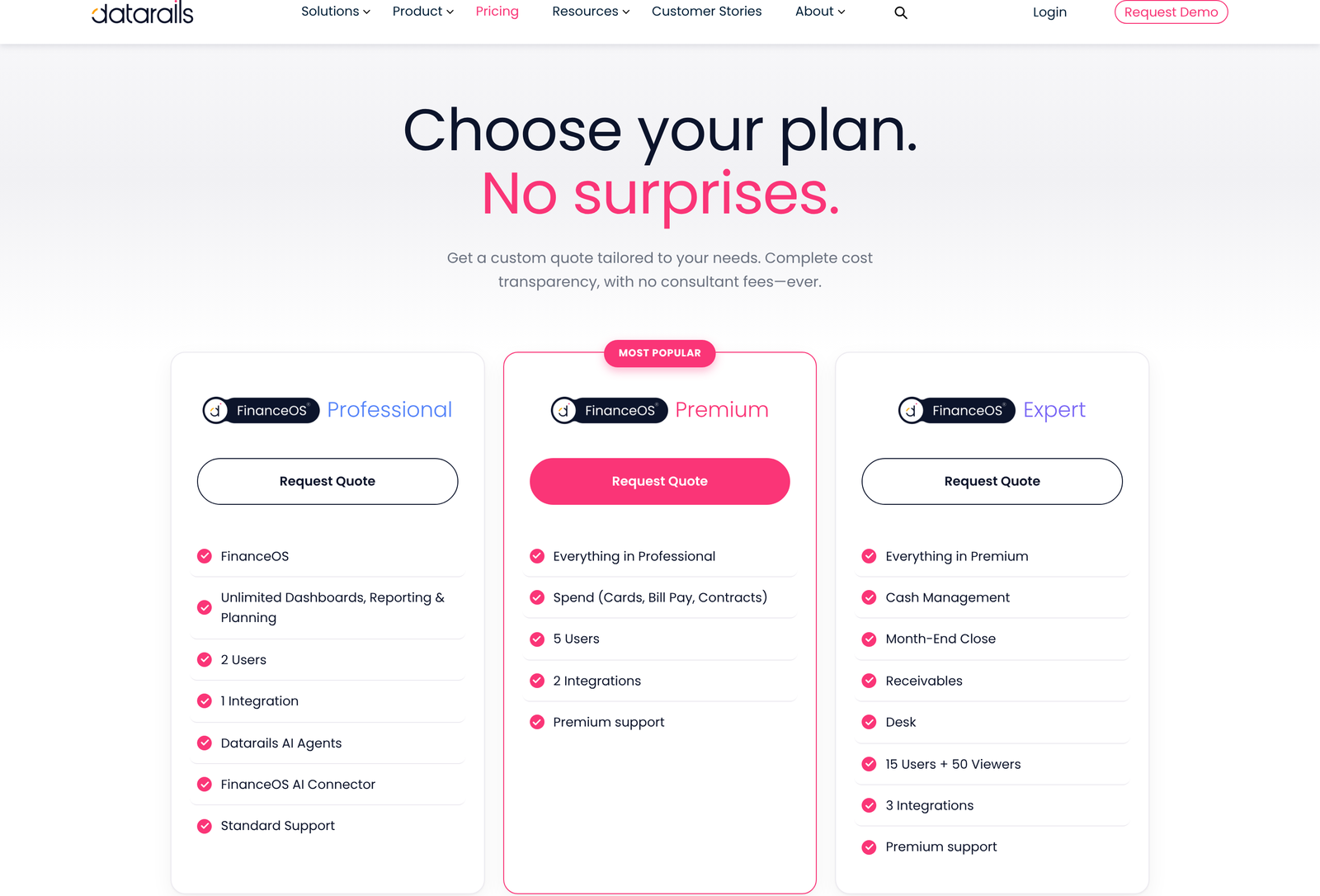
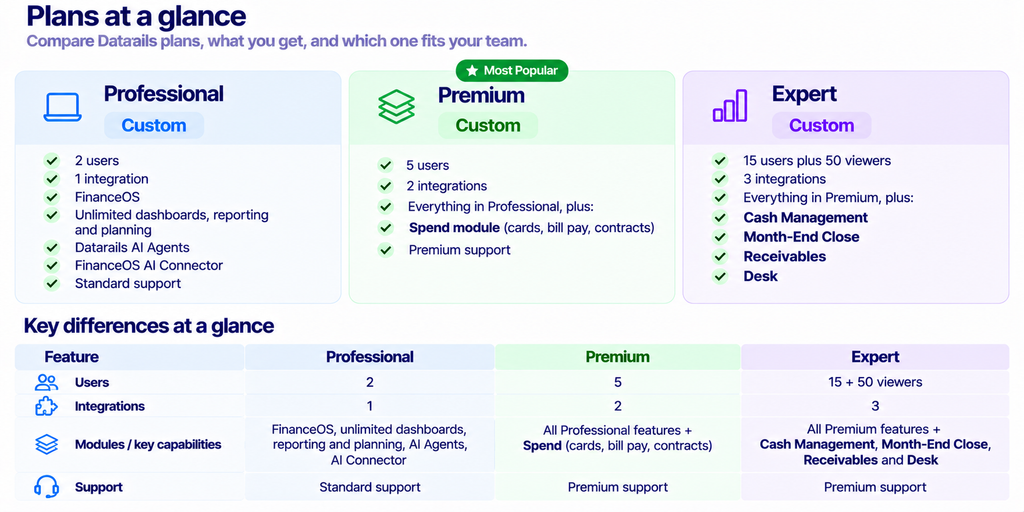
Note the viewer concept arriving only at Expert. Fifty read-only seats is a different kind of product from fifteen editors: it implies the output goes to budget holders across a business, not just around a finance team. If you need wide distribution of numbers, Expert is the first tier that offers it, regardless of how few people actually build models.
The jump from 2 users to 5 to 15 is steep, and nothing on the page describes buying a single extra seat. Ask about that on the call. A six-person team sitting just above the Premium line has an obvious question to put to sales.
One connector, four hundred and thirty-seven options
Here is the constraint most buyers will hit first. We counted the rendered integrations directory on 8 November 2026 and found 437 catalogue entries. Professional permits one of them. Premium permits two. Expert permits three.
That is a fit question dressed up as a pricing detail. Count your systems of record honestly before the demo. A company running NetSuite alone is fine on Professional. A company running QuickBooks for the books, Salesforce for pipeline, and BambooHR for headcount needs three slots, which puts it at Expert, which also means paying for fifteen users it may not have.
Two catalogue entries complicate the count further. “Custom API” and “SFTP” are listed as integrations in their own right. Whether pointing Datarails at a database through either of those consumes one of your slots is not stated anywhere we could find, and the answer changes the tier you need. Put it on the question list.

Datarails is listed in the Xero App Store, rated 5.0 from three reviews and listed since May 2022, which is the only third-party marketplace confirmation of a connector we were able to obtain. The listing describes the Xero objects as shared from Xero to Datarails, so read it as a data feed into the platform rather than a two-way sync. Three reviews are a thin sample, and all of them are several years old.
Rival planning tools sit inside the same catalogue, Prophix and Oracle Hyperion among them. That is quietly useful: it means a parallel run is possible, where the incumbent keeps producing numbers while Datarails is proven against it.
The Excel premise, and who it suits
Datarails markets itself as Excel-native, meaning your existing models stay as they are and the platform handles consolidation, version control and reporting around them. The vendor claims models work unchanged with no code required. We report that as the vendor’s claim, because we have not tested a migration.
The premise is a genuine differentiator for a specific buyer. Finance teams who have spent years building models in Excel face a real cost when a planning tool asks them to rebuild everything in a proprietary modelling language. Avoiding that rebuild is the central argument, and for a team with deep Excel assets it is a strong one.
Be clear-eyed about what Excel does and does not do, though. A single worksheet holds 1,048,576 rows by 16,384 columns, which is ample for most finance work and a hard wall for transaction-level detail at scale. Spreadsheets also fail in well-documented ways: the European Spreadsheet Risks Interest Group maintains a public catalogue of production spreadsheet failures precisely because the errors are common and expensive.
Datarails positions version control, workflows and the audit layer as the answer to exactly that risk. The pitch is coherent. Whether the governance layer is strong enough for your auditors is a question for your auditors, not for a vendor page.
Multi-entity finance teams get the most out of it
Currency translation, intercompany eliminations, multiple charts of accounts and JV investment accounting all appear on every tier. These are not generic reporting features. They are the machinery of consolidating a group.
Under IFRS 10, a parent controlling one or more entities must present consolidated statements, with control as the basis for consolidation. If that describes your group, the work is mandatory and it is painful by hand. A finance team closing a five-entity group across two currencies is the clearest fit for this product on the whole page, and notably can do it from Professional, because none of that capability is gated upward.
A single-entity business in one currency is paying for machinery it will not run. The reporting and planning still work, but the strongest part of the platform goes unused, and cheaper tools cover plain budgeting.
What the modules are, and the ambiguity around them

Six things carry the Datarails name. FinanceOS is the governed platform layer. Datarails FP&A is the flagship. Four workflow modules sit on top: Month-End Close, Cash, Spend, and Desk. The FinanceOS AI Connector is the seventh piece, and it is the most unusual.
- Cash gives visibility into cash position and runway.
- Month-End Close turns the close into a governed workflow with sign-offs.
- Spend covers cards, bill pay, and contracts.
- Desk is ticketing built for finance, with role-based assignment and financial data attached to each ticket.
Now the ambiguity. The pricing page bundles these into tiers, putting Spend in Premium and Cash, Month-End Close, and Desk in Expert. The same page also offers modules you can layer onto any plan. Both statements appear without being reconciled, so whether a Professional customer can buy Cash on its own is unresolved from public information. Ask directly, because the answer could save you two tier jumps.
One more oddity worth raising on the call: “Receivables” appears in the Expert plan card and nowhere else on the site. No definition, no product page, no row in the comparison table. Do not assume what it covers.
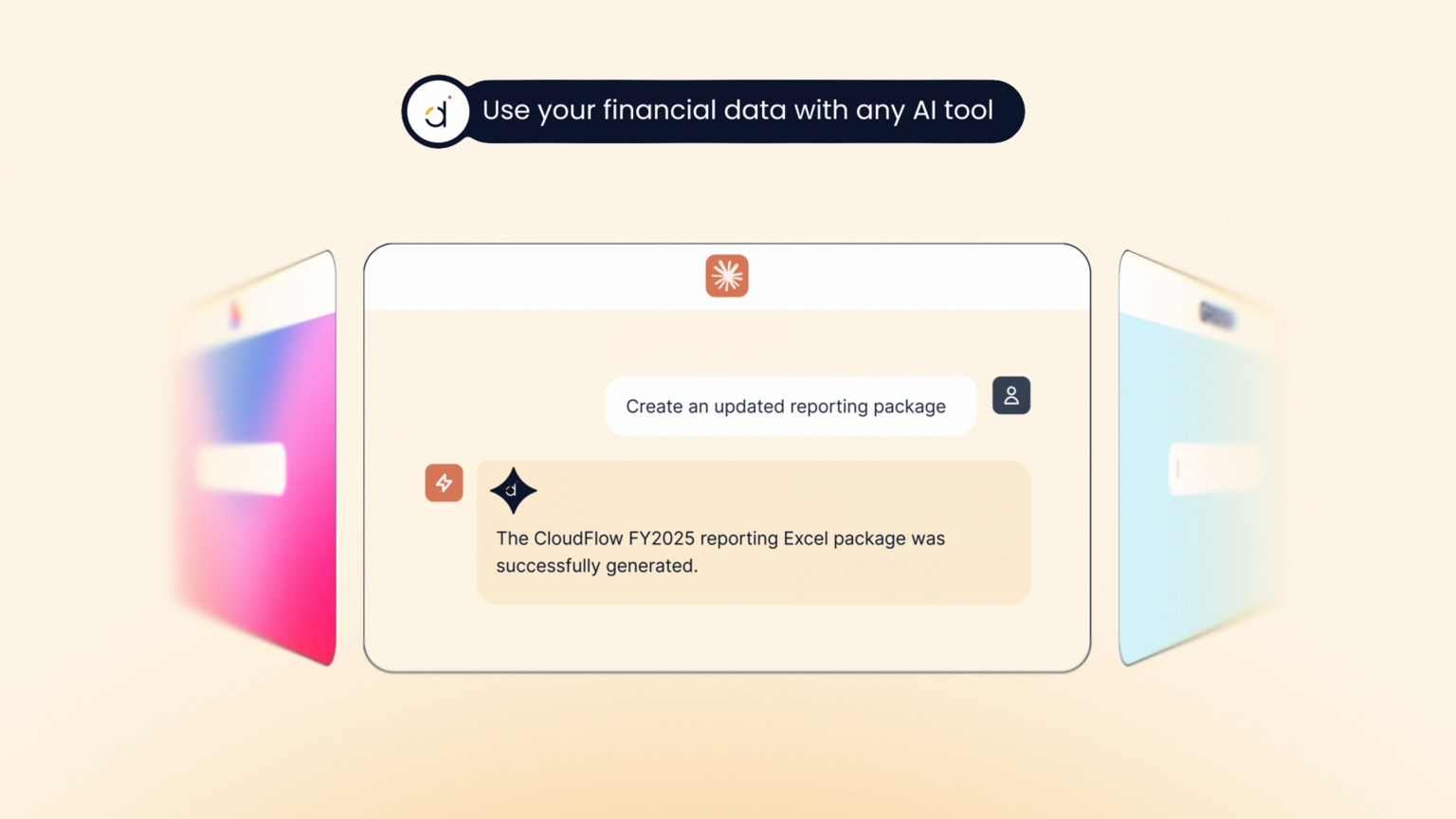
The AI Connector deserves a note of its own. It exposes the governed financial layer to outside AI tools, with ChatGPT, Claude, Copilot, Gamma, and Lovable named on the page. Governance features like this are usually an enterprise upsell, and here it sits on all three tiers. For a team already pasting financials into chat tools, that is a meaningful control.
Who fits which plan
Professional
Choose it if: your finance function is one or two people, you have a single system of record, and you want consolidation and version control without rebuilding your models. You give up AI Storyboards and premium support, which is a modest sacrifice given everything else carries over.
Premium
Choose it if: you need a third, fourth or fifth seat, you connect two source systems, or spend control is an active problem. The Spend module is the real reason to be here, so if cards and bill pay already live somewhere you trust, the seat count is doing all the work in this decision.
Expert
Choose it if: budget holders outside finance need to see numbers, which is what the 50 viewers are for, or you need a third connector, or the month-end close itself is the thing you are trying to fix. Cash, Month-End Close, Receivables, and Desk arrive together at this tier.
Who should look elsewhere?
Anyone who needs to evaluate software by using it. There is no self-serve signup and no advertised trial. Getting started means a form, then a demo hosted by the vendor. Teams that buy by running a pilot in a fortnight will find the process slower than they want.

Anyone who needs a price before a sales conversation. The page headline reads “Choose your plan. No surprises.” and promises complete cost transparency with no consultant fees ever, while publishing no figures at all. The promise may well hold once you are quoted. The page does not let you check it.
Teams that have already left Excel behind are a poor fit too. If your models live in a dedicated planning tool and nobody misses spreadsheets, the central argument for Datarails has nothing to grip. We looked at the plan structure from a different angle in Datarails Plans: Seats, Not Features, and at the product itself in Datarails Review for Finance Teams.
Running it alongside what you have
Because rival planning tools appear inside the integrations catalogue, a cautious migration is available to you. Keep the incumbent producing the numbers that go to the board. Point Datarails at the same sources. Compare the two outputs for a full quarter before anyone depends on the new one.
This matters more than usual given there is no trial. A demo shows you a polished path through the product with the vendor driving. A parallel run shows you what happens when your actual chart of accounts meets the data mapper, which is where planning migrations normally go wrong. Build the overlap period into the contract conversation rather than discovering you need it afterwards.
One caution on slot counting during an overlap: if the incumbent tool occupies one of your one, two or three integration slots while you compare, you have fewer left for the systems that matter. Clarify whether a temporary connector counts against the limit.
Why the viewer seat decides more than it looks
Fifty viewers arriving only at Expert sets a quiet boundary between two ways of running finance. Below it, numbers are built by finance and sent out as files. At that tier, department heads can open the reporting themselves.
Teams often underestimate how much of the month-end burden is distribution rather than modelling: chasing budget owners, re-cutting the same report by department, answering the same three questions in email. If that describes your close, the viewer allocation is the feature you are buying, and it does not exist on the two lower plans at any price.

Conversely, a finance team that reports upward to three executives and nobody else will never touch fifty viewers. Paying the Expert tier for distribution you do not need is the most likely way to overbuy this product.
Support is the other real difference
Standard support on Professional, premium support on Premium and Expert. Alongside AI Storyboards, this is the only genuine feature split in the range, which gives it more weight than a support line usually carries.
Datarails says its customer success staff all come from finance backgrounds and cost nothing extra. Treat that as a claim, since we cannot verify staffing. If true, it would matter during implementation, where the hard part is usually mapping a messy chart of accounts rather than operating the software. Ask what premium support means in response times and named contacts, because “premium” by itself is not a commitment.
Questions to bring to the demo
- What does one additional seat cost on each tier, and can viewers be bought separately?
- Do “Custom API” and “SFTP” consume an integration slot?
- Can a module such as Cash be added to Professional, or is it only available by moving to Expert?
- What is “Receivables”?
- Is the Xero connector one-way, as the App Store listing implies, or two-way?
- What is the contract term, and does the quoted figure change at renewal?
What we could not verify
- Any price for any plan. None is published, so we quote none.
- Datarails’ “600+ integrations” figure. We counted 437 catalogue entries, so roughly 163 would be unlisted. Reported as a vendor claim.
- Its “4 to 6 weeks” implementation window, also a vendor claim.
- Whether seats or integration slots can be bought outside a tier.
- Whether the modules are genuinely purchasable à la carte.
FAQ
How much does Datarails cost?
The vendor publishes no figures. All three plans route to a Request Quote form, and we will not estimate a number we cannot source.
Which Datarails plan do I need?
Count two things: how many people need to build or edit, and how many source systems must connect. Professional covers 2 users and 1 integration, Premium 5 and 2, Expert 15 plus 50 viewers and 3. Features barely differ, so those two counts decide it.
Is there a free trial?
None is advertised anywhere on the site. Every call to action leads to a demo or a quote request.
Do I have to leave Excel?
No, and that is the product’s main argument. Datarails claims existing models work unchanged, with the platform supplying consolidation, version control and reporting around them. Treat the claim as a claim.
Is Datarails good for a single-entity company?
It works, but you leave the best part unused. Intercompany eliminations, currency translation and multiple charts of accounts are the standout capabilities, and a single entity in one currency needs none of them.
How many systems can Datarails connect to?
The catalogue listed 437 options when we counted it on 8 November 2026. Your plan decides how many you may actually use: one, two or three.
The short version
Datarails fits a finance team that consolidates a multi-entity group, lives in Excel by choice, and would rather govern spreadsheets than replace them. Because capability is not tiered, a small team gets the full toolkit on the entry plan, which is unusual and genuinely in the buyer’s favour.
Your tier comes down to arithmetic you can do before the call: editors, viewers and connectors. Do that arithmetic first, bring the six questions above, and you will get more out of the demo than the demo gets out of you. You can request a Datarails demo here.
Sources
- Datarails pricing, tier limits and comparison table, read 8 November 2026.
- Datarails integrations directory, 437 entries counted from the rendered page, 8 November 2026.
- Datarails FinanceOS.
- Datarails on the Xero App Store, 5.0 from 3 reviews, listed May 2022.
- Microsoft, Excel specifications and limits.
- IFRS 10, Consolidated Financial Statements.
- EuSpRIG spreadsheet horror stories.