


Quick answer: Pingtree fits businesses that sell leads to more than one buyer and need the routing decision made in milliseconds. Self Service starts at $499 a month with a free trial, and Managed Services starts at $2,500 scoped with an account team. Both figures are published as starting costs rather than fixed plan prices. Buyer count decides fit, not company size. Three or more buyers competing for the same lead, and the platform earns its fee. If you route every lead to one CRM, you are paying $499 a month for a webhook.
Disclosure: Stack99 earns a commission if you buy through links on this page. It costs you nothing extra and never changes our assessment.
Lead distribution software gets sold on throughput and bought on anxiety. The pitch is always speed, and the real purchase is usually a fix for something that went wrong: leads sold twice, a buyer quietly rejecting half your volume, a compliance request you could not answer. Working out whether Pingtree suits you means being honest about which of those problems you actually have.
This page sorts that out by use case. Pricing was re-checked against the vendor’s published page on 10 November 2026, and the product details come from Pingtree’s own documentation.
What you are buying
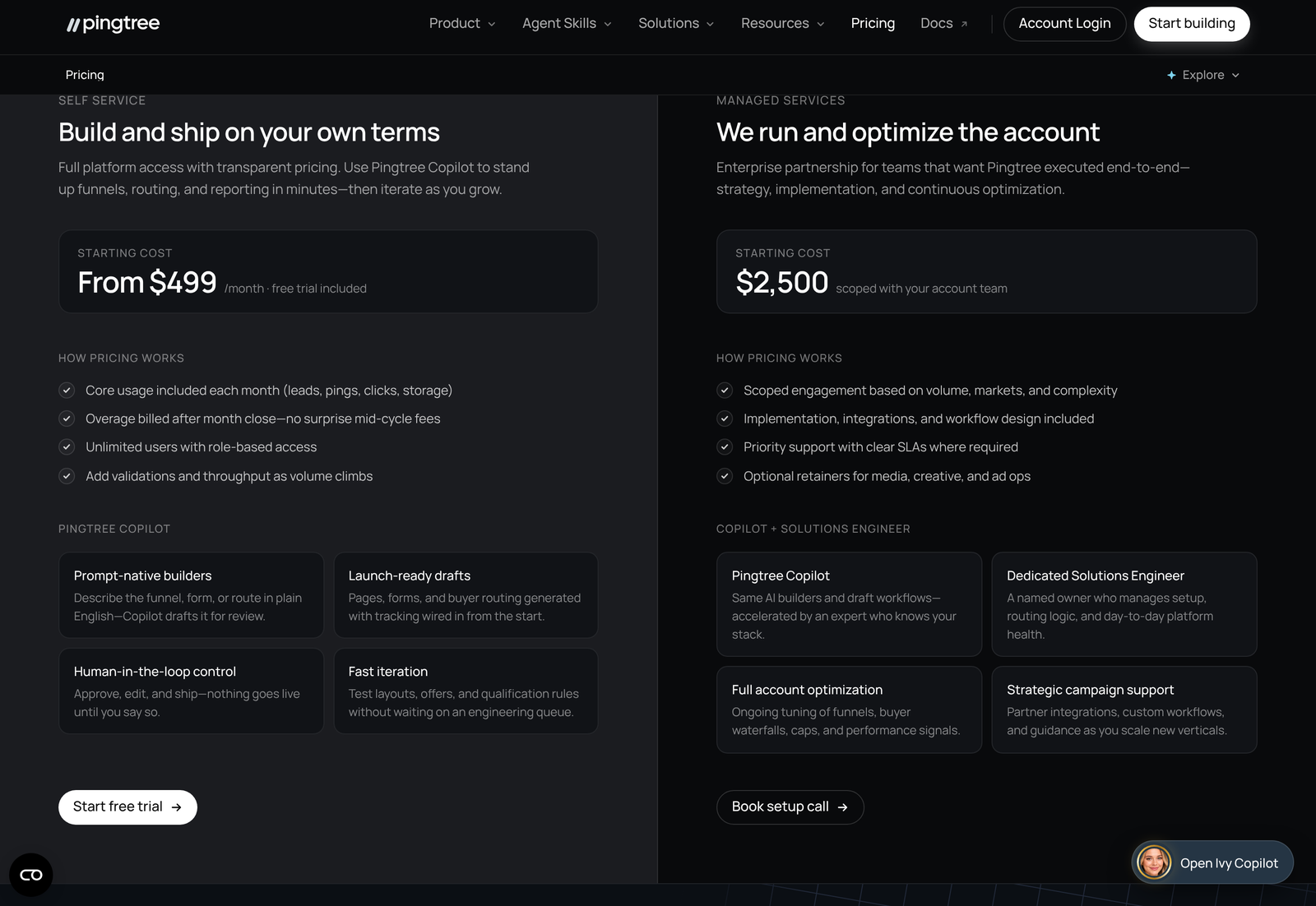
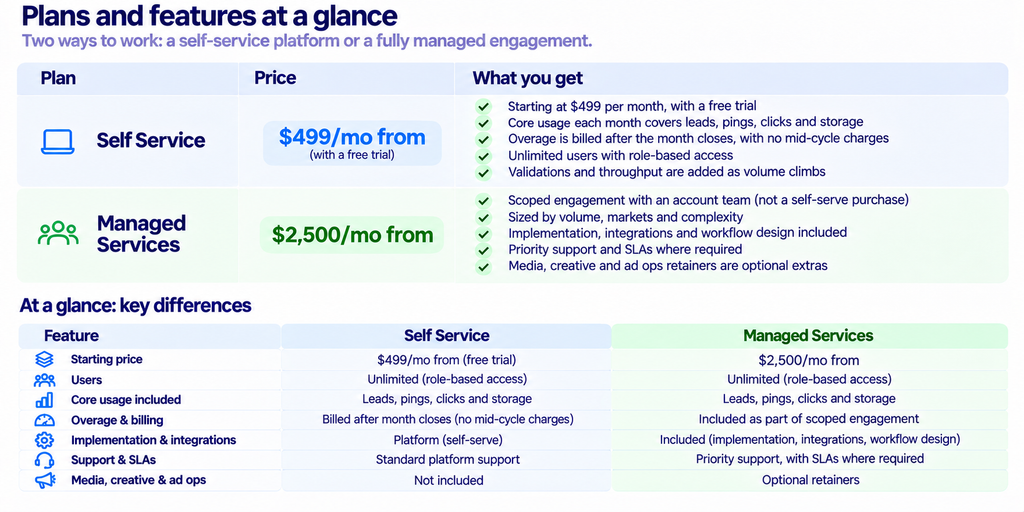
Two details in that table change how you should budget. Neither price is a ceiling, since both are described as starting costs and usage above the included allowance is billed afterwards. And the user count is not a lever: seats are unlimited with role-based access, so adding people costs nothing. That is unusual in this category, and it removes the common temptation to share one login across a team.
The monthly allowance is where your real cost lives. Leads, pings, clicks, and storage are all metered, and a ping-heavy operation consumes allowance far faster than lead volume alone would suggest, because a single lead can generate a ping to every eligible buyer before one of them wins it. Ask for the ping allowance specifically, not the lead allowance, when you scope a trial.
The five routing methods, and why only one applies per campaign
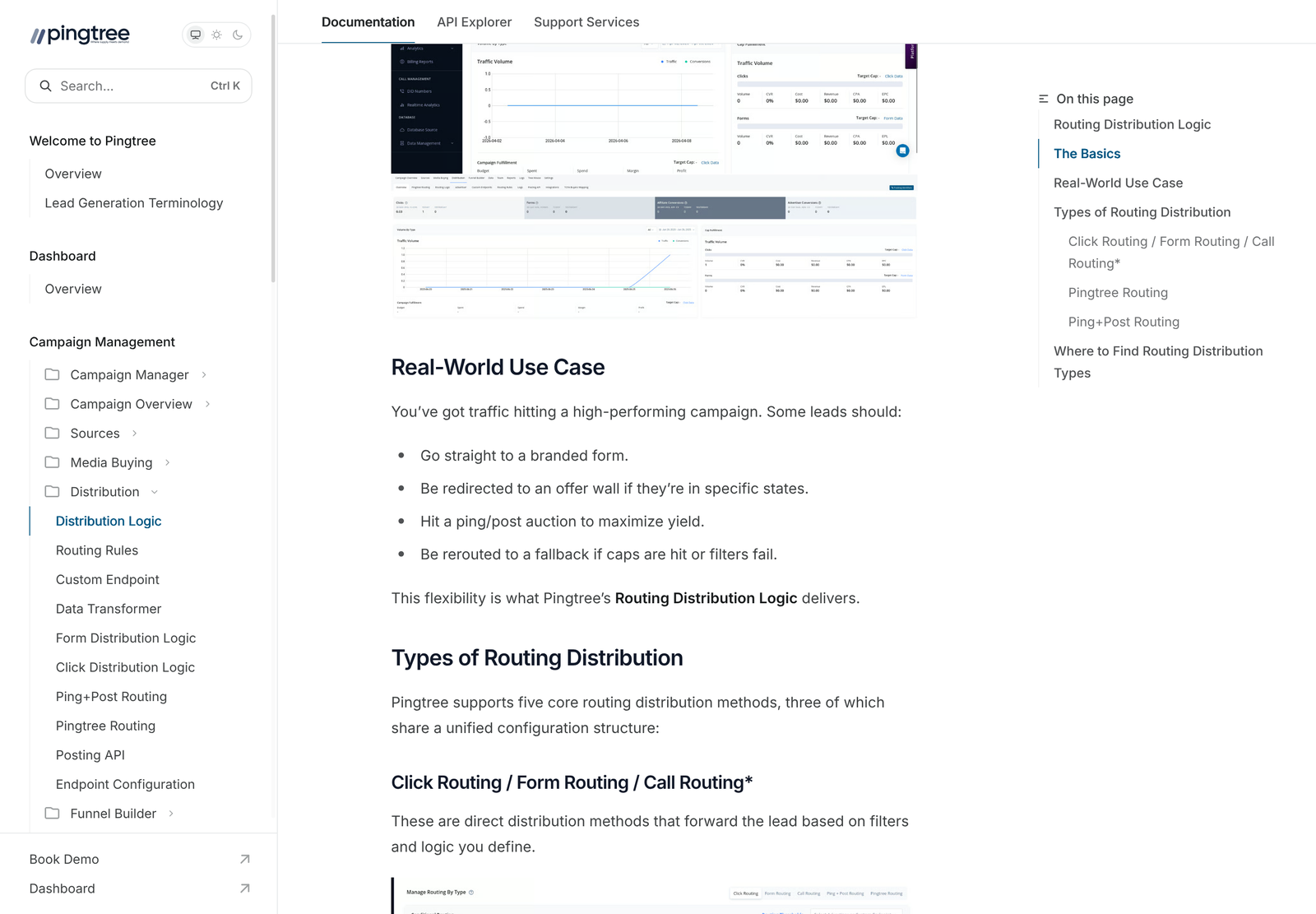
Pingtree documents five core routing methods. Click, Form and Call routing share a single configuration pattern between them, with Call Routing currently marked as coming soon. The two that matter commercially are Ping and Post, and Pingtree Routing.
They are mutually exclusive per campaign. You choose one method for a campaign and that choice governs every lead flowing through it. Teams used to blended waterfall tools sometimes expect to mix an auction with a fallback sequence inside one campaign. The product does not work that way, so running both means running two campaigns.
Ping and Post: the auction
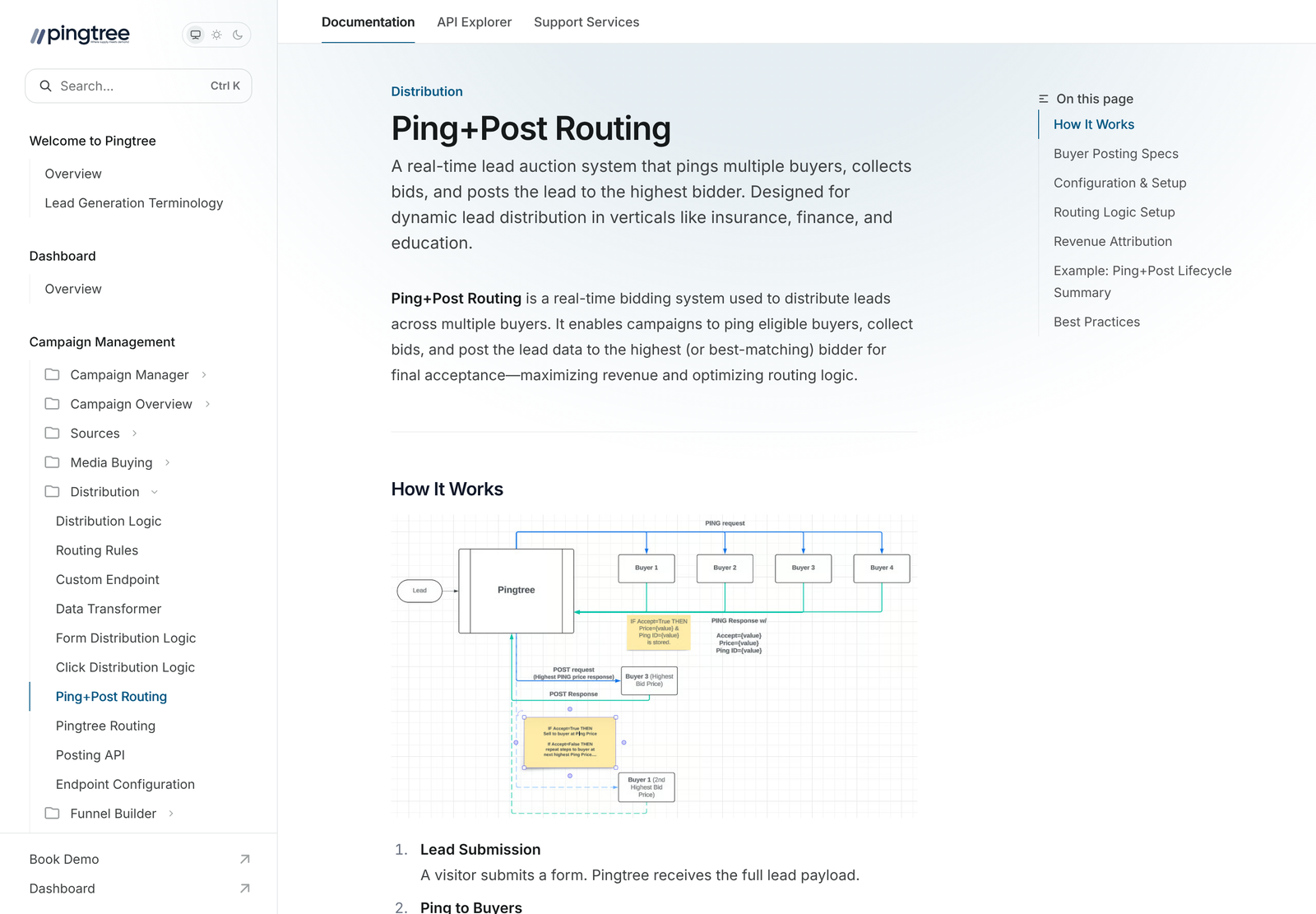
The sequence runs in six steps. A lead is submitted. Pingtree pings every eligible buyer with partial data. Each buyer returns an accept or reject, a bid, and a ping identifier. The highest bid wins. Full data is then posted to that buyer along with the ping identifier so the two halves reconcile. If the winner rejects at post, the next bidder is tried, and a lead that exhausts every bidder is marked unsold.
Partial data on the ping is the whole design. Buyers bid on enough information to price the lead without receiving enough to use it, which is what stops a buyer from declining the post and keeping the contact anyway. If your buyers will not accept a partial-data ping, this method does not work for you regardless of what the software can do.
Pingtree Routing: the waterfall
Here the order is fixed by priority rather than by bid. Buyers sit in groups, and group A is exhausted before group B is tried. Timeouts are honoured at the endpoint level first and only then at the group level, which matters when one slow buyer could otherwise stall an entire group. An asynchronous mode posts to several endpoints in parallel and sells to the first success that meets your minimum price.
Pick this when your buyers pay fixed prices, and your advantage comes from relationships rather than from competitive tension. Pick ping and post when buyers will bid against each other. Choosing the waterfall because it feels simpler, while running buyers who would happily bid, leaves money on the table every single lead.
Caps against scrubs: the distinction that catches people
Two features sound like they do the same job and do not.
Cap Settings block payouts. They do not block the submission. A lead arriving after a buyer’s cap is reached still comes through your system; it simply does not generate a payout for that buyer. Caps can be set per lead type, covering clicks, forms, and calls, and they come in global and monthly varieties.
Form API Validation blocks the submission itself. That is the control you want when the problem is junk data arriving rather than money going out.
Confusing the two produces a predictable failure. An affiliate manager sets a cap expecting volume to stop, volume keeps arriving, and the leads sit unpaid in the system while the affiliate keeps sending. Scrubs are a third thing again: they withhold payment until a qualification or revenue threshold is met, with optional sub-ID conditions, which is how you handle a source whose quality you suspect but cannot yet prove.
Compliance and verification
The integration list reads like a map of regulated lead generation, and each item can be toggled per traffic source rather than applied globally. TrustedForm and Jornaya handle consent certification. An eConsent module, a blacklist and do-not-call API, and fraud detection cover the obvious exposure. Array Credit Pull and Spinwheel add credit data, with Spinwheel working through SMS verification. Google Places validates addresses, a session recording API captures the user journey, and loan lookup and general lookup fill in the rest.
Per-source toggling is the detail that earns its keep. A compliant publisher sending certified consent should not pay for a credit pull on every record, and a questionable new source should get every check you have. Platforms that apply verification globally force you to price for the worst source you accept.
On the media side, Pingtree supports enhanced conversion reporting into Facebook, using hashed user data along with the fbp and fbc identifiers and supporting multiple buyers, and into TikTok through the Events API with the ttclid identifier and buyer-level triggers. For an arbitrage operation, this closes the loop: the buyer who actually paid for a lead becomes the conversion signal the ad platform optimises against.
Who it fits
Choose it if: you sell the same lead type to three or more buyers. Competitive tension is the thing the software converts into revenue, and below three buyers, an auction has nothing to work with.
Choose it if: you run paid media against lead revenue. The Facebook and TikTok conversion integrations feed real buyer payouts back into optimisation, which is a different quality of signal from counting form fills.
Choose it if: you operate in a regulated vertical. Lending, insurance and home services all demand consent records you can produce months later, and bolting TrustedForm or Jornaya onto a homegrown router is slower than it looks.
Choose it if: several people need to work in the system. Unlimited seats with role-based access means the compliance reviewer, the media buyer, and the account manager each get their own login at no extra cost.
Skip it if: every lead goes to one destination. A single-buyer operation needs a webhook and a retry, not an auction engine, and $499 a month buys a lot of developer time.
Skip it if: your buyers refuse partial-data pings. Without that, ping and post collapses into a waterfall, and you are paying auction prices for sequential routing.
Skip it if: call routing is your primary need today. Call Routing is documented as coming soon, so a call-first business should confirm availability before signing anything. Businesses in that position usually start with a call tracking layer instead, which our WhatConverts review covers, or with telephony such as the setup in our CallHippo integrations guide.
Three worked scenarios
The mortgage affiliate with six buyers
Six lenders bidding on the same application is the textbook case. Ping and post extracts the highest price per lead, TrustedForm certifies consent, and Array or Spinwheel adds credit data that lets lenders bid with more confidence. Caps keep each lender inside its monthly commitment, and scrubs hold payment on a new traffic source until funded-loan data arrives. At $499 a month, a lift of even $0.50 per lead pays for the platform at a thousand leads.
The home services network
Contractors buy at fixed prices by postcode and rarely bid. Pingtree Routing suits this better: priority groups by territory, endpoint timeouts so a slow contractor does not block the group, and asynchronous posting when speed to first contact decides who wins the job. The compliance stack matters less here, though the blacklist and do-not-call API still does real work.
The single-advertiser arbitrage
One advertiser, a fixed price per lead, paid traffic on top. This is the case where the answer is no. You have no auction to run and no routing decision to make, so almost the entire feature set sits idle. The conversion reporting integrations are genuinely useful, but they are not $6,000 a year useful on their own. Revisit once a second buyer appears. Teams at this stage often get more from a credit-based enrichment tool, which our piece on who Bitscale is for works through.
Self-serve against managed
The gap between the two is $2,001 a month at the published starting points, which is a five-fold step rather than an upgrade. What the higher tier buys is people: strategy, implementation, integration work, workflow design, priority support with SLAs where required, and optional retainers covering media, creative, and ad ops.
Judge that against the cost of the alternative. Two thousand dollars a month is roughly a fractional ops hire, so the question is whether you already employ someone who can configure routing rules, map fields per endpoint, and diagnose a buyer who starts silently rejecting posts. Where that person already exists on your team, the self-serve tier with its Copilot prompt-based setup is the better value. Where that work would otherwise land on a founder at midnight, the managed tier is cheaper than it looks.
One more thing to settle before a trial: who owns the buyer relationships. The software assumes you already have signed buyers with endpoints to post to. It will not find them, negotiate prices, or get you approved on a lender’s panel. Operators who arrive expecting a marketplace find an engine instead, and the engine is useless without buyers plugged into it. Line up at least three before the trial clock starts, or you will spend the free period configuring routes that have nowhere to route.
Configuration details that cost people time
- Routing rules take a name, then groups combined with a top-level AND or OR, then conditions in an IF field, operator, value, THEN action shape. Nesting logic across groups is where most misconfiguration happens.
- The data transformer maps values per endpoint from inside Lead Routing, supporting string, number, and date types. Dates need a preset mask defined in the form builder first, so a date field that works everywhere else can fail at a single buyer.
- Verification toggles are per source. Set them once per new publisher rather than assuming a global default carried over.
- Cap type must be chosen deliberately between global and monthly. A global cap that was meant to be monthly stops paying out permanently and looks like a buyer problem.
What I could not verify
- What the included monthly allowance actually covers in units. Pingtree names leads, pings, clicks, and storage as the metered items without publishing quantities, so your effective price depends on a number you have to ask for.
- Overage rates. Billing after month close is documented; the rate is not.
- A timeline for Call Routing beyond the coming soon label.
- The dashboard figures on Pingtree’s homepage, which show numbers such as 12,480 clicks and a 4.2x return. Those are interface mockups rather than customer results and should not be read as performance data.
- Any independent review volume. No third-party rating aggregate was available at a scale worth citing.
Frequently asked questions
Is Pingtree worth it for a small lead business?
It depends on buyer count rather than company size. A two-person business with five competing buyers gets more from it than a twenty-person business shipping everything to one CRM. The threshold to apply is three or more buyers bidding on the same lead type.
How much does Pingtree cost per month?
The entry tier starts at $499 a month with a free trial. Managed Services starts at $2,500 and is scoped with an account team. Both are published as starting costs, and usage above the included monthly allowance is billed after the month closes.
Can I run ping and post alongside a waterfall?
Not inside a single campaign. The routing methods are mutually exclusive per campaign, so running both means running separate campaigns and splitting traffic between them.
Does a cap stop leads arriving?
No. Cap Settings block the payout only. Leads continue to arrive after a cap is hit. To stop the submission itself you need Form API Validation, which is a separate control.
How many users are included?
Seats are unlimited with role-based access, so team size does not change the price. Your cost scales with volume through the metered allowance instead.
Does it handle inbound calls?
Call Routing appears in the documentation marked as coming soon. Click and form routing are live. A business whose primary channel is inbound calls should confirm current availability directly before committing.
The short version
Pingtree is built for operators running an auction, and it prices accordingly. The routing engine, the per-source verification toggles and the buyer-level conversion reporting all assume multiple buyers competing for the same record. Give it that and $499 a month is recovered on a small per-lead lift. Give it one buyer, and most of what you are paying for never runs.
Count your buyers first. Three or more, with buyers who accept a partial-data ping, and the next step is the free trial on Self Service and test one campaign end to end before you scope anything larger.
Sources
- Pingtree pricing, re-checked 10 November 2026
- Pingtree documentation