



Quick answer: Bitscale is a credit-metered GTM data platform, so the question is not how many seats you have but how many enrichments you run. Free gives 200 credits, which is a demo. Growth at $349 a month gives 15,000. Booster at $799 gives 50,000. Enterprise starts at $15,000 a year on annual billing. Credits burn only when a provider returns a valid result, which makes waterfall enrichment cheaper here than the pricing suggests at first glance. Figures read from bitscale.ai/pricing on 6 October 2026.
Disclosure: Stack99 earns a commission if you buy through links on this page. It costs you nothing extra and never changes our assessment.
What the product is
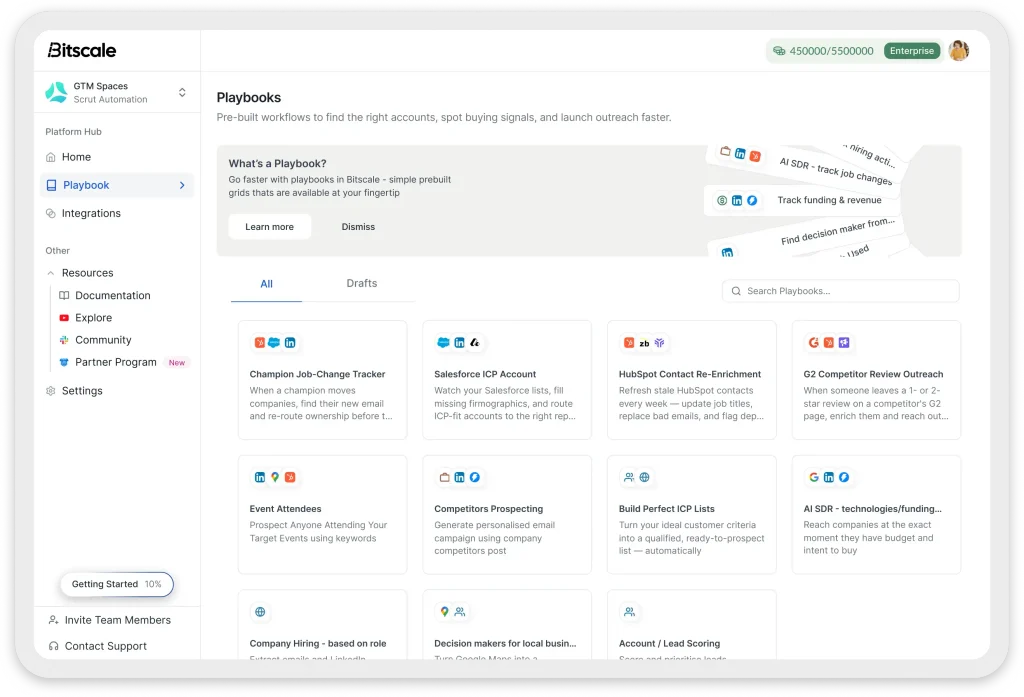
Bitscale sits in the category that grew up around spreadsheet-shaped enrichment: you build a grid, point columns at data providers and AI models, and let rows fill themselves. The vendor’s own comparison pages name Clay, Lusha, Apollo and ZoomInfo, which tells you who it expects to be shortlisted against.
Three things define how it charges. Grids hold rows. Action columns run operations against those rows. Credits pay for the operations that succeed.
Understand those three and every pricing decision below falls out cleanly.
The price list
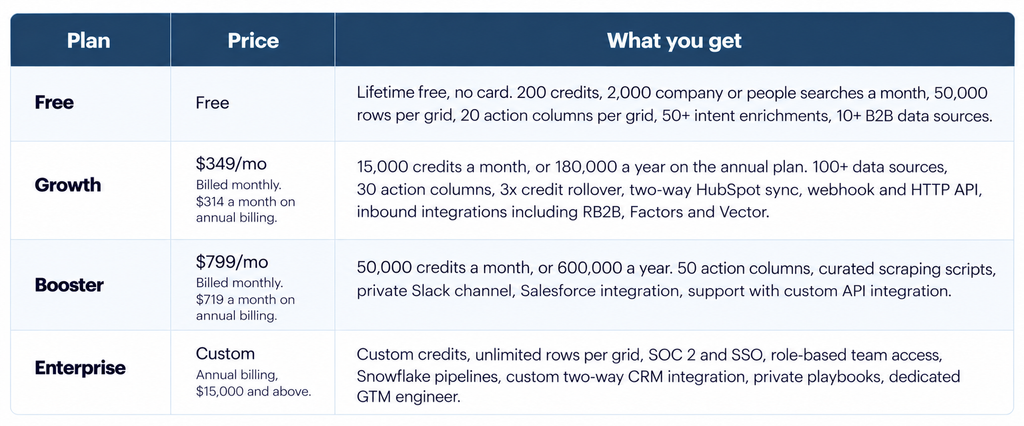
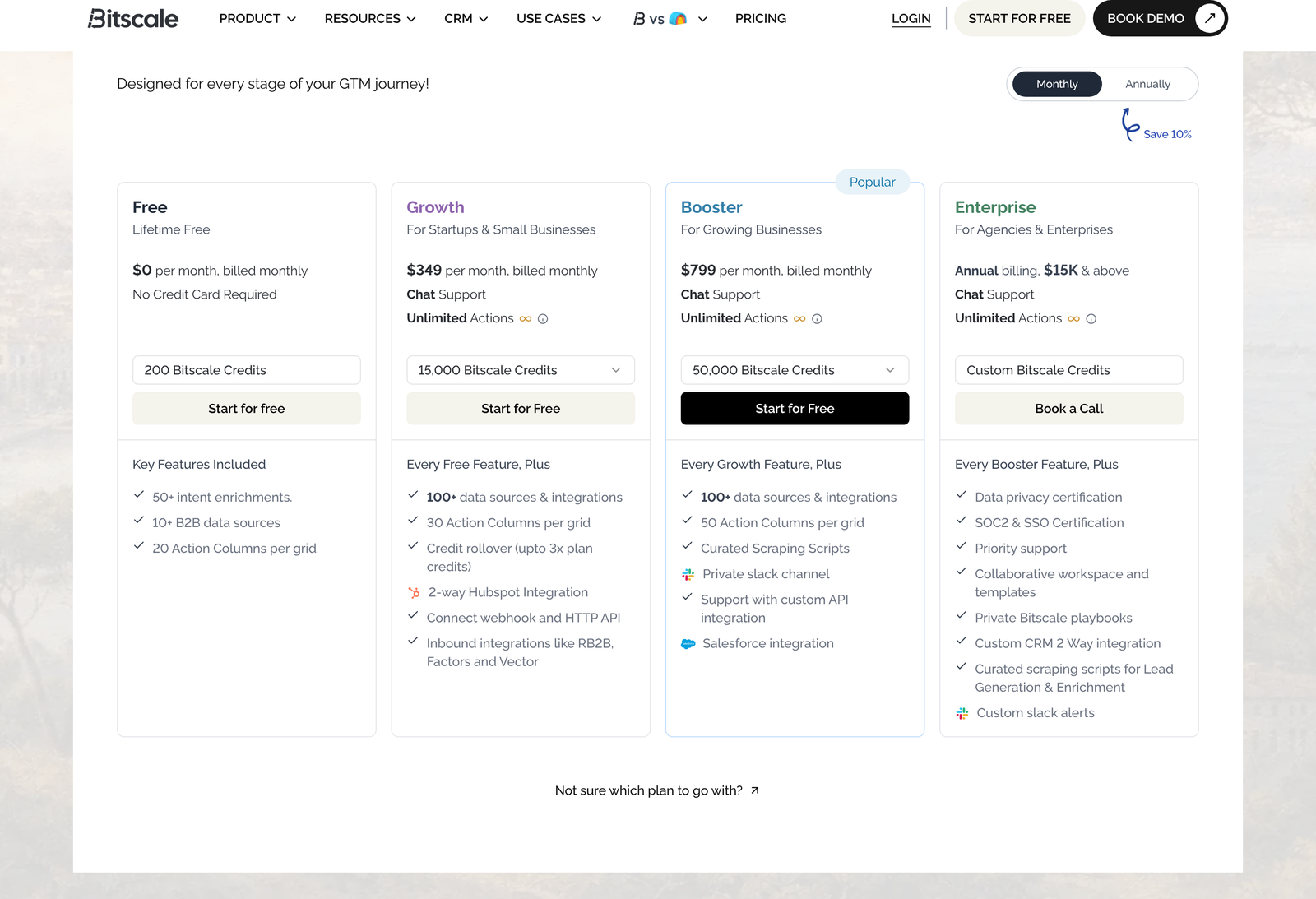
Credit where it is due on that last point. Most vendors in this category load the annual toggle by default and let a casual reader carry away a discounted figure. Bitscale opens on Monthly, so $349 and $799 are exactly what they appear to be.
Credits burn only on success
This single rule decides whether the platform suits you.
Bitscale’s own FAQ states that credits are spent only when a data provider returns a valid result, and that failed lookups, formula columns, and CRM syncs are always free.
Think about what that does to a waterfall. The standard pattern in this category is to chain providers: ask the cheapest source first, fall through to a second if it returns nothing, then a third. Under a charge-on-attempt model, you pay for every miss along the chain, which punishes exactly the workflow the tool exists to run. Under charge-on-result, you pay once for the provider that actually answered.
Formula columns being free matters almost as much. Cleaning a domain, splitting a name, normalising a job title, and testing a condition are all operations a real grid performs thousands of times, and none of them consume budget here.
One caveat. Published material does not state how many credits a given enrichment costs, and different providers in a waterfall almost certainly carry different weights. A list of 10,000 contacts does not map to 10,000 credits in any predictable way. Ask for the credit table for the specific enrichments you plan to run before you size a plan.
What a credit costs on each plan
Divide price by credits, and the ladder becomes legible.
Growth on monthly billing costs 2.33 cents per credit. Booster on monthly billing costs 1.60 cents. Switching to annual drops those to 2.09 cents and 1.44 cents, respectively.
Booster is therefore 31% cheaper per credit than Growth at the same billing cadence. Look at the step between them rather than the blended rate, and the gap widens: $450 more a month buys 35,000 more credits, which prices the marginal credit at 1.29 cents. Any team that will reliably use more than about 21,500 credits a month should price Booster, because past that point the bigger plan is cheaper in absolute terms once you account for what you would otherwise buy as overage or leave unenriched.
Credit rollover softens the edges. Growth and Booster both carry rollover up to three times the plan allowance, so a Growth account can bank 45,000 credits and a Booster account 150,000. Seasonal teams running hard in two quarters and quietly in two others get real value from that.
Annual billing changes the credit count too
Flip the toggle to Annually, and two things move at once.
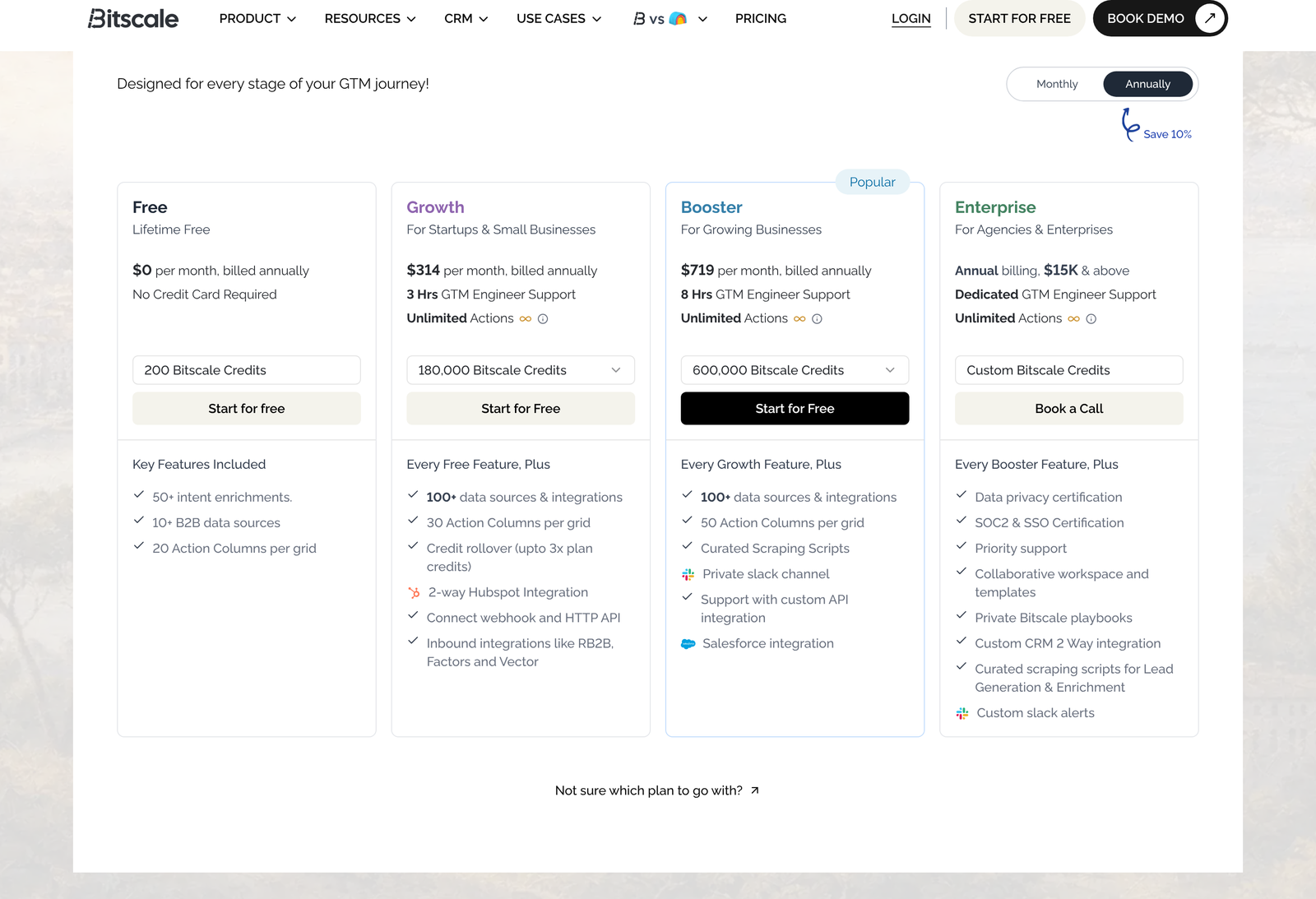
The rate falls to $314 and $719 a month. The credits restate as an annual pool: 180,000 on Growth, 600,000 on Booster. Both numbers are twelve times the monthly allowance, so the quantity is unchanged. What changes is the shape of the budget.
Check the discount. Twelve months at $349 is $4,188, against $3,768 on annual billing, a saving of $420 or 10.03%. Booster runs $9,588 against $8,628, which is $960 or 10.01%. The “Save 10%” badge beside the toggle is accurate to two decimal places, which is rarer than it should be.
One substantive difference shows up on the cards beyond price. Monthly plans list Chat support. Annual plans list 3 hours of GTM Engineer support on Growth and 8 hours on Booster. Buying a year not only saves 10%, but it also buys human implementation time, and for a team without a dedicated operations hire that may be worth more than the money.
Who the free tier is actually for
Two hundred credits. At Growth’s monthly rate, that is roughly $4.66 of enrichment.
Notice the mismatch with the other free limits. The tier allows 50,000 rows per grid and 2,000 company or people searches a month, both generous, alongside 200 credits, which is not. You can load a large list and search widely, then enrich almost none of it.
Read that as deliberate. The free tier is a product tour: build a grid, wire a few action columns, see what the output looks like on a handful of rows, decide whether the interface fits how your team thinks. Nobody is running a quarter’s prospecting on it, and the limits are arranged so that trying would fail quickly rather than slowly.
Use it to answer one question only: does the grid model suit the person who will operate it daily? If that person finds the interface clumsy, no credit allowance fixes it.
Who Growth fits
The $349 tier is aimed at startups and small businesses, and the feature jump from free is larger than the price jump suggests.
Data sources go from 10+ to 100+. Each grid gets 30 action columns instead of 20. Grid capacity doubles to 100,000 rows. Searches go from 2,000 to 15,000 a month. Two-way HubSpot sync arrives, as do webhooks, the HTTP API, source scheduling, 50+ GTM playbooks, credit reporting analytics, outbound email integrations such as Instantly and Smartlead, inbound signal integrations including RB2B, Factors and Vector, and access to advanced models including Claude Sonnet.
Growth suits a team of roughly two to eight people running outbound, where one person owns the data layer and HubSpot is the system of record. Fifteen thousand credits a month is enough to enrich a few thousand contacts deeply, or a larger list shallowly, depending on the waterfall you build.
Growth is the wrong plan if your CRM is Salesforce. That integration starts at Booster, and working around it with webhooks is the kind of project that quietly consumes an engineer for a fortnight.
Where Booster fits
At $799 a month, the platform starts behaving like infrastructure rather than a tool.
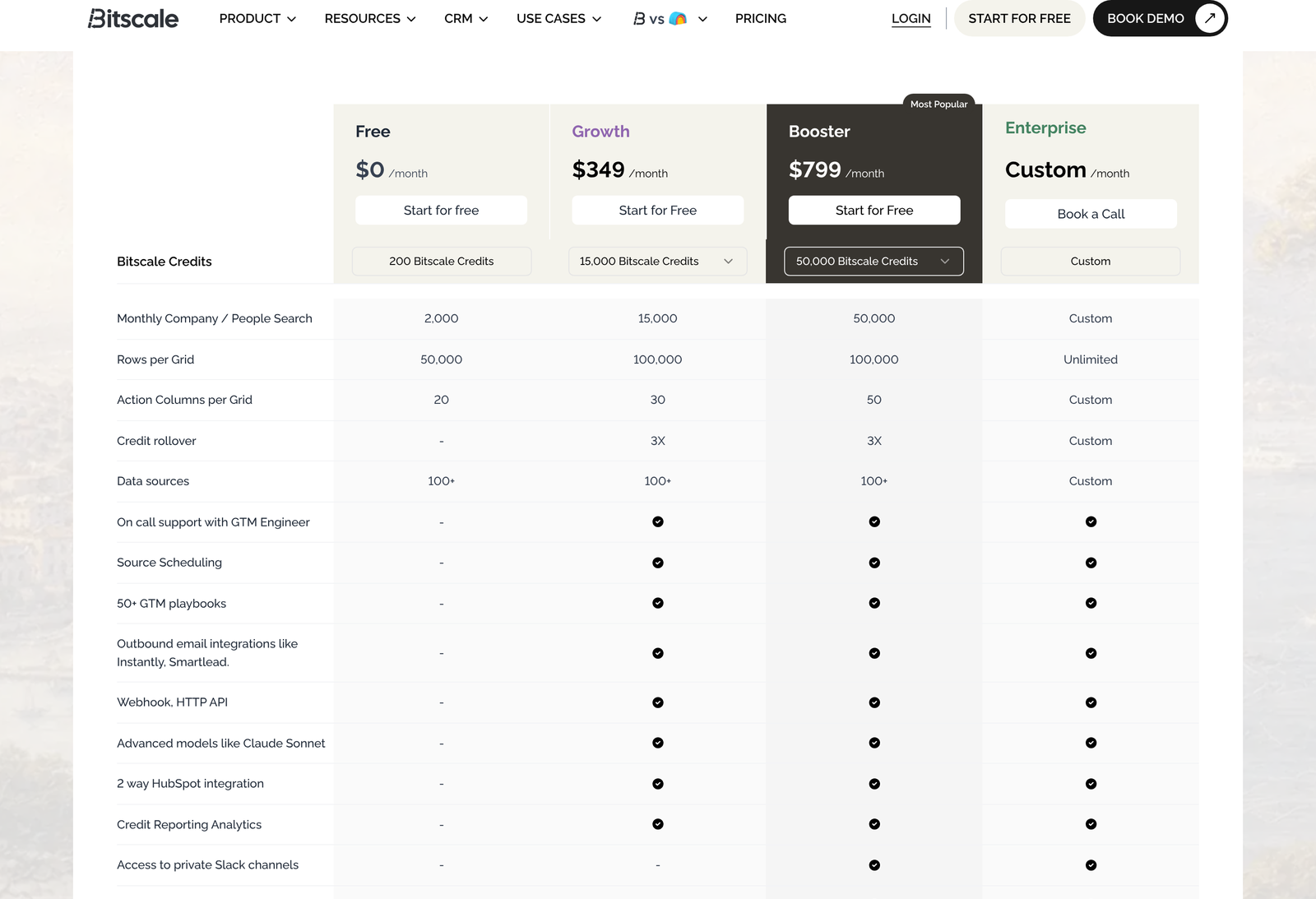
Four things arrive here. Salesforce integration. A private Slack channel with the vendor. Curated scraping scripts. Support with custom API integration, plus AI prompting support. Action columns rise to 50, and monthly search allowance to 50,000.
Grid capacity does not move. Both Growth and Booster cap at 100,000, so if your constraint is list size rather than enrichment depth, paying $450 more a month buys you nothing on that axis.
Booster suits a revenue operations function with a named owner, running Salesforce, where enrichment feeds routing and scoring rather than just a weekly list. The private Slack channel is the quiet differentiator: when a pipeline breaks at 6 am before a campaign, the difference between a chat queue and a shared channel with the vendor’s engineers is the difference between fixing it and missing the send.
Enterprise, and the $15,000 floor
Enterprise is annual only, and the card states “$15K and above” rather than hiding behind the word Custom. That floor is $1,250 a month, roughly 1.7 times the annual Booster rate.
What the money buys is mostly governance and plumbing: SOC 2 and SSO, data privacy certification, role-based team access, an audit-friendly posture, Snowflake pipelines, custom two-way CRM integration, private playbooks, custom Slack alerts, priority support, and unlimited rows per grid.
Bitscale also publishes a four-week onboarding plan for this tier, with a dedicated GTM engineer handling integration and schema mapping in week one, pipeline configuration in week two, staging and validation in week three, and production cutover in week four. Whether a given customer hits that schedule is not something we can verify from outside, but publishing the shape of it at all is a reasonable signal that implementation is treated as a project rather than a signup.
Three triggers push a company here regardless of credit volume: a security review that requires SOC 2 evidence, a data team that wants enriched records landing in Snowflake, and a CRM that is neither HubSpot nor Salesforce out of the box. Any one of those makes Booster a dead end.
Four teams this is wrong for
Anyone who wants a contact database. Tools like ZoomInfo sell you a directory you query. This sells you a workspace you build. If nobody on your team will own the grid, the credits go unspent, and the subscription becomes shelfware.
Teams under about five people with light volume. At $349 a month, the entry rung costs more than many full sales stacks. Below a few thousand enrichments a month, the arithmetic rarely holds.
Organisations that need SSO before signature. Single sign-on and role-based access sit in Enterprise, so a security policy that mandates either one sets your floor at $15,000 a year, whatever your usage looks like.
Anyone who cannot get a credit cost table. Without knowing what each enrichment consumes, plan sizing is guesswork, and guessing wrong on a credit-metered platform is expensive in both directions.
The integration question
Two-way CRM sync is the feature people underestimate when comparing these platforms.
HubSpot’s own API documentation gives a sense of the mechanics involved. Contacts are retrieved from a versioned CRM objects endpoint that returns a maximum of 100 records per request, with paging for anything larger, and separate batch endpoints exist for creating, reading, and updating records in bulk. A sync that pushes enriched fields back onto 40,000 contacts is therefore a batching and rate-management exercise, not a single call.
That is why “2-way HubSpot integration” is a tier-gated line item rather than a checkbox, and why the Salesforce equivalent sits a tier higher again. Anyone evaluating on feature lists alone should weight those two rows heavily.
CRM syncs consuming no credits, per the vendor’s FAQ, is a meaningful detail here. A platform that charged per synced record would make continuous two-way sync financially unattractive, which would defeat the point of having it.
How to choose
Start on Free if: you are testing whether the grid model fits your operator. Two hundred credits answer that question and no other.
Choose Growth if: HubSpot is your CRM, one person owns prospecting data, and you expect to stay under roughly 20,000 credits a month. $349 monthly, or $3,768 for the year with three hours of engineer time attached.
Choose Booster if: you run Salesforce, or your monthly credit need is above about 21,500. $799 monthly, or $8,628 for the year with eight hours of engineer time.
Choose Enterprise if: security requires SSO or SOC 2 evidence, data belongs in Snowflake, or your CRM needs a custom connector. Budget from $15,000 a year.
Pay annually if: the implementation hours matter to you. The 10% saving is real but modest; the engineer time attached to annual plans is the larger prize for a team without operations headcount.
For adjacent tooling on the same desk, our notes on Apollo.io cover the database-plus-sequencer end of this market, who Bright Data suits covers raw collection, and Leadfeeder covers inbound visitor signals of the kind Bitscale ingests.
FAQ
How much does Bitscale cost?
Free is $0 with 200 credits. Growth is $349 a month billed monthly, or $314 a month billed annually. Booster is $799 monthly or $719 annually. Enterprise is annual billing from $15,000.
What is a Bitscale credit?
The unit of enrichment. Per the vendor’s FAQ, a credit is consumed only when a data provider returns a valid result. Failed lookups, formula columns, and CRM syncs cost nothing. The per-enrichment credit cost is not published, so request it.
Do unused credits roll over?
On Growth and Booster, up to three times the plan allowance. That means a ceiling of 45,000 banked credits on Growth and 150,000 on Booster. Free accounts get none.
Which plan do I need for Salesforce?
Booster at minimum. Two-way HubSpot sync arrives on Growth, but Salesforce integration is listed only from Booster upward, and a custom two-way CRM connector is Enterprise.
Is single sign-on available?
Only on Enterprise, alongside SOC 2 certification and role-based team access. A security requirement for any of those sets your floor at $15,000 a year.
How many rows can a grid hold?
50,000 on Free, 100,000 on both Growth and Booster, unlimited on Enterprise. Row capacity does not improve when you move from Growth to Booster.
What does annual billing change besides price?
Support. Monthly plans list chat support, while annual plans list 3 hours of GTM engineer time on Growth and 8 hours on Booster. The credit quantity itself is identical, restated as an annual pool.
Which AI models does it use?
The comparison table lists “Advanced models like Claude Sonnet” from Growth upward. They are absent from the free tier.
Sources
- Bitscale pricing, read 6 October 2026 on both the monthly and annual billing toggles, including the plan comparison table and pricing FAQ.
- Contacts CRM API, HubSpot developer documentation, for the 100-record page limit and batch endpoints behind any two-way sync.
- Claude models overview, Anthropic, for the model family named in the plan comparison.