


Quick answer: CrankWheel is browser-based screen sharing built for phone sales, where the prospect clicks a link and sees your screen without installing anything. Solo costs $29 a month for one user with unlimited meetings. Team starts at $99 a month for unlimited users sharing 100 meetings, and climbs a published ladder to $1,562 for 2,000 meetings. Enterprise is quote-only. The unusual part is the billing unit: you are charged for meetings, not seats, which inverts the maths most sales tools teach you. Figures read from crankwheel.com/pricing on 6 October 2026.
Disclosure: Stack99 earns a commission if you buy through links on this page. It costs you nothing extra and never changes our assessment.
What the product is for
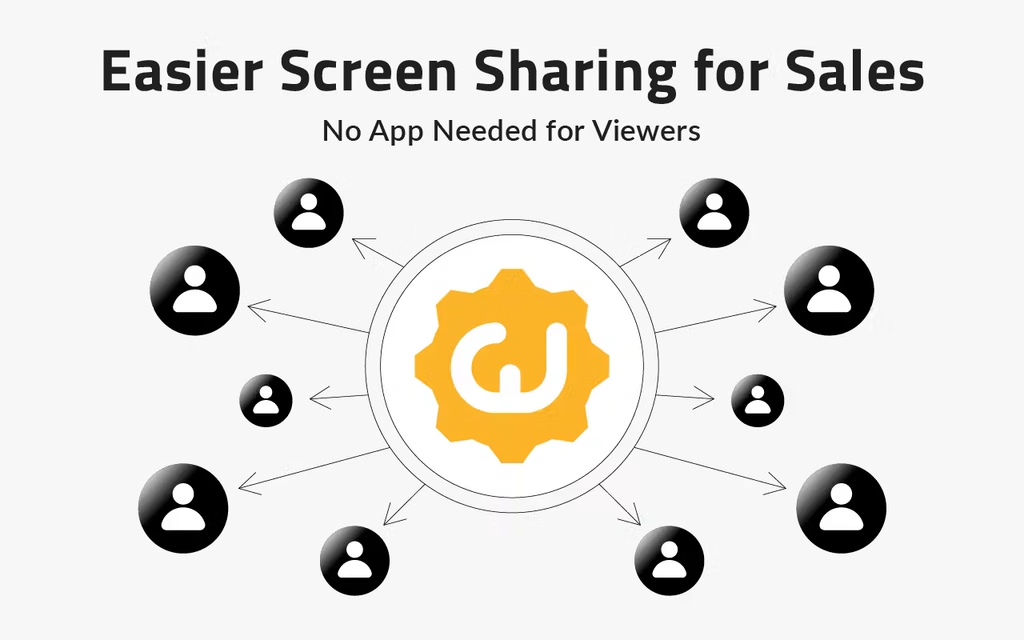
CrankWheel solves a narrow problem. An agent is on the phone with someone who isn’t technical, isn’t expecting a demo, and won’t install a conferencing client. The agent needs that person looking at a screen within about ten seconds, or the moment passes.
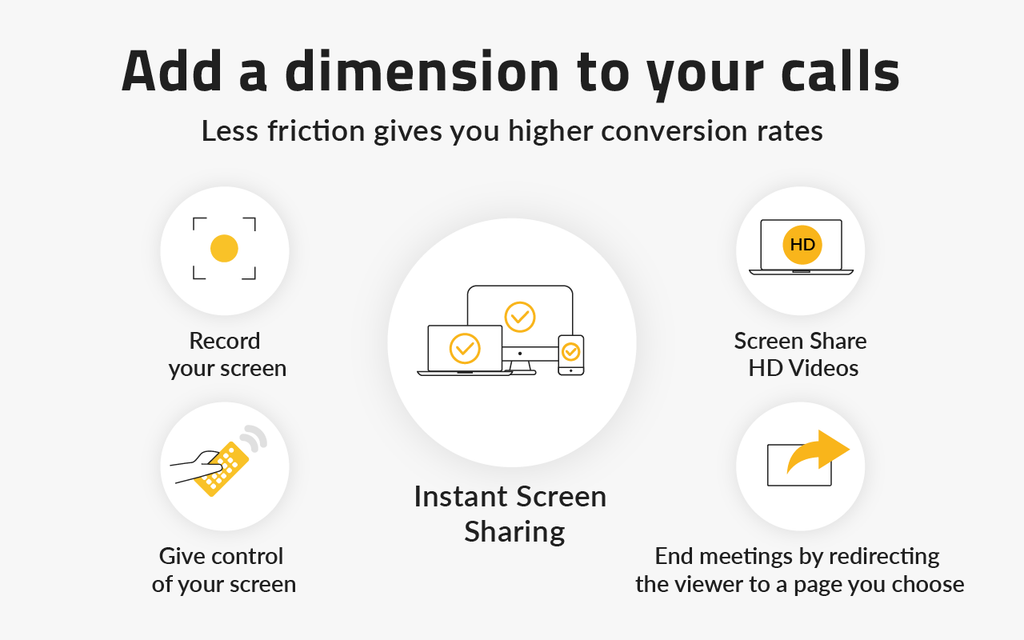
Everything in the product follows from that. Viewers join in whatever browser they already have open, on a phone if that is what they are holding – no download, no account, no meeting ID to read out. The vendor’s own documentation claims sessions work even on old Internet Explorer builds, which tells you a good deal about the customer base: insurance, mortgage, solar, home services, local media sales.
The case studies on the site point the same way. BeeDigital selling digital marketing to local businesses. Connells Group mortgage services. Salesgenie connecting to inbound leads. Canada411 closing on the first call. This is not a tool competing with Zoom for the weekly standup.
The price list
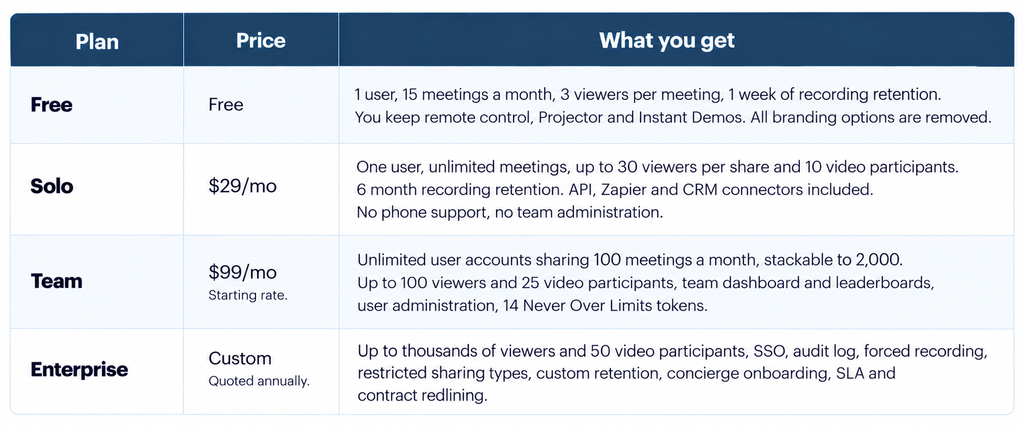
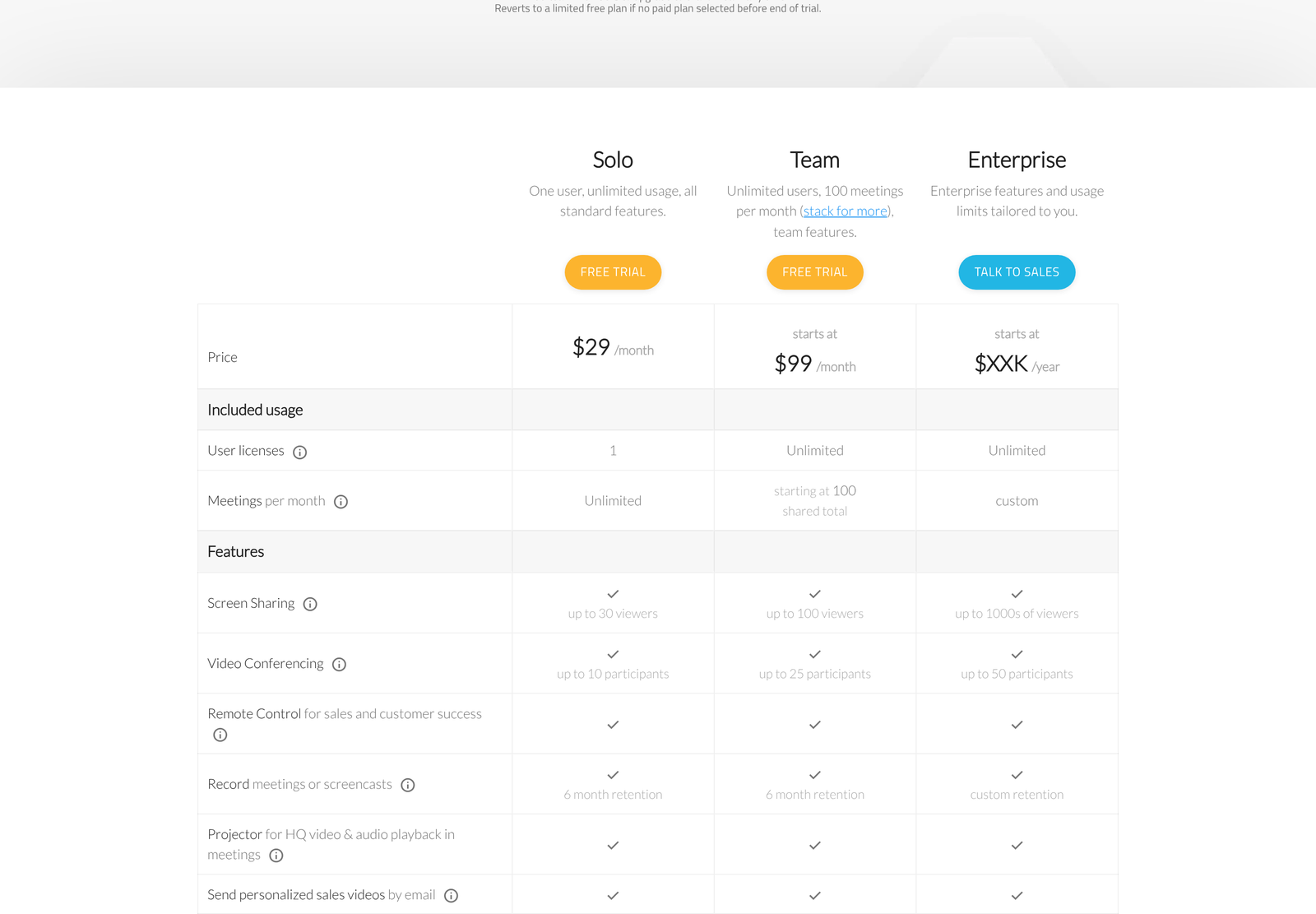
No monthly versus annual toggle sits on this page, and the rates above are monthly. A discount for annual payment exists on Solo and is discussed below.
What counts as a meeting
On Team plans, this definition is your entire bill, so read it before anything else.
CrankWheel counts a meeting when a user hosts a session with one or more viewers, when an Instant Demo request is marked as having resulted in a phone call, and when a user creates a share link or a segment for one of their recordings. Sessions shorter than 40 seconds do not count. Recording on its own does not count either.
Two of those four will surprise people. Creating a share link for a recording consumes a meeting, so a rep who records one demo and then sends it to twelve prospects as twelve separate tracked links has spent twelve units, not one. And an Instant Demo that converts into a phone call counts even though no screen was ever shared.
The 40-second floor is a genuine piece of generosity. Misdials, tests, and abandoned connections are free. Teams running inbound queues will hit that threshold often.
Limits reset on your own signup date rather than the first of the month, which matters for anyone reconciling usage against a calendar-month sales target.
The Team ladder, and what volume actually buys
Team is not one price. Twenty of them are published in full behind a link on the pricing page, running from Team 100 at $99 to Team 2000 at $1,562. Each rung adds 100 meetings a month and keeps user accounts unlimited.
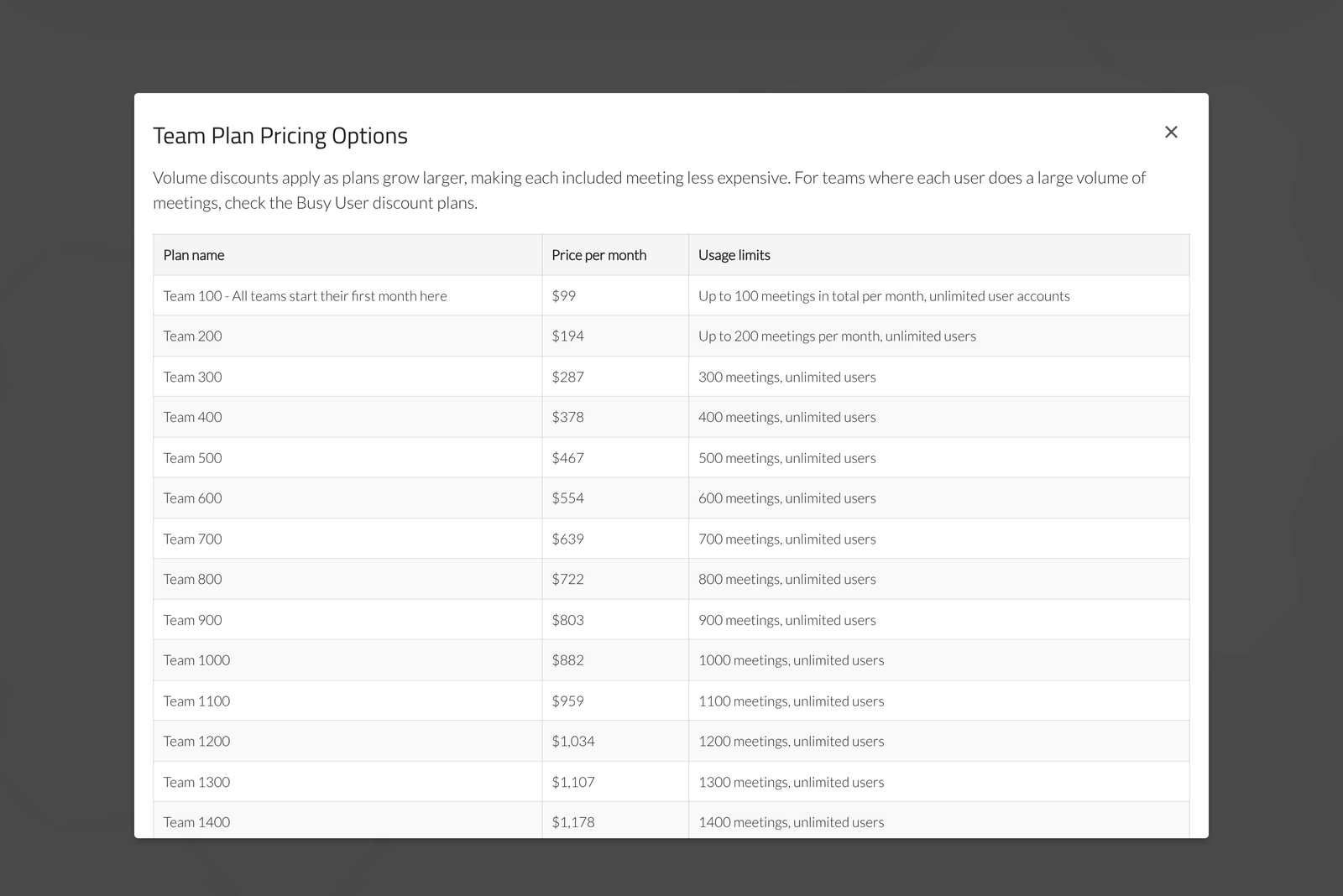
Divide price by meetings and the volume discount shows its true size. The first rung costs 99 cents a meeting. Team 500 costs 93.4 cents. Team 1000 costs 88.2 cents. Team 2000 costs 78.1 cents.
So twentyfold volume buys you 21% off the unit rate. Gentle, by software standards, and a reason nobody should stretch to a larger rung purely for the discount. Buy the usage you need.
A worked case. Six agents, each running roughly 45 qualifying sessions a month, give 270 meetings. Team 300 at $287 covers it with headroom. Per agent, that is $47.83 a month, which sits above a Solo licence and below most dialler seats. Hire two more agents without changing call volume per head, and you are at 360 meetings, so Team 400 at $378, or $47.25 per agent. The per-head cost barely moves, because headcount was never the meter.
The Busy User discount, and why it shrinks as you grow
A second ladder sits under the first. If you have three or fewer user licences per stacked Team plan, CrankWheel offers Busy User pricing, advertised as up to 40% off.
Team 100 drops from $99 to $59 for up to three users sharing 100 meetings. Team 500 drops from $467 to $287 for 15 users and 500 meetings. Team 2000 drops from $1,562 to $1,055 for 60 users and 2,000 meetings.
Check those three against the standard ladder, and the discount is not flat. At the bottom rung, it is 40.4%. At Team 500 it is 38.5%. At the top it is 32.5%. The “up to 40%” headline is accurate and, as headlines go, honest, but the benefit quietly erodes as you climb.
Why it erodes is easy to see. The discount exists to serve a small number of prolific closers rather than a wide floor of occasional users. The ratio is fixed at three users per stacked plan, so Team 2000 under Busy User means 60 named seats, which is no longer a small team. The discount is tapering back toward the standard rate precisely because the customer no longer looks like the one it was designed for.
One trap sits here. Standard Team plans carry unlimited user accounts. The discounted versions cap them at three per stack. A nine-person team on Team 300 pays $287 with everyone licensed. The same team cannot take Busy User Team 300 at $174, because that tier allows nine users exactly, and the tenth hire breaks it. Growing headcount silently pushes you back up to the standard ladder.
Where Solo quietly beats Team
Solo has no meeting limit at all. One user, unlimited usage, $29 a month. That single line reshapes the comparison for small, heavy teams.
Take three agents each running 120 sessions a month, so 360 in total. Team 400 costs $378. The Busy User version of Team 400 costs $231. Three Solo licences cost $87, and none of them can run out of meetings.
That is a gap of $144 a month against the cheaper Team option, or $1,728 a year. What the Solo route costs you is everything with the word “team” in it: no shared usage dashboard, no leaderboards, no central administration of accounts, no phone support, 30 viewers per share instead of 100, and 10 video participants instead of 25. Each licence is its own island.
For a three-person agency where the owner is one of the three, that trade is often worth making. For a sales floor where a manager needs to see who demoed what, it is not. Decide which of those you are before pricing the Team ladder, because the honest answer may knock an order of magnitude off the bill.
Solo also carries the only published payment discount: 48% off for paying twelve months at a time, described on the pricing page as a Loyalty Discount. CrankWheel does not print the resulting figure. Applied to $29, it implies roughly $15.08 a month, or about $181 a year, though that is our arithmetic rather than a published price. Confirm it at checkout.
The free plan is real, and it removes one specific thing
Trials revert to a free plan rather than expiring into nothing, and cancelling a paid subscription does the same. The free tier gives one user, 15 meetings a month, three viewers per meeting, and one week of recording retention.
Remote control works. Projector works. Instant Demos work. What goes is branding: every customisation resets to CrankWheel defaults, and the vendor states it gives a week’s notice before that happens and before the team member list collapses back to the account owner alone.
Fifteen meetings a month is enough to keep a dormant account warm or to let a very occasional user stay reachable. Running a business on it is out of the question, and the tier was never meant for that.
Never Over Limits
Team plans include 14 tokens under a trademarked name. Hit your meeting ceiling and spend one unblocks usage for a full working day, which buys you time to decide whether the spike was a one-off or a signal to upgrade.
Fourteen tokens across a year works out at just over one a month. Solo gets none, which costs nothing, since Solo has no limit to exceed.
Compare this against the usual alternative, which is a hard stop or an automatic overage charge. A token system puts the choice in front of a human instead of silently billing them. Small design decision, real difference at month end.
What makes the no-install claim work
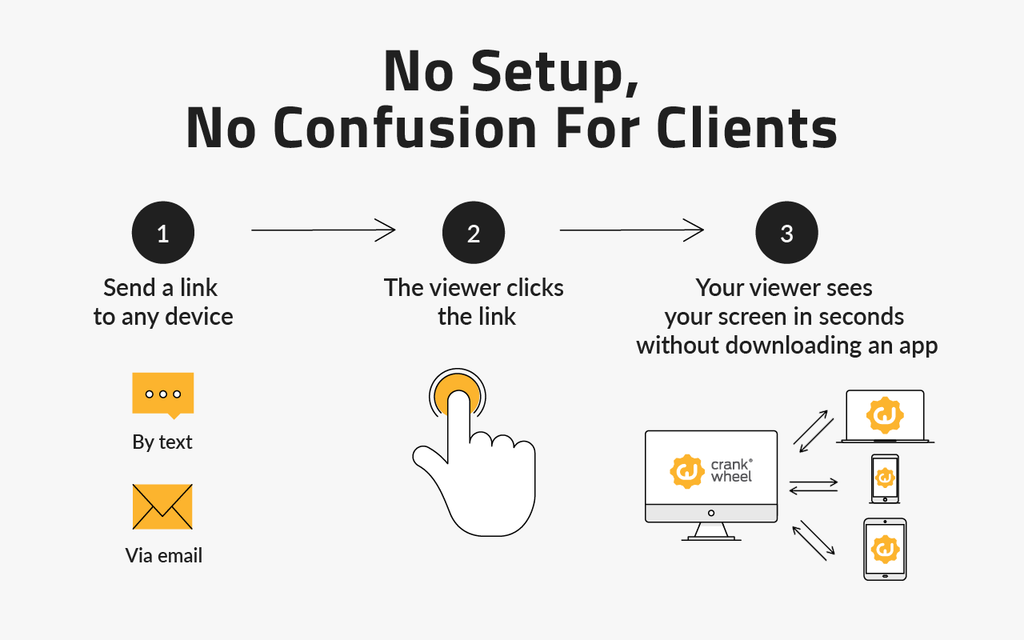
Viewers install nothing because nothing needs installing on their side: they are receiving a stream in a browser tab. Presenters have a choice. A browser extension for Chrome, Edge, and Firefox takes a few seconds and improves usability, and most features run without it.
Browsers themselves supply the capture. The Screen Capture API’s getDisplayMedia method prompts a user to pick a display, window, or tab and hands back a stream that can be transmitted over WebRTC, and it is restricted to secure contexts, meaning the page must be served over HTTPS. All of that is standardised behaviour described by W3C and documented on MDN, not vendor magic.
Knowing that helps you evaluate the claim properly. The hard part was never the capture. It is the join path: no room to create, no credentials to exchange, no app store detour on a prospect’s phone. CrankWheel optimised that path and built a price list around how often you use it.
One platform caveat belongs in any internal pitch for remote control. Viewers need no download to be granted control of your mouse and keyboard, but presenters require Windows or macOS for that specific feature.
Branding is the upsell
Several things you might assume are included sit outside the base price.
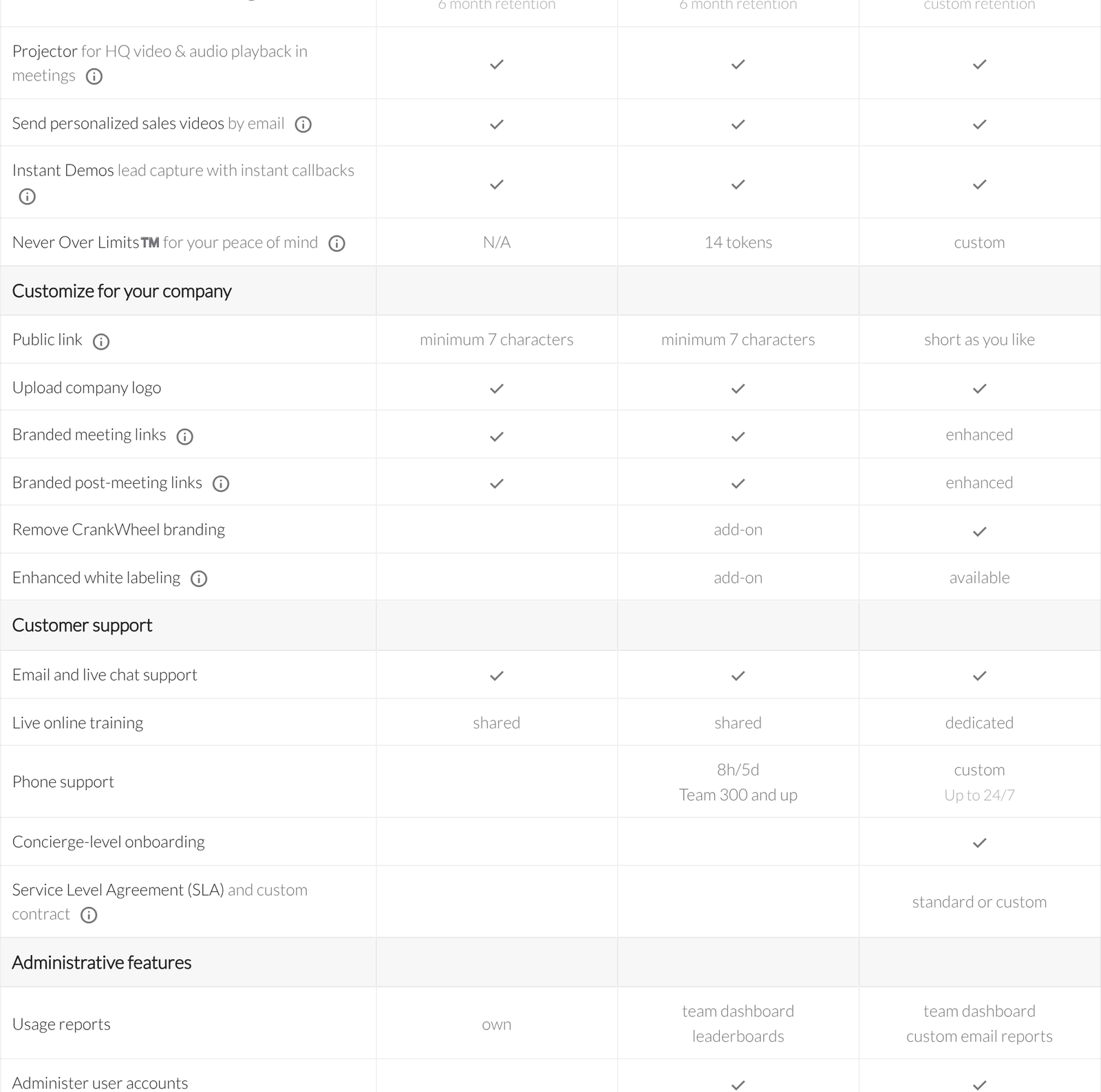
Uploading a company logo is included everywhere paid. Branded meeting links and branded post-meeting links are included on Solo and Team, and described as enhanced on Enterprise, where a CNAME can point the link at your own domain. Removing CrankWheel branding altogether is an add-on on Team and included on Enterprise. Enhanced white labelling, which covers custom disclaimers and matching prospect-facing interfaces to your colours and fonts, is an add-on on Team and merely available on Enterprise.
Public link length follows the same shape: a minimum of seven characters on Solo and Team, as short as you like on Enterprise.
Neither add-on carries a published price. If your sales motion depends on the prospect never seeing a vendor name, budget for a quote rather than the sticker.
What sits behind the Enterprise wall
Five controls appear only on Enterprise, and four of them are compliance features: forced recording of all sessions, restricting which sharing types are allowed, an audit log, corporate single sign-on, and concierge onboarding. Phone support starts at Team 300 with 8 hours across 5 days, and reaches up to 24/7 on Enterprise.
Regulated sellers should read that list first. A mortgage or insurance operation that must retain every session will find the one feature it cannot do without parked in the quote-only tier, and should get that quote before falling in love with the $99 entry point.
Recording retention runs six months on Solo and Team, with up to ten years available as an add-on, and the pricing page notes that extended retention is free for insurance agents.
Integrations
API access, Zapier, and CRM connectors are all present from Solo upward, with no gating by tier. Supported CRMs listed on the page include Salesforce, HubSpot, Zoho, HighLevel, Less Annoying CRM, and Insites. Connectors let a session launch from a contact or lead record and write meeting details, including a recording link, back to it.
Putting API access on the cheapest paid plan is a decision worth crediting. Plenty of competitors reserve it two tiers up, which turns reporting and data portability into an upgrade conversation.
Who it fits
Choose Solo if: you sell alone, or you are a small group that does not need shared reporting. $29 a month, no meeting ceiling, and a 48% discount for paying yearly.
Choose Busy User Team if: you have three or fewer heavy users per stacked plan and want the team dashboard. At $59, the first rung is the cheapest route into team features.
Choose standard Team if: headcount is growing or already above three per stack. Pick the rung above your busiest month and keep the tokens for the rest.
Choose Enterprise if: compliance requires forced recording, an audit log or SSO, or your brand must not appear alongside anyone else’s.
Look elsewhere if: you want a general meeting platform for internal calls. Viewer counts, participant limits and the per-meeting meter all point at outbound and inbound selling. For adjacent tools, see our notes on Getscreen.me for remote access and CallHippo integrations for the dialer side of the same desk.
FAQ
How much does CrankWheel cost?
Solo is $29 a month. Team starts at $99 a month for 100 meetings and runs to $1,562 for 2,000. Busy User pricing starts at $59. Enterprise is quoted annually, and the page shows only “$XXK /year”.
Is there a free version?
Yes. One user, 15 meetings a month, three viewers per meeting, one week of recording retention, and no branding options. Trials and cancelled subscriptions both land here.
Does the viewer need to install anything?
No. Viewers join in the browser they already have, including on a phone. Presenters can optionally add an extension for Chrome, Edge, or Firefox, and most features work without it.
What counts against my meeting allowance?
Hosting a session with a viewer for more than 40 seconds, creating a share link or segment for a recording, and an Instant Demo request marked as having become a phone call. Recording by itself does not count.
How many users does a Team plan include?
Unlimited on the standard ladder. Busy User pricing caps it at three per stacked plan, so Team 300 under that discount allows nine.
What happens when I run out of meetings?
Team plans carry 14 Never Over Limits tokens. Spending one restores usage for a full working day rather than blocking you or triggering an automatic overage charge.
Can I get annual billing?
The page advertises a 48% Loyalty Discount on Solo for paying twelve months at a time. No annual rate is published for Team, so ask.
Which CRMs connect?
Salesforce, HubSpot, Zoho, HighLevel, Less Annoying CRM, and Insites are named on the pricing page, alongside Zapier and direct API access. All of these are available from Solo upward.
Sources
- CrankWheel pricing, read 6 October 2026, including the Team Plan Pricing Options table and the pricing FAQ.
- MediaDevices: getDisplayMedia(), MDN Web Docs, for how browser screen capture and its secure-context requirement work.
- Screen Capture, W3C, the specification behind that method.