


Quick answer: Miro bills per member. Paid plans run $10 a month for Starter and $25 a month for Business when you pay monthly. Switch to yearly billing and those drop to $8 and $20 a month per member, a 20% cut. The Free plan costs nothing and caps you at three editable boards. Enterprise is quote-only and starts at 30 members. The pricing page opens on the yearly toggle, so the first number you see is not the monthly rate.
Disclosure: Stack99 earns a commission if you buy through links on this page. It costs you nothing extra and never changes our assessment.

The number on the page is the yearly rate
Load miro.com/pricing and the Starter card reads $8. Read the small type beside it, and you get the rest of the sentence: “per month per member, billed yearly.” The toggle above the cards has already been set to Yearly before you arrived. Miro is not hiding anything; the label is right there, but the figure most people carry away from a ten-second glance is the discounted one.
Click Monthly and the cards redraw. Starter becomes $10. Business becomes $25. Same features, same credits, different commitment.
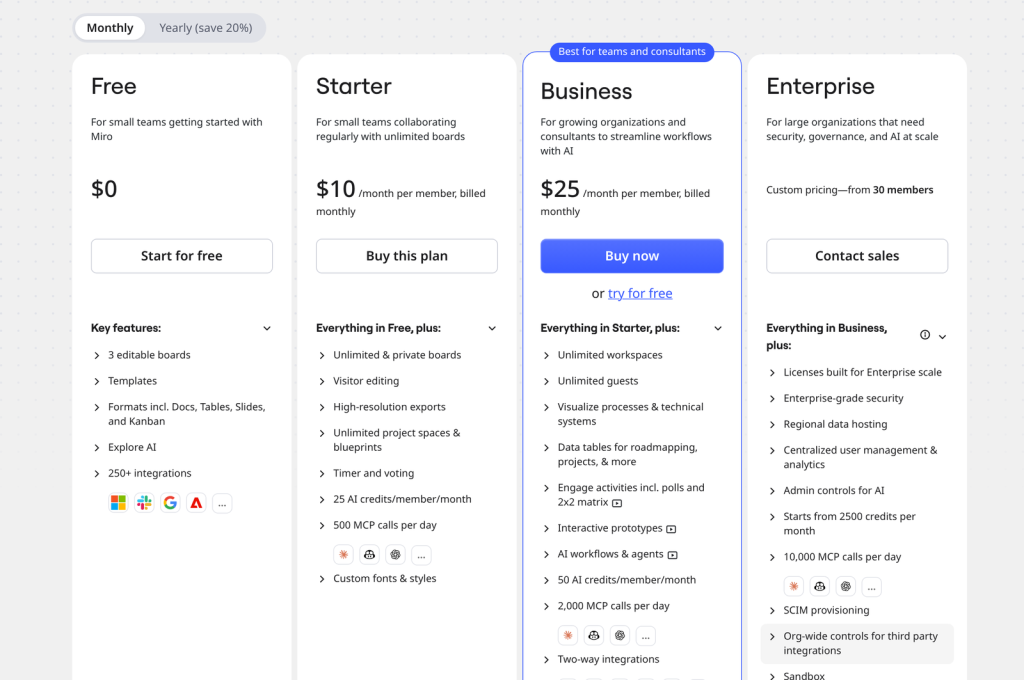
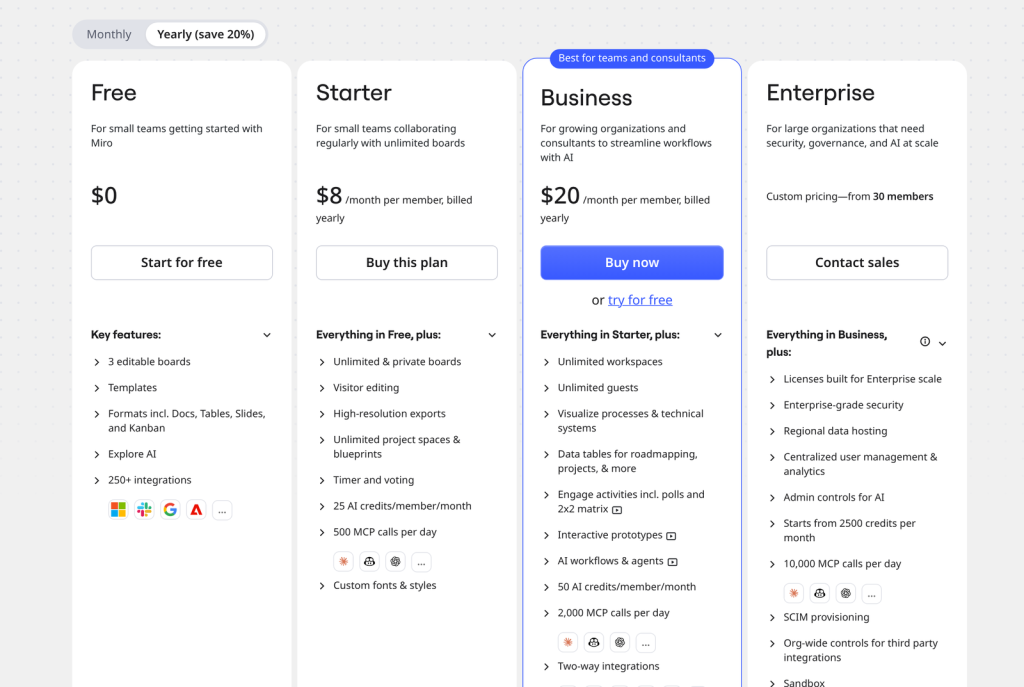
The discount holds at exactly 20% on both paid tiers. Starter falls from $10 to $8, Business from $25 to $20. Over twelve months one Starter seat costs $120 monthly or $96 yearly. One Business seat costs $300 monthly or $240 yearly. A ten-person Business team pays $3,000 a year on monthly billing and $2,400 on yearly, a $600 difference for giving up the right to cancel mid-term.
Every Miro plan and what it costs
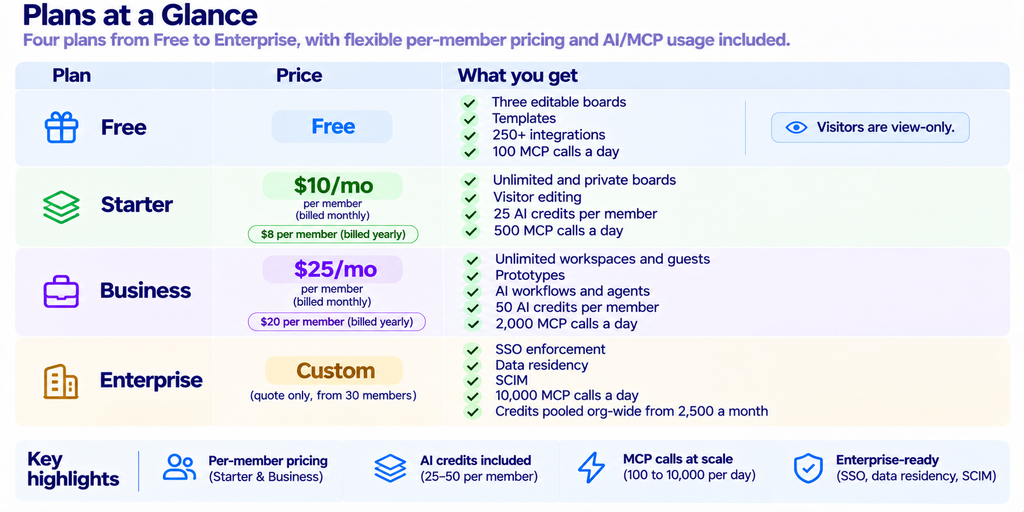
Prices captured from Miro’s pricing page on 5 November 2026 in US dollars, with both toggle states recorded. Miro offers a currency selector, so a reader outside the United States may see different figures.
What Free actually allows
Three editable boards. That is the line that decides whether Free works for you. Miro’s own wording is careful: you can create and share unlimited boards, and the three most recent ones stay editable. Older boards do not vanish. They become read-only until you free up a slot or upgrade.
For a pair of people running occasional workshops, three live boards is survivable. For anyone who keeps a standing retro board, a roadmap, and a sprint board, you hit the ceiling in week one, and the fourth thing you make pushes the oldest into read-only. Free also limits visitors to viewing. They cannot edit, which removes the main reason a lot of teams reach for a whiteboard in the first place.
What Free does include is generous by the standards of the category: the full template library, the structured formats (Docs, Tables, Timeline, Kanban, Slides), and access to 250+ integrations. You are not working in a crippled product. You are working in a small one.
Starter at $10 removes the board cap
Starter is the plan that turns Miro into somewhere you keep things rather than somewhere you visit. Unlimited boards, private boards, and project spaces you can organise and then templatise as blueprints. High-resolution exports to JPG or PDF arrive here too, which matters if board output ever leaves the tool and lands in a deck or a client document.
Visitor editing is the quiet upgrade. On Starter, you can share a board publicly and let people edit without signing in. Workshop facilitators and anyone running sessions with clients will feel that difference more than the board count.

Starter gives each member 25 AI credits a month. Miro’s own estimate is roughly twelve document summaries, or five diagrams or tables. Credits are allocated per member, so a four-person Starter team has 100 credits a month between them.
Business at $25 is priced around AI and guests
Two and a half times Starter is a steep step. The features that justify it cluster in two places.
First, people from outside your company. Business adds unlimited guests, who sign in and collaborate properly, and unlimited workspaces you can keep separate per client or per team. Agencies and consultancies tend to land on Business for that reason alone, which is presumably why Miro badges the card “Best for teams and consultants.”
Second, the AI surface. Interactive prototypes, AI workflows and agents, and the Engage activities such as polls and 2×2 matrices all sit behind Business. The credit allowance doubles to 50 a member a month, which Miro estimates at about ten prototype screens or slides. MCP calls, the channel that lets external AI tools read and write board content, jump from 500 a day to 2,000.
Two-way integrations are a Business feature as well. Free and Starter get the 250+ app library, but the sync that keeps Jira, Asana, Linear, ClickUp and Azure DevOps updated in both directions is gated. If your reason for buying Miro is that the roadmap on the canvas should match the roadmap in the tracker, that requirement puts you on Business regardless of headcount. Our breakdown of Miro integrations goes through the marketplace, the API and MCP in more detail.
AI credits and MCP calls, plan by plan
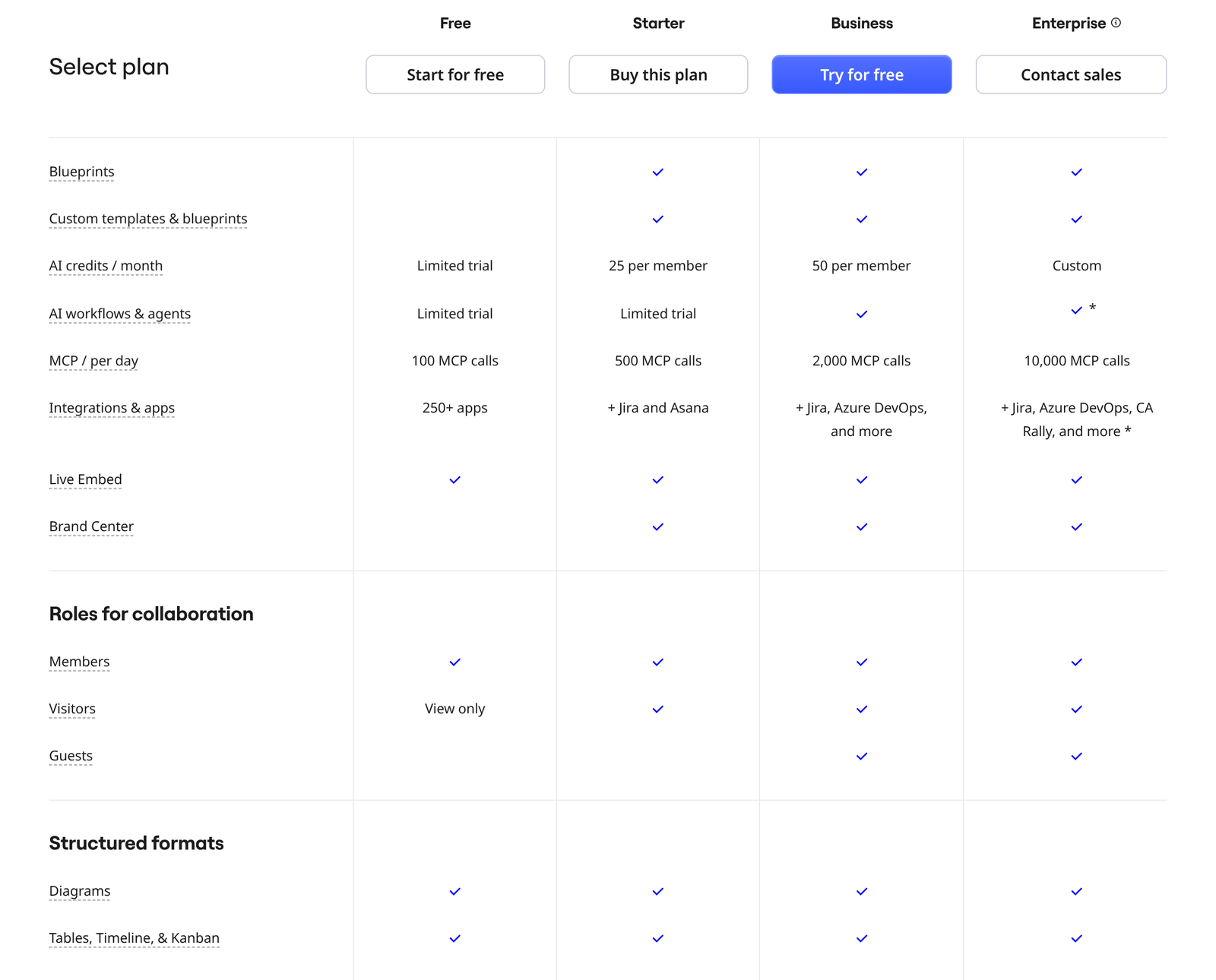
Miro’s comparison table states these directly, and they are the clearest per-plan limits on the page:
- AI credits a month. Free gets a limited trial. Starter: 25 per member. Business 50 per member. Enterprise is custom and pools org-wide, starting from 2,500 a month with the count scaling to seat numbers.
- MCP calls a day. Free 100, Starter 500, Business 2,000, Enterprise 10,000.
- AI workflows and agents. Limited trial on Free and Starter. Included on Business and Enterprise.
- Integrations and apps. 250+ apps on Free. Starter adds Jira and Asana. Business adds Jira, Azure DevOps, and more. Enterprise adds CA Rally on top.
Credits are a consumable, not a feature flag. A Business seat with 50 credits does not get unlimited prototypes; it gets about ten screens by Miro’s own reckoning. Heavy AI use is the one line item on this pricing page that can move unpredictably, and it is the thing to model before you commit to an annual term.
Members, visitors, and guests are three different things
Miro charges per member, and the word carries weight. Members are the licensed seats you pay for. Visitors are unlicensed people who reach a board through a public link. A guest is a signed-in collaborator from outside your organisation.
Free gives visitors view-only access. Starter lets visitors edit. Guests are available only from Business upward. If you work with a rotating cast of clients who need to sign in and stay in, guest access rather than seat count is what pushes the bill. Ten internal members on Business is $200 a month on yearly billing, and the clients you invite as guests add nothing to that figure.
Enterprise starts at 30 members
No public price. Miro states a floor of 30 members and routes you to sales. What you are buying is governance rather than canvas features: enforcement of SSO, audit trails, domain control, data residency in the EU, US, Australia or Japan, SCIM provisioning, org-wide control over which third-party integrations are allowed, and a sandbox environment for testing changes before rollout.
Two paid extras sit beside it. Enterprise Guard covers data discovery and classification for sensitive board content. Premium support adds 24/7 access and guaranteed SLAs. Neither carries a public figure, so budget for them as unknowns rather than assuming they are bundled. Miro publishes its security posture at trust.miro.com if you need the documentation before a procurement conversation.
Working out what you will actually pay
Four numbers decide the bill. How many people need to edit. Whether outsiders need to sign in. How much AI you will run. Whether you can commit to a year.
A three-person startup that runs a weekly planning board and nothing else can sit on Free indefinitely, as long as they tolerate three live boards. Add a fourth standing board and Starter at $8 a member yearly costs $288 a year for the three of them.
A twelve-person product team that syncs with Jira both ways needs Business. Yearly, that is $20 times twelve times twelve months, or $2,880 a year. Monthly billing on the same team is $3,600. The $720 gap is the price of flexibility.
A consultancy with six staff and forty client contacts pays for six Business seats, not forty-six. $1,440 a year on yearly billing. Guest access is the reason the arithmetic stays small, and it is the single biggest cost lever on this pricing page for anyone doing client work.
An organisation of forty with a security review ahead of it is going to Enterprise whether or not the canvas features warrant it, because SSO enforcement and audit trails are not purchasable below that tier.
What the pricing page does not settle
Three things we could not verify from Miro’s public pages and have therefore left out rather than guessed at.
Education pricing is referenced on the pricing page but the detail lives in Miro’s help centre, which refused our requests. Treat any figure you read elsewhere as unconfirmed until you see it on Miro’s own site.
What a credit costs once you exhaust the monthly allowance is not stated on the pricing page. Neither is whether credits roll over. Ask before you sign if AI is central to your use.
Enterprise Guard and Premium support are listed as additions with no public price attached.
How Miro compares on price alone
Per-member pricing in the $8 to $25 band puts Miro in the same territory as most collaborative canvas tools, and the Free plan is more capable than the word “free” usually signals. The differentiator at the top of the range is the AI surface and the two-way trackers sync, neither of which every team needs. We have looked at where Miro wins and loses against the alternatives in our Miro versus alternatives comparison, and at the feature set itself in our rundown of Miro’s top features.
You can start on Miro’s free plan and upgrade once the three-board limit bites, which is the cheapest way to find out whether the tool suits how your team works. Business carries a 14-day trial if you want to test guests and AI workflows before committing.

The trial path, and what it tests
Miro puts a 14-day Business trial on the pricing page and repeats the offer in its own FAQ for people who cannot decide between tiers. Starting there rather than on Starter is the more useful experiment, because a trial of the top commercial plan is the only way to see guests, interactive prototypes, AI workflows, and two-way Jira sync behave on your own boards.
Run the trial with real work rather than a sample board. Invite one external collaborator as a guest and watch whether the sign-in step causes friction. Push a real sprint to Jira and pull it back. Spend a dozen AI credits on the kind of diagram you would actually produce, then multiply what you used by your headcount and your month. Those three checks answer the only questions the price list cannot.
Downgrading afterwards is cheaper than discovering the ceiling later. A Starter team that outgrows its AI allowance in week two has learned something worth $15 a member a month.
Starter or Business, by team size
The gap between the two paid tiers is $12 a member a month on yearly billing, or $15 on monthly. Scaled out, that gap is what you are deciding about:
- Five members. Starter $480 a year, Business $1,200 a year. Difference $720.
- Ten members. Starter $960, Business $2,400. Difference $1,440.
- Twenty-five members. Starter $2,400, Business $6,000. Difference $3,600.
- Thirty members. Starter $2,880, Business $7,200, and you are now at the floor where Enterprise becomes available as an option.
All four rows assume yearly billing. Add 25% for monthly. At twenty-five members the annual difference buys a lot of other software, so the question becomes narrow and answerable: do you need signed-in external collaborators, two-way tracker sync, or more than 25 AI credits a head. One yes puts you on Business. Three noes mean Starter is doing the job and the extra $3,600 is buying capability you will not open.
Seat count alone never forces the upgrade. Miro does not cap members on Starter, so a forty person team can sit on the cheaper tier indefinitely if none of those three needs apply. Whether that is wise depends on whether your security team has opinions about SSO, which is an Enterprise feature and therefore a separate conversation entirely.
Currency and regional figures
Every figure in this article is in US dollars. Miro’s checkout links carry an explicit currency parameter, so the storefront is localised and a reader in another market may see a different number against the same plan. Confirm on the pricing page in your own region before you budget, and check whether tax is shown inclusive or added at checkout.
Frequently asked questions
Is the $8 figure on Miro’s pricing page the monthly price?
No. $8 is the per-member monthly rate when you pay for a year up front. The monthly billing rate for Starter is $10. The page loads with the yearly toggle already selected, so $8 is the first number shown.
How much does Miro cost for a team of ten?
On Starter, $80 a month billed yearly or $100 billed monthly. On Business, $200 a month billed yearly or $250 billed monthly. Miro charges per member, so the figure scales linearly with licensed seats.
Is Miro free forever?
Yes, the Free plan has no time limit. It caps you at three editable boards, restricts visitors to viewing, and gives only a limited trial of the AI features. Boards beyond the three most recent become read only rather than being deleted.
What is the difference between a guest and a visitor in Miro?
A visitor reaches a board through a public link without an account. A guest signs in and collaborates as an external member of your workspace. Visitors can edit from Starter upward. Guests require Business or Enterprise. Neither consumes a paid member seat.
Does Miro charge extra for AI?
Each paid plan includes a monthly credit allowance rather than a separate AI fee: 25 a member on Starter, 50 a member on Business, custom pooled credits on Enterprise from 2,500 a month. What happens when you run out is not stated on the public pricing page.
What is the cheapest Miro plan with unlimited boards?
Starter, at $8 a member a month on yearly billing or $10 on monthly. Unlimited and private boards are the headline addition over Free.
Sources
- Miro pricing page, both billing toggle states and the full plan comparison table, captured 5 November 2026.
- Miro Enterprise for the governance and administration feature set.
- Miro Trust Center for security and compliance documentation.
- Miro Terms of Service for billing and subscription terms.