


Quick answer: Modge charges per seat, and the recurring monthly rates are $5 for Basic, $7 for Pro, and $9 for Premium, with Enterprise quoted. Commit to a year, and those drop to $4, $5.50, and $7 per seat. The catch is presentation: the pricing page loads with the Yearly toggle already selected, so the first figures you see are the discounted ones. Two add-ons sit on top at $2 a seat each, which means a Basic seat with both bolted on costs the same $9 as a bare Premium seat.
Disclosure: Stack99 earns a commission if you buy through links on this page. It costs you nothing extra and never changes our assessment.
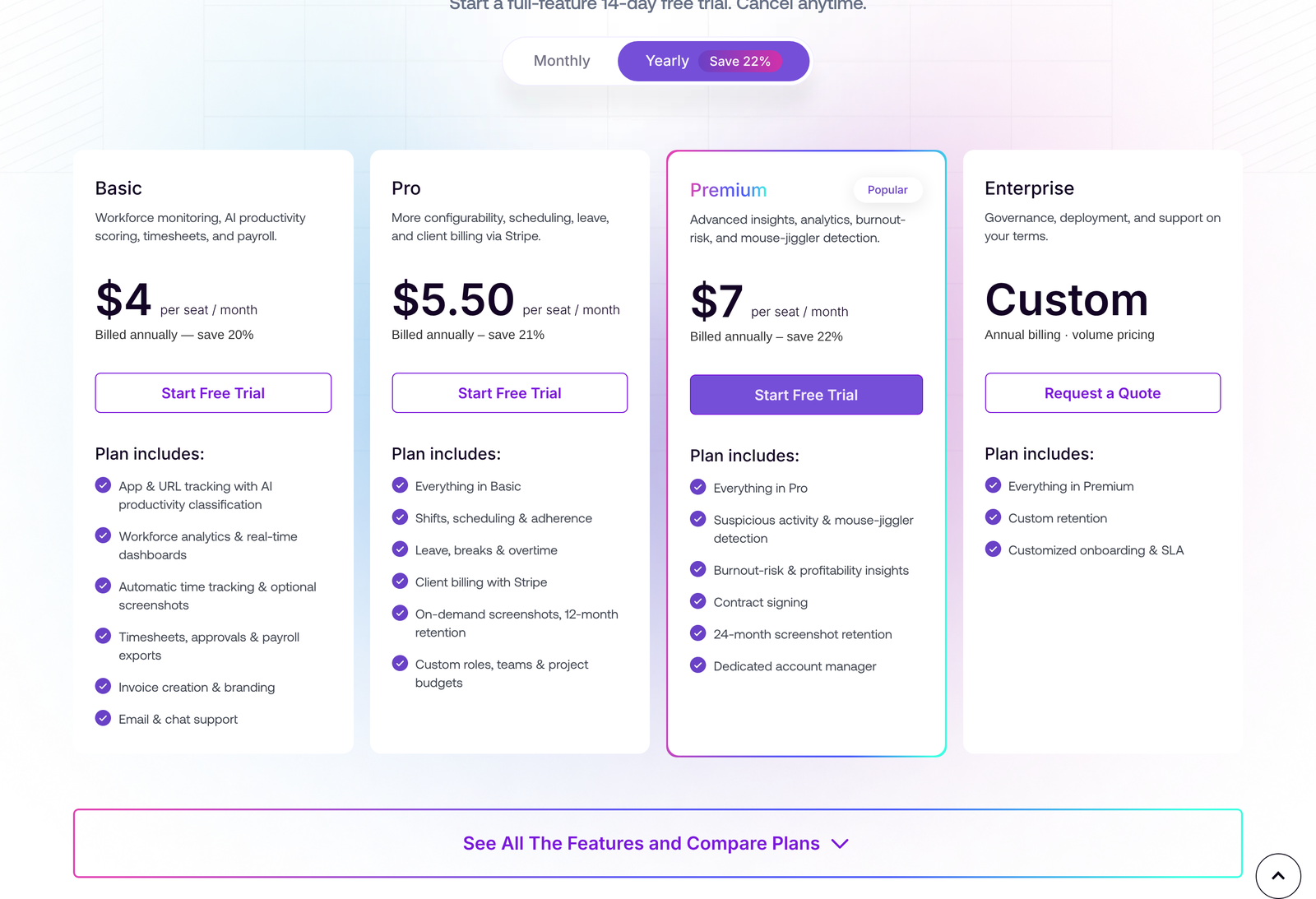
The page opens on the annual view
Load modge.com/pricing and the cards read $4, $5.50, and $7. Under each one, in grey, sits the line that explains them: billed annually. The toggle above the cards has two states, and the Yearly pill carrying a “Save 22%” badge is the one highlighted on arrival. Nothing is concealed, but the default framing shows you the cheapest number the product has.
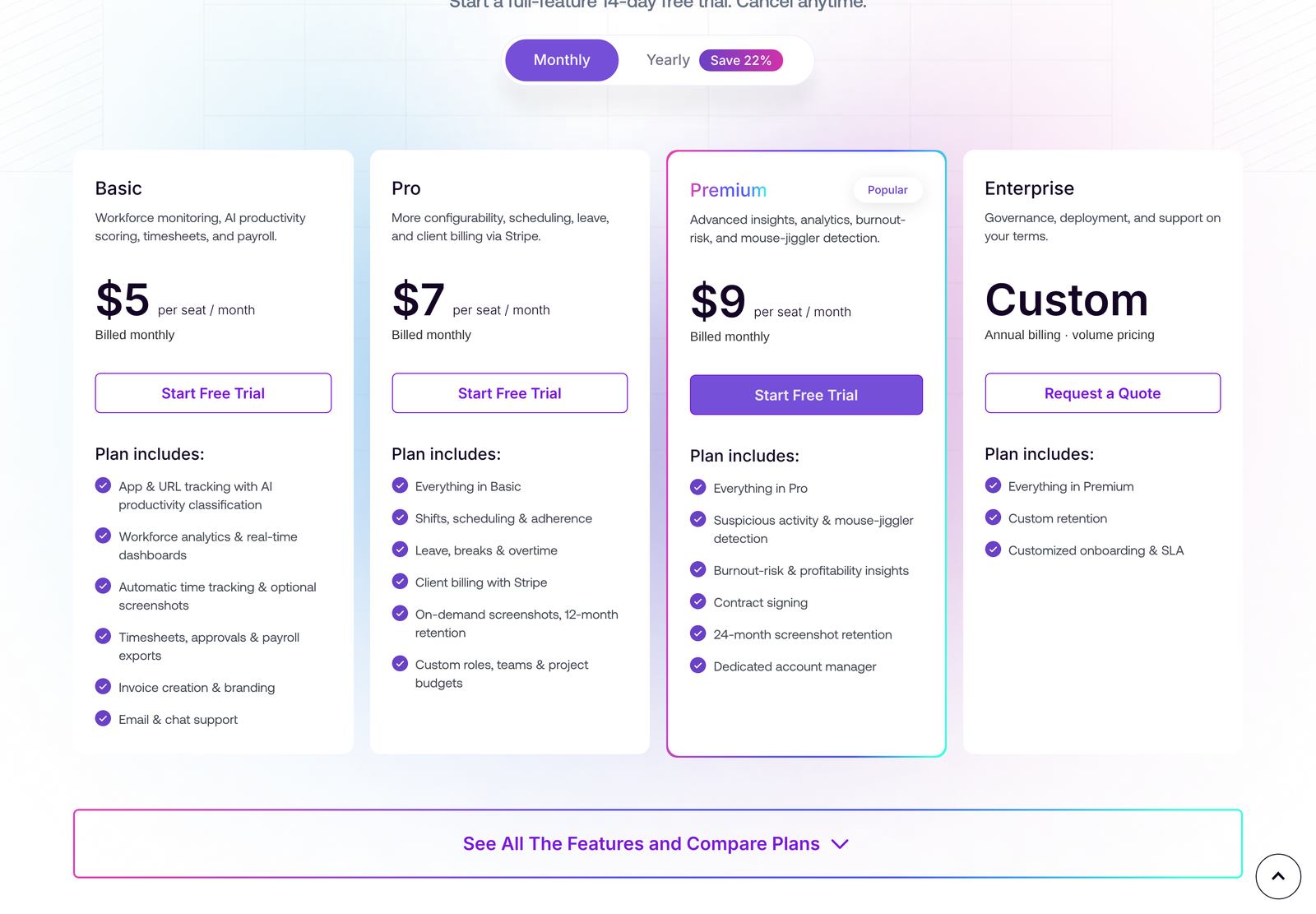
Click Monthly and the same four cards redraw. Basic goes to $5, Pro to $7, Premium to $9, each labelled billed monthly. These are the rates you pay if you want the option to leave next month.
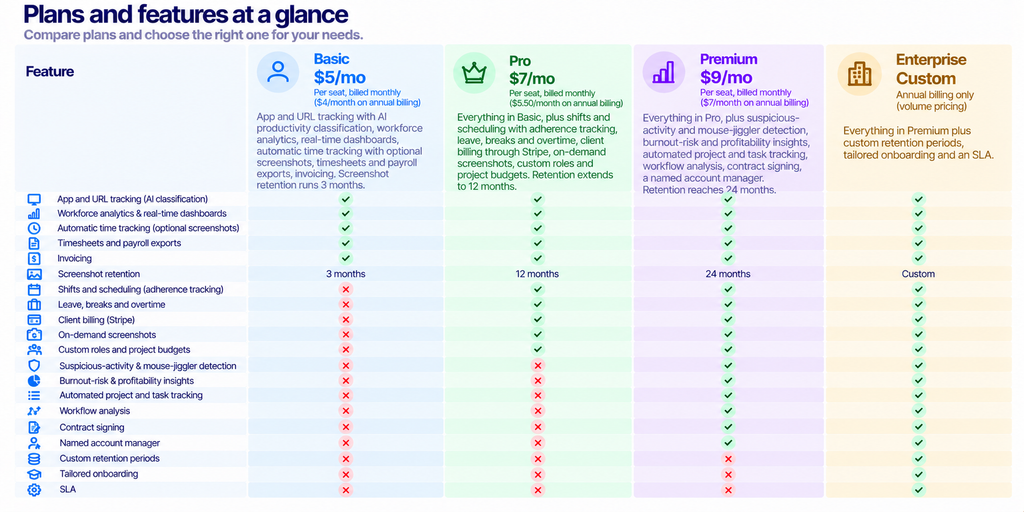
One trap for anyone comparing vendors from a spreadsheet: the feature comparison table further down the page repeats the plan headers with prices attached, and those headers also carry the annual figures. Expand the comparison, scroll past twenty rows of features, and the $4 and $5.50 are still looking at you regardless of which toggle you set. If you are pasting figures into a procurement sheet, take them from the cards after clicking Monthly.
The four plans, priced
Add-ons are priced separately and attach to any tier, per seat, prorated the same way seats are:
- More Screenshots, $2 a seat a month. Raises capture from 18 an hour to 60 an hour, which the vendor describes as ten every ten minutes. Offered on Basic, Pro and Premium.
- Extended Data Retention, $2 a seat a month, or $1.67 on annual billing. Keeps financial and operational records for six years and pushes monitoring data past your tier’s default window. Offered on every tier.
Running the arithmetic
The annual discount is modest and it is not uniform, which is unusual enough to check. Basic moves from $5 to $4, a 20% saving. Pro moves from $7 to $5.50, which is 21.4%. Premium moves from $9 to $7, or 22.2%. Each card states its own percentage and each one is accurate. The headline badge on the toggle says 22%, which is the best case rather than the average, so a Basic buyer who took the badge at face value would be out by two points.
Put real seat counts against it. A 25-person team on Basic pays $125 a month, $1,500 over a year. Prepay and the same team pays $1,200, saving $300. The same team on Premium pays $225 a month, $2,700 a year, against $2,100 prepaid, saving $600. Those are small absolute numbers next to payroll, which is the point: the decision here is rarely about price.
Where the arithmetic does get interesting is the add-ons. Both together cost $4 a seat a month. Stack them onto Basic and you reach $9, identical to Premium’s monthly rate. You would be paying Premium money for Basic’s scheduling-free feature set, with 60 screenshots an hour and six-year record retention, but without shifts, adherence, Stripe billing, burnout insights or the account manager. Anyone drawn to the screenshot add-on should price Pro and Premium in the same breath.
A second wrinkle: Extended Data Retention is the only line item with its own annual rate, $1.67 against $2. That is a 16.5% discount, lower than any plan’s. More screenshots show a single $2 figure with no annual equivalent on the card, so assume it bills at $2 either way until a quote says otherwise.
What actually separates the tiers
Retention length is the clearest ladder. Three months on Basic, twelve on Pro, twenty-four on Premium, custom on Enterprise. If you bill clients from proof of work and your contracts require you to keep evidence for longer than ninety days, Basic is already eliminated before any feature comparison starts.
Scheduling is the second gate. Shifts, recurring patterns, per-person grace windows, late and missed shift notifications, adherence scoring and attendance thresholds all begin at Pro. A team that only needs to know how many hours were worked can stay on Basic. A team running coverage across shifts cannot.
.svg)
Premium is sold on inference rather than measurement. Suspicious activity and mouse-jiggler detection, burnout-risk scoring, profitability insights, workflow analysis and industry-specific process optimisation. Each of those is a judgement the software makes about a person, and each is the kind of output a works council or an employment lawyer will want to see documented before it informs a decision about anyone’s job.
Capture frequency sits outside the ladder entirely. Every tier captures up to 18 screenshots an hour, including Enterprise, and 60 an hour requires the add-on at every level. Buying up does not buy you more frequent screenshots.
Check this before a pilot: role-based retention windows are separate from plan retention. Modge documents members seeing 30 days of screenshots, managers 90 and owners unlimited. Plan retention sets how long data exists; those role policies set who can look back how far.
What the monitoring captures
The feature list is specific in a way that helps you write a policy. App and URL tracking records apps and sites during tracked sessions with timestamps and durations, down to the exact browser URL. AI classifies each app or site as productive, neutral or unproductive, with your own organisation rules taking priority over the suggestions, plus per-job-title overrides so the same tool can count differently for different roles.
Screenshots are optional and can be switched off per organisation or per person, captured only during tracked sessions, with a configurable interval and configurable blur for privacy-sensitive roles. Multi-monitor capture is included. On-demand screenshots, which pull an instant capture from an active session, start at Pro.
One line deserves quoting because it anticipates the obvious question. On keyboard and mouse activity, Modge states that aggregated input intensity shows how active a session was, counts only, never what was typed, and says plainly that it is not a keylogger. Hold them to that in writing if you deploy it.
Time tracking rounds it out: idle detection with configurable thresholds, offline tracking with crash recovery that resumes the same session, auto-stop on sustained inactivity or at daily and weekly hour limits, multi-device tracking on one seat, overtime flagged against scheduled shift ends. Timesheets populate from tracked sessions, pay periods lock on approval, and every manual edit is recorded with editor, timestamp, and reason in an append-only log.

The compliance cost missing from the pricing page
Deploying monitoring software in the United States carries notice obligations that vary by state, and two of them have teeth.
New York requires any private employer with a place of business in the state to give prior written notice on hiring to employees subject to electronic monitoring of telephone, email, or internet use. The notice can be paper or electronic; employees must acknowledge it in writing or electronically, and it must also be posted somewhere monitored employees can readily see it. The Attorney General enforces it, with civil penalties capped at $500 for a first offence, $1,000 for a second, $3,000 for a third and each one after.
Connecticut expanded its own electronic monitoring statute this year. Public Act 26-73, signed 4 June 2026 and effective 1 October 2026, requires prior written notice of the types of monitoring and the specific premises where it may occur, with a conspicuous posting at the monitored location counting as notice. For anyone hired on or after 1 October 2026, employers must also hand over a plain-language written statement before the employee starts, listing prohibited activities and the activities that may be monitored without prior written notice. Penalties run on the same $500, $1,000, $3,000 scale, imposed by the Labor Commissioner after a hearing.
Read those alongside Modge’s per-seat price and the ratio shifts. A 25-seat Basic subscription costs $1,500 a year. A single third Connecticut offence costs $3,000. The software is the cheap part; the policy, the acknowledgements and the posting are the work, and none of it appears in a seat count. Build the notice before you build the dashboard.
Who Modge fits
Agencies and professional services billing hours to clients are the natural buyer. Project and billable tagging, bill rates per member or per project with effective-from dates, invoice creation with branding, and client billing through Stripe on Pro together cover the loop from tracked time to money collected. At $7 a seat, that is inexpensive for what is effectively time tracking plus invoicing.
Distributed teams running shifts are the second fit, and they need Pro for scheduling and adherence rather than Basic.
Poor fit: anywhere your workforce is unionised or covered by a works council, anywhere you operate in the EU without a lawful basis documented for monitoring, and any team where trust is already the presenting problem. Mouse-jiggler detection is a feature that announces what a deployment is for, and staff read that announcement whether or not anyone intends it.
Also consider whether you need monitoring at all or just timesheets. If the answer is timesheets, Basic at $4 or $5 a seat with screenshots switched off is a reasonable buy, and you can leave most of the product unused. Compare it against Hubstaff pricing and Jibble alternatives before committing, since both sit in the same bracket.
Three questions to settle before you buy seats
First, how many seats do you actually need? Modge counts one seat per person and allows unlimited devices on that seat, so a field worker with a laptop and a tablet costs the same as a desk worker with one machine. Contractors who work a few hours a week still occupy a seat, which pushes agencies toward Pro, where project budgets and bill rates make part-time contributors easier to account for.
Second, who approves time? Pay periods run weekly, semi-monthly or monthly, or can be switched off entirely for raw time data, set as an organisation default with per-member overrides. Manager approval locks a period permanently, and that lock is deliberate: the numbers signed off stay signed off. Decide who holds that authority before the first pay run, because unwinding an approved period is not presented as an option.
Third, where does the data go afterwards? Payroll-ready CSV exports are listed in generic, Wise, and PayPal formats. If your payroll provider is none of those, somebody is writing a transform, and that work belongs in the evaluation rather than in month two.
What we could not verify
Three claims on the Modge site are not checkable from public sources, and we have left them out of the assessment. The homepage cites over 2,000 users and teams becoming 27% more efficient, with no methodology attached. The pricing page carries three review badges reading 4.6, 4.8, and 4.2 out of 5 with review counts, but names no platform for any of them, and the major review sites refuse our crawler, so we cannot confirm them. Treat all five numbers as marketing until Modge attributes them.
The trial is stated plainly, and we take it at face value: 14 days, full features, cancel anytime. The cards do not say whether a card is required up front, so ask.
Frequently asked questions
How much does Modge cost per month?
Paying month to month, $5 a seat on Basic, $7 on Pro, and $9 on Premium. Enterprise is quoted. Committing to a year brings those to $4, $5.50, and $7 a seat.
Why do the prices change when I click the toggle?
The page defaults to the Yearly view, which shows annual-billed rates presented as a monthly figure. Clicking Monthly reveals the month-to-month rates, which are a dollar to two dollars higher per seat.
Is the 22% saving accurate?
For Premium, yes. Basic saves 20%, and Pro saves 21.4%. Each card carries its own correct percentage; the badge on the toggle shows the highest of the three.
Do I have to pay extra for screenshots?
Basic screenshot capture at up to 18 per hour is included on every plan. Raising that to 60 per hour costs $2 per seat per month through the More Screenshots add-on, at every tier that offers it.
How long does Modge keep screenshots?
Three months on Basic, twelve on Pro, twenty-four on Premium, and a custom window on Enterprise. The Extended Data Retention add-on pushes monitoring data beyond the tier default and keeps financial and operational records for six years.
Does Modge log keystrokes?
The vendor says no. Its feature description states that keyboard and mouse activity is captured as aggregated intensity, counts only and never content, and explicitly says it is not a keylogger.
Can I monitor staff without telling them?
Not in New York or Connecticut, and the rules differ elsewhere. New York requires written notice on hiring with acknowledgement and a posted notice; Connecticut requires notice of monitoring types and locations, plus a plain-language statement for anyone hired from 1 October 2026. Check your own jurisdictions before deployment.
Sources
- Modge pricing, checked 28 October 2026 in both toggle states, including the add-on cards and the expanded feature comparison.
- N.Y. Civil Rights Law section 52-c, electronic monitoring notice and penalties.
- Connecticut Public Act 26-73, amending Conn. Gen. Stat. section 31-48d, effective 1 October 2026.
Nothing here is legal advice. Monitoring policy and employee notices belong with your employment counsel.
Open Modge’s pricing page and click Monthly before you compare it to anything.