



Quick answer: Miro ships six integration surfaces, and most of them cost nothing. The 250+ app marketplace works on the free plan, and so does the MCP server that connects Claude, Cursor, or Copilot to your boards. Two gates carry a real price. Two-way sync with Jira, Asana, Linear, ClickUp, and Azure requires Business at $25 per member per month, and SCIM provisioning plus org-wide app controls require Enterprise. For a twelve-person team, the two-way sync gate alone costs $1,728 a year over Starter on annual billing.
Disclosure: Stack99 earns a commission if you buy through links on this page. It costs you nothing extra and never changes our assessment.
Six surfaces, not one integration list
Ask most vendors about integrations, and you get a logo wall. Miro publishes six genuinely different ways to connect something, and they sit at different levels of effort and cost.
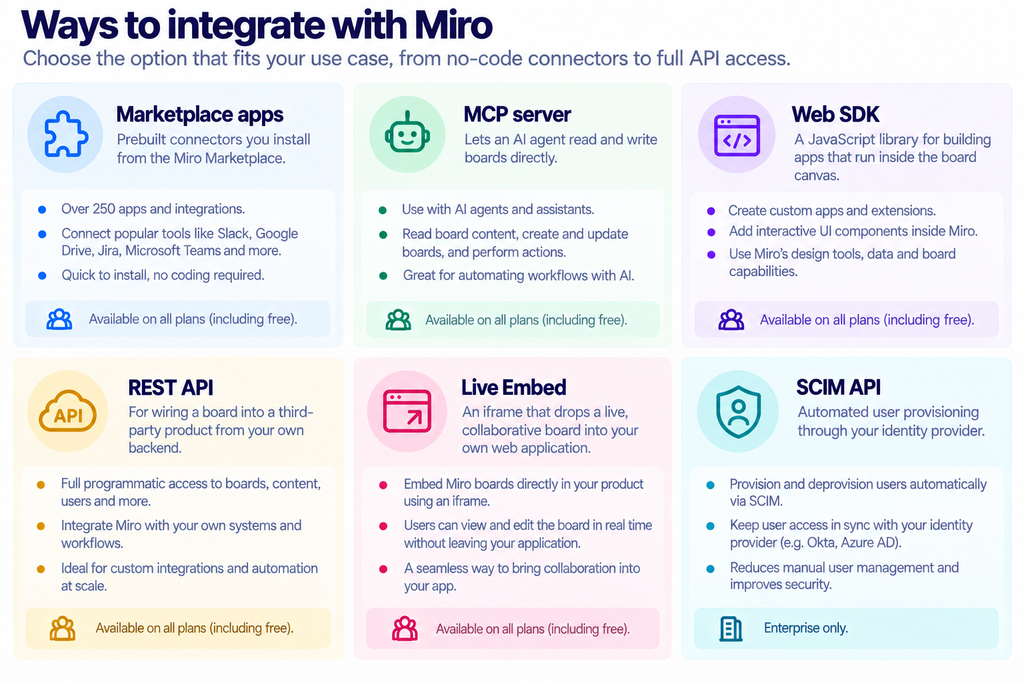
The first two need no developer. The next three need one. The last needs an IT admin and an Enterprise contract. Working out which row you are in saves a great deal of time before you look at prices at all. Our Miro features breakdown covers the canvas itself.
The marketplace, and what it actually contains
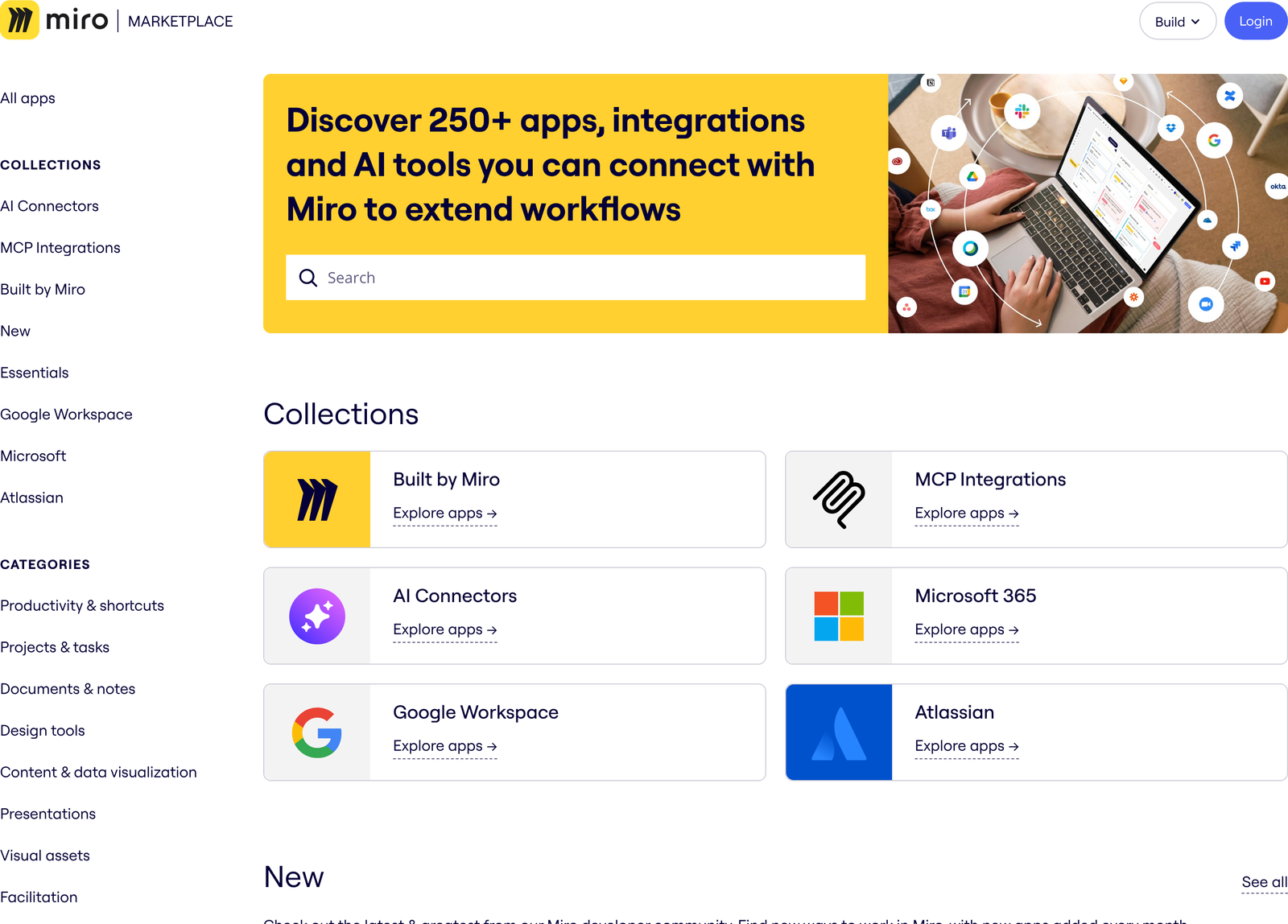
Miro groups the catalogue into collections including Built by Miro, MCP Integrations, AI Connectors, Microsoft 365, Google Workspace and Atlassian. Categories run across productivity, project and task tools, documents, design tools, data visualisation, presentations, facilitation, research, communication and admin.
Install counts are published on the listings, which is more transparency than most app stores offer. Jira Cards, built by Miro itself, shows 502,000 installs and a 3.4 rating from 36 reviews. That combination tells you something useful: enormous adoption, lukewarm satisfaction. A heavily installed app with a mediocre score usually means people need the connector and tolerate its limits.
Filter by pricing model before you get attached to anything. The directory separates free, paid, free-and-paid, paid-with-trial and free-with-Miro-plans. Several apps in the catalogue are third-party products with their own subscriptions, so an integration being listed does not make it included.
Where the plan gate actually falls
Here is the pricing page as it loads. Note the toggle: Yearly is preselected, so $8 and $20 are prepaid rates rather than month-to-month ones.
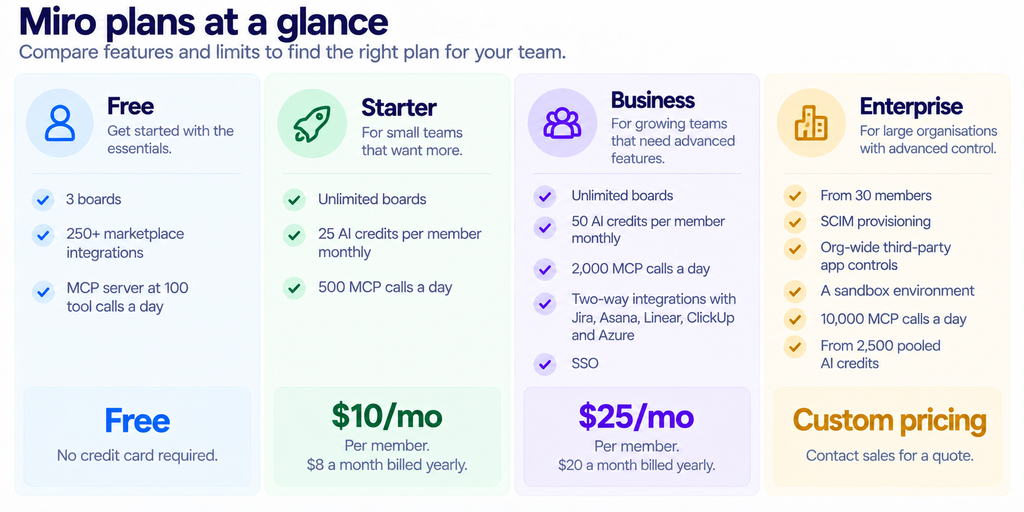
Read that table as an integration document rather than a pricing one. Three of the four rows differ mainly in how much machine access they permit.
The expensive gate: writing back to Jira
Installing Jira Cards on the free plan gets you Jira issues rendered on a board. Changes do not flow back. Editing a card in Miro and expecting the ticket to update is a Business-plan behaviour, listed on that card as “two-way integrations” covering Jira, Asana, Linear, ClickUp and Azure.
Price that gate properly. A twelve-person product team on Starter annual pays $96 a month, so $1,152 a year. The same team on Business annual pays $240 a month, so $2,880. Two-way sync therefore costs $1,728 a year for those twelve people. Pay monthly rather than yearly, and the gap widens to $2,160.
Whether that is worth it depends on one question: does anyone actually edit tickets from the canvas? Teams that run sprint planning on a Miro board and then retype the outcome into Jira are paying twice in staff time. Teams that treat the board as a read-only picture of the backlog are paying $1,728 for nothing.
The MCP server, and the limit that governs it
Miro’s MCP server is the most interesting integration on the list because it is the only one that lets software you did not write operate your boards. An agent in Claude, Claude Code, Cursor, Codex, Gemini CLI, or VS Code connects over the Model Context Protocol and starts reading and building.
The exposed tools fall into nine groups: boards, diagrams, documents, tables, code widgets, comments, images, layout, and prototypes. Your agent can create a board, search boards you have access to, read items with pagination, generate a diagram from a description, reply to comment threads and mark them resolved, upload images, or produce a prototype from HTML screens.
Authentication uses OAuth 2.1 with dynamic client registration, and the server respects existing board permissions rather than bypassing them. On Enterprise, an admin has to enable it for the organisation first, optionally restricting access by team or user group. Everywhere else it is on by default and simply needs authorising from your MCP client.
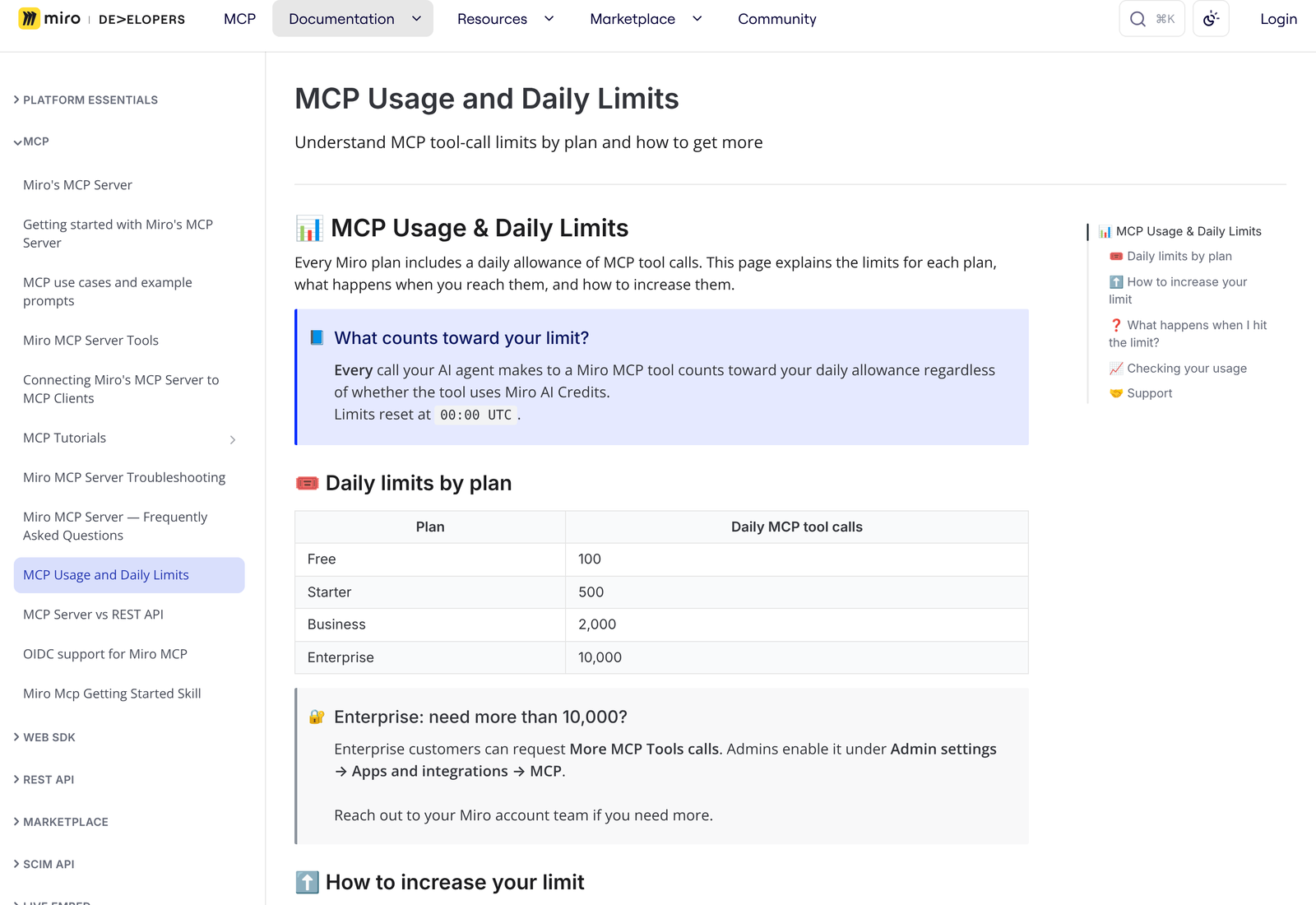
| Plan | Price | What you get |
|---|---|---|
| Free | Free | 100 MCP tool calls a day across the account. |
| Starter | $10/mo | 500 a day. Roughly 42 per person on a twelve-person team. |
| Business | $25/mo | 2,000 a day. Roughly 167 per person on a twelve-person team. |
| Enterprise | Custom | 10,000 a day, raised on request through your account team. |
Those allowances are per account, not per person, which is the detail most teams miss. One developer running an agent in a loop can drain a Starter plan’s daily budget before lunch and block everyone else until midnight UTC. Hit the ceiling and further calls fail with an error telling you to upgrade.
A hundred calls a day on the free plan is enough to evaluate the thing and not much more. Summarising one busy board with comments can consume a dozen calls on its own.
Building your own: the numbers that constrain you
Both developer surfaces meter in credits rather than requests, and the two schemes are separate.
REST API
Every method sits in one of four weight levels. Level 1 costs 50 credits and allows 2,000 requests a minute. Level 2 costs 100 credits at 1,000 requests. Level 3 costs 500 at 200 requests. Level 4 costs 2,000 at 50 requests. A global ceiling of 100,000 credits a minute sits over all of it.
Responses carry X-RateLimit-Limit, X-RateLimit-Remaining and X-RateLimit-Reset headers, so a well-written client can back off before it gets refused rather than after. Build that in from the start.
Web SDK
The in-board library allows 100,000 credits a minute and 1,000,000 an hour. Miro translates that into concrete throughput: 2,000 board items a minute or 20,000 an hour, dropping to 200 image items a minute and 2,000 an hour.
The reason images cost ten times more is that they are published. Most calls are Level 1 at 50 credits. Creating or updating an image or an embed is Level 3 at 500, because the operation is computationally heavier. Anyone bulk-importing a few thousand images should plan around the hourly ceiling rather than the per-minute one.
Endpoints you cannot reach without Enterprise
Eight API families are marked Enterprise in the reference: Projects, Organizations, Teams, Board Classification, Audit Logs, User Groups, eDiscovery and AI Interaction Logs. The last two sit behind Enterprise Guard, a separate add-on.
Anyone planning to automate team creation, classify boards by sensitivity, or pull an audit trail for compliance should confirm the contract covers it before writing code. Miro does offer temporary access to enterprise-level APIs through a request form for development purposes.
Live Embed and SCIM
Live Embed puts a working board inside your own product through an iframe, with oEmbed support and a separate authentication flow. oEmbed is an open format rather than a Miro invention, which means any platform that already consumes oEmbed providers can render a board without custom work.
SCIM sits at the opposite end. It automates provisioning, syncing, and deactivation of users through an identity provider such as Okta or Entra ID, and the protocol is defined in RFC 7644. Miro restricts it to Enterprise, which starts at 30 members.
Deprovisioning is the part worth arguing for in a budget conversation. Without SCIM, removing a leaver from Miro is a manual admin task, and a missed one leaves a former employee holding access to boards that may contain roadmaps or customer data.
Install, or build?
Most teams reach for the marketplace first and should. A prebuilt connector costs an admin five minutes and nothing in engineering time. The decision only gets interesting when no listing fits.
Miro splits custom work along a clear line. Anything that changes what users see or do on the canvas belongs in the Web SDK, which runs your JavaScript inside the board with its own app panels and modals. Anything that moves data between a board and a system elsewhere belongs in the REST API, called from your own backend.
Both paths are documented with working examples rather than reference pages alone. The developer site publishes quickstarts for a Web SDK app, a REST API app, and a full-stack Next.js app, plus specific how-tos for two-way sync between app cards and GitHub cards, OAuth login to a third-party service, and converting frame coordinates to board coordinates. A design-guidelines section and a component library called Mirotone exist so custom panels do not look foreign.
Publishing matters too. An app can stay private to a developer team, be shared with a single organisation, or go through submission review onto the public marketplace. Internal tools need none of that review, which keeps the cost of a small bespoke connector lower than most people assume.
AI credits and tool calls are different budgets
Confusing these two is the easiest mistake to make on the pricing page, because both appear on the same card.
AI credits fund Miro’s own generative features: clustering sticky notes, generating diagrams, summarising, running AI workflows. Starter includes 25 a member monthly and Business includes 50. Enterprise pools them org-wide starting from 2,500 a month, scaling with seat count, with an admin dashboard tracking usage.
MCP tool calls fund external agents reaching into your boards. Those are counted per account per day and reset at midnight UTC. A single credit and a single tool call have nothing to do with one another.
Why the distinction costs money: a twelve-person Business team holds 600 AI credits a month between them and 2,000 MCP calls a day, which works out to near 60,000 a month. Heavy agent users exhaust neither budget evenly. Teams running agents hard will hit the daily call ceiling while sitting on unused credits, and upgrading for credits does nothing to fix that.
Governing what gets connected
A 250-app marketplace is a supply chain. Each installed app holds a permission scope against boards that may contain unreleased roadmaps, customer names, or architecture diagrams.
Below Enterprise, control is thin. Individual users authorise apps for themselves, and there is no central approval queue. Miro puts org-wide controls over third-party integrations on Enterprise, where an admin can approve, restrict or pre-authorise apps for every team from one place. The same tier adds a sandbox, a replica environment for testing custom development before it touches production.
Agent access follows the same pattern. On Enterprise, an admin enables the MCP server for the organisation and can scope it by team or user group. Below that, it is enabled by default. Any security review of Miro should treat that default as the thing to examine, since it means an employee can connect an external AI client to company boards without asking anyone.
The mitigating detail is that MCP respects existing board permissions. Each agent sees what its authorising user sees and no more. That limits blast radius without removing the governance question of which agents get connected at all.
Which plan your integration needs
- Free is enough if: you want marketplace apps and a little agent access to evaluate the idea.
- Starter is enough if: you need unlimited boards and light daily agent use, with no write-back to a tracker.
- Business is required if: edits must flow back into Jira, Asana, Linear, ClickUp or Azure, or your agents make more than 500 calls a day.
- Enterprise is required if: you need SCIM, audit logs, board classification, a sandbox, or central control over which third-party apps your organisation may install.
One warning about the Free tier. Three boards is a hard limit, and an integration that creates boards programmatically will hit it immediately. Evaluate connectors on Free; run them on Starter at the least. For the broader product picture, see our Miro review and the Miro alternatives comparison.
FAQ
How many integrations does Miro have?
More than 250 marketplace apps, available on every plan including Free. Separately, there are five developer and admin surfaces: Web SDK, REST API, Live Embed, SCIM, and the MCP server.
Does the Jira integration sync both ways on the free plan?
No. Jira Cards installs on Free, but two-way sync is listed as a Business feature at $25 a member monthly, or $20 billed yearly.
Can I use Miro’s MCP server without paying?
Yes. It works on all plans, including free teams, capped at 100 tool calls a day. The allowance resets at 00:00 UTC.
Do MCP calls consume AI credits?
Some tools do and some do not, but every call counts against the daily tool-call allowance either way. The two budgets are separate, and you can exhaust one while the other is untouched.
What are the Miro API rate limits?
REST methods are weighted at 50, 100, 500, or 2,000 credits, permitting 2,000, 1,000, 200, or 50 requests a minute, respectively, under a global ceiling of 100,000 credits a minute. The Web SDK allows 100,000 credits a minute and 1,000,000 an hour.
Is SCIM available below Enterprise?
No. SCIM provisioning is listed only on Enterprise, which Miro quotes from 30 members upward.
Sources
- Miro pricing and the Miro Marketplace, both captured 11 October 2026 in both billing states.
- Miro MCP usage and daily limits and the REST API rate limiting reference.
- The Model Context Protocol specification, the open standard the MCP server implements.
- RFC 7644, the IETF standard defining the SCIM provisioning protocol.
- The oEmbed specification, the open format behind Miro’s Live Embed support.