



Quick answer: Capsule CRM lists more than 100 integrations in its App Marketplace, but the catalogue is tiered. The Free plan gets the basics. Starter unlocks what Capsule calls Premium Integrations, naming Xero, Zendesk, and Import2 on the pricing page. Growth is where the AI Connectors appear, covering ChatGPT, a Claude connector marked coming soon, and a Custom MCP Connection. Paid plans run $22, $40, $60, and $75 per user per month billed monthly, or $18, $36, $54, and $72 billed annually.
Disclosure: Stack99 earns a commission if you buy through links on this page. It costs you nothing extra and never changes our assessment.
Most CRM integration pages are a wall of logos. Capsule’s is a wall of logos with a pricing gate behind it, and the marketplace page doesn’t describe the gate at all. You have to read the plan cards to find out which connections your account can actually make. This piece maps the catalogue against the plan that unlocks it, using Capsule’s own pricing page and marketplace as the source.
What is actually in the marketplace
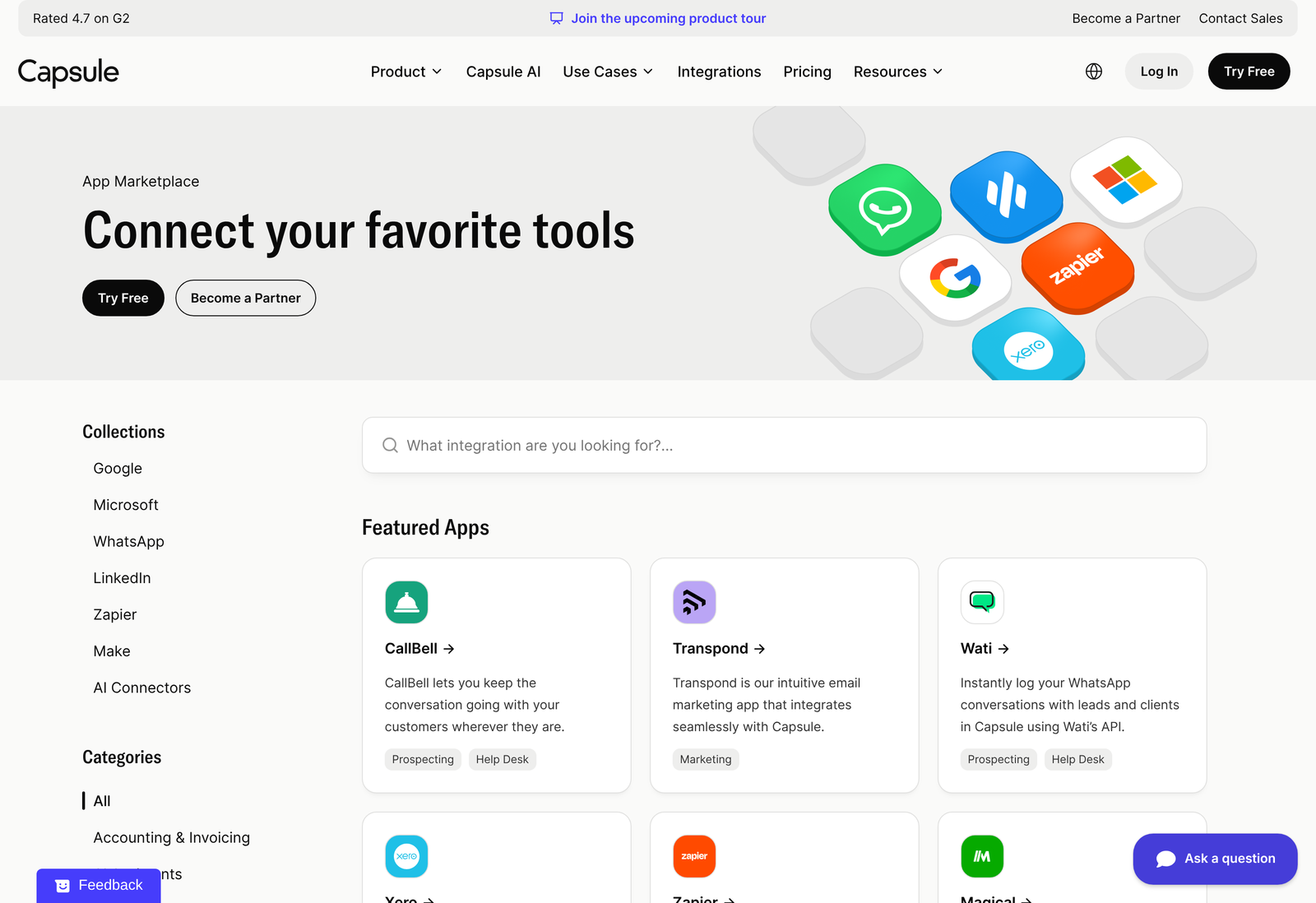
Capsule’s App Marketplace splits two ways. Collections sit at the top: Google, Microsoft, WhatsApp, LinkedIn, Zapier, Make and AI Connectors. Below them sit around thirty categories, from Accounting & Invoicing through to Webforms and Workplace Management. The marketplace page carries a “Connect to 100+ integrations” line, and counting the distinct app pages linked from the directory gives 55 listings with their own detail page. The gap between those two numbers is mostly the Zapier and Make long tail, which Capsule counts as integrations because the connector exists even though the app page does not.
Accounting is the deepest category by a distance. Xero, QuickBooks Online, FreeAgent, FreshBooks, Sage Accounting, KashFlow, Crunch, Wave and Paycove all have their own listings. Capsule sells heavily to accountants and professional services firms, so that concentration is not an accident.
Telephony is the second cluster. KrispCall, Aircall, JustCall, Kixie, CircleLoop, CallPal, Softphone.Pro, SwitchboardFree, Yay and Invoco all appear, alongside a Kallio listing that covers 3CX, Aircall and Dialpad together. Several of these carry a UK only note in their marketplace description, which matters if your team is not in Britain. CircleLoop, SwitchboardFree and Invoco each say so.
The plan gate nobody mentions on the marketplace page
Here is the part that costs people money. Capsule’s pricing page lists “Premium Integrations” as a Starter plan feature, described as “Access direct integrations with tools like Xero, Zendesk and Import2”. It does not appear in the Free plan’s feature list. If your plan is to run Capsule free and wire it to your accounting system, that plan does not survive contact with the pricing page.
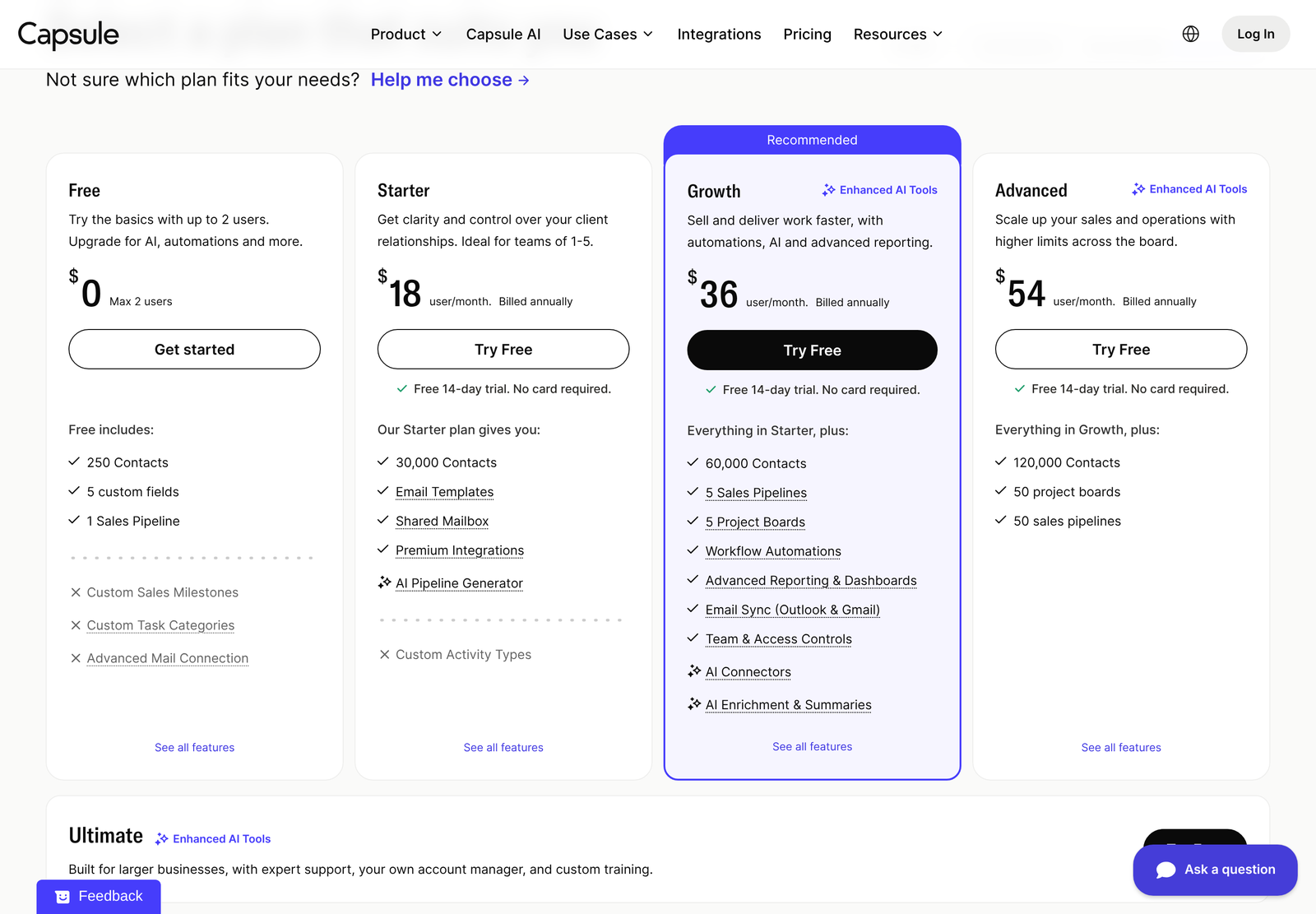
Move up one tier and a second gate appears. The Growth plan card lists “AI Connectors”, described as connecting Capsule “to the AI assistant you already use, like ChatGPT or Claude, through our official connectors or Custom MCP”. Growth also carries AI Enrichment & Summaries, which fills in contact details such as job title and LinkedIn profile and summarises the last 50 activities on a record.
So the integration ladder looks like this. Free gives you a CRM with 250 contacts and one pipeline. Starter opens the direct connectors to accounting and help desk tools. Growth opens the AI layer. Advanced and Ultimate raise limits rather than adding new connector classes.
What each plan costs
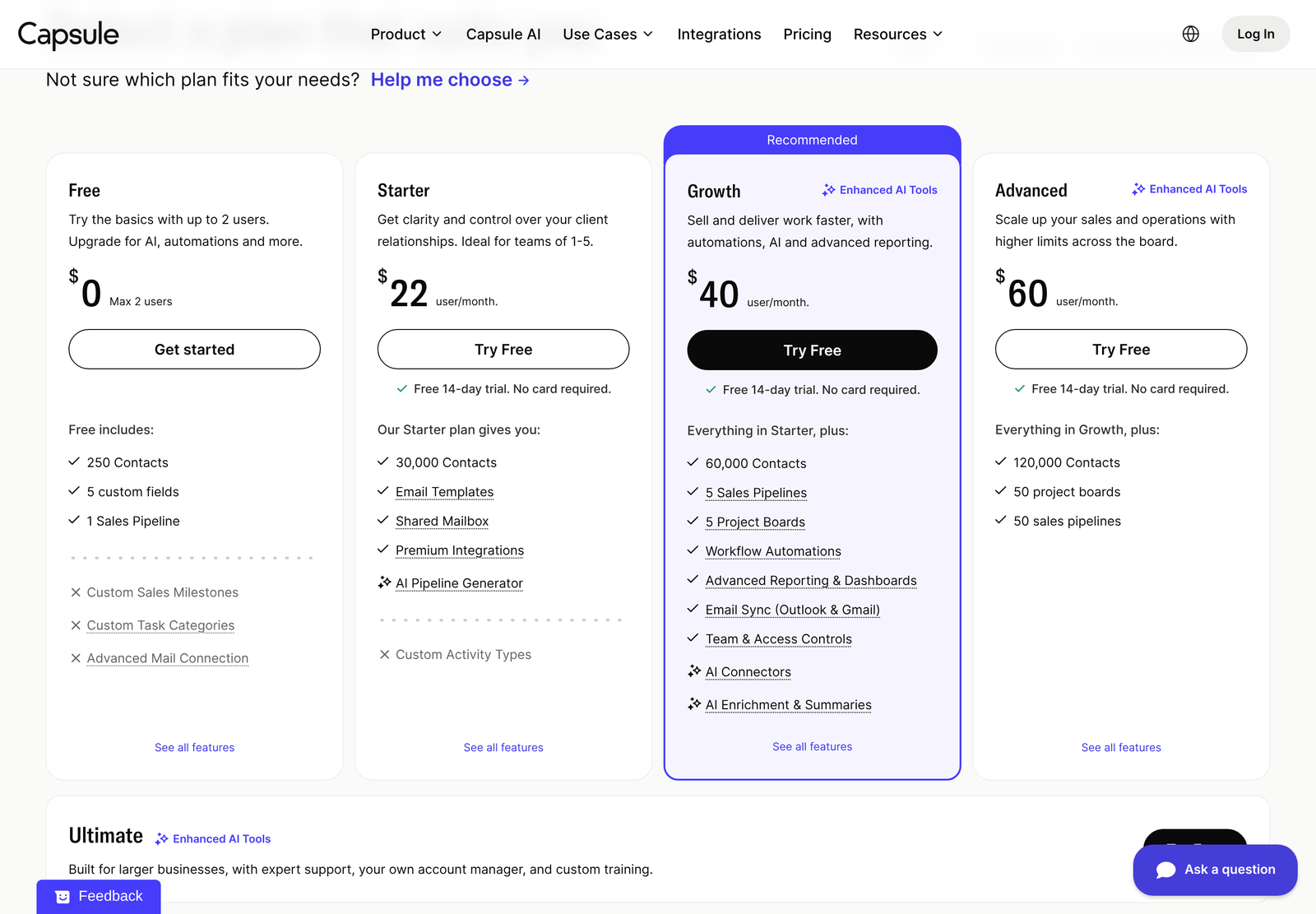
Capsule’s pricing page opens with the annual toggle already selected, so the first numbers you see are not the monthly rates. Flipping to Pay Monthly moves Starter from $18 to $22 and Growth from $36 to $40. Capsule’s own FAQ states the full set, and the two toggle states confirm it.
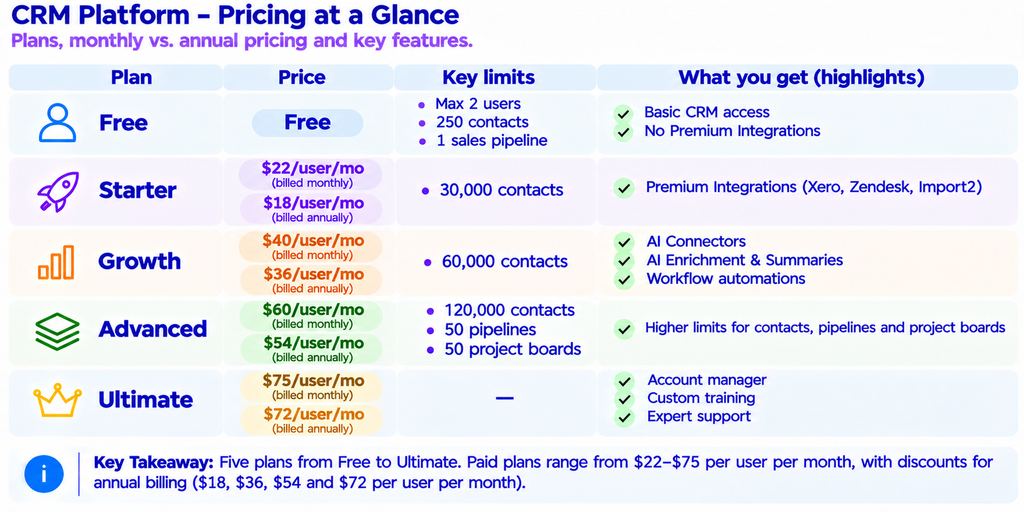
Notice the Ultimate row. Every other plan saves about 18 percent on annual billing. Ultimate saves four percent. If you are pricing a move to the top tier, the annual commitment buys you very little there compared with what it buys lower down.
The accounting connectors, in order of depth
Xero is the flagship. Capsule maintains a listing on the Xero App Store, and that listing is more candid than Capsule’s own marketing. It spells out the setup path: you need a professional Capsule account and a Xero account, you authorise from Account Settings, and Capsule then syncs every Xero contact that has at least one non-draft invoice. Matching contacts get linked; new ones get created.
That “at least one non-draft invoice” condition is the kind of detail that decides whether a migration goes smoothly. Draft invoices do not bring a contact across. Plan your first sync around that.
The Xero listing has 64 reviews as of this writing, with 80 percent at five stars and 13 percent at four. Among the lower scores is a specific, useful complaint: one reviewer reports that changing a delivery address in Capsule does not always propagate to Xero. Treat two-way address sync as something to verify rather than assume.
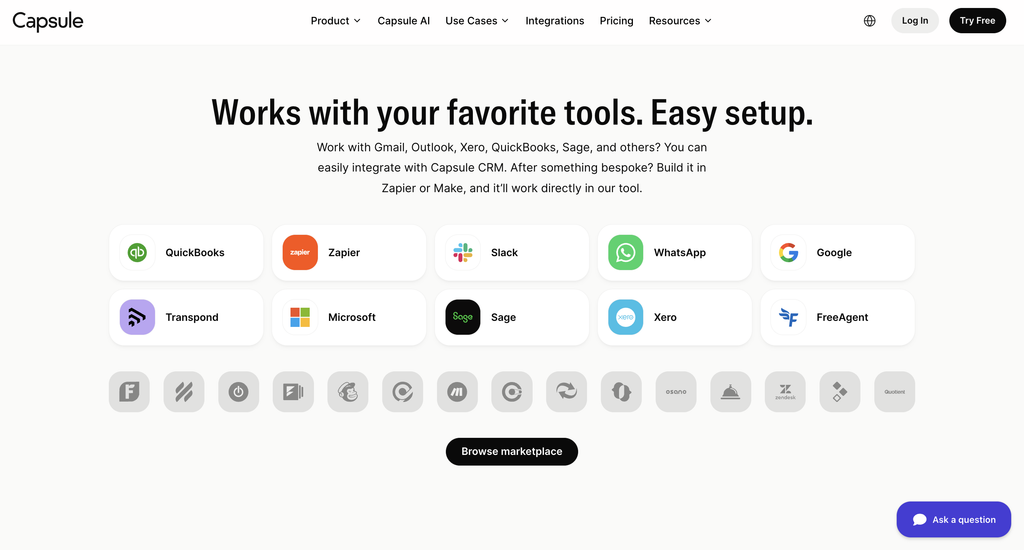
QuickBooks Online, FreeAgent, FreshBooks, Sage Accounting and KashFlow all have their own direct listings. Crunch and Paycove handle invoicing and quoting rather than full ledgers. Wave rounds out the free end. A small UK practice will care that FreeAgent and KashFlow are both here, which is a genuine differentiator against CRMs that only ship a QuickBooks connector.
AI connectors and what “coming soon” means
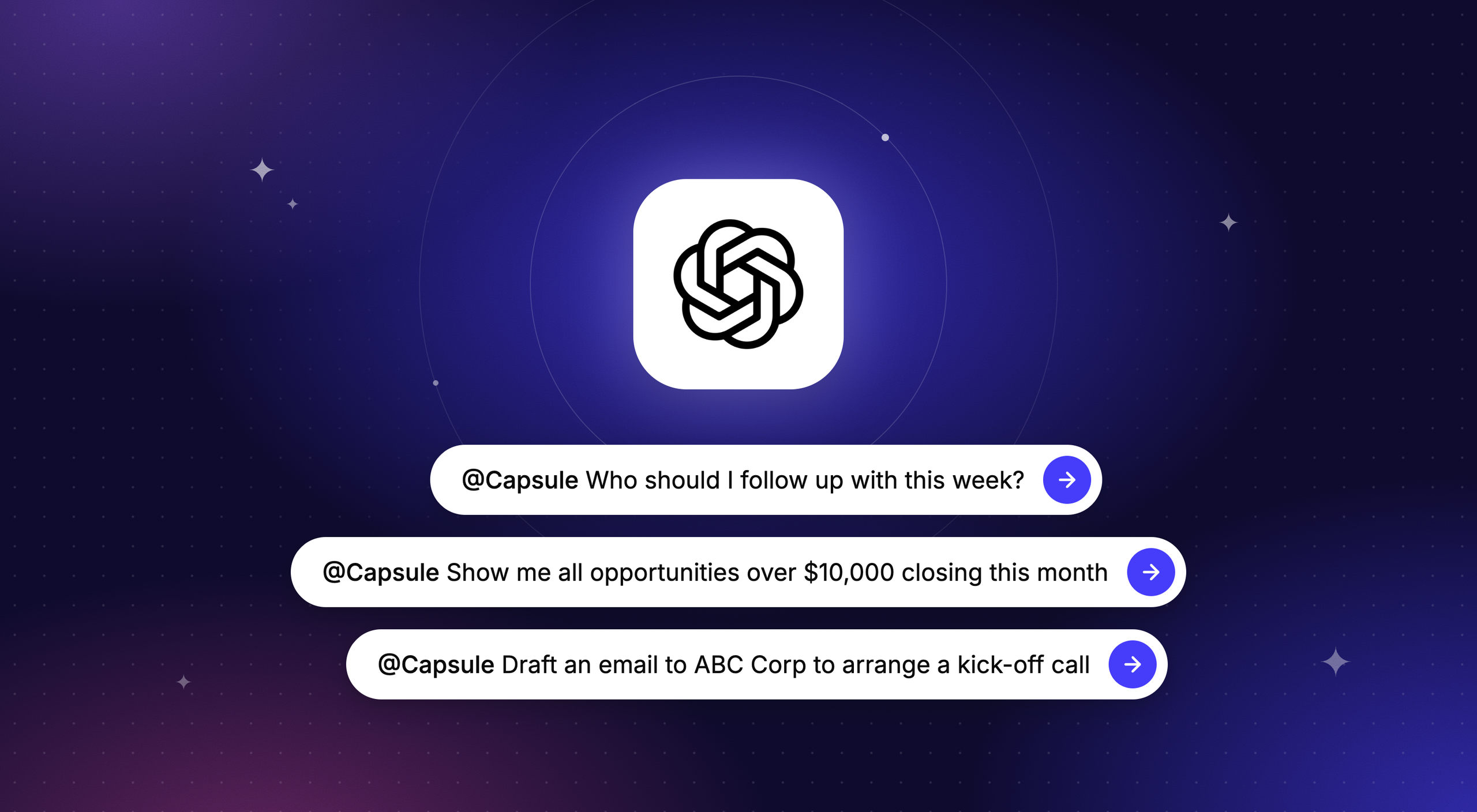
Capsule’s AI Assistants category holds three entries. ChatGPT is live, described as letting you “ask ChatGPT about your pipeline, contacts and tasks, and update Capsule without leaving the chat”. The Claude entry carries a Coming soon ribbon. Custom MCP Connection is the third, positioned as a way to bring Capsule data into whichever AI tool you already run.
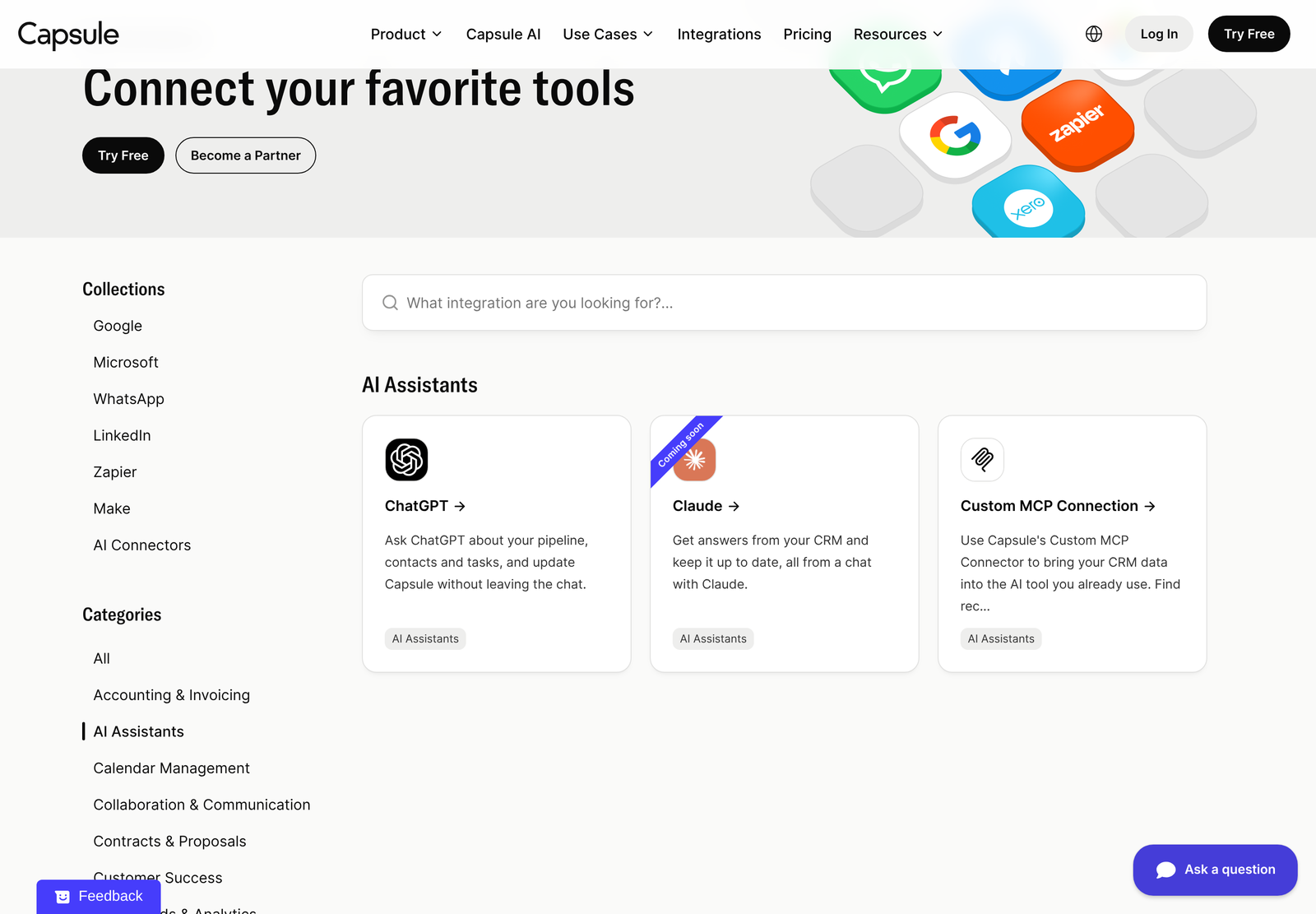
Two things follow. If a Claude connector is load-bearing for your workflow, it is not available yet, and Capsule has not published a date. And all three sit behind Growth, so the AI layer costs $36 per user per month annually, double the Starter rate. For a four-person team, that is $1,728 a year against $864.
The Custom MCP route deserves a flag. MCP connectors expose CRM records to an external model. Before you switch one on across a shared workspace, check who in your team can query it and what data it reaches, because Capsule’s role and permission controls also live on Growth and above.
Telephony, and the KrispCall overlap
Capsule’s phone connectors cover click-to-dial, call logging, and caller ID rather than deep call analytics. KrispCall’s listing describes a virtual phone system for browser-based calling. Aircall is pitched at sales outreach. JustCall adds recordings and voicemail sync. Kixie leans on automated calling and texting.
If you are choosing a phone system to sit alongside Capsule, the connector list narrows your field before any feature comparison does. We have looked at two of these separately in our CallHippo integrations guide and the Aircall features breakdown.
The glue layer
Capsule carries an unusually wide set of automation platforms: Zapier, Make, Microsoft Power Automate, Zoho Flow, Integrately, OttoKit, Cyclr, Skyvia and Flow XO. Zapier and Make each get their own Collection in the marketplace sidebar, which tells you how much traffic Capsule expects to route through them.
This matters for coverage gaps. When you filter the marketplace to a category Capsule does not serve directly, the page does not return an empty result. It returns a prompt suggesting Zapier, Microsoft Power Automate, or Make, plus a form to request the integration. Useful, and also a reminder that a logo in a “100+” count is not the same as a maintained first-party connector.
Skyvia and Cyclr sit at the other end. Skyvia is positioned for ETL and data pipelines; Cyclr for embedding Capsule integrations inside your own SaaS product. Neither is a click-and-connect proposition.

The remaining clusters
Four other groupings carry enough listings to be worth planning around.
Web forms. Capsule covers both WordPress form plugins and the hosted form tools. Gravity Forms and Ninja Forms handle the WordPress side, creating contacts, opportunities and tasks from submissions. Wufoo, Jotform, Formstack and Typeform cover hosted forms. Transpond also contributes a website forms listing of its own. If your lead capture currently lands in an inbox, this is the cheapest capture-to-close improvement available on a Starter plan.
Help desk and customer success. Zendesk is the headline name, and it sits inside the Premium Integrations bundle on Starter. Help Scout, Helpwise, and Enchant fill out the support tooling. Akita covers customer success and churn. Reve Chat and Userlike handle live chat, while CallBell, Wati, Timelines.ai and LazoChat all route WhatsApp conversations into Capsule records.
Contracts, quoting and proposals. Docusign anchors this group. Better Proposals, Proposable, NiftyQuoter and Quotient each pull Capsule contact data into a document workflow. For a professional services firm quoting repeatedly against the same contact records, this cluster plus the accounting connectors covers the full quote-to-invoice path without leaving Capsule as the system of record.
Meetings and transcription. Zoom logs activity, summaries, and transcripts back to Capsule. Otter records meetings and writes notes into the record. Fireflies does transcription and analysis, though it lists notes it connects through Zapier rather than directly, which puts it on the other side of the first-party line discussed above.
Inventory and operations is thinner but present: Shopify for orders and cart activity, Cin7 Omni and Cin7 Core for stock and supply chain, and the Tidy family covering project, stock and construction work. OfficeRnD handles flexible workspace management. Toggl, Clockify and Hourtick cover time tracking against Capsule projects and opportunities.

Transpond, and why the two products are sold together
Transpond is Capsule’s own marketing platform, and it appears in the marketplace as a featured app rather than as a bundled module. Capsule’s FAQ draws the line clearly: Capsule includes email templates for writing to individual contacts, and campaign sending lives in Transpond. From there you build email campaigns, schedule social posts and handle enquiries, with engagement syncing back onto the Capsule contact record.
Budget for this separately. The per-user prices in the table above buy Capsule. Transpond is a second product with its own pricing, and the engagement sync is the reason to run both rather than pairing Capsule with Mailchimp. Mailchimp, Klaviyo, MailerLite, Constant Contact and AWeber all have Capsule listings if you would rather keep the email platform you already use.
Our Capsule and Transpond pricing breakdown covers the combined cost, and the fit guide looks at which team sizes get value from the pair.
Two gaps in the catalogue
Worth checking before you commit. There is no direct Salesforce or HubSpot connector, which is expected given Capsule competes with both, and no direct Slack alternative beyond Slack itself and Microsoft Teams. Data privacy is covered by a single listing, Osano, under a category of its own.
The second gap is documentation. Capsule’s marketplace entries describe what each app does, not which plan it needs. The plan requirement is only stated on the pricing page, and only for the two bundles named there. For anything outside Xero, Zendesk, Import2, and the AI connectors, the trial is the reliable way to confirm your tier can switch it on.
Reporting and data exit
Three listings deal with getting data out. SyncHub connects Capsule to Power BI, Tableau and Snowflake. A Looker Studio Connector handles dashboards. MyCRMBackup writes contacts, deals, pipelines and tasks to Google Drive.

On the way in, Import2 offers free import from 25 or more CRMs, MigrateMyCRM runs assisted migrations, and ClonePartner covers customisable moves. Capsule also publishes an API for developers. Between the import tools and the backup tool, the lock-in risk here is lower than most CRMs at this price.
Who runs Capsule
Capsule is a service of Zestia Limited, registered in England with company number 06418281. The Companies House record shows an active private limited company incorporated on 5 November 2007, registered at Level 1, 20 Dale Street, Manchester, with its SIC code set to data processing and hosting. Eighteen years of trading is a reasonable answer to the question of whether the integrations will still be maintained next year.
Choosing a plan for the integration you need
Work backwards from the connector, not from the contact limit. Three rules cover most cases.
- Choose Starter if: you need Xero, QuickBooks, Zendesk or an import from another CRM, and your team is one to five people. $22 per user monthly, $18 annually.
- Choose Growth if: you want the ChatGPT connector, Custom MCP, email sync with Outlook or Gmail, or role-based access controls. $40 monthly, $36 annually.
- Choose Advanced or Ultimate if: the constraint is volume rather than connector class. Neither adds a new category of integration.
One more consideration. Every paid plan starts with a 14-day free trial that Capsule says includes every feature, every integration and unlimited users, with no card required. Use it to test the specific connector you are buying for. A connector that exists is not the same as a connector that syncs the field you care about, as that Xero delivery address review shows.
Frequently asked questions
Can I use Capsule integrations on the free plan?
Capsule’s pricing page lists Premium Integrations, naming Xero, Zendesk, and Import2, as a Starter feature. It does not appear on the Free plan card. Free is capped at two users, 250 contacts, and one pipeline.
Which plan do I need for the ChatGPT connector?
Growth. AI Connectors appear in the Growth column of the pricing page, under “Everything in Starter, plus”. That is $36 per user per month billed annually, or $40 billed monthly.
Is there a Claude connector for Capsule?
A Claude listing exists in the AI Assistants category with a Coming soon ribbon. Capsule has not published a launch date. The Custom MCP Connection is available now and can serve a similar purpose.
How many integrations does Capsule have?
Capsule advertises more than 100. Counting distinct app detail pages in the marketplace directory gives 55. The difference is largely made up of connections routed through Zapier and Make.
What happens if Capsule has no direct integration for my tool?
The marketplace returns a panel suggesting Zapier, Microsoft Power Automate, or Make, and offers a form to request the integration. Zapier and Make both have dedicated Collections, so this is the designed path rather than a fallback.
Does the Xero integration sync both ways?
Capsule describes keeping customer and supplier information in sync and showing Xero invoice summaries inside the Capsule contact page. At least one reviewer on the Xero App Store reports delivery address changes not always carrying across. Test the fields you depend on during the trial.
Sources
- Capsule CRM pricing page, for plan prices in both billing states and the per-plan feature lists.
- Capsule CRM App Marketplace, for the category list, collections and app directory.
- Capsule CRM on the Xero App Store, for the setup steps, sync behaviour and user reviews.
- Companies House record for Zestia Limited, for incorporation and company status.
Prices and plan contents were checked on 17 November 2026 and can change. Check the current Capsule plans before you commit to a tier for a specific connector.