


Datarails offers three plans, Professional, Premium, and Expert, and publishes a detailed feature comparison between them. Read that comparison closely and something unusual emerges: almost nothing in it is gated. Nineteen of the twenty-one rows carry a tick in all three columns. The tiers differ by how many people can log in, how many systems you can connect, and which product modules come bundled.
Disclosure: Stack99 earns a commission if you buy through links on this page. It costs you nothing extra and never changes our assessment.
The short answer
All three Datarails plans include the full FP&A feature set: Reporting, Planning, Dashboards, Data Mapping, Lookups, Workflows, Permissions, Allocations, Currency Translation, Intercompany eliminations, and the AI suite. Only two capabilities are restricted: AI Storyboards and Premium Support, both absent from Professional.
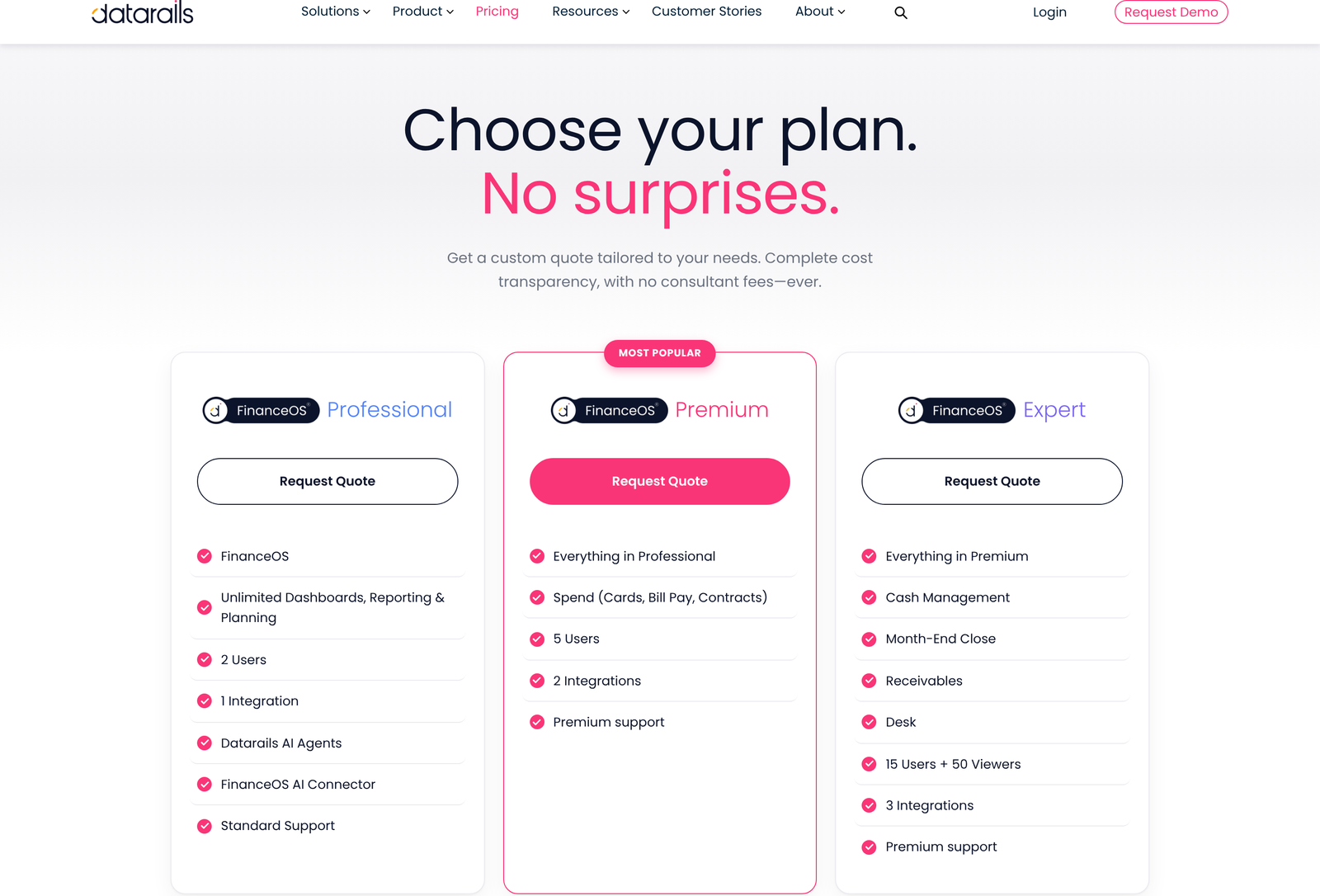
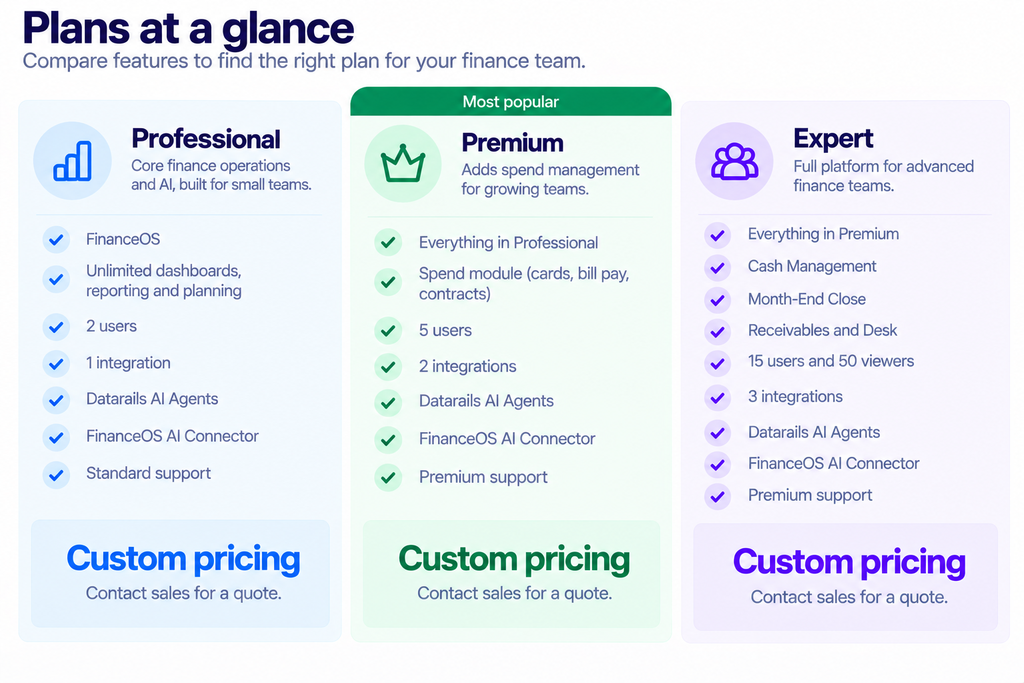
The real ladder is quantitative. Professional allows 2 users and 1 integration. Premium allows 5 users and 2 integrations and adds the Spend module. Expert allows 15 users plus 50 view-only seats and 3 integrations, and bundles Cash Management, Month-End Close, Receivables and Desk. No prices are published anywhere; every plan routes to a quote request.
On the missing prices
The pricing page is headed “Choose your plan. No surprises.” and promises complete cost transparency with no consultant fees. It then shows three identical Request Quote buttons and not a single figure. Those two things sit oddly together.
We will not invent numbers to fill the gap. What the page does give you is unusually precise structural detail, which is enough to work out what you would be buying and to arrive at a sales call knowing which tier your requirements land in. That is the job this article does.
The comparison table and what it reveals
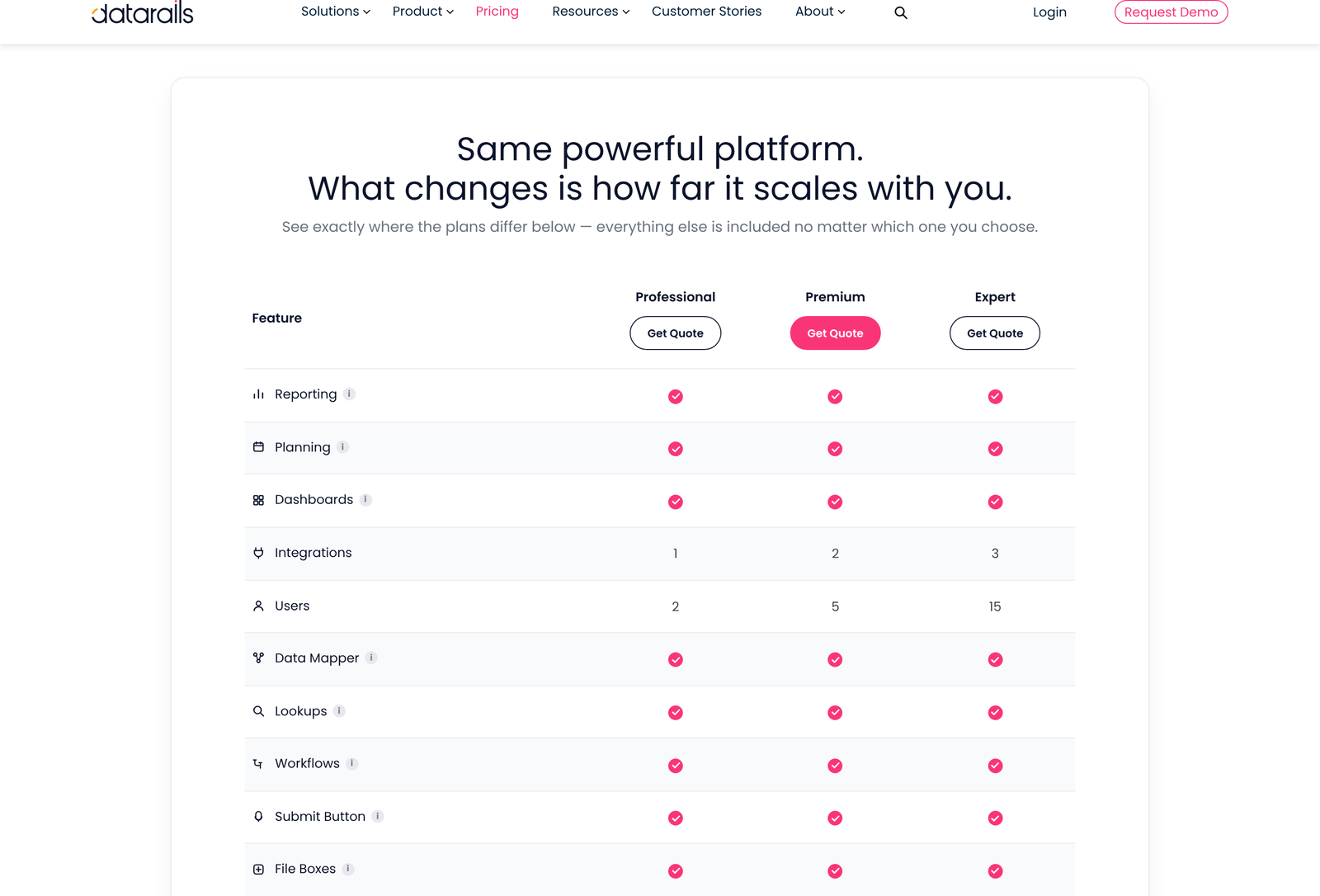
Datarails frames this honestly in its own heading: “Same powerful platform. What changes is how far it scales with you.” The table bears that out.
Present on every tier: Reporting, Planning, Dashboards, Data Mapper, Lookups, Workflows, Submit Button, File Boxes, Filters, Version Control, the AI Suite, the FinanceOS AI Connector, Permissions, Allocations, Custom Reports, Multiple Charts of Accounts, Currency Translation, Intercompany Eliminations and JV Investment Accounting.
Absent from Professional only: AI Storyboards, which generate board-ready presentations from dashboards, and Premium Support.
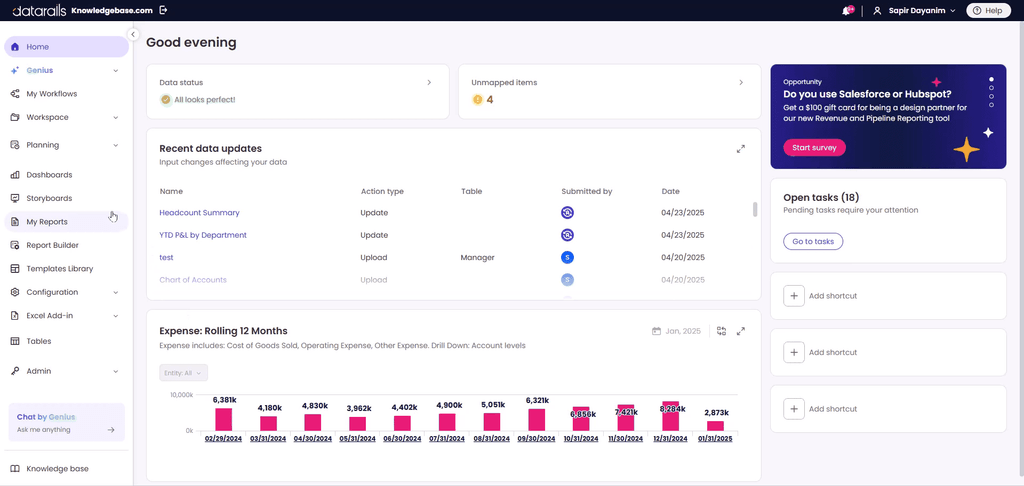
Compare that with the usual pattern in this category, where consolidation mechanics and governance controls are reserved for the top tier and used to force upgrades. A two-person finance function on the entry plan here gets intercompany eliminations, multi-currency translation, and joint venture accounting. Those are the hardest parts of the job, and they are not being withheld.
One integration is the number to watch
Datarails advertises connections to more than 600 systems. The Professional plan lets you use one of them.
That single figure is the most consequential limit on the page, and it deserves more attention than the seat count. A finance team consolidating a single NetSuite instance is fine. A team pulling from an ERP, a payroll system, and a CRM needs three connections, which is Expert territory regardless of how few people will log in.
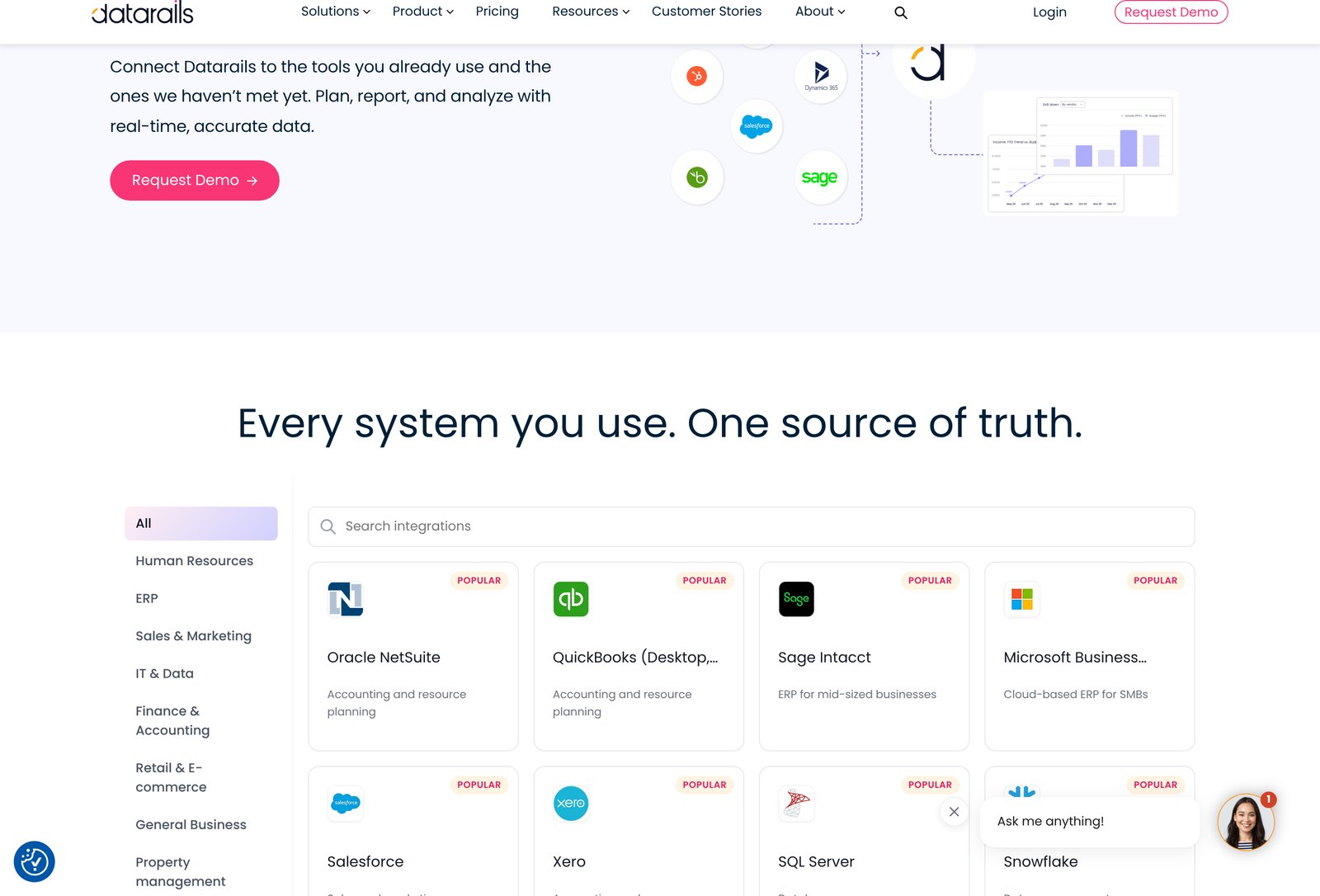
The directory marks a set of connectors as popular: Oracle NetSuite, QuickBooks in both Desktop and Online flavours, Sage Intacct, Microsoft Business Central, Salesforce, Xero, SQL Server, Snowflake, HubSpot, Microsoft Great Plains, Paylocity and SAP Business One. Categories run well beyond finance, covering human resources, IT and data, retail and e-commerce, property management, customer service, construction, professional services, and supply chain.
Snowflake and SQL Server in that list are worth a pause. Their presence means the platform can treat a warehouse or a database as a source alongside an accounting system, which is how a finance team reports on operational metrics rather than only on the general ledger. Spending your single Professional connection on a warehouse rather than an ERP might be the right call for some teams.
Our write-up on QuickBooks as an accounting platform covers the source side of that connection for smaller finance teams.
Seats, and the viewer tier that appears late
Two users on Professional. Five on Premium. Fifteen on Expert, plus fifty viewers.
Viewers appear nowhere except the Expert card, and the distinction matters more than the headline count suggests. Most people who consume a finance pack never build one. Budget owners who receive a report, department heads who check a dashboard, executives who read a summary: these are view-only relationships that would be absurd to license as full seats.
Because that category only exists at Expert, a company of 60 people wanting broad visibility into departmental budgets has one option, even if only three of them will ever touch a model. The jump from five full users to fifteen plus fifty viewers is the largest step on the ladder and likely the largest price step too.
The modules, and a contradiction
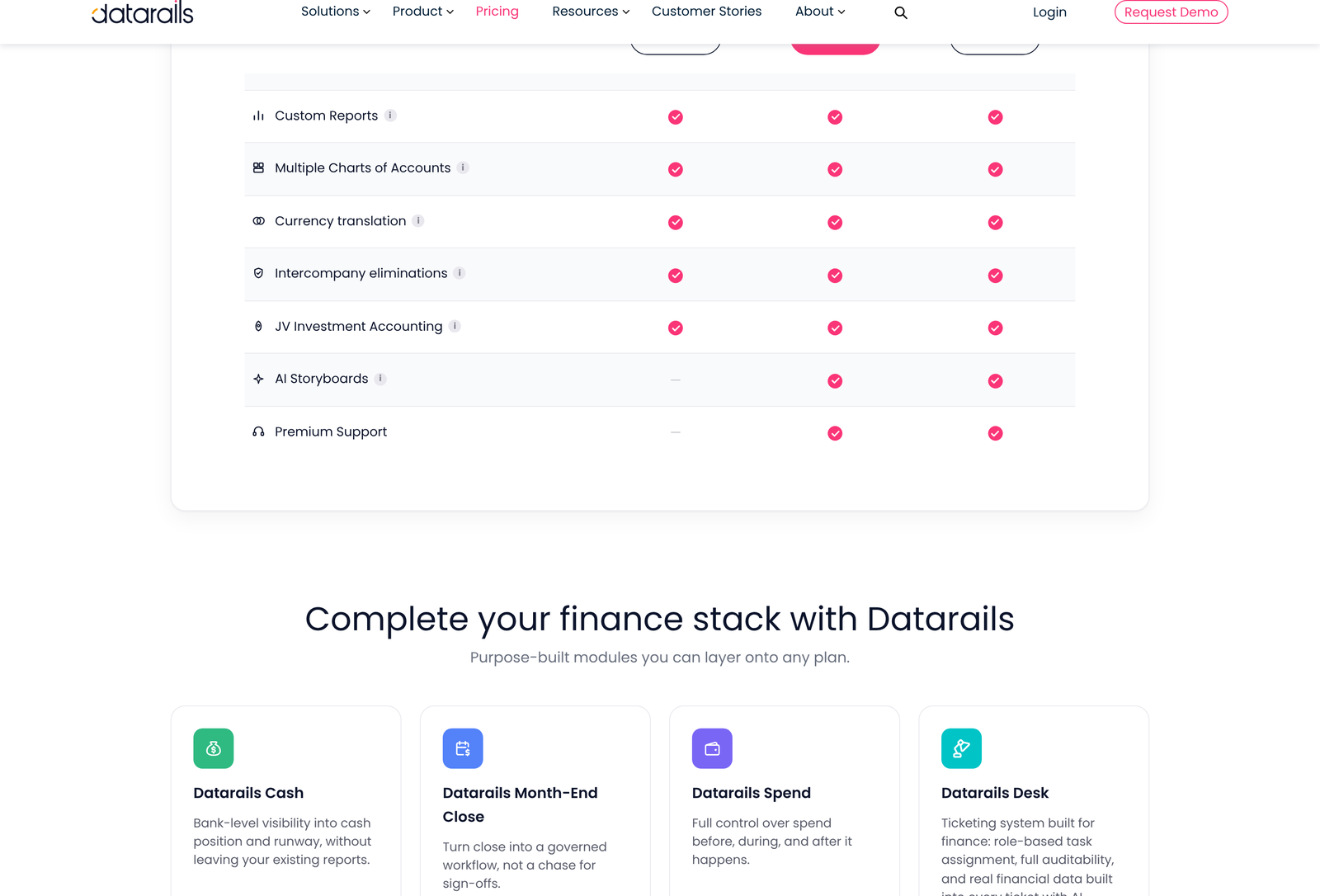
Below the comparison table sits a section headed “Complete your finance stack with Datarails”, offering four modules described as “purpose-built modules you can layer onto any plan”. They are Cash, Month-End Close, Spend and Desk.
Those same modules also appear as tier inclusions higher up the page. Premium includes Spend. Expert includes Cash Management, Month-End Close and Desk. So the page simultaneously bundles them into tiers and sells them as add-ons available to any tier. Both statements can be true if a Professional customer may buy Cash separately at extra cost while an Expert customer receives it inside the plan, but the page never says so. This remains the one point where the published structure is genuinely ambiguous, and resolving it belongs on a sales call before you assume an upgrade is the only route to a module.
Each module targets a distinct workflow. Cash gives visibility into position and runway with forecasting and scenario analysis. Month-End Close turns the close into a tracked workflow with sign-offs rather than a chase. Spend covers cards, bill pay, and contracts, controlling money before, during, and after it is committed. Desk is a ticketing system built for finance, with role-based assignment, auditability, and financial data attached to each ticket.
Receivables is the odd one out. It is listed in the Expert plan card and appears nowhere else: not in the module section, not in the product navigation, not in the comparison table. Ask what it covers rather than assuming.
Six products under one name
Part of the confusion around Datarails comes from the name covering a platform and a family of products at the same time. Untangling them helps before any sales conversation.
FinanceOS is the platform: the governed layer holding consolidated data, metrics, permissions, and lineage. Datarails FP&A is the flagship product for planning, budgeting, forecasting, and reporting. Then come the four workflow modules: Month-End Close, Cash, Spend, and Desk. The FinanceOS AI Connector is the sixth item, exposing the governed layer to outside AI tools.
Every plan includes FinanceOS and the FP&A product. The modules are what move between tiers. Reading the pricing page with that split in mind turns an apparently cluttered page into a simple proposition: one platform, one core application, four optional workflows.
The workflow features nobody markets
Four rows in the comparison table describe the unglamorous mechanics of collecting numbers from people who do not work in finance, and they tend to decide whether a rollout succeeds.
Workflows route budgets, forecasts, and reports to the right reviewers automatically. The Submit Button gives a budget owner one click to send their numbers, replacing the email chase that consumes the first week of every planning cycle. File Boxes collect supporting documents and backup against the report they belong to, so the evidence for a number sits beside the number. Version Control separates drafts from approved figures, which prevents the recurring disaster of a working file being presented as final.
All four are on every tier. For a small finance team, these matter more day to day than any AI capability, because they address the part of the job that involves other departments.
The Excel-native claim
Datarails positions itself as Excel-native and states that models carry across unchanged, with no code and no IT involvement required. The pitch is aimed squarely at finance teams who have been told for a decade that their spreadsheets are a liability.
Two features make that claim concrete. Lookups pull any number from any period or entity into any report using formula syntax the team already knows. Data Mapper aligns GL accounts, departments, and cost centres to a reporting structure once, after which reports stay aligned automatically. Both are present on all three tiers.
Staying in Excel inherits Excel’s own ceilings, which matter once your data volumes get large. A single worksheet holds 1,048,576 rows by 16,384 columns. Transaction-level detail across several entities and several years can approach that, at which point the consolidation layer rather than the spreadsheet needs to carry the weight. Datarails is designed for exactly that split, with the platform holding the data and Excel holding the model, so the limit is a design consideration rather than a flaw.
Consolidation features in plain terms
Four rows in the comparison table do the heavy lifting for any business with more than one legal entity, and all four appear on every tier.
Multiple Charts of Accounts consolidates entities running on different account structures into one reporting view, which is the usual aftermath of an acquisition. Currency Translation converts each entity into the reporting currency at the appropriate rate. Intercompany Eliminations remove transactions between group companies so consolidated revenue is not inflated by internal trade. JV Investment Accounting handles joint ventures and minority holdings under the method each requires, naming non-controlling interests, equity, and cost.
These are not conveniences. Under IFRS 10, a parent controlling one or more entities must present consolidated financial statements, and the standard defines control as the basis for deciding what gets consolidated. Getting eliminations and translation right is a reporting obligation, so a platform that handles them on its entry tier removes a real constraint from a small group finance function.
Allocations and Permissions round out the governance set. Allocations distribute shared costs across departments and entities each period using rules defined once, which is how a central overhead reaches the department P&Ls without a manual journal. Permissions control visibility down to entity, department, or individual report, so a department head sees their own numbers and not the group’s.
FinanceOS and the AI connector
FinanceOS is the governed data layer underneath everything else: consolidated financial data, finance-defined metrics and reporting structures, permissions, audit trails and lineage. The AI Suite sits on top, offering natural language chat over that data, automated agents for recurring analyses, and custom agents.
The FinanceOS AI Connector is the more interesting piece. Rather than keeping AI inside the product, it exposes the governed layer to outside tools, naming ChatGPT, Claude, Copilot, Gamma, and Lovable. The argument Datarails makes is that most AI tools connect to raw systems and therefore produce outputs finance cannot stand behind, whereas queries running against a consolidated and permissioned layer inherit that governance.
Whether it works as described is something only a trial will tell you. What can be verified from the comparison table is that both the AI Suite and the connector appear on all three tiers. AI governance is usually the first thing vendors reserve for enterprise buyers, so finding it on the entry plan is a genuine differentiator.
Teams evaluating dashboard tooling alongside this may find our Databox review useful for comparison on the visualisation side.
Working out which tier you need
Count three things, in this order.
Systems first, because the integration allowance is the tightest constraint. List every source whose data must appear in your reporting. One source means Professional is viable. Two means Premium at minimum. Three or more means Expert, whatever your headcount.
People second, and split them honestly into builders and readers. Builders need full seats. Readers need viewers, which only exist at Expert. A team of four builders fits Premium; the same team with thirty report recipients does not.
Modules third. Spend arrives at Premium. Cash, Month-End Close, Receivables and Desk arrive at Expert, subject to the add-on ambiguity noted above. If one module is the whole reason you are buying, establish whether you can purchase it against a lower tier before accepting an upgrade quote.
Datarails states most FP&A implementations complete in four to six weeks and that customer success staff come from finance backgrounds at no extra cost. Both are vendor claims worth testing against references rather than accepting at face value.
You can request a quote or a walkthrough at Datarails.
Questions people ask
How much does Datarails cost?
Datarails publishes no prices. All three plans route to a quote request, and the page states there are no consultant fees. Any figure you find elsewhere is someone’s negotiated deal rather than a list price.
What is actually missing from the entry plan?
Only two things in the published comparison: AI Storyboards and premium support. Everything else, including consolidation, allocations, and the full AI suite, appears on Professional.
Can I connect more than three systems?
Expert’s published allowance is three. The page does not say whether additional connections can be bought, which makes it a question for the quote conversation if your stack is wider than that.
Do I have to leave Excel?
No. The platform is built around keeping models in Excel while consolidation, version control and refresh happen on the Datarails side. Lookups and the Data Mapper are the two features that make that split workable.
Which AI tools can reach the data?
Datarails names ChatGPT, Claude, Copilot, Gamma and Lovable for the FinanceOS AI Connector, and describes the list as covering leading AI tools generally.
Is there a free trial?
None is advertised. Every call to action on the pricing and product pages is a demo request or a quote request, which suits a platform that requires data connection and mapping before it does anything useful.
What is Receivables?
Unclear. The term appears in the Expert plan card and in no other place we could find: not the module list, not the product menu, not the comparison table. Treat it as an item to ask about rather than a documented capability.
Can a smaller plan buy a module as an add-on?
The page says modules layer onto any plan, while also listing them as tier inclusions. Those two statements are not reconciled anywhere, so confirm it directly. The answer decides whether a module you want justifies a tier jump.
Sources
- Datarails pricing page, read 13 October 2026, for the three tiers, the seat and integration limits, the full comparison table and the module section.
- Datarails integrations directory, for the named connectors and categories.
- Datarails FinanceOS AI Connector, for the governed data layer description and the named AI tools.
- Microsoft, Excel specifications and limits, for the worksheet row and column ceilings.
- IFRS Foundation, IFRS 10 Consolidated Financial Statements, for the consolidation requirement behind the elimination features.
Verified 13 October 2026. No price for any Datarails plan is published and none is estimated above. The 600-plus integration count, the four to six week implementation window and the Excel-native claim are the vendor’s own and are reported as such. Datarails does not appear in the Xero App Store listings, so the Xero connector could not be corroborated from a third-party marketplace.