



Quick answer: Bitscale’s headline feature is the waterfall, which chains ranked data providers per field and stops at the first verified hit. The feature that governs your bill is the credit meter underneath it. Bitscale now publishes what each action costs: 1 credit for an email lookup, 8 for a phone number, 2 for AI personalisation, 3 for deep web research. At the Growth rate of $349 for 15,000 credits, a phone number costs about 18.6 cents and an email about 2.3 cents.
Disclosure: Stack99 earns a commission if you buy through links on this page. It costs you nothing extra and never changes our assessment.
The shape of the product before the feature list
Bitscale presents as a spreadsheet. You build a grid of accounts or contacts, then add columns that do work: find an email, find a mobile number, read a company’s website and answer a question, write a first line for an outbound sequence. Each of those columns is an action, each action consumes credits when it succeeds, and the grid is where everything lands.
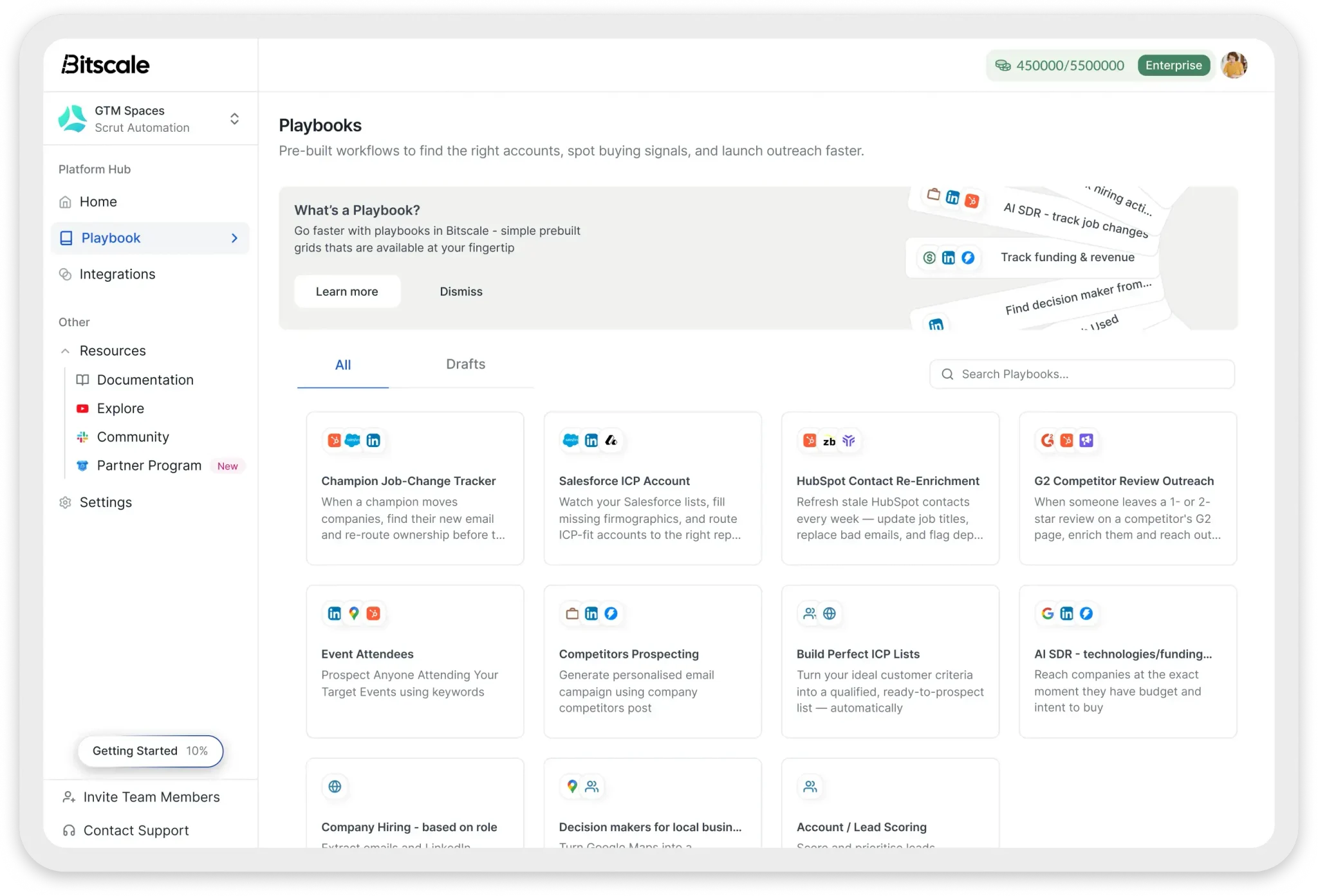
Anyone who has used Clay will recognise the model immediately. Bitscale leans into the comparison, publishing a Clay alternative page and three more aimed at Apollo, Lusha and ZoomInfo. Reading the feature set as “a grid with enrichment columns” gets you most of the way, and the differences live in four places: how the waterfall picks providers, what a credit buys, what the research agent can do that a database cannot, and how many action columns your plan allows.
The waterfall, and what it can actually prove
A single data provider misses. Everyone in this market knows it, and the waterfall is the standard answer: line providers up in order, query the first, and if it comes back empty, try the next. Bitscale’s version runs a separate chain per field. Work email has one ranked sequence, mobile number has another, LinkedIn URL has a third. The moment a provider returns a verified result, the chain halts, and nothing further down it is queried or billed.
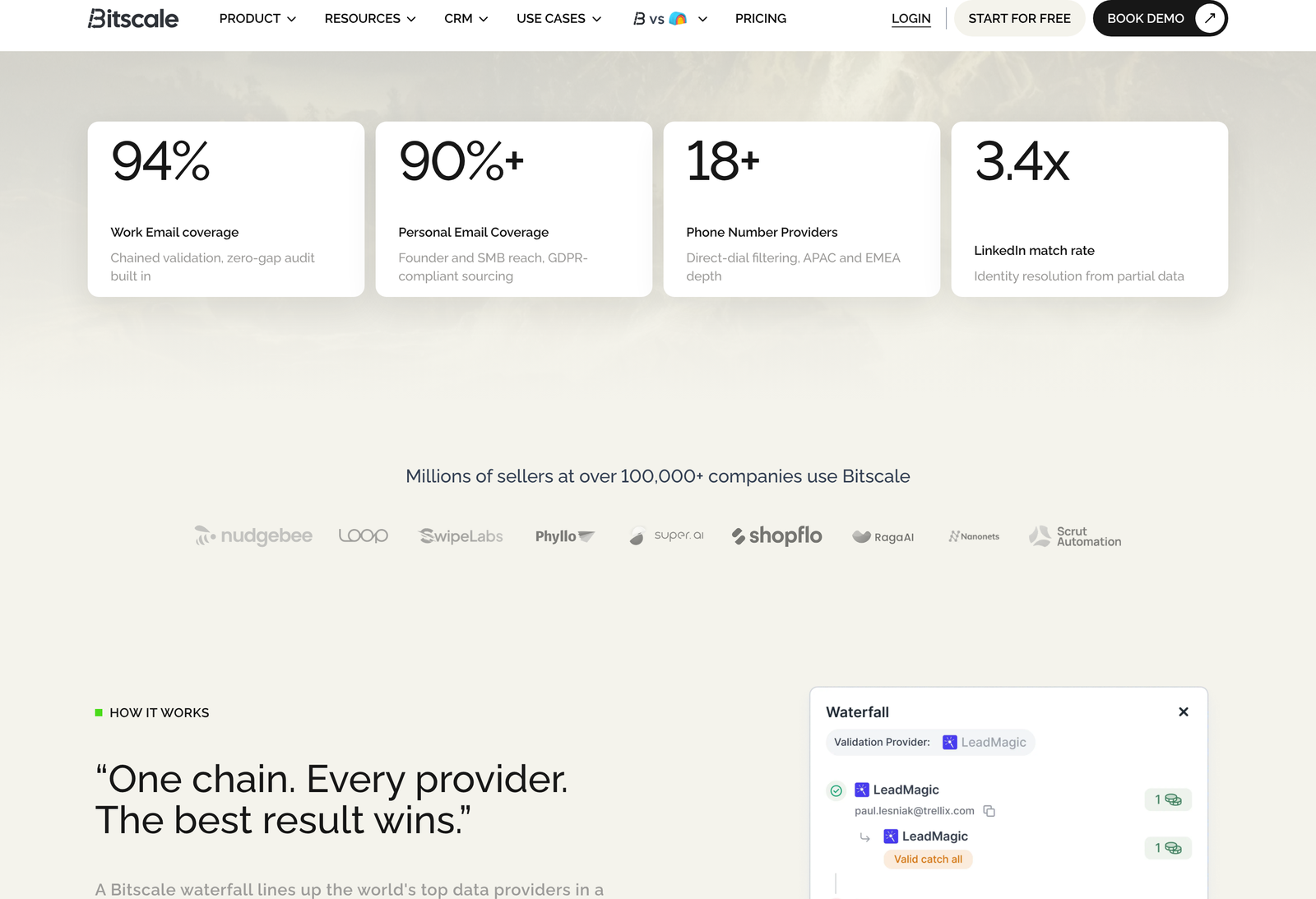
Two details raise this above a plain fallback list. Provider order is ranked by segment rather than fixed, so Bitscale says an EMEA mid-market list, a North American enterprise list, and an SMB-heavy list each run a different sequence built from historical accuracy. And every returned email passes three checks before it writes: syntax, an MX record lookup, then an SMTP probe.
Be clear-eyed about what that last step can and cannot prove. The SMTP conversation defined in RFC 5321 lets a sender ask a receiving server whether it will accept mail for an address, but the standard does not oblige the server to answer truthfully. Catch-all domains accept everything. Plenty of large providers refuse verification probes outright. An SMTP check is strong evidence and never proof, which is why a verification pass on your own side still earns its keep before a big send.
Bitscale puts four numbers on the waterfall page: 94% work email coverage, over 90% personal email coverage, 18 or more phone number providers, and a 3.4x LinkedIn match rate. Those are vendor figures with no published methodology or sample, and we are repeating them as claims rather than findings. The one claim you can test for nothing is the coverage gap audit, which Bitscale offers on an existing list before you spend a credit. Run it against a list whose true answers you already know.
One practical consequence of per-field chains: your cost profile changes with the fields you ask for, not with the size of the list. A 10,000-row grid that only needs work emails draws 10,000 credits at most, and fewer in reality because rows where every provider misses cost nothing. Attach mobile numbers to that grid, and it draws up to 90,000. Teams that blow through an allowance in week two almost always added a phone column to a list that did not need one.
There is a second-order effect on data quality too. Because the chain stops at the first verified hit, the provider that answers most often also shapes most of your dataset. Spot-check results by provider rather than in aggregate, especially on a segment where the ranked order was tuned for somebody else’s ICP.
Credits now carry published prices
This changed, and it changes how you should budget. Bitscale’s pricing FAQ now states per-action credit costs in plain numbers. One credit equals one successful enrichment hit. Email lookups are typically 1 credit. Phone numbers are 8. AI personalisation is 2. Deep web research is 3. Failed lookups inside a waterfall cost nothing, and formula columns and CRM syncs are always free.
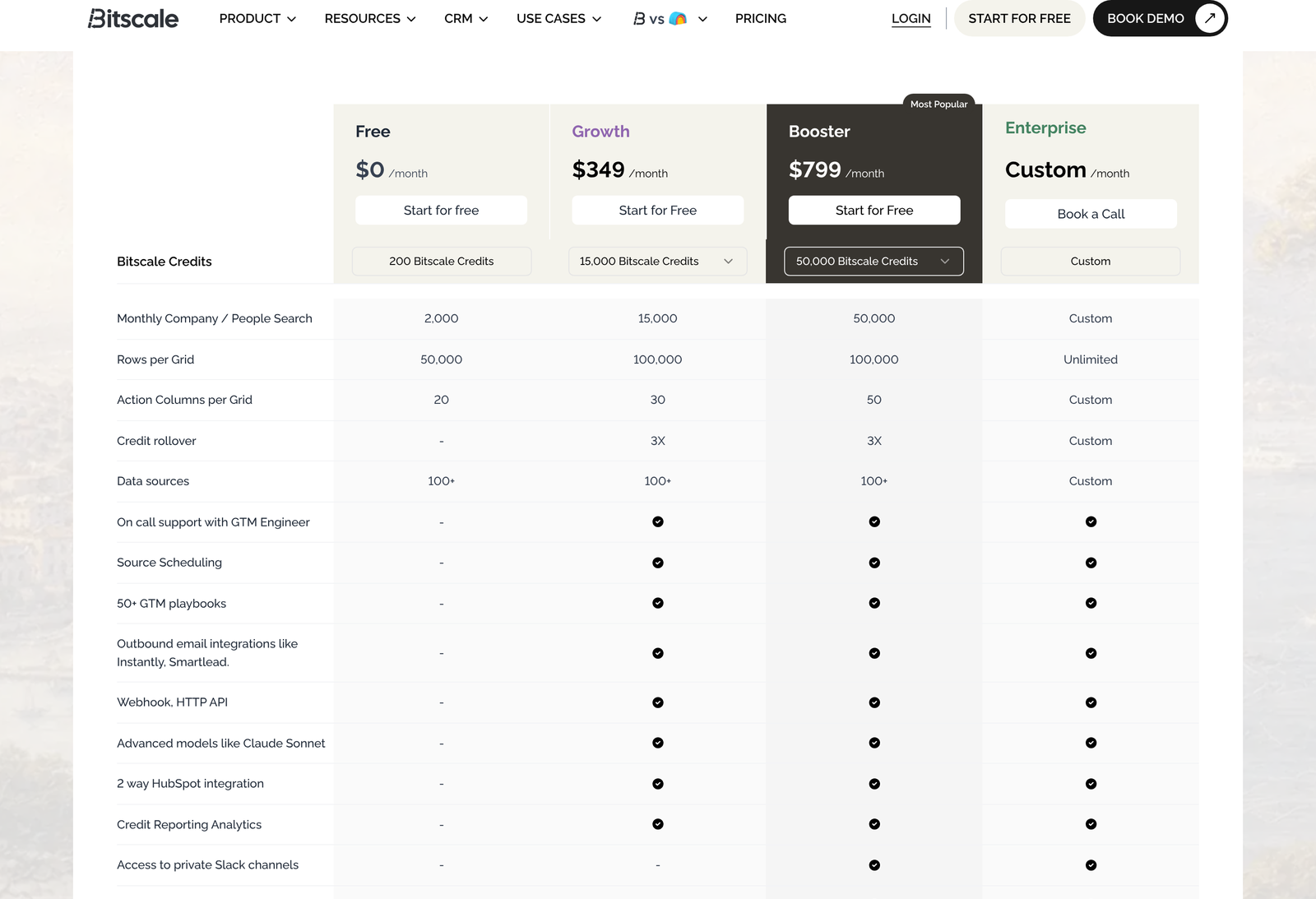
Pair that with the plan rates, and you can price a campaign before running it. Growth costs $349 a month for 15,000 credits, which works out at 2.33 cents each. Booster costs $799 for 50,000 credits, or 1.60 cents each. Annual billing shaves 10% off both: Growth drops to $314 a month and Booster to $719, taking the per-credit rate to 2.09 and 1.44 cents.
Now the useful arithmetic. A phone number at 8 credits costs 18.6 cents on Growth monthly and 12.8 cents on Booster monthly. Enrich 1,000 rows with an email, a mobile, and an AI-written opening line, and you are spending 11 credits per row, so 11,000 credits, which is 73% of a month’s Growth allowance and about $256 of value. Booster brings those same 1,000 rows down to roughly $176. Phone numbers are eight times the price of emails, so the single biggest lever on your Bitscale bill is deciding which rows genuinely need a mobile number.
Rollover softens the lumpiness. Monthly plans carry unused credits forward to a ceiling of three times the plan limit, so Growth tops out at 45,000 banked and Booster at 150,000. Annual plans hand you the whole year’s credits at the start to spend whenever you like, which suits anyone whose outbound runs in bursts around events or quarter ends.
Plan changes are not punitive. Upgrades are pro-rated and take effect immediately; downgrades wait until the next billing cycle so you keep credits you have already paid for.
BitAgent goes after answers no database holds
Databases know headcount, industry, and funding. They do not know whether a company runs its own conference, publishes a public trust centre, or just posted a first RevOps role. BitAgent is Bitscale’s answer: give it a question in plain language, and it runs the same research on every row of the grid.
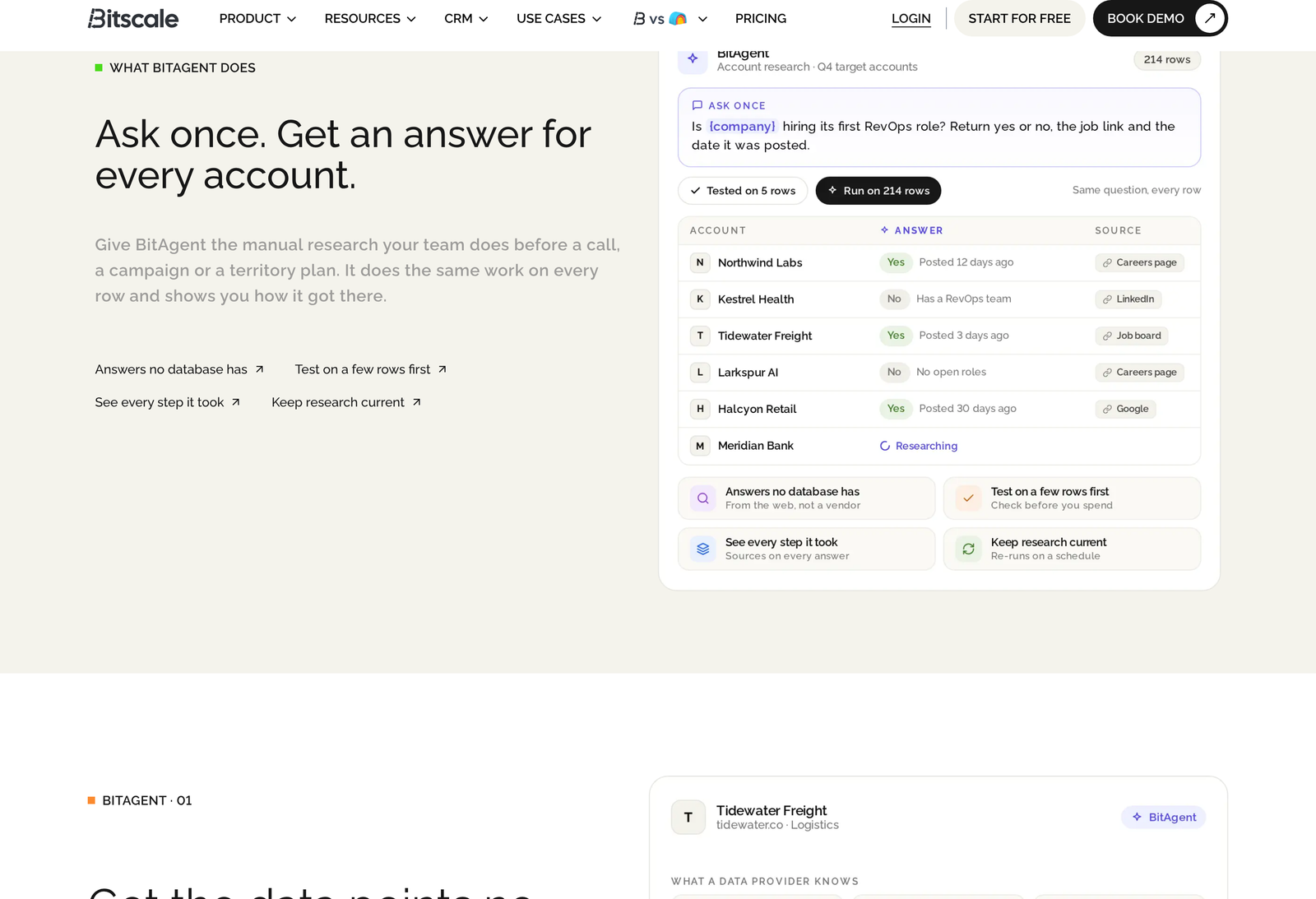
It states search order matters for accuracy: it reads the company’s own website first and only searches Google when the answer is not there. Output is structured rather than prose, so a column returns a yes, a no, or a specific value that you can filter and sort on. Every row shows the steps it took, which is the part that makes the output auditable rather than a black box.
Two workflow controls deserve attention because they are credit controls in disguise. Run the agent against five rows first, read what comes back, tighten the prompt, and only then release it on the full list. Run conditions then restrict the agent to qualifying rows. Deep web research costs 3 credits a row, so a careless prompt across 5,000 rows burns 15,000 credits, which is an entire Growth month. The same 5,000 rows filtered down to the 800 that fit your profile cost 2,400 credits, or roughly $56 at the Growth monthly rate.
Action columns are the gate nobody reads
Credits get all the attention. Action columns per grid are the limit that actually stops a workflow working. Free allows 20 per grid, Growth allows 30, Booster allows 50, and Enterprise removes the row cap entirely.
A realistic enrichment grid eats columns faster than you expect. Firmographics, a waterfall email, a waterfall mobile, a LinkedIn URL, three BitAgent research questions, a scoring formula, and two personalisation columns is already ten before anyone adds a branch. Thirty is comfortable for a single motion and tight for a team running several in one grid. Anyone planning to rebuild a full GTM workflow in one place should treat the 50-column Booster limit as the practical figure rather than the credit count.
What connects, and at which tier
Integration depth is the clearest difference between the paid tiers, and it is where the Free plan stops being useful for a real team.
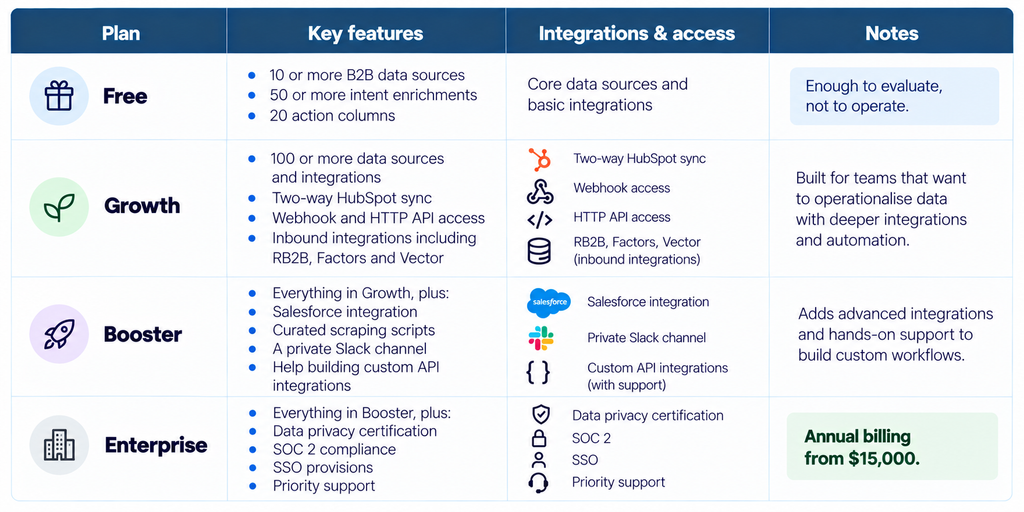
The HubSpot sync being two-way is the detail worth checking against your own setup. Writing enriched values back into a CRM means mapping into contact and company properties, and HubSpot’s CRM objects API documentation is where your RevOps lead should confirm which properties are writable and how deduplication behaves before you point an enrichment pipeline at production records. A Salesforce team has to reach Booster at $799 a month to get the same arrangement, which is a $450 monthly difference driven by nothing but CRM choice.
Playbooks worth reading before you build
Bitscale publishes a library of ready-to-run workflows, filtered by sales, marketing and RevOps. Eight were listed when we checked on 9 October 2026, and they are specific enough to be useful as a buying signal: Event Attendees, Competitors Prospecting, Active Customers SPOC, LinkedIn Conversational Intent, Champion Job-Change Tracker, Salesforce ICP Account, HubSpot Contact Re-Enrichment and G2 Competitor Review Outreach.
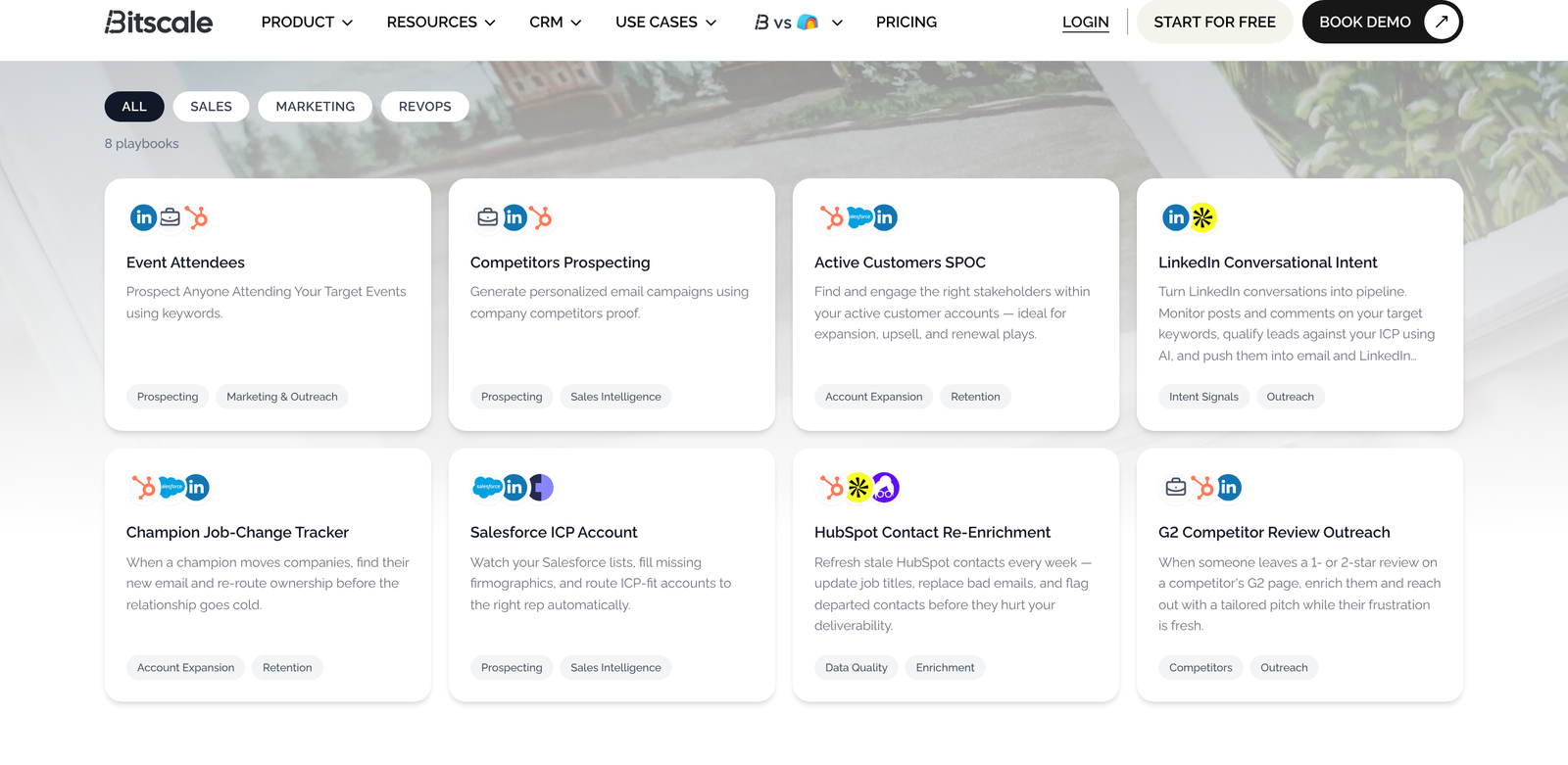
Read the list as a map of what the platform is built to do well. Job-change tracking and CRM re-enrichment are maintenance motions that pay back quietly every week. Event attendee prospecting and competitor review outreach are campaign motions that spike. Both shapes matter when you choose between monthly rollover and an annual credit pool.
One inconsistency to raise with sales
Bitscale’s pricing FAQ states that the company is SOC 2 Type II, ISO 27001, and CCPA compliant, with role-based access, full audit logs, and an EU data residency option, and points to a trust centre for documentation. The plan comparison on the same page lists “Data privacy certification” and “SOC2 & SSO Certification” as Enterprise features.
Both things can be true at once if the company holds the certification while contractual assurances, SSO, and residency controls are sold at the top tier. The page does not say so, and the two statements sit a few hundred pixels apart. If compliance is load-bearing for you, get the distinction in writing before signing rather than inferring it from a pricing table.
What each plan costs
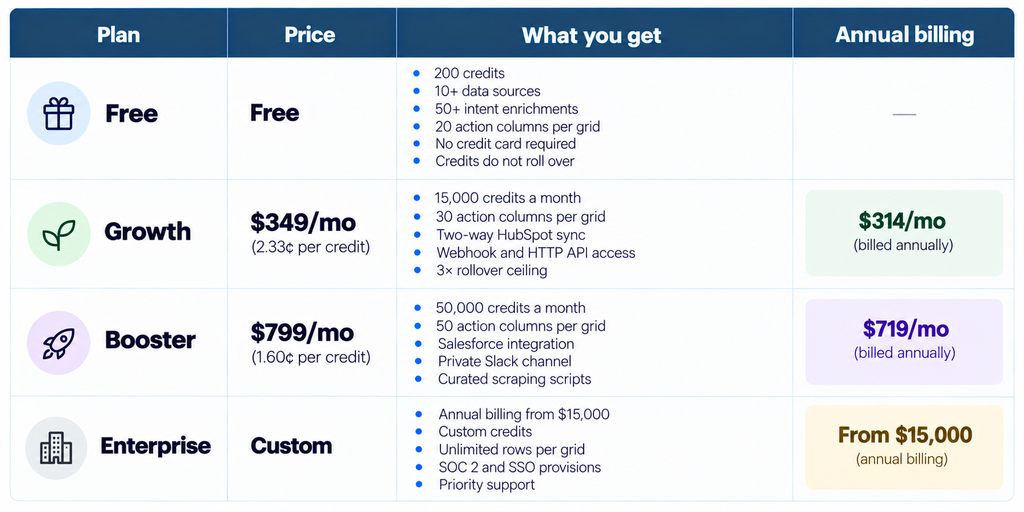
The page opens on the monthly toggle, which is unusual in this market and means the first figures you see are the true month-to-month rates. Switching to annual restates credits as a yearly pool rather than a monthly allowance. Over twelve months, Growth costs $4,188 monthly against $3,768 annually, a saving of $420. Booster costs $9,588 against $8,628, saving $960. Both work out at almost exactly the advertised 10%, which is rarer than it should be.
Which plan fits which team
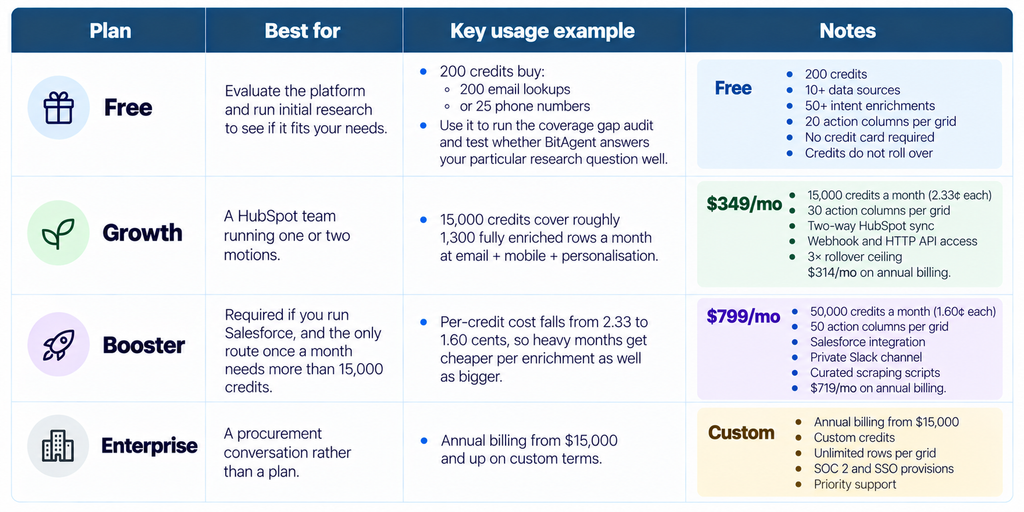
Starting on the free tier at Bitscale lets you run the gap audit before committing to anything. We covered the seats-versus-credits question separately in who Bitscale is for.
FAQ
What does one Bitscale credit buy?
One successful enrichment hit. Bitscale’s published rates are 1 credit for a typical email lookup, 8 for a phone number, 2 for AI personalisation, and 3 for deep web research. Failed lookups inside a waterfall are not charged.
Do unused Bitscale credits expire?
On monthly plans, they roll over up to three times your plan limit, so 45,000 on Growth and 150,000 on Booster. Annual plans release the full year’s credits up front to use at any point in the year.
Does Bitscale connect to Salesforce?
Yes, from the Booster plan at $799 a month. HubSpot’s two-way sync arrives earlier, on Growth at $349. CRM choice alone can therefore move your Bitscale bill by $450 a month.
How many columns can one grid have?
Twenty action columns on Free, thirty on Growth, and fifty on Booster. Rows per grid are a separate limit, and Enterprise is the tier that removes the row cap.
Is the waterfall email result guaranteed deliverable?
No tool can promise that. Bitscale runs syntax, MX, and SMTP checks, which catch most bad addresses, yet catch-all domains accept any address, and some providers refuse verification probes. Treat a verified result as high confidence rather than certainty.
Is there a way to test Bitscale without spending credits?
Partly. The coverage gap audit runs against an existing list without consuming credits, and formula columns and CRM syncs never cost anything. Actual enrichment draws on your 200 free credits.
The short version
Bitscale’s feature set is strongest where a single database is weakest: chained providers for coverage, a research agent for attributes nobody sells, and a credit model that only bills on success. Published per-action rates make it one of the easier tools in this category to budget, which was not true a few months ago. Watch the action column limit as closely as the credit count, and get the compliance wording clarified if that matters to your buyers.
For a different take on paying by the credit, our FullEnrich pricing breakdown runs the same arithmetic on a waterfall specialist. If you want the database-first comparison instead, see Apollo.io top features and Kaspr alternatives.
Sources
- Bitscale pricing page and FAQ, both billing toggles and per-action credit costs captured 9 October 2026.
- Bitscale waterfall product page, for the chain behaviour and the coverage claims.
- Bitscale BitAgent product page, for the research order and run conditions.
- RFC 5321, Simple Mail Transfer Protocol, for what an SMTP verification probe can establish.
- HubSpot CRM contacts API documentation, for checking writable properties before a two-way sync.