


AdCreative.ai sells three plans that share almost nothing in the middle of the feature list. Six capabilities run across every tier. Nine more switch on only at Professional. One waits until Ultimate. Knowing which bucket a feature falls into is most of the buying decision, because the price gap between Starter and Professional is a factor of six.
Disclosure: Stack99 earns a commission if you buy through links on this page. It costs you nothing extra and never changes our assessment.
The feature that is not a feature: the credit
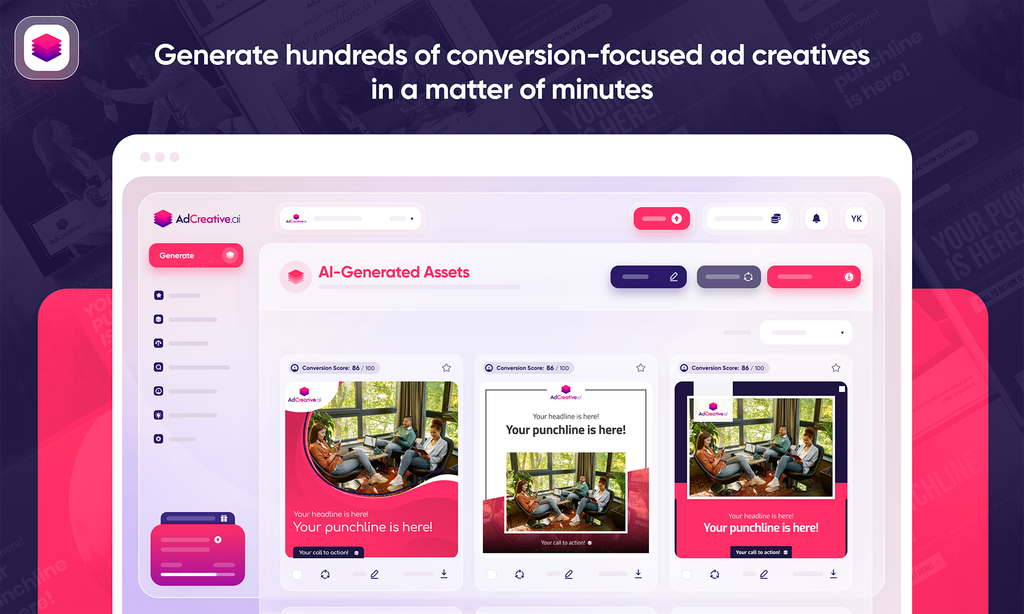
Start here, because every other capability runs through it. AdCreative.ai’s own FAQ states that “a credit is used when you download a generated ad creative” and that “you can generate unlimited creatives” while credits are consumed on download.
That inverts the usual AI tool economics. Generation is free and unlimited on every plan including Starter. What you pay for is taking the file away. So the workflow the pricing rewards is: generate widely, judge on screen, download only winners. A team that downloads everything to review it offline will burn a Starter plan’s 10 monthly credits in one sitting.
Three hard numbers define each tier, and they are the only numbers in the comparison grid that are not ticks and crosses.
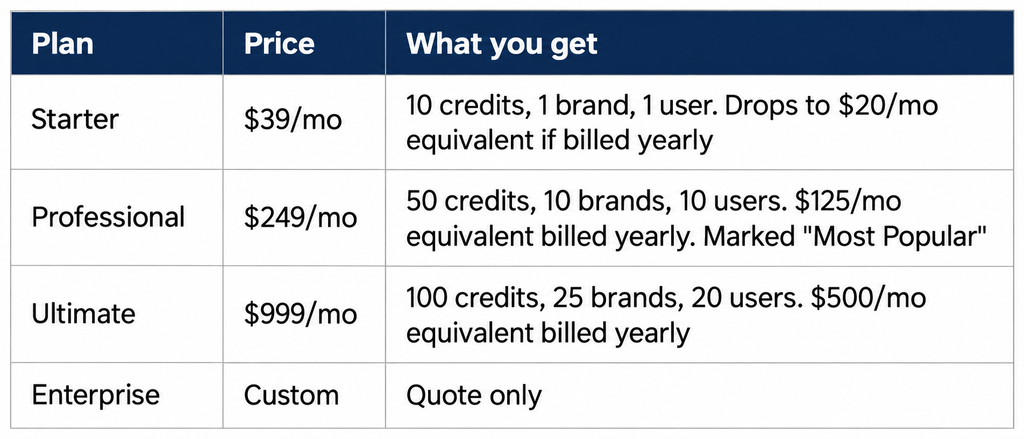
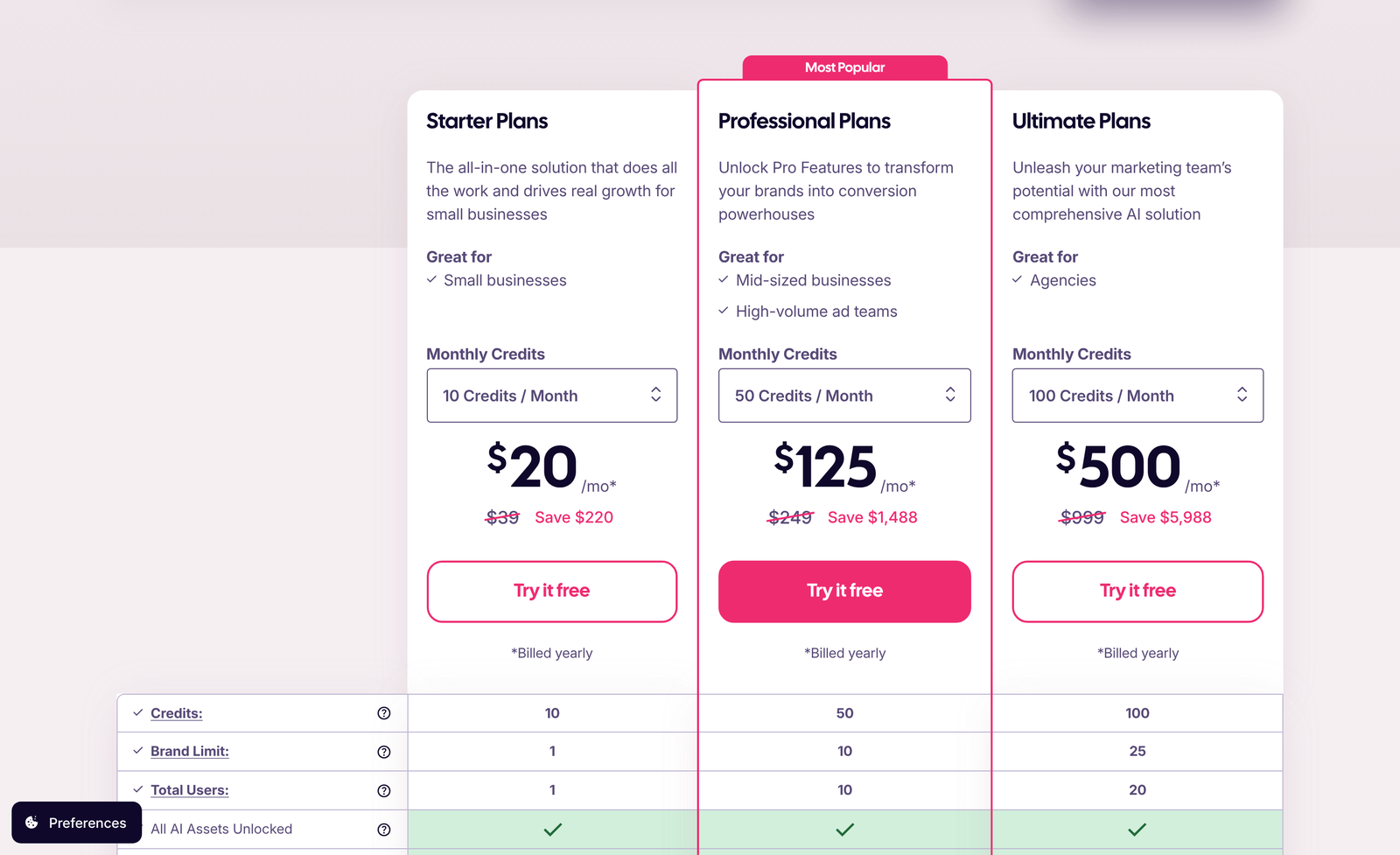
A warning about where those figures come from. AdCreative.ai has no /pricing page; the prices live in an anchored section on the homepage, and that section loads with the yearly tab preselected. Arrive, and you see $20, $125, and $500 against struck-through $39, $249, and $999, with a small asterisk reading “Billed yearly” under each card. The large figures are the annual rate expressed monthly. The struck-through ones are what you pay month to month.
Each card also carries a credit dropdown, so the listed price is an entry rung rather than a fixed plan price. Starter runs 10 credits with 1 brand at $39, then 15 credits with 2 brands at $89, 30 credits at $139, and 50 credits at $189. Professional runs 50 credits at $249, 75 at $339, and 100 at $400. Ultimate runs 100 credits at $999, 150 at $1,099, and 200 at $1,399.
Those ladders hide a real decision. Fifty credits costs $189 on Starter and $249 on Professional, a gap of $60 a month. For that $60, you move from 2 brands to 10, from 1 seat to 10, and you unlock nine features. Anyone sizing up from the entry Starter rung should jump rather than climb.
What every plan includes
Six rows carry a tick in all three columns.
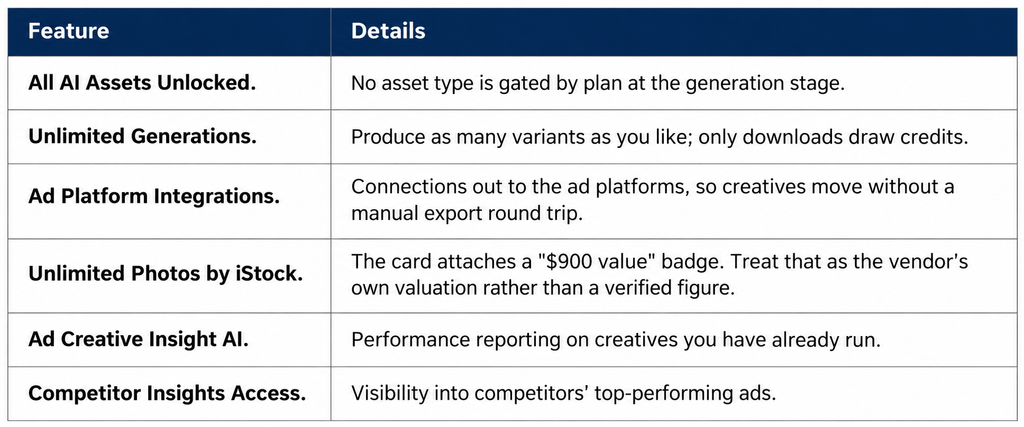
Competitor Insights on a $39 plan is the standout. Ad intelligence is usually sold as a separate subscription at several hundred dollars a month, and finding it at the bottom tier changes the calculus for a solo operator who mainly wants to see what is working in their category.
The nine features Starter does not get
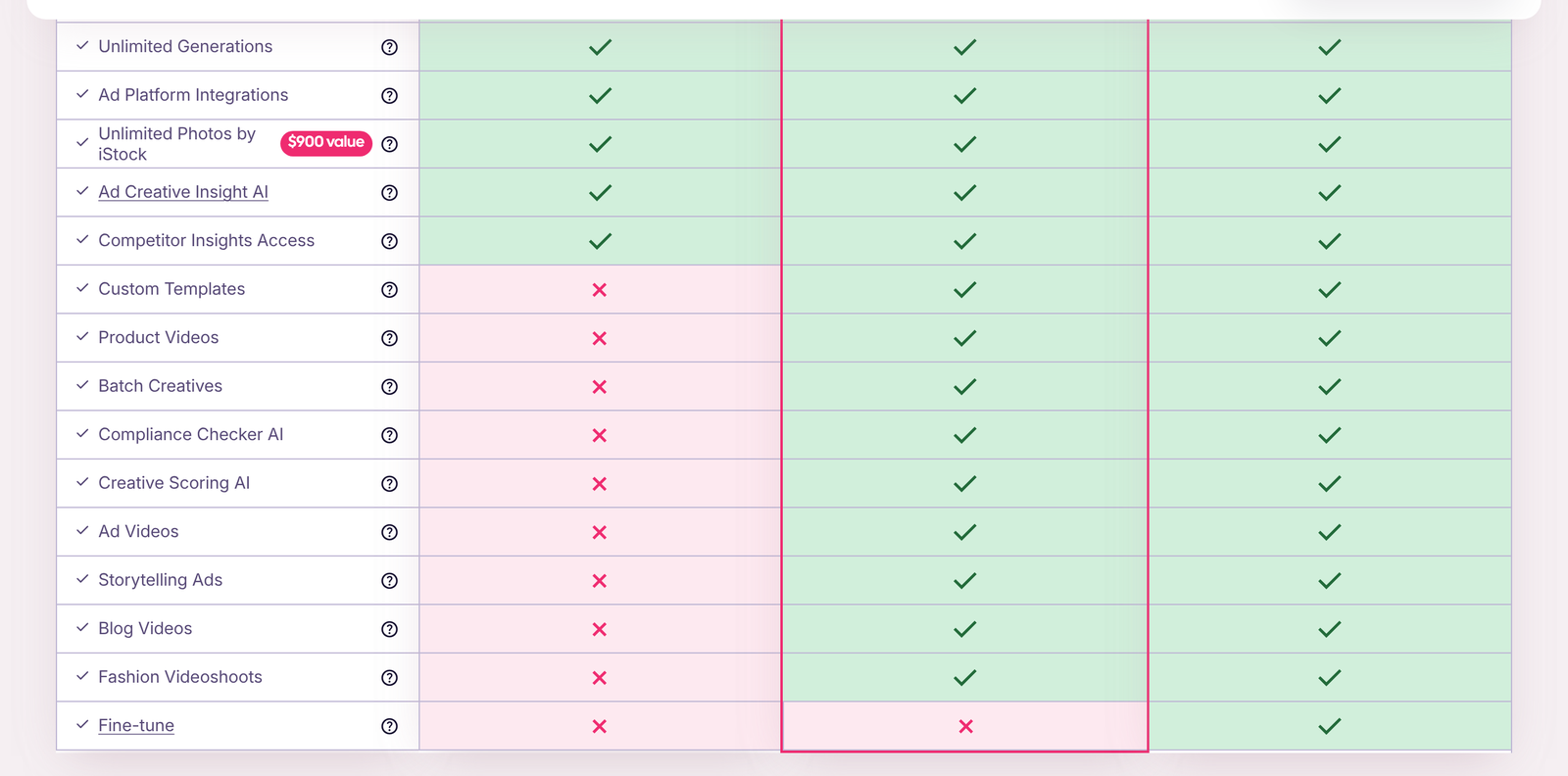
These carry a cross in the Starter column and a tick under both Professional and Ultimate. Together they are the reason the middle tier exists.
Creative Scoring AI
A predicted performance score attached to each creative before it runs. The product surface shows two numbers, a performance score and an awareness score, and the marketing pages display sample creatives carrying conversion scores in the nineties. Scoring is the feature most often described as the core of the product, so its absence from Starter is worth noticing. On Starter you generate and guess.
Batch Creatives
Generate across sizes and placements in one pass rather than one at a time. For anyone running the same campaign across Meta and Google formats, this is the difference between an afternoon and ten minutes. A single brand with one seat can live without it; an agency cannot.
Custom Templates
Save your own layouts rather than working from the supplied set. Brand consistency across a long campaign depends on this, and it compounds with the brand limit: 10 brands on Professional with saved templates per brand is a workable agency setup.

Compliance Checker AI
Pre-flight checks against platform rules before a creative goes out. Regulated categories feel this one most, since a rejected ad costs a review cycle and sometimes an account strike.
The four video rows
Product Videos, Ad Videos, Blog Videos and Fashion Videoshoots are four separate grid rows, all crossed out on Starter. The product pages describe uploading a product photo and generating video from it, with either a custom prompt or an AI-chosen direction. Video is the single largest block of capability behind the Professional gate. Anyone whose channel mix is video-first should read Starter as an image tool.
Storytelling Ads
Multi-frame sequences rather than single statics. Useful for the formats that reward a narrative arc across a carousel or a story placement.
One row belongs to Ultimate alone
One row in the entire grid carries a cross under both Starter and Professional and a tick only under Ultimate. Fine-tune is it.
This matters when you evaluate the jump from $249 to $999. You are paying four times as much for 50 extra credits, 15 extra brands, 10 extra seats and exactly one new capability. If fine-tuning the model on your own brand assets is not a requirement, the honest reading is that Ultimate is a capacity upgrade wearing a tier badge. Work out whether you need 25 brands and 20 seats, because that is what you are actually buying.
Agencies are the obvious fit. Twenty-five brands at $999 is $40 a brand a month, against $249 for 10 brands on Professional at $24.90 a brand. Per-brand cost rises as you go up, which is the opposite of how volume pricing usually works.
What the product does between those gates
Feature grids tell you what you are allowed to use. They are poor at telling you what the thing does. The vendor organises its own marketing around five capability blocks, and reading those alongside the grid makes the tiers easier to judge.
Ad creatives is the core: on-brand statics sized for the placements you name, generated in volume from a brand you import once. The site frames the workflow as three steps, import your brand, select an ad type, generate, and that import step is what the brand limit counts. One brand on Starter means one set of colours, fonts and logos living in the account at a time.
Product shoots turn a plain product photograph into studio-style imagery with a chosen backdrop or style, aimed squarely at ecommerce catalogues. Product videos take the same input and produce motion. Both are the kind of work that used to mean a photographer and a half-day, which is the real comparison rather than the subscription price.
Competitor Insight AI surfaces the ads competitors are running and which of them are performing, with separate views for Meta and Google placements. This one sits on every plan, so a $39 subscriber sees the same competitive picture an agency does.
Audience insight builds personas from the traffic data you connect, showing visit counts, bounce rate, pages per visit, unique visitors plus demographic splits, then predicts performance and brand recall scores against them. There is also a website scanner that reads a page you point it at and drafts ads from what it finds, which is the fastest route from nothing to a first draft.
None of that is gated by plan at the generation stage, which is what “All AI Assets Unlocked” on every tier means in practical terms. The gates sit on the refinement layer: scoring the output, checking it for compliance, batching it, saving it as a template, and turning it into video.
Credit arithmetic across the tiers
Since a credit is a download, cost per download is the cleanest cross-tier comparison. On yearly billing: Starter at $20 for 10 credits is $2.00 a download, Professional at $125 for 50 is $2.50, Ultimate at $500 for 100 is $5.00. On monthly billing, the same pattern holds at $3.90, $4.98, and $9.99.
Cost per download goes up as you climb. You are not buying cheaper creative at the top of the ladder; you are buying seats, brands, and the feature gates. Teams that mainly need volume should look hard at the in-plan credit dropdowns instead, where Professional at 100 credits for $400 lands at $4.00 a download against Ultimate’s $9.99 for the same count.
One discrepancy to flag. The yearly cards advertise savings of $220 on Starter, $1,488 on Professional, and $5,988 on Ultimate. Two of those reconcile exactly: twelve months of the $124 Professional gap is $1,488, and twelve months of the $499 Ultimate gap is $5,988. Starter does not. Twelve months of the $19 gap is $228, not $220. The $8 difference is small, but it means the Starter savings figure should not be trusted to the dollar.
Refund terms are 7 days on monthly billing and 30 days on yearly, conditional on the platform being unused. Generate anything and the window closes, which sits oddly with a product whose generation is unlimited and free.
What sits behind the product
The company was founded in 2021 and is based in Paris. Appier, listed on the Tokyo Stock Exchange under ticker 4180, acquired it in a deal the company announced at $38.7 million total, including a $27.3 million base (Appier press release). The site now carries an “an Appier group company” mark under the logo.
Ownership matters for a tool you are going to wire into live campaigns. A venture-stage product that could pivot is a different risk from a subsidiary of a listed company with disclosure obligations. Appier’s numbers are public, which is more than most AI creative vendors offer.
The homepage names Snapchat, Pernod Ricard, Reckitt, BNP Paribas and Chopard among its customers, claims 4 million-plus marketers, and quotes Semrush describing the company as holding “one of the largest high-conversion ad creative databases, if not the largest”. Those are vendor-page claims. We have not verified usage numbers independently, and you should not treat the 4 million figure as audited.
Why the asset volume matters at all
A reasonable objection to any bulk creative tool is that more variants do not mean better results. The platforms disagree. Google’s own guidance on responsive display ads pushes advertisers to supply many assets and let the system assemble combinations (Google Ads Help). Under that model, asset count is an input to the algorithm rather than vanity output, and a tool that produces twenty on-brand variations has a concrete job.
Which brings the download-based credit model back into focus. If the platform wants many assets and your plan charges per download, your real monthly capacity is the credit count, not the unlimited generation. Ten credits on Starter will not feed a responsive display campaign properly. Fifty on Professional starts to.
Choosing a tier
Choose Starter if: you run one brand, you work alone, your output is static images, and you download fewer than ten finished creatives a month. You still get competitor intelligence and unlimited generation, which is a lot for $39.
Choose Professional if: you need video, scoring, batch output or more than one brand. The gate between Starter and Professional is the real product boundary, and nine of the sixteen grid rows sit behind it.
Choose Ultimate if: you manage more than ten brands or more than ten people, or you specifically need Fine-tune. Otherwise, Professional with a larger credit rung is cheaper per download.
You can start a trial at AdCreative.ai and confirm the current rungs yourself, since the credit dropdowns move.
For the pricing detail on its own, see our AdCreative.ai pricing breakdown. If the feature gates have pushed you toward a different tool, the alternatives roundup covers the comparison set.
FAQ
What is a credit on AdCreative.ai?
A download. The vendor FAQ states a credit is used when you download a generated ad creative, and that generation itself is unlimited on every plan. Credits renew monthly.
Does Starter include video?
No. Product Videos, Ad Videos, Blog Videos, and Fashion Video Shoots are all crossed out in the Starter column of the comparison grid. Video begins at Professional.
Is creative scoring available on the cheapest plan?
No. Creative Scoring AI is gated off Starter. Ad Creative Insight AI, which reports on creatives already running, is included at every tier, so the two are easy to confuse.
What does Ultimate add over Professional?
Capacity plus one feature. You get 100 credits against 50, 25 brands against 10, 20 seats against 10, and Fine-tune, which is the only row in the grid exclusive to Ultimate.
Are the prices on the site monthly?
Not by default. The pricing section opens on the yearly tab showing $20, $125 and $500 per month with a “Billed yearly” asterisk. The true monthly rates are the struck-through $39, $249, and $999.
Can I get a refund?
The published terms allow 7 days on monthly plans and 30 days on yearly plans, but only where the platform has not been used.
Bottom line
Sixteen rows, one gate that matters. Everything about evaluating AdCreative.ai comes down to whether you need the nine capabilities that start at Professional, because the six shared rows make Starter unusually generous for $39 and the single Ultimate-exclusive row makes the top tier a capacity purchase. Count the brands you manage and the seats you need, decide whether video is part of the job, and the tier picks itself.
Plans, credits, and the comparison grid were read from adcreative.ai on 8 October 2026. The credit dropdowns and the tab defaults change, so verify before you commit.