


In this guide
Pricing Overview
AdCreative.ai is one of those tools where the headline price only tells part of the story. On the official site, the platform positions itself as a creative-production and performance workflow for marketers who need ad creatives, product visuals, AI videos, scoring, and competitor insight in one place. That means the monthly price matters, sure, but the bigger question is whether the credits, brands, and user allowances line up with how your team actually works.
Disclosure: Stack99 earns a commission if you buy through links on this page. It costs you nothing extra and never changes our assessment.

If you are only glancing at the entry plan, AdCreative.ai can look pretty affordable. If you are managing multiple brands, running campaigns every week, or producing a high volume of assets, the real cost can climb fast. That does not automatically make the tool expensive. It just means you should evaluate it as a workflow product, not as a casual design app.
If you want to see the plans directly while you read, start with AdCreative.ai here.
Pricing Tiers
At the time of review in April 2026, AdCreative.ai publicly shows these main plan families on its website:
| Plan | Price |
|---|---|
| Starter | $39/mo |
| Professional | $249/mo |
| Ultimate | $999/mo |
| Enterprise | Custom |
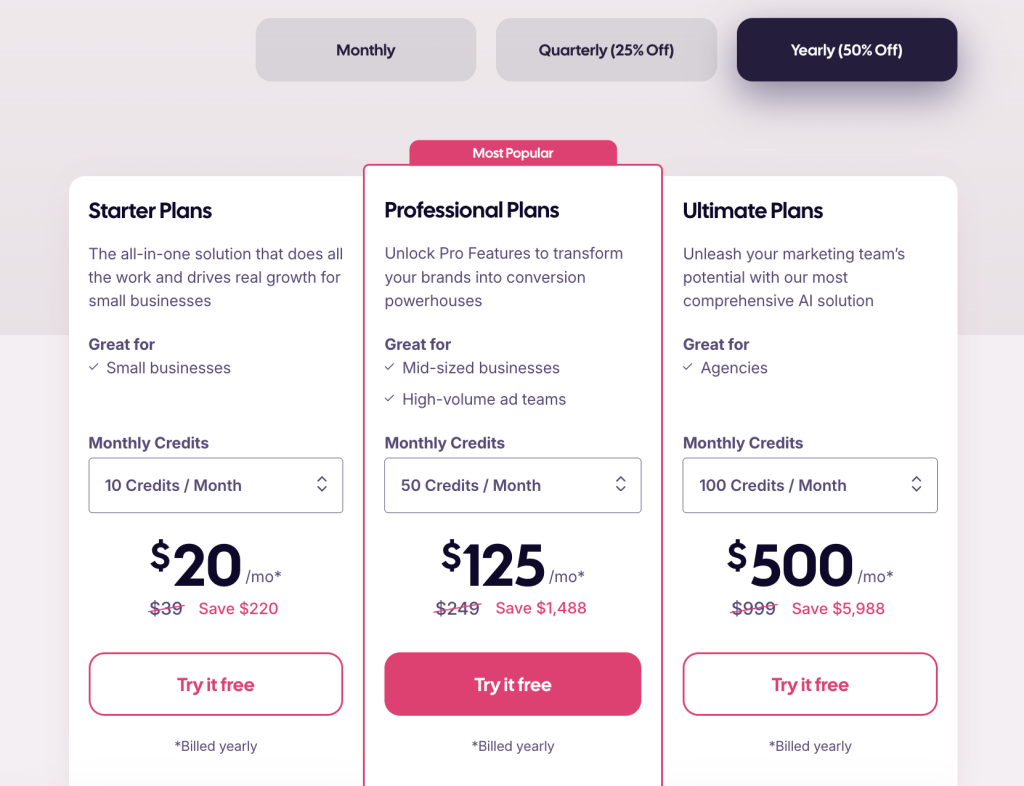
The site also shows that plan capacity changes in meaningful ways, not just cosmetic ones. Public plan details include:
- Starter with 10 credits, 1 brand, and 1 user
- Professional with 50 credits, 3 brands, and 10 users
- Ultimate with 100 credits, 25 brands, and 20 users
That is an important distinction. The jump between plans is not just paying for “more features.” You are paying for more production headroom, more brand capacity, more users, and a more realistic setup for an agency or growth team.
One thing I like here is that AdCreative.ai does not hide public pricing behind a demo wall. That makes early evaluation much easier. One thing I do not love is how quickly the cost leaps if you move from experimenting to operating at team scale.
What The Plans Actually Mean In Practice
The Starter tier looks like a real trial path for small businesses or solo operators who want to test the workflow without much risk. If you are running one brand, testing a few campaigns, and trying to understand whether the outputs are usable, the entry plan makes sense.
The Professional tier is where the platform starts to look like a team tool. With more credits, more brands, and more users, it feels better suited for agencies, e-commerce teams, and in-house marketers who need repeated output instead of occasional experiments.
The Ultimate tier clearly targets heavier production needs. If a team is creating multiple creative batches across many brands, the larger limits become more relevant. Otherwise, it may feel like overbuying.
Another useful way to read the plans is by operating rhythm. Starter fits teams still learning the workflow. Professional fits teams that already have active campaign cycles and need more repeatable output. Ultimate fits teams that treat creative production like ongoing infrastructure rather than occasional support.
If you want to compare that against your own workload, take the AdCreative.ai trial here and build one normal week’s worth of creative output, not just one pretty demo set.
Hidden Costs And Gotchas
This is where pricing reviews often get lazy, so let’s be direct.
The main “hidden” cost with AdCreative.ai is not a secret fee. It is a mismatch. If your team underestimates how many credits, users, or brands it needs, the apparently affordable starting point stops reflecting reality very quickly.
Here are the practical gotchas I would watch:
- Credits matter more than the headline monthly fee.
- Brand limits matter if you manage several clients or product lines.
- User limits matter if approvals and production are shared across a team.
- Enterprise-level needs are harder to model because that path becomes custom.
Another small but important detail: if you only use the product occasionally, even a lower monthly price can feel expensive. Tools like this make more sense when they are connected to an active campaign machine.
There is also a softer cost that does not show up on the pricing table: workflow maturity. If the team does not yet know how it wants to test creatives, organize brands, and move assets into campaigns, even a good tool can feel expensive because the operating process is still unclear.
ROI Example
The easiest way to think about ROI is to compare AdCreative.ai with the time and production cost of building repeated ad variations manually.
Imagine a small paid media team that needs:
- New static creatives every week
- Product variations for seasonal campaigns
- Several headline angles for testing
- Faster refreshes when creative fatigue hits
If that team currently depends on slow internal design queues or outside freelancers for every variation, the cost of delay adds up quickly. In that situation, even a higher software price can make sense if it shortens the gap between idea and launch.

On the other hand, if your team already has a strong design pipeline and only needs occasional support, the ROI gets weaker. The subscription starts to feel like an overlap instead of a leverage.
That is why I would not evaluate AdCreative.ai as “cheap” or “expensive” in isolation. I would evaluate it based on whether it removes a real production bottleneck.
For agencies, that ROI question becomes even sharper. A team handling several client brands can burn far more money in slow turnaround and fragmented approvals than it spends on software. In that context, brand limits and collaboration capacity matter almost as much as the raw credit count.
Cost Comparison To Alternatives
AdCreative.ai is not the cheapest tool in the broader AI creative category. If all you want is a lightweight graphic generator, there are cheaper options on the market.
But the official site is not really pitching a lightweight generator. It is pitching a stack that combines:
- Ad creative generation
- Product photoshoots
- AI video and UGC-style assets
- Creative Scoring
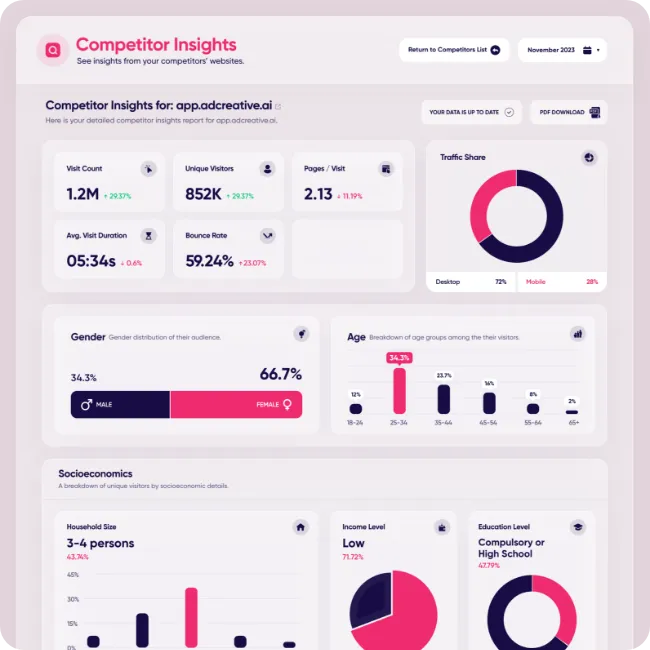
- Competitor Insights
- Template repeatability
That matters because a fair comparison is not “AdCreative.ai versus one banner app.” The more honest comparison is AdCreative.ai versus the messy mix of design work, testing prep, creative refreshes, and reporting support your team already pays for in time or money.
If you want to test whether that broader value is real, start with AdCreative.ai here and measure how much faster your team can get from concept to live assets.
Best Value Tier
For most teams, the best-value tier will probably be Professional rather than Starter or Ultimate.
Why not Starter? Because Starter feels ideal for testing, but many real teams will outgrow the user, brand, or credit limits quickly.
Why not Ultimate? Because Ultimate only becomes the obvious value choice when a team has enough ongoing production volume to make the larger capacity meaningful.
Professional is the middle ground where the platform starts to behave like a practical team tool without jumping straight into the heaviest pricing.
It is also the tier most likely to show the real value of the platform. Starter is excellent for proof of concept, but Professional is where the workflow begins to resemble how an active marketing team would actually use the software week after week.
Discounts And Annual Billing
The official site also advertises a 7-day free trial and says you can cancel anytime. That is useful because it lowers the cost of learning whether the platform fits.
AdCreative.ai also highlights yearly billing options on the site. Annual billing can lower the effective cost, but I would only consider it after a real usage test. Signing up annually before your team has proven fit is the kind of thing that sounds efficient and then turns into shelfware by month three.
If pricing is your main hesitation, use the AdCreative.ai trial here, run a real campaign workflow, and then decide whether the annual route makes sense.
Who Will Feel The Pricing Most
The people most likely to feel good about AdCreative.ai pricing are the ones already paying an execution tax somewhere else:
- Marketers are waiting too long for new creative
- Teams dealing with stale ad angles
- Agencies juggling several brands
- E-commerce operators who need repeated asset refreshes
The people most likely to feel the price pressure are those who mainly want occasional design help or who do not yet have enough paid-media activity to justify the workflow.
That is why pricing fit matters more than raw affordability. A cheaper tool that does not solve the real bottleneck can still be the more expensive decision in practice.
Verdict
AdCreative.ai’s pricing is fair for teams that genuinely need creative speed, testing volume, and multi-asset production support. It feels less compelling for people who only need the occasional graphic and want the lowest possible monthly cost.
My practical take for 2026 is simple: the platform is easiest to justify when creative delays are already slowing down ad execution. If that sounds familiar, start the AdCreative.ai trial here and judge the cost against your current production friction, not just the monthly sticker price.
FAQ
How much does AdCreative.ai cost in 2026?
At the time of review in April 2026, the public pricing page shows Starter at $39 per month, Professional at $249 per month, Ultimate at $999 per month, and Enterprise at custom pricing.
Does AdCreative.ai offer a free trial?
Yes. The official site advertises a 7-day free trial and says you can cancel anytime.
What makes AdCreative.ai pricing rise so quickly?
The biggest drivers are credits, brand limits, and user capacity. Those matter much more once a team starts using the product seriously.
Which AdCreative.ai tier looks like the best value?
For many active teams, Professional looks like the best value because it offers a more realistic team setup than Starter without jumping straight to Ultimate.
Is AdCreative.ai expensive?
It depends on your workflow. If you create ad assets constantly and need faster testing cycles, the cost can be justified. If you only need occasional visuals, it may feel expensive for what you use.
Before You Choose, Compare These
Hand-picked guides to help you choose the right tool — no fluff.
 AlternativesAdCreative.ai Alternatives 2026Credible alternatives and when each one wins.
 TutorialsNexGen Virtual Office Beginner's Guide 2026A clean start-here walkthrough with no jargon.
 Use CasesNinja Promo for Crypto Brands 2026A practical look at where it fits your stack.
 TutorialsNotify Me Beginner's Guide 2026A clean start-here walkthrough with no jargon.