



Quick answer. Alohi is not one product. It is a Swiss company running four: Sign.Plus for eSignatures, Fax.Plus for online faxing, Scan.Plus for mobile scanning and Dial.Plus for AI phone handling. There is no combined pricing page, and the feature you probably care about most, a HIPAA business associate agreement, sits on the Enterprise tier of both main products and nowhere below it. Sign.Plus runs $14.99 to $79.99 a month billed monthly. Fax.Plus runs $8.99 to $99.99. Both pricing pages open on the annual rate, so read the toggle before you read the number.
Disclosure: Stack99 earns a commission if you buy through links on this page. It costs you nothing extra and never changes our assessment.
Searching for “Alohi features” turns up a problem before it turns up an answer. Alohi is the parent brand. The features live in the products underneath it, and those products have separate sites, separate pricing pages, and separate feature sets that only partly overlap. Visiting alohi.com/pricing returns a 404, which tells you something about how the company thinks of itself.
This piece maps what each product actually does, which capabilities unlock at which tier, and which ones are genuinely load-bearing when you choose. Prices and feature lists were read off the vendor’s own pages on 24 October 2026.
Four products under one roof
- Sign.Plus handles electronic signatures, templates and signing workflows.
- Fax.Plus sends and receives fax over internet protocols, with its own numbers and page allowances.
- Scan.Plus turns a phone camera into a document scanner.
- Dial.Plus is the newest of the set, an AI phone solution.
Buying one does not get you the others, with two exceptions that the vendor publishes and that are easy to miss. Every paid Fax.Plus tier bundles 30 days of Sign.Plus. Every paid Sign.Plus tier bundles Scan.Plus Pro outright. If you were going to pay for scanning separately, stop and check whether you already have it.
Sign.Plus: what the signature features actually mean
The published catalogue runs to roughly a dozen named features. Several are ordinary. A handful change what the product can legally do for you.
Qualified Electronic Signature
This is the one that deserves attention, because the phrase has a precise meaning in European law rather than being marketing decoration. Under the EU eIDAS regulation, a qualified electronic signature is backed by a qualified certificate issued by an accredited trust service provider. The European Commission describes qualified trust services as recognised across member states and holding the same legal status as their paper equivalents.
Most eSignature tools offer a simple electronic signature, which is a drawn or typed mark plus an audit record. A qualified signature sits two steps above that in the eIDAS hierarchy. For a UK or US sales contract the difference rarely matters. For a cross-border agreement in a regulated European sector, it can decide whether the document stands up.
American readers operate under a different regime. The ESIGN Act, Public Law 106-229, establishes that a signature, contract or record may not be denied legal effect, validity or enforceability solely because it is in electronic form. No certificate hierarchy is required. If your agreements never leave the United States, the qualified signature feature is a capability you are unlikely to exercise.
Audit trail and completion certificate
Sign.Plus records a real-time audit trail and issues a completion certificate when a document finishes. Treat these as the evidentiary layer. A signature with no record of who opened the document, from which address, and at what time is much harder to defend if someone later denies signing. The completion certificate is the artefact you hand to a lawyer or an auditor, and it is included from the lowest paid tier upward.
Templates, folders and Print to Sign
Reusable templates are capped by tier rather than unlimited everywhere, which catches people out. Personal allows five. Professional raises that to ten. Business removes the cap. A recruiting team sending six variants of an offer letter will hit the Personal ceiling in a week.
Print to Sign is a small feature with outsized convenience. It puts Sign.Plus in your operating system’s print menu, so any application that can print can push a document into a signing flow. Folders organise what comes back. Neither feature will win an evaluation on its own, though both reduce the friction that causes teams to abandon a tool after a month.
Identity verification and in-person signing
Professional adds ID verification, in-person signing and SMS authentication. Three capabilities, one underlying question: how confident are you that the person signing is who they claim to be? An emailed link proves control of an inbox and nothing more. SMS authentication adds a second channel. ID verification asks for a document. Estate agents, lenders and anyone handling a transaction that attracts fraud should treat Professional as the practical floor rather than Personal.
API, Zapier and the Google and Microsoft integrations
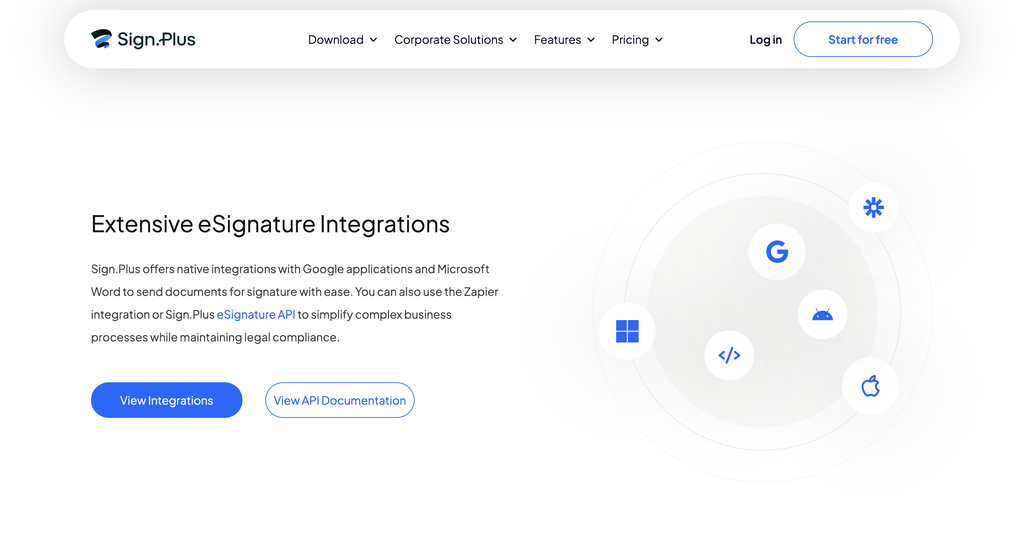
Sign.Plus publishes an eSignature API, offers a Gmail extension, and connects to Google and Microsoft tools plus Zapier. The Gmail extension reaches down to the Personal tier, which is unusually generous. Zapier arrives at Business. Teams whose signing flow needs to fire a webhook into a CRM on completion should budget for Business rather than Professional.
What Sign.Plus costs, tier by tier
Every figure below is the true monthly rate. The vendor’s page loads with the annual toggle already selected, so the numbers you see on arrival are lower than these. Annual equivalents appear in the right-hand column.
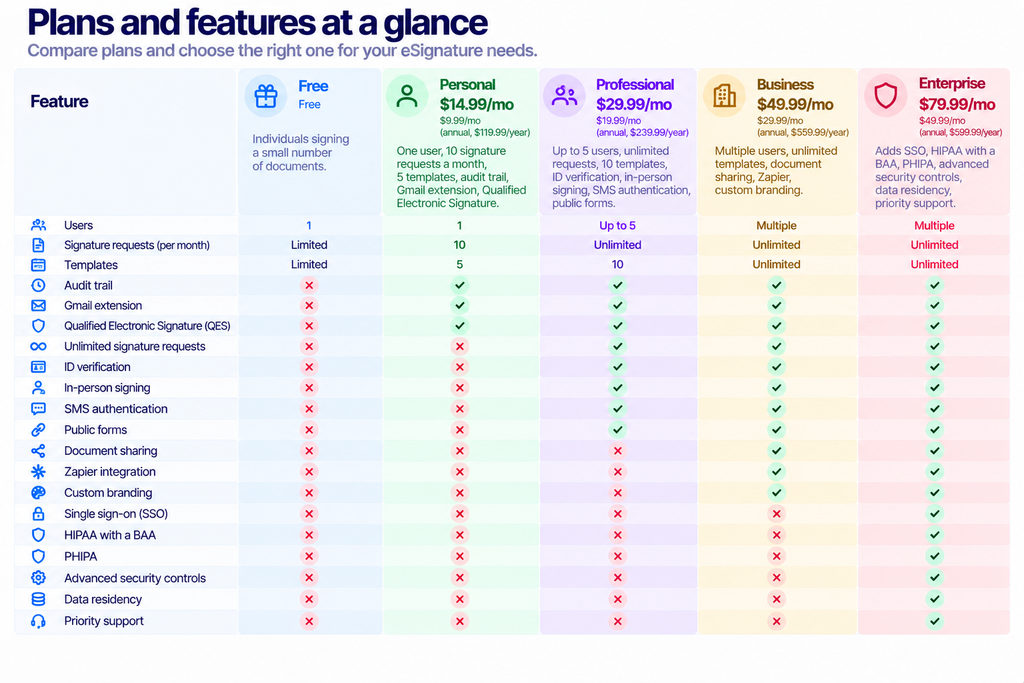
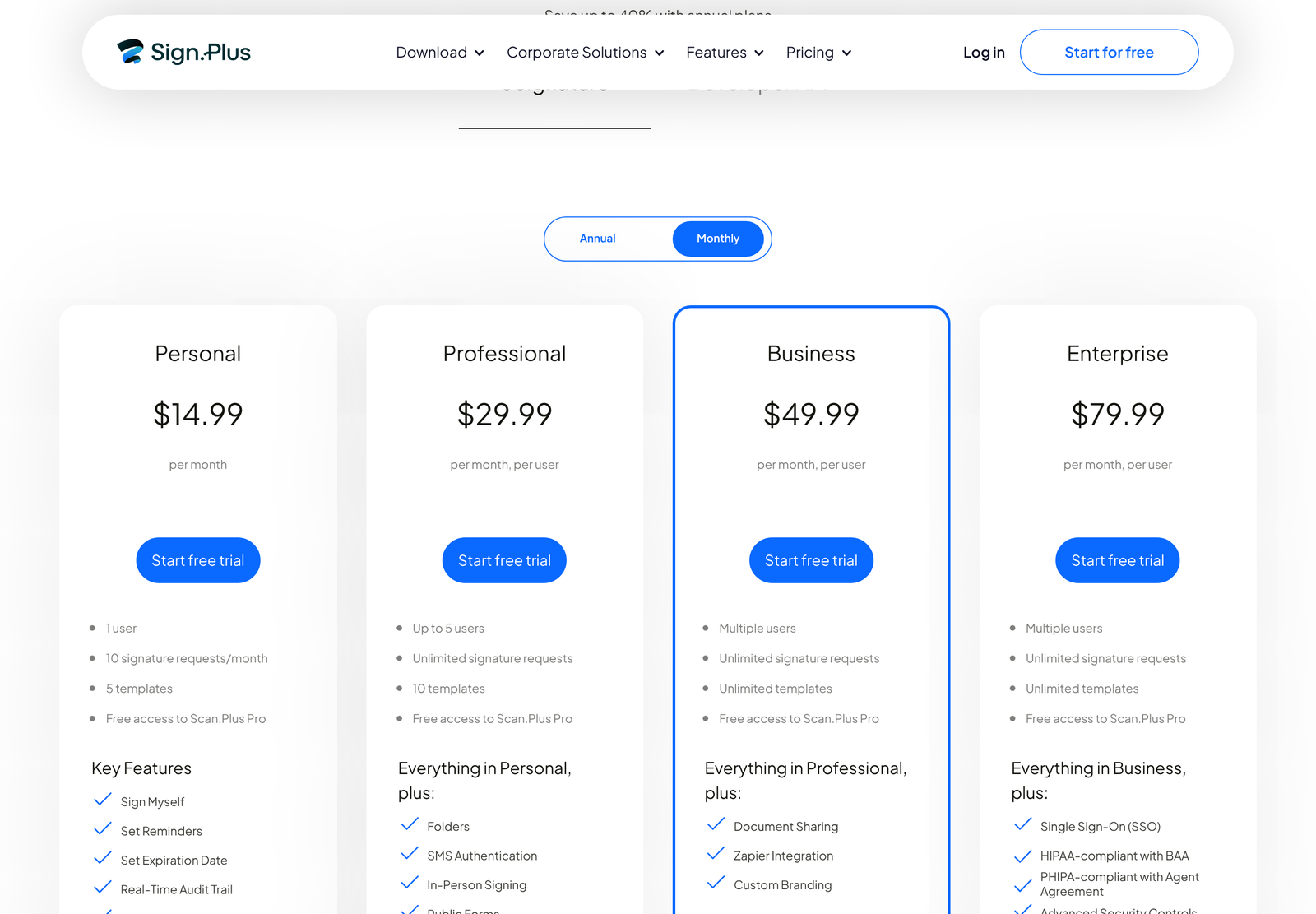
One seat boundary deserves a warning. Professional covers up to five users. The sixth person forces you onto Business. Five seats on Professional cost $149.95 a month; six on Business cost $299.94. Your sixth hire therefore costs $149.99 rather than the $49.99 the tier price implies.
The request cap nobody budgets for
Sign.Plus Personal includes ten signature requests a month. Not ten documents, not ten signatures: ten requests. Send a two-party agreement, and you have spent one. Send the same agreement again next week because the first version was wrong and you have spent another.
Ten is a realistic allowance for a sole trader signing the occasional contract. Any business with a recurring signing process will clear it. A small letting agency handling four tenancies a month, each needing a tenancy agreement, an inventory sign-off and a guarantor form, is at twelve requests before anyone makes a mistake. Professional removes the cap entirely, which makes the step from $14.99 to $29.99 less a tier upgrade than a condition of using the product at all.
Professional also adds public forms, a feature that changes the shape of the workflow rather than just raising a limit. A public form is a signing link you publish once and let anyone complete, instead of addressing each request to a named recipient. Consent forms, waivers and new-client intake all fit that pattern. Counting those as individual requests under the Personal cap would be unworkable, which is presumably why the two features arrive on the same tier.
Check your monthly signing volume before you look at any other number on the Sign.Plus page. That single figure tells you which tier you are actually buying.
Fax.Plus: features built around pages and numbers
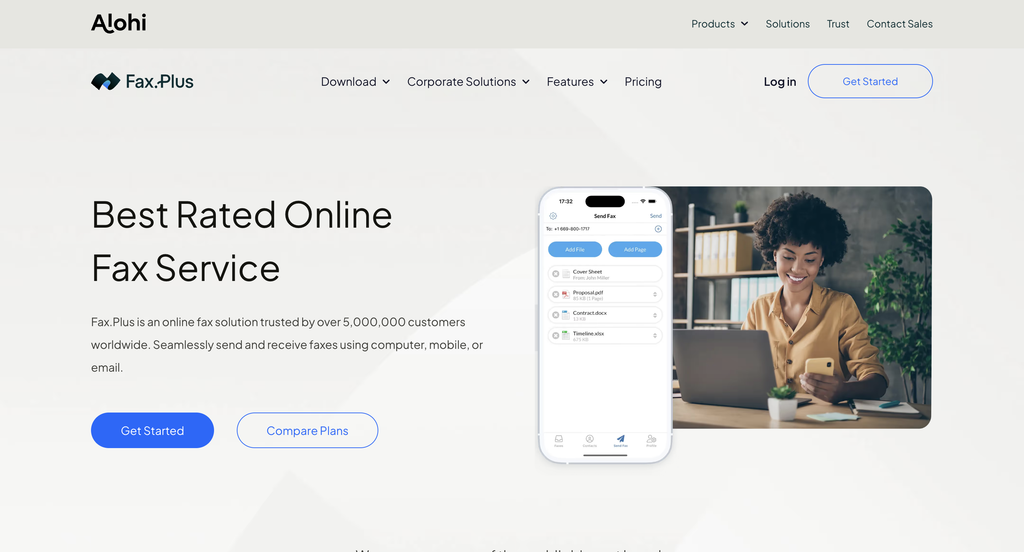
Online fax is a mature category where the feature list is less interesting than the limits attached to it. Fax.Plus publishes both.
Input methods
You can fax from the web app, a desktop app, Android, iPhone, your email client, or any print menu. Email to Fax is the feature most teams end up living in, because it lets people who will never log into a fax tool send one anyway. MFP integration connects an office multifunction printer, which matters if your workflow starts with a paper original.
Numbers
Basic includes one fax number. Additional numbers run $4.99 a month each. A custom number is a $19.99 one-time charge and a memorable number is $29.99 one-time. Toll-free numbers appear from Premium. Porting an existing US or Canadian number also requires Premium or higher, and the vendor notes that requirements differ by country of origin, so check before you assume your number can move.
AI faxing and data extraction
Two newer features stand out from the usual fax feature list. The vendor publishes AI-powered text and data extraction, which pulls structured fields out of an inbound fax image rather than leaving you a PDF to read. It also publishes AI Faxing over MCP, letting an AI assistant send a fax as a tool call. Medical and legal offices receiving high volumes of inbound documents are the obvious beneficiaries of the extraction feature.
Page caps, overage and per-fax limits
Each tier carries three separate numbers, and people routinely notice only the first. Monthly page allowance is the headline. Cost per extra page is the overage. Maximum pages in a single fax is the one that bites without warning.
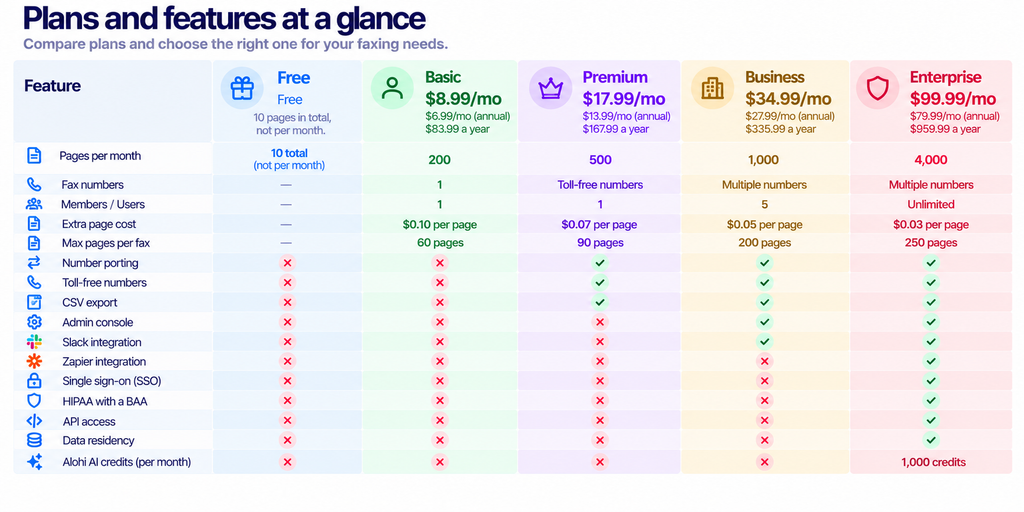
Seats constrain this product harder than pages do. Basic and Premium each include exactly one member. A three-person office sending 180 pages a month sits comfortably inside the Basic page allowance and still needs Business at $34.99, because two of those three people have nowhere to log in.
The HIPAA cliff
Healthcare is the single largest remaining use case for fax, so this one matters more than any other gate in the lineup. A HIPAA business associate agreement is available on the Enterprise tier only, on both Sign.Plus and Fax.Plus. Nothing below it carries a BAA.
The requirement is not a vendor preference. Under 45 CFR Part 164, a covered entity must obtain satisfactory assurances, in the form of a written agreement, that a business associate handling protected health information will safeguard it. A vendor advertising encryption without offering to sign a BAA does not put you in compliance.
Run the numbers on a two-doctor practice sending 300 pages a month. Page volume alone points at Premium, $17.99 on monthly billing. The BAA requirement overrides that entirely and lands you on Enterprise at $99.99, a multiple of about 5.6. Price the compliance feature, not the page count.
Security and compliance across the group
Alohi publishes a shared trust posture covering both main products: ISO 27001 certification, SOC 2 Type 2, PCI-DSS, TLS 1.3 in transit, multi-factor authentication, annual penetration test reports, and the option of choosing a data residency region. The company is based in Switzerland and leans on Swiss privacy law in its positioning.
Data residency is the feature most likely to decide an enterprise deal and the one most often skipped in a feature comparison. If your legal team has told you customer documents may not leave a particular jurisdiction, check which regions are offered before anything else on this page matters. The capability sits on Enterprise for both products.
Alohi also claims more than five million companies served, coverage in over 180 countries and 99.99% uptime. We found no third-party audit of those figures, so treat them as the company’s own account rather than as verified fact.
Scan.Plus and Dial.Plus
Scan.Plus is a mobile scanner, and its Pro version comes free with any paid Sign.Plus tier. Treat it as an included accessory rather than a product you evaluate separately.
Dial.Plus is described as an AI phone solution and sits in the same product navigation as the others. We did not verify its pricing or feature details in this pass, so nothing here should be read as a recommendation on it either way.
Which features should actually drive your choice?
Pick on compliance first. Needing a BAA, data residency or single sign-on, puts you on Enterprise, and the rest of the feature comparison becomes decoration.
Pick on seats second. Both products gate members aggressively at the lower tiers, and headcount moves your bill further than usage does.
Pick on identity third. ID verification and SMS authentication on Sign.Plus Professional are the difference between a signature you can defend and one you merely collected.
Everything else, from templates to cover sheets to the print menu hook, is convenience. Useful convenience, and not the thing to build a decision on.
For the full cost comparison across both products, including where the volume crossovers sit, see Alohi Pricing: Sign.Plus and Fax.Plus Costs.
Frequently asked questions
Does one Alohi subscription cover all four products?
No. Sign.Plus and Fax.Plus are billed separately and have their own pricing pages. Two bundles exist: a paid Fax.Plus plan includes 30 days of Sign.Plus, and a paid Sign.Plus plan includes Scan.Plus Pro.
Which tier includes a HIPAA business associate agreement?
Enterprise, on both Sign.Plus and Fax.Plus. No lower tier offers a BAA, whatever its encryption features say.
What is a Qualified Electronic Signature and do I need one?
It is the highest assurance level defined by the EU eIDAS regulation, backed by a qualified certificate from an accredited provider. You need it for certain regulated European transactions. For routine US agreements the ESIGN Act already gives electronic signatures legal effect without it.
How many people can use a Fax.Plus plan?
Basic and Premium include one member each. Business includes five. Enterprise is unlimited. Seat count, rather than page volume, is usually what pushes small offices up a tier.
Are the prices on the Alohi product pages monthly?
Not on arrival. Both Sign.Plus and Fax.Plus load with annual billing preselected, so the first figure you see is the discounted per-month rate on a yearly commitment. Switch the toggle to see the true monthly price.
Can I send a long document by fax on a cheap plan?
Only up to the per-fax ceiling. Basic stops at 60 pages in a single fax, Premium at 90, Business at 200 and Enterprise at 250. A 120-page deposition will not go out on Basic regardless of how much monthly allowance you have left.
Sources
- Sign.Plus features page and Sign.Plus pricing, for the capability catalogue and tier gates. Verified 24 October 2026.
- Fax.Plus features page and Fax.Plus pricing, for page allowances, per-fax ceilings, overage rates and number charges. Verified 24 October 2026.
- European Commission, eIDAS regulation, for qualified trust services and their legal standing across member states.
- ESIGN Act, Public Law 106-229, for the US rule that an electronic signature may not be denied legal effect solely because it is electronic.
- 45 CFR Part 164, for the business associate agreement requirement behind the HIPAA tier gate.