


Quick answer
AdCreative.ai generates ad images, video, and copy from your brand assets, and bills you for downloads rather than generations. Billed monthly, the three public plans cost $39, $249, and $999. Commit to a year, and those fall to $20, $125 and $500 a month, billed yearly. The pricing page opens on the yearly view, so the first number you see is not the month-to-month rate.
Cost per download runs $2.00 on Starter, $2.50 on Professional, and $5.00 on Ultimate at yearly rates. Higher tiers buy you seats, brands, and features, not cheaper creative.
Disclosure: Stack99 earns a commission if you buy through links on this page. It costs you nothing extra and never changes our assessment.
What AdCreative.ai is, and who owns it now
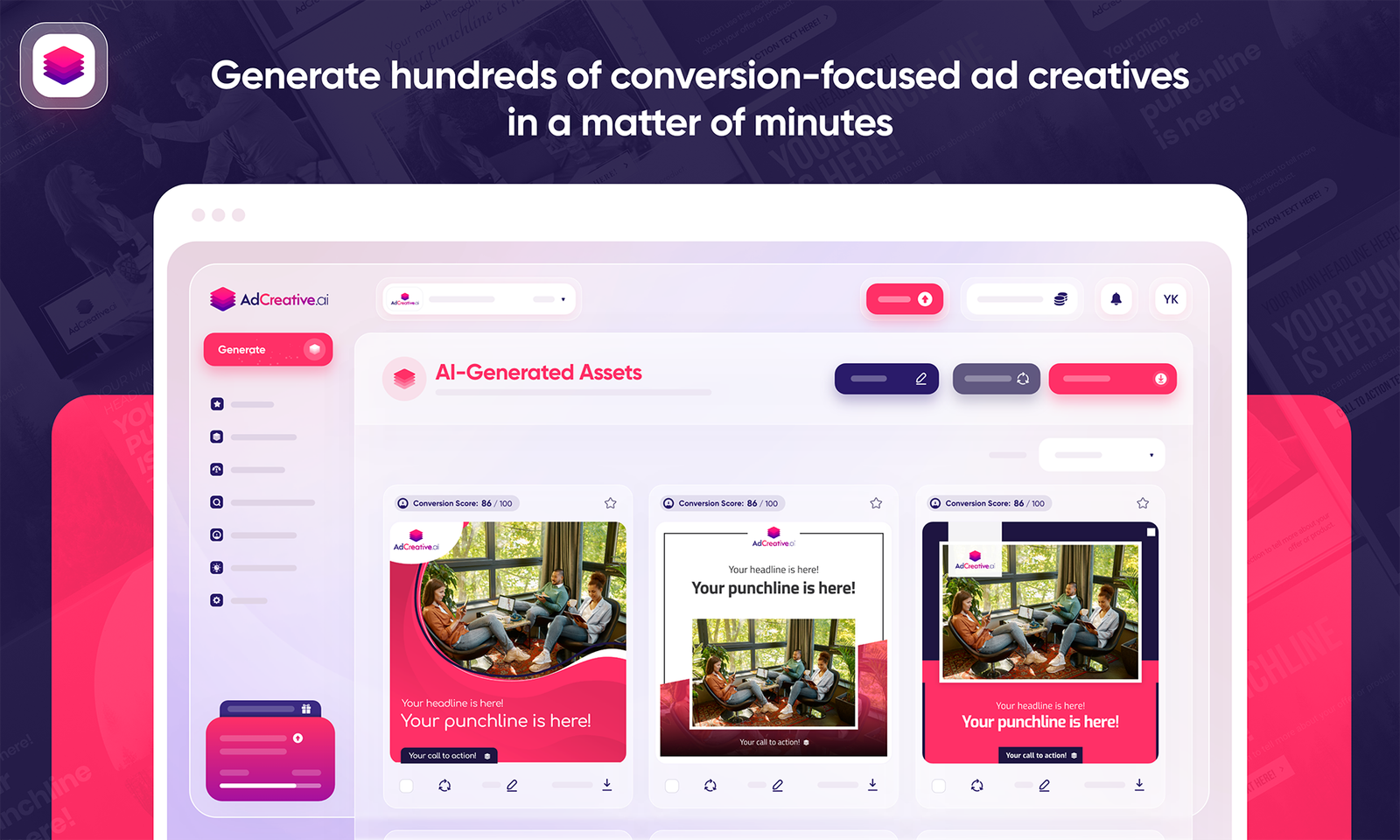
AdCreative.ai is a generative ad studio. You connect a brand, upload a logo and colours, optionally link a Meta or Google ad account, and the platform produces sized creative for whichever placement you pick. Output covers static images, product photoshoots, ad video, headlines, and body copy. The pitch is volume with a performance filter on top: generate widely, then let a scoring model rank what you produced before you spend money running it.
Ownership changed in 2025. Appier, the Tokyo-listed marketing AI company, announced an agreement to acquire AdCreative.ai for 38.7 million USD in total, including a 27.3 million USD base, with the transaction expected to close on 4 March. Appier’s release describes AdCreative.ai as Paris-based, founded in 2021, with Snapchat, Pernod Ricard, Reckitt, BNP Paribas and Chopard named as customers. The product now carries an “an Appier group company” lockup in its own header.
Why mention a corporate deal in a product review? Because roadmap and pricing sit downstream of it. A tool that has been folded into a larger ad cloud tends to get pulled toward that cloud’s priorities. Nothing in the current product suggests neglect, but you are no longer buying from an independent startup, and renewal terms three years out are harder to predict than they were.
The pricing page shows you the yearly rate first
AdCreative.ai has no separate pricing URL. Requesting adcreative.ai/pricing returns a 404. Prices live in a section of the homepage, which matters if you are trying to compare vendors quickly and expect a dedicated page.
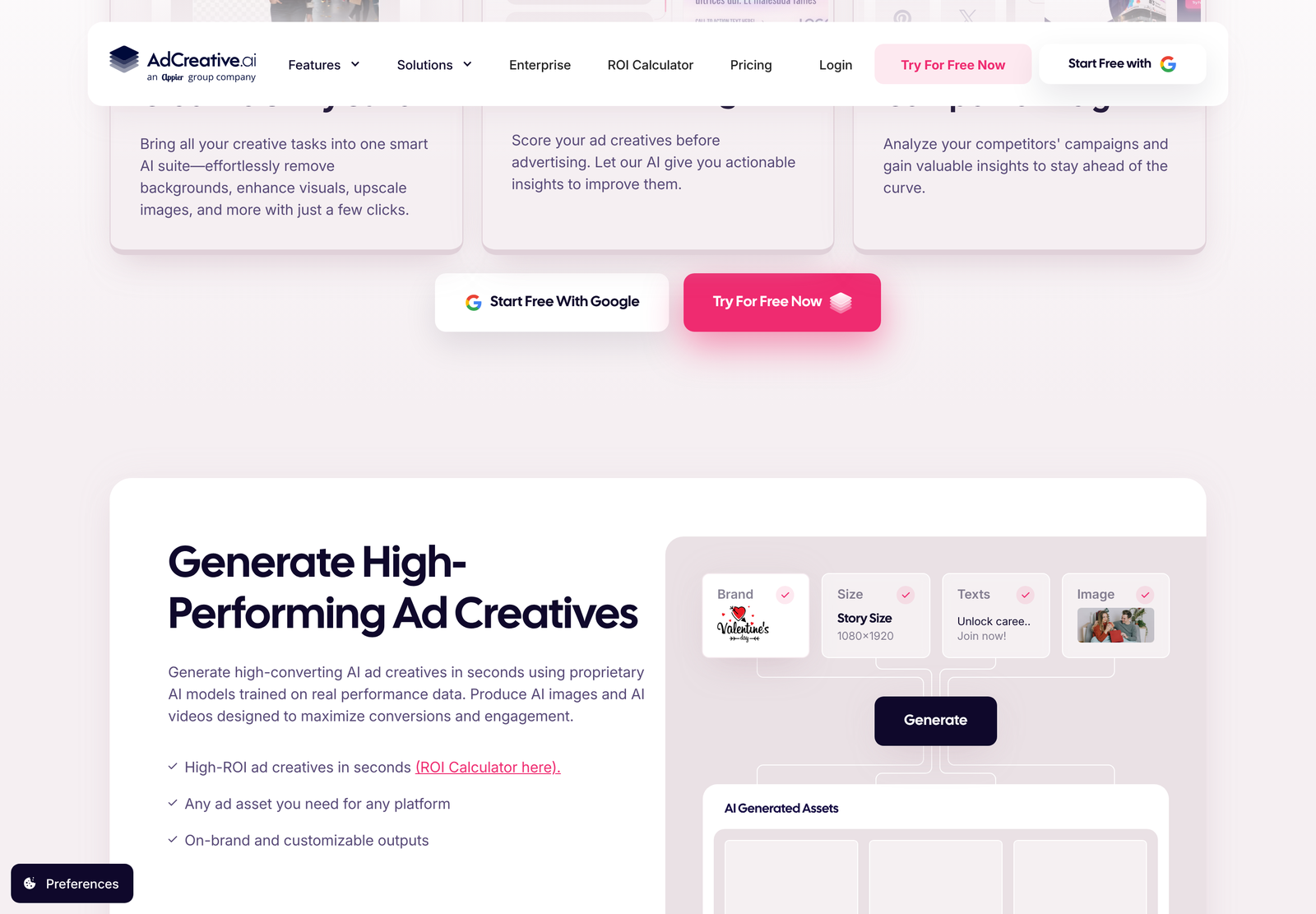
More important is what loads when you get there. Three billing tabs sit above the plan cards: Monthly, Quarterly (25% Off) and Yearly (50% Off). The page arrives with Yearly already selected. So the figures on screen read $20, $125 and $500 with a “/mo*” suffix, struck-through prices of $39, $249 and $999 beside them, and a small “*Billed yearly” line under each button.
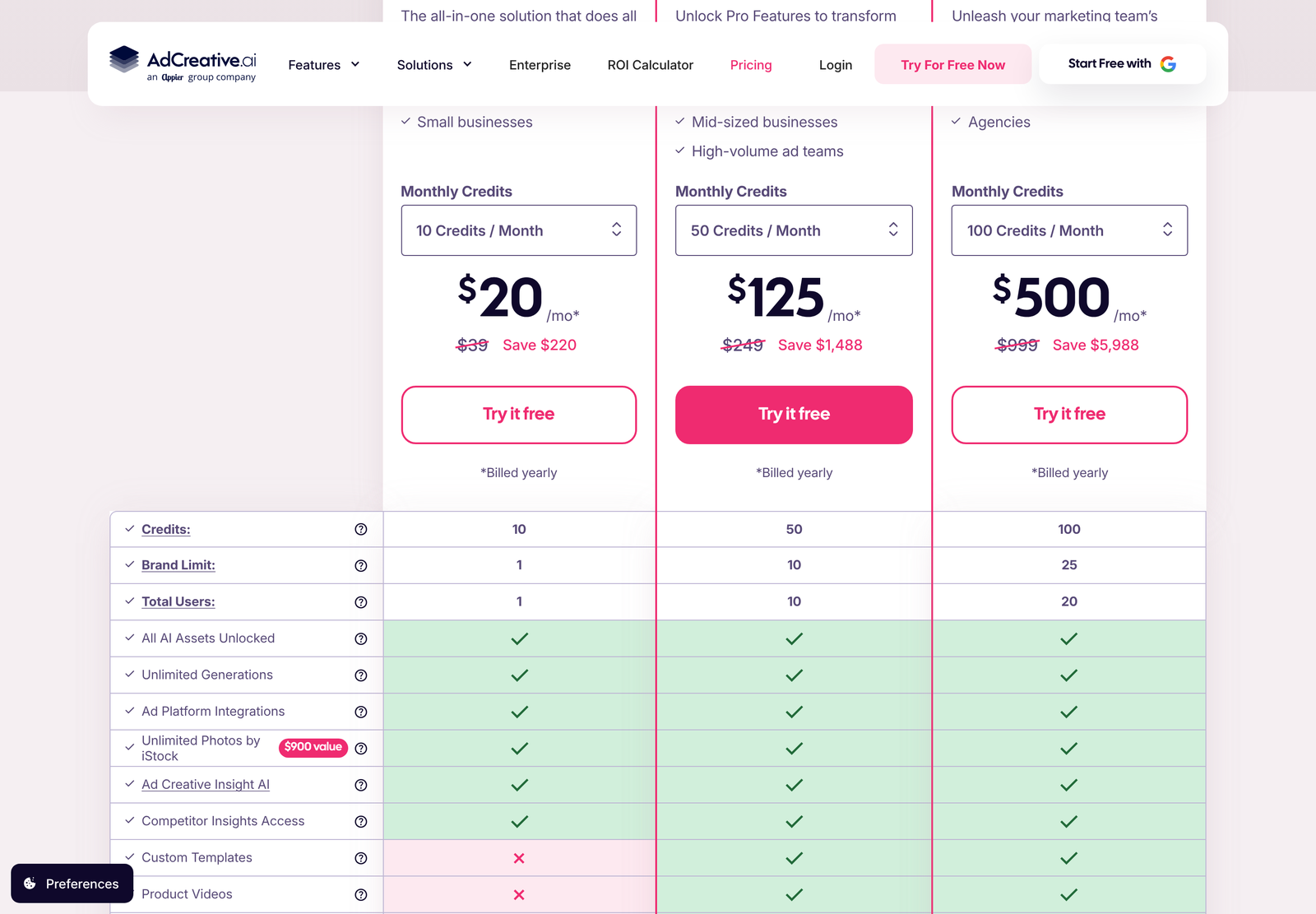
Click the Monthly tab and the strikethroughs disappear, leaving $39, $249, and $999. Those are the real month-to-month rates. Anyone skimming the default view and writing down “$20 a month” has recorded a number that only exists if you pay $240 up front.
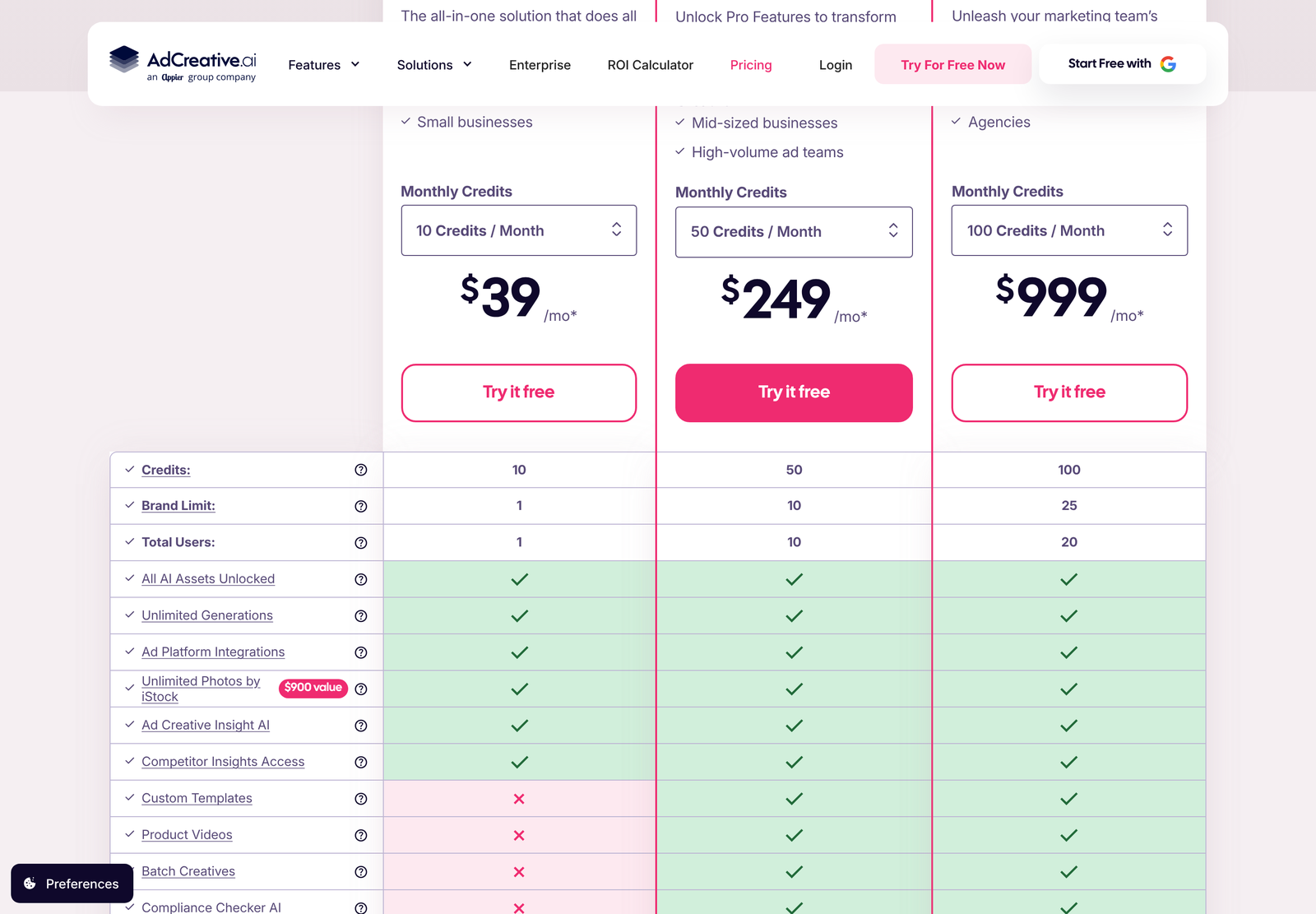
A quarterly option sits between the two and is marked 25% off. We could not get that tab to register a click during testing, so its figures stay out of the table below. Treat quarterly as roughly halfway between the two rates we did verify, and confirm it on the page before you buy.
AdCreative.ai pricing, verified October 2026
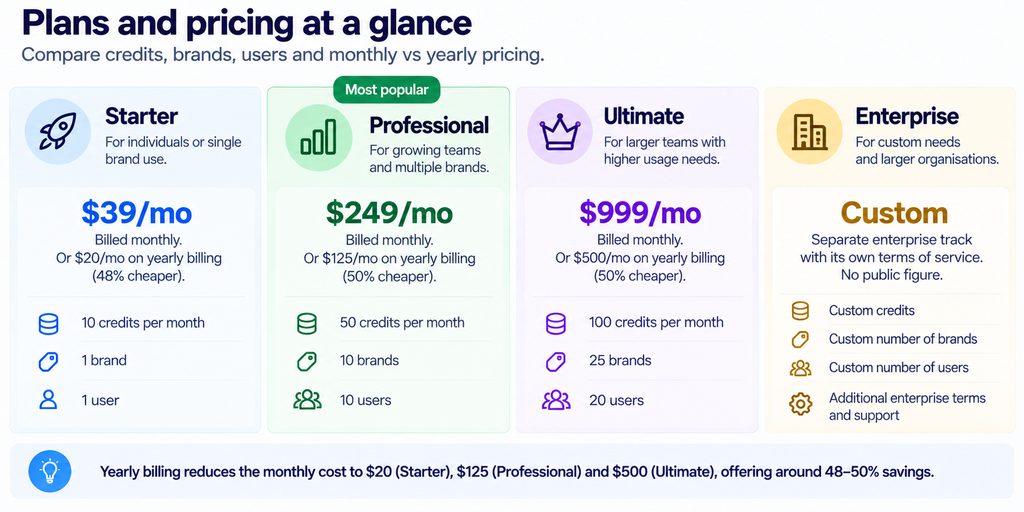
Every plan card offers a credit dropdown, so the three rows above describe the entry rung of each tier rather than a fixed ceiling. Pick a larger monthly credit allowance inside a plan, and the price moves with it.
A credit is a download, not a generation
This single mechanic decides whether the plans feel generous or mean. The vendor’s own FAQ states it plainly: a credit is consumed when you download a generated creative. Generation itself is unlimited on every plan. You can produce fifty variants of a square ad, look at all fifty, and spend nothing until you pull one down.
Which reframes the Starter plan. Ten credits a month sounds thin for an advertiser, and it is thin if you treat creative as disposable. For a small business running one evergreen campaign and refreshing the hero image monthly, ten downloads cover a lot. For an agency producing four sizes across three concepts for a single client, ten credits are gone in one afternoon.
Watch the second-order effect too. Because preview is free and download is metered, the natural behaviour is to over-generate and under-select. Teams that are disciplined about choosing before downloading will stretch a plan a long way. Teams that download everything “just in case” will burn through Professional’s fifty credits and find themselves shopping for Ultimate.
The arithmetic that decides whether this is cheap
Divide price by credits, and the picture inverts what you might expect from software pricing.
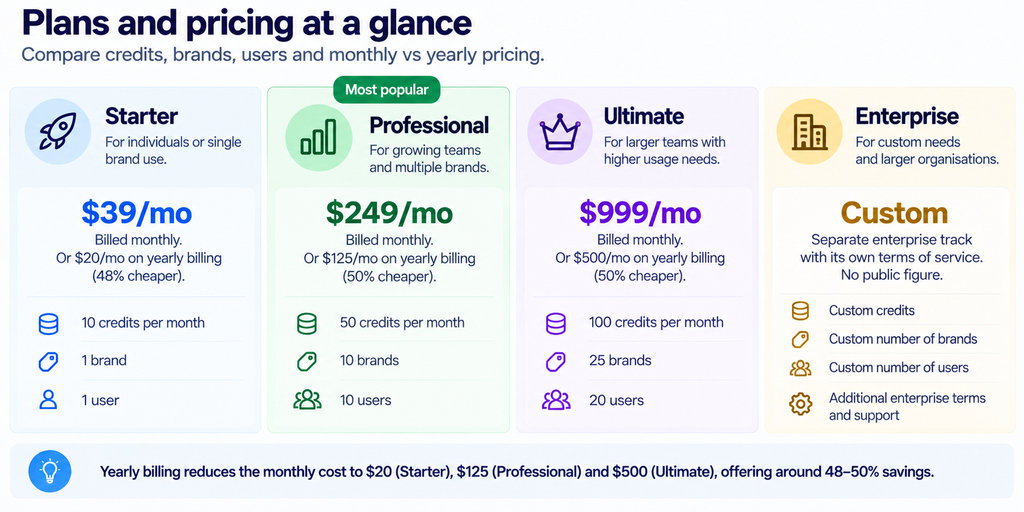
Moving up a tier makes each download more expensive, not less. That is unusual, and it tells you exactly what the ladder is selling. You are not buying volume discounts. You are buying brand slots, seats, and gated features, and the credits ride along as a secondary allowance.
Run the same sums on annual commitment and the gap between tiers gets concrete. Starter costs $240 for the year. Professional costs $1,500. Ultimate costs $6,000. The step from Starter to Professional is a 6.25x increase in spend for a 5x increase in downloads, a 10x increase in brands and a 10x increase in seats. Needing the brands and the seats makes that maths work. Wanting only more downloads does not.
Where the vendor’s own numbers stop reconciling
Each yearly card carries a “Save” figure. Two of the three check out exactly. Professional shows “Save $1,488”, and twelve months of the $124 gap between $249 and $125 is $1,488. Ultimate shows “Save $5,988”, and twelve times the $499 gap is $5,988.
Starter does not reconcile. Its card reads “Save $220”, but twelve times the $19 gap between $39 and $20 comes to $228. An $8 discrepancy changes nothing about whether you should buy, and it is small enough to be a rounding artefact from an underlying price like $19.33. Still, anyone building a budget from the page should derive the annual figure directly rather than trusting the badge.
One more claim deserves the same treatment. The comparison matrix lists “Unlimited Photos by iStock” with a “$900 value” tag attached. We did not verify that valuation against iStock’s own published plans and are not repeating it as fact. Stock access is genuinely included on all three tiers. The dollar figure beside it is marketing, not a price you would otherwise pay.
What each tier actually unlocks
The comparison table under the plan cards is the most useful part of the page. Six capabilities sit on every plan, Starter included: all AI assets unlocked, unlimited generations, ad platform integrations, the iStock library, Ad Creative Insight AI, and competitor insights access.
Starter loses several things that matter to anyone producing at scale. Custom templates are absent. So are product videos and batch creatives. The matrix continues below those rows into scoring, ad video, storytelling ads, and fine-tuning, and the pattern holds: Starter is a single-brand, single-seat tool for producing a handful of static assets, while Professional is where the production features switch on.
Brand limits deserve a second look at agency scale. One brand on Starter means one client. Ten on Professional and twenty-five on Ultimate are the numbers that decide your tier, long before credits do. An agency with twelve clients cannot use Professional regardless of how few downloads it needs.
What the tool is good at
Resizing is the strongest practical argument. Producing one concept across square, story, landscape and banner placements is tedious manual work, and a model that holds brand colours and logo placement steady across all four saves real hours. The vendor leans on this in its own copy, and it is the claim least dependent on taste.
Pre-flight scoring is the second. Ranking creative before you spend media budget on it is a sensible idea even when the model is imperfect, because the alternative is learning from spend. Google’s own guidance on responsive display ads pushes advertisers toward supplying many assets and letting the system combine them, which is the same direction of travel: more variants, machine selection.
Onboarding looks genuinely light. Brand setup is logo, colours, description, and an optional ad account connection. Nothing in the public flow requires a designer.

Where it falls short
Generated creative still looks generated. Layouts are template-shaped, and anyone who looks at a lot of advertising will spot the house style. For performance placements where the ad is competing on offer rather than craft, that is tolerable. For brand work, it is not.
Pricing presentation is the other weakness, and it is self-inflicted. A preselected yearly toggle, strikethroughs that only resolve if you click, an asterisk doing the work of a sentence, and one save figure that does not match its own inputs add up to a page you have to audit rather than read. The product may be fine. The page makes you work to establish what you are paying.
Refund terms are narrow. The vendor offers seven days on monthly plans and thirty days on yearly ones, conditional on the platform not having been used, which it defines as generating creatives or downloading assets. A refund window that closes the moment you try the product is a trial, not a refund. Use the free trial to evaluate and treat the paid plan as committed spend.
Who should buy which plan?
Choose Starter if: you run one brand, work alone, and need under ten finished assets a month. At $240 a year, it is cheaper than a single freelance design day, and the ceiling is high enough for a steady small campaign.
Choose Professional if: you manage several brands or clients, need more than one seat, or want templates and batch output. Ten brands and ten users at $1,500 a year works out at $150 per brand per year, which is the figure to compare against your current creative cost.
Choose Ultimate if: twenty-five brands is the binding constraint. Nothing else about the tier justifies the jump from $1,500 to $6,000 unless you are genuinely running that many accounts, since per-download cost doubles on the way up.
Skip it entirely if your advertising lives or dies on distinctive art direction, or if you produce fewer than a handful of creatives a quarter. A tool priced on downloads rewards regular output.
If you want the plan ladder on its own, we break it out in the AdCreative.ai pricing guide. For rival tools in the same bracket, see our AdCreative.ai alternatives roundup. You can also start a free trial of AdCreative.ai and test the credit model against your own output before committing to a year.
Getting a usable asset out of it
Output quality tracks input quality more tightly than the marketing suggests, so the setup step repays attention. Upload the logo as a transparent file rather than a screenshot of your website header, and enter hex values for brand colours instead of letting the system sample them. Both choices show up immediately in how clean the generated layouts look.
Connecting an ad account is optional and does two separate jobs. One is tuning: the vendor states that linking accounts lets its model tailor designs and predictions to your brand. The other is measurement, since Creative Insights needs account history to tell you anything about your average click-through rate or your best-performing colours. Skip the connection, and you still get generation, just without the analysis layer that the higher tiers charge for.
Then comes the part that decides your bill. Generate broadly, review on screen, and download only the variants you will actually run. Because the meter sits on download rather than generation, a ten-minute review pass before you export is worth more than any plan upgrade. Build that habit early, and you will probably sit a tier lower than you expected to need.
One workflow caveat: ad platforms change asset specifications, and a template library updates on the vendor’s schedule rather than yours. Check generated sizes against the current requirements for whichever network you are running before a large batch, particularly for newer video placements where specs have moved more than once.
Frequently asked questions
Is AdCreative.ai $20 a month?
Only on an annual commitment. The $20 figure is the Starter plan billed yearly, which means $240 charged up front. Billed monthly, Starter costs $39.
Does a credit get used when I generate an ad?
No. The vendor’s FAQ states that generation is unlimited and a credit is consumed on download. Preview as widely as you like; the meter runs when you take an asset out.
How many brands can I run on each plan?
One on Starter, ten on Professional, and twenty-five on Ultimate. Seats follow a similar ladder at one, ten, and twenty. For agencies, these limits usually bind before the credit allowance does.
Can I get a refund?
Seven days on monthly plans, thirty on yearly, and only if you have not generated or downloaded anything. Evaluate during the free trial instead.
Who owns AdCreative.ai?
Appier, listed on the Tokyo Stock Exchange under ticker 4180. Appier announced the acquisition agreement in February 2025 at 38.7 million USD total, and the product now sits inside Appier’s Ad Cloud alongside its other advertising tools.
Is there a free plan?
There is a free trial rather than a permanent free tier. The homepage pushes two entry points, a standard signup and a Google signup, both labelled as free to start.
Verdict
AdCreative.ai does the boring half of performance creative well. Multi-size output from one concept, a scoring pass before you spend, and a brand setup that takes minutes rather than a workshop. Judged on that, Starter at $240 a year is easy to justify for a solo operator, and Professional at $1,500 is defensible for an agency with several accounts.
Two things keep it short of a straightforward recommendation. Per-download cost rising as you climb the ladder means the tiers are selling capacity you may not need, so size your plan on brands and seats and let credits fall where they may. And the pricing page requires an audit: the yearly toggle is preselected, the monthly rate is hidden behind a strikethrough, and one of the three save figures does not match its own arithmetic. Verify what you are paying on the page itself before the card goes in.