


In this guide
Disclosure: Stack99 earns a commission if you buy through links on this page. It costs you nothing extra and never changes our assessment.
In this review
Quick verdict
Most small businesses don’t fail at marketing because they lack tools- they fail because those tools don’t talk to each other. The CRM doesn’t know what the email tool sent, the invoicing app has no idea a lead went cold, and the owner ends up doing follow-up by memory at 11 pm. Keap’s entire pitch is to collapse that mess into one system where a new lead is automatically tagged, emailed, texted, reminded, quoted, and invoiced without anyone touching it. In 2026, the question isn’t whether Keap can do that – it clearly can- it’s whether your business is far enough along to justify the price and the setup. You can start a free Keap trial here and follow along as we break it down.

What Keap actually is
Keap (formerly Infusionsoft) is a customer relationship and automation platform aimed squarely at small businesses — agencies, coaches, home-service companies, clinics, and solo operators with a few staff members. Rather than being a single-purpose app, it bundles several jobs into one place.
At its core is a CRM that stores every contact, their history, and their place in your pipeline. Around that, Keap layers marketing automation (its visual campaign builder and “Easy Automations”), email and SMS marketing, appointment scheduling, quotes, invoices and payments, and landing pages and forms. The point of paying for it all together is the automation glue: a form submission can trigger a tag, an email sequence, a text, a task for you, and a follow-up reminder — automatically.
What Keap does best
Keap’s strongest area is lifecycle automation for a small team. Where lighter tools stop at “send this email to this list,” Keap lets you build genuine if-this-then-that sequences around a contact’s behavior – booked a call, didn’t show, paid an invoice, went quiet for 30 days. For a service business where each lead is worth real money, and follow-up is the difference between closing and losing, that automation pays for itself faster than the price tag suggests.
The second standout is having sales and payments in the same system. Sending a quote, collecting a signature, and taking payment inside the same tool that holds the CRM record means nothing falls through the cracks between “interested” and “paid.” Open Keap here and map one of your real follow-up workflows onto it.
Pros and cons
What we liked
- Genuinely all-in-one: CRM, email, SMS, quotes, invoices and payments under one login
- Powerful automation that goes well beyond simple email sequences
- Built and supported for small businesses, with US-based support and migration help
- Text marketing baked in, not bolted on as a separate subscription
What to watch
- Higher entry price than lightweight CRMs or standalone email tools
- Mandatory paid onboarding for new accounts adds to first-year cost
- The feature depth means a real learning curve
- Cost scales with your contact count, so a big list raises the monthly bill
Pricing breakdown
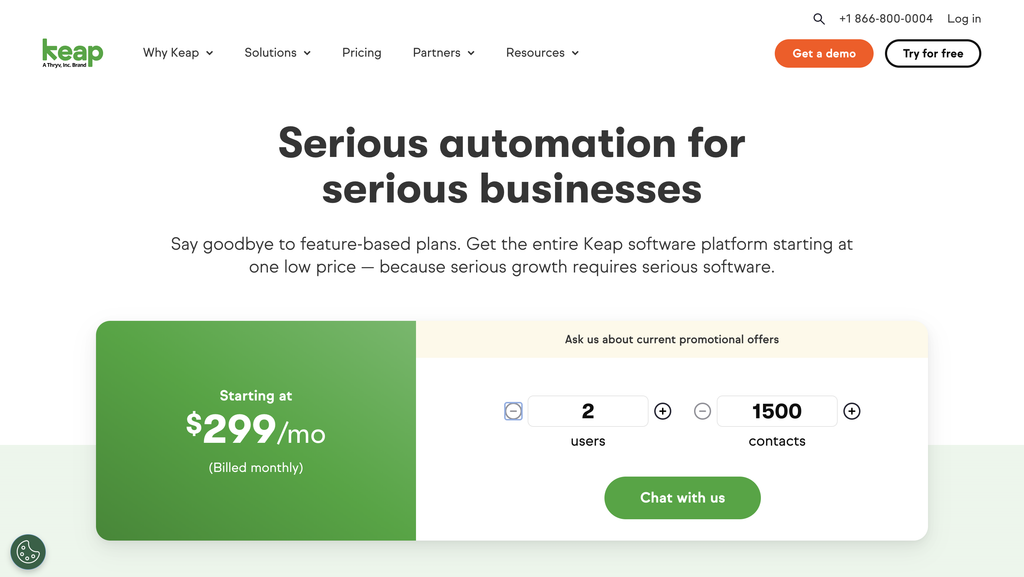
Keap has simplified toward a single platform plan in 2026 rather than the old multi-tier menu. Here is how the cost actually shapes up.
| Plan / item | Price | What you get |
|---|---|---|
| Keap platform | $299/mo | The full platform — CRM, automation, email & SMS, pipeline, quotes, invoices, payments, landing pages. 2 users included. Billed annually. |
| Additional user | $39/mo | Per extra team member added to the account. |
| Contact scaling | Varies | The monthly price rises as your contact list grows past the included volume. |
| Text marketing | $24–$279/mo | A starter tier is included; higher SMS/voice volumes are paid upgrades. |
| Onboarding | Quote | A paid implementation package is required for new accounts. |
| Free trial | $0 | 14-day trial, no credit card required (some sending is capped during the trial). |
Note: some third-party sites still list Keap’s older “Pro” (~$199) and “Max” (~$249) tiers for 2,500 contacts. Keap has been consolidating its pricing, so always confirm the current number on the live pricing page before you buy. If you want today’s exact figure for your contact volume, check current Keap pricing here.
Hidden costs & gotchas
The sticker price isn’t the whole story. First, onboarding is not optional — Keap requires a paid implementation package for new customers, so your true first-month cost is higher than $299. Second, the bill grows with your list: pricing scales by contact volume. Third, the power is also the learning curve — Keap only becomes cheaper-than-the-alternative once your automations are actually built and running, so factor in the setup time.
Who should use Keap
Keap makes the most sense for an established small service business that already has steady lead flow and is losing money to slow or forgotten follow-up. If you’re a coach, agency, clinic, contractor, or professional-services firm doing consistent revenue and stitching together a CRM plus a mail tool plus a scheduler plus an invoicing app, Keap can replace that stack and automate the handoffs. It’s less suited to a pre-revenue side project or someone who only needs a simple contact list and the occasional newsletter.
✓ Strong fit
- Established service business with steady lead flow
- Losing revenue to slow or forgotten follow-up
- Already juggling a CRM + email + scheduler + invoicing
- Ready to invest a little time in setup
✗ Probably overkill
- Pre-revenue side project or hobby
- You only need a simple newsletter now and then
- No time for a paid onboarding process
- A very small contact list with light needs
Keap vs the alternatives
Against HubSpot, Keap is more affordable at the small-business end and less enterprise-heavy, though HubSpot’s free tier is a stronger entry point for the budget-conscious. Against ActiveCampaign, Keap bundles payments and invoicing that ActiveCampaign doesn’t, while ActiveCampaign edges ahead on pure email-automation depth. Against all-in-one agency tools like GoHighLevel, Keap is more polished and better supported for a single business. The deciding factor is usually whether you want sales and payments in the same system — that’s where Keap pulls ahead.
FAQ
Is there a free version of Keap?
There is no permanently free plan, but Keap offers a 14-day free trial with no credit card required. Some sending features are limited during the trial.
Is Keap the same as Infusionsoft?
Yes — Infusionsoft was rebranded as Keap. Some of the most advanced legacy features live in the “Max Classic” (formerly Infusionsoft) edition.
Does Keap include text-message marketing?
Yes. A starter tier of text marketing is included in the platform, with paid upgrades for higher message and voice volumes.
Why is there an onboarding fee?
Keap requires a paid implementation package for new accounts to get automations and migrations set up correctly. It adds to first-year cost but reduces the chance of an expensive, half-configured rollout.
Final verdict
Keap earns its 8.2/10 by doing something few tools do well: putting the entire small-business customer lifecycle — capture, nurture, sell, invoice, get paid — into one automated system built and supported for owners rather than enterprises. It asks for a real commitment in both budget and setup, and it’s overkill for a simple newsletter. But for a service business outgrowing a patchwork of disconnected apps and bleeding revenue through slow follow-up, Keap is one of the strongest all-in-one answers on the market in 2026. Start your free Keap trial here →
Disclosure: This article contains affiliate links. If you sign up through them, Stack99 may earn a commission at no extra cost to you. Pricing and features are accurate to the best of our knowledge as of August 2026; always confirm current details on Keap’s official site.
Before You Choose, Compare These
Hand-picked guides to help you choose the right tool — no fluff.
 Use CasesWho Is EasyDMARC Best For? Use Cases & Fit (2026)Who gets the most out of it — and who should skip it.
 ComparisonsNavan vs Alternatives 2026The strongest competitors compared side by side.
 Use CasesWho Is Credit Repair Cloud Best For? Use Cases & Fit (2026)Who gets the most out of it — and who should skip it.
 Comparisons1Password vs Alternatives 2026The strongest competitors compared side by side.