


Quick answer: Streak fits one specific shape of team: five to forty people who live in Gmail, sell by email, and want a pipeline attached to the inbox rather than a separate system to log into. It costs $59 per user per month on Pro, or $49 if you pay for a year up front. Everyone on your team has to sit on the same plan, and there is no cheaper seat for people who only look at data. Teams that need phone-first workflows, heavy territory management, or a CRM their non-Gmail colleagues can use will outgrow it quickly.
Disclosure: Stack99 earns a commission if you buy through links on this page. It costs you nothing extra and never changes our assessment.
What Streak actually is
Streak is a CRM that runs inside Gmail. Not beside it, not synced to it. You install a browser extension, and your Gmail interface grows an extra layer: pipelines across the top, a sidebar showing the deal attached to whoever emailed you, columns you can fill with data about that deal. The emails are the records. There is no separate app to open and no habit to build, because the habit already exists.
That design decision explains almost everything about who should buy it. A CRM usually fails for one reason: the sales team stops updating it. Streak removes the updating step for the part that matters most, which is correspondence. Email history attaches itself to the right deal without anyone copying anything.
The same decision creates the ceiling. Your CRM now lives inside one person’s mailbox client. If half your company runs on Outlook, they are not users. Sell mostly by phone, and the thing Streak automates becomes the thing you do least.
The price you will actually pay
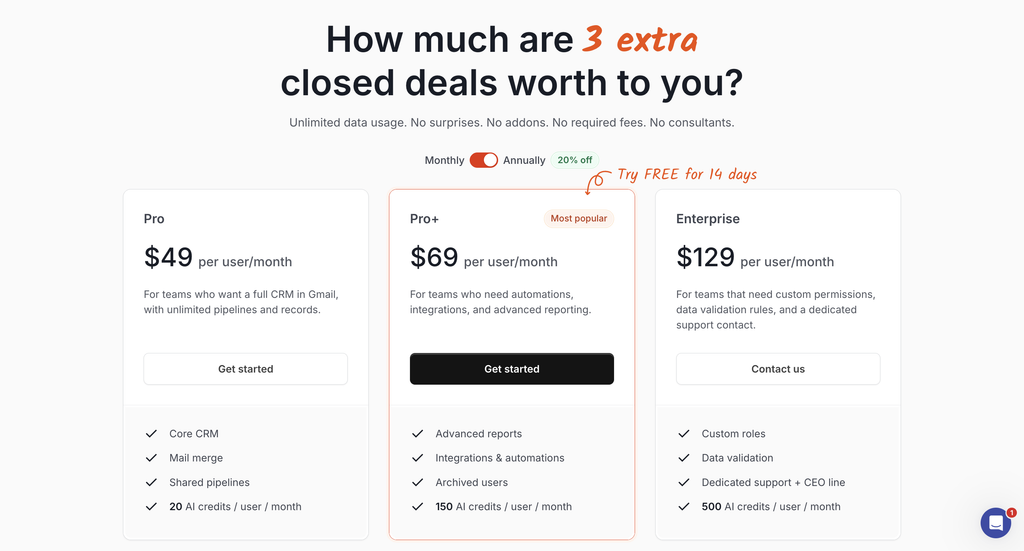
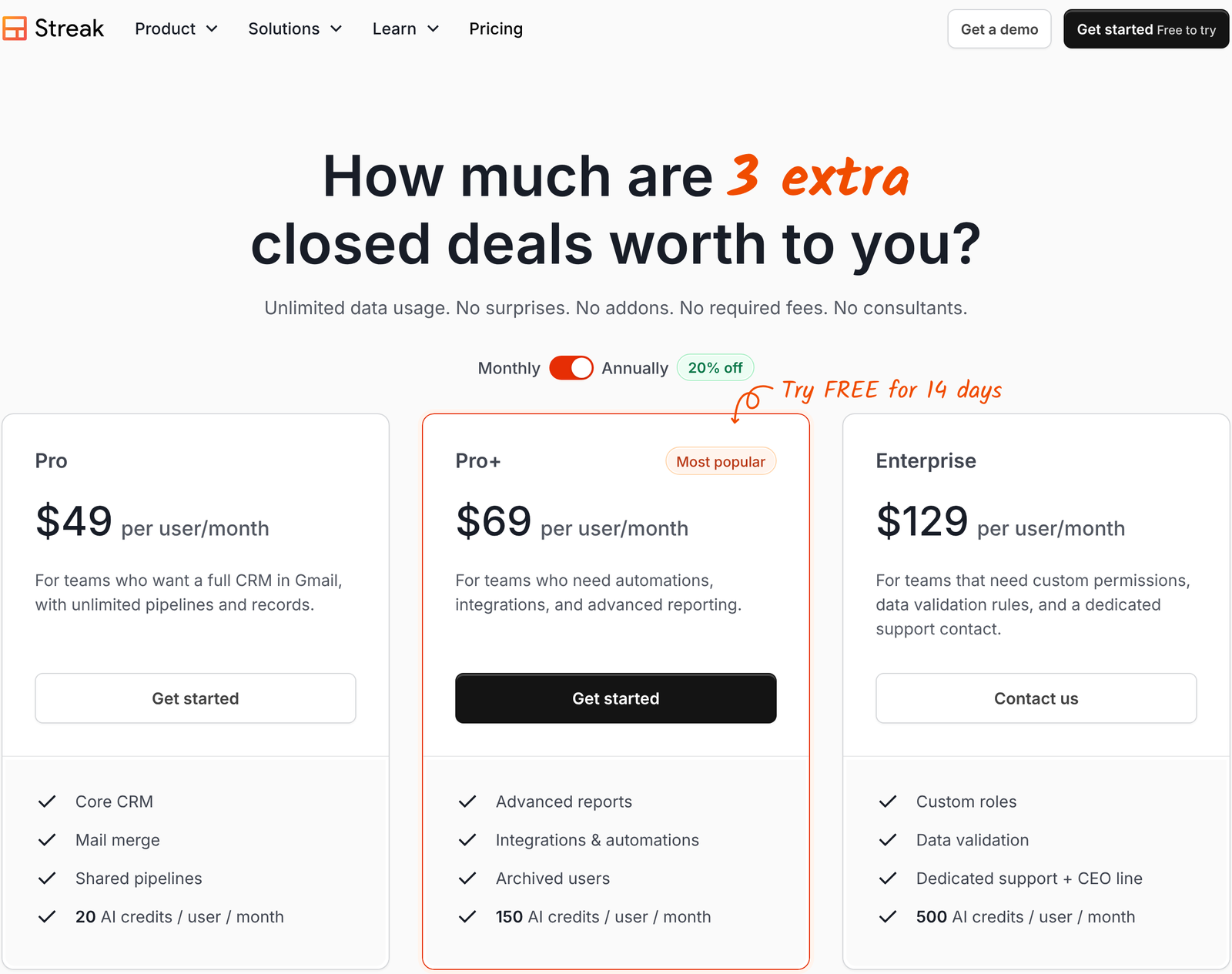
Open streak.com/pricing, and you see $49, $69, and $129 per user per month. Those are the annual numbers. The page loads with the Annually side of the toggle already selected, so the first figure you read is not the figure on a monthly invoice. Click across to Monthly, and the cards change to $59, $89, and $159.
Next to the toggle sits a badge reading 20% off. Divide, and the badge turns out to be an approximation that lands differently on each plan. Pro annual at $49 against monthly at $59 is a 16.9% saving. Pro+ at $69 against $89 is 22.5%. Enterprise at $129 against $159 is 18.9%. One of the three beats the badge; two fall short of it.
In cash terms per user per year: Pro saves $120, Pro+ saves $240, Enterprise saves $360. For a six-person team on Pro+, that is $1,440 a year to commit for twelve months instead of staying flexible. Whether that trade is worth it depends on how confident you are that the team size holds, because annual seats are bought in advance.
Three pricing rules that decide fit
Buried in Streak’s own FAQ are three constraints that matter more than the headline rate for deciding whether this tool suits your company.
Everyone sits on one plan
Streak states plainly that all team members must be on the same plan. You cannot put two power users on Pro+ and leave the rest on Pro. If one person needs Zapier, the whole team moves to Pro+, and everybody’s seat goes from $59 to $89.
Run that through a ten-person team. Ten Pro seats on monthly billing cost $590 a month. One requirement for an automation pushes the bill to $890. The extra $300 a month buys nine people a feature they did not ask for. On annual billing, the same move costs $200 more a month, $2,400 across the year.
There is no viewer seat
Asked directly whether view-only pricing exists, Streak answers no. Every user counts as a paid seat. Your finance lead who glances at the pipeline once a week costs the same as your best closer.
Plenty of CRMs sell a cheap read-only licence precisely so that managers and adjacent departments can see the numbers. Streak does not. If your org has a long tail of occasional viewers, price them all at full rate before comparing against anything else.
Integrations sit above the entry plan
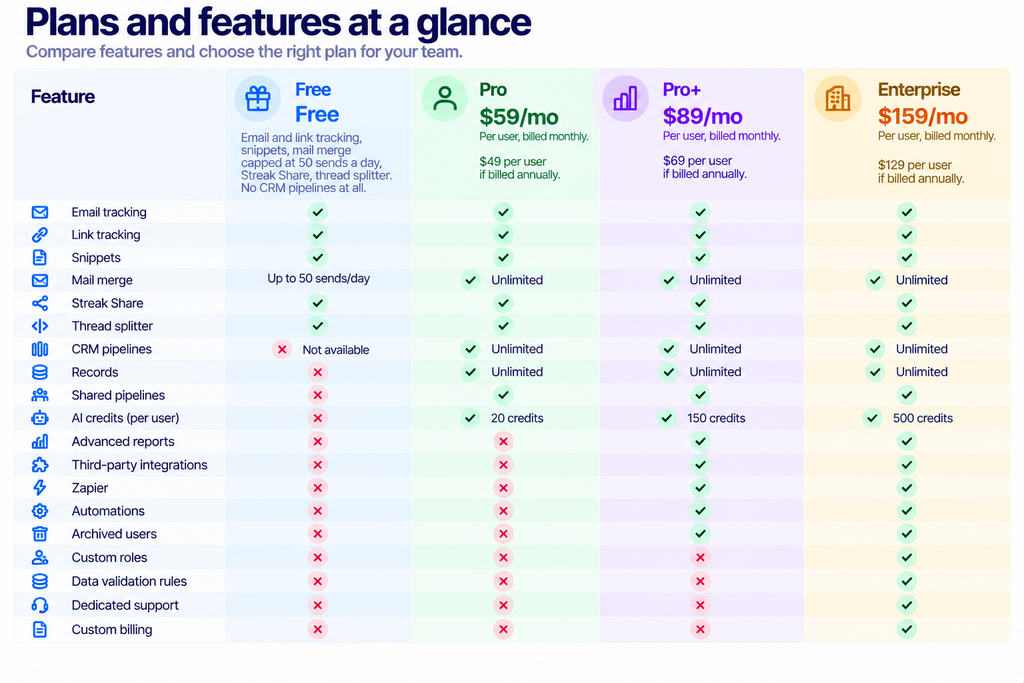
The Pro plan includes Google Workspace and a LinkedIn connector and a standard REST API. The feature table marks three rows as excluded from Pro: direct integrations with tools such as Calendly, Typeform, and Slack; Zapier; and automations. Webhooks are Pro+ and above as well.
So the real entry point for a team that wants its CRM wired into anything else is $89 per user per month, not $59. Call it a 51% jump above the advertised starting tier.
Who Streak fits
Small Gmail-native sales teams
Choose it if: your company runs on Google Workspace, your reps sell through written back-and-forth, and your current pipeline is a spreadsheet somebody updates on Fridays.
This is the core case, and Streak is genuinely good at it. Shared pipelines, automatic email sharing across the team, magic fields that update themselves with last-reply time and stage duration. Nobody has to log activity because the activity is the email. A four-person team on Pro annual pays $196 a month, which is a modest price for killing a spreadsheet.
Recruiters and investors tracking dealflow
Choose it if: you track a pipeline of people rather than a pipeline of products, and every stage of that pipeline is a conversation.
Streak markets pipelines for hiring and dealflow alongside sales, and the model suits them. A candidate pipeline is email at every stage. So is fundraising. The pitch here is not that Streak does recruiting better than an applicant tracking system, because it does not. The pitch is that a small firm can run several different pipelines in one tool without buying three separate products.
Solo operators who only need the email tools
Choose it if: you want read receipts and templates and a bit of mail merge, and have no interest in a pipeline.
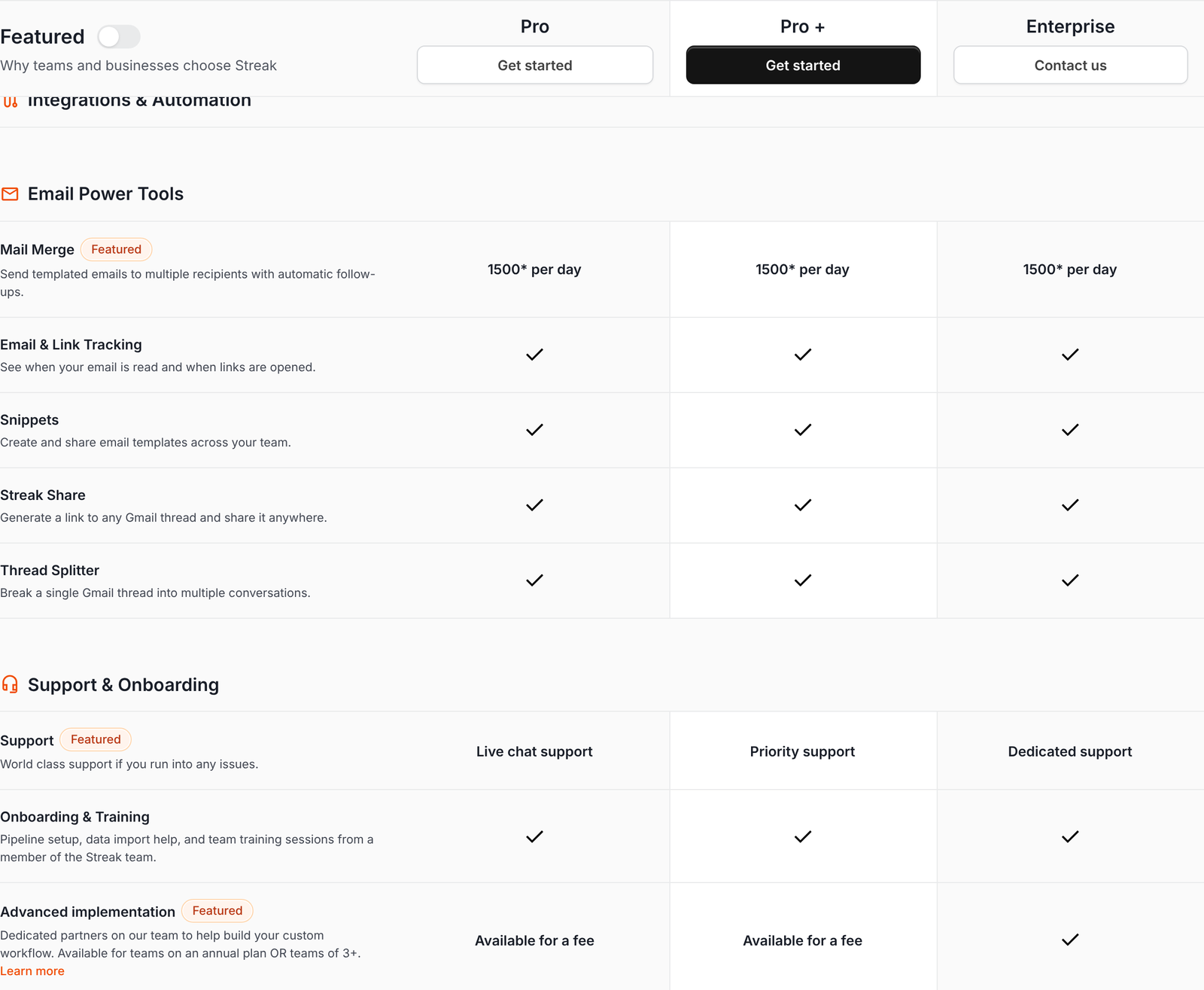
The free tier is not a trial. It runs indefinitely and includes email and link tracking, snippets, Streak Share for turning a thread into a public link, thread splitter, and mail merge limited to 50 sends a day. What it does not include is CRM pipelines, which is the actual product. Treat the free plan as a decent set of Gmail utilities rather than a free CRM.
Who should skip it
Companies with a mixed email estate
Skip it if: part of your business runs on Outlook or Microsoft 365.
This is the hard disqualifier, and no amount of feature comparison gets around it. The product is a Gmail extension. Mobile apps exist for iOS and Android, and there is a REST API, but the daily interface is Gmail in a desktop browser. A sales org split between two mail clients cannot run one pipeline here.
Phone-first sales floors
Skip it if: your reps dial all day and email is an afterthought.
Streak supports call logs and meeting notes, and connects to popular dialers, but the automation that makes it worth the money is email capture. A team doing 80 calls a day and six emails gets a fraction of the benefit while paying the full seat price. Look at a CRM built around a dialer instead.
Larger teams carrying many occasional viewers
Skip it if: you have twelve sellers and twenty people who want to look at the forecast.
Thirty-two seats on Pro+ annual run $2,208 a month. With no viewer tier and no mixed plans, that number does not come down. The single-plan rule and the absence of read-only seats compound each other, and they compound fastest at exactly the size where a company starts wanting dashboards for people outside sales.
The AI credit model, and when it bites
Streak’s AI features run on credits. Pro includes 20 per user per month, Pro+ includes 150, Enterprise includes 500. Credits do not roll over.
Each action has a published cost. A deal summary is 1 credit. Deal Q&A is 1. Autofill from the deal timeline is 1. Autofill that searches the web is 2. Automated AI actions cost 1 credit per 10 runs. Generating a meeting agenda is 1.
Twenty credits a month on Pro is roughly one AI action per working day. That is a taste, not a workflow. Anyone who actually adopts the summaries will exhaust the Pro allowance in the first week.
Top-up packs are sold monthly at 1,000 credits for $100, 2,500 for $200, 10,000 for $500, and 25,000 for $1,000. Unit price falls from 10 cents per credit on the smallest pack to 4 cents on the largest, so the packs reward volume steeply.
Here is the calculation worth doing before you upgrade for AI alone. Moving a user from Pro to Pro+ costs $30 more a month on monthly billing and adds 130 credits. Buying 130 credits through the cheapest pack costs about $5.20. The upgrade is not priced on credits; it is priced on integrations and reporting, and the credits ride along. Upgrade for the automations, not for the allowance.
What is genuinely unlimited
Credit limits aside, Streak is unusually clean on data caps. Records are unlimited on every paid plan. So are pipelines and shared contacts. Streak’s own headline promises unlimited data usage with no add-ons and no required fees, and the comparison table backs that up for the CRM itself.
Mail merge runs to 1,500 sends a day on all three paid plans, carrying an asterisk on the vendor’s page. The free plan is held to 50. Compare that against CRMs that meter contact records, and the picture improves: you pay per person, and then you stop paying.
One more thing in the buyer’s favour. Pro+ has a 14-day free trial that Streak says includes 1,000 AI credits, and the free plan requires no card. You can test the expensive tier before committing anyone.
Sizing it against your team
Four numbers decide this purchase, and none of them is the headline rate.
- Count every human who will ever open the CRM, viewers included. Multiply by the seat price. Treat the result as your floor.
- Decide whether anyone needs Zapier, webhooks, automations or a third-party connector. If even one person does, price the whole team at Pro+.
- Check that every one of those humans uses Gmail. Any Outlook user in the list breaks the model.
- Estimate monthly AI actions per user. Under 20, Pro is fine. Over 150, budget for packs regardless of plan.
A worked example. Seven-person agency, all on Google Workspace, wants Typeform submissions to create records automatically. Step two forces Pro+. Seven seats at $69 annual is $483 a month, $5,796 a year. The monthly-billing version of the same team is $623 a month. Now compare that against the spreadsheet it replaces and against a conventional CRM where five of those seven could sit on a cheaper licence.
Streak publishes a customer count of more than 4,000 companies and 750,000 professionals. Treat that as a signal of durability rather than of fit. Fit comes from the four questions above.
What moving in costs you beyond the licence
Seat prices are the visible number. Two quieter costs decide how a Streak rollout actually feels six months later.
The first is leaving. Your CRM data lives in a system bolted to one mail client, so an exit means exporting pipelines to CSV or Excel and rebuilding stage logic somewhere else. Streak includes import and export on every paid plan, which is more than some competitors offer, and the REST API gives you a programmatic route out. Check that the export covers custom fields and attachment references before you have 4,000 records riding on it.
The second is people leaving. When a rep departs, their mailbox holds the thread history for their accounts. Streak sells a feature for exactly this: archived users, which preserve a former employee’s email history without paying for a Streak seat or a Google licence. Useful, and it sits on Pro+ and above. A team on Pro that loses someone has to keep paying for a Google Workspace account to retain the correspondence, or lose the context.
Work that into the comparison. Lose two salespeople a year, with a Workspace licence at roughly $14 a month, and retaining those two dormant mailboxes costs about $336 annually. Archived users on Pro+ absorb that, which trims the gap between the two plans a little.
Onboarding is the third item, and it leans in your favour. Pipeline setup, data import help and team training come included on all three paid plans. Deeper custom build work is charged as a fee on Pro and Pro+, and bundled on Enterprise. Security questionnaires and quarterly strategy sessions are Enterprise only, which tells you something about who that $159 tier is really sold to.
Frequently asked questions
Is the free Streak plan a real CRM?
No. Streak states that the free plan does not include CRM pipelines. You get email and link tracking, snippets, 50 mail merge sends a day, Streak Share and thread splitter. Useful Gmail tooling, but the pipeline is the product and it sits behind Pro.
Can part of my team stay on a cheaper plan?
No. Streak’s FAQ says everyone on a team must be on the same plan. Budget on the basis that the most demanding user sets the price for everybody.
Does Streak work with Outlook?
The product is built as a Gmail extension and markets itself as a CRM for Gmail. Native mobile apps cover iOS and Android, and a REST API is available on every paid plan. If your team is on Outlook, this is the wrong tool.
What happens to unused AI credits?
They expire. Streak confirms credits do not roll over month to month. Additional packs are available if the included allowance runs short.
Is annual billing really 20% cheaper?
Close, but it varies by plan. Measured against the monthly rates on the same page, Pro saves 16.9%, Pro+ saves 22.5%, and Enterprise saves 18.9%. The badge is a round-number summary rather than a per-plan figure.
Which plan should a five-person team start on?
Start the Pro+ trial, because it costs nothing for 14 days and shows you the integrations. If nobody touches an automation during those two weeks, drop to Pro and save $150 a month across five seats on monthly billing.
The verdict
Streak solves a narrow problem extremely well. For a small, Gmail-committed team whose selling happens in writing, it removes the main reason CRMs fail, which is that nobody updates them. Unlimited records and pipelines on every paid plan is a genuinely friendly model.
The limits are structural rather than cosmetic. One plan for the whole team, no read-only seat, and integrations starting at $89 per user mean the bill climbs in steps rather than curves. Those three rules push the sensible ceiling to somewhere around forty people, and considerably lower if your org carries a lot of occasional viewers.
Test it free before you commit. Then read our breakdown of what the $49 figure actually covers, the integrations guide for what connects on which plan, and the alternatives roundup if the Gmail requirement rules you out.
Try Streak free, or read the vendor’s own pricing page and FAQ before you decide.