



Most project tools sell you a bigger number. More boards on the paid plan, more tasks, more seats. Plansom does something unusual: the published caps on its free plan and its $28 plan are identical. Five goals and one hundred tasks on both. One AI plan a month on both. Whatever $28 a user buys here, it is not headroom.
Disclosure: Stack99 earns a commission if you buy through links on this page. It costs you nothing extra and never changes our assessment.
The short answer
Plansom is an AI layer that reads the tools your team already uses, turns what it finds into goals and ranked tasks, and tells each person what to do next. Free is genuinely free, with what the vendor calls limited AI functionality. Pro is $28 per user a month, or $280 per user a year.
The paid plan does not raise a single published limit. It switches on six capabilities instead: AI Manage, unlimited AI Execute, unlimited AI Reporting, bottleneck alerts, success metrics and integrations. That last one matters most, because a tool whose whole premise is reading your other systems cannot read them on the free plan.
Worth checking before you buy: whether the five-goal and hundred-task caps are actually enforced on Pro, or are an artefact of how the cards were built. The vendor does not say, and it changes the answer for any team above about five people.
What Plansom does
Plansom describes itself as a work simplifier rather than a project manager, and the FAQ is unusually direct about the distinction. It states plainly that the product does not replace email, Slack, a CRM or your project tools. It sits over them.
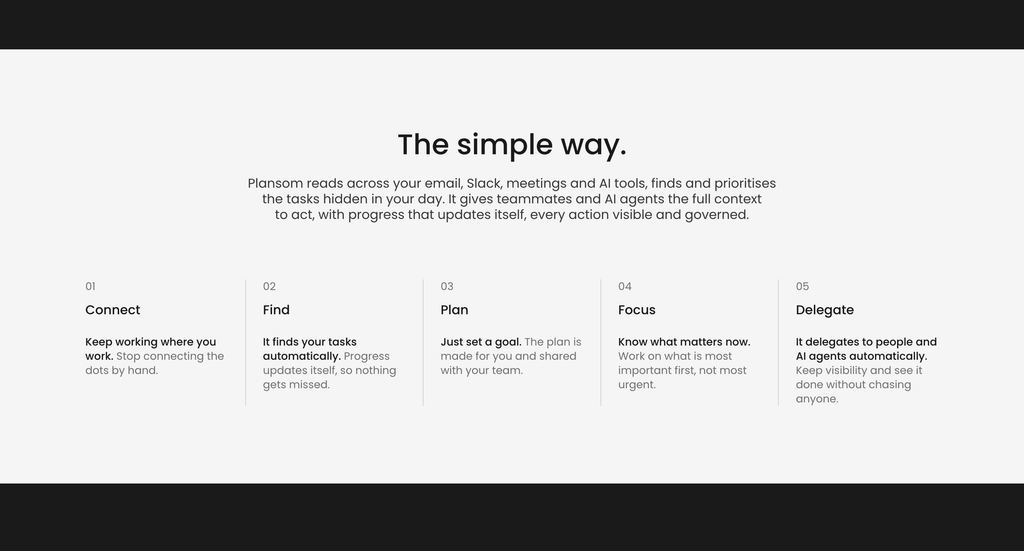
The mechanism works in three moves. Connected tools get read for work that is implied but never formally captured: a commitment buried in a meeting transcript, a request sitting in a thread. That work gets allocated to goals and broken into tasks. Then everything gets ranked by a proprietary algorithm the vendor names PlansomScore.
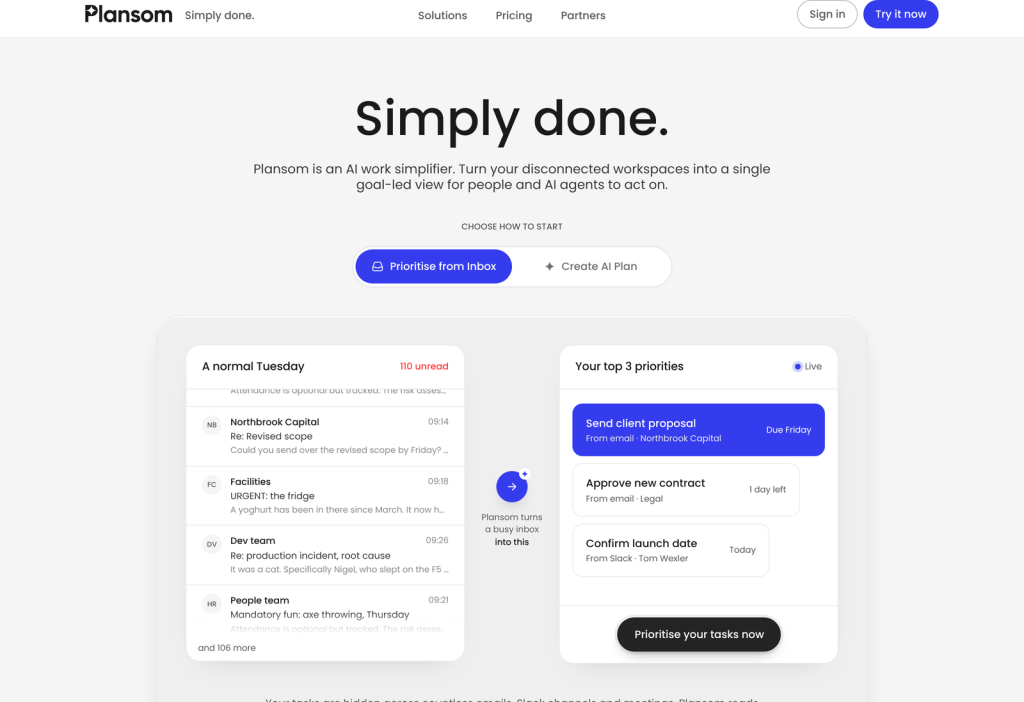
What the user sees is a view called My Day, which surfaces three priorities. Not a backlog, not a sorted list of forty things. Three. There is also an AI autopilot setting that hands progressively more of the planning, prioritising, delegating and executing to the system, plus built-in agents and the option to connect agents your team already runs.
That design is opinionated by choice. A tool that shows you three things has decided it knows better than you which three, and it has to be right often enough that you stop second-guessing it. Whether PlansomScore earns that trust is not something a pricing page can answer. No detail is published on how the score is computed, what inputs carry weight, or whether you can override a ranking you disagree with. For a product whose central promise is the ordering of your day, that is a meaningful silence.
What Plansom costs
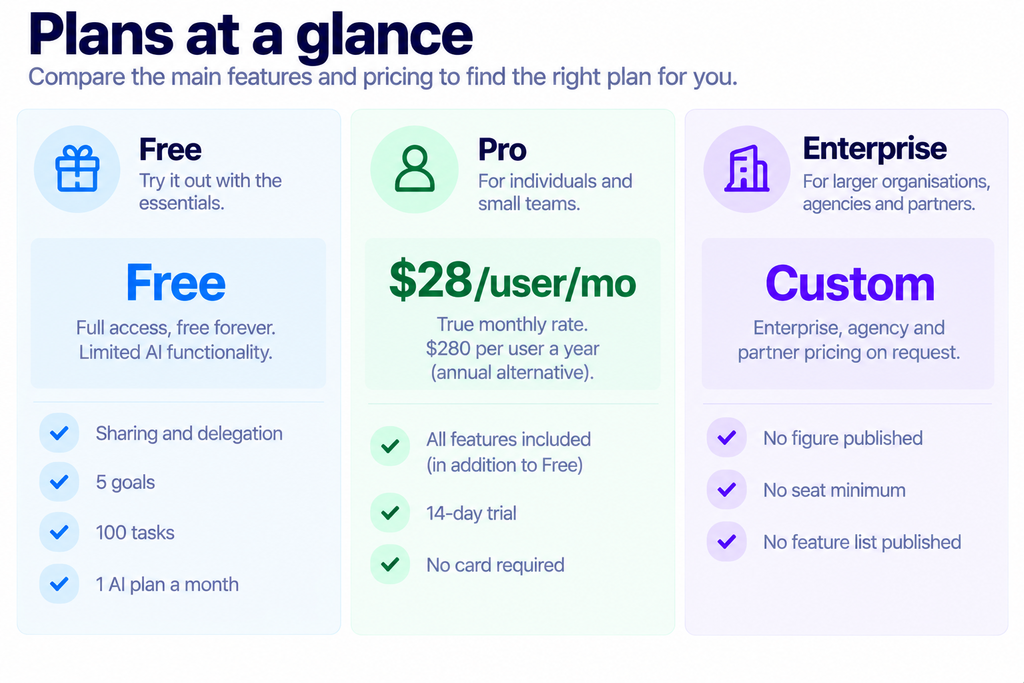
One note on finding that page at all. Both plansom.com/pricing and plansom.com/plans return a 404. The live page keeps its file extension at /pricing.html, which is easy to read as a vendor hiding its prices when it is doing the opposite. The figures are published, clearly, in both billing states.
The caps that do not move
Here is the finding that should shape your decision. We read the feature list on each card from the markup, row by row, checking which icon sits against each line rather than trusting the page text, because the rendered text collapses duplicate rows and misleads. Three numeric limits appear on both cards, and they are the same number on both.
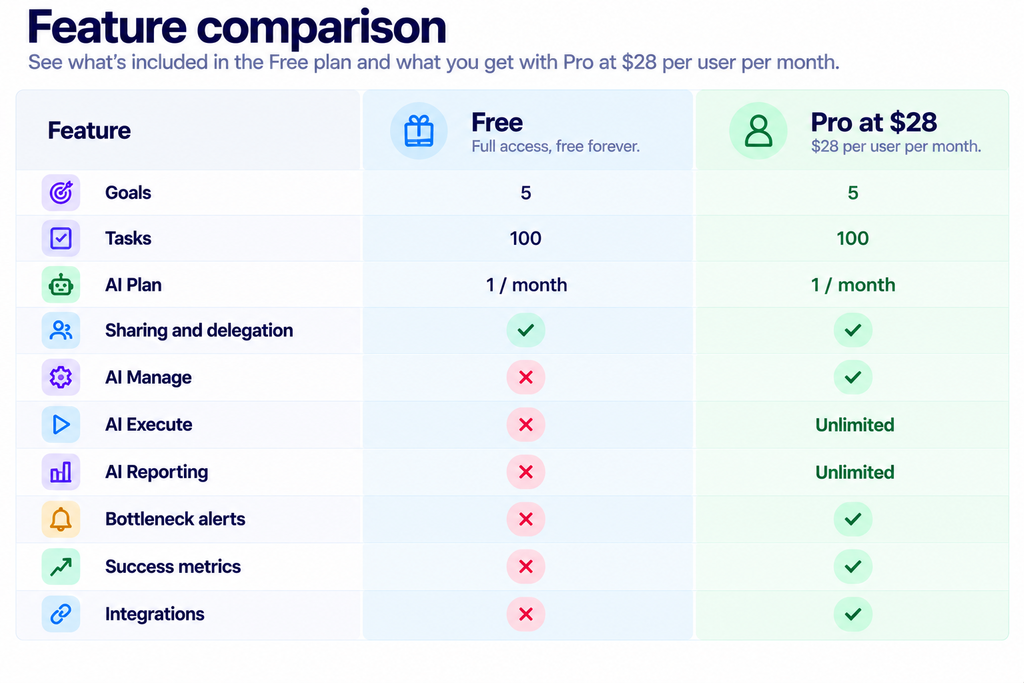
Five goals and a hundred tasks is a reasonable allowance for one person tracking their own work. For a team of eight, it is tight, and for a team of eight paying $224 a month, it is strange. A hundred tasks across eight people is twelve and a half each.
Two readings are possible. Either the caps are real on Pro, in which case this product is priced for individuals and very small teams whatever the per-seat billing implies. Or the card simply repeats the free tier’s limit rows because nobody updated the template, and Pro is uncapped in the product. We cannot tell from anything published, and the difference is large enough that you should put the question to the vendor before committing a team. Ask it in writing.
What the $28 actually switches on
Six rows flip from a cross to a tick, and they are not evenly weighted. Integrations is the one that changes the product.
Plansom’s entire premise is reading the systems where work actually lives and pulling the implied commitments out of them. Remove integrations, and you have a goal tracker you type into by hand, which is a different and much less interesting tool. The free plan is therefore a demonstration rather than a working version. Useful for seeing the interface, not for judging whether the idea works on your team’s real traffic.
AI Execute and AI Reporting both arrive as unlimited, which reads well until you ask what one unit of either is. Nowhere does Plansom define that unit, so unlimited has no denominator. AI Plan stays at one a month on both plans, so whatever generates the plan is rationed identically whether you pay or not. Bottleneck alerts and success metrics are the management-visibility pair, and AI Manage is the step where the system starts reallocating work rather than just surfacing it.
The annual option, and the badge
Monthly is preselected when the pricing page loads, which means $28 is the genuine recurring monthly rate rather than an annual figure divided by twelve. Plenty of vendors arrange this the other way round, so credit where it is due.
Switch to annual, and the figure becomes $280 per user a year, carrying a badge that reads Save 17%. Check the arithmetic: twelve months at $28 is $336, and $280 saves you $56, which is 16.67%. The badge rounds up by a third of a percentage point. That is a rounding artefact rather than marketing licence, and it is the kind of thing worth verifying yourself on any vendor’s page, because the same check sometimes exposes a much larger gap.
The effective annual rate works out at $23.33 a month. On five seats, you would pay $1,680 a year billed monthly against $1,400 billed annually, a difference of $280. On ten seats, the savings double to $560. No minimum seat count, annual commitment term or mid-term cancellation policy is published, so the usual question applies: what happens if you shed a seat in month four?
The real cost at team size
Per-seat pricing hides its total well, so here it is in whole numbers. Three seats run $84 a month, or $1,008 over a year billed monthly. Five seats are $140 a month and $1,680 a year. Ten seats reach $280 a month and $3,360 a year. Switch any of those to annual billing and the yearly figure drops to $840, $1,400, and $2,800 respectively.
Set those totals next to the published caps, and the tension becomes obvious. A ten-seat team paying $3,360 a year is working within five goals and a hundred tasks, if the cards are telling the truth about Pro. That works out at about $34 a year for each task the plan allows. That arithmetic is either wrong because the caps lift silently on Pro, or it is a signal that the product is aimed squarely at individuals and pairs rather than departments.

Account for a second subscription as well. Because Plansom explicitly does not replace your project tool, its cost sits on top of whatever you already pay for that, plus the meeting recorder it reads from. Budget it as an addition, never as a swap.
What it connects to
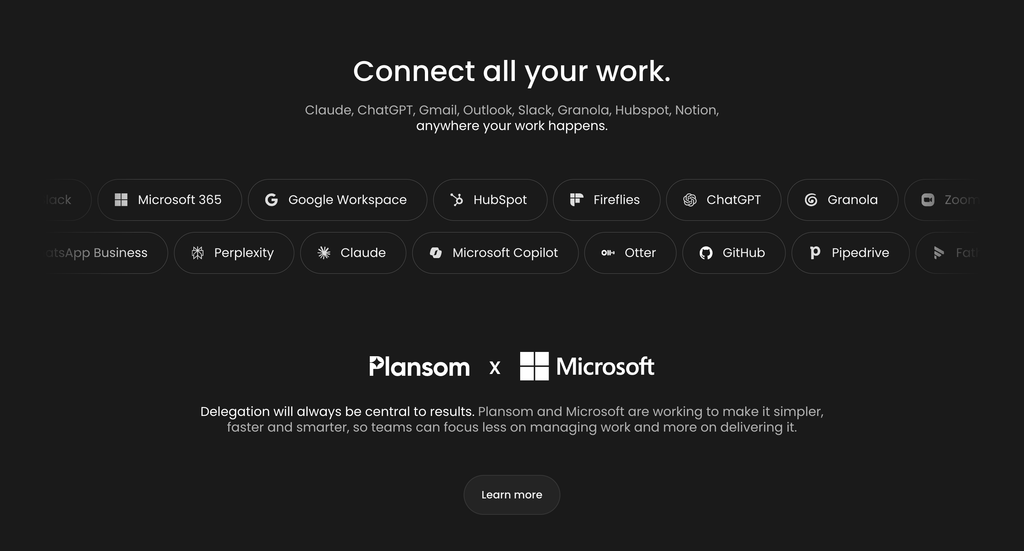
Eighteen tools are named on the homepage. Meetings and notes are well covered: Zoom, Fireflies, Granola, Otter and Fathom. Workplace suites appear as Microsoft 365 and Google Workspace, with Slack and Notion alongside, and the FAQ adds Gmail and Outlook on top of those. Sales is thinner, with HubSpot and Pipedrive. GitHub covers engineering; WhatsApp Business covers messaging.

Then there is a second group that tells you something about the design: ChatGPT, Claude, Gemini, Microsoft Copilot and Perplexity. Plansom treats assistants as sources of work in their own right, which is coherent if your team already drafts and decides inside them.
One caveat on that list. The page does not distinguish live integrations from announced ones, and we found no status page or changelog that does. If a specific connector is the reason you are buying, confirm it works today rather than inferring it from a logo. We have made the same point about other vendors whose logo walls run ahead of their connectors, including in our look at how Rippling separates connectors from plugins.
The Microsoft build is the most solid evidence available
For a company this small, independent documentation is scarce. One source stands out. Microsoft published a piece through its for-Startups programme in December 2025 describing how Plansom built its Teams agent, and the technical detail there is more specific than anything on the vendor’s own site.
It names the stack: Microsoft Foundry SDKs, the Teams SDK, Azure OpenAI, and Azure Database for PostgreSQL authenticated with Entra ID. It confirms Model Context Protocol support. It lists the adaptive cards the Teams agent posts, which are AI Coach, Goal Progress, Daily Updates, and Bottlenecks, and that last one lines up with the bottleneck alerts row on the Pro card. The piece carries quotes from Sherry List, CTO of Microsoft for Startups, and from Anders Schonberg, Plansom’s co-founder and chief executive.
Read it for what it is. A programme partner writing about a programme member is not independent review, and nothing in it tests whether the prioritisation is any good. What it does establish is that the Teams integration is a real engineering artefact rather than a logo, and that Entra ID authentication is in place, which is the sort of detail an IT reviewer will ask about.
Read the compliance wording closely
The footer reads “SOC 2 Ready” and “GDPR compliant”. Those four words deserve attention, because SOC 2 Ready is not SOC 2 certified and carries no audit opinion from anybody. It is a statement that the controls are believed to be in a state where an audit could be attempted. No auditor is named, no report date is given, and no report type is specified.
To be fair to the company, it chose accurate language where a looser phrasing was available, and the distinction only bites if your procurement process needs a report. If it does, ask whether an audit is under way and when a Type II window would close.
One further commitment from the FAQ is relevant given how much of your correspondence this tool reads: customer data is not used to train the underlying AI models. The company is registered in Dublin, at South Bank House on Barrow Street, which puts it inside the EU for data protection purposes.

Who should buy it
Choose it if: you are one person or a handful of people drowning in implied commitments across Slack, email, and meeting transcripts, and the appeal is being told three things to do rather than being handed a backlog. At $28 a seat with a 14-day trial and no card required, the cost of finding out is low. Teams already living inside Microsoft Teams get the most developed piece of the product.
Skip it if: you want a system of record. The FAQ says outright that this does not replace your project tool, so you are adding a layer rather than consolidating one, and that means another subscription and another place where work is represented. Tools like Process Street for repeatable process work solve a different problem and are not substitutes for each other.
Wait if: you need more than five goals or a hundred tasks and cannot get a straight answer on whether Pro lifts them. That single ambiguity is the biggest open question on the page, bigger than the price. Get it resolved, then start the trial and point it at your real traffic rather than a test workspace, because a tool that ranks work can only be judged on work you recognise.
FAQ
How much does Plansom cost?
There is a free plan, and Pro is $28 per user a month or $280 per user a year. Enterprise, agency and partner pricing is quoted on request with no figure published.
Is the free plan actually usable?
It is usable for looking around, and the vendor commits to always offering a free tier. Integrations are excluded, though, and reading your connected tools is the product’s main function, so the free plan cannot show you whether the idea works on your own data.
Does the paid plan raise the goal and task limits?
Not according to the pricing page, which shows 5 goals and 100 tasks on both plans. Whether those caps are enforced in the product on Pro is not stated anywhere, and we have not assumed either way.
Is there a free trial?
Yes, 14 days of full access with no credit card required, per the Pro card.
What does Plansom integrate with?
Eighteen tools are named on the homepage, spanning meeting recorders, the Microsoft and Google suites, Slack, Notion, HubSpot, Pipedrive, GitHub, WhatsApp Business, and five AI assistants. Gmail and Outlook are named in the FAQ. Integrations require the Pro plan.
Is Plansom SOC 2 certified?
No. The footer says “SOC 2 Ready”, which is a different claim and carries no auditor’s opinion. The company also states it is GDPR compliant and is registered in Dublin.
Does Plansom replace my project management tool?
The vendor says no. Its FAQ states the product does not replace email, Slack, a CRM or project tools, and is designed to sit over them.
Sources
- Plansom pricing, for both billing states, both plan cards, the per-card feature rows, and the Save 17% badge.
- Plansom FAQ, for PlansomScore, the three priorities in My Day, the AI autopilot, the named integrations, the statement that it does not replace existing tools, and the commitment not to train models on customer data.
- Microsoft for Startups, 10 December 2025, for the Teams agent architecture, the Foundry and Teams SDKs, Azure OpenAI, Azure Database for PostgreSQL with Entra ID, Model Context Protocol support and the four adaptive cards.
Prices and feature rows read from Plansom’s own pages on 17 and 20 October 2026, in both billing states, with the per-card rows parsed from the markup rather than the rendered text because the rendered text collapses duplicates. Six things are not published and have not been estimated here: any enterprise, agency or partner figure; the seat count where those terms begin; whether the five-goal and hundred-task caps bind on Pro; what one unit of AI Execute or AI Reporting is; whether the free plan limits workspace members; and which of the eighteen named integrations are live today rather than announced.