


Quick answer: Campaign Monitor is a competent, design-led email platform priced by contact count across four plans. At 500 contacts, the true monthly rates are $13 for Lite, $31 for Essentials, and $171 for Premier, with Enterprise quoted. Two things deserve your attention before you sign. The pricing page defaults to Annual, so the figure a visitor sees is 10% below the recurring rate, and Lite caps you at five emails per contact per month, which breaks the moment you mail more than once a week.
Disclosure: Stack99 earns a commission if you buy through links on this page. It costs you nothing extra and never changes our assessment.
Who owns Campaign Monitor now?
Start here, because it shapes everything else. Campaign Monitor is a Marigold product. Marigold’s own site currently lists three brands: Campaign Monitor, Emma and Vuture. The same page includes a short notice that Zeta Global acquired Marigold’s enterprise products.
Read that carefully. The enterprise portfolio has moved on, and what remains under the Marigold name is the mid-market group that Campaign Monitor now anchors. For a buyer that cuts both ways. A smaller lineup can mean sharper focus on the product you are actually buying. It can equally mean a business in transition, and transitions have a habit of reaching the roadmap eventually.
Nothing on the product itself suggests neglect. The product shipped a visible batch of new features recently, several of them tagged NEW on the pricing page: Marketing Studio, Email Workspace, Creative Lab, Brand Hub, Translation, Social Suite, Campaign Series and Drip Campaigns. Nobody ships eight labelled features into a product they are winding down.
The pricing page, and what it does not show you
Load the pricing page and two controls set the price: a contact-count dropdown that opens on “0 – 500”, and a Monthly or Annual switch that opens on Annual.
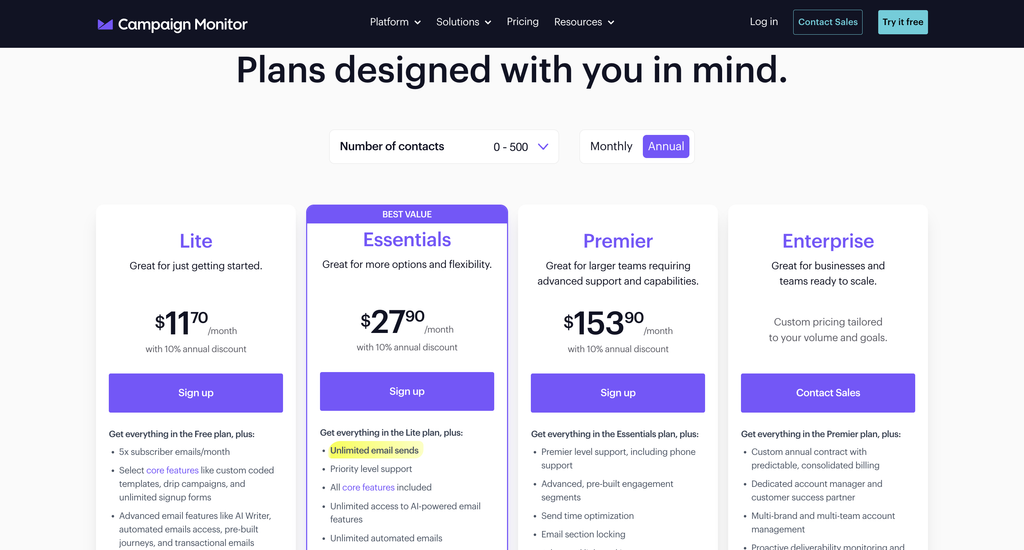
Look at the plan cards in that screenshot. Each one shows a dollar sign, a gap where the number belongs, and “/month” underneath. The figures never loaded for us, on repeated visits, with a current browser engine. We are reporting what we saw rather than guessing at a cause.
The numbers do exist. The vendor publishes them in the page itself, as attributes on each option of the contact dropdown, so a reader who views source can recover the whole ladder. We did exactly that, and the table below is built from those published values rather than from anything we inferred.
One more detail from the page source settles the billing question. The script that draws the prices multiplies the published figure by 0.9 when Annual is selected. So the attribute values are month-to-month rates, and the annual view shows them 10% lower. The card under Lite says “with 10% annual discount” in plain text, and the FAQ confirms it.
What the four plans cost
Here are the entry prices, at the smallest contact band, as true recurring monthly rates.
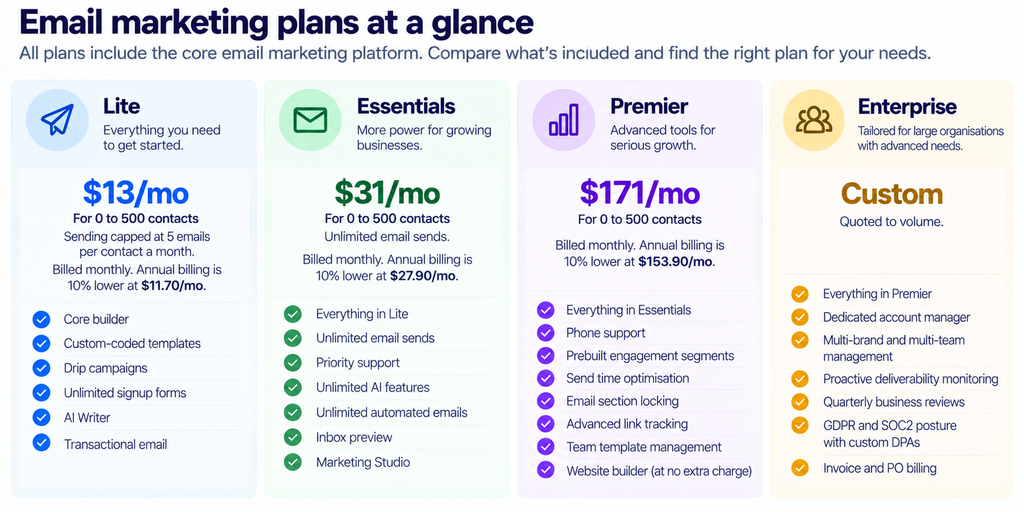
There is no permanent free tier. What you get instead is a 30-day free trial limited to 500 contacts and 500 emails, which is enough to judge the builder and little else.
How the price moves with your list
Seven contact bands are published, with anything above 50,000 pushed to a sales conversation. Essentials is the plan most buyers land on, so here is its full ladder at monthly rates.
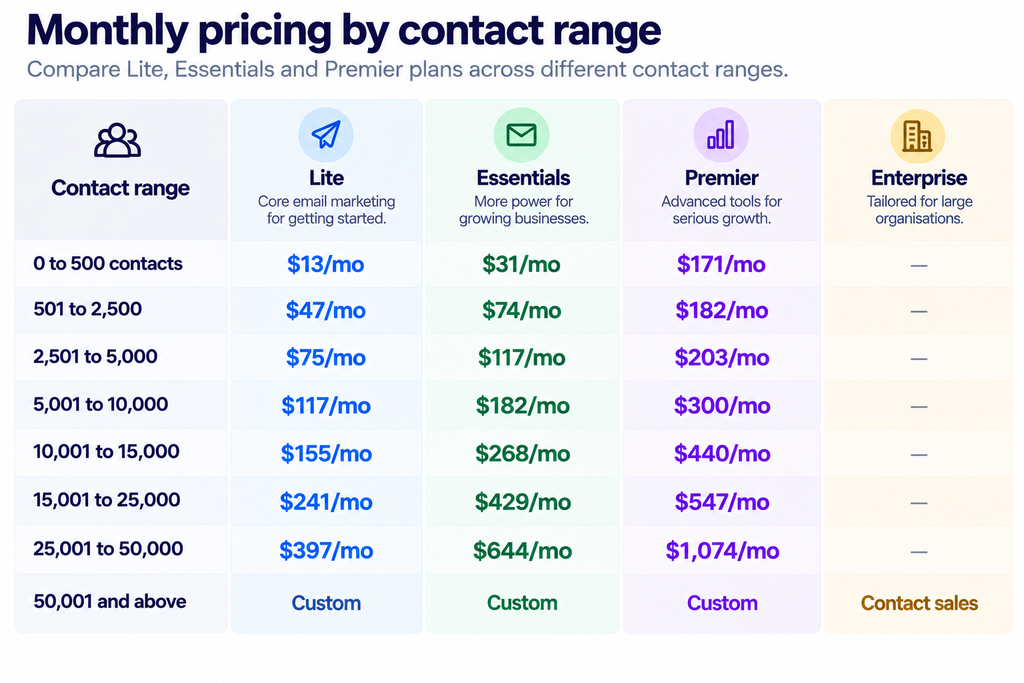
Convert those to cost per thousand contacts and the shape becomes obvious. On Essentials, a 500-contact list pays $62 per thousand. A 50,000-contact list pays $12.88. Small senders carry the heaviest unit cost by a factor of nearly five.
The sharpest step is the first one. Moving from 500 to 501 contacts takes Lite from $13 to $47 and Essentials from $31 to $74. Your list grows by a single address and your bill more than doubles. Anyone sitting in the high 400s should know that the next signup is an expensive one.
Premier behaves differently. It starts at a steep $171 and then barely moves for three bands, reaching only $203 at 5,000 contacts. A list of 5,000 pays 13 times Lite’s rate at 500 contacts but under twice it at 5,000. Premier is priced for organisations that were always going to have a real list, and it punishes anyone who buys it early.
The send cap is the real constraint on Lite
Lite advertises “5x subscriber emails/month,” and the page carries the resulting figure at every band: 2,500 sends at 500 contacts, 12,500 at 2,500, 50,000 at 10,000, 250,000 at 50,000. The multiplier is exactly five throughout.
Work out what five actually buys. A monthly newsletter uses one. A weekly newsletter uses about 4.3, which fits with almost nothing spare. Mail twice a week and you need roughly 8.6, so Lite fails before you have sent anything clever. Add a welcome sequence, a cart reminder or a re-engagement flow on top and the ceiling arrives sooner still.
Essentials removes the cap entirely. That single line, rather than the AI features or the priority support, is what most buyers are really paying the extra $18 a month for at the smallest band. Anyone running automation should treat Lite as a trial rather than a plan.
The overage policy is refreshingly plain. The FAQ says you will be notified and given the option to upgrade or to pay for the additional emails. No account suspension, no silent throttle.
What you actually get for the money
Campaign Monitor built its reputation on the builder, and that remains the strongest part of the product. You get a drag-and-drop editor, over 100 responsive templates, the ability to import custom-coded HTML, and a branded-template feature that pulls your colours and assets straight from a URL you supply. Two million Pexels images are available inside the editor.
The AI layer is newer and sits mostly under the Marketing Studio banner. Email Workspace generates a complete branded email from your website and a stated goal. Creative Lab produces images and banners from a prompt. Brand Hub stores your identity once so the other two apply it automatically. Translation creates localised versions of a campaign, and Social Suite turns a campaign into an Instagram post. On Lite, these carry “Limited trial access” labels; Essentials unlocks them properly.
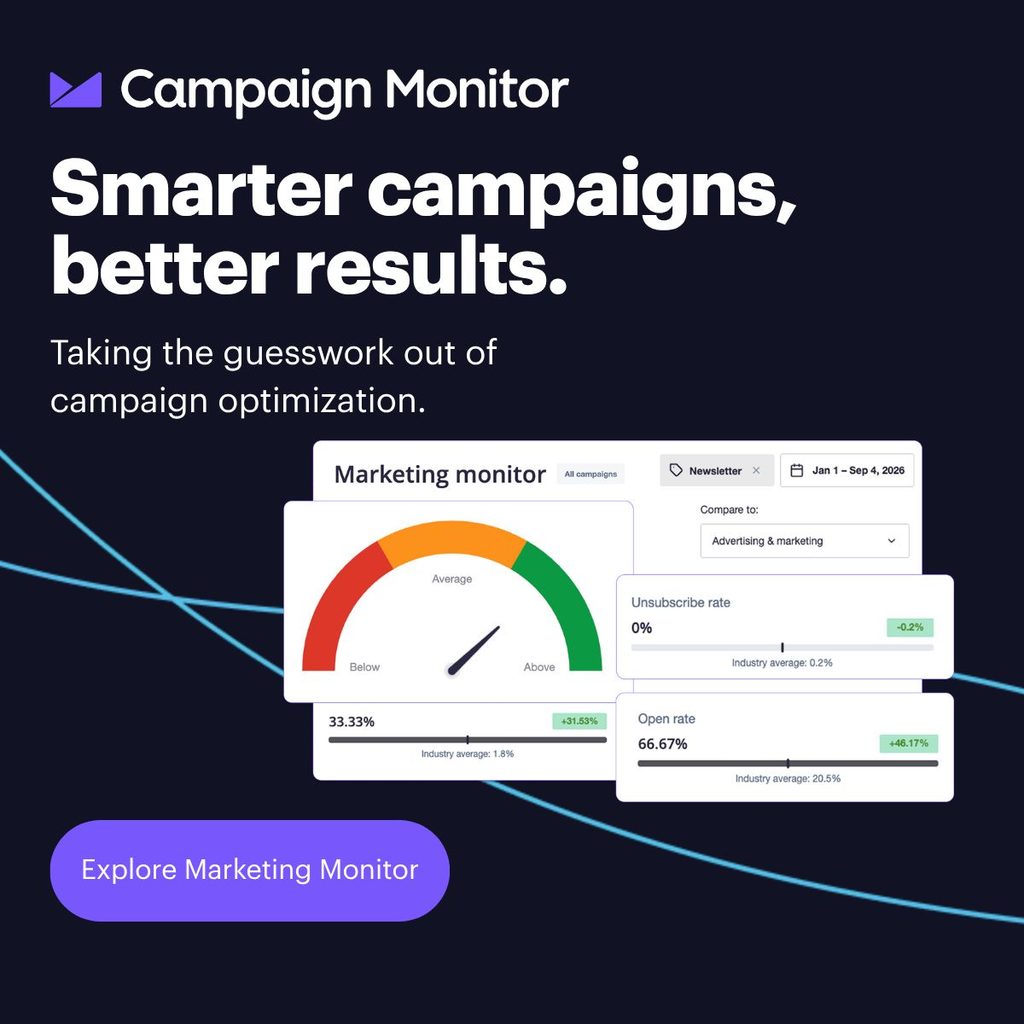
Reporting covers the expected ground with two touches worth calling out. A non-human click filter strips bot clicks from your reports, which matters more than it used to now that security scanners open everything. Worldview shows opens and clicks on a live map, which is mostly theatre but good theatre.
Agency features sit in their own section: a client dashboard with metrics widgets and starred clients, a consolidated activity view, client-level performance data, per-client permissions, and independent client billing with the option to add your own markup. Agencies are clearly a deliberate segment here rather than an afterthought.
One add-on to note. The drag-and-drop website builder costs $10 a month on Lite and Essentials, and comes included with Premier. Factor it in if you want it, because it slightly narrows the gap between tiers.
Deliverability, and the part no platform can do for you
Any review of an email platform written now has to deal with the sender rules that took effect in February 2024. Google requires anyone sending more than 5,000 messages a day to Gmail accounts to publish SPF, DKIM, and DMARC records, to keep the spam rate reported in Postmaster Tools below 0.30%, and to support one-click unsubscribe in marketing mail alongside a visible unsubscribe link.
Several of the required pieces come with the platform. A Preference Center lets subscribers change what they receive instead of leaving. Inbox preview and the automated design test run your campaign through major clients and popular spam filters before it goes. Deliverability support from an expert team is listed as a feature, and proactive deliverability monitoring is an Enterprise line item.
What no platform can hand you is domain authentication. Those three records live on your own DNS, and a provider can only tell you what to publish. If your spam complaint rate drifts above 0.30% because you bought a list, no amount of template polish will rescue the campaign. Budget a morning for DNS before your first send and the rest gets much easier.
Integrations and the practical details
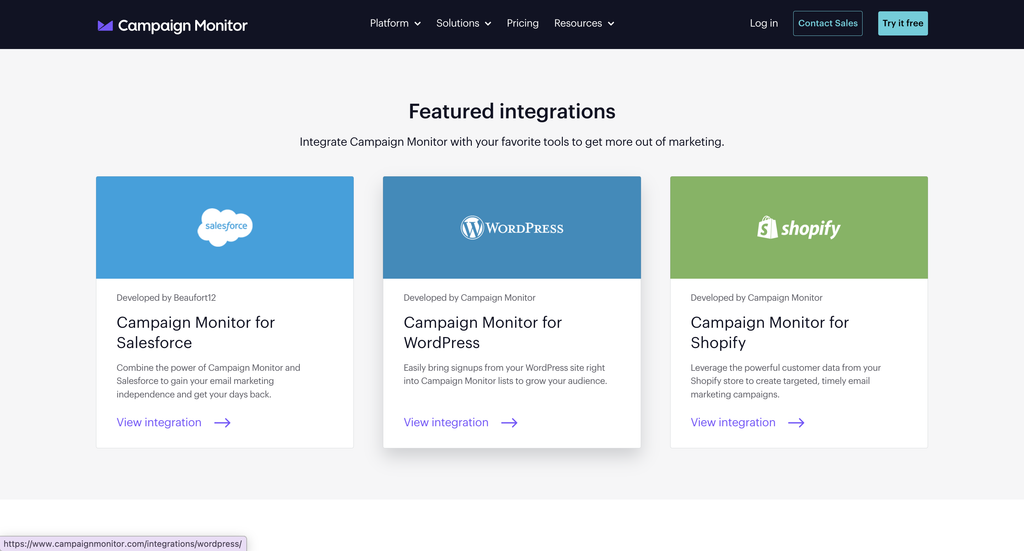
The platform states 250 or more integrations, naming Salesforce, WordPress, and Google Analytics as examples, with a custom API for anything missing. Several smaller details from the FAQ belong in your budget.
- The 10% annual discount does not apply to agency or multi-team plans. If you are an agency, the annual option is off the table.
- Nonprofits get 15% off, arranged through sales rather than applied automatically.
- Listed prices are USD. CAD, EUR, GBP, AUD and NZD can be supported by arrangement.
- Most credit cards are accepted, with invoicing available for high-volume senders and larger organisations.
- You can move between monthly Lite, Essentials and Premier without penalty.
- Premier support is described as queue priority rather than a different team, so you are buying speed rather than expertise.
Where it falls short
Three things would give us pause.
First, the pricing page that will not show its own prices. A prospective customer who does not view source cannot find out what Campaign Monitor costs without starting a signup or calling sales, on a page whose entire purpose is to answer that question. Combine it with the preselected Annual toggle and the pricing experience is the weakest part of the product.
Second, the jump out of the smallest band. More than doubling the bill at 501 contacts is harsh for exactly the customers least able to absorb it, and a 2,000-contact list pays the same $74 as a 501-contact one.
Third, the ownership picture. A notice about enterprise products moving to Zeta Global is not a crisis, and it is also nothing. Ask about roadmap commitments and contract continuity before signing anything multi-year.
What a year actually costs
Monthly figures flatten the differences between tiers. Annual totals sharpen them.
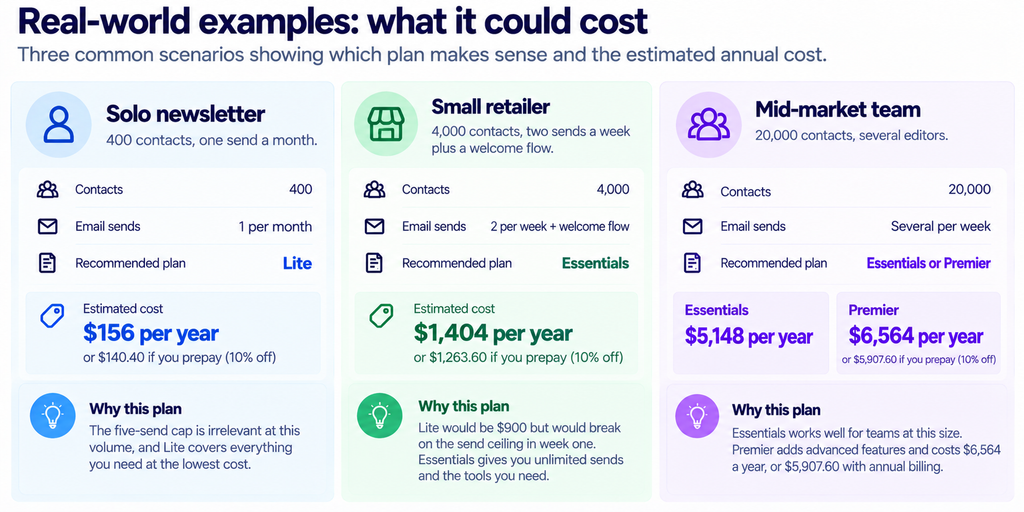
- Solo newsletter, 400 contacts, one send a month. Lite costs $156 a year, or $140.40 if you prepay. The five-send cap is irrelevant at this volume.
- Small retailer, 4,000 contacts, two sends a week plus a welcome flow. Essentials costs $1,404 a year, or $1,263.60 prepaid. Lite would be $900 and would break on the send ceiling in week one.
- Mid-market team, 20,000 contacts, several editors. Essentials costs $5,148 a year. Premier costs $6,564, dropping to $5,907.60 prepaid.
That last pair is the decision most buyers at scale will face. Premier costs $118 a month more than Essentials at 20,000 contacts, which is $1,416 a year. For that you get send time optimisation, prebuilt engagement segments, advanced link tracking, template section locking, and the website builder thrown in.
Whether that is money well spent turns on one question: do you have people editing templates who should not be? Section locking exists because marketers break layouts, and a single mangled send to 20,000 addresses costs more in goodwill than a year of the upgrade. Teams of one can skip it without a second thought.
Before you migrate
Two practical points if you are moving from another platform. Your sending reputation does not transfer with your list, so plan a warm-up rather than pointing 20,000 addresses at a new provider on day one. And check your automation inventory before you commit, because journeys rarely port cleanly and rebuilding them is the part of a migration that always runs long.
Use the 30-day trial for the builder and the template import, since 500 contacts is enough to judge both. Judge deliverability only after you are sending real volume, which means the first month on a paid plan is still part of the evaluation.
Who should buy it
- Choose Essentials if: you send more than once a week, want the automation and AI features without a cap, and your list is somewhere between 500 and 25,000. This is the plan the product is really built around.
- Choose Lite if: you send one newsletter a month to a small list and want a very good builder for $13. Treat the five-send ceiling as a hard wall rather than a guideline.
- Choose Premier if: you already have 5,000 or more contacts and need send time optimisation, locked template sections for a team of editors, or phone support. Below that list size it is poor value.
- Choose Enterprise if: you run several brands, need invoice billing and a custom DPA, or want someone watching deliverability on your behalf.
- Look elsewhere if: you are an agency hoping to prepay annually, or your list sits just above a band boundary with no growth planned.
For adjacent reading, our GetResponse integrations guide covers a platform with a different pricing logic, and the Leadpages pricing breakdown is useful if your bottleneck is capture rather than sending.
FAQ
How much does Campaign Monitor cost?
At the smallest band of 0 to 500 contacts, Lite is $13 a month, Essentials is $31, and Premier is $171, all in USD. Prices rise through seven contact bands up to 50,000, above which Campaign Monitor quotes individually.
Does Campaign Monitor have a free plan?
No permanent free tier. There is a 30-day free trial restricted to 500 contacts and 500 emails.
Why does the pricing page show no prices?
We cannot say why, only that the price area rendered empty on every visit we made. The underlying monthly figures are published in the page source as data attributes on the contact-count dropdown, which is where the numbers in this review come from.
Is the annual discount worth taking?
It saves 10%, confirmed in Campaign Monitor’s own FAQ. On Essentials at 10,000 contacts, that is $218 a year. Agency and multi-team plans are excluded from it.
How many emails can I send on Lite?
Five per contact per month. That is 2,500 sends on a 500-contact list and 50,000 on a 10,000-contact list. Essentials and above remove the cap.
Who owns Campaign Monitor?
Marigold, alongside Emma and Vuture. Marigold’s site states that its enterprise products have been acquired by Zeta Global.
Does it include a website builder?
Premier includes it. On Lite and Essentials, it is a $10 a month add-on.
Sources
- Campaign Monitor pricing, captured 12 October 2026. Plan rates were read from the published data attributes on the contact-count selector; the annual multiplier of 0.9 was read from the page’s own pricing script.
- Marigold, the parent brand, for the current product lineup and the notice regarding Zeta Global.
- Google’s Email sender guidelines, the source for the February 2024 bulk sender requirements, the 0.30% spam rate threshold and the one-click unsubscribe rule.
- RFC 8058, the IETF standard that defines one-click unsubscribe through the List-Unsubscribe-Post header.
- RFC 7489, the DMARC specification underpinning the authentication requirement.
- The Campaign Monitor help centre.
Two things we left out deliberately. We quote no third-party review score, because G2, Capterra and Trustpilot all refuse our declared crawler, so no aggregate rating could be checked at source. We also make no claim about Campaign Monitor’s specific implementation of one-click unsubscribe, since that detail is not stated on the pages we were able to read.