


In this guide
Pricing Overview :
Leadpages pricing in 2026 has two public layers on the current official pricing pages: a lighter HTML publishing layer and the fuller Leadpages conversion-optimization layer.
Disclosure: Stack99 earns a commission if you buy through links on this page. It costs you nothing extra and never changes our assessment.
On the current official leadpages.com/pricing page, the visible public plan anchors include:
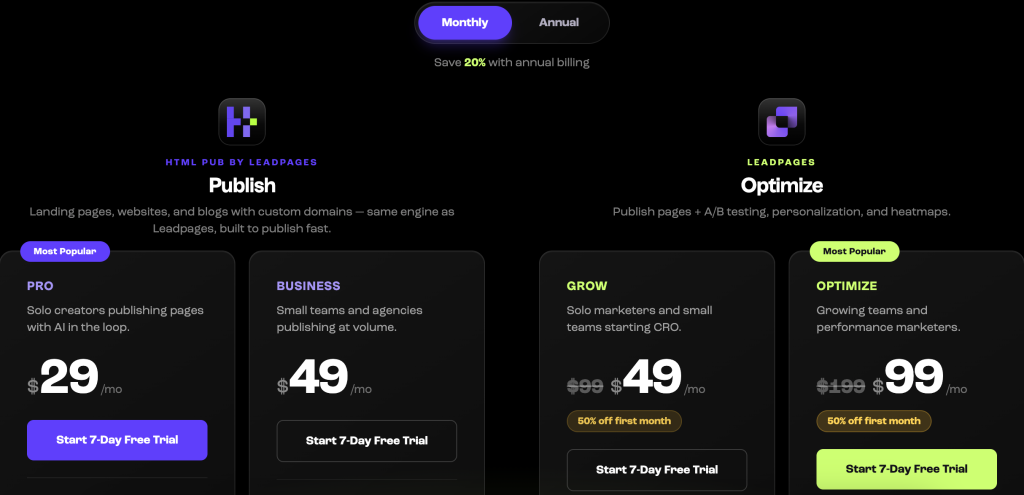
| Plan | Price | What you get |
|---|---|---|
| HTML Pub Starter | $10/mo | |
| HTML Pub Pro | $29/mo | |
| HTML Pub Business | $49/mo | |
| Leadpages Grow | $49/mo | for the first month, regularly $99 |
| Leadpages Optimize | $99/mo | for the first month, regularly $199 |
| Leadpages Scale | $399/mo |
The same official pricing page also highlights:
- 7-day free trial.
- Unlimited traffic on every Leadpages plan.
- AI page creation on every Leadpages plan.
- A/B testing is included on the Leadpages plans.
That means the first pricing decision is not just “which plan?” It is “do I only need publishing, or do I need conversion optimization too?”
If you want to inspect the live official pricing page directly, start with Leadpages here.
All Pricing Tiers Explained :
HTML Pub Starter –
Starter is the lowest public publishing tier and is shown at $10 per month.
The official page positions HTML Pub for users who mainly need:
- Pages.
- Blogs.
- Custom domains.
- SSL.
- AI-assisted authoring and a clean editor.
That makes Starter a publishing-first entry point rather than a full optimization stack.
HTML Pub Pro –
Pro is shown at $29 per month and sits in the middle of the HTML Pub ladder.
This is likely the fit for users who want more publishing capacity without yet paying for the full CRO toolset.
HTML Pub Business –
Business is shown at $49 per month.
The official page frames this side of the product around publishing at higher volume, with more pages, domains, blogs, and AI credits than the lower publishing tiers.
Leadpages Grow –
Grow is shown at $49 per month for the first month, regularly $99.
This is where the pricing story changes from publishing to conversion optimization.
The official pricing page highlights Grow as including:
- Everything in HTML Pub.
- A/B testing.
- Dynamic text replacement.
- Lead enrichment.
- 500 pages.
That is a meaningful step up for people running actual campaigns rather than just publishing pages.
Leadpages Optimize –
Optimize is shown at $99 per month for the first month, regularly $199.
The official page positions Optimize as adding:
- Smart Traffic.
- Click and scroll heatmaps.
- Auto-personalization.
- More pages and analytics retention.
This tier is clearly for teams that actively optimize conversion performance week by week.
Leadpages Scale –
Scale is shown at $399 per month.
The official pricing page frames Scale as the top automated-optimization layer, with the full auto-optimization loop and larger operational limits for higher-volume teams.
Hidden Costs And Gotchas :
Leadpages pricing is public and readable, but there are a few details worth slowing down for.
First, some of the most eye-catching plan numbers on the current official pricing page are first-month promotional numbers. Grow and Optimize are visibly shown at reduced first-month pricing, with higher regular prices right next to them.
Second, the product now has two layers:
- HTML Pub for publishing.
- Leadpages for publishing plus CRO tooling.
That means buyers can accidentally compare the wrong things if they are not careful. A cheaper HTML Pub plan is not a real substitute for a Leadpages plan if your team needs A/B testing, lead enrichment, and Smart Traffic.
Third, the official pricing page also makes it clear that feature depth changes materially by tier. Not every optimization feature is included at the lower paid levels.
If you want to avoid the most common pricing mistake, open Leadpages here and decide first whether your team is buying a publisher or a conversion stack.
That sounds simple, but it is exactly where many buyers get tripped up. They compare the lowest visible number to a broader CRO platform and then assume the cheaper layer is enough. In reality, HTML Pub and the main Leadpages plans are solving different problems. One is about getting pages live. The other is about testing, learning, and improving conversions over time.
ROI Calculation Example :
The cleanest Leadpages ROI calculation is not about page count. It is about conversion improvement and tool consolidation.
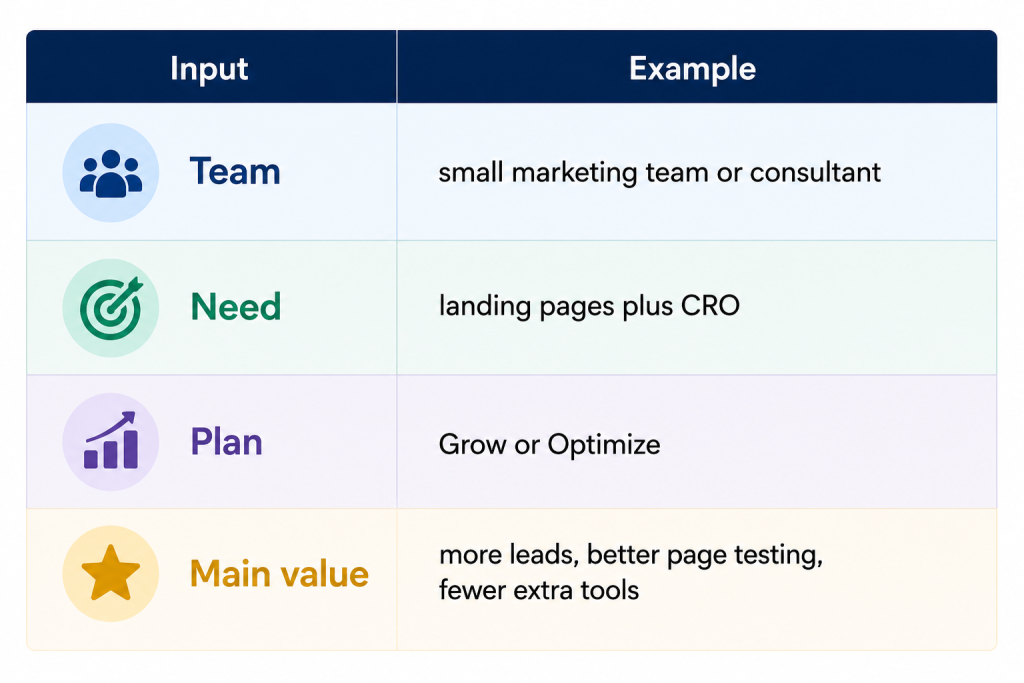
Here is a simple example:
The official pricing page itself makes the consolidation argument very directly. It compares Leadpages against a stack of separate tools for:
- Page building.
- Heatmaps.
- A/B testing.
- Lead enrichment.
- Integration glue.
That is a strong ROI lens because many teams are not replacing one tool. They are replacing several scattered subscriptions and a lot of friction.
If better testing and cleaner lead capture improve campaign results even slightly, the higher plan can justify itself much faster than the sticker price suggests.
Cost Comparison To Alternatives :
Leadpages pricing is interesting because it is now easier to separate users by maturity level.
The HTML Pub side competes with simpler publishing tools. The Leadpages side competes with stronger CRO and landing-page optimization platforms.
The official page even leans into this by comparing:
- Unlimited traffic versus competitors with caps.
- A/B testing on lower-priced plans than some rivals.
- Included AI page creation and lead enrichment.
That makes Leadpages look strongest for buyers who want conversion tooling without immediately paying enterprise-style optimization prices.
Best Value Tier Recommendation :
For most serious small marketing teams, Grow looks like the best value tier.
Why?
- It gets you out of the publishing-only layer.
- It includes A/B testing.
- It includes lead enrichment and dynamic text replacement.
- It does not jump straight to Optimize pricing unless you truly need Smart Traffic and heatmaps.
HTML Pub Starter and Pro make sense when the goal is simply to publish quickly and cheaply. But once conversions and testing matter, Grow becomes the more realistic operating plan.
Optimize is best when:
- You run multiple campaigns continuously.
- You care about AI visitor routing and heatmaps.
- CRO is part of weekly work, not an occasional project.
Scale is best when landing pages are no longer a side tool and have become part of a larger revenue operation. That tier only makes sense when the business already treats testing and optimization as a serious operating function rather than a once-a-quarter marketing experiment.
Discounts And Annual Billing :
The official ob.leadpages.com/pricing content still emphasizes annual billing discounts and says annual plans can save compared to monthly billing.
The current public leadpages.com/pricing page also shows strong promotional first-month pricing for Grow and Optimize.
That means there are really three pricing lenses buyers should watch:
- First-month promotional price.
- Regular monthly price.
- Annual savings were offered.
This is one of those products where the cheapest visible number is not always the best comparison number.
If you want to compare the current promo with the longer-term cost, start with Leadpages here and check how your expected usage maps to Grow, Optimize, or Scale after the introductory month.
A Simpler Buying Rule :
If your main goal is just to get pages online, stay on the publishing side.
If your main goal is to generate more leads and improve results through testing, move to the Leadpages side quickly.
That is the cleanest buying rule because it aligns the plan with the real job:
- HTML Pub for publishing.
- Grow for practical small-team conversion work.
- Optimize for heavier weekly optimization.
- Scale for serious revenue operations.
If you apply that rule first, the pricing page becomes much easier to read and much harder to misinterpret.
If you want to sanity-check that decision on a real project, open Leadpages here and compare the plan family against the actual way your team launches and improves campaigns.
Verdict: Is Leadpages Worth It?
Leadpages pricing is strong in 2026 because it gives buyers more than one entry path.
The official pricing pages show:
- Low-cost publishing plans through HTML Pub.
- Full conversion-focused plans through Leadpages.
- Unlimited traffic on Leadpages plans.
- AI page creation on every plan.
- A/B testing is included on the CRO side.
It is worth it when you are not only publishing pages, but actively trying to turn those pages into more leads and sales. It is less compelling if your team just needs a cheap page builder and will never test or optimize anything.
FAQ :
How Much Does Leadpages Cost In 2026?
The current official pricing page shows HTML Pub plans at $10, $29, and $49 per month, and Leadpages plans at Grow $49 first month / $99 regular, Optimize $99 first month / $199 regular, and Scale $399 per month.
Does Leadpages Offer A Free Trial?
Yes. The official pricing page highlights a 7-day free trial, and older official pricing flows also reference a 14-day free trial on some pages.
What Is The Difference Between HTML Pub And Leadpages?
HTML Pub is the publishing layer. Leadpages is the broader conversion-optimization layer that adds tools such as A/B testing, Smart Traffic, lead enrichment, and heatmaps.
Which Leadpages Plan Is Best For Most Teams?
Grow looks like the best value for many small teams because it adds meaningful CRO features without immediately jumping to higher Optimize or Scale pricing.
Is Leadpages Expensive?
It depends on the workflow. If you only need publishing, the lower HTML Pub plans may be enough. If you are replacing several CRO and landing-page tools, the higher Leadpages plans can be easier to justify.
Before You Choose, Compare These
Hand-picked guides to help you choose the right tool — no fluff.
 IntegrationsLeadpages Integrations Guide 2026What it connects to and how well each link holds up.
 Use CasesWho Is Leadpages Best For? Use Cases & Fit (2026)Who gets the most out of it — and who should skip it.
 Use CasesWho Is ThorData Best For? Use Cases & Fit (2026)Who gets the most out of it — and who should skip it.
 PricingCallHippo Pricing 2026Real tier prices and what each plan actually includes.