


In this guide
What Getscreen.me Counts As An Integration :
Getscreen.me has no app marketplace. Search its site for a directory of a thousand connectors and you will not find one, because the product does not work that way. Its integrations menu lists nine items, and every one of them is either a way to get identities in, a way to get devices in, a way to get the product into something else, or a way to make the connection itself work on an awkward network.
Disclosure: Stack99 earns a commission if you buy through links on this page. It costs you nothing extra and never changes our assessment.
Those nine, taken straight from the vendor navigation, split into four jobs:
- Deep integration: the OEM solution and the HTTP API reference.
- Feature extensions: analytics for technician and device workload.
- Importing technicians: single sign-on and Active Directory synchronisation.
- Importing devices and access: mass deployment, the Chrome extension, apps and plugins, and a custom proxy server.
Read that list against a typical remote access buyer and the shape becomes clear. Getscreen.me assumes you already have an identity system, a fleet of machines and possibly a product of your own. It does not assume you want it talking to your CRM.
If you want to follow along inside the product while you read, start with Getscreen here.
The HTTP API :
Everything programmable runs through one REST API, and the reference is public. Endpoints are grouped by what they touch rather than by feature name.
- Quick support, for the one-off invitation flow.
- Permanent access, split into devices, groups and software.
- Team, split into technicians, departments, permissions and roles.
- History, for connection records.
That grouping tells you what automation is realistic. Provisioning a new technician, putting them in a department, assigning a role and giving them a device group is all doable without touching the dashboard. Pulling connection history into a reporting warehouse is doable. Building a ticket-to-session workflow means your helpdesk calls the quick support endpoint, which is the pattern the vendor documents for service providers.
One limit deserves attention before you design anything. The API is rate limited per device rather than per account, at 100 requests an hour per device on Advanced and 1,000 an hour per device on Enterprise. A fleet of 50 devices on Advanced therefore carries an aggregate ceiling of 5,000 requests an hour. Your API budget grows as your fleet grows, which is friendlier than a flat account cap for anyone scaling up and tighter than it looks if you want heavy polling on a small estate.
Standard gets no API at all. If any part of your plan involves a script, Standard is the wrong plan and the price gap is the real cost of automation here.
OEM Integration :
The most interesting thing Getscreen.me sells is itself, as a component inside somebody else’s product.
Because the technician side runs entirely in a browser, the vendor documents embedding remote access into an existing web service. The documentation frames it as a common request from providers of electronic services who want remote support inside their own interface rather than as a separate tool their customers have to open.
Pairing that with the Getscreen.me branding options is where it gets commercially interesting. Branding covers which cover a custom logo, a product name, a subdomain and a personal domain. Combined with the API, a managed service provider can issue support sessions from its own portal, on its own domain, with its own name on the screen, and never show the Getscreen.me brand to an end customer.
Worth checking before you build: branding and OEM are plan-gated business options rather than universal features, and the per-technician price is the same whether a seat is used by your own staff or by a reseller. Model the seat count for the whole chain, not just your team.
Active Directory and LDAP :
If your operators and administrators already exist in a local Active Directory, Getscreen.me can import them as users. They then sign in with the same username and password they use everywhere else, which removes a separate credential set from your attack surface and from your offboarding checklist.
This is the integration most likely to decide your plan, and the plan comparison is blunt about where it lives.
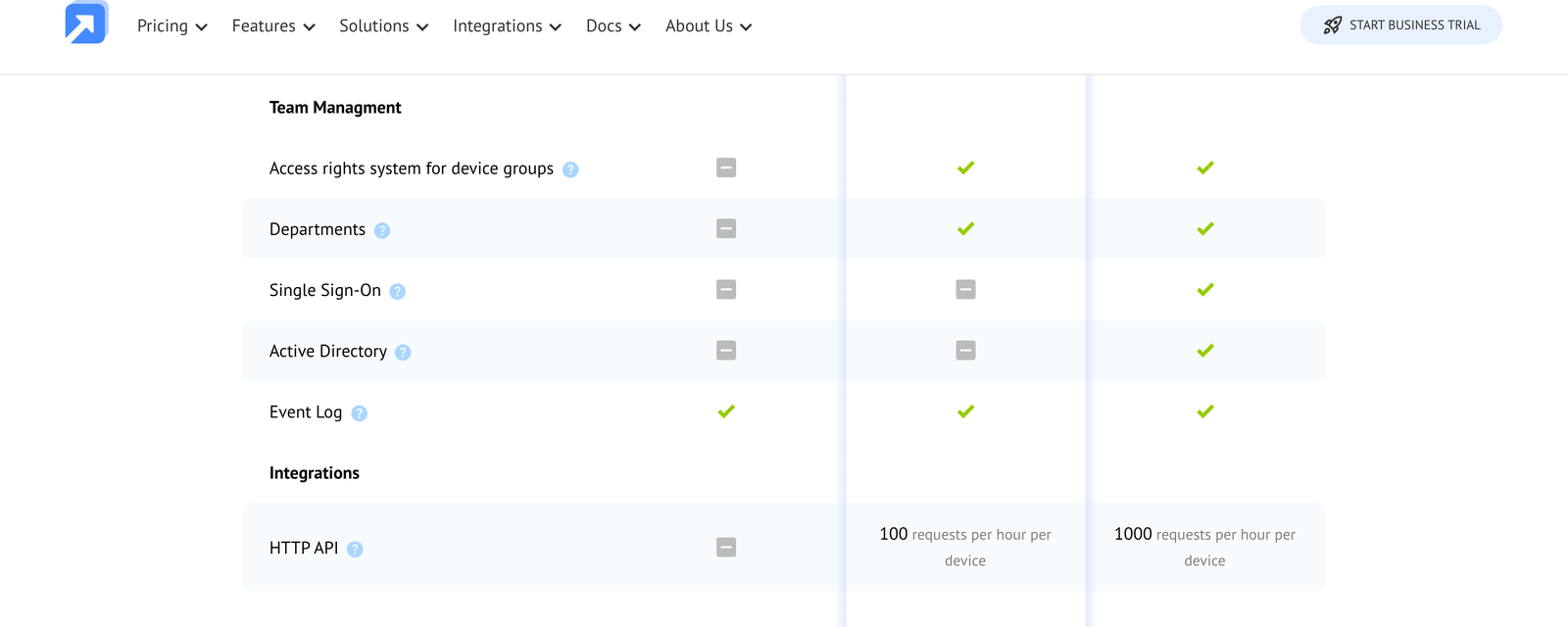
Active Directory sits on Enterprise alone. Standard and Advanced both show a dash. Any organisation with an identity policy that forbids standalone credentials is on the top plan from day one, regardless of how many technicians it has or how light its usage is.
Single Sign-On :
SAML single sign-on follows exactly the same rule. Enterprise only, dash on both lower plans.
Two adjacent team controls behave differently and are worth separating in your head. The access rights system for device groups and the departments feature both appear on Advanced and Enterprise, so delegated permissions do not require the top plan. The event log appears on all three, so an audit trail of who connected to what is available even at entry level.
That produces a clean decision rule. Teams that need structured permissions should buy Advanced. If you need your identity provider to own authentication, buy Enterprise. Those are different problems and Getscreen.me prices them separately.
Two-step verification is the fallback for everyone else. The vendor documents it as a one-time code delivered by email, by Telegram or through an authenticator app, and it is not tied to the Enterprise tier.
Remote Desktop Manager, Gateway and Proxy :
Three integrations exist to make connections work in environments that resist them.
Remote Desktop Manager is the one third-party tool Getscreen.me documents by name. RDM, from Devolutions, stores credentials and manages connections across a long list of protocols, from RDP and SSH to other vendors’ remote tools. Adding Getscreen.me as an entry there means technicians who already live in RDM do not have to leave it.
The Gateway app solves a different problem. This one is a small console application that gives other devices on the same network access to the Getscreen.me server. Reach for it when a direct connection to the server is blocked by network restrictions, or when the server needs to reach resources inside a customer network that are not exposed externally. Anyone supporting industrial or healthcare sites behind strict firewalls will recognise the need.
The custom proxy server covers the final case. Connections normally run peer to peer over WebRTC, and when network conditions block that, traffic falls back to proxy servers. Pointing that fallback at a proxy you control keeps session media on infrastructure you own. Organisations with data residency obligations should treat this as the feature that makes the product usable rather than as an optimisation.
What Each Plan Unlocks :
Here is the integration surface by plan, read from the vendor comparison on 16 October 2026.
- Standard: event log only. No HTTP API, no SSO, no Active Directory, no departments, no device group permissions.
- Advanced: adds the HTTP API at 100 requests an hour per device, the access rights system for device groups, and departments.
- Enterprise: adds single sign-on and Active Directory, and raises the API ceiling tenfold to 1,000 requests an hour per device.
You can check the current state of all three plans on the Getscreen.me plan comparison before committing. Nothing in that ladder is sold as an add-on. You cannot buy the API on Standard or SSO on Advanced, which makes the plan choice a single decision rather than a configuration exercise.
A self-hosted server is documented separately, with its own stack, system requirements, installation and maintenance guides. For teams whose real integration requirement is that nothing leaves their infrastructure, that path matters more than any connector.
What The Integration Tier Costs :
Pricing is built from two meters rather than a flat plan fee: seats for technicians and a per-device charge for permanent access. The plan comparison loads with an Annual Payments toggle already switched on and a 16% OFF badge beside it, so the first figures you see are annual rates.
| Plan | Price | What you get |
|---|---|---|
| Standard | $4.17/tech/mo | Annual rate; $5.00 billed monthly. Devices $0.08 a month annually, $0.10 monthly. Event log only on the integration rows, no API. |
| Advanced | $6.67/tech/mo | Annual rate; $8.00 billed monthly. Devices $0.13 a month annually, $0.15 monthly. HTTP API at 100 requests an hour per device, departments, device group permissions, unlimited quick support invitations. |
| Enterprise | $8.33/tech/mo | Annual rate; $10.00 billed monthly. Devices $0.17 a month annually, $0.20 monthly. Adds SAML single sign-on, Active Directory and a 1,000 requests an hour per device API limit. |
The advertised 16% discount holds up on seats. Standard moves from $5.00 to $4.17, Advanced from $8.00 to $6.67 and Enterprise from $10.00 to $8.33, which are cuts of 16.6%, 16.6% and 16.7%. The device meter is less consistent: $0.10 to $0.08 is 20%, $0.15 to $0.13 is 13.3% and $0.20 to $0.17 is 15%. Device-heavy buyers on Advanced get the smallest annual saving of anyone.
Work a real example. Five technicians and 200 permanently accessible devices on Advanced costs $59.35 a month, or $712.20 a year at annual rates. The same configuration on Enterprise costs $75.65 a month, or $907.80 a year. The step up is $195.60 a year, a 27.5% increase, and what it buys is single sign-on, Active Directory and ten times the API headroom.
Set against the cost of running a separate credential store for five technicians, under $200 a year is cheap. Set against a two-person shop with no identity provider, it is money for nothing. The device meter is what makes this decision specific to your fleet rather than to your team.
Mass Deployment and Extensions :
Getting the agent onto machines is its own integration, and the vendor documents mass deployment as a dedicated guide rather than a footnote. For anyone bringing more than a handful of devices under permanent access, this is the step that decides whether the rollout takes an afternoon or a fortnight.
Three smaller pieces round out the surface. A Chrome extension gives technicians account access from any page, and an apps and plugins section collects tools that extend access. Remote access analytics is documented as integrating specialised software with the system, using connection history as the worked example, which is the same data the history API endpoint exposes.
Note what is missing, because the absence is informative. There is no documented native connection to a ticketing system, no Slack or Teams notification integration, and no CRM link. Logging a session automatically against a ticket means writing that yourself against the history endpoint. Budget engineering time, not licence cost.
Verdict :
Getscreen.me integrates in the way infrastructure integrates rather than the way SaaS integrates. One documented REST API, two identity imports, an embedding path for your own product, and three pieces of network plumbing for environments that fight back.
For a managed service provider that wants remote support inside its own branded portal, this is a strong fit and the OEM path is genuinely unusual at the price. For an internal IT team with Active Directory and a policy against standalone logins, the answer is Enterprise and the only question is your device count. For a small team that just wants browser-based access with no automation, Standard is enough and the missing API costs you nothing.
The buyers who should look hardest at something else are those expecting a connector catalogue. Nothing here talks to a helpdesk, a chat tool or a CRM without code you write.
If the API and identity story matches what you need, start with Getscreen here and test one real provisioning call before committing to a plan.
One practical sequence saves money. Trial on Advanced, confirm the API covers your workflow at 100 requests an hour per device, and only move to Enterprise once your identity team actually requires SAML or Active Directory. The two tiers differ by less than you would expect on a small fleet and by a lot once device counts climb.
FAQ :
Does Getscreen.me have an API?
Yes, a public HTTP API covering quick support, permanent access devices, groups and software, team technicians, departments, permissions and roles, and connection history. It is not available on the Standard plan.
What are the Getscreen.me API rate limits?
100 requests an hour per device on Advanced and 1,000 an hour per device on Enterprise. The limit scales with your device count rather than being a flat account ceiling.
Does Getscreen.me support single sign-on?
SAML single sign-on and Active Directory synchronisation are both listed on the Enterprise plan only. Standard and Advanced show a dash on both rows. Two-step verification by email, Telegram or an authenticator app is available more widely.
Can Getscreen.me be embedded in another product?
Yes. The vendor documents an OEM path for building browser-based remote access into your own service, and pairs it with branding options covering logo, name, subdomain and personal domain.
What does the Gateway app do?
A console application gives other devices on the same network access to the Getscreen.me server. Use it where direct server access is blocked, or where the server needs resources inside a customer network that are not exposed externally.
Which plan do I need for integrations?
Advanced for the API, departments and device group permissions. Enterprise for single sign-on, Active Directory and the higher API limit. Standard carries the event log and nothing else from the integration rows.
Sources
- Getscreen.me plan comparison, for the per-technician and per-device rates in both billing states, the Annual Payments toggle and the Team Management and Integrations feature rows, read 16 October 2026.
- Getscreen.me integrations documentation, for the custom proxy server, Gateway app, remote access analytics, OEM embedding, Remote Desktop Manager and Active Directory guides.
- Getscreen.me HTTP API reference, for the quick support, permanent access, team and history endpoint groups.
More on Getscreen.me
Hand-picked guides to help you choose the right tool — no fluff.
 Advanced GuidesGetscreen.me Advanced Guide 2026Deeper workflows once the basics are in place.
 AlternativesGetscreen.me Alternatives 2026Credible alternatives and when each one wins.
 AlternativesairSlate Alternatives 2026Credible alternatives and when each one wins.
 ReviewsApollo.io Review 2026Hands-on verdict with the pros, cons and who it fits best.