


In this guide
What Actually Connects
KrispCall runs a public integration directory and claims more than 100 connections to CRM and business tools. The claim holds up better than most. Browsing the listing on 9 October 2026 turns up a long roster of named, individually documented integrations rather than a wall of logos with no pages behind them.
Disclosure: Stack99 earns a commission if you buy through links on this page. It costs you nothing extra and never changes our assessment.
The ones KrispCall flags as popular are HubSpot, Pipedrive, Zapier, Microsoft Teams, Zoho CRM, ActiveCampaign, Crisp, LiveAgent, Microsoft Dynamics 365, monday.com, Capsule, Front, noCRM.io, Nimble, Bitrix24, Intercom, Help Scout, Salesforce and PCRecruiter. Recent additions listed separately include Affinity, Agile CRM, Apptivo, Ashby, Attio, Bigin, BoldDesk, Brevo and Clio.
Two things stand out about that roster. It leans heavily toward CRM and help desk rather than general productivity, which tells you who the product is built for. And it includes several tools that rarely appear in telephony directories at all, such as Clio for law firms and Ashby and PCRecruiter for hiring teams.
The Twelve Categories
The directory sorts everything into twelve filters: CRM, ATS, Workflow Automation, Customer Support, Productivity, Sales Automation, Collaboration, Project Management, Marketing Automation, ERP, AI and Transcription, and Help Desk. Four tabs sit above them for Latest, Upcoming, Popular and All.
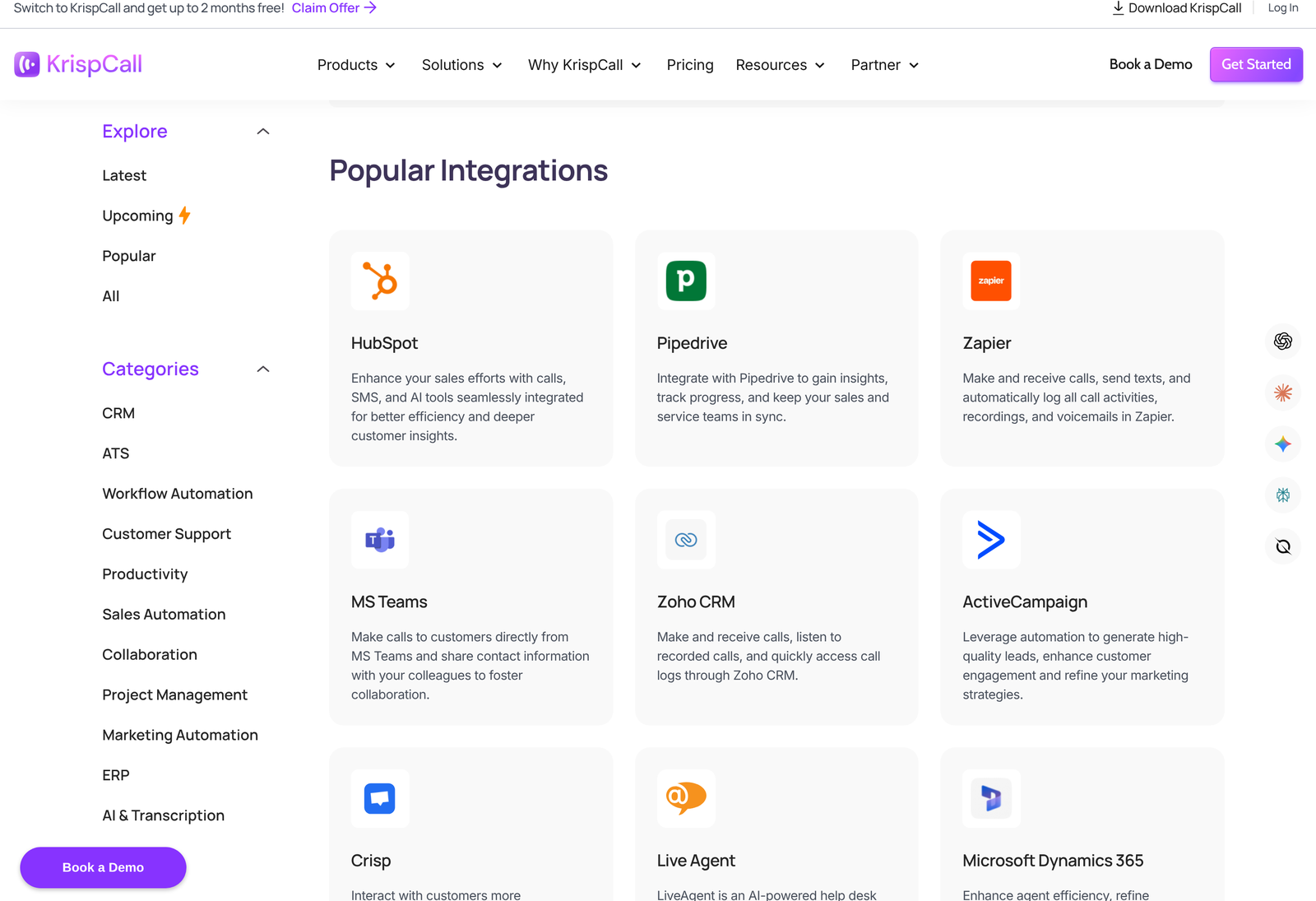
That Upcoming tab is useful and most buyers never open it. If the tool you need is listed there rather than under All, you are being shown a roadmap item, not a product you can switch on this week. Check it before you sign anything on the strength of a connection you were promised in a demo.
An ATS category sitting alongside CRM is the giveaway for who else buys this. Recruiters live on the phone, log everything against a candidate record, and are badly served by phone systems built for sales pipelines. Ashby, PCRecruiter and Clio in one directory means KrispCall is chasing professional services as well as sales desks.
What The Spread Of Tools Tells You
Count the CRMs in that list and the pattern is obvious. HubSpot, Pipedrive, Zoho, Salesforce, Microsoft Dynamics 365, Bitrix24, Capsule, Nimble, noCRM.io, Agile CRM, Apptivo, Attio, Affinity, Bigin. Fourteen named CRM connections is more than most cloud phone vendors attempt, and the long tail matters more here than the famous names do.
Big vendors integrate with HubSpot and Salesforce because they have to. Supporting noCRM.io, Bigin and Apptivo is a choice about who you are selling to, and it points squarely at small and mid-sized teams running CRMs the enterprise vendors ignore. Businesses on one of those should look at KrispCall purely on that basis.
Support tooling is thinner but still real: Intercom, Front, Help Scout, Crisp, LiveAgent and BoldDesk. Project and collaboration coverage is thinnest of all, with monday.com and Microsoft Teams carrying most of the weight. Plan accordingly if your phone system needs to reach a project tracker rather than a customer record.
One absence we noticed: no Slack entry appeared in the listings we browsed, despite a Slack page existing elsewhere on the site. Verify that one directly if Slack notifications form part of your workflow.
How A CRM Integration Behaves
Directory counts tell you nothing about depth, so take the HubSpot connection as the worked example, since KrispCall documents it in the most detail.
- Click to dial. The KrispCall dialer appears on contact and deal records inside HubSpot with the number prefilled, so reps call without leaving the CRM.
- Two-way contact sync. Contacts stay aligned in both directions, and existing records can be bulk synced during setup rather than trickling across as they are touched.
- Workflow triggers. HubSpot automation can fire KrispCall actions, including sending an SMS, off workflow events such as a new contact or a deal stage change.
- Automatic logging. Calls, notes and messages attach to the matching contact, so the CRM record carries the full history without anyone copying anything.
- Texting in place. SMS sends from inside HubSpot and logs in both systems, including mid-call sends for pushing a link without hanging up.
Bidirectional sync plus event-driven triggers is a genuinely deep integration rather than a dialer bolted to a sidebar. Do not assume every one of the hundred behaves this way. Depth varies, and the only reliable method is to open the individual integration page for your own tool and read what it claims before you buy.
The Plan Gate Nobody Mentions
Here is the detail that should shape your plan choice, and it is easy to read straight past. Integrations are tiered.
The Starter card lists “100+ integrations (Basic Only)”. The Max card lists “100+ integrations (Advanced)”. Salesforce appears as its own line item on Advance rather than being bundled into the generic count. Scroll a little further down the same page and a summary strip reads “Every plan comes with 1 free US/UK/CA number per user, the full calling suite, and 100+ integrations”, with no mention of basic or advanced.
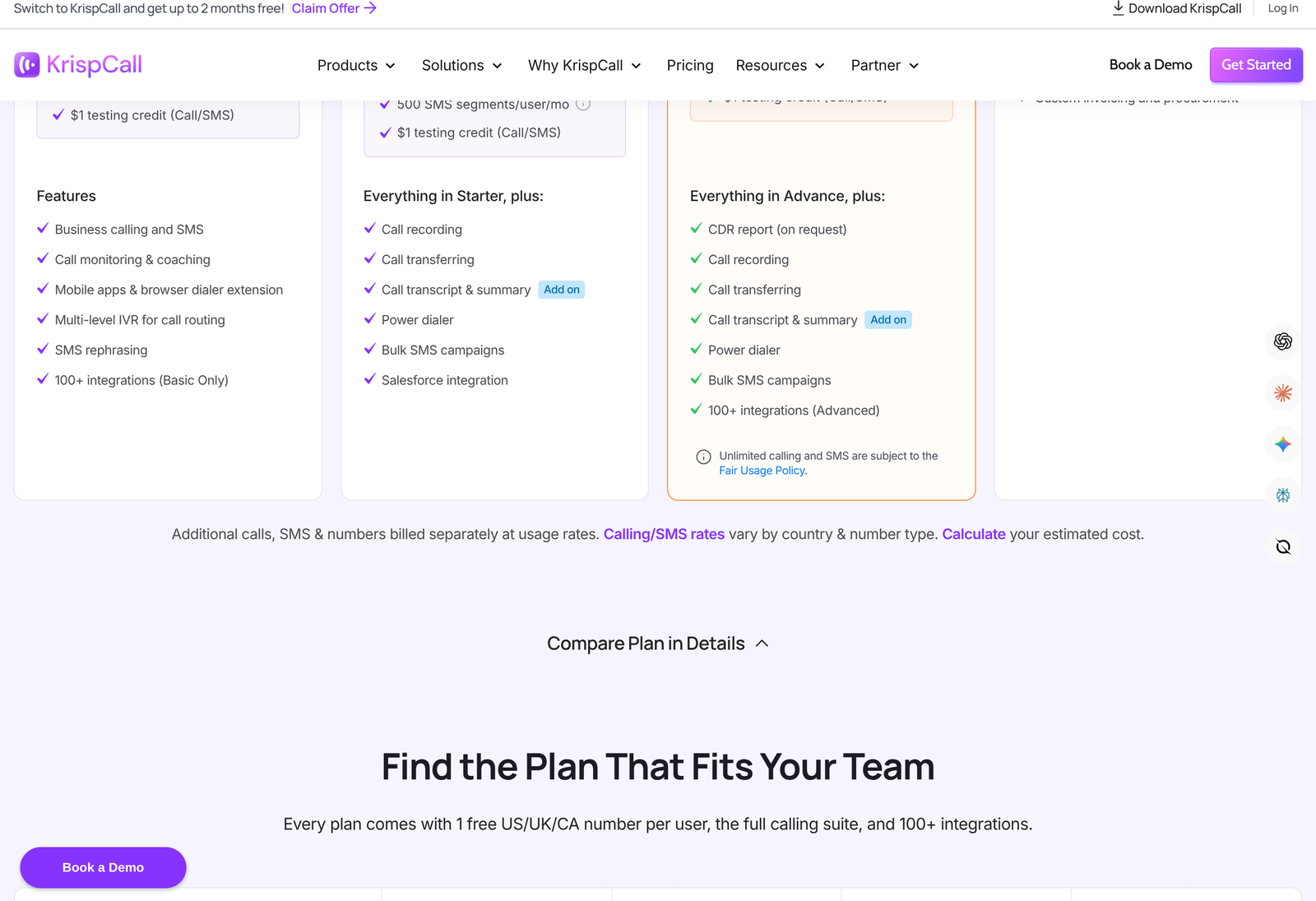
Nowhere on the pricing page does KrispCall define what separates basic access from advanced. Whether the difference is sync direction, trigger support, field mapping or something else is left unstated. For a buyer choosing between $12 and $48 per user per month, that is the single most important unanswered question on the page, and it belongs at the top of your list for their sales team.
Ask it in a form that is hard to deflect. Name your CRM, name the behaviour you need, and ask which plan delivers it. “Does two-way HubSpot contact sync work on Starter, yes or no” gets a usable answer. “Do you integrate with HubSpot” does not.
Zapier As The Escape Hatch
Zapier sits in the popular list, and its presence changes how you should read the other hundred. Anything KrispCall does not connect to natively can usually be reached through Zapier, which KrispCall describes as supporting calls, texts and the automatic logging of call activity, recordings and voicemails.
Two caveats come with that route. Zapier is a separate subscription with its own task-based pricing, so a high-volume call centre logging every call through it can spend more on the automation layer than on the phone system. And a Zapier hop adds latency, which matters when a rep expects a record to appear the moment a call ends.
Use native where it exists and Zapier for the edges. A team on HubSpot with one odd internal tool is a good fit for that split. Anyone whose entire stack sits outside the directory should price Zapier properly before concluding KrispCall works for them.
What Connecting Costs
Integrations carry no separate line-item charge. They ride on the subscription, so the real cost question is which tier your required depth forces you onto.
| Plan | Price | What you get |
|---|---|---|
| Starter | $15/user/mo | 100+ integrations marked Basic Only. Up to 5 users. Business calling and SMS, call monitoring, multi-level IVR. $12 a user on annual billing. |
| Advance | $40/user/mo | Adds Salesforce as a named integration, plus call recording, transferring, power dialer and bulk SMS. Up to 50 users. $32 a user annually. |
| Max | $60/user/mo | 100+ integrations marked Advanced, CDR report on request, no member limit. $48 a user annually. |
| Enterprise | Custom | Volume pricing above 50 seats, custom uptime SLA, ISO 27001 compliance support, advanced admin controls. |
The pricing page opens on the annual toggle, so the figures you first see are already discounted. Annual billing takes exactly 20% off at every tier: $15 becomes $12, $40 becomes $32, $60 becomes $48. A ten-person sales team needing whatever “Advanced” means pays $480 a month on annual billing against $600 month to month.
Budget for the usage charges separately, because calls, SMS and extra numbers bill at rates that vary by country and number type. US and Canadian messaging also carries registration costs that are identical on every plan: a $4.50 one-time brand registration fee, a $15 one-time campaign vetting fee, and $1.50 a month for a low volume campaign.
Setting It Up In The Right Order
- Connect the CRM first and run the bulk contact sync before anyone makes a call. Numbers that do not match a record log as orphans, and cleaning those up later is miserable.
- Place five test calls and five test texts, then open the CRM and check the logging. Confirm direction, duration, recording link and which user the activity attached to.
- Add workflow triggers only once logging is proven. An automated SMS firing off a bad trigger reaches real customers.
- Register your messaging campaign early. The vetting fee is small and the approval wait is not, so start it on day one rather than the day before launch.
- Layer in help desk or project tools last, after the CRM path is stable.
KrispCall offers a 14-day refund on the subscription and lets you cancel at any time, which gives you a fortnight to complete that sequence. Spend it on the integration rather than on call quality, because call quality shows up in the first hour and sync problems show up in week two.
When Your Tool Is Missing
KrispCall runs a request page for integrations it does not have. Treat a submitted request as a wish rather than a commitment, and never buy on the strength of one. Check the Upcoming tab, check Zapier, and if neither route works, the product is not ready for your stack yet.
Teams weighing this against other cloud phone systems will find our KrispCall alternatives guide covers the competitive picture, and the CallHippo integrations guide runs the same analysis on a close competitor.
Verdict
As integration directories in cloud telephony go, this one is above average: real pages behind the names, twelve sensible categories, genuine depth on the CRM connections, and coverage of recruiting and legal tools that competitors ignore. The HubSpot integration in particular does bidirectional sync and event triggers rather than just parking a dialer in a sidebar.
One thing holds it back from an unqualified recommendation, and it is a documentation problem rather than a product one. Splitting integrations into basic and advanced without defining either term, then contradicting the split a few hundred pixels lower, leaves buyers unable to choose a plan from public information. Get that answered in writing for your specific CRM, and the rest of the picture is strong. You can start a KrispCall trial here and test the sync inside the refund window.
FAQ
How many integrations does KrispCall have?
The directory headline claims more than 100 CRM and business tools, organised into twelve categories with an individual page for each integration.
Does KrispCall integrate with HubSpot?
Yes, and it is the deepest documented connection. Dialling and texting happen from HubSpot records, contacts sync both ways with a bulk sync at setup, calls and notes and messages log automatically, and HubSpot workflow events can trigger KrispCall actions.
Which plan do I need for Salesforce?
Salesforce appears as a named line item on the Advance plan, which is $40 a user monthly or $32 on annual billing. Confirm the depth you need with KrispCall before committing.
What is the difference between basic and advanced integrations?
KrispCall does not define it publicly. Starter is labelled Basic Only and Max is labelled Advanced, with no stated explanation of what changes. Ask their team directly, naming your CRM and the exact behaviour you need.
Can I connect a tool the directory does not list?
Usually through Zapier, which KrispCall supports for calls, texts and the automatic logging of activity, recordings and voicemails. There is also a request page for new integrations, though a request is not a release date.
Do integrations cost extra?
No separate charge appears for them. Calls, SMS and additional numbers bill separately at usage rates that vary by country, and US messaging carries one-time registration fees of $4.50 and $15 plus $1.50 a month for a low volume campaign.
Before You Choose, Compare These
Hand-picked guides to help you choose the right tool — no fluff.
 AlternativesKrispCall Alternatives 2026Credible alternatives and when each one wins.
 TutorialsKrispCall Communications Inc. Beginner's Guide 2026A clean start-here walkthrough with no jargon.
 PricingStampEzee Pricing 2026Real tier prices and what each plan actually includes.
 AlternativesSuperfiliate Alternatives 2026Credible alternatives and when each one wins.