


Disclosure: Stack99 earns a commission if you buy through links on this page. It costs you nothing extra and never changes our assessment.
Integration counts are the least reliable number a software vendor publishes. LearnWorlds publishes three of them, and they do not agree with each other. The integrations hub says “50+ native officially supported integrations” in one line and “3000-6000+ possible tools via automation + native support” in the next. The plan comparison table describes Zapier as offering “integrations with more than 1000+ tools”. Zapier’s own listing for LearnWorlds advertises 9,000 apps.

None of those figures tells you the thing that decides a purchase, which is what your specific plan can connect. We pulled the full per-plan integration matrix from LearnWorlds’ own comparison page on 22 October 2026 and counted it row by row.
What is actually in the catalogue
The integrations hub organises everything into eighteen categories: payment gateways, payment methods, tax management, live sessions, video, digital credentials, CRM, customer service, email marketing, growth tools, affiliates, social proof, accessibility, multiple languages, user authentication, analytics, UX analytics and automations.
Named products across those categories include Stripe, PayPal and Shopify for payments; Stripe Tax and Quaderno for tax; Zoom, Microsoft Teams, Webex, Calendly and Google Meet for live training; HubSpot for CRM; Freshchat, Zendesk, Olark, Intercom and Tawk.to for support; Mailchimp, ActiveCampaign, MailerLite, Kit, GetResponse, Moosend, AWeber and Constant Contact for email; Google Analytics, Google Tag Manager, Meta and Mixpanel for measurement; Hotjar, Fullstory, Mouseflow and FullSession for session replay; Vimeo and Wistia for video; Google Drive and Dropbox for files; Accredible and Credly for credentials; ReferralCandy and Refersion for affiliates; plus Weglot, accessiBe, FOMO, OptinMonster, BDOW! and Google Search Console.
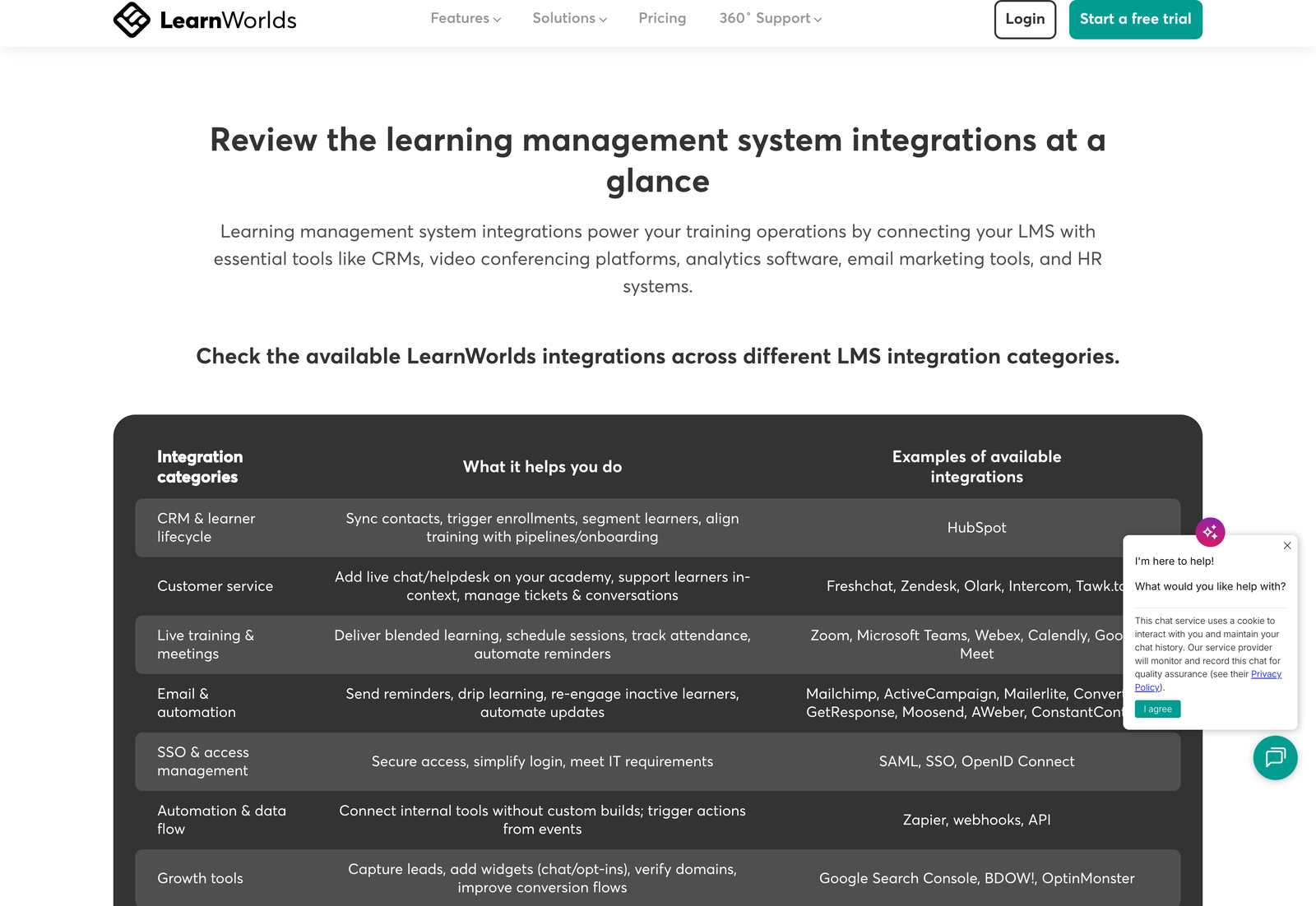
Count the distinct third-party products named there, and you land close to fifty once the four automation bridges are included. That count of four deserves attention on its own. LearnWorlds supports Zapier, Make, Integrately, and Pabbly rather than the single Zapier connection most platforms stop at, which gives buyers a real choice of automation pricing instead of one captive route.
The gating is the story
LearnWorlds sells four plans: Starter, Pro Trainer, Learning Center, and a combined High Volume and Corporate tier. Its comparison table carries 38 integration rows. Reading down the Starter column changes the picture the hub page paints.
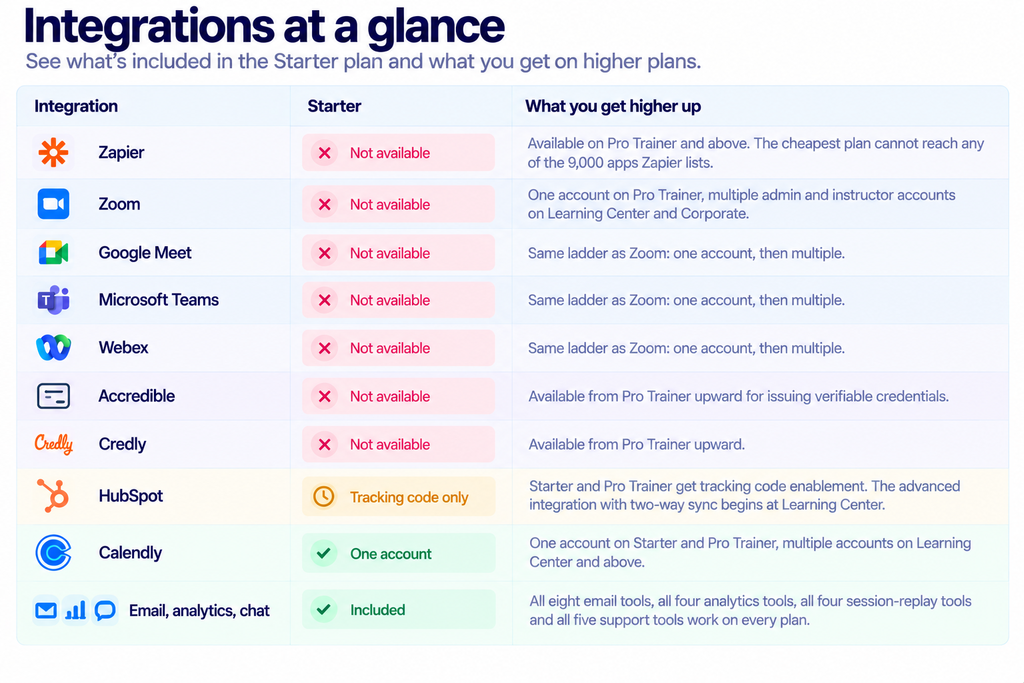
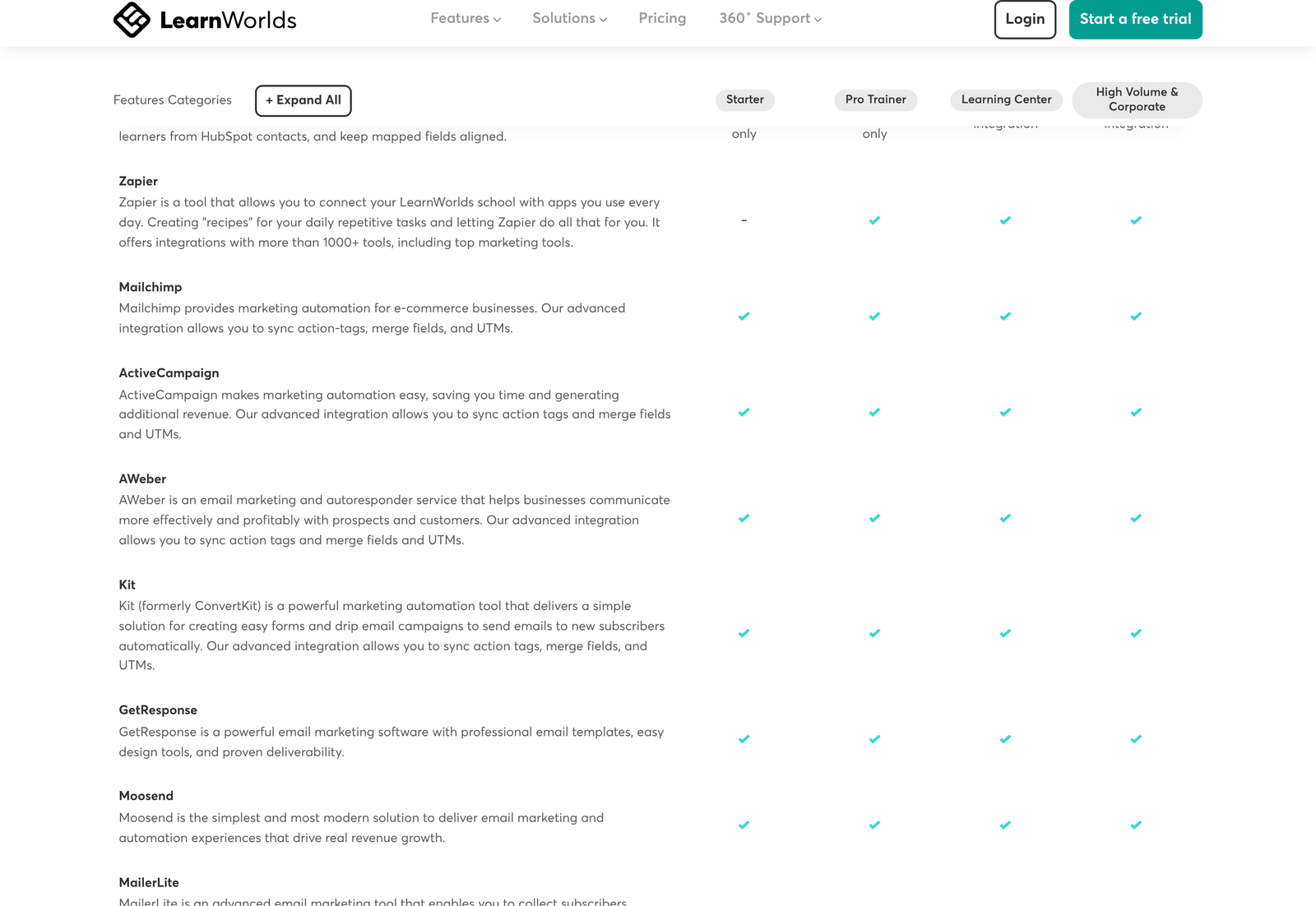
Seven of the 38 rows are unavailable on Starter and one more is degraded, leaving 30 fully working. That is a respectable number, and the pattern matters more than the count. Everything Starter keeps is a tag you install to send data outward: pixels, replay scripts, chat widgets, email list syncs. Everything Starter loses is a connection that brings something back in, whether that is a live class, a credential, or an automation firing into another system.
Code-level access starts at tier three
LearnWorlds promotes “API & webhooks for fully custom workflows” near the top of its integrations hub without saying which plans carry them. Its comparison table answers the question plainly. Both show a dash on Starter and a dash on Pro Trainer, arriving only on Learning Center and Corporate.
LTI 1.3 follows the same line. Learning Tools Interoperability is an open specification published by 1EdTech that lets an external tool plug into a learning platform and report grades and progress back without a bespoke build. LearnWorlds supports it for bringing providers such as LinkedIn Learning and H5P inside a course, and the row reads unlimited on Learning Center and Corporate, unavailable below.
SCORM is gated differently and more gently. Starter cannot upload packages at all. Twenty packages are allowed on Pro Trainer, against a total size limit. Both top tiers are unlimited. Custom user roles follow the tier-three pattern once more.
Add it up and a single conclusion falls out. Anyone whose plan involves writing code against LearnWorlds, syncing a CRM properly, or embedding external learning tools is buying Learning Center whatever their learner numbers say.
What that extensibility costs
LearnWorlds opens its pricing page on annual billing with a “Save 20%” badge, so the figures you meet first are annual rates expressed per month. Switch the control to monthly, and the real recurring rates appear.
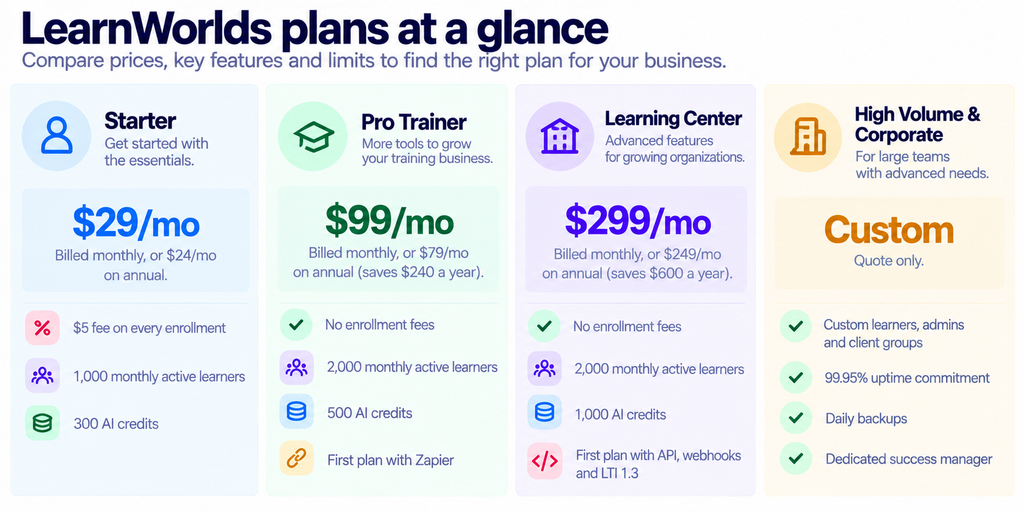
Check the discount claim, and it holds at one tier only. Only Pro Trainer, falling from $99 to $79, reaches 20.2%. Starter drops 17.2% and Learning Center 16.7%. The two savings figures LearnWorlds prints beside the cards are exact: twelve months of Pro Trainer costs $1,188 monthly against $948 annually, a $240 gap, and Learning Center runs $3,588 against $2,988, which is $600.
Now price the gates. Zapier costs the Starter to Pro Trainer step, which is $70 a month on monthly billing or $55 on annual. Everything else, meaning the API, webhooks, LTI 1.3 and the real HubSpot sync, costs the Pro Trainer to Learning Center step of $200 a month on monthly billing or $170 annually. Put differently, the extensibility layer alone runs $2,400 a year on top of a plan you were already paying for.
Paying more does not buy more learners
One row in the comparison table deserves separate attention. Monthly active learners run 1,000 on Starter and 2,000 on Pro Trainer. They also run 2,000 on Learning Center.
Tripling your bill from $99 to $299 therefore adds no capacity whatsoever. Every dollar of that step buys capability: the API, webhooks, LTI, unlimited SCORM, white-label options, custom user roles, multiple video accounts, and the advanced HubSpot integration. A training business that is simply growing its audience has no reason to climb past Pro Trainer until it hits the 2,000 ceiling, at which point the only route is a Corporate quote.
The $5 enrollment fee changes the Starter maths
Starter is the only plan carrying a transaction charge, at $5 per enrollment, and LearnWorlds marks both plans above it as having no enrollment fees. That single line moves the breakeven a long way from where the headline prices suggest.
Starter costs $70 a month less than Pro Trainer on monthly billing. Divide $70 by the $5 fee, and you get 14. Sell fourteen enrollments in a month and the two plans cost the same. Sell more than that, and Starter is the more expensive option while also lacking Zapier, every video-meeting connector, and both credential providers.
On annual billing, the crossover arrives sooner. A $55 monthly gap divided by $5 gives eleven enrollments. Any course business selling a dozen seats a month has already passed the point where the cheapest plan saves money.
What the Zapier connection actually does
Once you reach Pro Trainer, the Zapier listing is worth reading before you design anything, because the trigger behaviour is better than most platforms manage. LearnWorlds exposes Assessment Completed, New Certificate, User Enrolled in Product, New Lead, and Learning Activity Completed, and Zapier marks every one of them as instant rather than polling.
That distinction has teeth. A polling trigger waits for a scheduled check, which on Zapier’s free tier means a wait of up to fifteen minutes. An instant trigger fires on the event. For a welcome sequence or a certificate handoff into a CRM, the difference decides whether your learner gets an email while they are still looking at the screen.
Worth comparing against an email platform on the other side of that connection: our GetResponse integrations guide covers a catalogue where every Zapier trigger polls instead.
Payments and tax sit on every plan, which is unusual
Many course platforms reserve payment flexibility for higher tiers or take a revenue cut that falls as you pay more. LearnWorlds does neither. Stripe, PayPal and Shopify appear on all four plans, as do Stripe Tax and Quaderno for calculating and filing sales tax.
Tax automation on the cheapest plan is genuinely useful for anyone selling across borders, because VAT and sales tax obligations do not scale with your subscription tier. A solo course seller in the EU faces the same compliance surface as a training company, and having Quaderno or Stripe Tax available at $29 a month removes a reason to delay selling internationally.
Set that against the $5 enrollment fee and the trade becomes clear. LearnWorlds is not restricting how Starter customers take money; it is taking a slice of each transaction instead. Whether that is cheaper than a higher subscription depends entirely on volume, which is the calculation set out above.
Single sign-on lives in a category of its own
The hub lists a user authentication category covering SAML, SSO and OpenID Connect. Those are protocols rather than products, and their presence signals that LearnWorlds expects to sit inside corporate identity systems rather than only behind its own login screen.
Anyone evaluating the platform for employee training should treat this as the first question to put to sales, because the comparison table places custom user roles on Learning Center and Corporate only. Identity and permissions tend to travel together in procurement, and an IT team that requires SAML will usually also require role separation between administrators, instructors, and reviewers.
Four automation bridges, not one
Most platforms publish a Zapier connection and stop. LearnWorlds documents Zapier alongside Make, Integrately and Pabbly, describing Make as drag-and-drop workflow mapping, Integrately as one-click setups, and Pabbly as the cost-effective route into its own sales and marketing suite.
Having a choice here is worth more than it first appears. Automation platforms price on task volume, and a busy academy firing a Zap on every assessment completion, certificate issue, and enrollment can run through a Zapier allowance quickly. Being able to move that traffic to a cheaper engine without losing the connection is a real cost lever, and it is available from Pro Trainer upward.
One caveat belongs here. Only the Zapier listing publishes its triggers and actions in public, so we cannot confirm that the other three expose the same five instant events. Assume parity at your own risk and test before committing a workflow to Make or Pabbly.
AI credits are metered, and the step is small
LearnWorlds includes AI tooling on every plan for course building, assessments, emails and images, then meters it with monthly credits: 300 on Starter, 500 on Pro Trainer, 1,000 on Learning Center and a custom allowance on Corporate. Extra credits are sold as a checkout add-on in blocks of 20,000 on every plan except Starter.
Those numbers are worth holding next to the price steps. Moving from Pro Trainer to Learning Center triples your bill and doubles your AI allowance, while the add-on route sells 20,000 credits at once, which is twenty times the Learning Center monthly allocation. Anyone whose bottleneck is genuinely AI generation should price the add-on before climbing a tier, since the tier step is clearly sold for the integration layer rather than for credits.
LearnWorlds does not publish what one credit buys, so there is no way from the public pages to translate 300 credits into several generated lessons, images, or assessments. Treat the allowances as relative rather than absolute until support gives you a conversion.
Migration is offered as a service, and the target list is telling
Near the bottom of the pricing page, LearnWorlds offers to run migrations for you, moving courses, learners, certificates and subscriptions. It names the platforms it has moved customers away from: Kajabi, Thinkific, Teachable, Podia, Moodle, LearnDash, WordPress and Skilljar.
That list spans three different product categories. Kajabi, Thinkific, Teachable, and Podia are creator-economy course platforms. Moodle, LearnDash and WordPress are self-hosted or open-source stacks. Skilljar is customer-education software sold to enterprises. Covering all three suggests LearnWorlds is positioning against very different buyers at once, which also explains why its integration gating splits so sharply between marketing pixels at the bottom and LTI with SCORM at the top.
No price is published for the migration service, and the only stated commitment is a free consultation. A done-for-you migration is described as available on request, which puts it in the same quote-only bucket as the Corporate tier.
Matching a plan to a job
Choose it if: you sell a handful of self-paced courses, run no live sessions, and want your existing marketing stack to see the traffic. Starter handles pixels, replay, chat, and email list syncing perfectly well. Keep an eye on that enrollment fee.
Choose it if: you teach live, issue credentials, or want automation. Pro Trainer unlocks the video connectors, Accredible, Credly, Zapier, and SCORM uploads in a single step, and it removes the per-enrollment charge. Most working training businesses belong here.
Choose it if: a developer is involved, a CRM must stay in sync, or external learning tools need to appear inside your courses. Only Learning Center carries the API, webhooks, LTI 1.3 and advanced HubSpot, and nothing below it substitutes.
For the wider picture on the platform itself, see our LearnWorlds review, the pricing breakdown and our note on who the platform suits.
What we could not verify
- The “50+ native” count and the “3000-6000+ possible tools” range. We counted 38 rows in the comparison table and roughly fifty named products on the hub page, which is consistent with the first claim but not confirmation of it.
- Any Corporate or High Volume figure, seat minimum, or contract term.
- What the SCORM “total size limit” on Pro Trainer actually is. The row names a cap without a number.
- Whether the four automation bridges carry identical trigger coverage. Only the Zapier listing publishes its triggers.
- API rate limits. No public documentation states them.
- The “13,000+ learning businesses” figure, which is a vendor claim with no date or source.
- Review platform ratings. G2, Capterra, and Trustpilot all refuse our declared crawler.
Frequently asked questions
Does the Starter plan support Zapier?
No. The Zapier row shows a dash under Starter and a tick under Pro Trainer, Learning Center, and Corporate. Reaching Zapier from the cheapest plan requires an upgrade, not an add-on.
Which plan do I need for the API?
You need Learning Center, at $299 a month billed monthly or $249 annually. Webhooks and LTI 1.3 share that threshold, so all three arrive together.
Is the HubSpot integration real on cheaper plans?
Starter and Pro Trainer get “HubSpot tracking code enablement only”, which places a script on your pages. Contact sync, enrollment triggers, and field mapping belong to the advanced integration that begins at Learning Center.
Can I run Zoom classes on Starter?
Not through an integration. Zoom, Google Meet, Microsoft Teams, and Webex are all unavailable on Starter. Pro Trainer connects one account per tool, and Learning Center allows multiple admin and instructor accounts.
What is LTI 1.3 for?
It is an open 1EdTech specification that lets an external tool sit inside a course and pass progress and grades back without a custom build. LearnWorlds names LinkedIn Learning and H5P as examples, and states that LTI activities stay connected to the external provider so updates there appear in your courses.
Does a higher plan raise my learner limit?
Only once. Starter allows 1,000 monthly active learners and Pro Trainer allows 2,000. The tier above also allows 2,000, so that upgrade buys capability rather than capacity.
Sources
- LearnWorlds integrations hub, for the category list, named products, and the automation bridges, checked 22 October 2026.
- LearnWorlds full plan comparison, for the 38-row integration matrix and the API, webhook, LTI, and SCORM rows.
- LearnWorlds pricing page, read in both billing states.
- Zapier’s LearnWorlds listing, for the instant trigger set.
- 1EdTech, Learning Tools Interoperability, the body that publishes the LTI specification.