


In this guide
Why This Post Matters
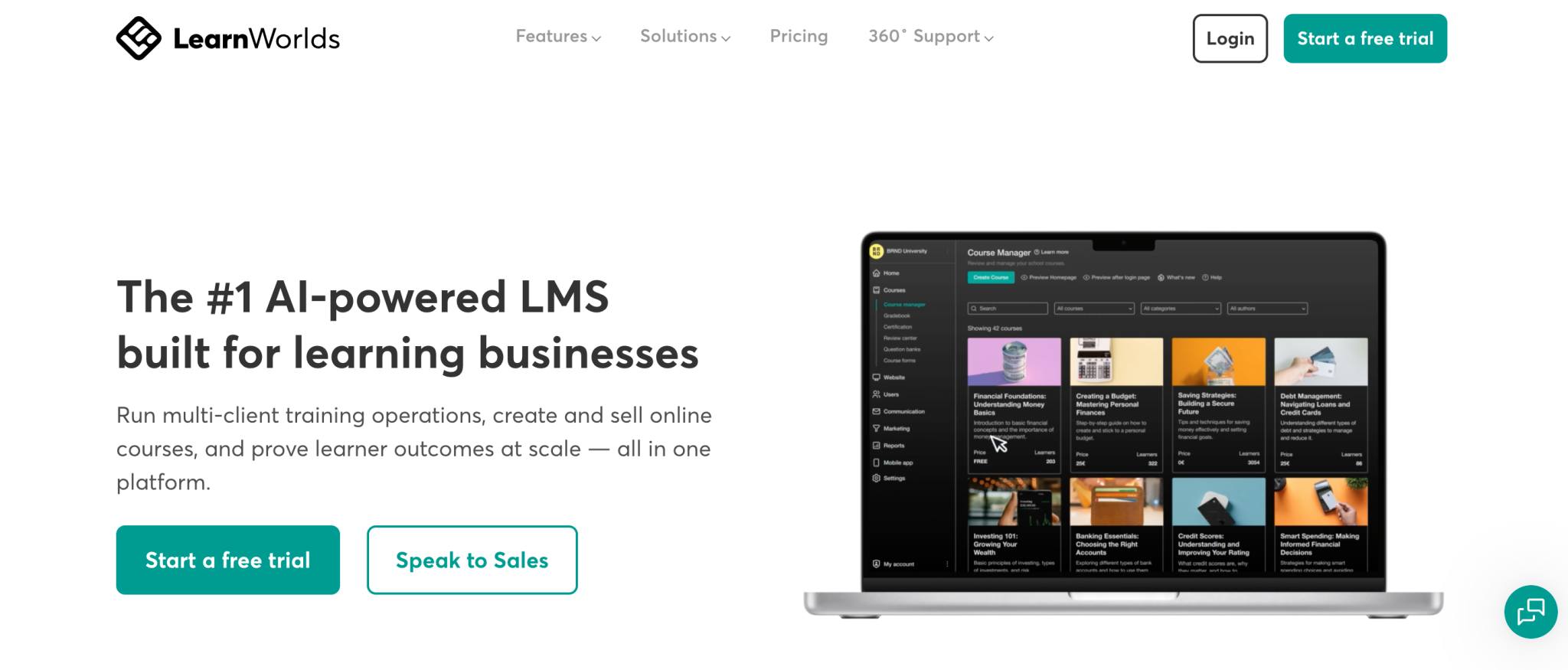
LearnWorlds is a course platform and learning management system for people who want their own branded school rather than a listing on somebody else’s marketplace. Deciding whether it fits you is mostly a question of which plan you land on, because the feature split between tiers is unusually sharp and the entry plan excludes seven things most buyers assume are standard.
Disclosure: Stack99 earns a commission if you buy through links on this page. It costs you nothing extra and never changes our assessment.
Prices here were read from the vendor’s own pricing page on 15 November 2026, in both billing states. The page loads with annual billing preselected, so the figures shown first are not the monthly rate.
If you want to inspect the platform while you read, start with LearnWorlds here.
What The Official Pages Keep Pointing To
Four signals on the pricing page tell you who LearnWorlds thinks it is for, and the plan selector states it outright by asking you to choose a goal before showing prices.
- Launching my first course. The entry route, pointed at Starter.
- Solo course or coaching business. This points at Pro Trainer, described on the card as “for solo trainers and small course businesses”.
- Running a branded academy. Learning Center, “for branded academies and training teams”.
- Enterprise or multi-org training. Corporate, “for multi-school operations and high-volume programs”.
LearnWorlds states it serves more than 14,000 learning businesses. Those four goals map cleanly onto the four plans, which makes the fit question easier than it looks, provided you read the feature table rather than the headline prices.
Product Fit In 2026
Start with the hard exclusions, because they disqualify faster than any feature attracts. Starter cannot issue certificates. It cannot publish free courses, build learning paths, upload SCORM packages, generate AI subtitles, use interactive video, or connect Zoom, Meet, Teams or Webex. Zapier is also absent.
So LearnWorlds at the entry tier fits exactly one person: someone selling a single paid course, to a small number of students, who does not need to hand out a certificate at the end. Anyone running compliance training, accredited learning or a structured curriculum needs Pro Trainer as a floor.
At $79 a month on annual billing, Pro Trainer is where the platform becomes a normal course business tool. Certificates, free courses as lead magnets, unlimited learning paths, subscriptions and payment plans, 20 SCORM packages and one connected webinar account all arrive together.
A different kind of buyer arrives at Learning Center. Full white-label removes LearnWorlds branding entirely, up to 10 client groups keep separate customer cohorts apart, and LTI 1.3 lets the platform plug into a university or college environment. Agencies and consultancies selling training as a service start here.
To pressure-test the fit against your own catalogue, check LearnWorlds here and count how many of those seven Starter exclusions you actually need.
Pricing And Data Notes
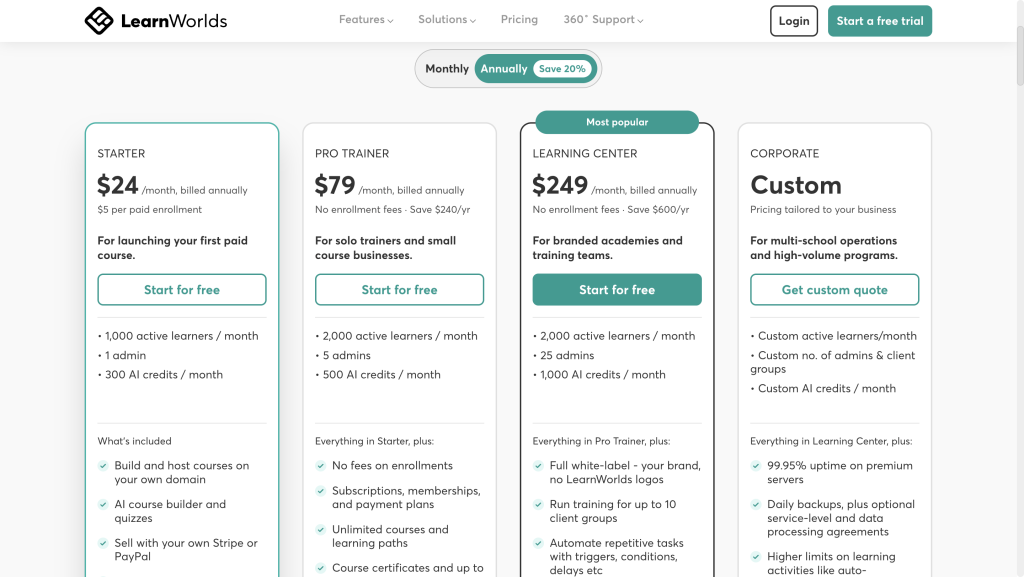
LearnWorlds does publish a pricing table, and it opens with the Annually toggle already selected beside a “Save up to 20%” badge. In that state the cards read $44, $79 and $249 a month. Click Monthly and the real month-to-month rates appear: $49, $99 and $299. Corporate is quoted.
The detail that decides the entry tier is the enrollment fee. Starter charges $5 per course enrollment and every plan above it charges none. On annual billing the gap between Starter and Pro Trainer is $35 a month, which seven enrollments close exactly. From the eighth enrollment Starter costs more while delivering less.
Work a realistic example. Twenty enrollments a month on Starter costs $44 plus $100 in fees, so $144. Pro Trainer costs $79 flat. The cheaper-looking plan is $65 a month more expensive and missing certificates.
Plan limits scale unevenly. Monthly active learners run 1,000, then 2,000, then 2,000, then custom, so Learning Center buys no extra learner capacity over Pro Trainer. Admin seats go 1, 5, 25, custom. AI credits go 300, 500, 1,000, custom. All prices exclude VAT, which is added for EU customers without a valid VAT number.
What Buyers Should Watch
One contradiction sits on the pricing page itself. The Starter card advertises “Live 1:1 and group sessions” while the comparison table marks live sessions and webinars with a cross for Starter. Those probably describe native sessions against external webinar accounts, but the page never says so. Confirm it before buying Starter if running training through Zoom or Teams matters.
SCORM capacity is the second thing to check. Twenty packages come with Pro Trainer, and a migrated corporate catalogue often runs well past that, since each module is typically its own package. Counting your existing files is a five-minute job that can decide between $79 and $249 a month.
Academic buyers should go straight to LTI 1.3 availability. It is marked with a cross on both Starter and Pro Trainer, so any deal involving a university starts at Learning Center regardless of learner numbers.
Add-on pricing is not published. The branded mobile app, extra AI credits and extra emails are all sold separately with no figures on the page, so budget for them as unknowns rather than estimates.
To evaluate those gaps directly, open LearnWorlds here and compare the comparison table against one real course you already run.
Practical Recommendation
Match yourself to one of four profiles and the decision resolves quickly.
Testing whether a course sells at all, with under eight enrollments a month and no certificate needed? Starter at $44 works, and the enrollment fee stays small while volume is small.
Running a course business as your income? Pro Trainer. The certificate alone usually settles it, and the removed enrollment fee pays for the upgrade at modest volume.
Delivering training to other companies under your own brand? Learning Center. Client groups and full white-label are the features you are buying, not capacity.
Multi-school operations, a data processing agreement, more than 25 admins or phone support? Corporate, and the quote conversation starts there.
A free trial is available on all three published plans, so open LearnWorlds here and load one real course before committing to a year.
FAQ
Who Is LearnWorlds Best For?
Course creators, coaches and training businesses that want their own branded school rather than a marketplace listing. The strongest fit is a solo trainer or small course business on Pro Trainer, and agencies delivering training to client companies on Learning Center.
Is The Starter Plan Enough To Launch A Course?
Only a bare one. Starter has no certificates, no learning paths, no free courses, no SCORM, no Zapier and no external webinar integration, and it charges $5 per enrollment.
What Does LearnWorlds Cost?
$49, $99 and $299 a month paid monthly, falling to $44, $79 and $249 on annual billing. Corporate is quoted. The pricing page shows the annual figures by default.
When Does Upgrading From Starter Pay For Itself?
At eight enrollments a month on annual billing, or ten on monthly billing. That is where the $5 per-enrollment fee exceeds the price difference to Pro Trainer.
Which Plan Do Universities Need?
The top two plans, because LTI 1.3 is unavailable on Starter and Pro Trainer.
Can I Move My Existing Courses Across?
LearnWorlds offers a done-for-you migration on request and lists Kajabi, Thinkific, Teachable, Podia, Moodle, LearnDash, WordPress and Skilljar among platforms it has moved customers from, saying courses, learners, certificates and subscriptions transfer.
Verdict
LearnWorlds fits people building a branded learning business, and it fits them properly from Pro Trainer upward. Unlimited video hosting on every plan, a built-in community and selling on your own domain are genuinely generous inclusions that several competitors meter.
The reservation is Starter. At $44 a month with seven capability exclusions and a per-enrollment charge, it is priced as an on-ramp rather than a working plan, and buyers who compare headline prices across platforms will misjudge it.
Final Buying Note
Decide by capability, not by price. Write down whether you need certificates, SCORM, Zapier, white-label or LTI, then read across the comparison table once. The plan that clears your list is the plan, and in most cases it will not be the cheapest one on the page.
For the full tier-by-tier feature split and the current pricing detail, our LearnWorlds integrations breakdown and LearnWorlds review go further.
Before You Choose, Compare These
Hand-picked guides to help you choose the right tool — no fluff.
 AlternativesTrainual Alternatives 2026Credible alternatives and when each one wins.
 Advanced GuidesUniqode Advanced Guide 2026Deeper workflows once the basics are in place.
 TutorialsVolza Beginner's Guide 2026A clean start-here walkthrough with no jargon.
 ReviewsWebydo Review 2026Hands-on verdict with the pros, cons and who it fits best.