


In this guide
Why Integrations Matter Here
Melio connects to four accounting systems and no more: QuickBooks Online, QuickBooks Desktop, Xero and NetSuite. Short, by the standards of accounts payable software, and the shortness is the point. Each connection is a two-way sync built and maintained by Melio rather than a generic connector, so bills, vendor records and payment status move in both directions without anyone exporting a CSV.
Disclosure: Stack99 earns a commission if you buy through links on this page. It costs you nothing extra and never changes our assessment.

Which of those four you can actually use depends on what you pay. Accounting sync is absent from the free plan entirely, QuickBooks Online and Xero arrive on Core at $25 a month, QuickBooks Desktop on Boost at $55, and NetSuite only on Unlimited at $80. Work out which system your bookkeeper uses before choosing a tier, because that single fact sets your price.
If you want to inspect the sync settings while you read, start with Melio here.
What The Official Pages Show About Connectivity
Melio’s own integration pages and footer name these connections:
- QuickBooks Online sync
- QuickBooks Desktop sync
- Xero sync
- NetSuite sync
- Meta and Amazon Business, listed in the footer alongside the accounting integrations
Two of those five are not accounting sync at all. Meta and Amazon Business sit in the footer alongside the accounting systems, which flatters the count. The connections that remove recurring bookkeeping work number four.
Where Melio Fits In A Real Stack
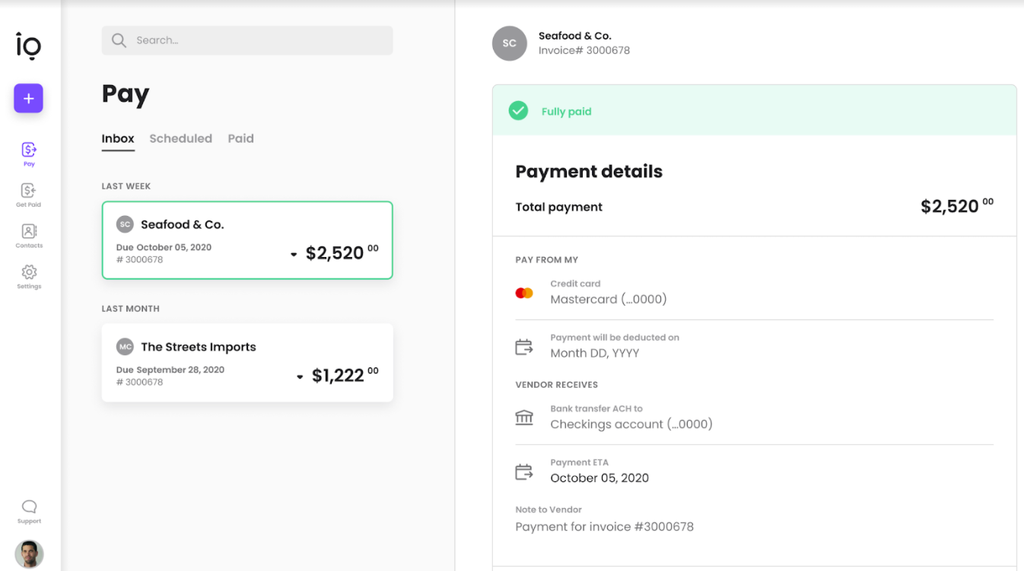
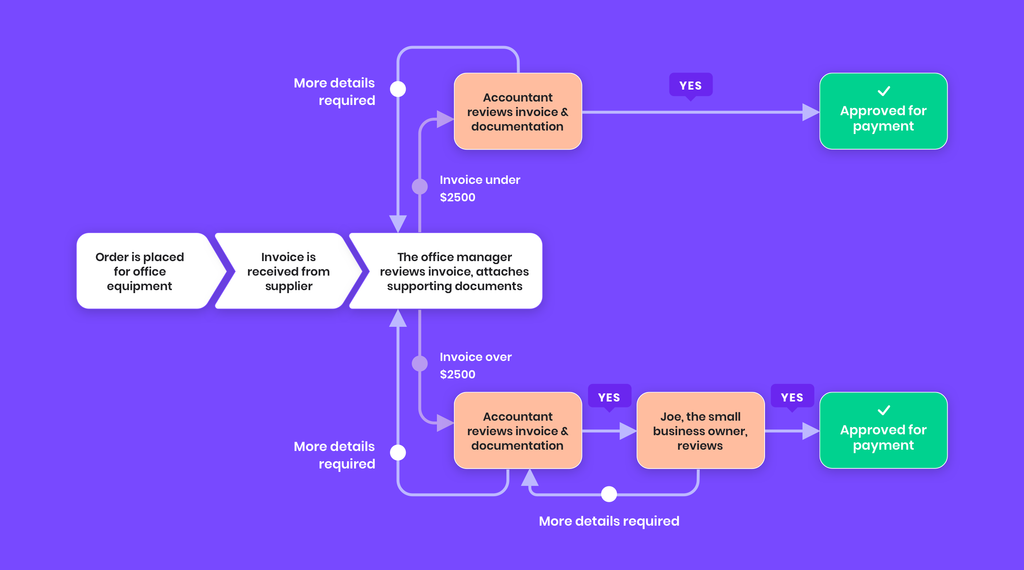
Melio sits between the bill and the bank. Invoices arrive by email or through its bill capture, approvals run inside Melio, the money leaves by ACH, card, cheque or international transfer, and the accounting system is updated automatically. Your ledger stays the system of record. Melio handles the payment and writes the result back.
Popular Workflow Patterns
What the QuickBooks sync actually moves, according to Melio’s own integration page:
- Unpaid bills, vendor details and available credits pulled from your accounting system into Melio.
- Outgoing payment details written back once a payment is scheduled.
- Incoming payments marked as paid in both systems when an invoice is settled through a payment request.
- Bills captured in Melio synced to QuickBooks Online with classes, locations and line items categorised automatically.
Setup Approach
Connecting takes four steps and no technical work. Open Settings, choose Accounting Software Sync, click Connect under your accounting system, and sign in when prompted. One exception is documented: accounts receivable sync with QuickBooks Desktop needs a personalised set-up arranged with Melio’s team rather than a self-serve connection.
If you want to test that directly, open Melio here and compare the sync against the ledger your bookkeeper already closes each month.
One detail worth checking before you commit. Melio’s footnote states that vendor credits sync only via QuickBooks Online. Xero, NetSuite and QuickBooks Desktop users do not get that behaviour, so credits still need applying by hand. Review Melio here if credit handling is central to how you pay suppliers.
Automation And API Considerations
Melio publishes a B2B Payouts API and runs an embedded partnerships programme, so payments can be driven from another platform rather than from Melio’s own interface. The API is a different product from the accounting sync and is not part of any published self-serve plan. Treat the API as a conversation with their partnerships team, not a feature you can switch on from Settings.
Troubleshooting Lens
Here is a contradiction to raise with Melio before you buy on plan alone. The FAQ on their QuickBooks integration page states that QuickBooks Desktop and NetSuite support is only available on the Unlimited plan. The pricing page shows QuickBooks Desktop sync included on Boost, one tier lower and $25 a month cheaper. Both pages are live on melio.com. If Desktop sync is your reason for upgrading, get the answer in writing rather than assuming Boost covers you.
Verdict
Melio’s integration story is narrow and deep rather than broad. Four accounting systems, each with a real two-way sync, beats forty shallow connectors for a finance team whose whole problem is that payments and the ledger disagree. The pricing ladder is the catch: your accounting software, not your payment volume, decides which plan you need.
If that sounds relevant, try Melio here and test the sync against one month of real bills before the 90-day free period runs out.
FAQ
Why Are Integrations Important For Melio?
Because the value is reconciliation. Paying a vendor is the easy half. Melio’s sync is what stops someone retyping that payment into QuickBooks, Xero or NetSuite afterwards.
Should I Connect Everything At Once?
No. Connect your accounting system first and run one full billing cycle through it. Card, international and expense features can wait until the ledger agrees with Melio.
What Matters More Than The Number Of Integrations?
Which accounting system is supported, and on which plan. Four good syncs serve a finance team better than a long logo wall, and the plan gating decides your actual cost.
How Should I Evaluate The Integration Fit?
Run a month of real bills end to end, then open your accounting system and check whether anything needed manual correction. Clean books after one cycle is the whole test.
When Does The Integration Story Look Weak?
When the connection you need sits two tiers above the plan you wanted, or when a documented exception applies to you, such as vendor credits syncing only through QuickBooks Online.
Decision Baseline
Start from the accounting system you already run. Xero or QuickBooks Online puts you on Core at $25 a month plus $10 for each additional user. QuickBooks Desktop points at Boost at $55. NetSuite forces Unlimited at $80, which is also the only plan with unlimited seats and unlimited free ACH payments. A five-person finance team on Core pays $25 plus four extra seats at $10, so $65 a month, which lands close enough to the $80 Unlimited rate that the larger plan deserves a look.
A Better Trial Question
Rather than asking whether Melio feels easy during a demo, ask whether your month-end close got shorter. Every paid plan is free for the first 90 days, which is roughly three closes. Run the sync through all three and count how many journal corrections your bookkeeper had to make in each one. A falling number is the only evidence that matters here.
The First Week Test
Keep the first week narrow. Connect the accounting system, import the unpaid bills Melio pulls across, and pay a handful of vendors by ACH. Resist switching on approval workflows, card payments and international transfers at the same time, because when something fails to reconcile you want one variable to inspect rather than five. The free ACH allowance on Core is 20 a month, which is ample for a first-week test.
Adoption Reality
Adoption fails here at the handover between whoever schedules payments and whoever closes the books. The person paying bills sees Melio working perfectly. The bookkeeper discovers classes, locations or line items landing in the wrong place. Melio says bills captured in Melio sync to QuickBooks Online with classes, locations and line items categorised automatically by AI, learning from corrections over time, so expect that learning period and plan for someone to review the categorisation during it.
What To Measure
Three numbers are enough. Count journal corrections per close, days from bill receipt to payment sent, and the share of bills that arrived through the dedicated bills inbox rather than being keyed in. Those map directly onto the reconciliation, speed and capture claims Melio makes, and all three can be read off your existing accounting reports without new tooling.
The Handoff Check
The handoff that matters runs from the bill arriving to the ledger being updated. Melio covers the middle of that chain well. Check both ends: whether your vendors actually send invoices to the bills inbox, and whether your accountant accepts the entries the sync creates without rework. A payment tool that forces manual journal entries afterwards has moved the work rather than removed it.
Team Ownership
Give this to the person who closes the books, not the person who pays the bills. The bookkeeper sees the output of every sync decision and will spot a mis-categorised class long before the payer does. Include whoever approves spending too, since custom approval workflows start on Core and change how the two roles interact.
Where Complexity Hides
Complexity hides in the exceptions Melio documents in small print. Vendor credits sync only through QuickBooks Online. Accounts receivable sync with QuickBooks Desktop needs a personalised set-up. Historical bills predating the connection are a separate question worth asking before you migrate. None of these is a flaw, and each one can turn a clean demo into a messy first month if nobody checked.
A Fair Evaluation Window
Melio hands you a generous window: 90 days free on every paid plan, with no credit card required to start. Set a decision date at the end of the second month so you have a full close to review and a month of margin. An evaluation that drifts past the free period turns into a subscription nobody consciously approved.
Evidence Over Enthusiasm
Save the evidence your accounting system already produces. Export the reconciliation report before Melio and after two closes with it. Note which bills needed manual adjustment and why. That record settles the renewal conversation far better than a general sense that payments feel smoother, and it tells you whether the next plan up is worth the money.
The Exit-Cost Question
Your bills and payment history live in Melio, and your ledger lives in the accounting system the sync writes to. That is a comfortable position, because leaving means your books stay intact in QuickBooks, Xero or NetSuite regardless. Confirm you can export payment history and vendor records from Melio itself, then treat the accounting system as the copy that matters.
Training Without Theater
Train on one bill, start to finish. Capture it, route it through approval, pay it, then open the accounting system and look at the resulting entry together. Fifteen minutes spent that way teaches more than a tour of every menu, and it surfaces categorisation disagreements on day one rather than at quarter end.
The Honest Limitation Test
Melio’s boundary is the four accounting systems. If your business runs on a ledger outside that list, no plan fixes it and no workaround is published. The second boundary is the plan ladder, where a NetSuite shop has exactly one option at $80 a month. Both limits are clearly stated by Melio, which is more than many vendors manage, and both are easier to accept before signing than after.
More on Melio
Hand-picked guides to help you choose the right tool : no fluff.
 PricingBLACKBOX AI Pricing 2026Real tier prices and what each plan actually includes.
 TutorialsEleven Labs Inc. Beginner's Guide 2026A clean start-here walkthrough with no jargon.
 ReviewsNavan Review 2026Hands-on verdict with the pros, cons and who it fits best.
 Use CasesWho Is Runpod Best For? Use Cases & Fit (2026)Who gets the most out of it – and who should skip it.