


- What The Official Pages Show About Connectivity
- Where Ultahost Fits In A Real Stack
- Popular Workflow Patterns
- Setup Approach
In this guide
Why Integrations Matter Here :
Hosting does not integrate the way a SaaS app does. There is no marketplace of one-click connectors, because the connections that matter run over DNS, FTP, SSH, a database port and a control panel. Judging a host on an app count misses the point entirely.
Disclosure: Stack99 earns a commission if you buy through links on this page. It costs you nothing extra and never changes our assessment.
What actually matters is which control panel you get, what gets installed for you, how your existing site arrives, and whether the certificate and backup pieces are handled or left to you. UltaHost answers all four on its own pages, so this guide works from those rather than from a connector directory that does not exist.
If you want to inspect the product while you read, start with Ultahost here.

What The Official Pages Show About Connectivity :
The shared range runs on cPanel, which UltaHost describes as the most popular and powerful web hosting control panel. That single fact settles most of the integration question, because cPanel is the lingua franca of shared hosting: file manager, email accounts, MySQL databases, cron jobs, DNS zone editor and subdomains all sit behind one familiar interface that thousands of tutorials already document.
UltaHost also sells hosting built around other panels as separate products. CyberPanel hosting and ispmanager hosting each appear in the product menu alongside Linux, PHP and Node.js hosting. Choosing the panel at purchase rather than switching later is the practical implication.
WordPress plans add UltaPress, described as a unified dashboard for creating and managing WordPress with an AI site builder attached. Those plans list one-click automatic installation, a WordPress staging tool, PHP version control, WordPress Multisite and unlimited databases.
Where Ultahost Fits In A Real Stack :
Four connection points carry almost all the weight for a small site.
- Domain and DNS. Free domain transfer appears on every shared plan, and UltaHost publishes free WHOIS, DNS, SSL and uptime checker tools for diagnosing records.
- Certificates. A free Let’s Encrypt certificate is provided, which is the same automated certificate authority most modern stacks already assume.
- Backups. Shared accounts are backed up daily with multiple recovery points retained. WordPress plans list automated daily backups separately.
- Content delivery. Content delivery is sold as an add-on on WordPress plans rather than bundled.
Read that last line carefully when budgeting. An add-on is a line item, and performance comparisons that assume a CDN is bundled will mislead you.
Popular Workflow Patterns :
Three patterns cover most real deployments.
Moving an existing WordPress site in. UltaHost lists a free migration plugin on managed WordPress plans and free website migration as a service in its footer. Migration is the step where hosting changes go wrong, so establish which of the two you are being offered before you cancel anything with your current provider.
Starting from nothing. One-click automatic installation puts WordPress on the server, and the AI site builder generates a starting design. Fast, and worth treating as a first draft rather than a finished site.
Running a staging copy. The WordPress staging tool on managed plans gives you somewhere to test a plugin update before it reaches visitors. Any site earning money should use it, and the absence of staging is a common reason people outgrow cheap hosting.
Setup Approach :
Order matters more than speed here. Buy the plan, then transfer or point the domain, then install or migrate the site, then issue the certificate, then confirm the first backup actually ran.
Confirming that backup is the step people skip. A retention policy on a marketing page is a promise; a restore you have tested yourself is a capability. Run one restore into staging during your first month, while the 30-day money-back window still gives you an exit.
To see the panel and the setup path for yourself, open Ultahost here before committing to a multi-year term.
Automation And API Considerations :
cPanel brings its own automation surface: cron jobs for scheduled tasks, an API used by most deployment tooling, and standard database access. Anyone deploying from a repository or running scheduled imports is working with cPanel’s mechanisms rather than anything specific to this host.
Node.js hosting is sold as its own product line, which matters if your application is not PHP. Shared hosting optimised for WordPress and a Node runtime are different purchases, and buying the wrong one is an avoidable mistake.
VPS plans change the picture completely. Root access means you install what you like, and UltaHost’s VPS Basic at $5.52 a month on the two-year term undercuts Shared Business at $10.35. Anyone comfortable administering a server gets more control for less money by skipping the middle shared tiers.
Troubleshooting Lens :
Most hosting problems are DNS problems wearing a disguise. Propagation delays after a transfer, a stale A record, a certificate that cannot validate because the domain still points elsewhere: the four free checker tools UltaHost publishes exist precisely for this, and they work on any domain rather than only on hosted ones.
Security tooling on the WordPress line is named rather than vague: Monarx security, dedicated firewalls, regular security patching, automatic updates for instances and plugins, and 24/7 real-time monitoring. Automatic plugin updates deserve a decision rather than acceptance, because an auto-updated plugin occasionally breaks a working site.

Buyer Lens :
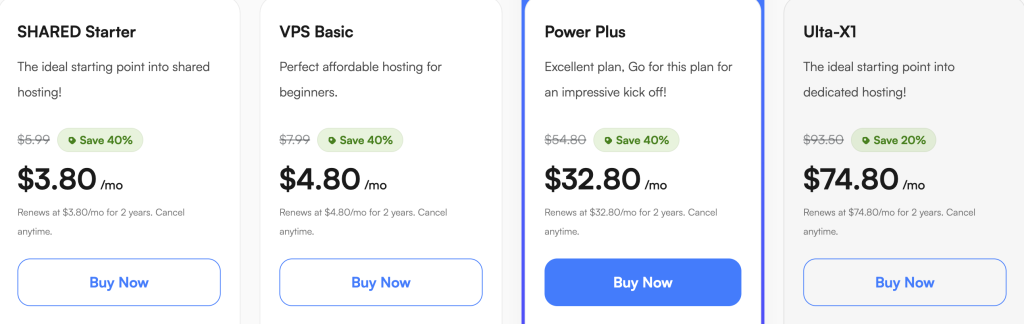
Pricing on the shared range is promotional and the page says so. The two-year term is preselected with a 40% discount badge and a countdown timer running alongside.
- Shared Starter: $3.44 a month on two years, against $4.39 monthly. One domain, roughly 10,000 visits, 30 GB NVMe.
- Shared Basic: $5.18 on two years, against $6.39 monthly. Four domains, roughly 15,000 visits, 60 GB.
- Shared Business: $10.35 on two years, against $12.29 monthly. Unlimited domains, roughly 25,000 visits, 80 GB.
- Shared Pro: $13.23 on two years, against $16.29 monthly. Unlimited domains, roughly 49,000 visits, 110 GB.
The 40% badge measures against UltaHost’s own struck-through figure rather than against its monthly rate. Compare the two-year price to the monthly price and the real gap runs between 15.8% and 21.6%. One genuine point in the host’s favour: every shared card states the renewal rate explicitly and it matches the purchase rate, so no renewal cliff waits at the end of the stated term.
To check those figures against the live page, review Ultahost here and switch the term toggle yourself.
Operational Note :
Storage economics do not move in a straight line across the shared range. At two-year rates the cost per gigabyte of NVMe works out at $0.115 on Starter, $0.086 on Basic, $0.129 on Business and $0.120 on Pro. Basic is the best value per gigabyte and Business the worst.
Measured against traffic instead, the ranking flips: cost per 1,000 monthly visits comes to $0.270 on Pro, $0.344 on Starter, $0.345 on Basic and $0.414 on Business. Pick your metric according to whether your site is storage-heavy or traffic-heavy, because no single plan wins on both.
Final Buying Note :
Decide the control panel before the price. cPanel on shared hosting suits anyone who wants familiar tooling and plentiful documentation. CyberPanel or ispmanager are separate products, and a VPS with root access costs less than the middle shared tiers while giving you everything.
Then decide the term honestly. A two-year commitment at these rates saves roughly a fifth against monthly, which is real money and a long time to be locked to a provider you have not yet used.
Verdict :
UltaHost integrates the way shared hosting integrates: through cPanel, standard protocols and a set of bundled pieces covering certificates, backups and migration. The WordPress line adds genuine tooling in staging, one-click installation and a managed dashboard. A CDN add-on and the panel choice at purchase are the two details most likely to affect you later.
Vendor claims including 5x faster loading and a 4.9 out of 5 rating from 2,500 reviews could not be verified, because the review platform behind that figure refuses our declared crawler. Treat both as marketing until you have your own numbers.
To test the setup path on a real site, try Ultahost here and use the 30-day money-back window as your evaluation period.
FAQ :
Does UltaHost use cPanel?
Yes, on the shared range. UltaHost also sells CyberPanel hosting and ispmanager hosting as separate product lines, so the panel is chosen at purchase rather than switched afterwards.
Is SSL included?
Yes. A free Let’s Encrypt certificate is provided, and UltaHost separately publishes a free SSL checker tool for verifying any domain’s certificate.
Can UltaHost migrate my existing site?
Managed WordPress plans list a free migration plugin, and free website migration appears as a service in the site footer. Confirm which applies to your plan before cancelling your current hosting.
Does the price include a CDN?
It is an add-on on WordPress plans rather than an included feature. Budget for it separately if page speed across regions matters to you.
What does hosting actually cost per month?
On the two-year term the shared plans run $3.44, $5.18, $10.35 and $13.23 a month. Paying monthly costs $4.39, $6.39, $12.29 and $16.29. Each shared card states a renewal rate matching the purchase rate for the stated term.
Is a VPS cheaper than shared hosting?
VPS Basic at $5.52 a month on the two-year term costs less than Shared Business at $10.35, so root access is cheaper than the mid shared tier if you are willing to administer the server yourself.
More on Ultahost
Hand-picked guides to help you choose the right tool — no fluff.

PricingFullEnrich Pricing: What a Credit CostsReal tier prices and what each plan actually includes.

FeaturesAdCreative.ai Features: What Each Plan AddsThe standout features and whether they justify the price.

Use CasesWho Keap Is For at $299 a MonthA practical look at where it fits your stack.
ReviewsSaneBox Review: What 2 Features Really MeanHands-on verdict with the pros, cons and who it fits best.