



Most deliverability tools separate their feature list by plan. InboxAlly does the opposite, and the consequence is that choosing a tier is a volume decision rather than a capability one.
Disclosure: Stack99 earns a commission if you buy through links on this page. It costs you nothing extra and never changes our assessment.
What the product does, mechanically
InboxAlly runs a network of real mailboxes. You add those addresses to your sends, or let the platform generate warm-up sends on your behalf, and the seed accounts then behave like engaged recipients. The engagement is the product. Mailbox providers watch what recipients do with mail and weight future delivery accordingly, so the aim is to feed those systems positive signals until classification shifts.
The features page names the specific actions the seeds take:
- Scroll down through the message, which only happens on genuinely opened mail where content runs past the fold.
- Remove from spam, which tells the provider its filter made a mistake.
- Remove from promotions, which disputes the sorting rather than the filtering.
- Reply, using a set of generic replies the platform supplies.
- Mark as important.
- Click a link, which signals trust rather than mere interest.
One inconsistency worth flagging: the pricing page describes “seven distinct engagement actions” while the features page details six by name. We could not reconcile the two from public pages, so take six as the confirmed count and ask what the seventh is if the difference matters to you.
Why the feature list is the same on every plan
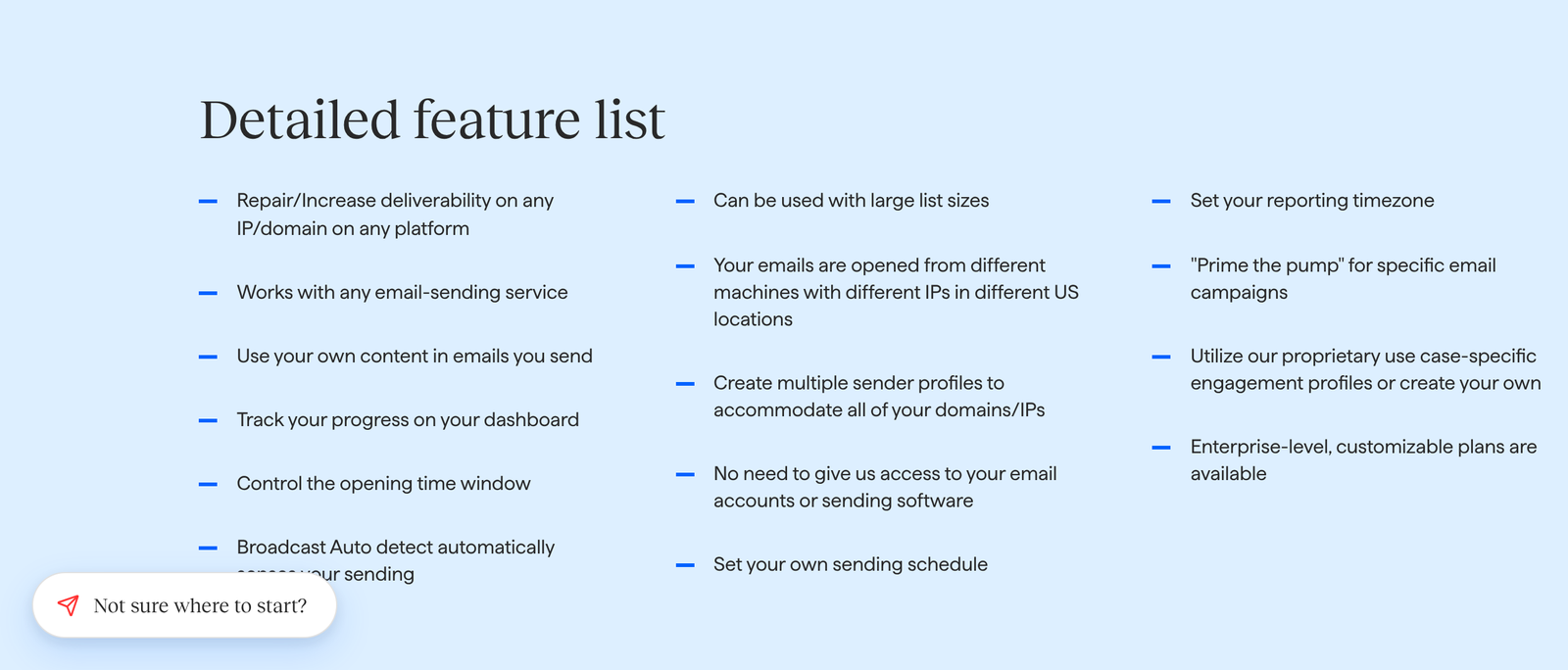
InboxAlly states the position directly on its pricing page: tiers scale the volume, never the capability. That is unusual enough in this category to be worth testing against the plan cards, and the cards hold it up. Nothing in the Starter description is missing a feature the Premium description has. The differences are seed volume, sender profiles and support.
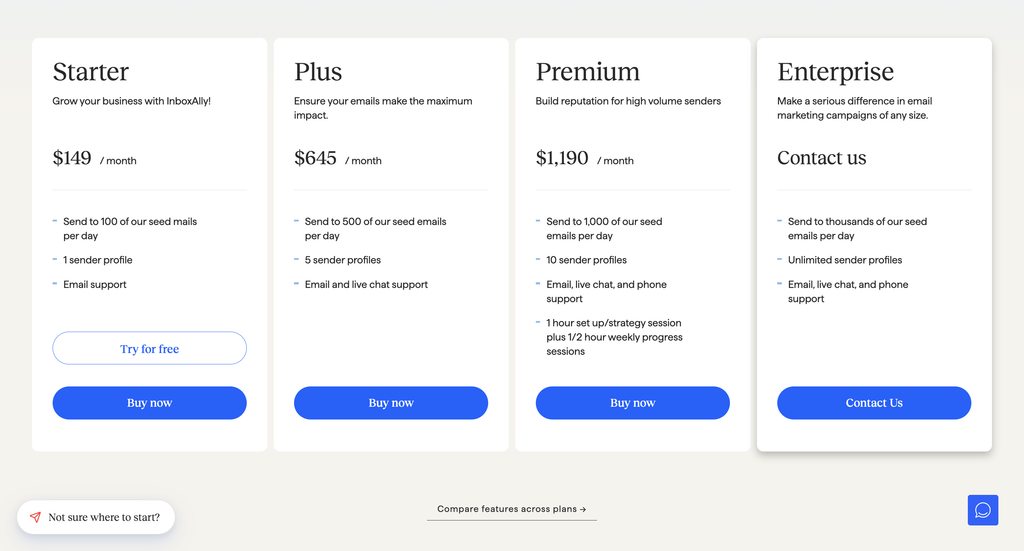
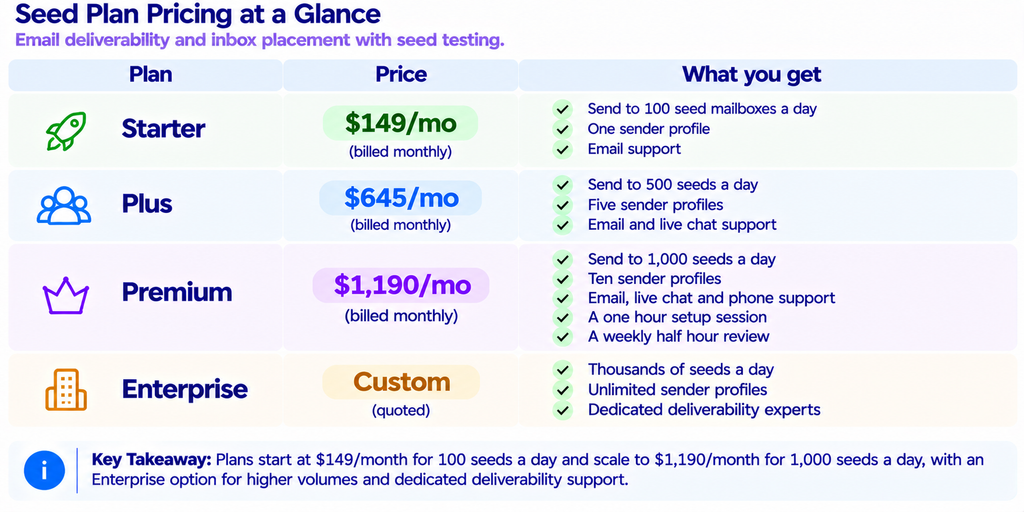
All four are billed monthly in US dollars. No annual toggle appears on the page, and no annual discount is published. A ten day trial runs without a credit card.
The cost per seed is not flat
Divide price by daily seed capacity and the tiers diverge sharply.
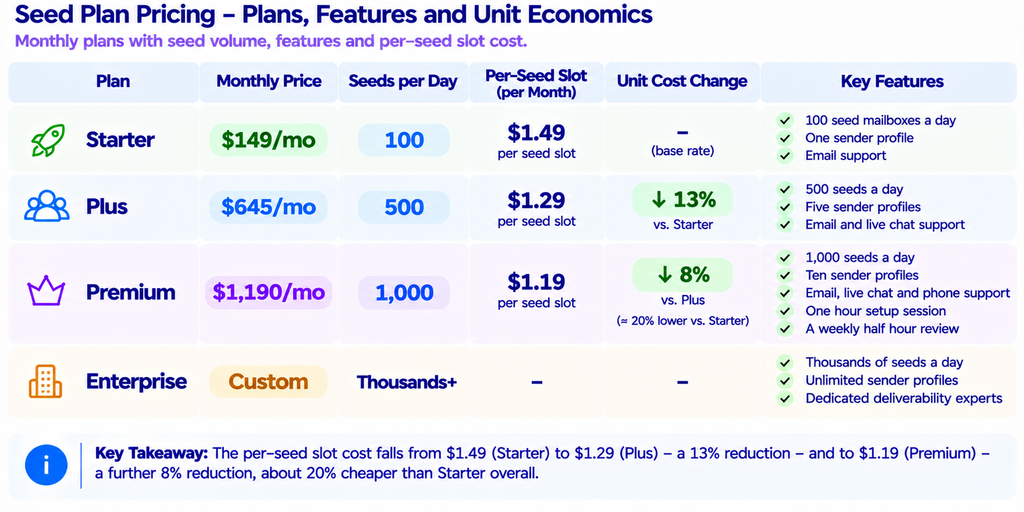
Volume buys a discount, but a modest one. Going from Starter to Plus multiplies your seed capacity by five and your bill by 4.3. The jump in absolute money is what stings: $496 a month more, or $5,952 a year, for capacity most single-domain senders will not use.
Sender profiles tell a different story. Starter gives one, Plus gives five. Per profile, that is $149 against $129. An agency running five client domains is the natural Plus buyer, and for them the seed capacity is almost incidental. The profile count, not the seed count, is what pushes most buyers up a tier.
Sizing a plan against your actual sending
InboxAlly publishes a ratio that makes this calculable: a 5 percent seed-to-send ratio, with 100 seeds stated as supporting 2,000 or more daily sends.
Apply it, and the plans map onto volume cleanly. Starter covers roughly 2,000 sends a day, which is about 60,000 a month. Plus covers around 10,000 a day, or 300,000 a month. Premium covers around 20,000 a day, or 600,000 a month.
Cross-check that against your own list before reading any further. A business emailing a 40,000-person list twice a month is sending 80,000 messages, but spread across two send days, not thirty. Daily seed capacity is a per-day ceiling, so bursty senders should size on their heaviest day rather than their monthly total. Divide your largest single send by twenty, and you have the seed count that day needs.
The features worth paying attention to
IA Score and IA Reputation
IA Score is a predicted inbox-placement figure generated by a proprietary machine learning model based on dozens of features. IA Reputation rates a domain LOW, MED or HIGH, live and per domain, which InboxAlly positions as an equivalent to Google Postmaster Tools.
That equivalence deserves scrutiny, not acceptance. Google’s own email sender guidelines tell senders to monitor domain reputation and spam rate in Postmaster Tools directly, and Postmaster reports on what Gmail actually observed. A vendor score is a model’s prediction. Useful as an early indicator, particularly because it updates continuously and covers providers beyond Gmail, but not a substitute for the provider’s own numbers. Run both.

Adaptive Autowarmup
This is the hands-off mode. The platform writes the warm-up emails, chooses the timing, and adjusts as your domain’s signals move. The alternative is to include seed addresses in your own list segments and send on your normal schedule, which turns real campaigns into the warm-up.
The access implications differ, and this is the single most important operational detail in the product. Adding seeds to your own sends gives InboxAlly no access to your accounts, your sending platform or your DNS. Autowarmup has to send on your behalf, so most of its options need credentials: an SMTP login, a Gmail app password or a SendGrid API key. The default option sends through InboxAlly instead and requires you to verify your sending domain with DNS records.
Security teams will care about that difference. InboxAlly states it never reads or acts on mail in your own inbox under either model, but handing over an SMTP credential is a different review than pasting a list of addresses into a segment.
Three ways to connect
The full REST API is documented and available on every plan, including Starter at $149. Native integrations cover HubSpot and Klaviyo, among others. Failing both, InboxAlly works with any platform that can send to a list, which needs no integration and no credential access at all.
API access on the entry plan is genuinely uncommon in this category. Teams that want to wire seed injection into their own sending pipeline can do it on the cheapest tier rather than buying up for a developer feature.
Monitoring that sits alongside the warmup
Inbox placement testing with a provider breakdown, live blacklist monitoring and DMARC reporting all run in-app on every plan. The dashboard tracks where your mail landed over the previous 30 days and lists the broadcasts you sent, so the warmup and the measurement live in one place rather than two subscriptions.
Preset engagement profiles let you pick a posture rather than tune individual settings. Options run from a default through to reputation protection, with custom configuration available. You also control the opening time window, the sending schedule and the reporting timezone, and a Broadcast Auto detect feature senses your sending without being told.
A dedicated CSM on every plan
Every customer is assigned a success manager, Starter included. Email and live chat come with all plans. Phone and Zoom start at Premium, which also brings the one hour setup session and a weekly 30-minute strategy review. Enterprise adds dedicated deliverability experts.
Note the small discrepancy between the plan card and the FAQ on the same site: the Starter card lists email support only, while the support FAQ says live chat comes with every plan. If chat matters at the $149 tier, confirm it before you buy.
What the features cannot do for you
Engagement signals are one input into inbox placement. They are not the only one, and no amount of seed activity fixes the things mailbox providers check first.
Google’s sender guidelines set out hard requirements for anyone sending 5,000 or more messages a day to personal Gmail accounts. Authenticate with SPF and DKIM, publish a DMARC record, and use a DKIM key of 1024 bits or longer for personal Gmail. Support one-click unsubscribe with the List-Unsubscribe and List-Unsubscribe-Post headers. Keep the spam rate reported in Postmaster Tools below 0.10 percent, and never let it reach 0.30 percent.
Those are gates, not preferences. A domain failing authentication will not be rescued by seeds marking mail as important. Google also warns that a high spam rate leads to increased spam classification and that improvements take time to show up, which is the mechanism InboxAlly is trying to reverse and also the reason reversal is slow.
InboxAlly is reasonably candid about the timeline. Its own FAQ says most domains see better placement within two to four weeks of steady warmup, and that damaged or new domains take four to eight weeks. It also says plainly that the ten-day trial will not cover a full warm-up cycle and should be used to judge fit instead. Set expectations accordingly: at Starter pricing, a four- to eight-week repair is $149 to $298 before you know whether it worked.
The free tools, and why they matter before you subscribe
InboxAlly publishes a set of tools that require no account: an SPF record generator, a DMARC record generator, a BIMI record generator, a spam database lookup, an email spam checker, a spam word checker, and email list verification.
Run those before you pay for anything. Three of the four requirements Google sets for bulk senders are DNS records, and a generator plus a lookup will tell you in ten minutes whether your domain already fails at the gate. A sender whose SPF record omits a third-party platform, or whose DKIM key is shorter than 1024 bits, has a problem that no quantity of seed engagement addresses. Fixing it costs nothing.

List verification belongs in the same pre-flight check. High bounce rates and spam complaints are what drove the reputation damage in most cases, and a warm-up running underneath a dirty list is bailing out a boat with the hole still open. InboxAlly’s own positioning acknowledges this: the platform is built to reverse bad classification, which presumes you have stopped causing it.
How to tell whether it is working
Two numbers move on different clocks, and conflating them produces a lot of premature cancellations.
IA Score and IA Reputation update as new data arrives, so the in-app view responds within days. Gmail’s own view, visible in Postmaster Tools, lags: Google states that improvements in spam rate take time to reflect positively on spam classification. Watch the vendor score for early direction and the provider’s numbers for the verdict.
A sensible measurement plan looks like this. Record your Postmaster spam rate and domain reputation on day one, before anything changes. Keep sending volume roughly constant through the warmup, because a volume spike confounds the result. Check inbox placement by provider weekly in InboxAlly rather than daily, since the signal is noisy at short intervals. Hold judgment until week four at the earliest on a healthy domain and week eight on a damaged one, which are the windows InboxAlly itself quotes.
Budget accordingly. Eight weeks on Starter is roughly $298. On Plus it is $1,290. Deciding at week two that nothing has happened is the expensive mistake, because you pay for the period that would have produced the result and then stop before it arrives.
Matching a plan to a situation
Choose Starter if:
You have one sending domain, your heaviest day stays under roughly 2,000 messages, and you want the full platform including the API. At $1.49 per seed slot it is the most expensive tier per unit, and for a single domain that premium is irrelevant because you cannot use five profiles.
Choose Plus if:
You run multiple domains. Five sender profiles at $645 works out to $129 each, below the Starter rate for one. Agencies and multi-brand senders land here on profile count long before seed volume becomes the binding constraint.
Choose Premium if:
You send at scale, or you want the human attention. Phone support, a structured setup session, and a weekly review are the real differentiators at $1,190, since the software is identical to Starter’s. Judge this tier on whether a weekly half-hour with a specialist is worth $545 a month over Plus.
Look elsewhere if:
Your authentication is not in place yet, since the free DNS record generators on InboxAlly’s own site will serve you better than a subscription. Or your budget tops out below $149 a month, where cheaper single-inbox warmup tools exist, and InboxAlly has no entry tier to meet them.

Frequently asked questions
Do higher InboxAlly plans unlock extra features?
No. InboxAlly states that every plan includes the full platform and that tiers scale volume only. Higher plans raise daily seed capacity and sender profile counts, and widen the support channels available to you.
Is the API available on the cheapest plan?
Yes. The full REST API is documented and available on every plan, Starter included.
Does InboxAlly need access to my email account?
Only in one mode. Adding seed addresses to your own sends requires no access to your accounts, your platform, or your DNS. Adaptive Autowarmup sends for you, so most of its options need an SMTP login, a Gmail app password, or a provider API key, and its default option needs DNS verification of your sending domain instead.
How many sends does 100 seeds support?
InboxAlly publishes a 5 percent seed-to-send ratio and states that 100 seeds support 2,000 or more daily sends. Size against your single largest send day rather than your monthly volume.
Is there an annual plan or discount?
None is published. The pricing page quotes all tiers as billed monthly in US dollars, with no billing toggle.
How long is the trial?
Ten days, with no credit card required. InboxAlly says outright that this will not cover a full warm-up cycle and should be used to assess fit rather than to measure a reputation repair.
The short version
Buying InboxAlly means picking a volume, not a feature set. IA Score, Autowarmup, the API, placement testing, and a dedicated CSM all arrive at $149. Work out your heaviest single send day, divide by twenty for the seed count, count your domains for the profile count, and the plan picks itself. Most buyers who move above Starter do it for the second number rather than the first.
Get your SPF, DKIM, and DMARC records in order first, because no engagement signal compensates for failed authentication. Then take the ten day trial here and judge the dashboard and the fit, not the reputation curve, which will not have moved yet.
Also on Stack99: InboxAlly alternatives, the integrations guide, a beginner’s guide, and an advanced guide.
Sources
- InboxAlly pricing page, including plan cards, the seed-to-send ratio and the support FAQ, checked 23 November 2026.
- InboxAlly features page, engagement actions and the detailed feature list.
- Google, Email sender guidelines, authentication requirements, one-click unsubscribe, and the 0.10 / 0.30 percent spam rate thresholds.