


Quick answer: TikTok for Business has no subscription price. You buy ads at auction, and the only published numbers are a recommended $30 minimum daily ad group budget for North America and EMEA ($20 in APAC) and three signup credit offers. Those offers reward the opposite of what their badges suggest. The one labelled “$500 OFF” pays 100 cents on every dollar you spend. The one badged “$10,000 OFF” tops out at $6,000 in credit and its effective rate falls as you spend more. For most advertisers starting under four figures a month, the middle offer is worth more than the biggest-sounding one.
Disclosure: Stack99 earns a commission if you buy through links on this page. It costs you nothing extra and never changes our assessment.
Reviewing an ad platform is awkward because there is no price list to argue with. TikTok charges you what the auction charges you. So a useful review has to cover the parts that do carry fixed, checkable numbers, the tools you get for free alongside the ad buying, and the claims the vendor makes about reach that you should treat with some care.
That is what follows. The signup credit figures below were captured on 3 November 2026 and the budgeting guidance was re-checked against TikTok’s own site on 10 November 2026.

The credit offers and the badge that misleads
New advertisers pick one of three promotional offers at registration. Read the badges, and you would assume they rank in a straight line. They do not.
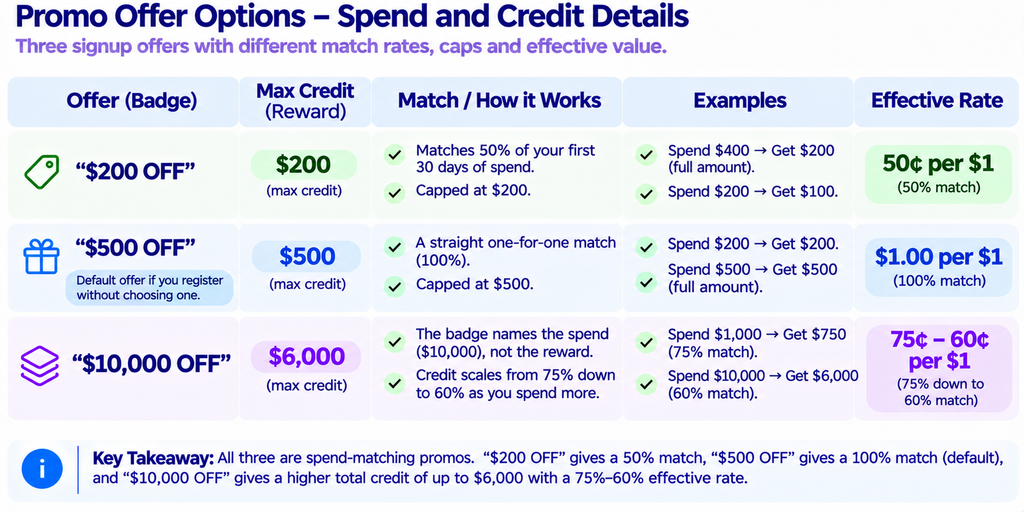
Row three is the one to slow down on. A badge reading “$10,000 OFF” sitting beside badges reading “$200 OFF” and “$500 OFF” invites you to read all three the same way, as the credit on offer. In the first two cases, that reading is correct. In the third, it is not: $10,000 is the spend required, and the credit caps at $6,000. TikTok’s own site banner elsewhere describes “up to USD 6000 free ad credits”, which lines up with $6,000 and not with the badge.
Now run the arithmetic a new advertiser actually faces. Say you plan to spend $500 in your first month.
- The $200 offer returns $200, because 50% of $500 exceeds its cap.
- The $500 offer returns $500, matched dollar for dollar.
- The $10,000 offer returns nothing at all, because its first published threshold is $1,000 of spend.
At $1,000 of spend, the picture shifts only slightly. The middle offer still caps at $500, while the top offer pays $750. So the crossover sits somewhere between $500 and $1,000 of first-month spend, and the biggest badge only wins in absolute terms once you are past four figures. Even then it never pays at the rate its badge implies: 60 cents per dollar at the $10,000 mark is the worst effective rate of the three.
One practical consequence of the default assignment: if you register without picking, you land on the one-for-one offer. For a small advertiser that happens to be the right outcome. A business planning a $10,000 launch that clicks through registration without reading has quietly given up $5,500 of credit.
The floor under every campaign
TikTok publishes a recommended minimum on its budgeting page: $30 a day at ad group level for web conversion campaigns in North America and EMEA, and $20 a day for APAC brands. Budgets can be set at both campaign and ad group level, and the platform names Lowest Cost Bidding as its spend-based approach.
Treat $30 as a floor rather than a target. A single ad group at the recommended minimum runs about $900 a month before you have tested a second audience or a second creative. Most accounts need at least two ad groups to learn anything, which puts a realistic first month closer to $1,800. Our earlier piece on who the $30 floor actually fits works through that in more detail.
Put the two sets of numbers together and the credit offers look different again. A $1,800 first month collects $500 under the one-for-one offer, or $750 under the top one. The top offer wins at that level, though by $250 rather than by the $9,500 its badge suggests.
How the spend actually behaves once you start
Two mechanics catch people out in the first fortnight, and neither is hidden, just easy to skim past.
Budgets exist at two levels at once. You can cap a campaign and you can cap each ad group inside it. Running three ad groups at $30 each under a campaign cap of $50 produces throttling that looks like poor delivery rather than a setting you chose. Decide which level is doing the controlling and leave the other generous.
The second is the objective. TikTok bills against the objective you select, impressions or conversions, and the optimisation follows that choice rather than your intent. An account set to impressions will faithfully buy cheap impressions from people who will never convert. Every auction platform behaves this way, though it causes more damage here because the cost per impression is low enough that a misconfigured campaign can run for days without the spend looking alarming.
Watch the credit window as well. Every offer is tied to a 30-day window from registration, so the credit is earned against spend inside that window rather than whenever you eventually get around to launching. Registering in order to look around, then launching six weeks later, forfeits the match entirely. Set up the account when the creative is ready, not before.
What you actually get access to
TikTok splits its business surface into two groups of tools, and several of them cost nothing whether or not you ever place a bid.
Business tools
- Ads Manager is the buying surface. Smart+ handles automated campaign optimisation, and Ad Assistant walks you through setup. You pay against a chosen objective, either impressions or conversions.
- Business Account is the organic account type, with its own analytics.
- Business Center is the layer above, for multiple accounts, assets and permissions.
- TikTok Shop is the commerce side, with a separate academy and help centre.
Creative tools
- TikTok One is the umbrella entry point.
- Symphony Creative Studio handles generative production.
- Creative Exchange matches you with production partners.
- Creative Center is public trend, top-ad, and sound research, and it needs no account at all.
Of everything listed above, Creative Center is the most useful for someone still deciding. It opens without a login and shows what is currently working in your category. A competitor doing serious volume on TikTok is visible there before you spend a dollar finding out. Agencies and freelancers use it as a research tool independent of where their client money goes.
Business Center, and who needs it
TikTok organises Business Center around three ideas: collaboration across teams and partners, centralisation of assets such as ad accounts, creators and audiences, and accountability through visible permission control. If you already run an Ads Manager account, linking it is a documented path under Assets, then Advertiser accounts, then Add advertiser account.
Single-brand advertisers running one account can skip this entirely for a while. The case for setting it up early is turnover: when a freelancer or agency has been granted access through a shared password rather than a permission structure, removing that access later is messy. Agencies holding several clients have no real choice, and that is clearly who the product was built for.
A caution on reading the marketing page itself. The dashboard imagery shows figures such as “2,344,211 views from last 7 days”. Those are interface mockups rather than reported platform statistics, and they should not be quoted as evidence of anything.
Branding formats and measurement
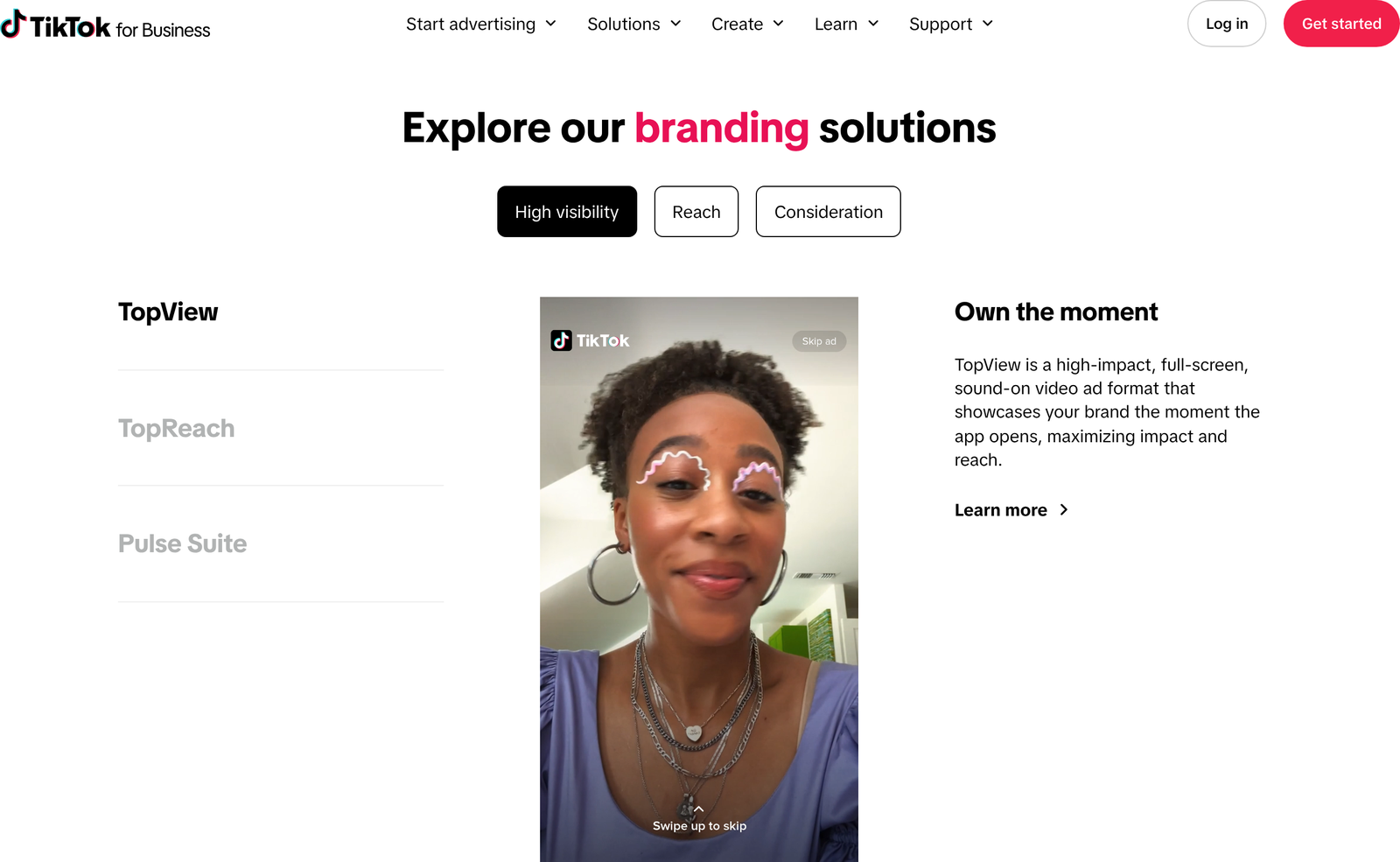
Above the self-serve auction sits a reserved-buy layer: TopView, which is a full-screen sound-on placement at app open, plus TopReach and the Pulse Suite. TikTok organises these against three stages, high visibility, reach and consideration.
No price is published for any of them. That is normal for reserved inventory and it is also the point at which a self-serve review stops being useful. If a sales conversation is required to learn the cost, assume the entry point is well beyond what a small advertiser would commit.
On measurement, TikTok offers Conversion Lift Studies, which it calls its gold standard, and Unified Lift, which runs brand lift and conversion lift together. Lift studies are the honest way to measure an ad platform, since they compare against a holdout rather than counting clicks the platform attributes to itself. The practical catch is sample size. Lift studies need enough spend and enough conversions to reach significance, so they are not available in any meaningful way to an advertiser at the $30 floor.
The claims, and how much weight they carry
TikTok cites third parties for several of its headline statements. Citing a source is better than not citing one, so read the footnotes rather than the headline.
- Ranked first among consumers for capturing attention, attributed to Kantar Media Reactions 2025. A survey of consumer perception, which measures what people say about attention rather than attention itself.
- Pulse captures 40.3% additional audience compared with television alone, attributed to Nielsen ONE Ads, US, 2024 to 2025. The footnote gives the sample as N=91 campaigns and defines the figure as TikTok unique reach divided by TV unique reach plus overlap. Ninety-one campaigns is a thin base for a precise-looking decimal.
- 99% of inventory meets industry brand safety standards, attributed to Integral Ad Science in 2025. The footnote restricts the claim to IAS-measured inventory, and the share of total inventory that was measured is not disclosed. A 99% figure across an unstated denominator tells you less than it appears to.
- Over a billion users. No external citation accompanies this one.
None of these is dishonest. Each shows a vendor framing its own evidence favourably, which is what vendors do. The reason to pull the footnotes apart is that media plans get built on the headline and never revisit the base.
Learning and partner support
TikTok Academy offers structured training with a certification track. A Marketing Partners directory lists vetted vendors, and there is a dedicated section for agencies. Published case studies include Toyota on automotive lead generation, Vero Moda on full-funnel work, and Arrae and Truly Beauty on GMV Max.
One note from testing: guessed help-centre article URLs return an “article no longer exists” page. Navigate from the homepage rather than constructing links, or you will conclude documentation is missing when it is simply moved.
Who it fits
Choose it if: you can commit at least $1,500 to $2,000 across a first testing month, you have or can make vertical video at a reasonable clip, and your buyer is plausibly on the platform. Creative volume matters more here than on search, because the feed burns through an asset quickly.
Choose it if: you run an agency. The permission layer, the partner directory and the certification track are all built around managing accounts you do not own.
Skip it if: your total monthly ad budget is a few hundred dollars. One ad group at the recommended minimum consumes $900 a month, and a single ad group rarely teaches you enough to justify the spend.
Skip it if: you cannot produce video. Static creative adapted from display campaigns performs poorly in a sound-on vertical feed, and tooling such as Symphony Creative Studio reduces the production problem without removing it. Teams in that position often get further with a creative generation tool first, which is the ground our AdCreative.ai integrations review covers, or with a scheduling layer like the one in our SocialBee integrations breakdown.
What I could not verify
- Any price or minimum commitment for TopView, TopReach or the Pulse Suite. None is published.
- The cost of Creative Exchange.
- Feature availability by market. The global site lists tools that may not be live in every country.
- How Smart+ and Ad Assistant make their decisions. Both are described by outcome rather than mechanism.
- Eligibility rules for the credit offers beyond the spend threshold and the 30-day window. Those credit figures were captured on 3 November 2026 and are served to new advertisers at registration, so confirm your own offer on screen before you plan around it.
Frequently asked questions
How much does TikTok for Business cost?
Nothing as a subscription. Ads Manager, Business Account, Business Center and Creative Center carry no fee. Your cost is auction spend, and TikTok recommends a $30 daily minimum per ad group for web conversion campaigns in North America and EMEA, or $20 in APAC.
Is the “$10,000 OFF” offer really worth $10,000?
No. Its credit caps at $6,000 and $10,000 is the spend required to reach that cap. At $1,000 of spend it pays $750. The effective match rate falls from 75% to 60% as spend rises, which is the reverse of how volume discounts usually behave.
Which credit offer should a small advertiser pick?
Below roughly $500 of first-month spend, the one-for-one offer badged “$500 OFF” returns the most per dollar. It is also the offer assigned by default if you register without choosing, so inaction happens to favour small advertisers here.
Do I need Business Center?
Only if more than one person or organisation touches your advertising. A single advertiser with one account can run everything from Ads Manager. Agencies and brands working with external partners should set it up before granting access, because retrofitting permissions onto a shared login is painful.
Can I research TikTok ads without signing up?
Yes. Yes. The Creative Center opens publicly and shows trending content, top-performing ads and sound data without an account. That makes it a reasonable first step before deciding whether to register at all.
Verdict
As a product, TikTok for Business is more generous than its reputation suggests: a free research tool that needs no account, a free permission layer, a certification track, and lift-based measurement that is methodologically sound once your volume supports it. As a purchase, it demands more than its marketing implies. The real entry cost is a four-figure testing month and a steady supply of vertical video, not a $30 daily budget.
The sharpest thing to take away is the badge problem. Three offers presented in the same visual format do not use the same unit, and the largest-looking one is the weakest per dollar until you are spending at a scale that most new advertisers are not. Pick your offer against your actual planned spend. If you are ready to test, you can open a TikTok Ads Manager account and check which offer appears on your registration screen before committing a budget.
Sources
- TikTok for Business, setting a budget, read 10 November 2026
- TikTok Business Center, read 10 November 2026
- Kantar Media Reactions, cited by TikTok for the attention claim
- Nielsen ONE, cited by TikTok for the Pulse reach claim