


Quick answer: Tax1099 charges you twice. There is a per-form filing fee that steps down with volume, starting at $2.99 for a 1099 or W-2 and falling to $0.72 once you pass 500 forms, and there is an optional annual platform fee of $249 (Teams) or $349 (Scale). The Essential plan carries no annual fee at all, so a small filer pays only for forms. Both platform fees are billed yearly, not monthly. One caution before you budget: the worked example Tax1099 publishes on its own pricing page does not agree with the tier table printed directly above it, and the gap is $142.50 on a 600-form filing.
Disclosure: Stack99 earns a commission if you buy through links on this page. It costs you nothing extra and never changes our assessment.
Most filing software hides its real cost in one of two places. Either the subscription looks cheap, and the per-form charges pile up, or the per-form rate looks low, and you discover the feature you need sits two plans higher. Tax1099, built by Zenwork, splits the difference unusually: the subscription is genuinely optional, and the per-form rate genuinely falls as you file more. Whether that works out cheaper than a flat-rate competitor depends almost entirely on how many forms you push through in January.
This page walks the arithmetic. Every figure below came off the vendor’s published pricing page on 10 November 2026.
The three plans, and why Essential is not a trial
Tax1099 sells three platform tiers. Only two of them cost anything.
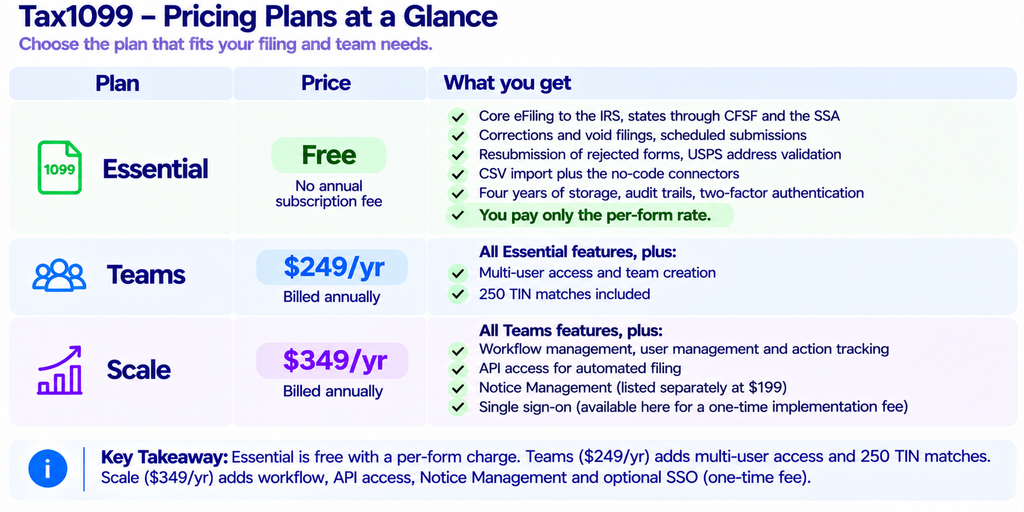
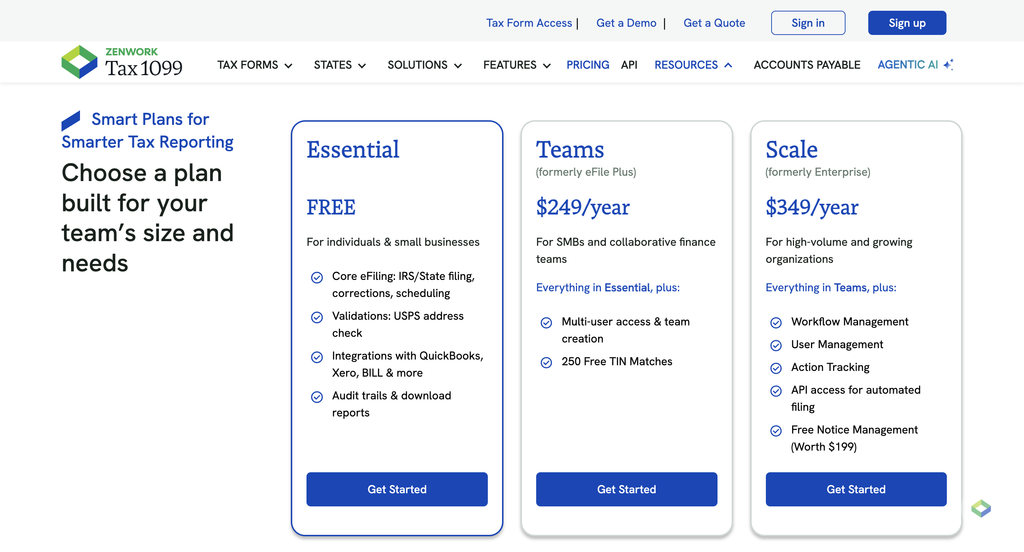
Notice what Essential already includes. Address validation, corrections, scheduled filing and the QuickBooks and Xero imports are not withheld as upsell bait. That matters because it removes the usual reason a one-person bookkeeping practice gets pushed onto a paid tier. If you file for a handful of payers and nobody else touches the account, the free plan does the job.
Teams exists for one reason: more than one person needs to log in. The 250 TIN matches bundled with it are worth $250 at the standard $1.00 real-time rate, which means Teams pays for itself the moment you would have bought those matches anyway. Scale is a different purchase entirely. You buy Scale for the API and the workflow controls, and the included Notice Management is a $199 line item folded in.
The per-form tiers
Here is where the money actually moves. Tax1099 prices by form family, and the ladder below covers the common ones: 1099, 1098, 1095, W-2, W-2C, and W-2G.
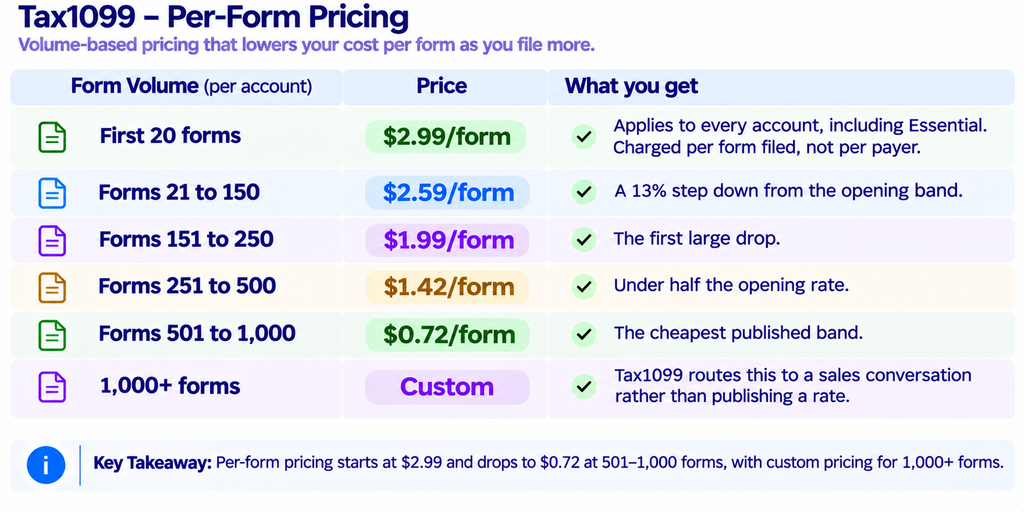
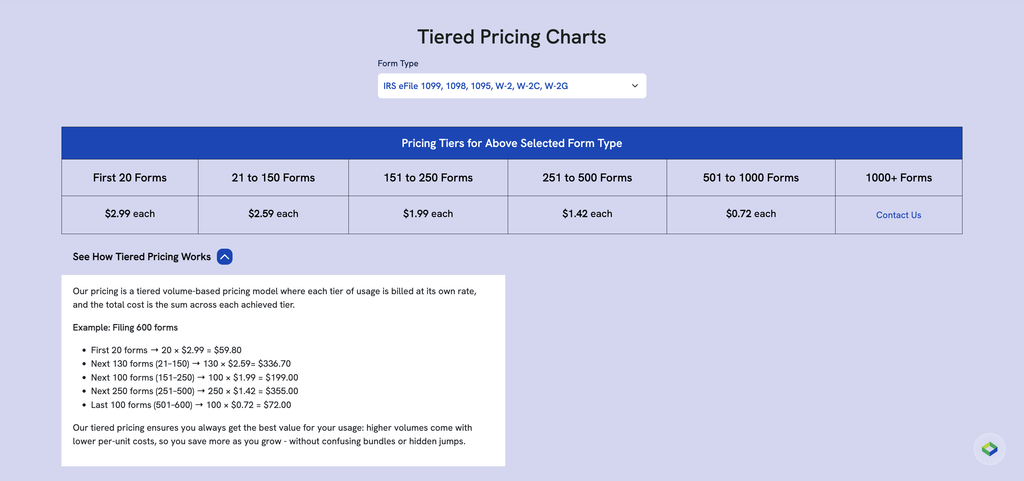
Read that as a staircase, not a lookup. Tax1099 states the model plainly: each band bills at its own rate, and your total is the sum across every band you reach. File 300 forms and you are not charged 300 times $1.42. You pay $2.99 on the first twenty, $2.59 on the next hundred and thirty, $1.99 on the hundred after that, and $1.42 only on the final fifty.
The discrepancy on the vendor’s own page
Tax1099 publishes a worked example under a collapsed heading called “See How Tiered Pricing Works”. Expand it and you get a 600-form calculation. The band labels in that example do not match the form counts printed beside them.
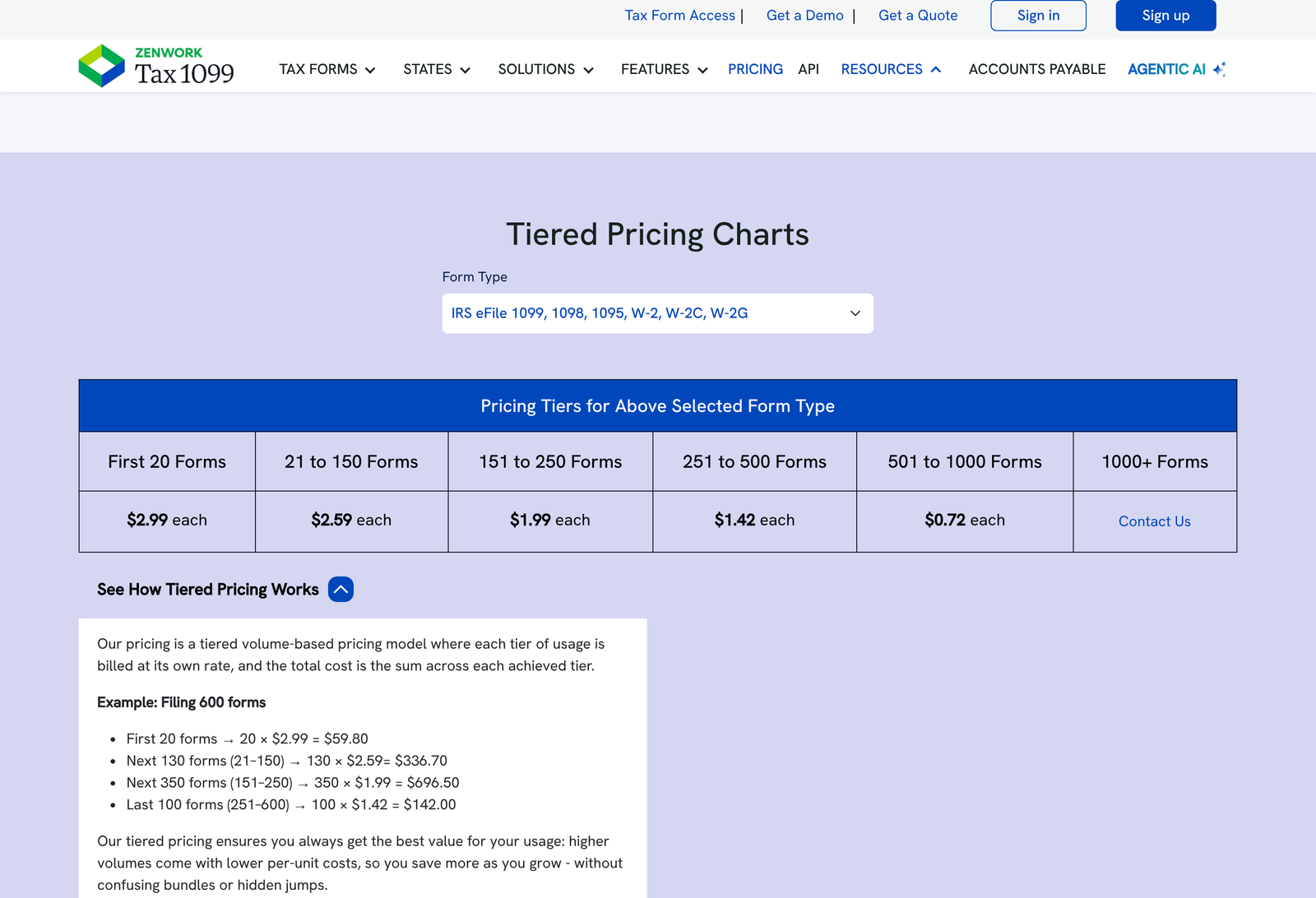
The example reads:
- First 20 forms, 20 at $2.99, giving $59.80
- Next 130 forms (21 to 150), 130 at $2.59, giving $336.70
- Next 350 forms (151 to 250), 350 at $1.99, giving $696.50
- Last 100 forms (251 to 600), 100 at $1.42, giving $142.00
The first two lines are fine. The third and fourth have their counts swapped. A band running from 151 to 250 contains 100 forms, not 350. A band running from 251 to 600 contains 350 forms, not 100. Tax1099 applied the smaller count to the more expensive rate and the larger count to the cheaper one, in the wrong order.
Their four lines total $1,235.00. Rework the same filing against the tier table sitting immediately above the example and you get something different:
- 20 forms at $2.99 is $59.80
- 130 forms at $2.59 is $336.70
- 100 forms at $1.99 is $199.00
- 350 forms at $1.42 is $497.00
That comes to $1,092.50. The gap between the two figures is $142.50, and the published example is the higher of the pair. I cannot tell you which number the billing system actually produces, because only an invoice settles that. What I can tell you is that the two published artefacts disagree, and the cheaper of the two follows from the vendor’s own tier table. Before you commit a budget built on that example, run your own volume through the calculator on the pricing page and compare it against the staircase by hand.
One more number for anyone modelling this: the 501 to 1,000 band at $0.72 never appears in the vendor example, since 600 forms stops inside the 251 to 500 band plus the overflow above it. A filer at 800 forms picks up 300 forms at $0.72, which is where the pricing gets genuinely aggressive.
Other form families price differently
The selector above the tier table is easy to miss, and it rewrites every number below it. A few of the other ladders:
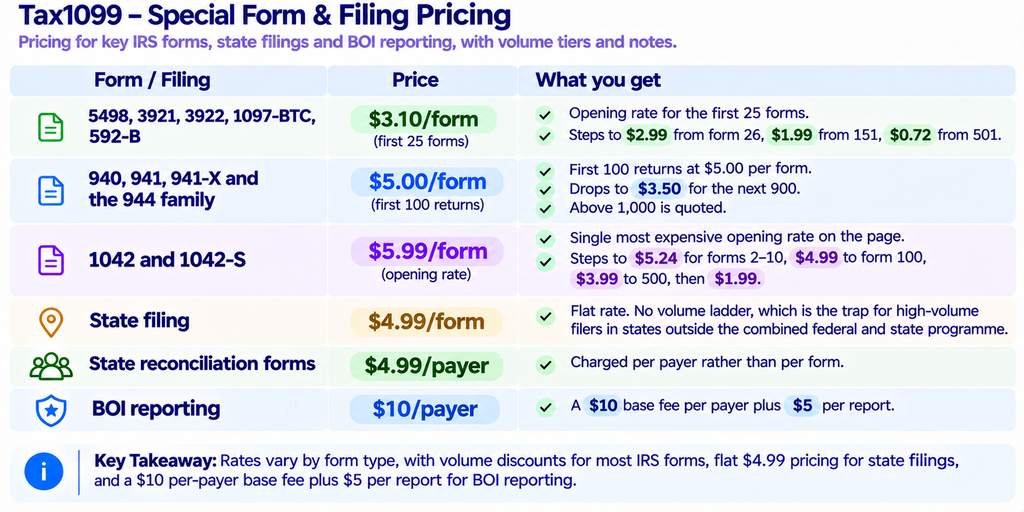
The flat state rate deserves a second look if you file across many jurisdictions. Federal forms get cheaper as you scale. State filings do not. A business filing 600 federal 1099-NECs that also need separate state submission is looking at $4.99 each on the state side with no discount, which can quietly exceed the federal bill.
Add-ons, and the two that bite
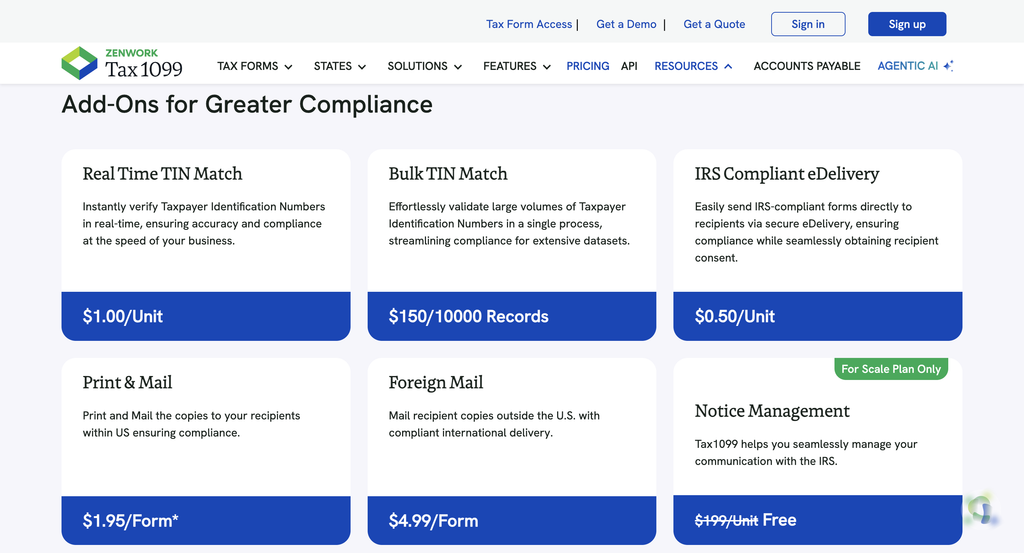
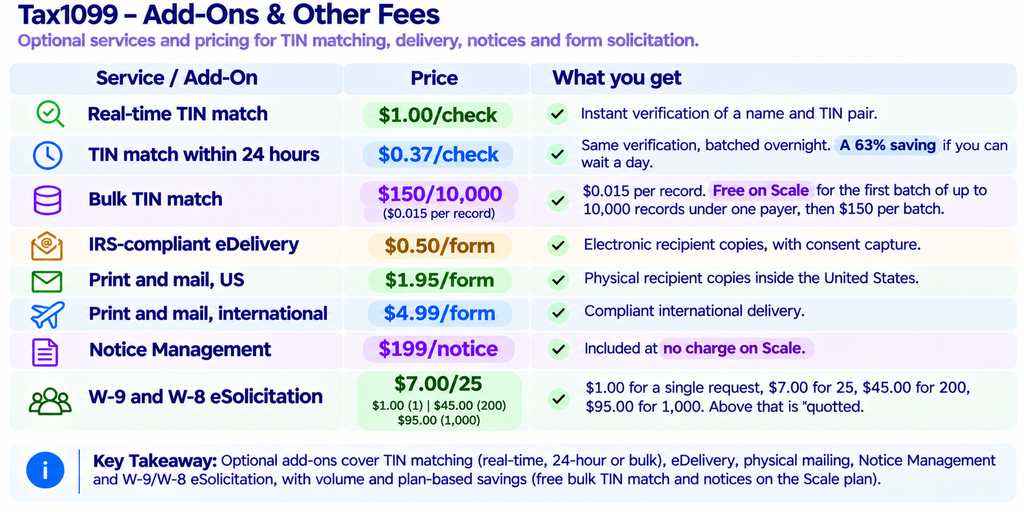
Two of those will reshape your bill more than the filing fee does.
Delivery is where the per-form rate doubles
A 1099-NEC filed in the second band costs $2.59. Mail the recipient copy inside the US, and you add $1.95, which is a 75% increase on that form. Send it electronically instead, and you add $0.50. On 400 recipients, the choice between paper and electronic delivery is $780 against $200, a $580 swing that has nothing to do with which plan you bought.
There is a seasonal sting attached. Tax1099 applies a rush fee of $1 per mail piece on USPS requests placed in the final five days of filing season, through 2 February. Four hundred late recipient copies therefore cost $2.95 each rather than $1.95. Filing a week early saves $400 on that volume, which is a stronger argument for early filing than any compliance lecture.
TIN matching has a 63% discount hiding in the delay
Real-time matching costs $1.00. The 24-hour batch costs $0.37. For a January verification run against 2,000 vendors, that is $2,000 against $740. Bulk matching takes it further still at $150 per 10,000 records, or $0.015 each, which is roughly one sixty-seventh of the real-time rate.
The IRS runs its own TIN matching service free of charge to authorised payers through e-Services, and if your volume is low and your team already holds e-Services credentials, that route costs nothing at all. See the IRS guidance on TIN matching before you buy credits you may not need. What you are paying Tax1099 for is the batching, the audit trail, and the absence of a separate login, not access to data the IRS gates.
Where each plan starts to pay for itself
Run the breakevens and the picture clarifies quickly.
Teams costs $249 and includes 250 TIN matches. Those matches list at $1.00 each in real time, so the plan is free in effect for anyone who was going to run 250 real-time checks. Buy the same 250 checks on the 24-hour batch instead, and they cost $92.50, which leaves $156.50 of the subscription to be justified by multi-user access alone. Whether a second login is worth $156.50 a year is a question only your team structure answers, though for a two-person bookkeeping practice sharing one password it usually is.
Scale costs $349, exactly $100 more than Teams, and folds in Notice Management that otherwise lists at $199 per notice. A single IRS notice in a year therefore covers the upgrade twice over. Add API access and the first free bulk TIN batch, worth $150, and Scale is cheaper than Teams for anyone who expects either one notice or one bulk verification run. That pricing is unusual. Most vendors widen the gap between their top two tiers rather than narrowing it.
For comparison on how differently vendors slice this, our breakdown of Checkr’s five separate price lists shows the opposite approach, and Unleashed’s Core against Pro pricing is another case where the headline tier is not the number that decides the bill.
The regulatory backdrop you are buying into
Two things make 2026 an awkward year to pick a filing vendor on price alone.
First, the electronic filing threshold. Businesses filing ten or more information returns in aggregate must file electronically, a threshold low enough to capture most employers with any contractor spend. Paper is no longer a fallback for a business of almost any size.
Second, the platform transition. The IRS has moved information return filing toward the Information Returns Intake System, with the older FIRE system being wound down. Tax1099 markets itself as IRIS-ready on its own site. Any vendor you choose this season should be able to say the same, and the question to put to a salesperson is which system your returns transmit through today rather than which one is on a roadmap.
Tax1099 also lists state filing through the combined federal and state programme. Where a state participates, one submission can satisfy both. Where it does not, you are back to that flat $4.99 per form with no volume relief, so check your states before you model the cost.
The separate transcript product, and its annual toggle
Buried near the bottom of the same page sits a product that has nothing to do with filing: IRS tax transcript retrieval, sold on its own subscription with a monthly and annual switch.
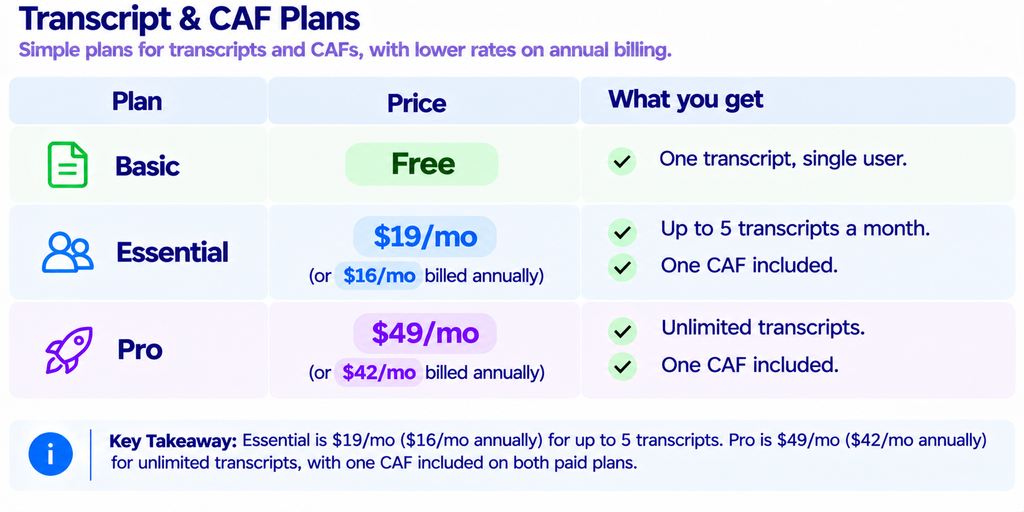
The toggle on that section is labelled “Save 15%”, and the arithmetic backs the label: 15% off $19 lands at $16.15, and 15% off $49 lands at $41.65. Both round to the annual figures shown. The monthly rates are the ones you pay without committing to a year, so treat $19 and $49 as the real recurring prices and the lower pair as the discount for paying up front. Tax1099 also sells individual transcripts at $19 each through Zenwork’s CAF service for filers without their own CAF number.
Who should buy which
Choose Essential if: you file under roughly 150 forms, one person handles the account, and you can live with buying TIN matches individually. Your entire annual cost is the per-form ladder plus whatever delivery method you pick. A 60-form filer with electronic delivery pays about $163 in filing fees and $30 in delivery, and nothing else.
Choose Teams if: more than one person needs a login, or you run a real-time verification sweep of 250 vendors or more each January. The bundled matches cover most of the fee on their own.
Choose Scale if: you want API filing, you expect at least one IRS notice a year, or you verify in bulk. At $100 above Teams it is the cheapest insurance on the page, given a single notice lists at $199.
Get a quote instead if: you cross 1,000 forms. Every ladder on the page stops publishing at that point, and the enterprise track is a form rather than a price.
What I could not verify
A few figures on the page resisted confirmation, so they are left out above rather than guessed at.
- The state add-on price for the GovPay tax payment product. The page shows a discounted figure against a struck-through original, and text extraction loses the strikethrough. The base GovPay subscription is clear: $39.99 a quarter or $149.99 a year, plus $2.99 per transaction.
- The per-variant mapping of the Form 990 family. Form 990-N is free, and the rest of the family runs between $59.99 and $129.99 per return, but the page’s layout does not let me pin each figure to each variant with confidence.
- Tax1099’s own marketing claims of a 4.9 rating from 23,416 reviews and over a million businesses served. Those are vendor statements, and no independent source is cited for either.
- Whether the billing engine follows the tier table or the worked example. Only an invoice resolves that.
Frequently asked questions
Does Tax1099 have a free plan?
Yes, and it is a real plan rather than a trial. Essential carries no annual subscription fee and includes core eFiling, corrections, scheduling, address validation, the accounting integrations, and four years of storage. Filing triggers the per-form rate, starting at $2.99.
Is the $249 for Teams monthly or annual?
Annual. Both paid platform tiers are quoted per year, $249 for Teams and $349 for Scale. Neither tier offers a monthly option. The separate transcript product is the only part of the page sold monthly.
How much does it cost to file 500 1099 forms?
Working the staircase: 20 at $2.99 is $59.80, then 130 at $2.59 is $336.70, then 100 at $1.99 is $199.00, then 250 at $1.42 is $355.00. Total $950.50 in filing fees. Add delivery at $0.50 or $1.95 per recipient on top, and any TIN matching you run.
Why does the per-form price change when I pick a different form?
Because each form family has its own ladder. The 1099 and W-2 group opens at $2.99, the 5498 and 3921 group opens at $3.10, payroll returns open at $5.00, and 1042-S opens at $5.99. The selector above the tier chart controls which ladder is displayed, and it is easy to read a rate that belongs to a form you are not filing.
Are state filings included in the federal price?
No. State filing is billed separately at a flat $4.99 per form with no volume discount. Where a state takes part in the combined federal and state programme, one submission can cover both, so your state cost depends on which jurisdictions you file in.
What is the cheapest way to verify TINs here?
Bulk matching at $150 per 10,000 records works out at $0.015 each. The 24-hour batch is $0.37 and real-time is $1.00. Scale customers get the first bulk batch of up to 10,000 records under one payer at no charge. Authorised payers can also use the IRS e-Services TIN matching programme directly at no cost.
The short version
Tax1099 prices honestly in structure and awkwardly in presentation. The staircase is real, the free tier is real, and Scale at $349 is priced oddly close to Teams in a way that favours the buyer. Against that, the page asks you to notice a form-family selector, a collapsed accordion, a flat state rate that breaks the volume logic, and delivery charges that can exceed the filing fee. The published 600-form example disagreeing with the table above it by $142.50 is the clearest signal that you should model your own numbers rather than trust the worked example.
Model your volume, pick your delivery method first, then choose the plan. You can start on Tax1099’s Essential plan without paying anything up front and move up only once a second login or an API call forces the question.
Sources
- Tax1099 eFile pricing page, read 10 November 2026
- IRS, e-file Forms 1099 with IRIS
- IRS, Filing Information Returns Electronically (FIRE)
- IRS, Taxpayer Identification Number (TIN) matching