


Disclosure: Stack99 earns a commission if you buy through links on this page. It costs you nothing extra and never changes our assessment.
Most email platforms meter one of three things: how many contacts you store, how many emails you send, or how many people log in. GetResponse meters only the first. Sends are unlimited on every paid plan, seats are not sold separately below the Enterprise tier, and the entire bill turns on a single slider marked “List size”. Get that number wrong when you sign up, and your costs move by a factor of twenty-eight.
This page records what the pricing page showed on 22 October 2026, in both billing states and across all seven list-size bands, with the arithmetic checked against the vendor’s own savings claims.

The first number you see is not the monthly price
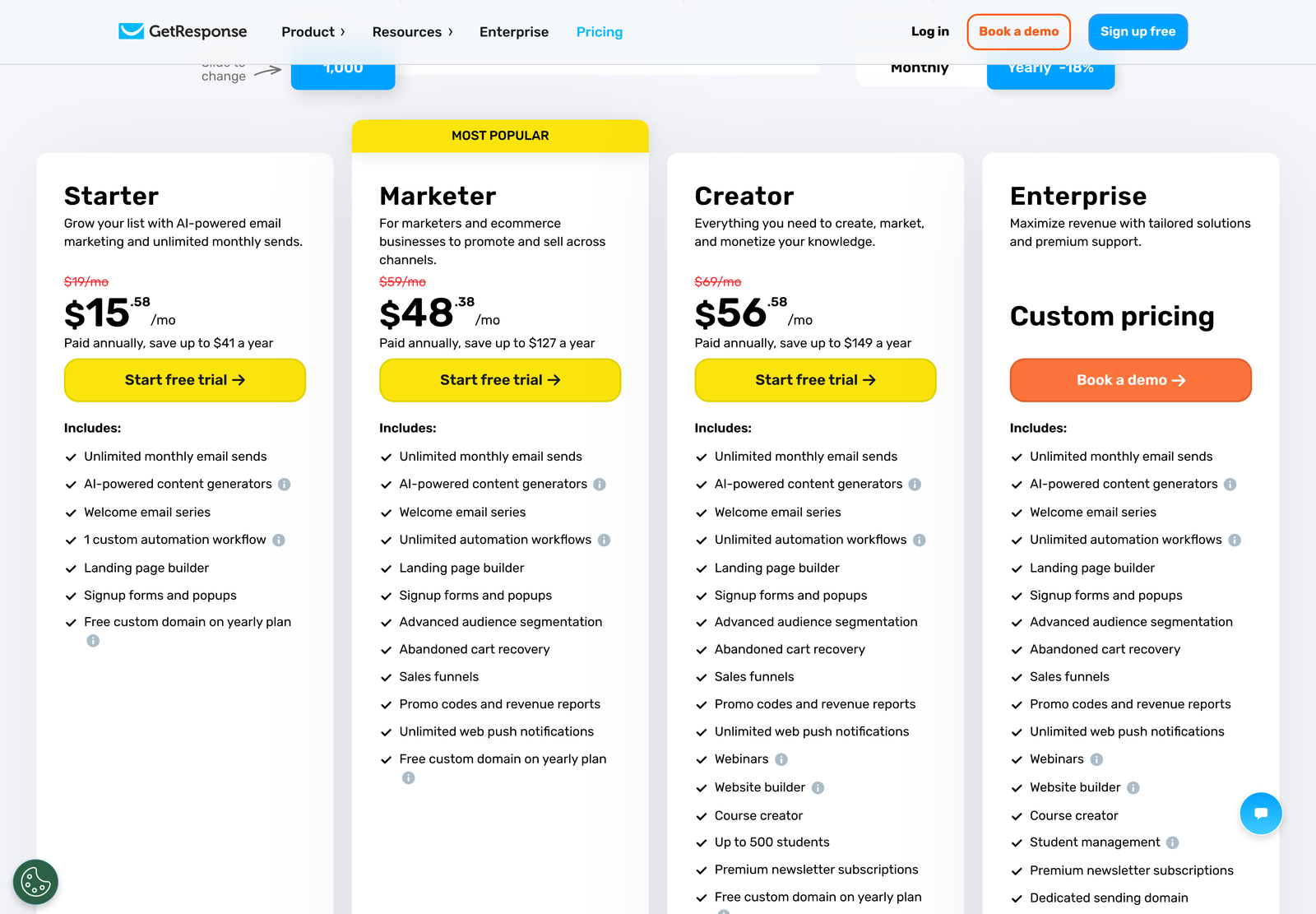
Load getresponse.com/pricing in a clean browser, and the billing control sits on “Yearly -18%” before you touch anything. We confirmed this at the markup level rather than by eye: of the two radio inputs behind the switch, the second one carries checked on arrival.
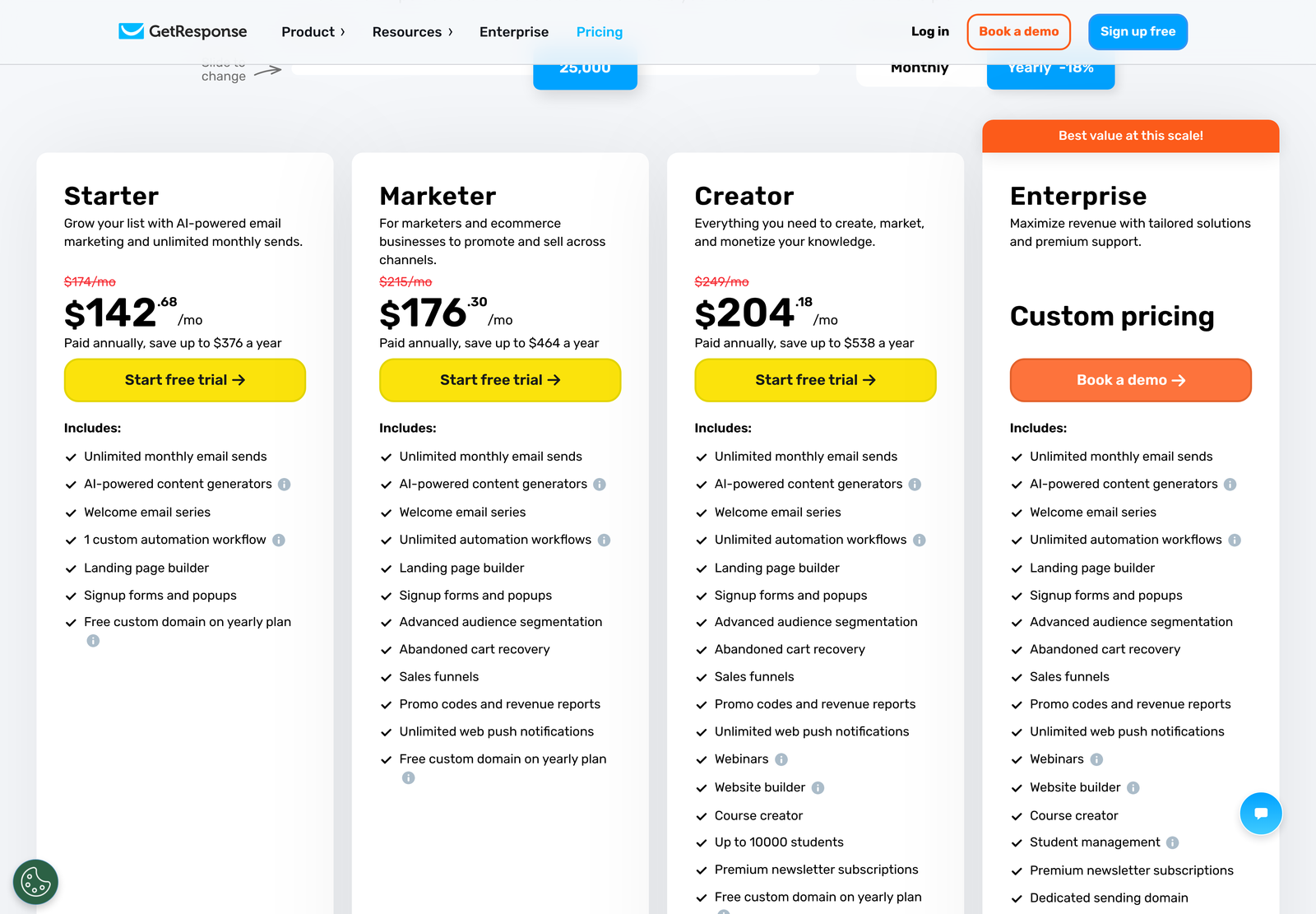
That matters because of how the cards are drawn. Each one prints two figures. The smaller one sits at 14 pixels in red with a line through it. The larger sits at 44 pixels in black. On arrival, the struck-out figure is $19, and the large figure is $15.58, which inverts what a quick glance suggests: the crossed-out number is the real monthly rate and the prominent one is the discounted annual rate divided by twelve.
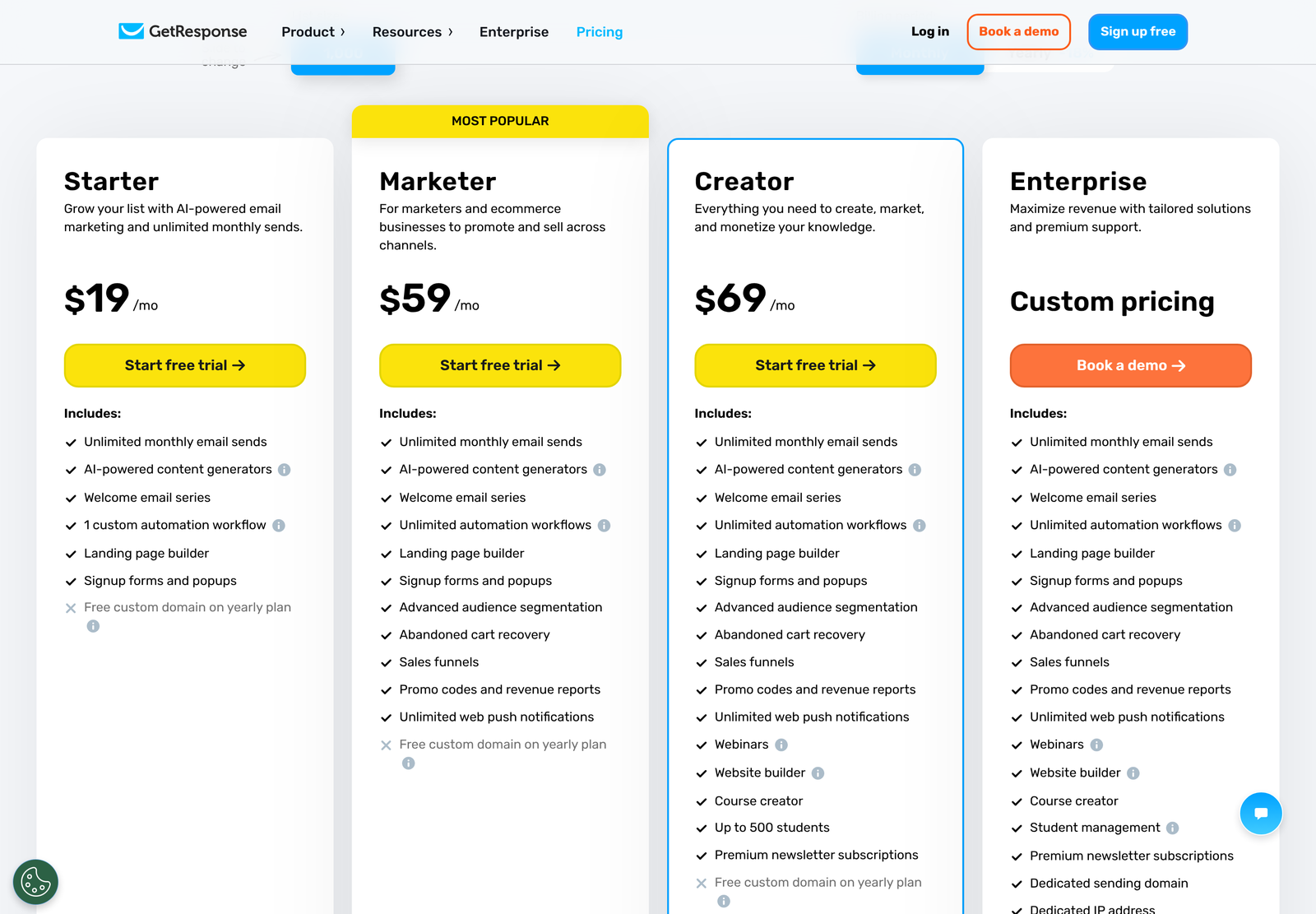
Click “Monthly” and the strikethrough disappears. The same three plans now read $19, $59 and $69 at full size with no decoration, which is the confirmation that those are the recurring month-to-month rates.
Credit where it is due: the 18% badge is accurate. Divide $15.58 by $19, and you get 0.82 exactly. That ratio holds for $48.38 against $59, for $56.58 against $69, and at every list size we tested up to 100,000 contacts. Plenty of vendors advertise “save up to” a figure that is true only at the top tier. GetResponse’s discount is flat across the whole grid.
What each plan costs at 1,000 contacts
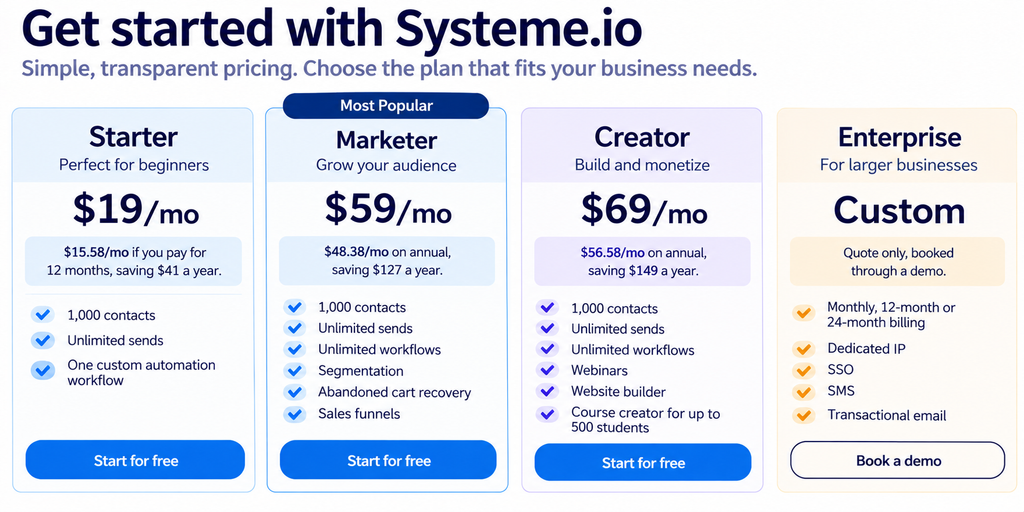
Prices are stated by GetResponse as net amounts, with local taxes applied on top depending on where you are billed.
The slider is the real pricing page
Above the plan cards sits a control labelled “Slide to change”. It defaults to 1,000 contacts and steps through seven positions. Every step rewrites all three prices. Here is the full monthly ladder, captured one step at a time.
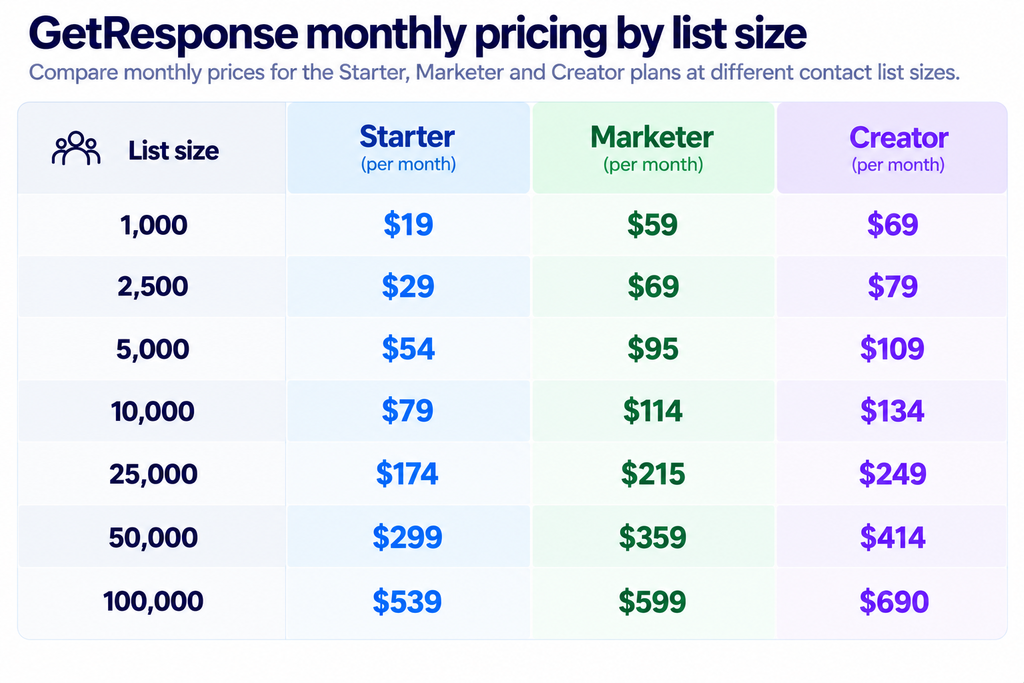
All figures above are the monthly rates. Multiply by 0.82 for the annual equivalent. The slider’s final position is labelled “100,000+” and holds the same prices as 100,000, which means anything larger moves you into a quote.
Cost per thousand subscribers falls as you grow
Divide the Starter price by the list size and the curve bends in your favour. A 1,000-contact list costs $19.00 per thousand subscribers a month. At 2,500, that drops to $11.60. By 10,000 it is $7.90, by 50,000 it is $5.98, and at 100,000 it reaches $5.39. The platform gets roughly three and a half times more efficient per subscriber across the range.
Something more useful happens to the gap between plans. On a 1,000-contact list, Marketer costs 3.11 times what Starter costs. At 5,000, the multiple is 1.76. At 25,000, it is 1.24. At 100,000, Marketer costs 1.11 times Starter, an eleven percent premium for unlimited automation workflows, advanced segmentation, abandoned cart recovery, sales funnels, and revenue reporting.
Read that as a buying rule. With a small list, choosing between Starter and Marketer is a real financial decision, because you are tripling your bill. That stops being true on a large one. A business at 100,000 contacts paying $539 to avoid a $60 increase is saving 0.9% of its email budget by giving up the features that make the list earn anything.
Where the feature line actually falls
Four things appear on every paid plan: unlimited monthly email sends, the AI content generators, a welcome email series, and the landing page builder with signup forms and popups. A free custom domain is included if you pay yearly.
Starter then stops abruptly. It carries exactly one custom automation workflow. Everything that makes lifecycle email work sits above it: unlimited workflows, advanced audience segmentation, abandoned cart recovery, sales funnels, promo codes with revenue reports, and unlimited web push notifications all arrive together on Marketer.
Creator is a different kind of upgrade. For $10 a month more than Marketer at the 1,000-contact band, you add webinars, a website builder, a course creator capped at 500 students, and paid newsletter subscriptions. Nobody buying Creator for the email features is getting value; it is priced for people selling knowledge products.
Enterprise collects the infrastructure items. Dedicated sending domain, dedicated IP address, single sign-on, SMS marketing, mobile push, AI product recommendations, transactional email, and priority support are all quote-gated. If your deliverability plan requires a dedicated IP, no published price covers you.
The free account, and a limit that does not reconcile
GetResponse gives new accounts 14 days of premium features. After that, you keep the account rather than losing it, dropping to a free version whose limits are published only inside a collapsed FAQ entry. They are specific:
- Landing pages: publish as many as you like, capped at 1,000 unique visitors a month, with no A/B testing.
- Webinars: limited to 10 people, counting you and your presenters.
- Messages: a GetResponse badge is added to everything you send, removable only by upgrading.
- Course creator: unlimited courses for up to 250 students, but selling them requires a paid plan.
- Premium newsletters: unlimited, with free subscriptions only. Paid subscriptions need a paid plan.
One line in that list sits oddly against the pricing cards. GetResponse’s free-account FAQ says you can “create and publish as many workflows as you want”, with the dynamic segment filter withheld. The Starter card, meanwhile, advertises one custom automation workflow. We found nowhere on the site where GetResponse reconciles those two statements, so we are reporting both as written rather than guessing which governs. If automation count is central to your decision, ask support to confirm the Starter ceiling in writing before you pay.
Upgrades are instant; downgrades are a support ticket
You can raise your list-size limit, switch billing period or move to a higher package yourself from Billing, and the change applies immediately. Your billing cycle then restarts from that date.
Going the other way is manual. GetResponse states that downgrades “can only be performed by the Support Team as per your request”, whether you are dropping a tier or moving from annual back to monthly. That is a meaningful asymmetry for a product priced on list size, because lists shrink after a cleaning pass and a seasonal business may want to step down in its quiet quarter. Budget for a ticket and a wait, not a toggle.
Two commercial terms are easy to miss. Charities and NGOs are offered 50% off every monthly plan through a named programme. Enterprise buyers can request a Pilot Program instead of a trial, described as 30 days of platform access with dedicated support, arranged through a demo booking.
What the integration count is worth
GetResponse advertises “170+ integrations” in its main navigation. We could not audit that catalogue item by item, but the Zapier listing gives an independent view of how the platform behaves once connected, and it carries a detail that affects automation design.
Every GetResponse trigger Zapier exposes is a polling trigger. New Contact, New List, New Newsletter, New Autoresponder, New Landing Page, and New Form all wait for Zapier to check, which happens every 15 minutes on Zapier’s own free tier. Nothing fires instantly. If your plan involves a real-time handoff from a GetResponse signup into another system, that quarter-hour window is the floor unless you build against the API directly.
For comparison, our GetResponse integrations guide covers the native connector list, and the beginner’s guide walks through a first campaign.
Who you are buying from
The vendor is GetResponse S.A., registered at Grunwaldzka 413 in Gdansk, Poland, under KRS number 0000942075 and tax number NIP 9581468984, with share capital of PLN 5,703,836 stated as fully paid. The company dates its MarTech work to 1998 and describes itself as a Lifecycle Automation Platform.
The customer figure of “over 350k” appears on both the pricing page and the investor relations page. It carries no date, no definition of a customer, and no third-party audit, so treat it as positioning. We tried to corroborate the KRS registration at an independent Polish registry and were refused at the door, so the registry details above are reported as GetResponse publishes them.
The annual commitment, costed over a full year
A per-month figure hides how much the billing choice is worth in cash. Run it out over twelve months, and the decision sharpens, because the 18% discount compounds against a base that is itself rising with your list.
A Starter account holding 1,000 contacts costs $228 a year paid monthly, or $186.96 paid upfront. Saving $41 is pleasant and nothing more. Move that same account to 10,000 contacts and the annual figures become $948 against $777.36, a $170.64 difference. Take it to 100,000, and you are comparing $6,468 with $5,303.76, where the commitment is now worth $1,164.24 a year.
The higher tiers scale the same way. Marketer at 100,000 contacts runs $7,188 a year, monthly against $5,894.16 annually. Creator at that size costs $8,280 or $6,789.60. Every one of those gaps is larger than the entire first-year bill of a small Starter account, which is the clearest argument for deciding your billing period deliberately rather than accepting the default.
Weigh that against the downgrade friction described above. Committing twelve months at 50,000 contacts saves real money, and it also locks you into a list size you cannot reduce without a support conversation. Businesses with predictable lists should take the discount. Businesses running seasonal spikes, or planning a serious list-cleaning pass, are buying a cheaper rate and a slower exit at the same time.
Which plan fits which business
Choose it if: you publish a newsletter, send broadcasts, and want one welcome sequence running behind a signup form. Starter covers that completely, and unlimited sends mean a daily publisher pays no more than a monthly one. The single workflow is enough for a single job.
Choose it if: you sell products online and your email needs to react to behaviour. Marketer is the floor for abandoned cart recovery, and it is also where segmentation stops being a list filter and starts being a trigger. Anyone running more than one lifecycle sequence has already outgrown Starter regardless of list size.
Choose it if: your product is the knowledge itself. Creator bundles a course builder, webinars, a website builder, and paid newsletter subscriptions into the email bill, which removes a separate course platform from your stack. Our LearnWorlds pricing breakdown is the comparison to run before assuming that bundling wins, since a dedicated platform prices learners rather than contacts.
Skip the self-serve tiers entirely if you need a dedicated IP address, single sign-on, SMS, or transactional email. Those sit behind a quote, and no amount of slider movement surfaces a number for them.
Support hours are published, which is rarer than it should be
Buried in the same FAQ that holds the free-account limits, GetResponse states exactly when a human is available. Live chat runs in English from 7 AM to 11 PM, dropping to 7 AM to 9 PM at weekends, on GMT+1. Polish live chat is weekdays only, 9 AM to 5 PM. A chatbot covers all languages around the clock, and email support is answered 24 hours a day in English, Polish, German, Spanish, Portuguese, French, and Italian.
Check those hours against your timezone before you commit. A buyer on the US West Coast sees English live chat close at 2 PM local time, which turns most of their working afternoon into an email-only relationship. Priority support exists, and it is an Enterprise line item rather than something you can add to a published plan.
Two customer results appear beside the pricing cards and deserve the usual caution. Steve Forrer of the Wurth Group is quoted putting a 72% turnover increase down to GetResponse targeting and automation, and Dominika Puk of Eveline Cosmetics reports $13,000 in sales from a single campaign. Neither carries a date, a baseline, a campaign size or an independent check. They are testimonials selected by the vendor, so read them as evidence that the platform can work rather than as a forecast of what it will do for you.
What we could not verify
- Any Enterprise figure, seat minimum, or contract value. The tier is quote-only at every list size.
- What happens when you exceed your contract ceiling mid-month, and whether overage is charged or sending is paused. No published answer.
- The size of the charity and NGO discount beyond the stated 50%, including which organisations qualify.
- Whether Starter’s single-workflow limit or the free account’s unlimited-workflow statement is the operative one.
- The 170+ integration count and the 350k customer count, both vendor claims without a source.
- Published review scores. G2, Capterra, and Trustpilot all refuse our declared crawler, so no aggregate rating is quoted here.
Frequently asked questions
Is $15.58 really the Starter price?
Only if you commit to twelve months upfront. Month-to-month, Starter at 1,000 contacts is $19. The $15.58 figure is that annual commitment divided across twelve months, and the pricing page shows it by default.
Does GetResponse charge for emails sent?
No. Unlimited monthly email sends appear on all four plans, including Starter. Your bill moves with how many contacts you store, not how often you mail them. Mailbox providers still apply their own sender requirements regardless of what your platform allows, so volume is governed by reputation rather than by price.
How many billing periods are there?
Two on the self-serve plans: monthly or 12 months. Enterprise customers get a third option of 24 months.
Can I try it before paying?
Yes. New accounts get 14 days of premium features, then fall back to a free account rather than being closed. That free tier carries a GetResponse badge on outgoing mail and caps landing page traffic at 1,000 unique visitors a month.
Which plan suits an ecommerce list?
Marketer, because abandoned cart recovery, sales funnels, and promo codes with revenue reports are the lowest tier that carries them. Starter cannot run a recovery sequence, and its single workflow allowance rules out running several lifecycle automations at once.
What if my list shrinks?
You will need to raise a support ticket. Self-service covers upgrades only; GetResponse performs downgrades manually on request.
Sources
- GetResponse pricing page, both billing states and all seven list-size bands, checked 22 October 2026.
- GetResponse investor relations, for the registered entity, KRS and share capital.
- Zapier’s GetResponse listing, for trigger types and polling cadence.
- Google’s email sender guidelines, for the sender requirements that apply independently of your platform’s send allowance.