


Quick answer: accessiBe accessWidget runs $59, $179, or $479 a month, and the tier you land on is decided by your traffic rather than by anything you choose. Paying yearly costs $490, $1,490, or $3,990 and saves almost exactly 30%. The pricing page opens on the yearly view, so the first number you see is not the monthly rate. Before you compare that to a competitor, read the Excluded Issues page, because PDFs, CAPTCHA, payment iframes, and single-page apps fall outside the subscription.
Disclosure: Stack99 earns a commission if you buy through links on this page. It costs you nothing extra and never changes our assessment.
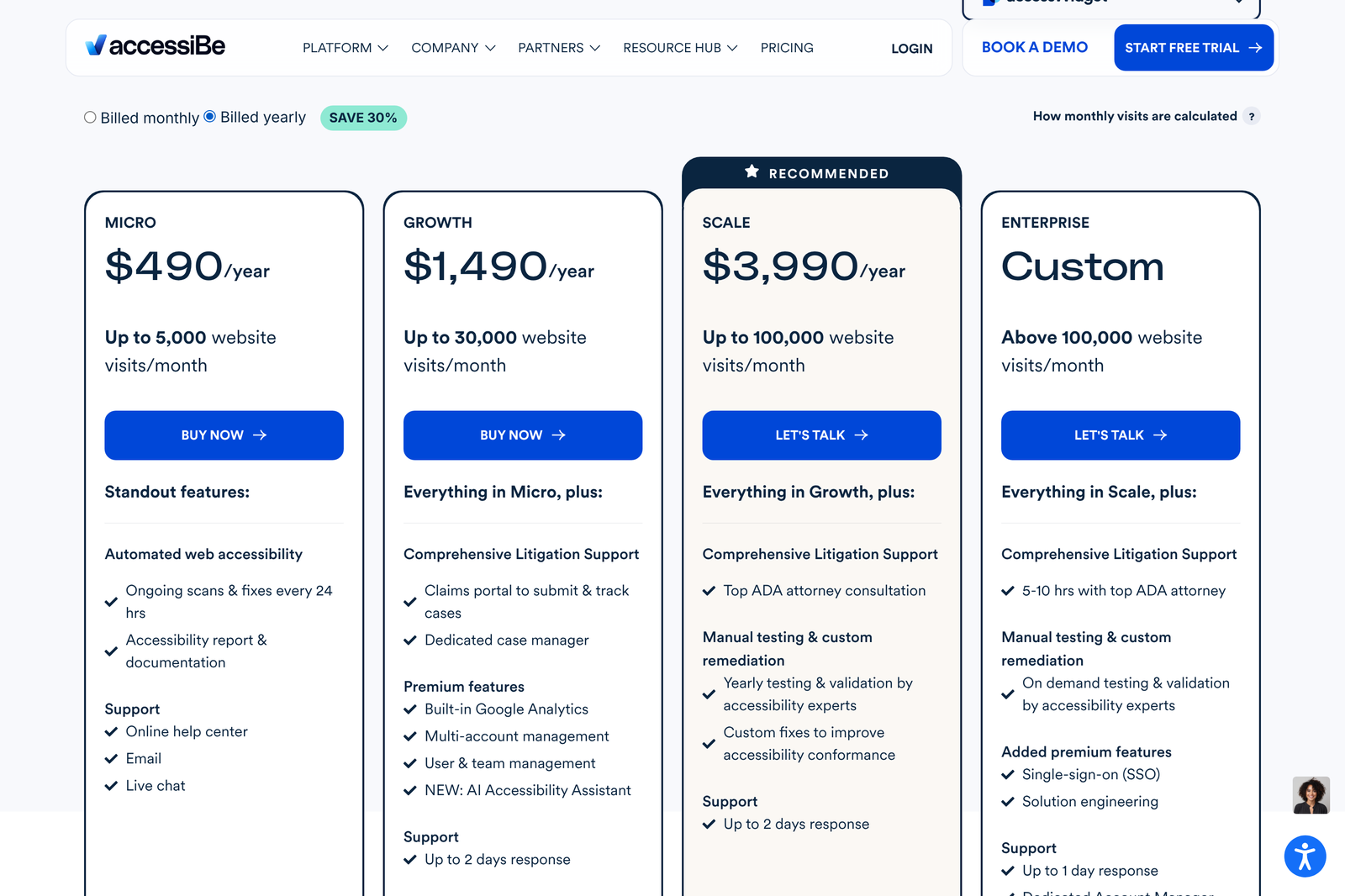
The page opens on the yearly toggle
Load the accessWidget pricing page and the Micro card reads $490. Nothing on the card is hidden or wrong, but the radio button labelled “Billed yearly” is already selected when the page renders. We checked the DOM on 26 October 2026, and the yearly input carries checked on arrival. A buyer skimming four cards walks away believing the entry plan costs $490 a year when the monthly rate is $59.
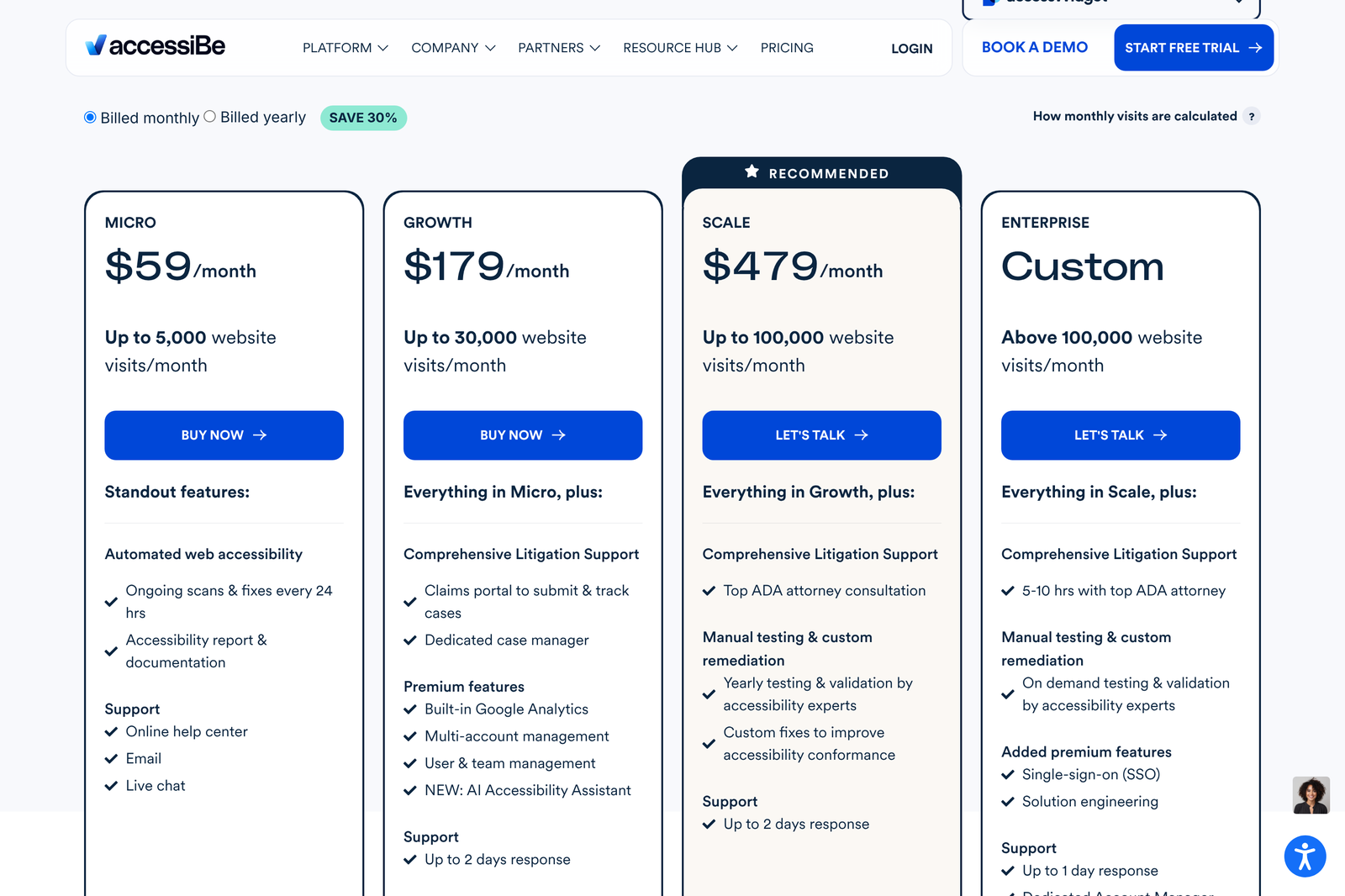
Click “Billed monthly” and the same four cards redraw with the recurring rates. Both sets of figures live in the markup at once, which is why a text scrape of the page returns $59 and $490 side by side with no indication of which one applies.
The four plans, priced
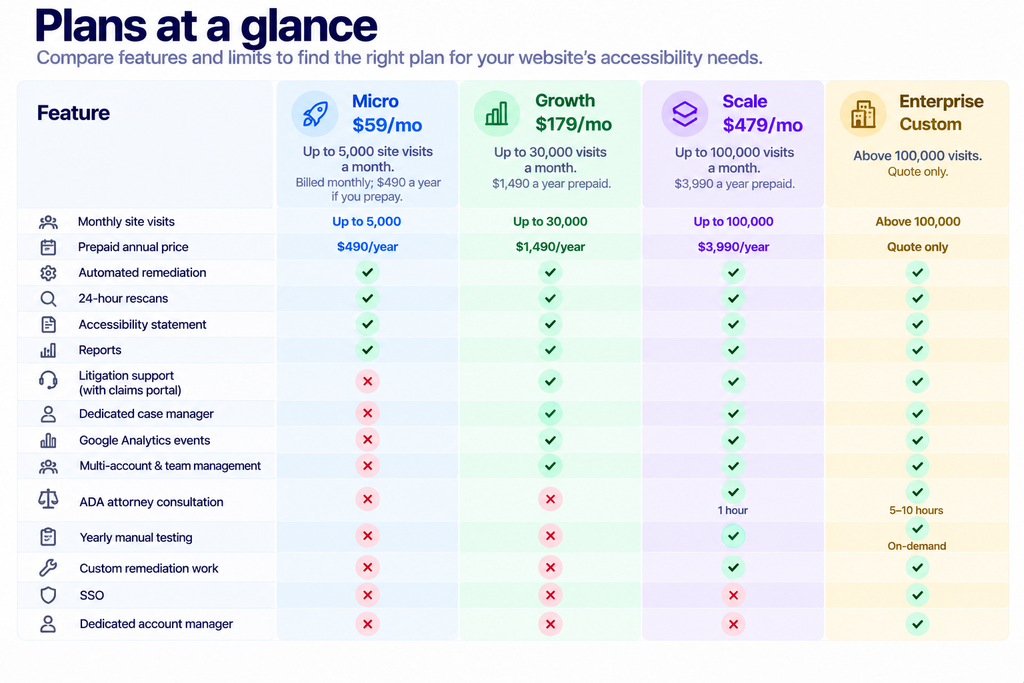
Run the annual discount, and it holds steady across the ladder. Micro costs $708 over twelve monthly payments against $490 prepaid, a saving of $218 or 30.8%. Growth saves $658 off $2,148. Scale saves $1,758 off $5,748. Both of those land on 30.6%. The “SAVE 30%” badge is accurate, which is less common than it should be.
Similarweb sets your bill, not your analytics
Here is the mechanism most buyers miss. accessiBe does not ask you to report your traffic and does not read your Google Analytics. Its own explainer states that plans are priced on “average monthly visits (non-unique, desktop, and mobile)” to your domain, calculated from Similarweb data over the previous six months.
Three consequences follow. Your bill is set by a third-party estimate you do not control and cannot easily audit. The figure counts visits rather than unique visitors, so a returning customer who browses four times in a month costs you four. And because the window is six months long, a seasonal spike keeps influencing your tier well after the season ends.
If your own analytics and Similarweb disagree, and they frequently do for smaller sites, the quote follows Similarweb. Ask which figure the vendor has on file for your domain before you sign anything, particularly if you sit near a ceiling.
The steps between tiers are far steeper than the tiers look
Cost per visit falls as you climb. At the Micro ceiling of 5,000 visits, you pay $0.0118 a visit. Growth’s ceiling of 30,000 works out at $0.0060. At the Scale ceiling of 100,000, you pay $0.0048. Read only that and the ladder looks like a sensible volume discount.
Now look at the floors. A site serving 5,001 visits a month has crossed into Growth and pays $179, up from $59. That single extra visit costs $120 a month, a 203% increase. Measured against the traffic you actually have, the price per visit at the Growth floor is $0.0358, three times what you were paying the month before. The same cliff repeats at 30,001 visits, where the bill moves from $179 to $479 and climbs 168%.
Sites that sit just under a ceiling get the best value on this ladder. Sites that have just crossed one get the worst. Work out where your six-month average puts you, and if you are at 4,800 visits and growing, budget for $179 rather than $59.
Subdomains are separate subscriptions
The vendor FAQ is explicit: accessWidget covers any page within the domain you subscribe for, and “if you’d like accessWidget to scan and remediate your subdomains, you will need to subscribe for additional plans.”
Plenty of businesses run shop.example.com, help.example.com, and careers.example.com. Under this model, each of those is its own line item, priced on its own Similarweb traffic. A company budgeting $59 for accessibility can find itself holding three or four subscriptions. Count your subdomains before you count your money.
What the extra $120 a month at Growth actually buys
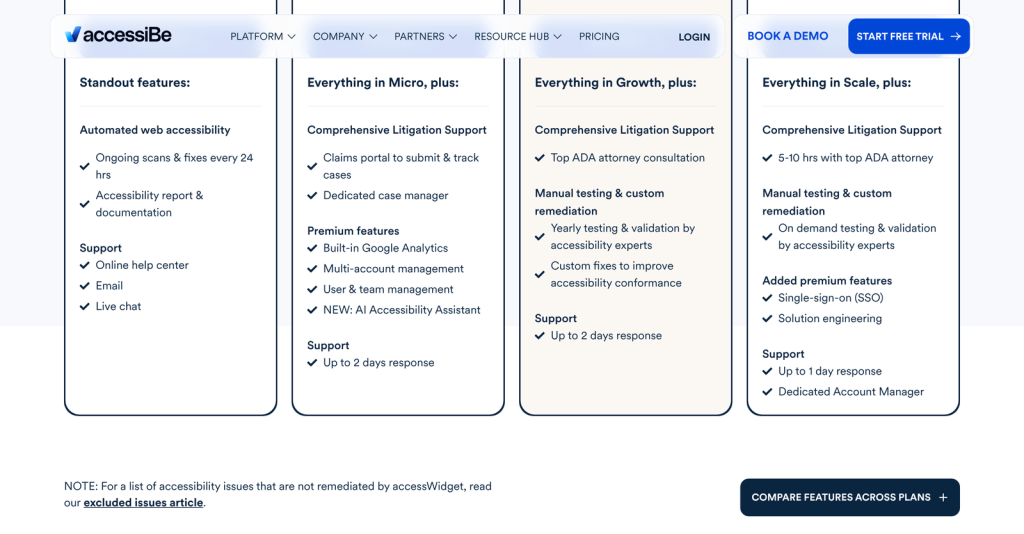
Micro is the automation on its own: remediation, scans every 24 hours, an accessibility statement, a monthly audit report you can download as a PDF, and support through a help centre, by email, or on live chat.
Growth adds a different category of thing. The feature list calls it Comprehensive Litigation Support, and it covers a claims portal for submitting and tracking cases plus a dedicated case manager who stays with a demand letter until it resolves. Google Analytics event tracking, multi-account management, team roles, and an AI Accessibility Assistant arrive at the same tier.

That is the real split in this product line. Micro sells you software. Growth and above sell you somebody to call when a letter arrives. Whether $120 a month is a fair price for that depends entirely on your exposure, and businesses in the United States serving consumers online carry more of it than most.
Scale and Enterprise are legal products with software attached
Scale brings one hour of consultation with an ADA attorney, yearly manual testing by accessibility experts, and custom fixes developed from what that testing finds. Enterprise raises the attorney allowance to between 5 and 10 hours, makes manual testing available on demand, and adds single sign-on, solution engineering, and a dedicated account manager.
Support response times tighten only at the top. The comparison table lists 48 hours for Micro, Growth and Scale alike, dropping to 24 hours on Enterprise. Paying $479 instead of $59 does not get your emails answered faster.
One figure on that table deserves attention. Custom legal terms are marked as relevant to businesses on a yearly Enterprise package of $20k or more. Scale prepaid costs $3,990, so negotiating your own contract language means committing roughly five times the top published price.
Fifteen things the subscription excludes
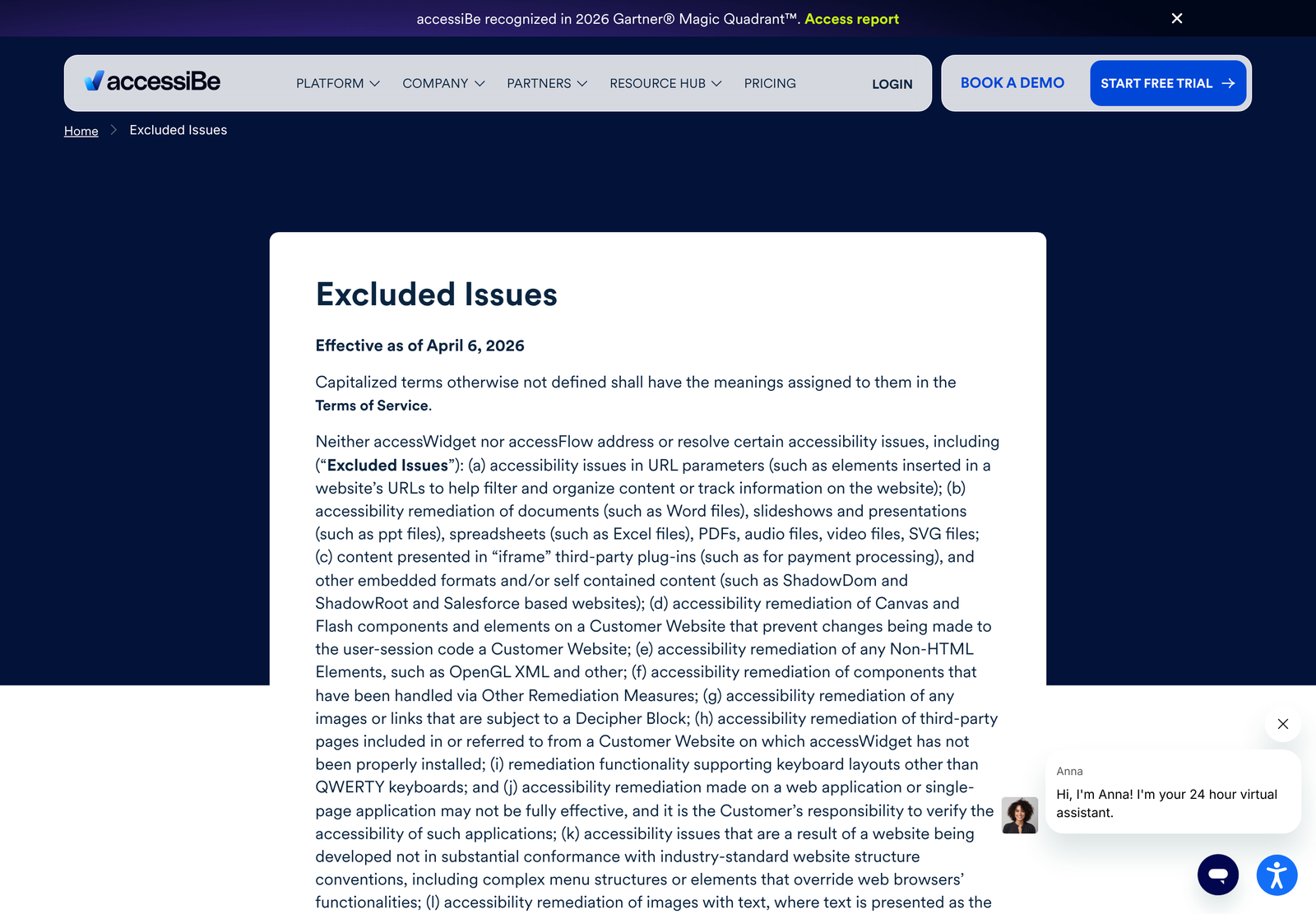
accessiBe publishes an Excluded Issues page, effective 6 April 2026, and links to it from a footnote on the pricing page. It is fifteen lettered items long, and it is the most useful document the company has put online, because it tells you what you are not buying.
The exclusions that cost real money are these:
- Documents and media. Word files, PowerPoint, spreadsheets, PDFs, audio, video and SVG are all outside scope. A university, a law firm or a council that publishes PDFs has just discovered its largest accessibility problem is not covered.
- Third-party iframes, including payment processing. Checkout is frequently an embedded iframe. So is a booking widget, a chat window or an embedded form.
- CAPTCHA. The page states that neither accessWidget nor accessFlow render or suggest remediations for CAPTCHA elements, including alternative authentication methods.
- Single-page applications. Remediation on a web app or SPA “may not be fully effective”, and verifying it is explicitly the customer’s responsibility.
- Images with text in them. If the text is the main part of the image rather than marked up in HTML, it is excluded.
- Non-QWERTY keyboard layouts. Canvas and Flash elements are out too, along with Shadow DOM content, Salesforce-based sites, and pages where the CMS blocks third-party scripts.
None of this makes accessWidget a bad product. An overlay injects JavaScript into pages it did not author, and several items on that list are genuinely outside what injected JavaScript can reach. The problem is that a buyer comparing $59 against a $5,000 manual audit is not comparing like with like, and the pricing page does not say so above the fold.
Where the exclusions collide with WCAG 2.2
WCAG 2.2 became a W3C Recommendation on 5 October 2023 and added nine success criteria to the 2.1 set. Four of them are Level A or AA, which is the conformance target almost every accessibility clause names.
- 3.3.8 Accessible Authentication (Minimum), Level AA. This is the criterion that CAPTCHA engages directly, and CAPTCHA is excluded by name.
- 2.5.8 Target Size (Minimum), Level AA. Interactive targets need a minimum size. That is a layout property of your CSS.
- 2.5.7 Dragging Movements, Level AA. Drag interactions need a single-pointer alternative, which usually means rewriting the component.
- 3.2.6 Consistent Help, Level A and 3.3.7 Redundant Entry, Level A. Both are information-architecture decisions made across your whole site.
Those are structural requirements. A widget can adjust contrast, expose landmarks, fix focus order and relabel controls. It cannot make your buttons bigger across every breakpoint or redesign a drag-and-drop interface. Budget for development work alongside the subscription rather than instead of it.
The FTC order that shapes what accessiBe can claim
In January 2025, the Federal Trade Commission announced an order requiring accessiBe to pay $1 million over its marketing, and approved the final order in April 2025. The matter is FTC file number 222-3156 and the Commission voted 5-0 to accept it.
The complaint alleged that accessiBe marketed accessWidget as able to make any website compliant with WCAG when it did not do so for all customer sites, and that the company placed third-party articles formatted to look like independent reviews without disclosing its connection to them.
Going forward the order bars accessiBe from claiming its automated products can make any website WCAG compliant, or keep it compliant over time, without evidence to support the claim. It also bars representing that third-party reviews or blog posts are independent opinions when they are not, and requires clear disclosure of any unexpected material connection an endorser has. Each violation of the final order can draw a civil penalty of up to $51,744.
Read that as useful consumer information rather than as a reason to rule the product out. An order of this kind constrains the marketing you will encounter while shopping, which means the claims on the current site are more carefully worded than the ones the FTC objected to. It also tells you that independent-looking coverage of accessibility overlays deserves a second look at who wrote it.
Two things on accessiBe’s own pages disagree
The plan comparison table lists a feature as meeting “web accessibility requirements in accordance to WCAG 2.2 standards”. The FAQ several hundred pixels further down the same page says accessWidget “audits accessibility issues on your website, and then remediates them in adherence to WCAG 2.1 Level AA.”
Those are different targets. 2.2 adds the nine criteria listed above, several of which the Excluded Issues page then carves out. If a contract or a procurement questionnaire requires you to name a conformance level, get the answer in writing from sales rather than from either of those two pages.
What we could not verify
- The length of the free trial. The site shows a “Start Free Trial” button on every page and never states a duration on the pricing page, so we have left it out rather than guess.
- Whether the published tiers are the prices a sales conversation produces. Scale and Enterprise both route to “Let’s talk” rather than a checkout.
- The 33-language claim for the accessibility interface, which we repeat as a vendor statement because we could not test it from outside a subscription.
- Aggregate ratings from the usual review platforms. G2, Capterra and Trustpilot all refuse our declared crawler, so we publish no rating rather than one we did not read.
Who each plan fits
Micro at $59 a month suits a brochure site or a small shop under 5,000 monthly visits, built on a mainstream CMS, with no PDF library and no custom checkout. You are buying automated remediation and a documented paper trail of effort.
Growth at $179 is the plan to pick when the risk matters more than the software. If you sell to United States consumers and a demand letter would be a genuine problem, the claims portal and case manager are what you are paying for.
Scale at $479 starts to make sense once manual testing is a requirement rather than a nice idea, since yearly expert testing and custom fixes only appear here. One hour of attorney consultation is a small allowance, so treat it as triage rather than representation.
Enterprise is for sites above 100,000 monthly visits, and realistically for organisations that need SSO and their own contract terms. Expect the $20k annual threshold to come up.
Skip the ladder entirely if your accessibility problem is a PDF archive, a Salesforce-hosted portal or a single-page app. Those sit in the exclusions, and the subscription will not move them. Compliance budgets rarely stop at one tool, and if email authentication is on the same list, our EasyDMARC pricing breakdown covers that side. For teams weighing where the site itself runs, the Netlify pricing guide is the companion piece.
Ready to look at the plans directly? Start with accessiBe here.
Frequently asked questions
How much does accessiBe cost a month?
accessWidget costs $59 a month for Micro, $179 for Growth, and $479 for Scale. Enterprise is quote-only. Those are the rates on the monthly billing toggle; the page defaults to the yearly view, where the same plans read $490, $1,490, and $3,990 a year.
Is the annual discount really 30%?
Close enough to call it accurate. Micro saves $218 against twelve monthly payments, which is 30.8%. Growth and Scale both save 30.6%.
How does accessiBe decide which plan I need?
By traffic. The company uses Similarweb to calculate your domain’s average monthly visits over the past six months, counting non-unique desktop and mobile visits. You do not self-report the number.
Does one subscription cover my subdomains?
No. The vendor FAQ states that remediating subdomains requires additional plans. Each subdomain is priced on its own traffic.
What does accessWidget not fix?
The Excluded Issues page lists fifteen categories. The ones that matter commercially are PDFs and other document formats, plus audio and video files, third-party iframes including payment processing, CAPTCHA, Canvas and Flash elements, Shadow DOM content, Salesforce-based sites, images with embedded text, and single-page applications where effectiveness is not guaranteed.
Does buying accessiBe make my site ADA compliant?
No vendor can promise that, and this one is under an FTC order that specifically bars claiming its automated products make any website WCAG compliant without evidence. Treat the subscription as one input to an accessibility programme rather than the whole of it.
What is litigation support and which plan has it?
It starts at Growth. You get a portal for submitting and tracking claims and a dedicated case manager who works a demand letter through to resolution. Scale adds an hour with an ADA attorney, and Enterprise raises that to between 5 and 10 hours.
Will the widget slow my site down?
accessiBe states that accessWidget loads asynchronously and has no effect on loading speed. We have not measured this independently.
Sources
- accessiBe accessWidget pricing and plan comparison, captured 26 October 2026
- accessiBe Excluded Issues, effective 6 April 2026
- FTC, order requiring accessiBe to pay $1 million over deceptive claims, 3 January 2025
- FTC, final order approved, April 2025, file 222-3156
- W3C Web Accessibility Initiative, What’s New in WCAG 2.2
- Web Content Accessibility Guidelines (WCAG) 2.2, W3C Recommendation