


Intro For Beginners :
GetResponse pairs list building and newsletters with automation, landing pages, signup forms, webinars and a course builder, depending on which plan you land on. For a beginner the important thing is not the feature list but one number: Starter includes exactly one custom automation workflow. Everything you read about GetResponse automation assumes unlimited workflows, which begins at Marketer. Decide early whether one workflow is enough, because it shapes the whole first month.
Prices below were checked on 28 October 2026 at the default list size of 1,000 contacts. GetResponse scales price by list size using a slider on the pricing page, so your own figures will differ as the list grows.
Disclosure: Stack99 earns a commission if you buy through links on this page. It costs you nothing extra and never changes our assessment.
If you want to follow along in the product, open GetResponse here and start the trial before reading the setup section.
Account Setup :
The trial has a shape worth understanding before you start the clock. GetResponse gives you a 14-day free trial with access to premium platform features. After those 14 days you keep a Free account, but you lose the premium features. That is a downgrade rather than a shut-off, and it means anything you build during the trial using premium capabilities stops working on day 15 unless you pay.
Practical consequence: do not spend the first week exploring. Spend day one importing a real list and sending one real campaign, so you learn whether deliverability and the editor suit you while the premium features are still switched on.
Billing periods are monthly or twelve months on the standard plans. Enterprise adds a 24-month option. Prices on the pricing page are stated as net amounts, with local taxes applied separately, which catches out buyers outside the United States comparing against tax-inclusive competitors.
What The Official Pages Show Matters :
Load the pricing page and the Yearly toggle, badged minus 18%, is already active. The monthly figures sit above the headline price with a line through them. Read quickly and you will note the entry price as $15.58 when the month-to-month rate is $19.
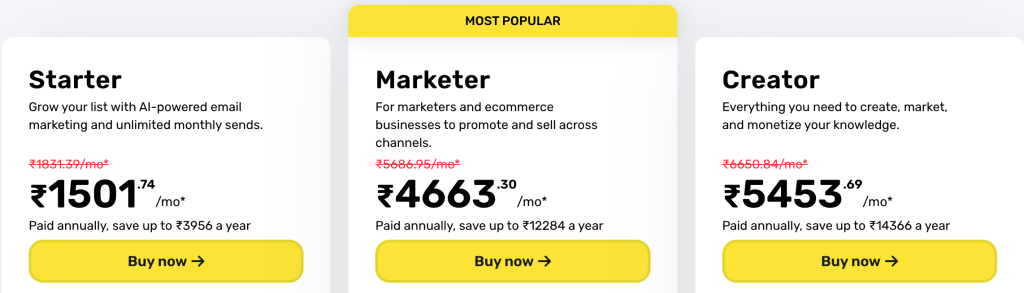
Here are the four plans at 1,000 contacts, monthly rate first:
- Starter, $19 a month ($15.58 paid annually). Unlimited monthly sends, AI content generators, a welcome email series, one custom automation workflow, landing page builder, signup forms and popups. Paying annually saves up to $41 a year.
- Marketer, $59 a month ($48.38 annually), marked most popular. Adds unlimited automation workflows, advanced segmentation, abandoned cart recovery, sales funnels, promo codes with revenue reports and unlimited web push. A yearly commitment saves up to $127.
- Creator, $69 a month ($56.58 annually). Adds webinars, a website builder, a course creator for up to 500 students and premium newsletter subscriptions. Yearly billing saves up to $149.
- Enterprise, custom. Adds a dedicated sending domain and dedicated IP, SSO, SMS, mobile push, AI product recommendations, transactional email and priority support.
The arithmetic is consistent at 18% across all three published tiers. Twelve months of Starter at $19 comes to $228 against $186.96 prepaid, a $41.04 difference. Marketer saves $127.44 and Creator $149.04. Every “save up to” figure on the page checks out.
Dashboard Overview :
What you can reach from the dashboard depends entirely on your tier, and the gaps are not cosmetic. On Starter you get the email editor, the landing page builder, forms and popups, plus a single automation workflow slot. Segmentation is basic. Abandoned cart recovery, sales funnels and promo codes are absent, which rules out most ecommerce use.
Creator is a different product wearing the same login. Webinars, a website builder and course hosting for up to 500 students turn it into a platform for selling knowledge rather than a mailing tool. Someone evaluating GetResponse purely as an email sender should ignore Creator entirely and compare Starter against Marketer.
First Workflow Walkthrough :
Five steps get you from empty account to a measurable first send. Do them in this order.
- Authenticate your sending domain before importing anyone. GetResponse offers a free custom domain on yearly plans, and Enterprise adds a dedicated sending domain and IP, but authentication records are yours to publish either way.
- Import a list you already have permission to email. A purchased or scraped list will damage your sending reputation faster than any feature can repair it.
- Build a signup form or landing page so new subscribers arrive with a timestamp and a source. Retrofitting consent records later is painful.
- Set up the welcome email series, included on every paid tier. This is the one automation that earns its keep on Starter, where you only get one workflow.
- Send one real newsletter to a small segment and read the results before scaling. Open and click figures from a hundred engaged subscribers tell you more than a template preview.
If you want to test that sequence directly, start your GetResponse trial here and complete steps one and two on the first day.
Best Practices For New Users :
Deliverability rules changed for everybody and they apply regardless of which platform you pick. Google treats anyone sending more than 5,000 messages a day to Gmail accounts as a bulk sender, and bulk senders must have SPF, DKIM and DMARC configured for the sending domain. DMARC alignment requires the domain in your From header to align with either the SPF domain or the DKIM domain; the enforcement policy itself may be set to none. DKIM keys must be 1024 bits or longer for personal Gmail accounts, with 2048 recommended where your provider supports it.
Two further requirements matter from your first campaign. Marketing and subscribed messages must support one-click unsubscribe and carry a clearly visible unsubscribe link in the body. Spam rates reported in Postmaster Tools must stay below 0.30%, and Google’s own guidance sets a tighter working target of below 0.10% with 0.30% treated as a line never to touch.
Set up Google Postmaster Tools on day one, not after your first deliverability scare. It is free, it is the only place you see the spam rate Google actually measures, and a new sender has no history to fall back on.
Common Beginner Mistakes :
Quoting the annual rate as the monthly price. GetResponse is far from alone in defaulting to the discounted view, but budgeting at $15.58 and paying $19 is a 22% overrun on the line you forecast.
Buying Starter and then discovering the single workflow limit. One custom automation workflow covers a welcome series or a re-engagement sequence, not both. Teams that plan any branching logic should price Marketer from the start rather than upgrading three weeks in.
Treating the trial as a tour. Fourteen days of premium access then reverts to a Free account without those features, so a trial spent clicking around teaches you nothing you can keep.
Importing before authenticating. Sending from an unauthenticated domain to a cold list is the fastest route to a spam rate you cannot explain, and the damage follows the domain rather than the platform.
Support Resources :
A help centre sits at getresponse.com/help and the pricing page carries its own FAQ covering billing periods, plan changes and the trial mechanics. Premium and priority support is an Enterprise feature, so on Starter through Creator you are using standard channels.
For the deliverability side, the authoritative reference is Google’s own sender guidelines rather than any vendor guide, because Gmail acceptance is decided by Google and not by your sending platform. To check what your own plan includes, compare the GetResponse tiers here against the workflow count you settled on.
Final Buying Note :
Answer one question before you compare GetResponse to anything else: how many automation workflows will you actually run in the first ninety days? One means Starter at $19 a month is genuinely cheap for unlimited sends plus a landing page builder. Two or more means Marketer at $59, and the comparison set changes completely at that price.
Our GetResponse integrations guide covers what connects to the rest of your stack once you have chosen a tier.
Verdict :
GetResponse is a reasonable first email platform, with the caveat that its entry tier is narrower than the marketing suggests. Unlimited monthly sends on a $19 plan is a real advantage over competitors that meter volume. The single automation workflow is a real limit. Work out which of those two facts describes your next three months and the decision makes itself.
If that sounds like your situation, try GetResponse here and spend day one on domain authentication and a real import.
FAQ :
Is GetResponse Good For Beginners In 2026?
For a straightforward newsletter, yes. Starter at $19 a month gives unlimited monthly sends, a landing page builder, forms and a welcome series. For anything involving branching automation or ecommerce recovery, Starter is too narrow and Marketer at $59 is the realistic entry point.
What Should I Do First?
Authenticate your sending domain with SPF, DKIM and DMARC before importing a single contact. Everything else can be fixed later; sending reputation is the one thing that is slow to repair.
How Long Should The First Setup Take?
Plan for the first two days of the 14-day trial, since premium features disappear when the trial ends. Domain authentication and a list import on day one, a signup form and the welcome series on day two, then one real send to a small segment.
What Is The Biggest Mistake New Users Make?
Budgeting from the price shown on arrival. The pricing page opens on the Yearly view at minus 18%, so the $15.58 you see is the annual-billed rate and the month-to-month figure is $19.
What Is The Best Way To Evaluate GetResponse?
Count the automation workflows your plan needs, then send one real campaign to a genuinely opted-in segment during the trial and check the spam rate in Google Postmaster Tools. Those two checks separate the plans more cleanly than any feature grid.
More on GetResponse
Hand-picked guides to help you choose the right tool, without the fluff.
 Case StudiesPipedrive Case Study 2026What actually happened when teams rolled it out.
 ComparisonsTenable vs Alternatives 2026The strongest competitors compared side by side.
 TutorialsVista Social Beginner's Guide 2026A clean start-here walkthrough with no jargon.
 FeaturesWebydo Top Features 2026The standout features and whether they justify the price.