


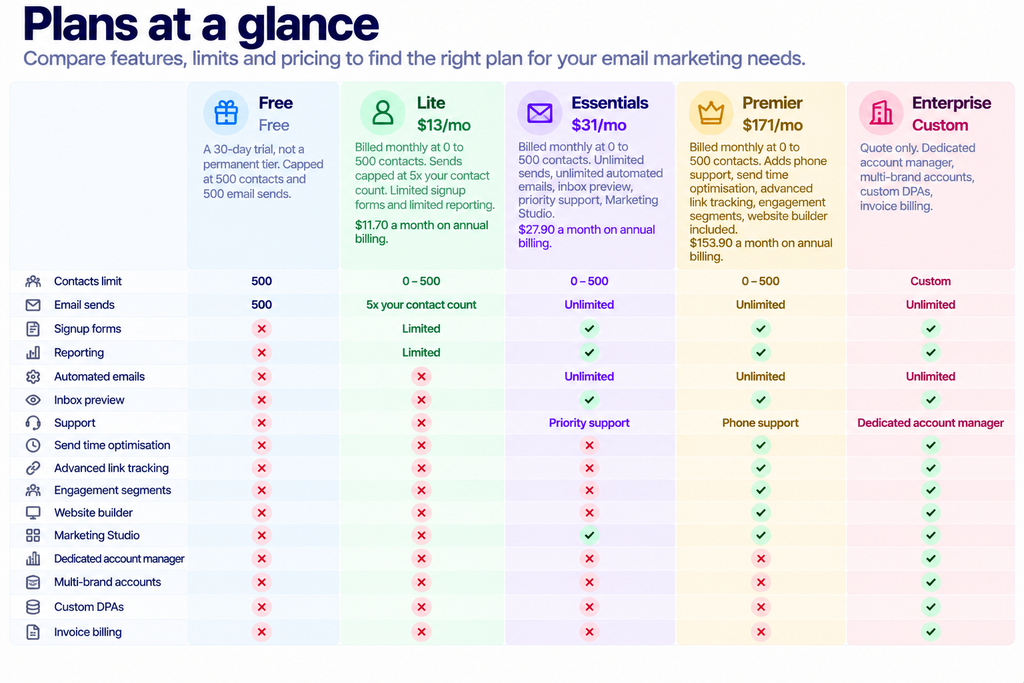
Quick answer: Campaign Monitor’s “Free” column is a 30-day trial capped at 500 contacts and 500 emails, so budget for a paid plan from week five. Lite starts at $13 per month, billed monthly for up to 500 contacts, with sends capped at five times your contact count. Before you send anything, authenticate your sending domain: Gmail and Yahoo have both required SPF or DKIM from every sender since February 2024, and an unauthenticated first campaign is the fastest way to land in spam.
Disclosure: Stack99 earns a commission if you buy through links on this page. It costs you nothing extra and never changes our assessment.
Step zero: understand what you are signing up for
Most guides start with the template builder. Start here instead, because the pricing page carries two selectors that change every number on screen, and beginners routinely budget off the wrong one.
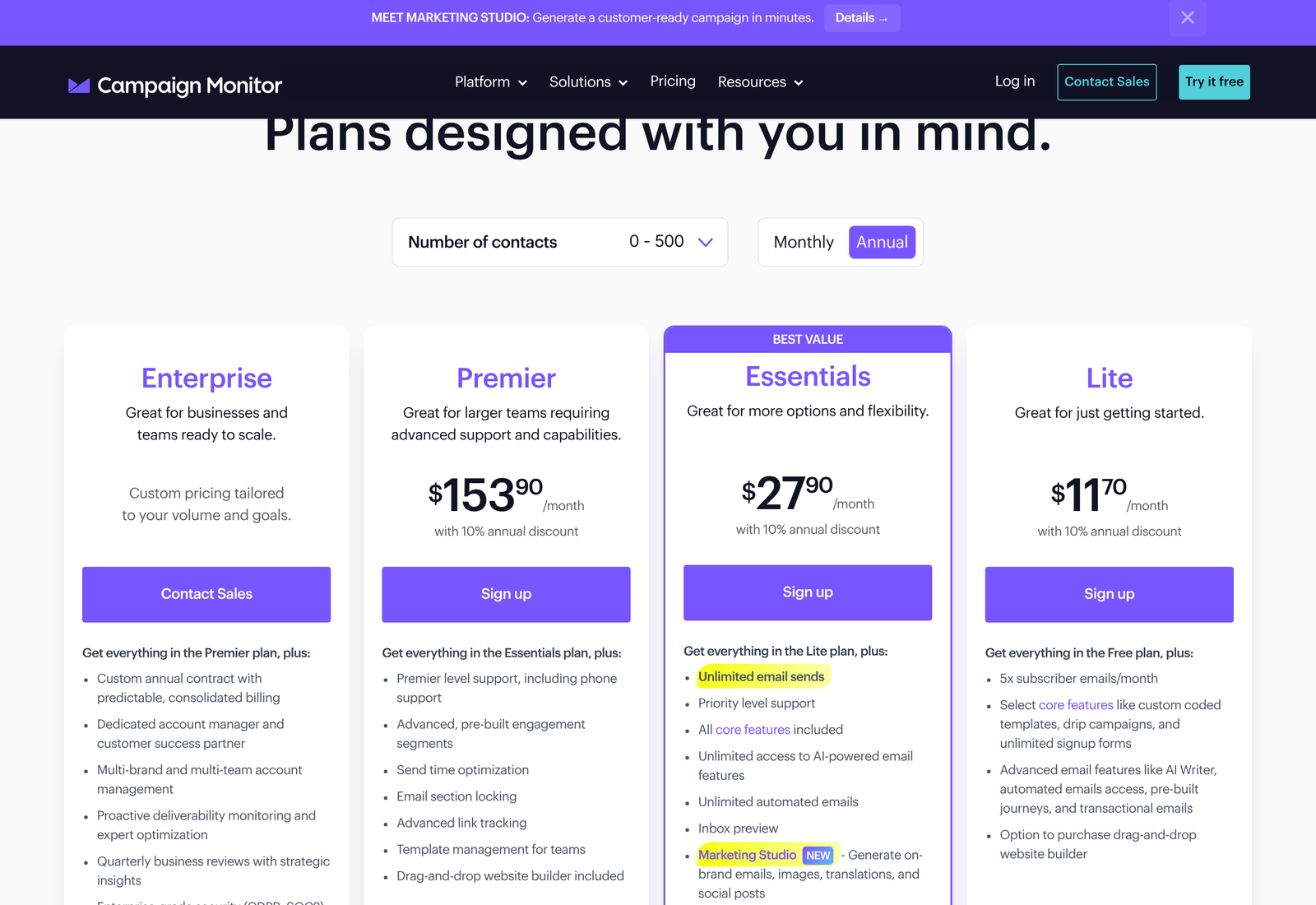
The toggle at the top right loads on Annual. Prices shown on arrival are the discounted annual rate expressed per month. Click Monthly and all three move up by exactly a tenth.
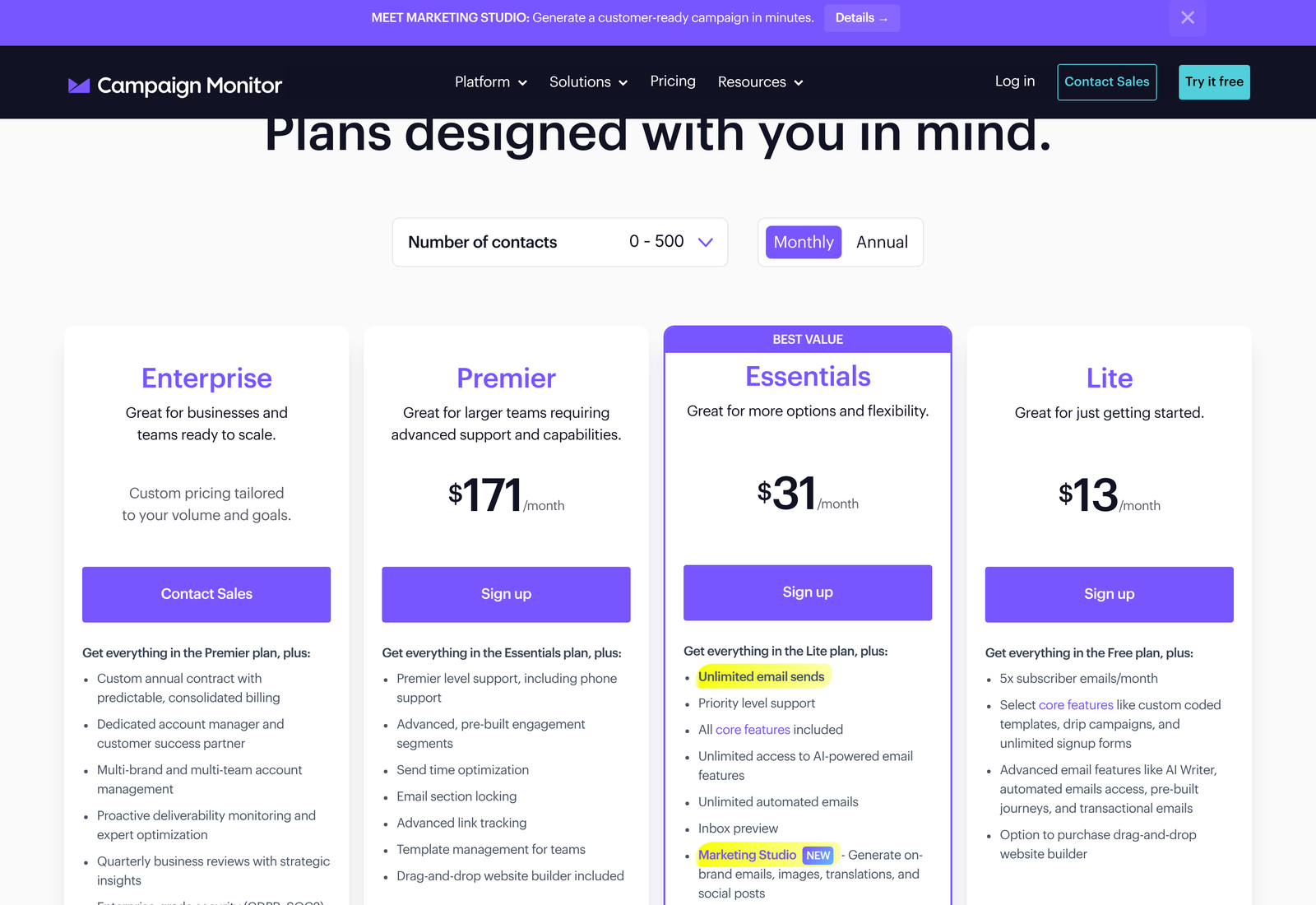
The second selector is the contact-count dropdown, and it matters more than the billing toggle once your list grows. Move it from 0 to 500 up to 2,501 to 5,000, and the monthly figures become $75 for Lite, $117 for Essentials and $203 for Premier. Lite roughly sextuples while Premier climbs by under a fifth, which tells you where Campaign Monitor expects to make its money.
Do the planning arithmetic now. A list of 4,000 contacts on Lite costs $900 a year billed monthly. The same list on Essentials costs $1,404. Switching later is easy; discovering the gap after you have built twenty templates is annoying.
The send cap nobody reads
Lite’s plan card says “5x subscriber emails/month,” and the comparison table turns that into a hard number. At the 0 to 500 contact tier, Lite allows 2,500 sends a month. At the 2,501 to 5,000 tier, it allows 25,000.
Five sends per contact per month sounds generous until you count properly. A weekly newsletter alone uses four. Add a welcome sequence, a monthly offer, and a re-engagement campaign, and you are over the line. Essentials and Premier carry unlimited sends, and that single row is the honest reason most teams end up above Lite rather than any particular feature.
Step one: authenticate your domain before anything else
Skip this and the rest of the work is wasted, because your campaign will not reach inboxes reliably no matter how good the template looks.
Since 1 February 2024, Google requires every sender mailing Gmail addresses to set up SPF or DKIM for their sending domain, keep valid forward and reverse DNS records, transmit over TLS, format messages to RFC 5322, and keep the spam rate reported in Postmaster Tools below 0.3%. Yahoo’s requirements match closely: SPF or DKIM at minimum, spam rate under 0.3%, valid forward and reverse DNS, compliance with RFC 5321 and 5322.
Cross 5,000 messages a day to Gmail and the bar rises. Google then wants SPF and DKIM together, a published DMARC policy, the domain in your From: header aligned with either the SPF domain or the DKIM domain, plus one-click unsubscribe and a clearly visible unsubscribe link in the body. Yahoo asks bulk senders for the same combination, accepts a DMARC policy of p=none as a starting point, recommends a working rua tag so you actually receive the reports, and accepts relaxed alignment.
One-click unsubscribe has a specification behind it. RFC 8058 defines the List-Unsubscribe-Post header that makes a single click actually unsubscribe someone rather than merely opening a page, and Yahoo calls that POST method highly recommended. The platform adds those headers for you on marketing sends, though the DNS records are yours to publish.
Practically, this means visiting your DNS provider before you touch the email builder. Publish the records Campaign Monitor gives you during account setup, wait for propagation, then send yourself a test and check the headers show a DKIM pass. Teams that skip this step and send to 2,000 people on day one often never recover the domain reputation they burned.
Step two: get a list in without poisoning it
Lists arrive by CSV upload or through an integration. Both paths work. The question is what you import.
A spam rate ceiling of 0.3% is tighter than it sounds. Three complaints per thousand delivered messages puts you over. An old list bought or scraped two years ago will blow through that on the first send, and the damage attaches to the domain you just authenticated.
Start with people who asked. If your only list is a spreadsheet of past customers, send to the most recent 200 first and read the result before sending to the rest. Signup forms come included on every plan, though the comparison table marks them Limited on Lite, so check the form count against your plan if you intend to run several.
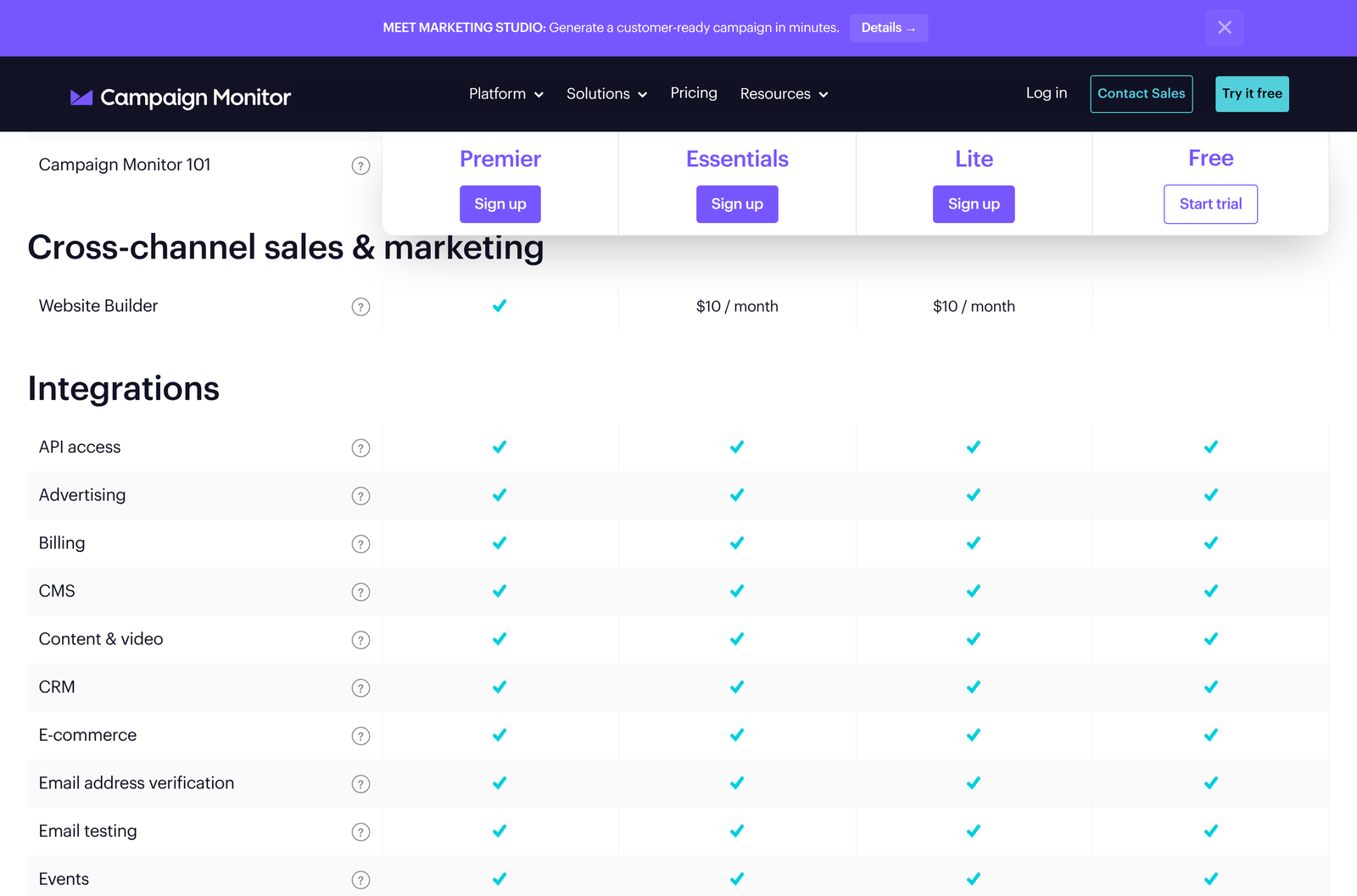
Campaign Monitor’s integration catalogue covers the usual list-growth sources. WordPress and Shopify connectors are built by Campaign Monitor itself. Salesforce is built by Beaufort12. Unbounce, Intercom and OptinMonster all push signups in from landing pages, chat and popups, and Facebook Lead Ads arrives through Zapier. Every integration category in the comparison table shows a tick on all four plan columns, so connector access is not what you are paying extra for.
Step three: build the email
Three routes exist, and beginners should take the first one. Use a pre-designed template, apply your brand once, then duplicate it for every future campaign. The drag-and-drop builder handles layout without HTML. A custom-coded template is available if your designer wants control, and Lite includes custom-coded templates despite being the entry plan.
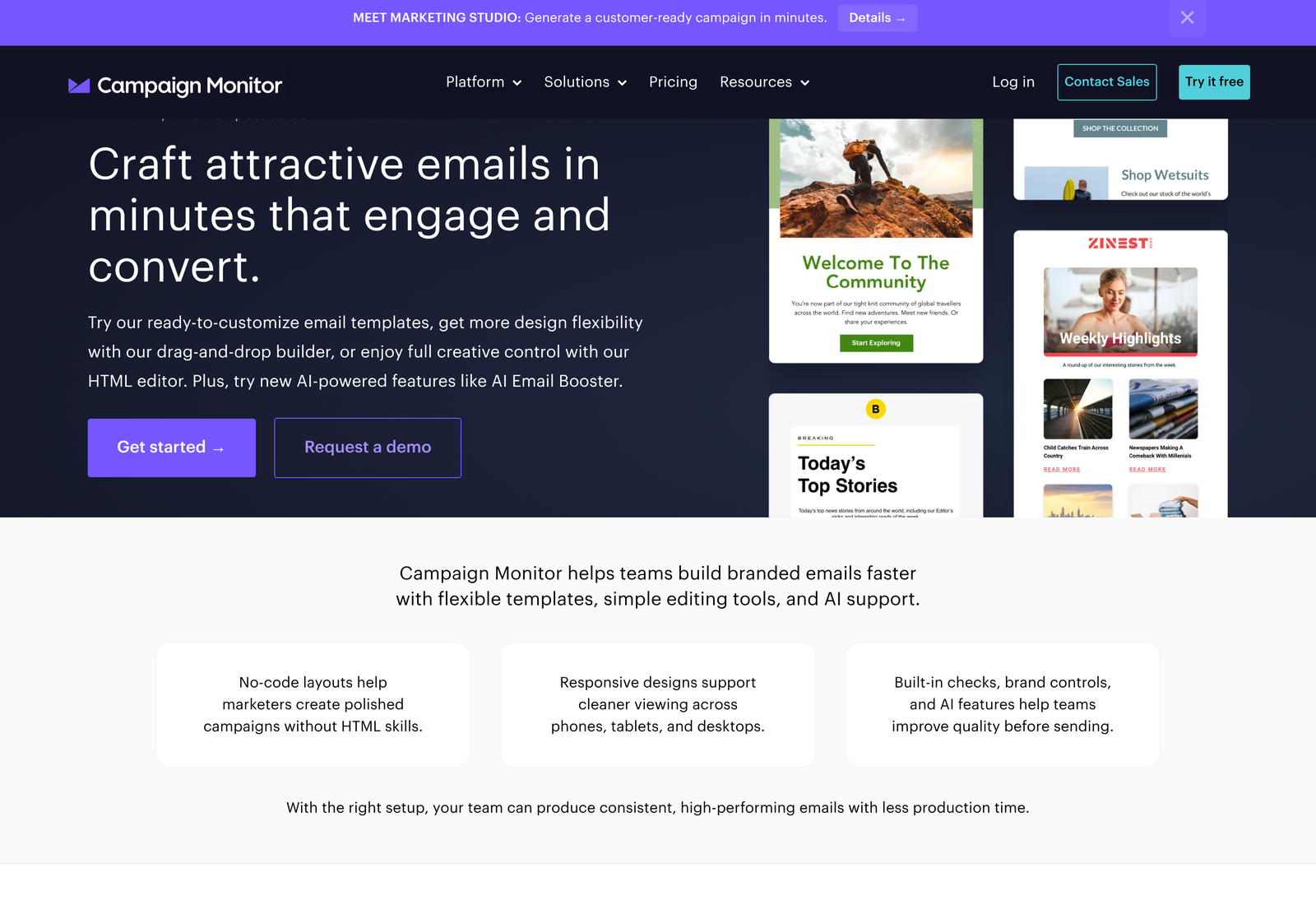
Two AI tools sit in the builder. AI Writer drafts copy from a prompt so you are editing rather than staring at an empty block. AI Email Booster reads a finished email and suggests changes against your stated campaign goal, which you review and apply or ignore. Lite gets access to advanced email features, including AI Writer. Essentials upgrades that to unlimited access to the AI-powered features.
Brand consistency is a setup task, not a per-campaign one. Apply colours and fonts once to a custom template, then duplicate. The builder also suggests recent colour and font selections as you build, which quietly keeps a team from drifting across three shades of the same blue.
Step four: final checks
Pre-send tools are bundled under the Final Checks heading. Preview the email on mobile, on desktop and across popular email providers, then send a test to colleagues for a human read.
Read your own test on a phone before anything else. Over half of most lists will open there, and a two-column layout that looked balanced on a laptop frequently collapses into something unreadable.
Check four things on the test send. Does the From: name read like a person or a department someone recognises? Does the preview text say something, or has it defaulted to “View this email in your browser”? Do all links resolve? Is the unsubscribe link visible without hunting, which Google explicitly requires for bulk marketing mail?
Inbox preview across providers is an Essentials feature. On Lite, you are checking manually, so keep a Gmail address, an Outlook address and a phone handy and send yourself the test three ways.
Step five: send, then read the report properly
You can send immediately or schedule ahead, including delivery in each recipient’s own time zone. Send time optimisation, which picks the moment per subscriber rather than per time zone, is a Premier feature.
Reporting is where the plan tiers bite hardest for a beginner. Real-time reporting analytics show as Limited on Lite, as does Worldview reporting. You still see sends, opens, and clicks. Deeper slicing waits for Essentials.

One report feature deserves attention whatever your plan: the non-human click filter. Corporate security gateways routinely click every link in an email to scan it, which inflates click counts and makes a mediocre campaign look like a hit. A filter that strips those clicks gives you numbers you can act on. Campaign Score summarises the result in a single figure, useful for a quick comparison between two sends and useless for anything finer.
Watch your spam complaint rate from the first campaign. Both Gmail and Yahoo want it under 0.3%, and Google Postmaster Tools reports the Gmail side for free. Set that up the same week you publish your DNS records.
Step six: stop sending one-offs
A single newsletter is a chore you repeat. Automation turns the work you already did into something that keeps running.
Campaign Monitor ships prebuilt journeys for common moments: a welcome sequence, an anniversary offer, a thank you. Review one, adjust the copy, switch it on. Custom journeys trigger on specific actions or milestones with conditional paths and your own timing.
Drip Campaigns handle the other shape of automation, a planned series across a fixed period rather than a reaction to behaviour. Product launches, pre-event promotion and post-event follow-up fit this pattern. Lite includes drip campaigns, which is unusual for an entry plan.
Mind the interaction with the send cap. Automated emails on Lite are explicitly limited to your email send volume, so a welcome journey consumes the same 2,500 allowance as your newsletter. Essentials makes automated emails unlimited. For anyone running journeys seriously, that row and the unlimited sends row are the same decision.
Transactional email runs through the same platform. Order confirmations, shipping notices, and password resets get your branded templates rather than whatever your application framework produces by default, and Lite lists transactional emails among its advanced email features.
If the first campaign underperforms
Low opens on a first send usually have one of four causes, and the report tells you which.
Check deliverability before you blame the subject line. Open the delivery figures and compare sent against delivered. A gap means bounces, and a large bounce count on a first send points at list quality rather than at anything you wrote. Hard bounces from a freshly imported list are the clearest signal that the list is older than you thought.
Delivered but unopened is a different problem. Authentication failures land mail in spam without bouncing it, so re-read the headers on your own test copy and confirm the DKIM pass. Google Postmaster Tools will show the Gmail portion of your traffic and whether the spam rate crossed 0.3%.
Opened but not clicked points at the email itself. Pull up the mobile preview again. Links buried below three paragraphs of preamble get missed on a phone screen, and a single clear action near the top usually outperforms four competing ones further down.
Clicked but nothing happened afterwards is the least visible failure and the most common. The campaign worked and the landing page did not. Campaign reporting stops at the click, so pair it with whatever analytics runs on the destination before you rewrite an email that was doing its job.
Resist rewriting everything at once. Change the subject line on the next send and leave the rest alone, or you will learn nothing from either campaign.
Five things that catch beginners out
The Free column is a trial. Thirty days, 500 contacts, 500 emails. Plan your migration to a paid plan during week three rather than week five.
The price you first see is annual. Budget from the Monthly toggle unless you have already committed to a year. At 0 to 500 contacts, the gap is $1.30 a month on Lite and $17.10 on Premier.
The website builder is not free below Premier. It is $10 a month on Essentials and on Lite, included only on Premier. The Lite card calls it an option to purchase, which is accurate and easy to skim past.
Users are unlimited on every plan. Pricing keys off contact count, so adding colleagues costs nothing. Roles, permissions and two-factor authentication are available throughout, which makes agency and multi-person use viable on the entry tier.
Marketing Studio access varies. Its components appear as Limited trial access on some plans rather than as a flat yes or no. Treat anything labelled that way as a preview rather than a feature you can build a process on.
A realistic first fortnight
Days one and two: start the trial, publish DNS records, set up Google Postmaster Tools, send yourself a test and confirm authentication passes.
Days three to five: import your most engaged 200 contacts. Build one branded template from a pre-designed starting point. Send to those 200, read the report, fix what the numbers show.
Week two: import the rest of the list, switch on a welcome journey, add a signup form to your site. Count your expected monthly sends against the 5x cap and decide between Lite and Essentials with a real number rather than a guess.
Our full Campaign Monitor review covers how the platform holds up past that first fortnight. If you want to walk through the setup yourself, start the 30-day trial and get the DNS records published on day one.
Frequently asked questions
Does Campaign Monitor have a free plan?
No permanent free plan. The Free column on the pricing page is a 30-day free trial limited to 500 contacts and a 500 email send limit. After that, you move to Lite, Essentials, Premier or an Enterprise quote.
How much does Campaign Monitor cost for a small list?
At 0 to 500 contacts billed monthly, Lite is $13 a month, Essentials is $31, and Premier is $171. Annual billing takes 10% off, giving $11.70, $27.90, and $153.90, respectively. Prices rise with the contact-count selector: at 2,501 to 5,000 contacts, the monthly figures are $75, $117, and $203.
How many emails can I send on the Lite plan?
Five times your contact count per month. That is 2,500 sends at the 0 to 500 tier and 25,000 at the 2,501 to 5,000 tier. Automated emails count against the same allowance. Essentials and Premier both carry unlimited sends.
Do I need SPF and DKIM to use Campaign Monitor?
Gmail and Yahoo both require SPF or DKIM from every sender, and both require SPF and DKIM together plus a DMARC policy once you pass 5,000 messages a day. Publishing the records Campaign Monitor supplies is the first task of your setup, ahead of building any email.
How many users can I add?
Unlimited on every plan, including the trial. User roles, permissions, and two-factor authentication appear across all four columns of the comparison table.
Is the website builder included?
Included on Premier. On Essentials and Lite, the drag-and-drop website builder is a $10 per month add-on.
Sources
- Campaign Monitor pricing, both billing states and two contact tiers captured 25 October 2026
- Campaign Monitor email template builder
- Campaign Monitor integrations
- Google Workspace: Email sender guidelines
- Yahoo Sender Hub: sender best practices and requirements
- RFC 8058: Signaling One-Click Functionality for List Email Headers