



Bitscale sells credits, not seats. That single fact decides whether the platform is cheap or ruinous for your team, because the same $349 a month buys 15,000 email lookups or 1,875 phone numbers. This page works through the published rates, the per-action credit costs Bitscale prints in its own FAQ, and the arithmetic that tells you which tier you actually need.
Disclosure: Stack99 earns a commission if you buy through links on this page. It costs you nothing extra and never changes our assessment.
The short answer
Growth costs $349 a month for 15,000 credits, which works out to 2.33 cents per credit. Booster costs $799 for 50,000 credits, or 1.60 cents each. Annual billing takes 10% off both and releases the whole year of credits up front. A credit is only spent when a data provider returns a result, and the price of a result varies by type: one credit for an email, two for AI personalisation, three for deep web research, eight for a phone number.
Pick Growth if you enrich fewer than 15,000 successful records a month and rarely need phone numbers. Pick Booster the moment phone enrichment becomes routine, because eight credits per number burns an allowance faster than anything else on the price list.
What each plan costs
Bitscale’s pricing page opens on the monthly toggle. That is unusual, and it works in your favour, because the first figure you see is the real recurring rate rather than an annual equivalent dressed up as a monthly price. Flip the switch to Annually, and the numbers drop by a tenth.
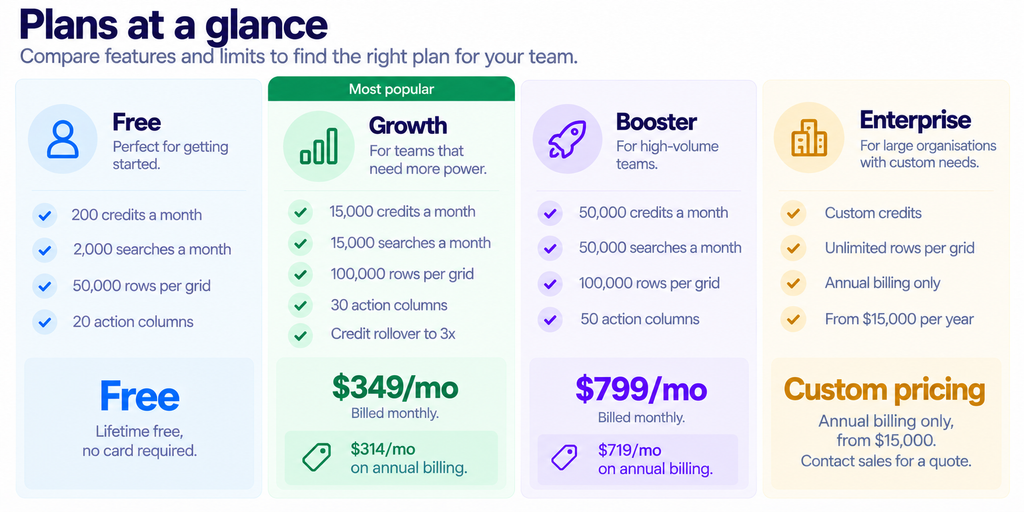
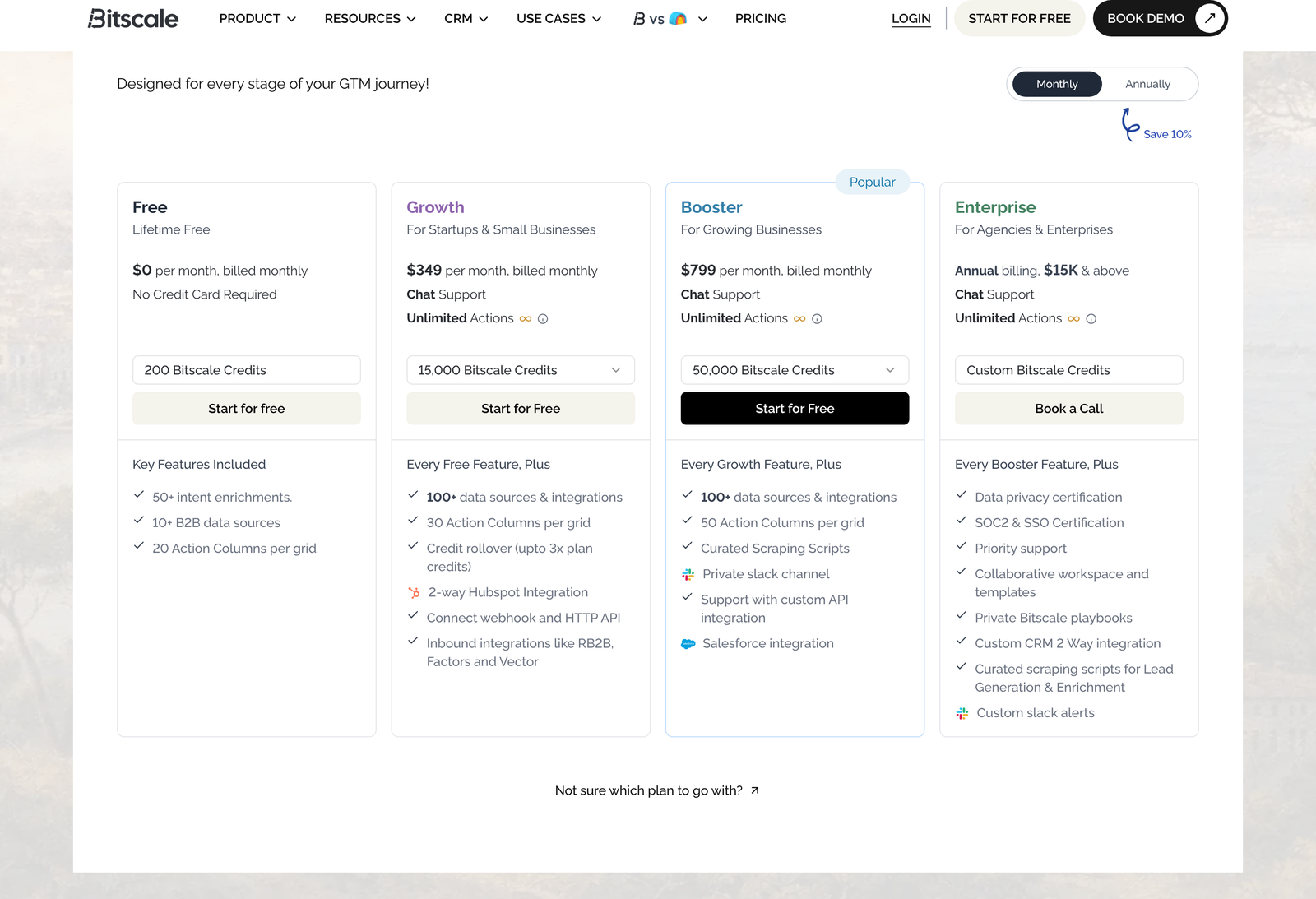
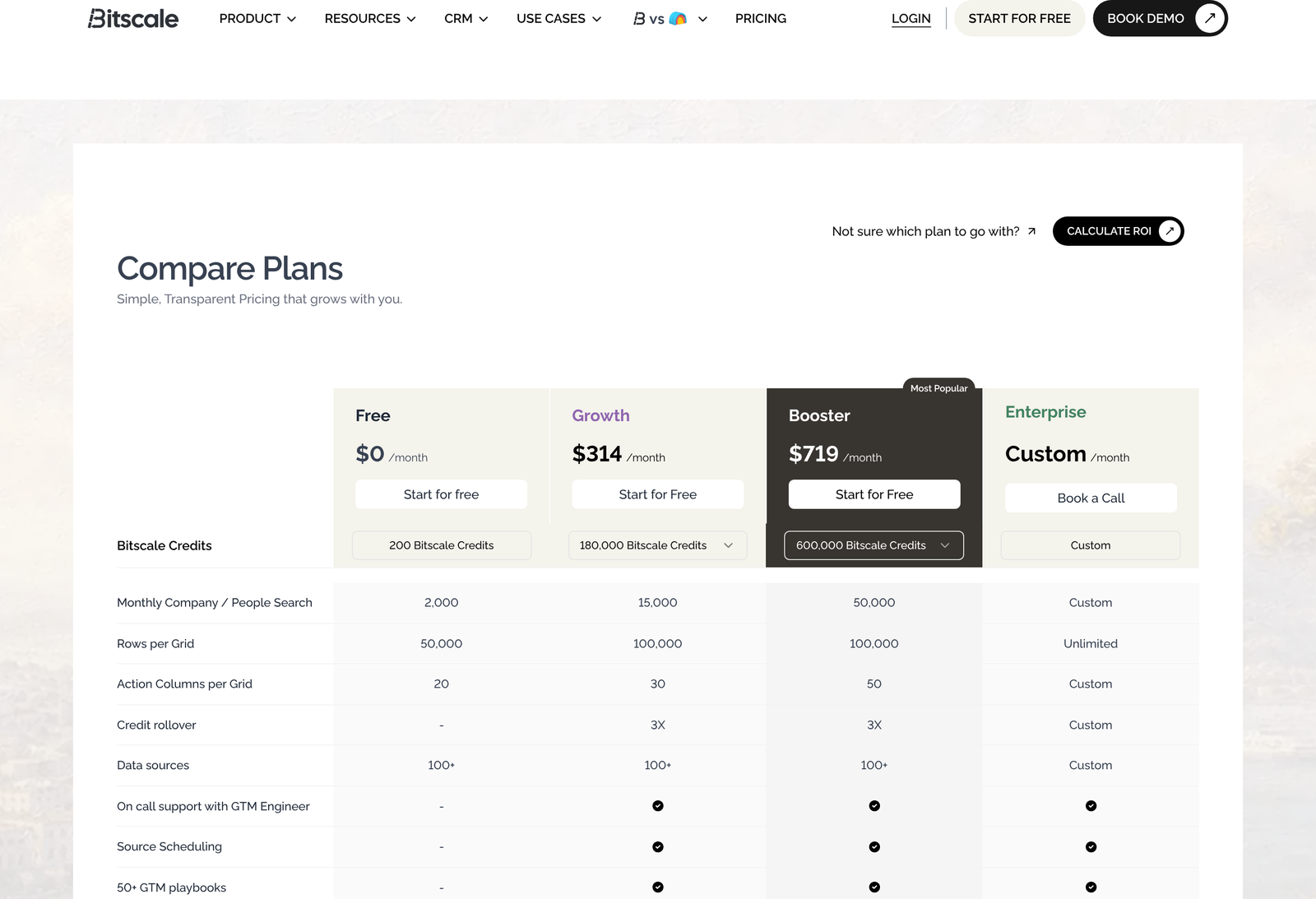
Annual billing is a clean 10% cut. Growth falls to $314 a month, billed as $3,768 for the year against $4,188 paid monthly, a saving of $420. Booster falls to $719, or $8,628 against $9,588, saving $960. Bitscale advertises 10% and delivers 10.03% and 10.01% respectively, so the badge is honest to within a rounding error.
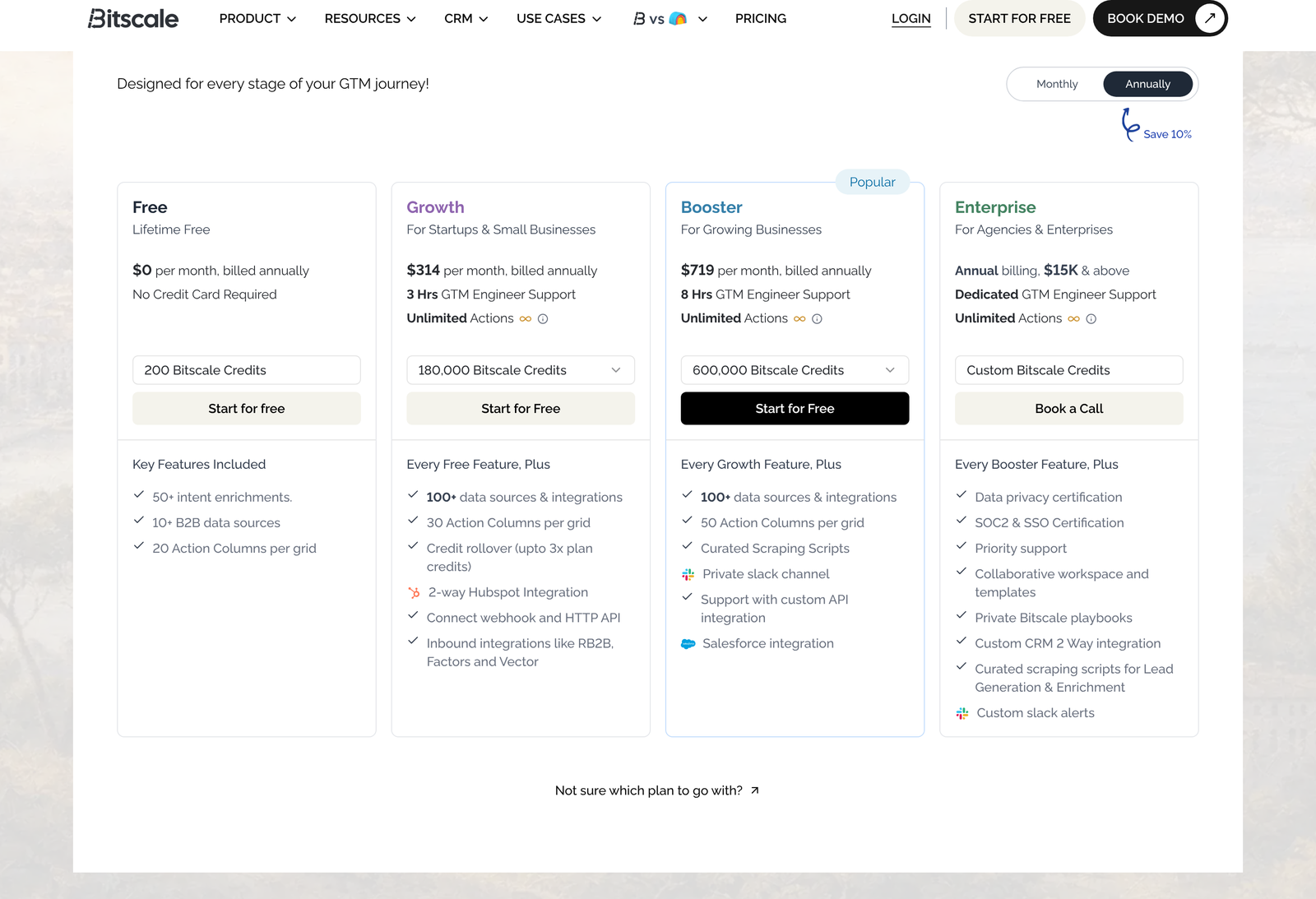
Check the annual credit figures against the monthly ones, and you find no bonus hiding in them. Growth’s 180,000 is exactly twelve times 15,000. Booster’s 600,000 is exactly twelve times 50,000. Committing for a year buys you a discount and nothing else, which is at least straightforward. What does change is timing: on annual billing, the whole pool is available from day one, so a heavy March can borrow against a quiet September.
One oddity turned up while capturing both toggle states. On the monthly cards, Growth and Booster both list “Chat Support”. Switch to annual and the same two cards read “3 Hrs GTM Engineer Support” and “8 Hrs GTM Engineer Support”. Whether annual buyers genuinely get engineer hours that monthly buyers do is not explained anywhere else on the page. Ask before you commit.
What a credit actually buys
Most enrichment vendors leave you guessing here. Bitscale publishes the answer in its pricing FAQ, and it reshapes the whole calculation. One credit equals one successful enrichment hit. The cost of that hit depends on what you asked for.
- Email lookup: typically 1 credit
- AI personalisation: 2 credits
- Deep web research: 3 credits
- Phone number: 8 credits
Failed lookups inside a waterfall cost nothing. Neither do formula columns or CRM syncs. You pay only for data that lands, which removes the usual anxiety about burning budget on a bad list.
Multiply those credit costs by the blended rate and the real price of each enrichment type appears:
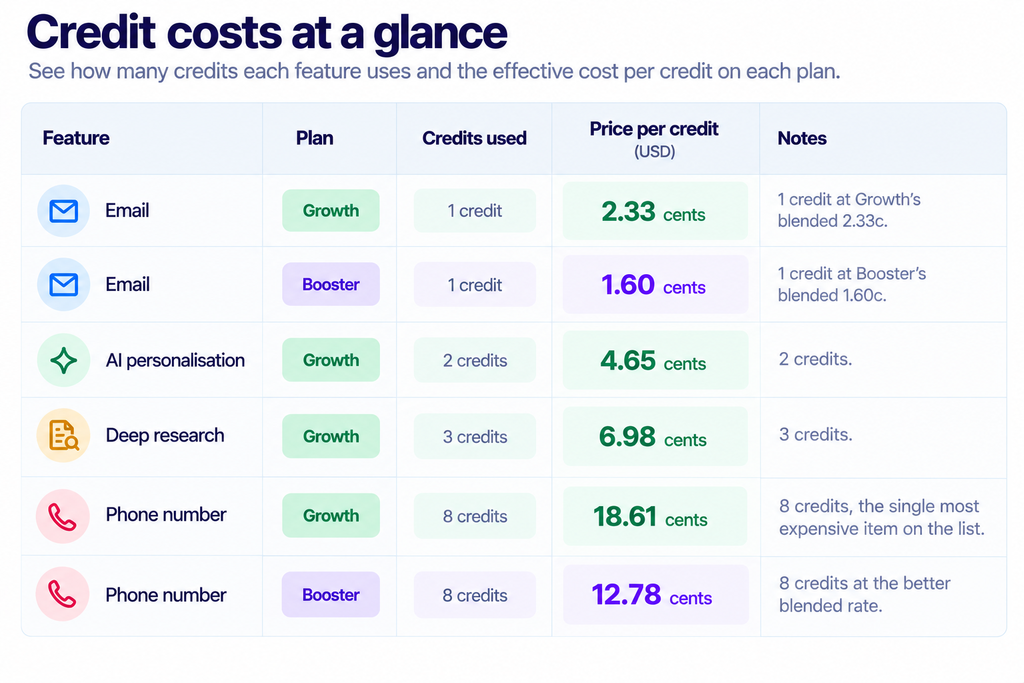
A phone number costs eight times an email. Nothing else on the price list comes close to that multiple, and it means your tier is decided less by how many contacts you enrich than by what you ask for each one.
Three worked examples
Email only, 3,000 contacts a month
Three thousand successful email lookups consume 3,000 credits. Growth bills $349 whether you use 3,000 credits or 15,000, so your effective cost is 11.63 cents per contact. You are paying for five times the capacity you need. The sensible move is to bank the surplus: Growth rolls unused credits forward to a ceiling of three times the plan allowance, which is 45,000.
Email, personalisation and research, 2,000 contacts
Ask for all three on every record, and each contact costs 1 plus 2 plus 3, so six credits. Two thousand contacts burn 12,000 credits and fit inside Growth with 3,000 to spare. Cost per fully enriched contact: 17.45 cents. This is roughly the sweet spot the Growth tier was designed around.
The same 2,000 contacts, with phone numbers
Add a phone number to each record and the per-contact cost jumps from six credits to fourteen. Two thousand contacts now need 28,000 credits, which Growth cannot supply. You move to Booster at $799. Cost per contact becomes 39.95 cents, and your monthly bill rose by $450 because you added one field. Phone enrichment is the line item that moves people between tiers.
Looked at from the other direction, that $450 step buys 35,000 extra credits, a marginal rate of 1.29 cents. Cheaper per credit than anything Growth offers. If you are going to cross 15,000 credits at all, crossing decisively is better value than hovering at the edge.
Forecasting your burn before you buy
Every figure above collapses into one formula. Take the number of records you expect to enrich in a month, multiply by the credit cost of the fields you want on each, and compare the total against 15,000 and 50,000.
Credits per record is just the sum of what you ask for. Email alone is one. Email plus personalisation is three. Email, personalisation, and research is six. Add a phone number to any of those, and you add eight. A team enriching 1,500 records a month with the full set, including phone, needs 1,500 times 14, so 21,000 credits, and Growth is already out of reach at a volume most people would describe as modest.
Run the same formula with phone removed and the answer is 9,000 credits, comfortably inside Growth. One field, a $450 difference in monthly bill. Before committing to a tier, write down the recipe you actually intend to run rather than the one you might run someday, because the phone field is where optimism gets expensive.
Here is the break-even in the other direction. Growth gives 15,000 credits. Divided by a full-recipe-plus-phone cost of 14 credits, that supports 1,071 records a month. Divided by an email-only cost of one credit, it supports 15,000. The tier does not have a headcount or a contact limit; it has a credit limit, and your recipe sets the exchange rate between the two.
Searches are metered separately
Look again at the Free tier, and a detail stands out. It allows 200 credits but 2,000 company and people searches. Those are different meters. Searching the database to find who matches your criteria does not spend enrichment credits; pulling verified data about those people does.
On the paid tiers, the two numbers converge, with Growth offering 15,000 of each and Booster 50,000 of each. The distinction still matters for how you work. You can prospect widely, sift the results, and spend credits only on the subset that survives filtering. Teams who treat search as free and enrichment as costly will get far more out of an allowance than teams who enrich everything they find.
Free’s ratio of ten searches per credit is a deliberate invitation to do exactly that during a trial.
Getting a real answer out of 200 credits
Two hundred credits sounds thin. Used carefully, it settles the only question that matters, which is whether the data is any good on your market rather than on a demo list.
Build a list of 100 people you already have verified contact details for, ideally recent wins and recent churns across the segment you sell into. Run email enrichment across all 100 for 100 credits and measure the hit rate and the accuracy against what you know. Then spend the remaining 100 credits on 12 phone lookups for the records where a phone number would genuinely have changed an outcome. You now have a measured hit rate on your own data, which is worth more than any published coverage claim.
The Free tier is lifetime rather than time-boxed and needs no card, so this test costs nothing but an afternoon. Do it before you look at the paid tiers at all. A platform with a 40% hit rate on your segment is expensive at any credit price, and a platform with a 90% hit rate makes the arithmetic above worth running properly.
The limits that are not about credits
Credits get all the attention. Three other ceilings matter, and one of them behaves strangely.
Monthly company and people search tracks the credit allowance exactly: 2,000 on Free, 15,000 on Growth, 50,000 on Booster. Action columns per grid climb sensibly from 20 to 30 to 50. Rows per grid is where the ladder breaks. Free allows 50,000 rows. Growth raises that to 100,000. Booster, at more than twice the price of Growth, also allows 100,000. Only Enterprise lifts the cap entirely.
So a team whose constraint is list size rather than enrichment volume gains nothing from the Booster upgrade. Teams routinely working grids above 100,000 rows have their conversation with the Enterprise sales team about whatever your credit burn looks like.
Action columns deserve a line of their own. A grid can hold 20 of them on Free, 30 on Growth, and 50 on Booster. Each action column is a step in your enrichment chain, so the cap sets how elaborate a single workflow can get before you must split it across grids. Thirty steps cover most sequences people actually build. Fifty is for teams chaining several waterfalls, scoring passes and routing rules into one pipeline.
Features locked behind each tier
Several capabilities are gated rather than metered. Growth unlocks the 100-plus data source catalogue, two-way HubSpot sync, webhook and HTTP API access, source scheduling, the GTM playbook library, outbound email connections to tools such as Instantly and Smartlead, advanced models including Claude Sonnet, and credit reporting analytics. The cards also mention inbound connections to RB2B, Factors, and Vector.
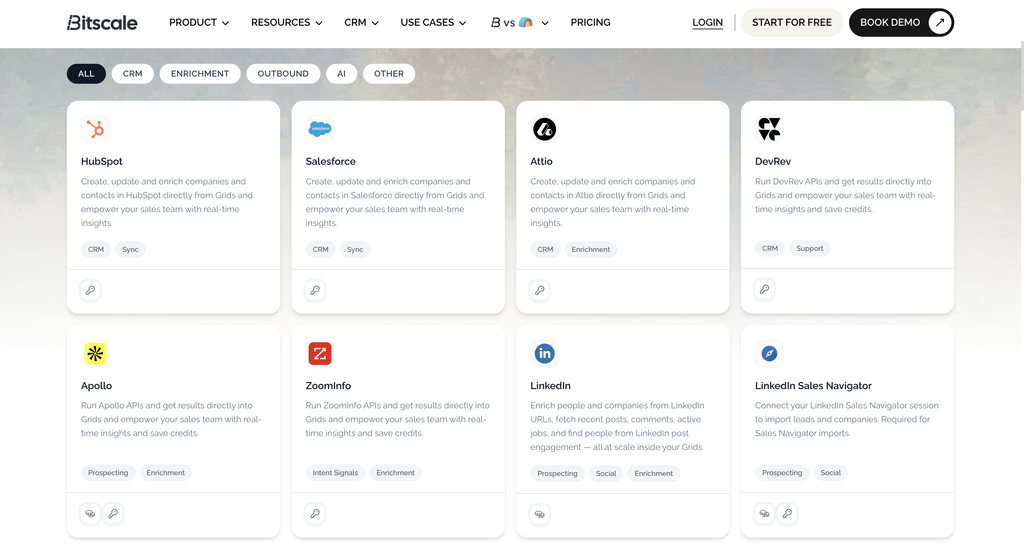
Booster adds a private Slack channel, Salesforce integration, AI prompting support, and curated scraping scripts. Salesforce is the one to watch: if your CRM is Salesforce rather than HubSpot, the entry price for a working setup is $799 and not $349, regardless of how few credits you need.
Enterprise reserves custom CRM integration, private playbooks, role-based team access, Snowflake pipelines, and single sign-on. Teams with an SSO mandate from their security function have exactly one tier available to them.
Where Enterprise starts
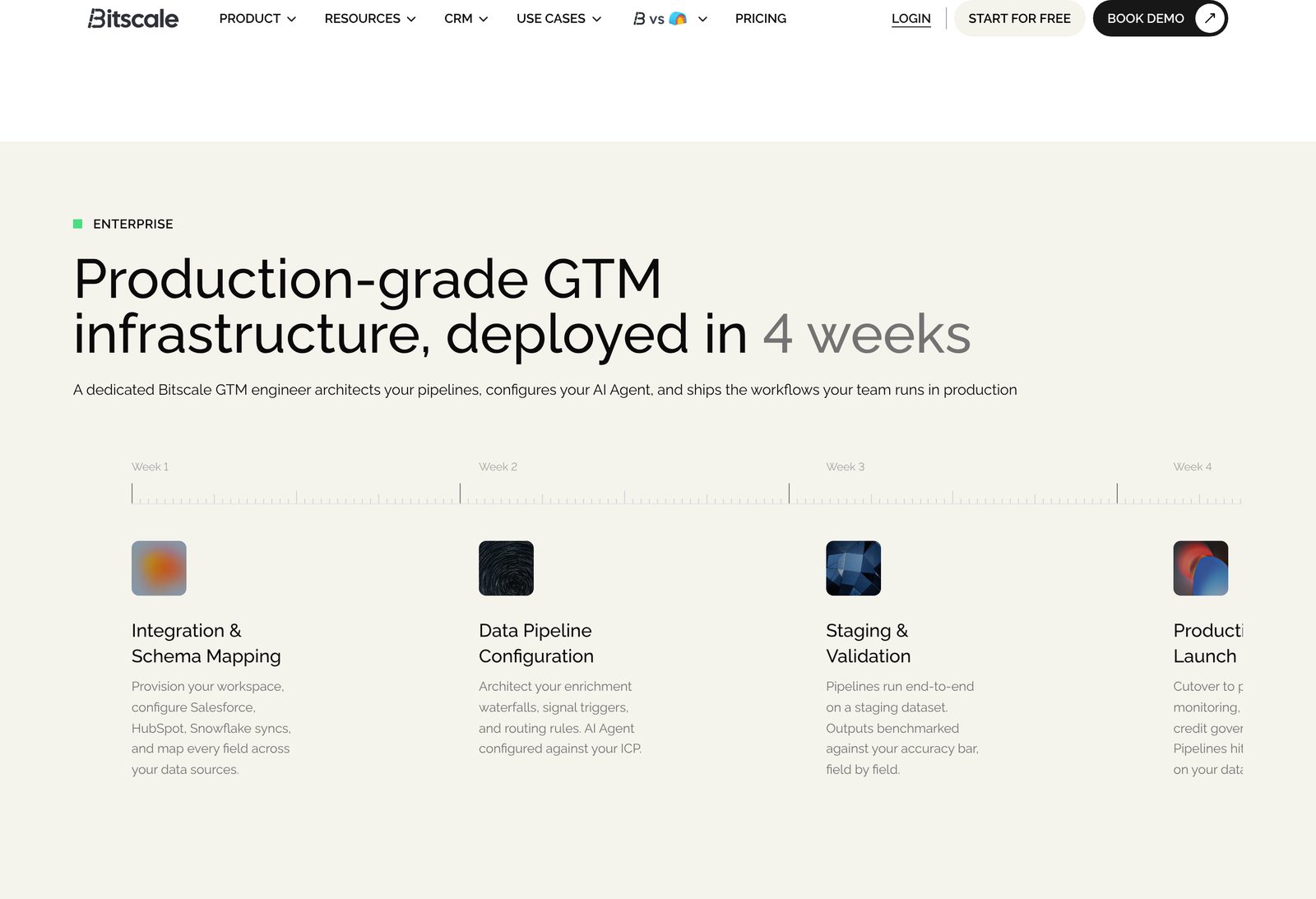
Enterprise is annual billing from $15,000. Set that against Booster’s annual commitment of $8,628 and the floor sits about 74% higher. For the money, Bitscale describes a four-week deployment run by a dedicated GTM engineer: schema mapping and workspace provisioning in week one, enrichment waterfalls and routing rules in week two, staging validation against your own accuracy bar in week three, production cutover with monitoring and credit governance in week four. The page claims pipelines reach 99% accuracy on your data, which is a vendor figure and not something an outside reader can test.
Billing mechanics
Upgrades mid-cycle are pro-rated and take effect immediately. Downgrades wait for the next billing cycle, which Bitscale frames as protecting credits you have already paid for. Rollover differs by billing basis: monthly plans accumulate to three times the plan limit, while annual plans hand over the full year at once with no cap to worry about. Free gets no rollover at all.
On compliance, Bitscale states SOC 2 Type II, ISO 27001, and CCPA, with role-based access, audit logs, and an EU data residency option. SOC 2 is an attestation framework administered through the AICPA, and a Type II report covers operating effectiveness over a period rather than design at a point in time, so it is the more meaningful of the two report types to ask for. CCPA obligations are set out by the California Attorney General. Bitscale points to a Trust Center for documentation; treat the certifications as claims until you have seen the reports.
The consolidation argument
Bitscale’s FAQ says most teams retire three to five tools on switching, naming ZoomInfo or Apollo for contact data, Hunter or Snov for email finding, and Bombora or 6sense for intent. Treat that as a sales claim rather than a finding. Still, it gives you a useful test: add up what those tools cost you today, then compare against $349 or $799 plus the credit arithmetic above. If the sum of your current contracts exceeds Booster’s annual $8,628 and your volumes fit inside 50,000 credits a month, the consolidation case is arithmetic rather than opinion.
Our separate write-up on how the enrichment waterfall actually works covers the mechanism that makes the failed-lookup rule valuable, and who the credit model suits looks at team shape rather than cost.
Which tier to buy
Free is a genuine evaluation tier rather than a demo. Two hundred credits will enrich 200 emails or 25 phone numbers, enough to judge data quality against a list you already know the answers for. Start there.
Growth suits a team doing fewer than 15,000 successful enrichments a month on HubSpot, where phone numbers are occasional rather than standard. Booster earns its $450 premium in three situations: sustained volume above 15,000 credits, routine phone enrichment, or Salesforce as the system of record. Enterprise is for grids above 100,000 rows, SSO requirements, or Snowflake pipelines, and it starts at nearly double Booster’s annual spend.
You can check current rates and start on the free tier at Bitscale.
Questions people ask
Does a failed enrichment cost a credit?
No. Bitscale states that credits are spent only when a data provider returns a valid result. Failed lookups inside a waterfall, formula columns, and CRM syncs are all free.
How much cheaper is annual billing?
Ten per cent on both paid tiers. Growth goes from $4,188 to $3,768 a year, Booster from $9,588 to $8,628. The credit allowance is identical, just released as a single annual pool.
What happens to credits I do not use?
On monthly plans, they roll forward up to three times your plan limit, so 45,000 on Growth and 150,000 on Booster. Annual plans release everything up front for use any time in the year. The Free tier has no rollover.
Is there a cheaper way to get Salesforce sync?
Not within the published tiers. Two-way HubSpot arrives at Growth, but Salesforce is gated to Booster, so $799 a month is the floor for a Salesforce setup no matter how light your enrichment volume.
Does Booster raise the grid size limit?
No. Growth and Booster both cap at 100,000 rows per grid. Only Enterprise removes the limit, which catches out teams who assume every ceiling rises with price.
Can I switch plans part-way through a month?
Yes. Upgrades are pro-rated and apply instantly. Downgrades take effect at the start of the next cycle.
Which costs more, personalisation or research?
Deep web research at three credits runs half again the price of AI personalisation at two. Both sit far below a phone number. Trimming a recipe to fit a tier? Cutting phone saves more than cutting the other two together.
Do searches use credits?
No. Company and people search has its own monthly allowance, which on the Free tier is ten times the credit allowance. Finding prospects is metered separately from enriching them.
Sources
- Bitscale pricing page, read 13 October 2026, for every rate, credit allowance, limit, and FAQ answer quoted above. Both toggle states captured.
- AICPA, System and Organization Controls, for what a SOC 2 report covers.
- California Attorney General, California Consumer Privacy Act, for the obligations behind the CCPA claim.
Figures verified on 13 October 2026. We could not independently confirm the ISO 27001 certification because iso.org refused our requests, and the 99% pipeline accuracy figure is Bitscale’s own. Neither is treated as established fact above.