


In this guide
Why This Post Matters :
A landing page only earns its keep when the lead it captures reaches the system that acts on the lead. Instapage states on its integrations page that it connects with “120+ popular marketing and sales solutions”, and the page title goes further, promising “the largest integration ecosystem”. Counting connections is the easy part. The part that decides whether your form submission arrives in your CRM within seconds or within an hour is how each connection is built, and Instapage labels that on every listing.
Disclosure: Stack99 earns a commission if you buy through links on this page. It costs you nothing extra and never changes our assessment.
This guide works through the three connection types Instapage publishes, the eleven categories it files them under, and the questions worth asking before you count a tool as supported.
To inspect the catalogue while you read, start with Instapage here.
What The Official Pages Keep Pointing To :
Instapage sorts its catalogue into eleven filterable categories, and the list tells you where the platform expects to sit in a stack:
- Advertising, Analytics and Call Tracking, covering the measurement side of paid campaigns
- CRM, Email Marketing and Marketing Automation, which is where captured leads are meant to land
- E-commerce, Live Chat, Exit Intent & Pop-ups and Webinar, covering on-page conversion mechanics
- Other, the catch-all that holds anything the ten named buckets miss
Notice what is absent. No category exists for help desk, accounting, project management or data warehousing. Instapage builds for the paid-acquisition loop and nothing beyond it, and the category list is the clearest statement of that scope the company publishes.
Product Fit In 2026 :
Every entry in the catalogue carries one of three labels, and this is the detail that changes how an integration behaves.
Instapage. A native connection the company builds and maintains. You authenticate inside Instapage and map form fields to the destination. Lead delivery happens on submission.
Zapier. The connection runs through Zapier rather than through Instapage. You need a Zapier account, the task volume counts against your Zapier plan, and delivery timing follows Zapier’s polling or trigger behaviour rather than Instapage’s. A tool listed this way is supported by Instapage in the sense that a recipe exists, not in the sense that Instapage built a direct link.
External app. The other tool does the connecting, usually by placing a script on your page or pulling data from its own side. Instapage documents the setup; the integration belongs to the partner.
The first alphabetical page of the catalogue shows how mixed the ecosystem is. ActiveCampaign, Autopilot and AWeber are native. ActiveDemand, Agile CRM, amoCRM and Benchmark run through Zapier. 123 Forms, AdRoll and Apex Chat are external apps. That is three native out of ten on one page of eleven, which is a sample rather than a census, and it is reason enough to check the label on the specific tool you depend on before you sign.
If you want to pressure-test that fit early, check Instapage here and look up your CRM by name.
Pricing And Data Notes :
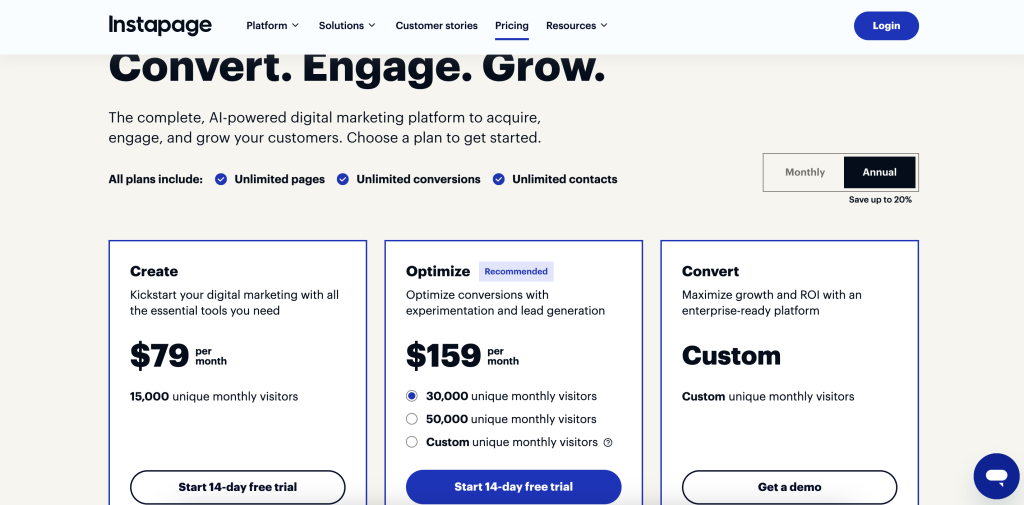
Instapage’s pricing page carries no published price table. It offers a 14-day free trial, a demo request and a “Try for free” route, and it cites 1,200+ reviews, but the plan costs are not printed on the page. Treat Instapage pricing as quote-dependent and get the number in writing.
Two cost consequences follow from the integration labels above. A Zapier-mediated connection carries a second subscription, because the task volume lands on your Zapier plan rather than on Instapage. A high-traffic campaign pushing thousands of form fills a month can make that the larger of the two bills. Native connections carry no such pass-through.
On data handling, Instapage’s own platform navigation lists Security alongside Integrations and an API. Any lead data crossing into a third tool is worth a short review with whoever owns privacy at your organisation, particularly where a Zapier step means personal data transits a fourth system.
What Buyers Should Watch :
Four things are worth checking before you treat the 120+ figure as a promise.
- The label on your specific tool. Supported via Zapier and supported natively are different products with the same word attached.
- Field mapping depth. A native connection that passes email and name but drops your hidden campaign fields will break attribution. Test with a real form containing every field you rely on.
- What happens on failure. Ask where a lead goes if the destination rejects it. A silently dropped submission is worse than a visible error.
- The API as a fallback. Instapage lists an API in its platform navigation. If your destination is absent from all eleven categories, that is the route, and it is a development project rather than a toggle.
The builder also accepts JavaScript, HTML and CSS and third-party scripts directly on the page, which is how most tracking pixels and chat widgets get added regardless of whether a formal listing exists.
To evaluate that directly, open Instapage here and compare it against one real campaign.
Practical Recommendation :
Work backwards from your destination rather than forwards from the catalogue. Write down the two or three systems a lead must reach: the CRM, the email platform, the ad network receiving conversion events. Look each one up by name on the integrations page and record its label.
If all of them come back native, Instapage’s ecosystem claim holds for your stack and setup is a configuration task. If two of the three route through Zapier, budget for the Zapier plan and accept the extra hop. If any of them is missing entirely, price the API work before you commit, because a landing page that cannot deliver to your system of record is a design tool rather than a campaign tool.
Final Buying Note :
Instapage’s integration catalogue is genuinely broad and the company is unusually transparent about how each connection is built. Most vendors publish a logo wall and leave you to discover which links are native and which are a Zapier recipe in disguise. Printing the mechanism next to every entry is a point in Instapage’s favour, and it also means a careful buyer has no excuse for being surprised later.
Use the catalogue the way the labels invite you to. Count mechanisms, not logos.
Verdict :
For a paid-acquisition team whose CRM and email platform both appear as native connections, Instapage’s integration layer does the job without additional tooling. For a team whose core systems sit behind Zapier labels, the real cost of the stack is higher than the Instapage quote suggests, and the delivery path is longer. Check the labels first; the 120+ headline cannot answer that question for you.
If you want to pressure-test that fit, try Instapage here and look up your own stack in the catalogue.
FAQ :
How Many Integrations Does Instapage Have?
Instapage states 120+ on its integrations page and spreads the catalogue across eleven pages of listings in eleven categories.
Are All Instapage Integrations Native?
No. Every listing carries one of three labels: Instapage for native connections, Zapier for connections routed through Zapier, and External app where the partner does the connecting. Check the label on the tool you need.
Do I Need A Zapier Subscription?
Only if the tool you want is labelled Zapier. Those connections consume tasks on your Zapier plan, which is a separate cost from Instapage.
What If My CRM Is Not Listed?
Instapage lists an API in its platform navigation, which is the supported route for anything absent from the catalogue. Treat it as development work and scope it before purchase.
Does Instapage Publish Its Prices?
Not on the pricing page as read in November 2026. The page offers a 14-day free trial and a demo request rather than a published plan table, so get pricing confirmed directly.
Integration counts, category names, connection labels and the named examples above were read from instapage.com/integrations and instapage.com/pricing in November 2026. Figures Instapage does not publish have been left out rather than estimated.
More on Instapage
Hand-picked guides to help you choose the right tool — no fluff.
Advanced GuidesInstapage Advanced Guide 2026Deeper workflows once the basics are in place.

Case StudiesInstapage Case Study 2026What actually happened when teams rolled it out.

Case StudiesAlidrop Case Study 2026What actually happened when teams rolled it out.
ComparisonsAmplemarket vs Alternatives 2026The strongest competitors compared side by side.