


- What Each Product Is For
- Where The Stack Fits Best
- Advanced Automation Workflows
- Webinar Production And Replay
In this guide
Quick Verdict:
Kartra, WebinarJam, and EverWebinar make the most sense when you want one funnel stack instead of a pile of separate tools. Kartra covers pages, emails, memberships, checkouts, affiliates, calendars, and webinars. WebinarJam handles live webinars. EverWebinar turns those webinars into automated, hybrid, and just-in-time experiences.
Disclosure: Stack99 earns a commission if you buy through links on this page. It costs you nothing extra and never changes our assessment.
If that sounds like a lot, it is. That is also the point.
The official pricing pages show a stack that can cover almost the entire webinar and funnel journey:
- Kartra has a 14-day free trial and visible tiers from Essentials through Professional.
- WebinarJam has a 14-day trial and live webinar tiers from Starter through Enterprise.
- EverWebinar has monthly, annual, and 2-year pricing for automated webinars.
If you want to review the stack while you read, start with Kartra here.
What Each Product Is For :
Kartra is the center of the system. The official site groups it around:
- Landing pages and websites.
- Online courses and memberships.
- Kartra AI copy assistance.
- Webinars.
- Form building.
- Funnels, campaigns, email marketing, and checkouts.
- Affiliate management, lead management, calendars, help desks, and real-time funnel analytics.
WebinarJam is the live presentation layer. The official support and pricing pages show that it is designed for:
- Live, interactive webinars.
- Multi-speaker events.
- Live chat, offers, polls, surveys, and whiteboards.
- Registration and notification workflows.
- Replays and post-webinar follow-up.
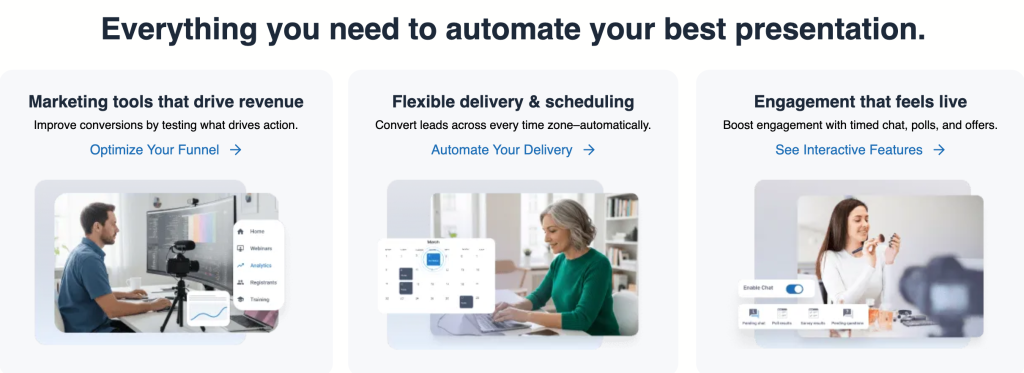
EverWebinar is the automation layer. The official pricing page makes that easy to understand:
- Automated webinars.
- Hybrid webinars.
- Just-in-time webinars.
- Simulated-live replay behavior.
- Live chat simulator and engagement tools.
If you want a single sentence summary, Kartra builds the funnel, WebinarJam runs the live event, and EverWebinar keeps the event working after you log off.
Where The Stack Fits Best :
This stack is strongest when the webinar is not just a webinar.
It works best if your webinar is also:
- A Lead Gen Event.
- A Product Demo.
- A Course Launch.
- A Coaching Funnel.
- A Paid Workshop.
- A Recurring Sales Asset.
That is where the bundle starts to feel smarter than a standalone webinar tool. You are not just buying a room. You are buying the path around the room.
Kartra’s pricing page shows why that matters. The Growth plan includes webinars for up to 300 guests, automations, affiliates, surveys and quizzes, and help desk support. The Professional tier adds real-time funnel analytics and help desk live chat. That means the webinar stops being a one-off event and becomes part of the broader revenue machine.
If you want the stack to behave like a funnel instead of a calendar invite, start with Kartra here.
[IMAGE: WebinarJam live room with chat, polls, and offers]
Advanced Automation Workflows:
The strongest reason to use this ecosystem is that the workflow can move automatically from registration to live event to replay to follow-up.
Here is the version that makes sense in practice:
- Kartra landing page captures the lead.
- WebinarJam handles the live registration and live event.
- Notifications go out through email, SMS, or voice reminders.
- The attendee joins the live room with chat, polls, and offers.
- The replay or follow-up sequence continues inside the funnel.
- EverWebinar turns the event into an evergreen asset for new leads.
That is a clean marketing loop. It reduces the amount of manual babysitting needed to keep a webinar selling.
The official WebinarJam help center also makes a few things clear:
- You can use reminders and follow-ups through built-in email, external email, SMS, or voice calls.
- You can auto-subscribe attendees to future webinars.
- You can use replay features for people who missed the live session.
- You can create webinars in express or full configuration mode.
That means the stack is not just for presenters who like talking live. It is also for teams that care about operational repeatability.
Webinar Production And Replay :
WebinarJam is the live engine. Its official pricing page shows a fairly serious live event set:
- Unlimited webinars.
- Automated webinars.
- Live chat.
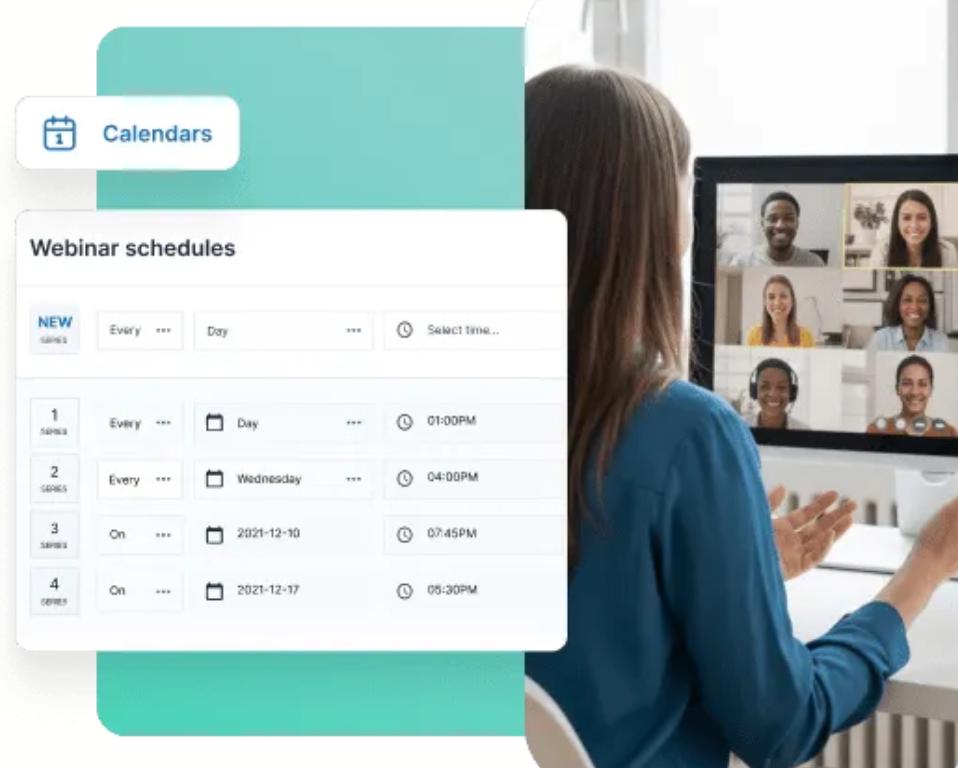
- Flexible scheduling.
- Fully customizable pages.
- Email and SMS system.
- Live offer displays.
- Polls and surveys.
- Whiteboard.
- Video injections.
- Custom backgrounds.
- Broadcast to Facebook and YouTube.
- Attendee spotlight.
- Always-on live room.
- Panic button.
The plan ladder is straightforward:
- Starter: 100 attendees.
- Basic: 500 attendees.
- Professional: 2,000 attendees.
- Enterprise: 5,000 attendees.
That makes WebinarJam easy to position. It is for teams that want more control over presentation, interaction, and conversion than a standard meeting tool can provide.
EverWebinar takes the replay side seriously too. Its official page says the product supports automated, hybrid, and just-in-time webinars, plus simulated live experiences, filters, notifications, polls, surveys, A/B testing, and professional pages.
If you are trying to build an event that keeps converting after the live date, start with Kartra here and map the WebinarJam-to-EverWebinar handoff before you launch.
Integrations And API Thinking :
This is the part advanced users care about the most.
Kartra is useful because it reduces the number of integrations you need to stitch together. The official site calls out integrations and APIs in its navigation, and the platform itself includes forms, funnels, email, calendars, help desk, affiliates, and analytics under one roof.
EverWebinar also integrates with Kartra directly, which is a big deal if you are trying to move leads from webinar registration into a broader nurture sequence. The EverWebinar help and pricing pages also mention other common tools and SMTP options.
The advanced rule here is simple:
- Use Kartra as the system of record for the funnel.
- Use WebinarJam for live event execution.
- Use EverWebinar for evergreen replay delivery.
- Use external tools only where you actually need them.
That approach keeps the stack cleaner and reduces the chance that your webinar looks impressive but leaks leads after the event.
Performance Optimization :
The biggest performance mistake with webinar stacks is overbuilding too early.
If you are running live launches, keep the setup boring:
- One landing page.
- One registration form.
- One reminder sequence.
- One live room.
- One follow-up path.
Then add complexity only after the basic webinar conversion path is working.
The pricing structure also rewards this approach. Kartra Essentials is enough for a small launch machine. Starter and Growth unlock more contacts, more automation, and the webinar features that make the bundle feel complete. WebinarJam and EverWebinar both have enough room to scale, but the real win is keeping the attendee experience simple.
That is especially important if your audience is mobile, busy, or not especially technical.
The cleaner the event flow, the more likely people are to stay with you through the offer.
Expert Workflow Example :
One practical setup for the stack looks like this:
- Kartra builds the page, writes the funnel copy, and tracks the lead.
- WebinarJam runs the live training with chat, polls, offers, and reminders.
- WebinarJam replay captures the people who miss the live event.
- EverWebinar turns the same content into an evergreen version.
- Kartra follow-up sequences continue the conversation after the event.
That gives you a funnel that can work for both live urgency and evergreen consistency.
This is also where the bundle becomes attractive financially. WebinarJam’s pricing page says EverWebinar is included in the Basic, Professional, and Enterprise packages at no additional cost. That means the live webinar product can unlock the evergreen layer without a separate extra purchase if you are on the right tier.
If you need a launch system instead of a single webinar tool, start with Kartra here and use the live pricing pages to map the bundle cost to your actual launch volume.
[IMAGE: Kartra pricing ladder and webinar bundle comparison]
Pricing Decision Map :
The pricing story is a lot easier once you divide the job by tool.
Kartra:
| Plan | Price | What you get |
|---|---|---|
| Essentials | $59/mo | $52/mo billed yearly |
| Starter | $119/mo | $99/mo billed yearly |
| Growth | $229/mo | $189/mo billed yearly |
| Professional | $549/mo | $429/mo billed yearly |
WebinarJam:
- Starter: $49 monthly or $39 annually.
- Basic: $99 monthly or $79 annually.
- Professional: $299 monthly or $229 annually.
- Enterprise: $499 monthly or $379 annually.
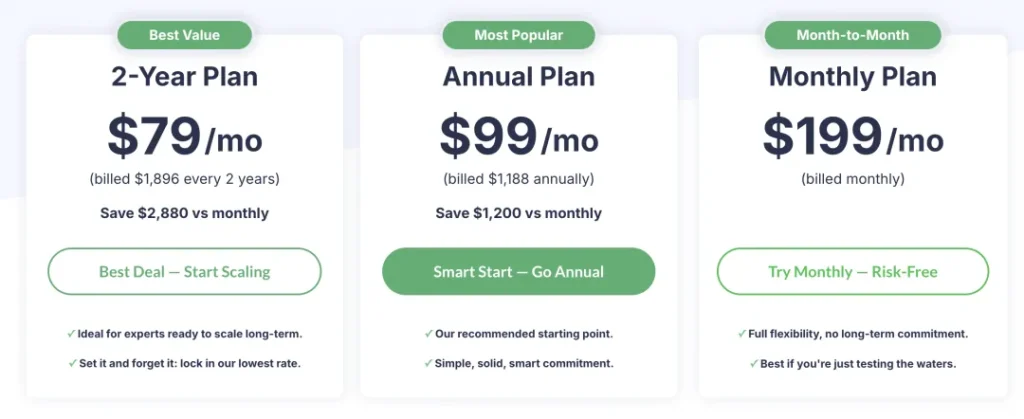
EverWebinar:
- Monthly: $199 per month.
- Annual: $99 per month billed annually.
- 2-Year: $79 per month billed every 2 years.
The easiest buying rule is this:
- If you need the whole funnel, start with Kartra.
- If you need a live webinar engine, compare WebinarJam plans.
- If you need evergreen webinars, compare EverWebinar plans.
- If you need all three to work together, evaluate the bundle as one system, not as separate line items.
What To Watch Before You Buy :
The smartest way to evaluate the stack is to ask whether you are actually going to use the moving parts.
It is easy to look at the bundle and get impressed by the scope. The better question is whether you need:
- Pages and checkouts in the same place as webinars.
- Live event tools that do more than basic screen sharing.
- Evergreen replays that keep selling after the live session ends.
- A funnel system that can handle follow-up without constant manual work.
If the answer is yes, the stack makes sense. If the answer is no, a smaller tool might be enough.
That is the difference between a good software purchase and a bundle that just looks powerful.
Verdict :
Kartra, WebinarJam, and EverWebinar are strongest when your webinar strategy is really a sales system.
That is the key idea. The stack is not only about hosting a session. It is about turning a session into a repeatable machine for leads, conversions, replays, and follow-up.
If that is the job, start with Kartra here and compare the live webinar and evergreen layers against the launch volume you actually expect.

FAQ :
What is the difference between WebinarJam and EverWebinar?
WebinarJam is built for live, interactive webinars. EverWebinar is built for automated, hybrid, and just-in-time webinars.
Does Kartra include webinars?
Yes. Kartra’s official pricing page shows webinar features on the higher tiers, including 300 guests on Growth.
Can I use EverWebinar without WebinarJam?
Yes. The official EverWebinar FAQ says you can use it without WebinarJam, although WebinarJam owners can import sessions more easily.
Does WebinarJam accept paid webinars?
Yes. The official help center says you can charge a registration fee through a third-party checkout before webinar registration is completed.
More on Kartra, WebinarJam & EverWebinar
Hand-picked guides to help you choose the right tool — no fluff.
 FeaturesKartra, WebinarJam & EverWebinar Top Features 2026The standout features and whether they justify the price.
 ReviewsKartra, WebinarJam & EverWebinar Review 2026Hands-on verdict with the pros, cons and who it fits best.
 Advanced GuidesSoftr Advanced Guide 2026Deeper workflows once the basics are in place.
 PricingKeeper Security Pricing 2026Real tier prices and what each plan actually includes.