


In this guide
Pricing Overview :
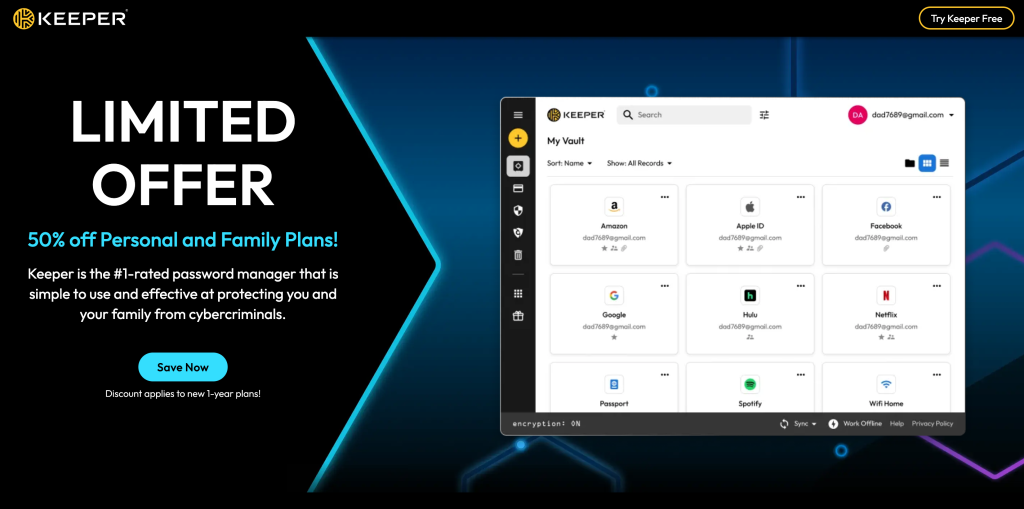
Keeper Security’s pricing story in 2026 is a lot cleaner than many cybersecurity products, which is refreshing. The official public pricing pages separate personal/family plans from business and enterprise plans, and the business page gives a very direct ladder for companies evaluating password management and access control at scale.
Disclosure: Stack99 earns a commission if you buy through links on this page. It costs you nothing extra and never changes our assessment.
That simplicity is useful because security buyers do not need more mystery. They need to know what the public entry point looks like, what changes as they move up, and where the quote-driven part of the conversation begins.
From the official business pricing page, the current public ladder is:
| Plan | Price | What you get |
|---|---|---|
| Business Starter | $2.00/mo | billed yearly |
| Business | $4.00/mo | billed yearly |
| Enterprise | $6.00/mo | billed yearly |
Keeper also maintains a separate personal and family pricing page, but the clearest publicly displayed B2B ladder is on the business and enterprise page.
If you want to compare the plans while you read, start with Keeper here.
Why The Pricing Structure Is Easier To Read Than Most Security Tools :
A lot of security software pricing feels like it was designed by people who actively dislike buyers.
You know the pattern:
- Vague feature descriptions.
- No obvious entry point.
- A “talk to sales” button before you even understand the category.
Keeper is more straightforward than that on the business pricing page.
The plans are presented as a progression:
- A lower-cost starter tier for sole proprietors and small teams.
- A business tier for broader company-wide security and administration.
- An enterprise tier for more advanced provisioning, RBAC, and governance.
That structure is easier to evaluate because it ties price movement to capability movement. You are not just paying more because someone decided the buyer looked serious. You are paying more because the management and governance model gets deeper.
Pricing Tier 1: Business Starter
The official page describes Business Starter as the plan that protects sole proprietors and small teams.
Publicly listed details include:
- $2.00 per user per month, billed annually.
- Encrypted vault and admin console.
- Credential sharing and autofill.
- Protection for 5 to 10 users.
That last detail matters.
Business Starter is not trying to be a universal SMB catch-all. It is clearly aimed at very small groups that want centralized password management without paying for a heavier admin stack.
That makes it a reasonable entry point for:
- Tiny agencies.
- Solo operators with a small support team.
- Founder-led companies getting serious about password hygiene.
- Small service teams that need shared credentials are handled better.
It is probably not the right long-term plan for a company that expects more complex governance or a broader organizational structure.
Pricing Tier 2: Business
This is where Keeper starts looking like the default practical choice for a normal growing company.
The public business plan currently shows:
- $4.00 per user per month, billed annually.
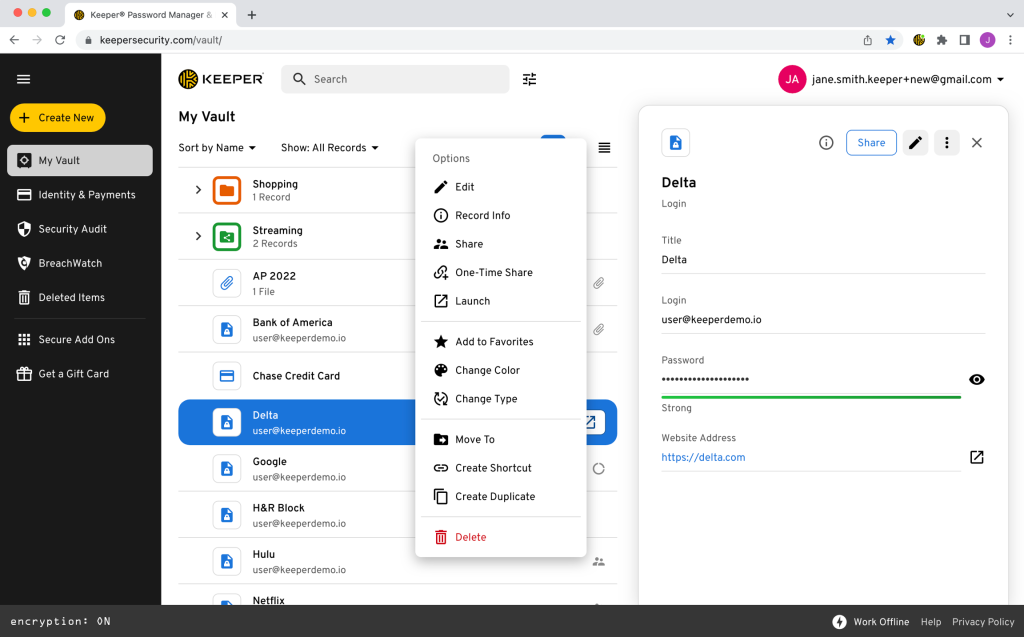
- Shared team folders.
- Delegated administration.
- Advanced organizational structure and integrations.
- A free Family Plan for every user.
That is a meaningful jump for only a modest increase in public list price.
The important part is not just the extra features. It is the administrative shift. Business is where Keeper starts supporting the reality that different teams need different credential boundaries and administrative control.
For most SMB buyers, this is probably the plan worth examining first.
If you are trying to pressure-test value instead of just staring at a pricing page, start with Keeper here and compare the Business plan to your current mix of password habits, sharing workarounds, and admin overhead.
[IMAGE: Keeper Security business plan features, including team folders and admin controls]
Pricing Tier 3: Enterprise
Keeper’s Enterprise plan is publicly listed at:
- $6.00 per user per month, billed annually.
The official page frames Enterprise around:
- Advanced provisioning.
- SCIM, AD/LDAP, and SSO/SAML support.
- Advanced two-factor authentication.
- Role-based access control.
- Developer APIs.
This is the tier where Keeper stops being mainly a password manager purchase and starts becoming more of an identity and governance decision.
The price difference between Business and Enterprise is not huge on paper. What really changes is the operational model. Enterprise is for teams that care about automated user lifecycle management, centralized identity tooling, and tighter policy control.
For buyers with larger teams or regulated workflows, that extra structure can be the whole point.
Hidden Costs And Gotchas :
Keeper is more transparent than many security vendors, but there are still a few things buyers should pay attention to.
Annual Billing Framing –
The public prices are shown as per-user monthly pricing billed annually. That means the real budgeting conversation should include annual commitment, not just the monthly headline.
Separate Pricing Paths –
Keeper has separate public pages for personal/family and business/enterprise. That is fine, but it does mean buyers should make sure they are reviewing the right track for their use case.
Enterprise Scope Creep –
The Enterprise tier is not expensive by enterprise-security standards, but the real cost question is not only the license. It is whether the organization actually needs advanced provisioning, RBAC, and API-level administration right now.
Add-Ons And Adjacent Products –
Keeper also sells broader access and security products beyond the core password management plans. If you start expanding into a wider platform conversation, make sure you separate the password manager budget from adjacent upsell categories.
That is not a red flag. It is just normal vendor sprawl management.
ROI Example :
The cleanest way to think about Keeper ROI is not “what is the value of one password?” It is “what is the cost of insecure sharing, weak onboarding, and avoidable admin cleanup?
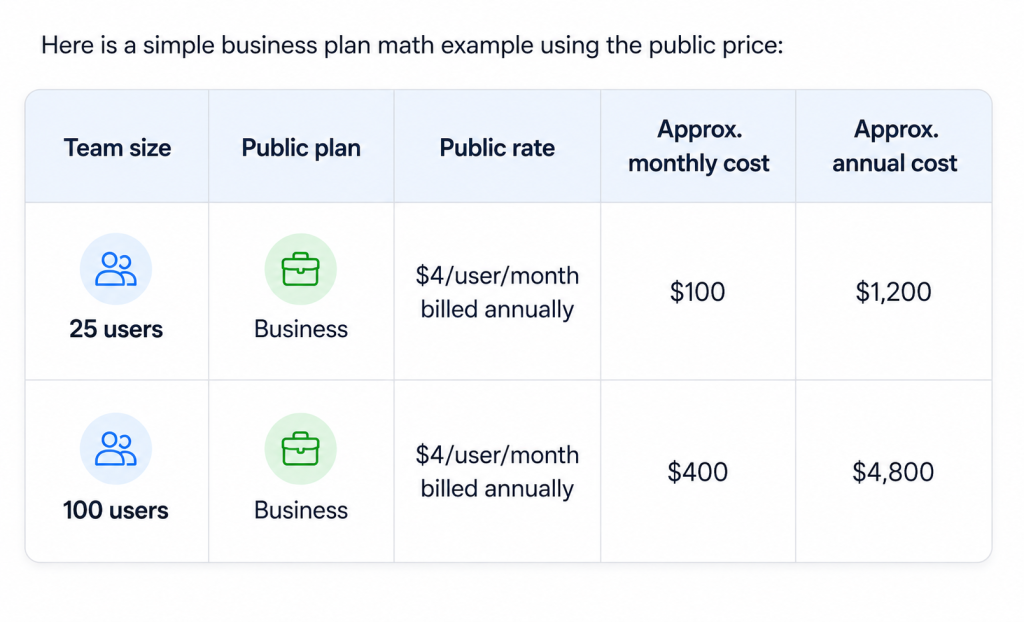
That spend is not trivial, but it is also not outrageous when compared with:
- Manual credential resets.
- Shadow IT password sharing.
- Offboarding mistakes.
- Weak access hygiene across contractors and departments.
Security software often feels “expensive” right up until the current process is examined honestly.
Cost Comparison Mindset :
Keeper’s biggest pricing strength is that it does not require a giant leap between starter, operating, and governance tiers.
The public ladder currently looks like this:
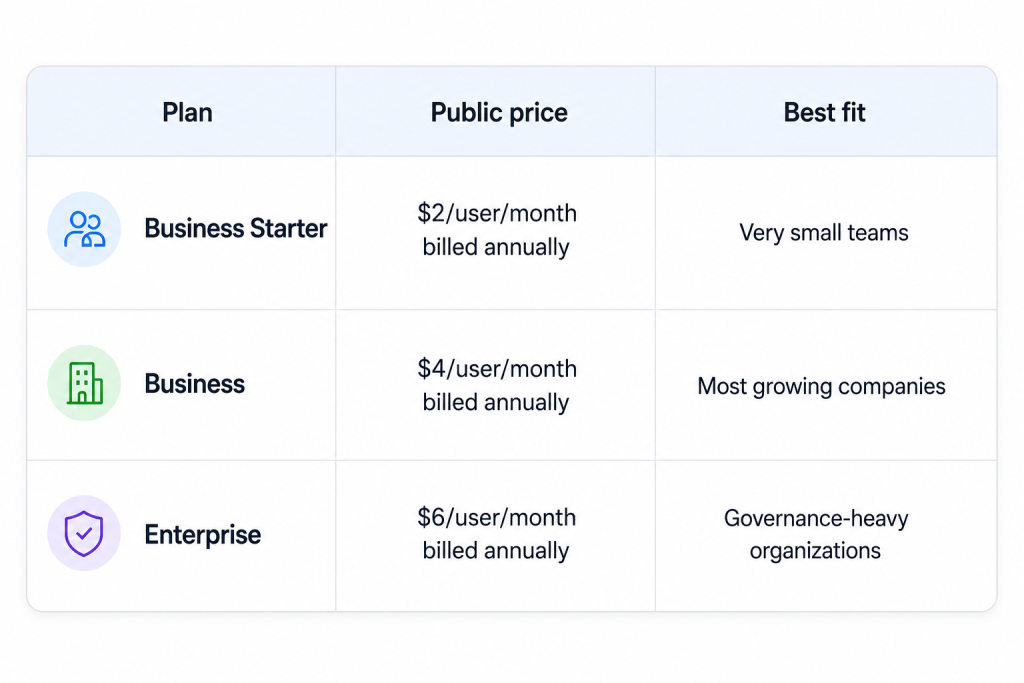
That is a helpful spread.
It means the cost jump is gradual enough that buyers can align plan choice with operational complexity instead of treating every upgrade like a budget crisis.
Best Value Tier :
For most companies, the Business plan looks like the best value tier.
Why?
- It is still reasonably priced publicly.
- It adds shared team folders and delegated administration.
- It introduces a stronger organizational structure and integrations.
- It includes a free Family Plan for each user, which is a quietly nice extra benefit.
Business Starter is attractive, but its 5-to-10-user framing makes it feel more like an entry point than the long-term sweet spot.
Enterprise makes sense when identity governance and automated provisioning are real priorities. But if a company is just looking for the best balance of admin control and cost, Business is the obvious middle ground.
If that is the tier you are weighing, start with Keeper here and map the Business plan against your current onboarding, offboarding, and shared-access workflow.
Discounts And Annual Billing :
The main public discount logic on the business page is baked into the annual billing presentation. The listed prices are clearly framed as billed annually, which is common in SaaS and especially common in security software.
That means buyers should not assume a month-to-month equivalent at the same public rate. Evaluate the annual commitment directly.
The safest public takeaway is:
- Business pricing is openly listed.
- It is shown on an annual billing basis.
- Enterprise still has a public per-user annualized price.
- Broader negotiation or expansion questions should happen after fit is confirmed.
Verdict :
Keeper Security pricing in 2026 is refreshingly understandable. The business page gives a public ladder from $2 to $6 per user per month, billed annually, and each tier maps to a clearer level of operational maturity instead of vague upsell theater.
Business Starter works for tiny teams. Business looks like the best value for most growing companies. Enterprise is where lifecycle automation, RBAC, and developer/API needs become central.
That makes Keeper easier to evaluate than a lot of competing security tools, and that alone is worth something.
If you want to compare it against your real security workflow, start with Keeper here and test whether the Business or Enterprise plan matches how your team actually handles credentials today.
FAQ :
How much does Keeper Security cost in 2026?
On the official business pricing page, Business Starter is $2.00 per user per month billed annually, Business is $4.00, and Enterprise is $6.00.
Which Keeper plan is best for most companies?
For most growing companies, the Business plan looks like the best value because it adds shared team folders, delegated administration, and stronger organizational controls without a large public price jump.
Does Keeper have separate pricing for personal and business users?
Yes. Keeper maintains a separate personal/family pricing page and a business/enterprise pricing page.
Is Keeper Enterprise quote-only?
The official business page publicly lists Enterprise at $6.00 per user per month billed annually, while still pushing buyers toward a quote or sales conversation for the broader enterprise evaluation.
Before You Choose, Compare These
Hand-picked guides to help you choose the right tool — no fluff.
 Use CasesWho Is Keeper Security Best For? Use Cases & Fit (2026)Who gets the most out of it — and who should skip it.
 IntegrationsKeeper Security Integrations Guide 2026What it connects to and how well each link holds up.
 ComparisonsZonka Feedback vs Alternatives 2026The strongest competitors compared side by side.
 ComparisonsFreshchat vs Alternatives 2026The strongest competitors compared side by side.