


Disclosure: Stack99 earns a commission if you buy through links on this page. It costs you nothing extra and never changes our assessment.
Vista Social is unusually broad for a social media tool. Publishing and a unified inbox are the obvious parts. Around them sit analytics, an ads manager spanning ten networks, brand listening, review management, a link-in-bio builder, employee advocacy, DM automations, and a project tracker called Vista Work. An AI layer named Ask Vista runs across all of it.
Breadth makes the tier question harder, not easier. Knowing a feature exists tells you nothing about which plan it arrives on, or whether it arrives at all. Everything below was read off vistasocial.com/pricing on 25 November 2026, in both billing states.
Read the toggle before the price
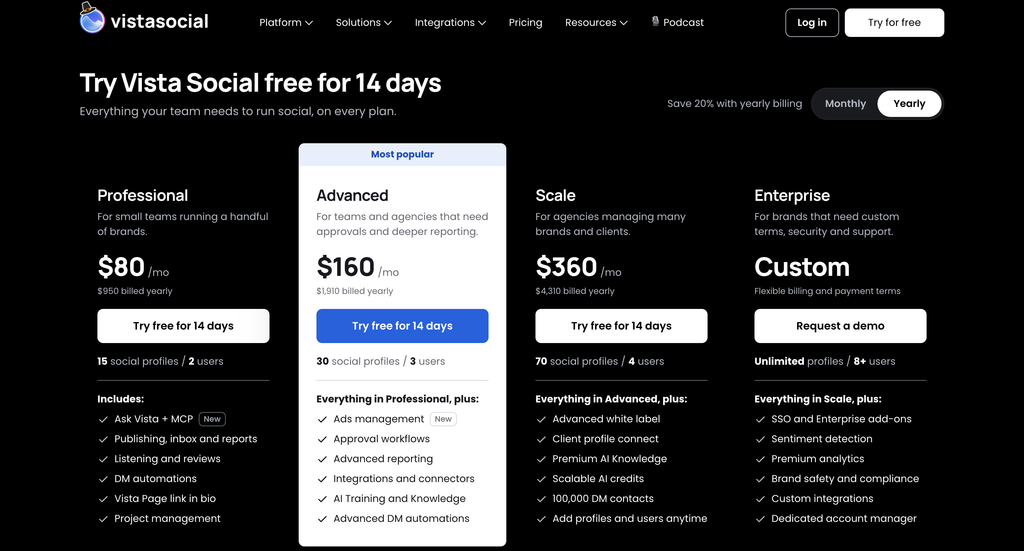
The page arrives with Yearly already selected. Professional shows $80 a month, Advanced $160, Scale $360, each with a smaller line underneath giving the annual total. Those monthly figures are annual rates divided by twelve.
Switch to Monthly and the numbers move to $99, $199 and $449.
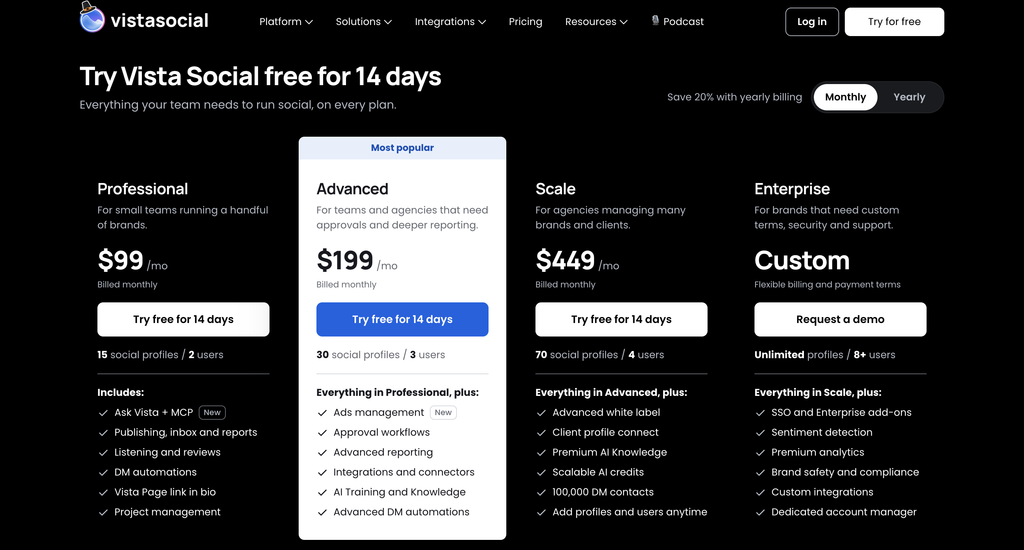
The maths here is at least honest. Its banner says “Save 20% with yearly billing,” and the arithmetic agrees to the dollar. Professional at $99 across twelve months is $1,188, against $950 paid annually, a saving of $238. Advanced runs $2,388 versus $1,910, saving $478. Scale runs $5,388 versus $4,310, saving $1,078. Each one is 20.0%.
Vista Social pricing and capacity
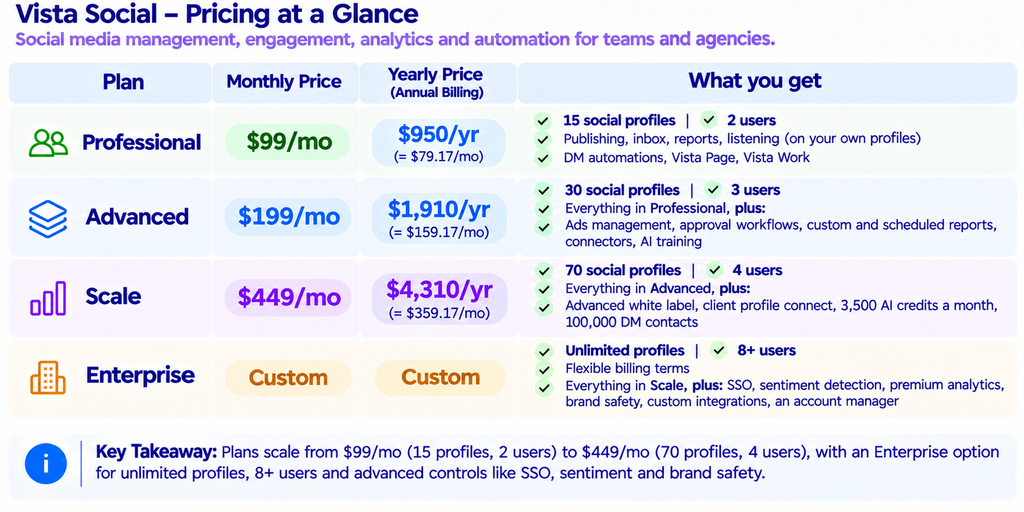
Every tier carries a 14-day free trial, and Vista Social states that the trial needs no payment detail.
Cost per profile barely moves
Divide each monthly price by the profile allowance and something becomes obvious. Professional works out at $6.60 per profile. Advanced is $6.63. Scale is $6.41. On annual billing the three land at $5.28, $5.31 and $5.13.
No volume discount is on offer. The upper tiers cost more because they do more, and the profile count rises alongside the price almost in lockstep. Upgrading to Scale purely to get cheaper profiles gains you about 19 cents a profile.
Seats tell a different story. Profiles multiply by 4.7 from Professional to Scale while users only double, from two to four. An agency with six account managers hits the user ceiling on Scale long before it runs out of profiles, and the fix is Enterprise rather than a seat add-on.
What Professional already includes
The entry tier is fuller than most competitors’ equivalents, which changes the upgrade question.
- Ask Vista and MCP. The AI command layer is not held back for higher tiers. Vista Social also exposes an MCP endpoint so you can drive it from your own AI assistant.
- Publishing, inbox and reports. Scheduling across channels, one inbox for messages, comments and reviews, plus standard reporting.
- Listening and reviews. Listening for content on your own social profiles is included at no extra cost.
- DM automations. Automated replies to comments and direct messages.
- Vista Page. A link-in-bio and landing page builder.
- Vista Work. Project and task management attached to the posts and reports it belongs to.
A solo operator or a two-person marketing team running fifteen profiles gets a genuinely complete toolkit at $99. Nothing in that list is a stub.
Advanced is the approvals and ads tier
Everything Advanced adds points at one scenario: other people need to see the work before it goes out, or money is being spent on it.
- Approval workflows. Multi-stage approvals covering your team, outside teams and clients. This alone decides the tier for most agencies.
- Ads management. Connect ad accounts, query performance through Ask Vista, create and edit campaigns.
- Advanced reporting. Custom reports you can save and send on a schedule, with semantic analysis of content performance.
- Integrations and connectors. Links out to chat tools, BI dashboards and automation platforms.
- AI Training and Knowledge. Train the model on your own content so captions and replies stay in voice.
- Advanced DM automations. Lead capture through direct messages.
If you post without review and buy no ads, the $100 gap between Professional and Advanced buys you fifteen extra profiles and a third seat. Weigh it on that basis rather than the feature list.
Scale is the client-facing tier
Scale exists for agencies whose clients see the software.
- Advanced white label. Your branding on the dashboard and the reports clients receive.
- Client profile connect. Send a client a link so they authorise their own accounts, which removes the worst part of agency onboarding.
- Premium AI Knowledge. Adds guidance, escalation rules, website sync and Zendesk sync on top of the Advanced AI training.
- 3,500 AI credits a month. Priced against the add-on bundles at $10 per 1,000, that allowance is worth about $35 a month.
- 100,000 DM contacts. The contact ceiling for direct message automation.
- Buy more as you go. Extra profiles in sets of ten, extra users when the team grows.
Client profile connect is the quiet standout. Chasing a client for Instagram access is the thing that delays onboarding by a fortnight, and a self-serve link removes it.
Four things no plan includes
Below the plan cards sits a strip labelled “Optional add-ons”. These attach to any tier and are charged separately.
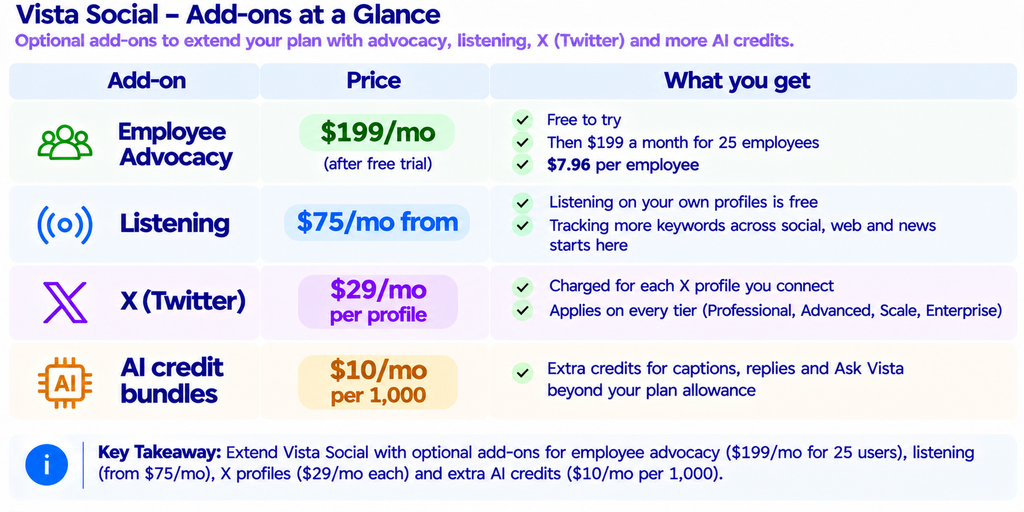
The X charge deserves attention if you manage client Twitter accounts. Five X profiles add $145 a month, which turns a $99 Professional plan into $244 and overtakes the cost of the plan itself. Three more add-ons alongside it and the headline price stops describing your bill.
Enterprise carries its own separate add-ons: single sign-on, an audit log of every change, and data migration to bring post history across.
Limits the networks impose, not Vista Social
Some ceilings have nothing to do with your plan. Meta’s own developer documentation states that Instagram accounts are limited to 100 API-published posts in a rolling 24-hour window, with a carousel counting as one post. Any scheduling tool publishing through the official API inherits that, Vista Social included.
TikTok adds a different kind of gate. Its Content Posting API documentation says content posted by unaudited API clients stays restricted to private viewing until the client passes a compliance audit. That is why third-party TikTok publishing works only through approved partners, and why support for it appears and disappears across tools in this category.
The X add-on fee belongs to the same story. Access to X’s API has been a paid product for some time, and Vista Social passes that cost through per profile rather than absorbing it into the plan price.
Ask Vista changes where the AI sits
Most social tools bolt a caption generator onto the composer and call it AI. Ask Vista is structured differently, and the structure is published on the platform pages rather than buried in release notes.
It breaks into three parts. Chat takes a request in plain language and acts on it. Agents take a job and run it without supervision. Skills are saved playbooks you invoke with a single command. All three reach across the whole product rather than only the publishing module, so asking about ad performance or inbox backlog goes through the same interface as asking for a caption.
Two things make the arrangement unusual at this price. First, it starts on Professional rather than being held back for agency tiers. Second, the platform exposes an MCP endpoint, which means your own AI assistant can drive it directly instead of you working through the dashboard. Teams already living inside an AI client get a second route into the tool at no extra charge.
Output quality depends on what the model has been trained on, and training is where the tiers divide. Advanced buys AI Training and Knowledge, which grounds captions and replies in your own content. Scale upgrades that to Premium AI Knowledge, adding escalation rules, website sync, and Zendesk sync. On Professional, the AI runs ungrounded.
The modules nobody budgets for
Three parts of the platform get less attention than publishing and tend to be discovered after purchase.
Ads Manager covers ten ad networks for launching, testing and optimising paid campaigns, and it is gated to Advanced. A team paying for a separate ads tool alongside a Professional plan should price the consolidation before renewing either.
Reputation handles reviews across the sites that matter to a brand, and it arrives on Professional as part of the unified inbox. Multi-location businesses fielding Google reviews often buy a dedicated reputation product for this, which the entry tier may already cover.
Vista Work is project and task management living alongside the posts and reports it relates to. It also arrives on Professional. Whether it replaces an existing tracker depends on how much non-social work your team runs through that tracker.
A worked agency example
Take an agency with twelve clients, four or five profiles each, so roughly 55 profiles. Three account managers plus a founder makes four seats. Clients approve posts before publishing and see branded reports. Six of the twelve want their X account managed.
Scale is the plan: 70 profiles and 4 users clears both counters, white label covers the reports, and approvals arrived back at Advanced. That is $449 a month, or $4,310 a year.
Then add the X profiles. Six at $29 is $174 a month, raising the real figure to $623, which sits 39% above the plan price. Across a year that is $2,088 of add-on charges against a $4,310 subscription. Budget from the total, not the card.
Hire a fifth account manager and the picture changes again. Scale caps at four users, so a fifth seat means an Enterprise conversation rather than an upgrade button, and its price is not published.
Which tier fits
Professional suits one or two people running up to fifteen profiles with no approval chain. The feature set is close to complete and the ceiling you hit first will be seats.
Advanced suits a small agency or an in-house team with a reviewer. Approval workflows and scheduled client reports are the reason to be here, and ads management makes it the floor for anyone running paid campaigns.
Scale suits an agency with more than a handful of clients who see branded dashboards. Seventy profiles across ten or fifteen clients is the working shape, and client profile connect pays for itself in onboarding time.
Enterprise becomes necessary at five or more seats, or when procurement asks about SSO and audit logs. Both sit outside the self-serve tiers entirely.
If you are weighing Vista Social against other tools in this category, our Vista Social alternatives comparison covers the field, and the integrations guide goes deeper on what connects to what. The beginner’s guide walks through first setup. For a price comparison against a smaller tool, see our breakdown of SocialBee’s cost per profile.
What I could not verify
Several details sit outside what the public pricing page states.
AI credit allowances on Professional and Advanced. Scale names 3,500 a month and the add-on bundles are priced, but the lower tiers’ included credits are not published on the pricing page.
The cost of extra profiles and seats on Scale. The page says profiles are bought in sets of ten and users can be added anytime, without naming either price.
Enterprise pricing of any kind, and aggregate review scores, since the major review platforms refuse automated requests.
Ready to test it? You can start the 14-day trial and connect real profiles before committing to a billing term.
FAQ
How much does Vista Social cost per month?
Professional is $99, Advanced $199 and Scale $449 on monthly billing. Paying yearly costs $950, $1,910 and $4,310 respectively, a flat 20% saving. Enterprise is quoted individually.
Why does the pricing page show $80 instead of $99?
Because the Yearly toggle is selected when the page loads. The $80 is the annual price of $950 divided by twelve. Click Monthly to see the month-to-month rate.
Which plan includes approval workflows?
Advanced and above. Professional has no multi-stage approval chain, so any team that needs a reviewer before posting starts at $199 a month.
Is listening included or extra?
Both. Listening for content on your own social profiles is free on every plan. Tracking additional keywords across social, web and news is an add-on starting at $75 a month.
Why is there a separate charge for X profiles?
X is listed at $29 a month per connected profile as an optional add-on on every tier. Access to X’s API carries a cost that the platform passes through rather than absorbing into plan prices.
How many people can use the account?
Two on Professional, three on Advanced, four on Scale, and eight or more on Enterprise. Scale allows extra users to be added, though the per-user price is not published.
Sources
- Vista Social pricing page, read 25 November 2026 in both the Monthly and Yearly toggle states, for all plan prices, allowances, feature lists and add-on charges.
- Meta, Instagram Platform content publishing documentation, for the 100-post rolling 24-hour publishing limit.
- TikTok for Developers, Content Posting API, for the audit requirement on API clients.