


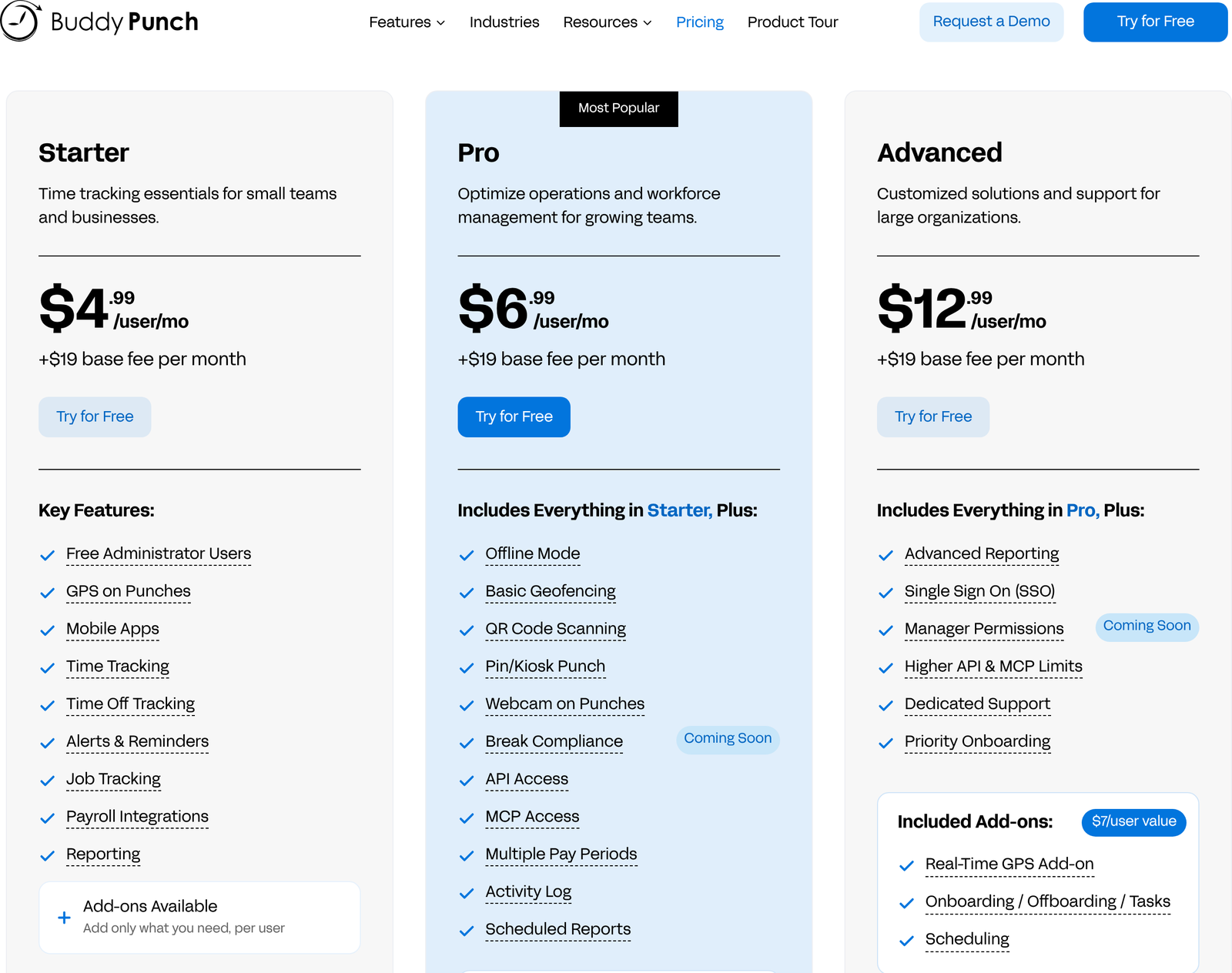
Buddy Punch sells a time clock, and its pricing page tells you something useful before you read a single feature. There is a $19 monthly base fee sitting on top of every plan, and it does not move when your headcount does.
Disclosure: Stack99 earns a commission if you buy through links on this page. It costs you nothing extra and never changes our assessment.
What Buddy Punch actually is
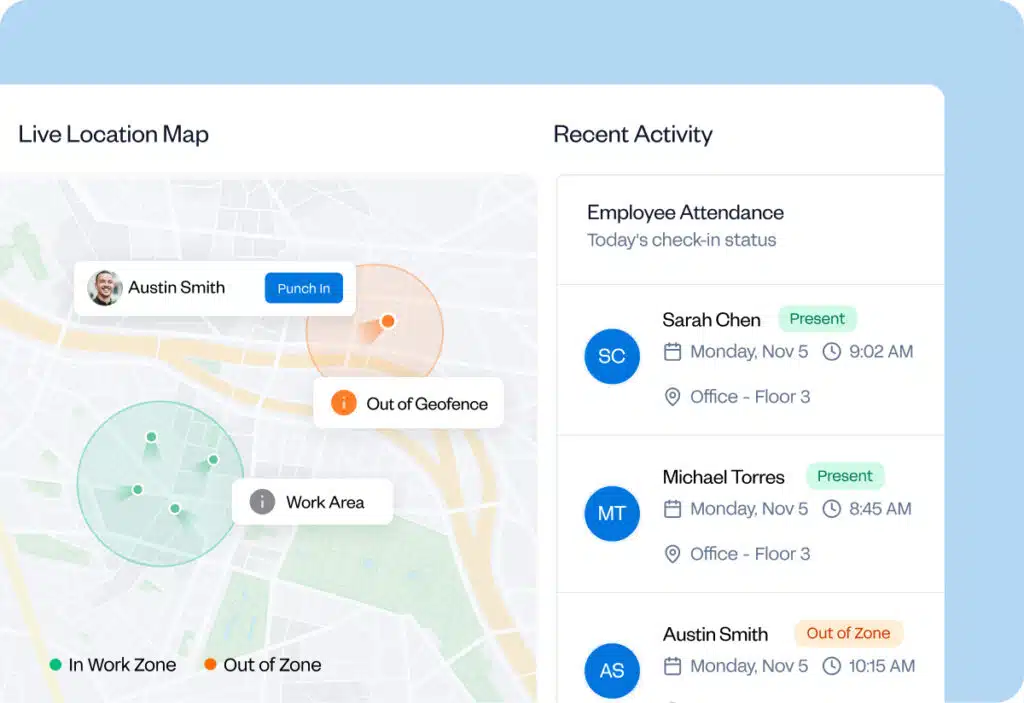
The product is employee time tracking with scheduling and payroll bolted alongside. Staff punches in from a phone, a browser, a shared tablet running kiosk mode, or a QR code taped to a wall. The software stamps each punch, applies your overtime and break rules, and produces a timesheet you push to payroll.
The target customer is visible in the feature list: GPS on punches, geofencing, webcam photos at punch-in, IP address locking, device locks. These exist because the buyer manages people who are not sitting at a desk in the office, and wants evidence attached to the hours they claim. Construction crews, cleaning companies, landscapers, home care agencies, restaurant groups.
Pricing, in both billing states
The pricing page opens with the annual toggle already selected and a badge reading “Save up to 18%”. That is the first thing to check, because the monthly figures are $1 higher per user on every tier.
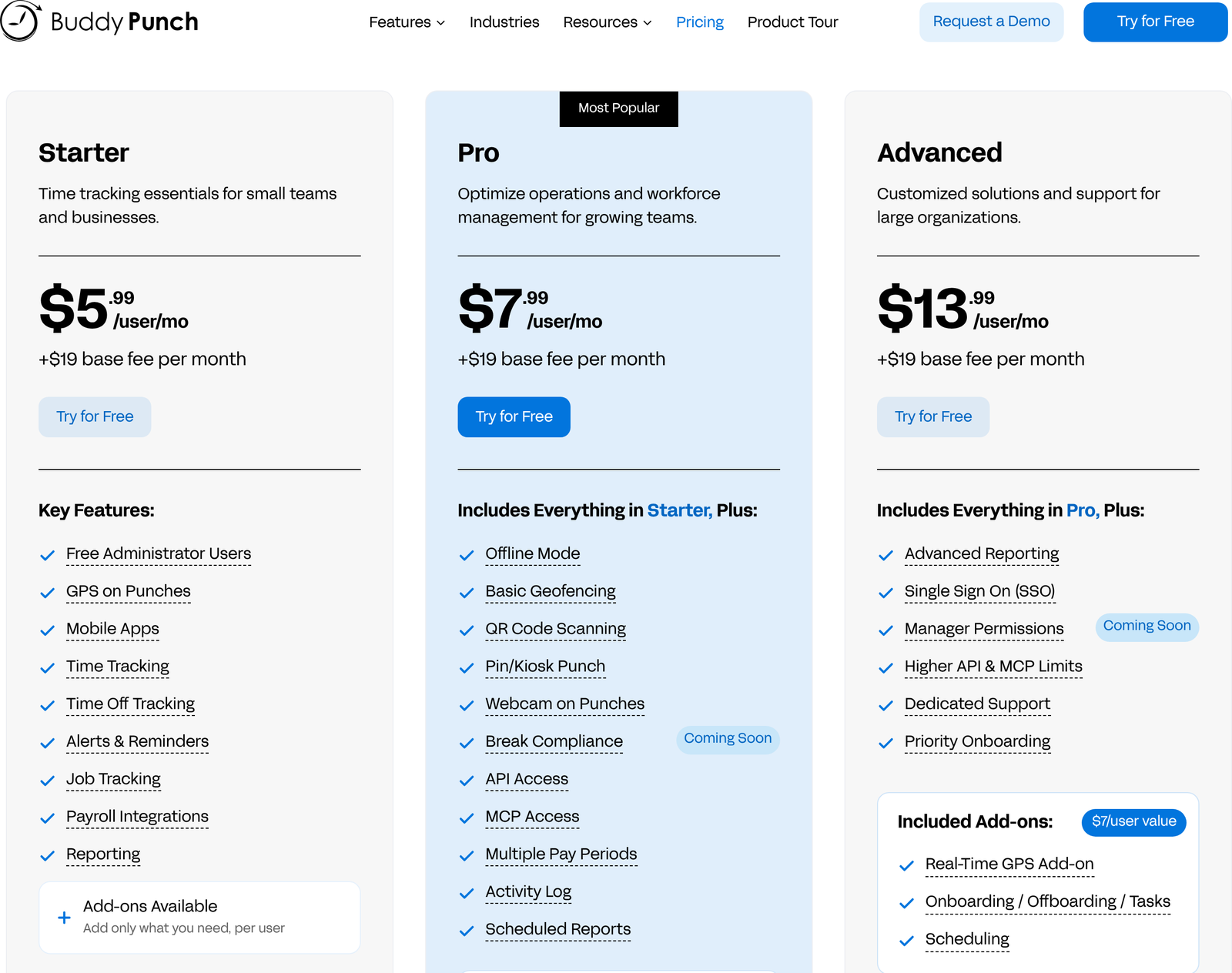
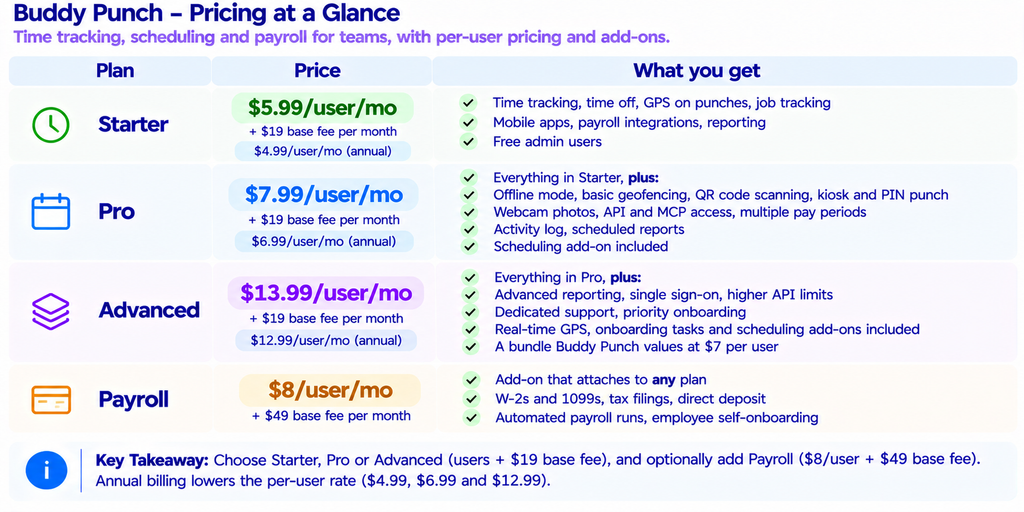
Two features on the plan cards carry a “Coming Soon” label rather than a tick: break compliance on Pro and manager permissions on Advanced. If either is the reason you are buying, ask for a date in writing before you pay.
A flat $19 changes who this is for
Per-user pricing looks cheap until a fixed fee sits beside it. Work out the real cost per head at different team sizes on Starter, annual billing, and the shape becomes obvious.
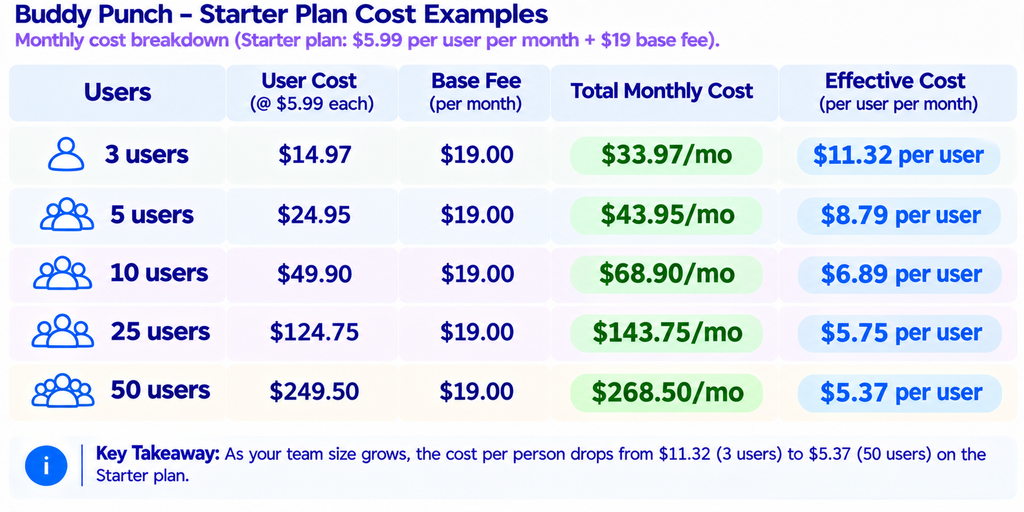
A three-person crew pays more than double the headline rate. At twenty-five people, the base fee shrinks to 13 percent of the bill, and the effective rate is within 80 cents of the advertised $4.99. This is pricing built for teams of roughly ten and up. Below five, the fixed component dominates and cheaper per-user tools will beat it on cost alone.
Why the annual discount underdelivers
Annual billing saves exactly one dollar per user per month on each tier. Against the per-user rate alone that is 16.7 percent on Starter, 12.5 percent on Pro and 7.1 percent on Advanced. Against the total bill it is less again, because the $19 base fee is identical in both states.
A five person Starter team saves $5 a month against a monthly total of $48.95, which is 10.2 percent rather than 18. At fifty people the saving is $50 against $318.50, or 15.7 percent. The advertised “up to 18%” is reachable only at large headcount on the cheapest tier, where the base fee has stopped mattering. Smaller teams should expect closer to ten.
Add-ons, and which plan absorbs them
Five things are unbundled and sold per user. The same add-on is free on a higher plan, which is where the real tier comparison lives.
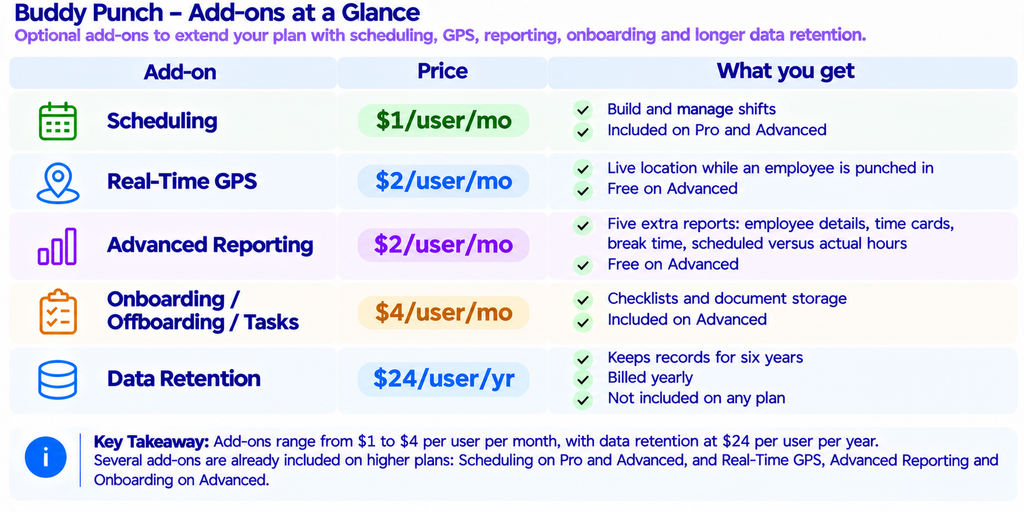
Stack the add-ons onto Starter and the gap to a higher plan closes fast. Starter at $4.99 with scheduling is $5.99, which is the Pro rate without any of Pro’s other features. Add real-time GPS and advanced reporting and you are at $8.99, a full two dollars above Pro. Anyone who wants scheduling should start the comparison at Pro rather than Starter.
Advanced at $12.99 bundles GPS, onboarding and scheduling, which Buddy Punch prices at $7 per user if bought separately. Pro at $6.99 plus those three add-ons would be $12.99, exactly level with Advanced, and you would still lack SSO, advanced reporting, higher API limits and priority onboarding. The Advanced bundle is the better buy for anyone who needs all three, which is an unusually honest piece of tier design.
Data retention is worth a separate thought
The $24 per user per year retention add-on buys six years of records. Federal law asks for less. The US Department of Labor’s Fact Sheet #21 requires employers to preserve payroll records for at least three years, and records on which wage computations are based, which explicitly includes time cards and work and time schedules, for two years.
Six years exceeds both floors by a wide margin. Some states and some industries ask for longer, and a business facing wage litigation has its own reasons to keep more. The default retention period on plans without it is not published, so if you decline the add-on you should ask support what happens to punches after year two or three rather than assume. For a thirty person team the add-on runs $720 a year, which is real money against a $1,815 annual Starter bill.
Integrations: 21 of them, and most are file exports
The integrations page lists 21 payroll and accounting destinations, with a developer API and Zapier for anything beyond them.
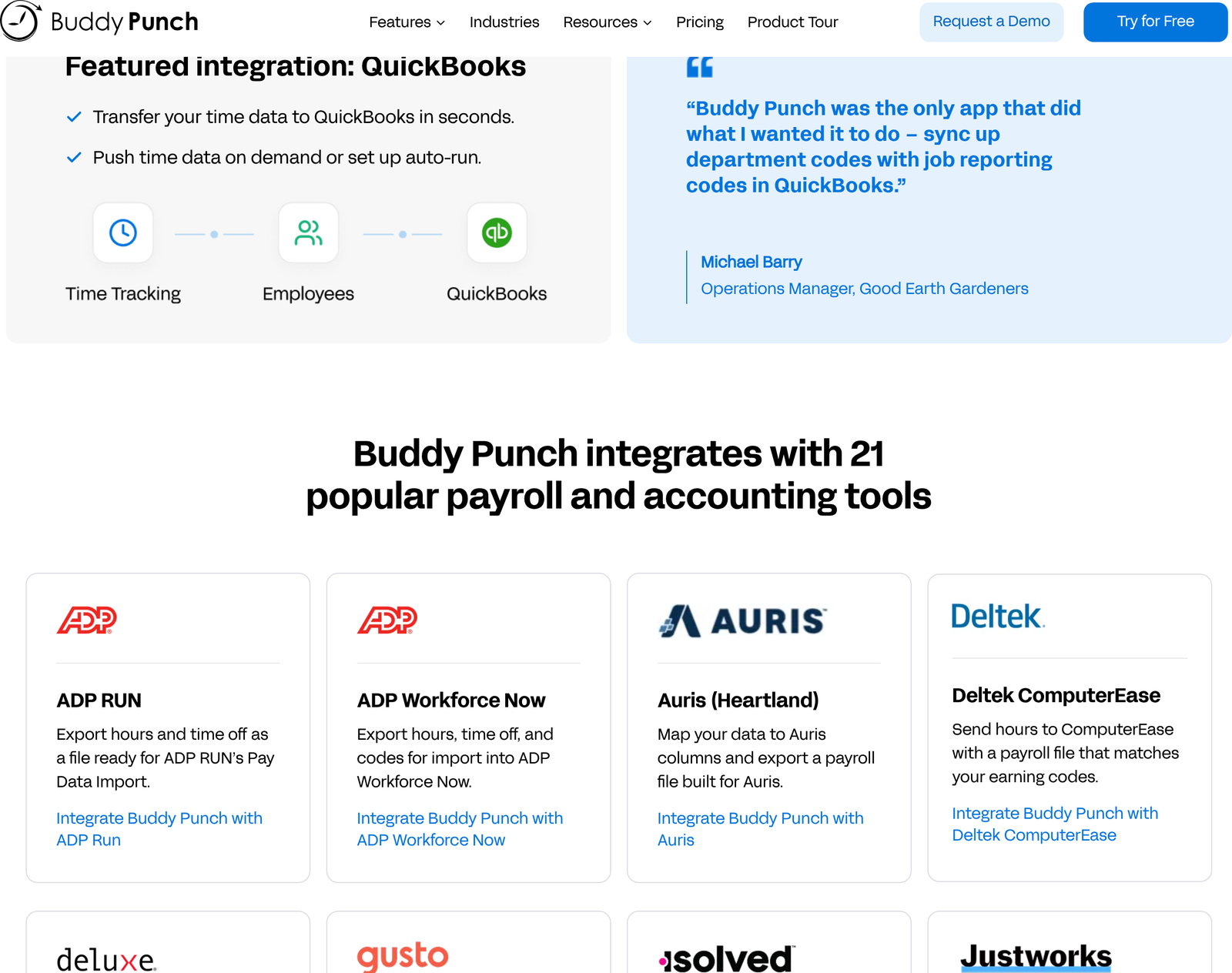
Read the descriptions carefully and a distinction appears. QuickBooks is described as a live transfer, where you push time data on demand or schedule an auto-run. Most of the rest are described in the language of files: “export hours and time off as a file ready for ADP RUN’s Pay Data Import”, “upload hours to Gusto’s CSV import”, “export a payroll file built for Auris”, “send hours to ComputerEase with a payroll file that matches your earning codes”.
A formatted export is genuinely better than retyping a timesheet. It is not the same as a connection that writes into your payroll system without a human in the loop. If your mental picture of “integrates with ADP” is a sync that runs itself, check the specific page for your provider before you budget the admin time away. The marketing promise of “no manual data entry required” holds for the typing; somebody still moves the file.
API and MCP access both start on Pro, not Starter, with higher limits on Advanced. Teams planning to build anything custom should price from Pro upward.
Where Buddy Punch is strong
Punch verification is unusually thorough
Few time clocks at this price stack as many controls on a single punch. GPS coordinates ship on Starter. Pro adds geofencing, webcam photos, QR scanning, and kiosk mode. Across the plans, you also get device locks, IP address locking, limits on the time of day a punch is allowed, automatic punch-outs, and an error log. A manager who suspects buddy punching has several independent ways to test the suspicion, which is presumably where the product name came from.
Administrators are free
Free administrator users appear in the Starter feature list. On tools that bill every login, a manager who never punches a clock still costs a seat. Here the office manager, the owner and the payroll clerk sit outside the per-user count. At $4.99 a head, the saving is modest; across several non-punching admins, it is the difference between tiers.
Overtime and pay rate handling is built in, not bought
Automatic overtime calculation with separate federal and state tracking, pay rate calculations by job, punch rounding, automatic break deduction, and a timecard approval workflow all appear on Starter. For an employer whose compliance exposure runs through hours worked, having that logic on the cheapest plan rather than behind an upgrade matters more than most feature-list entries.
Where it falls short
Small teams pay a penalty
Everything above about the base fee lands hardest here. Three employees on Starter pay $11.32 each. A sole trader with two staff is the wrong customer for this pricing model, and no amount of feature quality fixes a fixed fee.
Scheduling costs extra on the entry plan
The product markets itself as “time tracking, scheduling and payroll” in the page headline, yet scheduling is a dollar-a-head add-on unless you are on Pro or above. Payroll is $8 per user plus its own $49 base fee. Two of the three things named in the pitch are separately priced on the cheapest plan.
Two advertised features are not shipping yet
Break compliance and manager permissions both carry Coming Soon badges on the pricing cards. Break compliance in particular is the kind of thing a California employer buys the product for. Verify before purchase.
Some integration descriptions oversell
Covered above. A payroll file export counts as an integration in Buddy Punch’s taxonomy, and for most of the 21 listed providers that is what you are getting.
How it holds up over a year
Monthly pricing hides the annual figure, so here is a fifteen-person crew costed three ways on annual billing, which is the size where Buddy Punch starts to make sense.
- Starter: 15 x $4.99 plus $19 equals $93.85 a month, or $1,126.20 a year.
- Pro: 15 x $6.99 plus $19 equals $123.85 a month, or $1,486.20 a year.
- Advanced: 15 x $12.99 plus $19 equals $213.85 a month, or $2,566.20 a year.
Pro costs $360 a year more than Starter and brings offline punching, geofencing, kiosk mode, webcam verification, the activity log, and scheduling. Divided across fifteen people, that is $24 a head a year, which is cheap for the audit trail alone if your crews work off-site.
Advanced costs $1,080 a year more than Pro. Three of the four things it adds are add-ons you could buy on Pro for the same $1,080, so the genuine premium is zero if you want all three and considerable if you want one. Wanting only real-time GPS means paying $360 a year for it on Pro rather than $1,080 for the bundle. Add payroll on top of any of these and the bill grows by $8 a head plus a second $49 base fee, which at fifteen people is $2,028 a year.
Who should buy it
Choose Starter if:
You have ten or more hourly staff, you need defensible hours with GPS attached, and your payroll provider accepts a file. Budget $68.90 a month at ten people on annual billing. Skip it if you need shift scheduling, because the add-on math pushes you to Pro anyway.
Choose Pro if:
You schedule shifts, you have crews working outside mobile coverage and need offline punching, or you want a shared kiosk and QR punching on site. Pro is also the entry point for API and MCP access. At ten people on annual billing that is $88.90 a month.
Choose Advanced if:
You want live GPS tracking rather than point-in-time coordinates, you run onboarding paperwork through the same system, and single sign-on is a requirement from whoever owns IT. The bundled add-ons make Advanced the correct choice over Pro-plus-extras at identical cost.
Look elsewhere if:
You have fewer than five employees, your workforce is entirely desk-based and salaried, or you need a true bidirectional payroll sync rather than a formatted export.
Frequently asked questions
Is there a free plan?
No. There is a 14-day free trial that does not require a credit card. After that, every plan carries both the per-user rate and the $19 monthly base fee.
Does the $19 base fee apply on annual billing too?
Yes. The base fee is identical in both billing states, which is why the annual discount is worth less in percentage terms than the per-user comparison suggests.
Do managers and admins count as paid users?
Administrator users are listed as free on every plan, starting with Starter.
How long does Buddy Punch keep my time records?
The six-year figure applies to the paid Data Retention add-on at $24 per user per year. The default period on plans without the add-on is not published, so ask support. For reference, federal recordkeeping rules require two years for time cards and three for payroll records.
Does it work offline?
Offline mode starts on Pro. Punches recorded without a connection sync when the device reconnects. Starter does not include it.
Can I add payroll later?
Payroll attaches to any plan at $8 per user per month plus a $49 monthly base fee, separate from the $19 on your time tracking plan. A ten-person team running both pays two base fees.
Verdict
Buddy Punch does the core job well. Punch verification is thorough, overtime and pay rate logic sits on the cheapest plan rather than behind an upgrade, and administrators do not consume seats. The pricing is honest in the sense that every number is published, including the add-on prices most competitors bury.
What it is not is cheap for a small team. The $19 base fee turns a $4.99 headline into $11.32 a head at three employees, and the gap only closes around ten. Check your headcount against the table above before anything else, then decide between Pro and Advanced on whether you need all three bundled add-ons. Two features on the cards are still unreleased, so confirm those separately.
The 14-day trial needs no card, which makes testing against your own crew cheap. Start a Buddy Punch trial here and run a full pay period through it before committing to twelve months.
More on Stack99: a breakdown of Buddy Punch’s top features, a beginner’s setup guide, and an advanced guide for teams already running it.
Sources
- Buddy Punch pricing page, both billing states, checked 23 November 2026.
- Buddy Punch integrations, provider list and per-provider descriptions.
- US Department of Labor, Fact Sheet #21: Recordkeeping Requirements under the Fair Labor Standards Act.