


Disclosure: Stack99 earns a commission if you buy through links on this page. It costs you nothing extra and never changes our assessment.
Streak puts a CRM inside the Gmail window. No separate tab, no sync layer, no second inbox to keep tidy. Deals appear as rows attached to the email threads that created them, and the whole thing arrives as a browser extension rather than an application.
That design decision is the product. It explains the price, the plan boundaries, the size of company that loves it, and the size that outgrows it. Prices below were read off the vendor pricing page on 24 November 2026.
The price depends on a toggle you did not click
Load the pricing page and three paid cards show $49, $69, and $129 per user per month. The billing control above them has two labels, Monthly and Annually, and Annually is already selected.
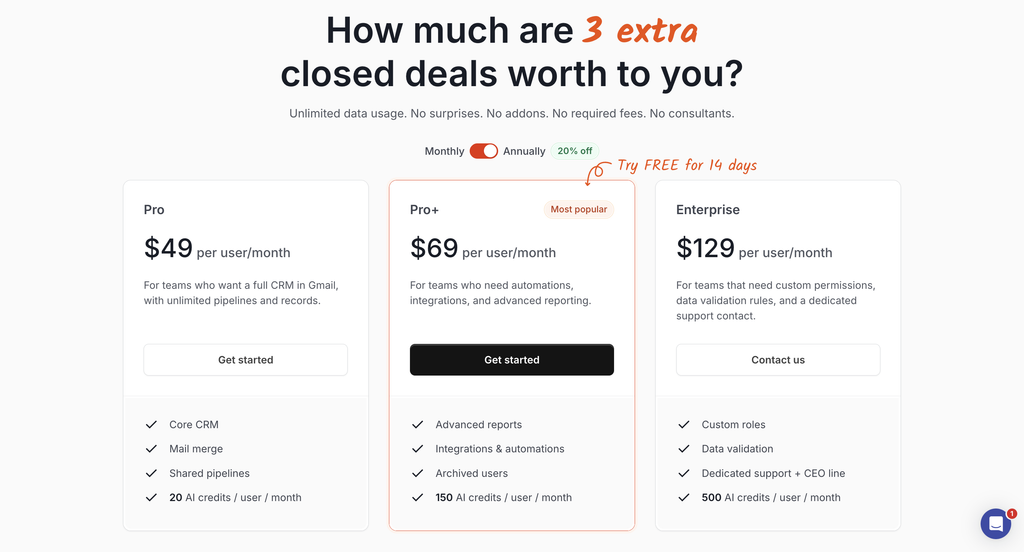
Flip it, and all three numbers move up by ten, twenty, and thirty dollars.
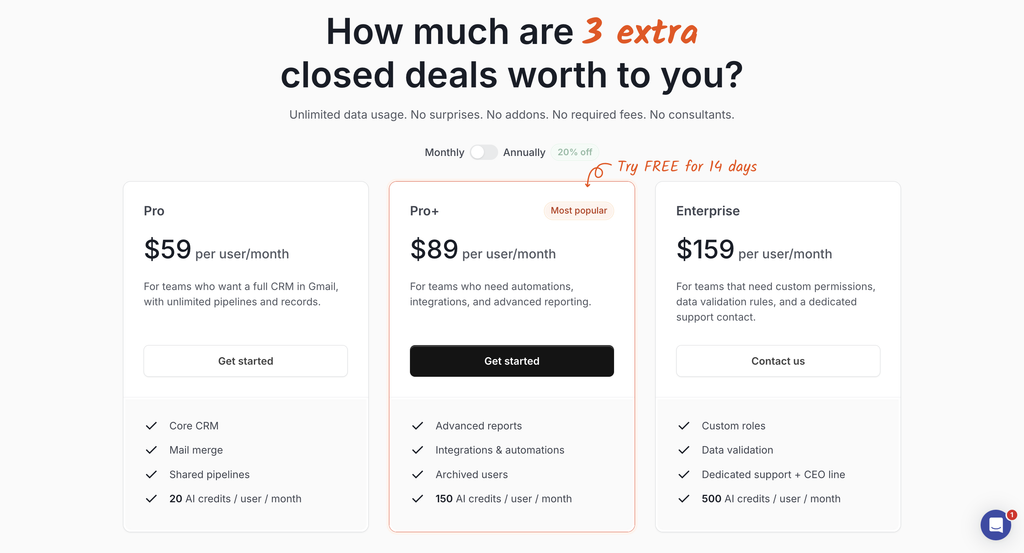
One quirk catches people who try this themselves: clicking the words Monthly or Annually does nothing. The clickable element is the switch graphic between them.
Streak pricing
The 20% badge is right on one plan
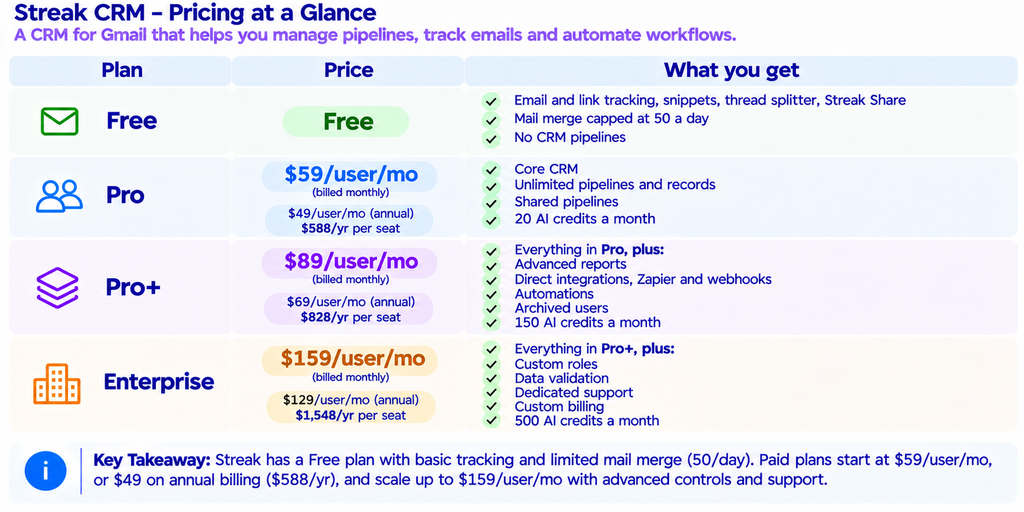
A badge next to the toggle advertises 20% off for annual billing. Checked tier by tier against the vendor’s own figures, the real discounts land in three different places.
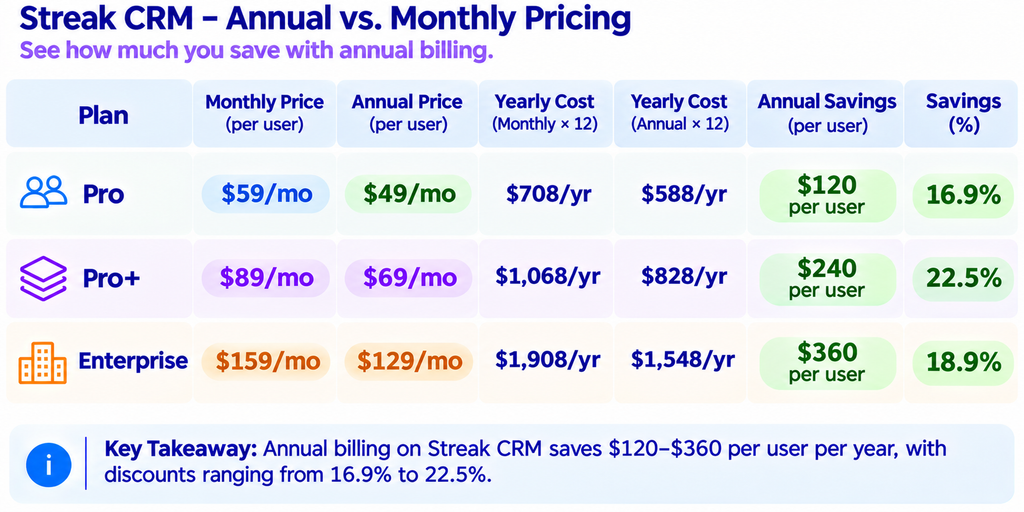
Only Pro+ beats the advertised figure. Pro, the plan most small teams start on, comes in more than three points under it. The rounding is in the vendor’s favour on two tiers out of three.
The free plan is not a CRM
Streak’s free tier gets described as a free CRM in a lot of places. That description does not hold. The free plan carries email tracking, link tracking, snippets, the thread splitter and Streak Share, with mail merge limited to 50 recipients a day. Pipelines, which are the actual CRM, start at Pro.
Call it a set of email power tools and the free tier makes sense. Someone who wants to know whether their proposal was opened gets real value at no cost. Someone who wants to track twelve deals through five stages needs to pay $59 a month.
The Pro to Pro+ gap is where it gets expensive
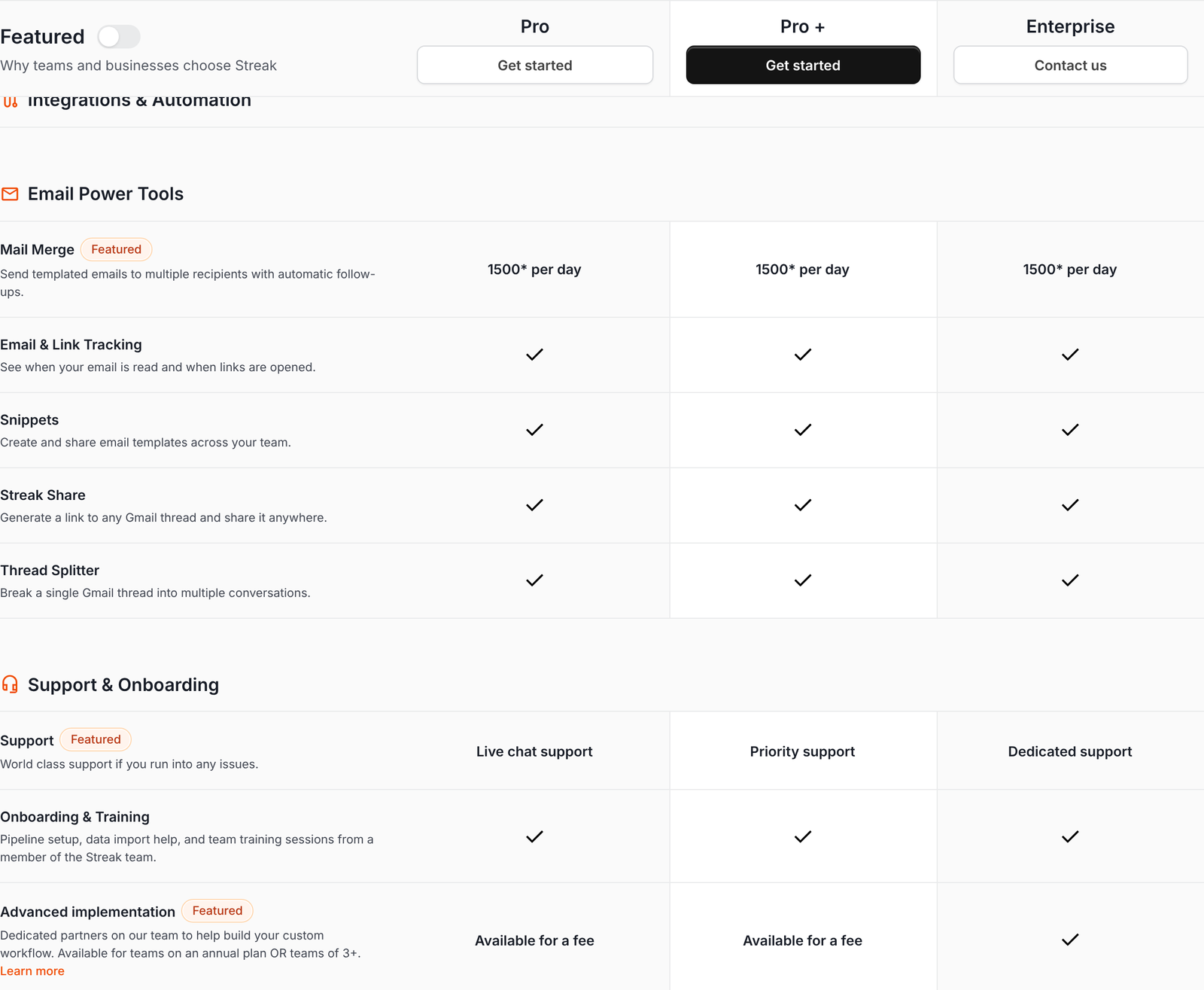
Pro gives you the CRM. What it does not give you is any way to connect the CRM to anything else. Direct integrations with tools like Calendly, Google Forms, Typeform, and Slack are Pro+ features. So is Zapier. So are webhooks and automations.
A four-person team pays $1,440 a year extra on monthly billing for that boundary, or $960 annually. Many buyers will not discover they need it until their first attempt to push a form submission into a pipeline fails.
Archived users also sit on Pro+. On Pro, a departing colleague either keeps consuming a paid seat or their record handling changes. For a team with turnover, that alone can justify the step up.
Everyone pays the same rate
Streak’s own FAQ states that all team members must sit on the same plan. There is no viewer seat, no read-only tier, no discounted licence for the person who looks at a dashboard once a month.
Work that through for a company of eight where three people sell, and five occasionally need visibility. On Pro+ monthly, those five observers cost $5,340 a year between them. A CRM with tiered seat types would charge a fraction of that. This is the single largest hidden cost in Streak’s model, and it grows with the part of your company that benefits least.
AI credits run on a meter
Each plan includes a monthly credit allowance per user: 20 on Pro, 150 on Pro+, 500 on Enterprise. Credits are pooled across the team and do not roll over, so an unused allowance expires at the end of the cycle.
Spending is published per action. A deal summary costs one credit. Deal Q&A costs one. Autofill from the timeline costs one, while autofill with web research costs two. A meeting agenda costs one, and automated AI actions bill one credit per ten runs.
Twenty credits a user on Pro is roughly one AI action per working day. Anyone using the features habitually will exhaust that in a week.
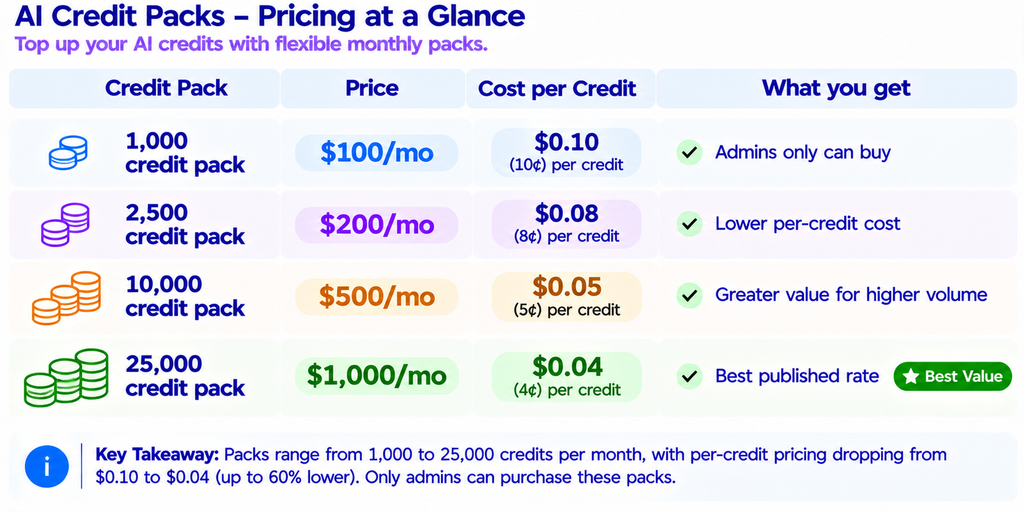
| Plan | Price | What you get |
|---|---|---|
| 1,000 credit pack | $100/mo | 10 cents per credit. Admins only can buy. |
| 2,500 credit pack | $200/mo | 8 cents per credit. |
| 10,000 credit pack | $500/mo | 5 cents per credit. |
| 25,000 credit pack | $1,000/mo | 4 cents per credit. Best published rate. |
Billing happens only on successful completion, which is fairer than it sounds. The structure still turns a per-seat subscription into something closer to metered billing once AI use becomes routine.
The mail merge limit is Google’s, not Streak’s
Paid plans lift mail merge from 50 a day to 1,500. That ceiling gets read as a Streak restriction. It is not.
Google’s own administrator documentation sets the Gmail limit at 2,000 messages a day, and 1,500 for mail merge, applied over a rolling 24-hour period rather than resetting at midnight. Google also notes that these limits can change without notice. Streak is passing through a constraint it does not control, and no Gmail-based sender can exceed it.
Anyone planning volume beyond that needs a dedicated sending platform, whatever CRM sits on top.
What users outside the vendor site say
Streak ships as a Chrome extension, which means there is a public listing with numbers the vendor does not control. On the Chrome Web Store, the extension holds a 4.3 rating from about 6,500 ratings, with roughly 700,000 users. The listing carries a Featured badge and Google’s note that the publisher has no history of violations.
Those figures are close to, though slightly below, Streak’s own claim of more than 750,000 professionals. Browser extension counts measure installs rather than paying customers, so neither number tells you how many people are on Pro or above.
Living inside Gmail cuts both ways
The upside is real and hard to replicate. Nobody has to remember to log an email, because the email is already the record. Adoption problems that sink CRM rollouts mostly vanish when the CRM is the tool people already have open.
The cost is a hard dependency. Streak needs Gmail. An Outlook shop cannot buy it. A company mid-migration to Microsoft 365 is buying something it will have to replace. A sales team that works from phones gets the mobile apps, which are a different and smaller experience than the desktop extension.
Browser extensions also carry an operational tax. Updates arrive on the vendor’s schedule, performance depends on the user’s machine, and corporate extension policies can block installation outright. None of that is unusual, and all of it is worth raising with whoever manages your browsers before you buy forty seats.
The email tools underneath the CRM
Four features sit below the pipeline layer and ship on every plan, including the free one. They are worth understanding separately, because for a meaningful number of users they are the whole reason to install the extension.
- Email tracking tells you when a message was opened. Link tracking does the same for individual URLs inside it.
- Snippets store reusable text you drop into a reply rather than retyping.
- The thread splitter breaks a long tangled conversation into separate threads, which is more useful than it sounds once a deal has run for three months.
- Streak Share hands a colleague visibility of a thread without forwarding it.
Tracking deserves one caution. Open tracking works by loading a remote image, and a growing share of mail clients now fetch those images automatically or block them outright. A read receipt from Streak, or from any tool using the same mechanism, is weaker evidence than it was five years ago. Treat an open as a hint rather than a fact.
Mail merge on the free plan runs to 50 recipients a day, which suits a founder emailing a shortlist. Paid plans raise it to the Gmail ceiling covered above.
What you actually get on a paid seat
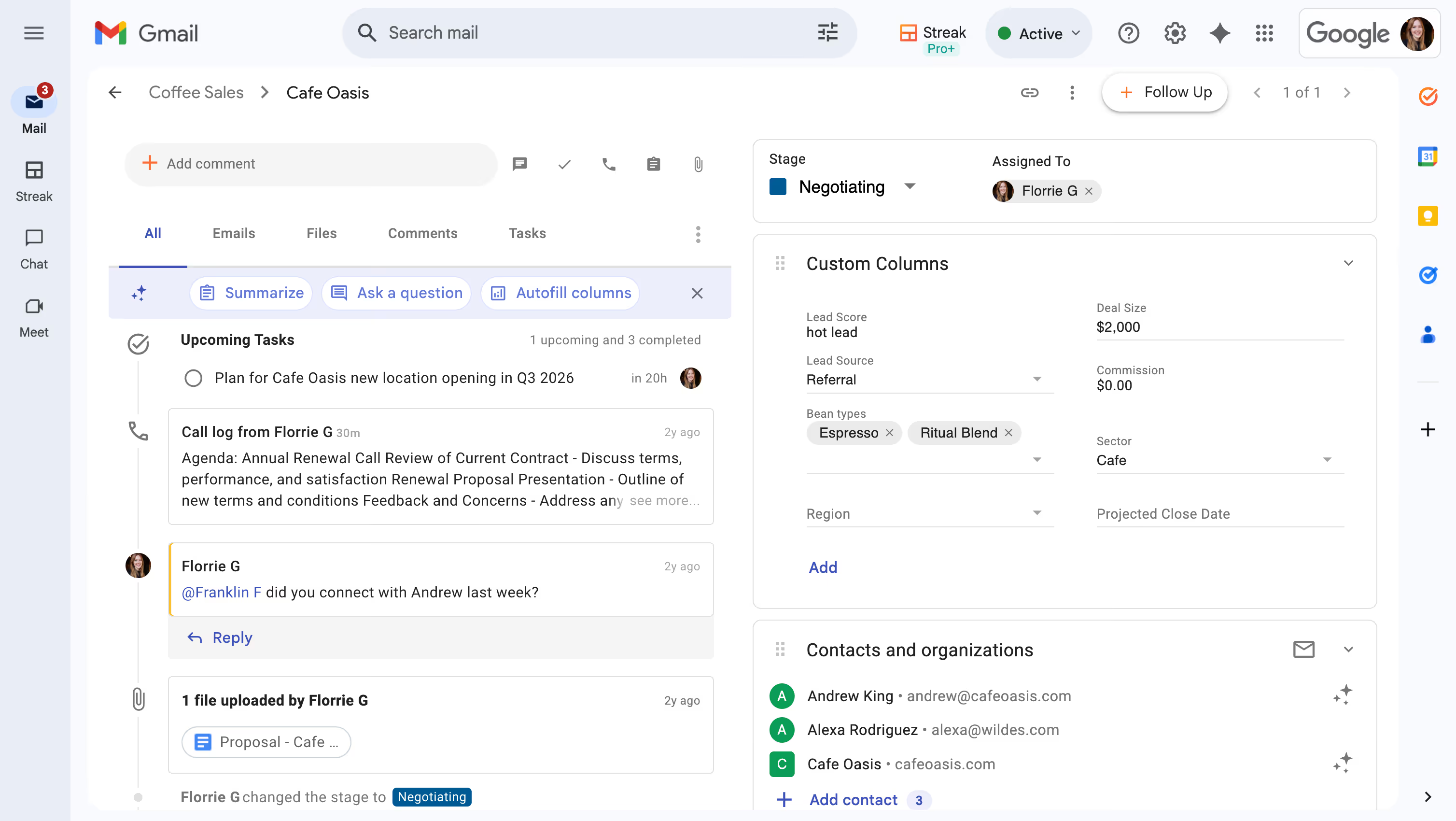
Pipelines are the core object. A pipeline holds boxes; a box holds the emails, files, notes, and custom fields attached to one deal or customer, and boxes move through stages you define. Because a box is bound to the Gmail thread, the correspondence history arrives without anyone copying it across.
Pro includes unlimited pipelines, records and contacts, shared pipelines for the team, standard reporting and basic permissions. The standard REST API is available on every paid plan, which matters if Pro+ is out of budget and you would rather write the integration yourself than pay for Zapier.
Mobile apps exist for iOS and Android. They are companions to the desktop extension rather than equivalents, and a team that works primarily from phones should trial them before committing.
Onboarding and training come with every paid plan. Advanced implementation carries a fee on Pro and Pro+ that the pricing page does not quote, and comes free on Enterprise.
Is Enterprise worth $70 more a seat?
Enterprise adds custom roles, data validation on fields, dedicated support including a direct line to the CEO, custom billing arrangements, help with security questionnaires, and a quarterly strategy meeting. AI credits triple from 150 to 500 per user.
Most of that list is procurement support rather than product. Data validation is the exception, and it is the one feature here that prevents a category of problem instead of helping you buy. A team that has watched its pipeline fill with inconsistent field values knows what that is worth.
Ten seats on Enterprise annually costs $15,480 against $8,280 on Pro+. Unless security questionnaires are genuinely blocking a deal for you, the $7,200 difference buys very little that shows up in daily use.
Who it fits
Choose it if: your whole team is on Google Workspace, your sales process is genuinely email-driven, and you have fewer than about ten people who need access.
Choose it if: previous CRM attempts failed because nobody updated the records. Streak’s structural answer to that problem is better than most.
Skip it if: you need observers. The same-plan rule makes casual visibility cost full price.
Skip it if: Outlook is anywhere in your plans, or if you need integrations on the cheapest paid tier.
What a real team pays
Headline per-seat rates hide the shape of the bill. Three worked examples, all on annual billing.
- Solo consultant on Pro: $588 a year. Competitive against most standalone CRMs, with the Gmail integration thrown in.
- Four-person agency on Pro+ because they need Zapier: $3,312 a year. The integration requirement adds $960 over Pro.
- Twelve-person company on Pro+ where only four sell: $9,936 a year, of which $6,624 buys visibility for people who will never close a deal.
The first two look reasonable. The third is where Streak’s pricing model stops matching how companies actually grow.
What we could not check
- Any aggregate score from G2, Capterra, or Trustpilot. All three refuse our declared bot user agent, so the only third-party rating quoted here is the Chrome Web Store listing.
- The vendor’s 4,000 companies and 750,000 professionals claims. Neither carries a linked methodology.
- The advanced implementation fee charged on Pro and Pro+. It is referenced but never priced.
- Whether credits bought in a pack expire with the monthly allowance or persist. The published rules cover included credits only.
- Record and pipeline limits beyond the word unlimited on the pricing page.
FAQ
Is Streak really free?
There is a free plan, but it contains no CRM pipelines. It covers email tracking, snippets, the thread splitter, and mail merge to 50 recipients a day. Pipelines begin on Pro at $59 a month.
Does Streak work with Outlook?
No. It is a Gmail extension. Outlook is not supported, and that is a design constraint rather than a roadmap gap.
Can some of my team be on a cheaper plan?
No. The vendor FAQ requires all team members to be on the same plan, and no read-only seat exists.
Why is Zapier not on Pro?
Streak places Zapier, webhooks, automations, and the direct integrations on Pro+ and above. Pro covers the CRM itself with no outbound connections.
Do unused AI credits roll over?
No. The included allowance resets each month and anything unspent is lost. Credits are pooled across the team while they last.
Is there a trial?
Pro+ carries a 14-day free trial that includes 1,000 AI credits.
The verdict
Streak solves the hardest problem in CRM, which is getting people to use it, by refusing to be a separate place. For a small Google Workspace team selling over email, very little else competes on adoption.
Two things should slow you down. The first is the Pro ceiling: a CRM with no integrations is a notebook, and fixing that costs $240 a seat a year. The second is the same-plan rule, which turns every observer into a full-price user and makes the product progressively worse value as the company grows around the sales team.
Price it at Pro+ monthly for your real headcount, not at the $49 the page shows you, then decide. Current plans are on the Streak pricing page.
Related reading on Stack99: Streak CRM Pricing, Who Streak CRM Fits and Streak Integrations Guide.