


Quick answer: CrankWheel bills by the meeting, almost everything else bills by the seat, and that single difference decides which one is cheaper for you. CrankWheel Team starts at $99 a month for unlimited users and 100 meetings. Zoom Pro is $16.99 per user per month, so the crossover sits at roughly six people: below six, occasional presenters, Zoom wins on price; above six, CrankWheel does, provided your whole team stays under 100 meetings a month. Demodesk has repositioned around call recording and coaching and is no longer a like-for-like swap. Surfly publishes no prices at all.
Disclosure: Stack99 earns a commission if you buy through links on this page. It costs you nothing extra and never changes our assessment.
Why the usual comparison table fails here
Put CrankWheel beside Zoom in a spreadsheet, and the columns refuse to line up. One charges for how often you present. The other charges for how many people might present. Comparing $29 against $16.99 as though they measure the same thing produces a wrong answer in both directions depending on your headcount.

So this page does the arithmetic rather than the feature grid. We priced four alternatives against CrankWheel on their own published pages, captured on 11 October 2026, and worked out where each one overtakes the others. Our full breakdown of the incumbent lives in the CrankWheel review.
The baseline you are replacing
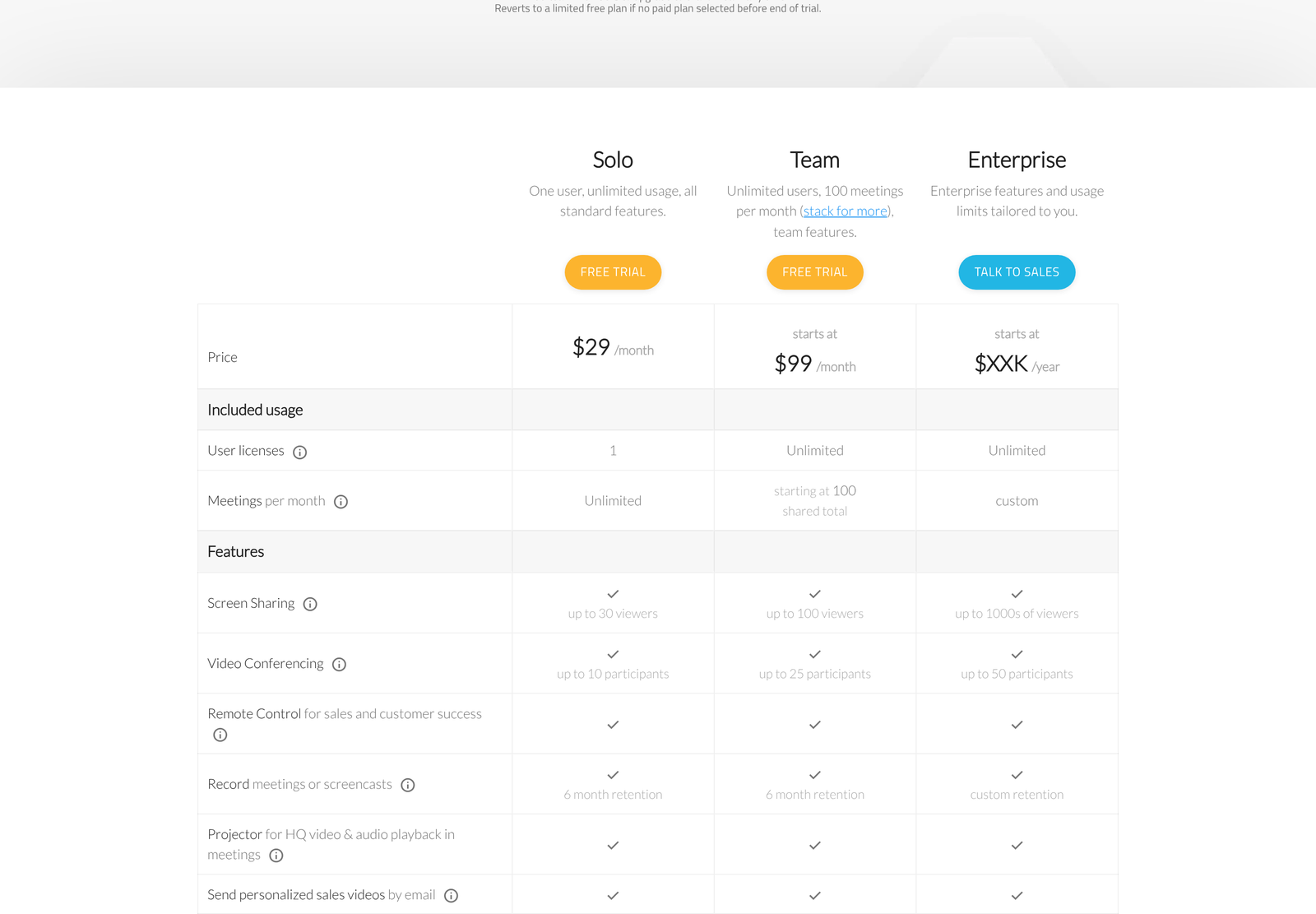
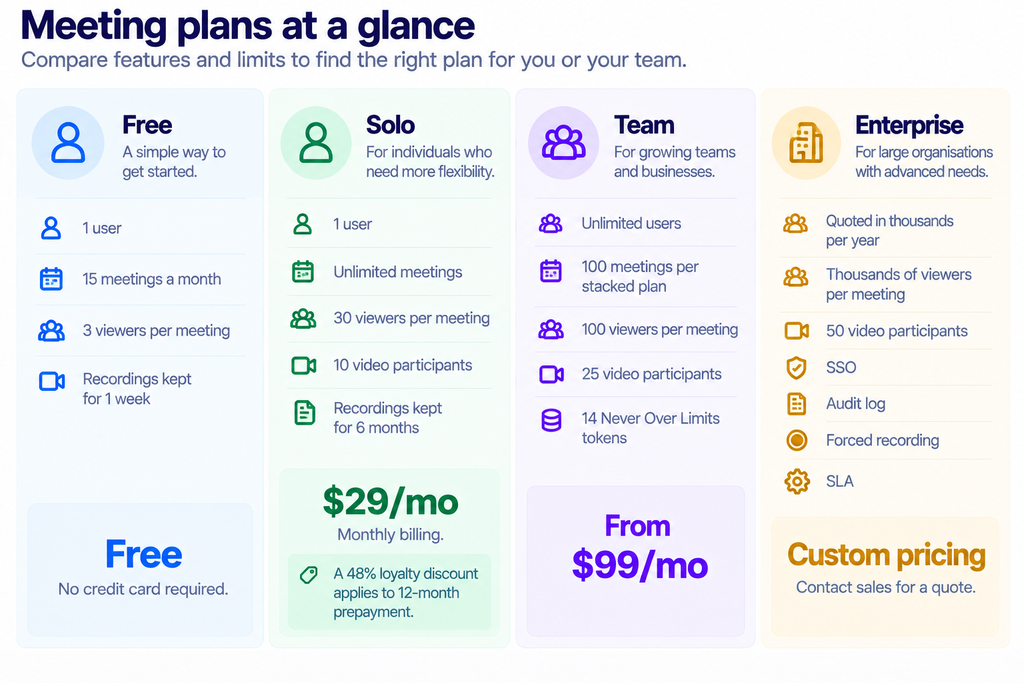
Read the meeting definition before you model anything. CrankWheel counts a meeting when you host a session with at least one viewer for 40 seconds or more, when you create a share link or a segment from a recording, and when an Instant Demo request gets marked as having led to a phone call. Recording on your own counts for nothing. Allowances reset on your signup date rather than the first of the month.
The Team plan stacks. Need 500 meetings rather than 100, and you buy five stacked units. Published monthly rates run $99 at 100 meetings, $194 at 200, $467 at 500, $882 at 1,000, and $1,562 at 2,000. Divide those out, and the unit cost falls from $0.99 per meeting to $0.78 as you scale.
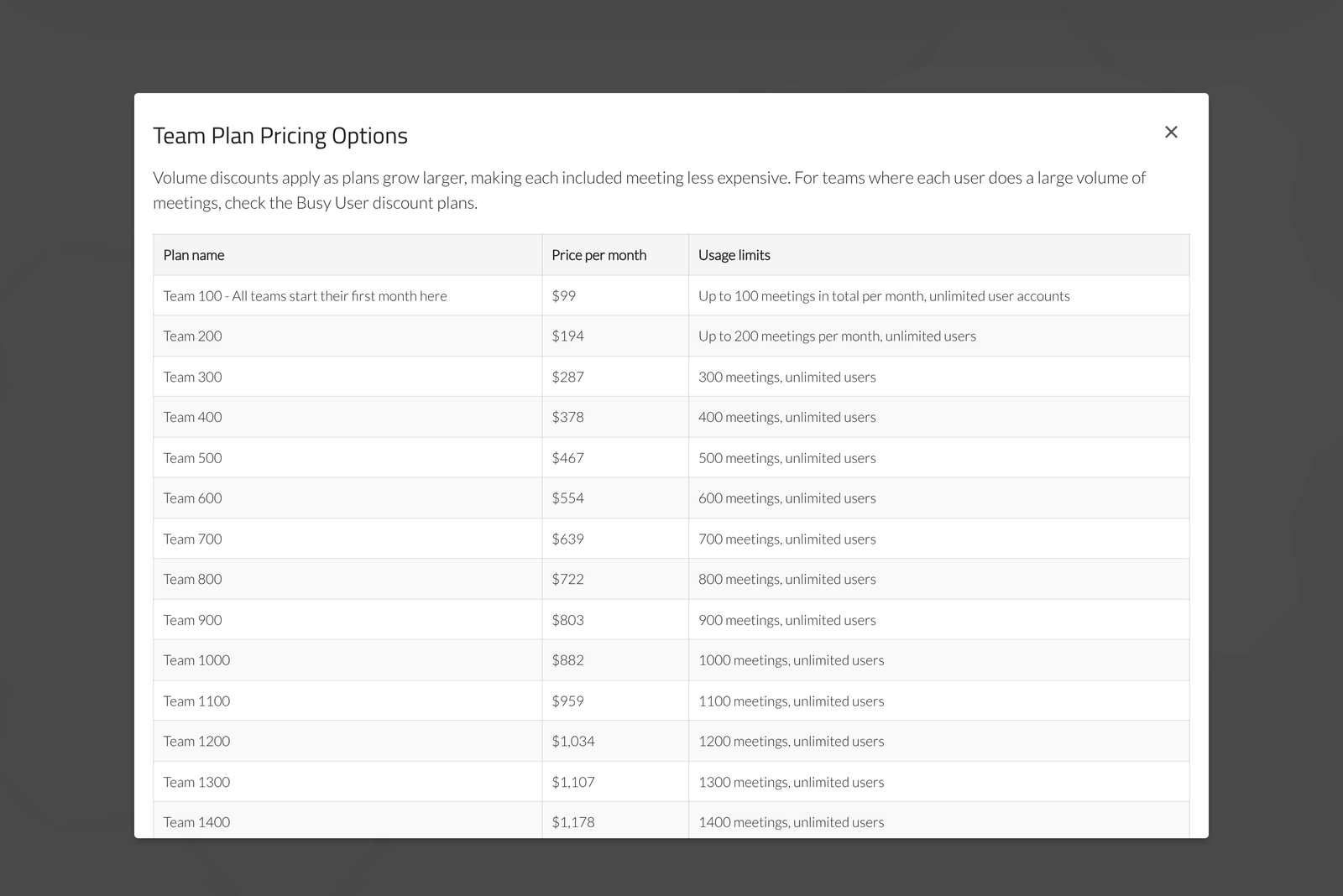
A cheaper “busy user” variant exists for teams running three or fewer user licences per stacked plan: $59 at 100 meetings, $287 at 500, $1,055 at 2,000. CrankWheel advertises that as up to 40% off. The real figure is 40.4% at Team 100, 38.5% at Team 500 and 32.5% at Team 2,000, so the discount tapers as you grow.
Alternative 1: Zoom
Zoom is the default comparison because almost everyone already has it. Its pricing page shows both billing bases side by side, which is more honest than most of the pages we audit.
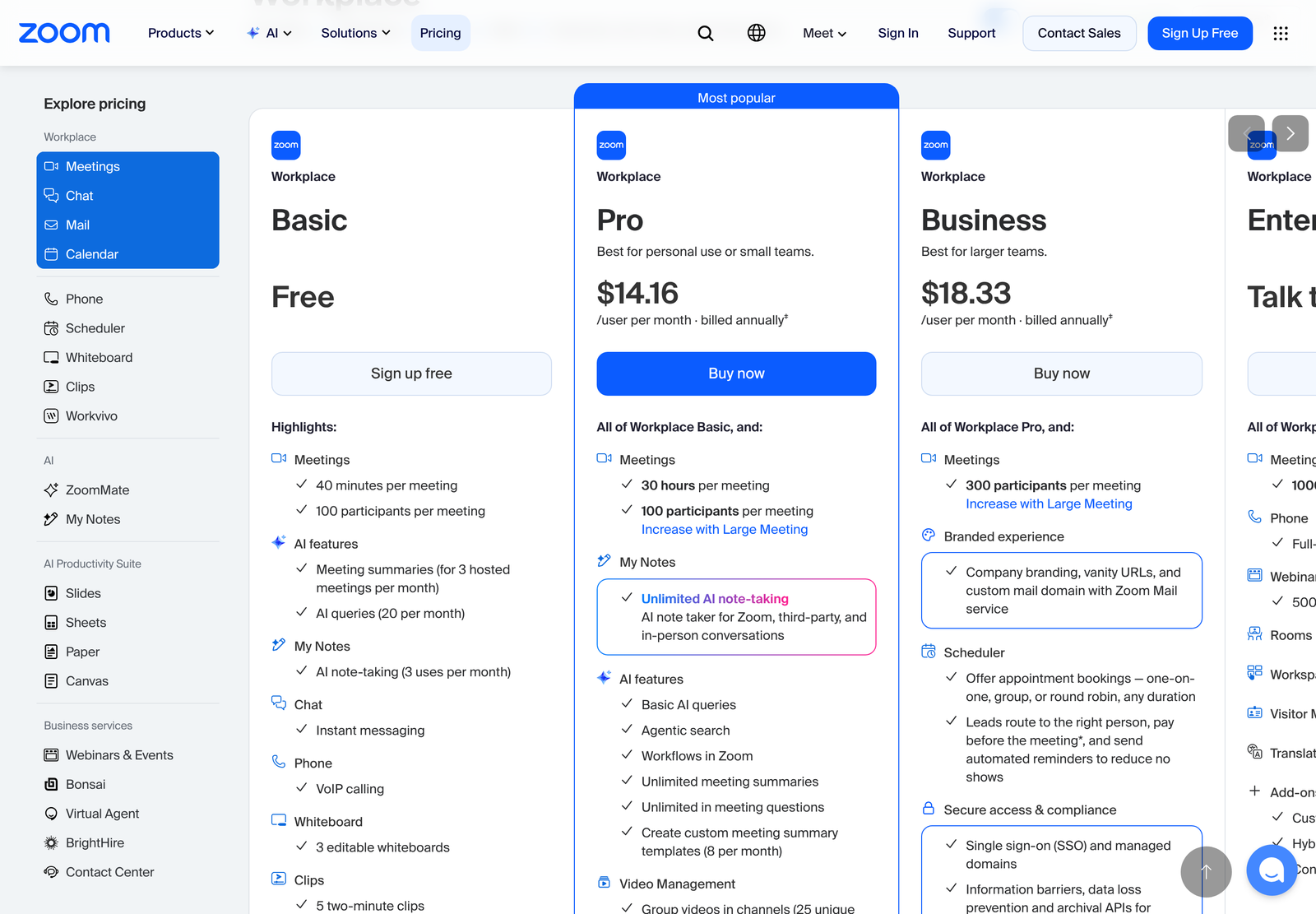
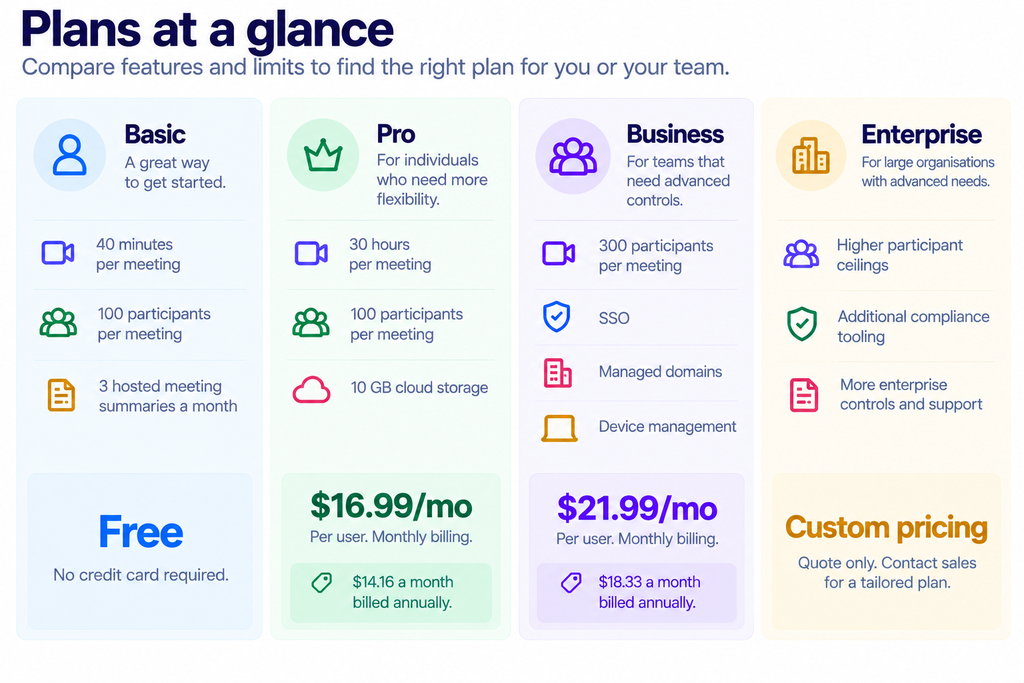
The free tier is genuinely usable for one-to-one selling, with one catch that matters: 40 minutes per meeting. Discovery calls that overrun get cut off, and the restart is visible to your prospect.
Where Zoom stops being cheaper
CrankWheel Team at $99 covers unlimited users. Zoom Pro at $16.99 covers one. Divide and the break-even lands at 5.83 users, so from the sixth presenter onward CrankWheel Team costs less. Against Zoom’s annual rate of $14.16 the crossover moves out to 6.99 users.
Twenty occasional presenters make the gap obvious: $339.80 a month on Zoom Pro, $99 on CrankWheel Team. The constraint is that those twenty people must share 100 meetings between them, five each. Teams that present daily blow through that and start stacking, at which point the arithmetic flips back.
For a single rep the answer is the other way round. CrankWheel Solo at $29 against Zoom Pro at $16.99 means paying 71% more for one seat. You would do that for the viewer experience rather than the price.
Alternative 2: Google Meet
Meet comes bundled with Google Workspace, so for anyone already paying for Workspace, the marginal cost of using it is zero. That makes it the strongest free-ish option on this list for teams inside the Google ecosystem.
Workspace publishes participant ceilings of 100, 150, 500 and 1,000 across its four tiers, with in-domain live streaming on the top one. Starter and Standard each cap at 300 users on the account; only Enterprise removes that limit.
We could not quote Workspace prices here. The per-tier figures did not render to our request on the pricing page, and our rule is to leave a number out rather than reproduce one we did not see. Check the page yourself before budgeting.
Meet shares Zoom’s structural weakness for outbound sales. Your prospect joins a meeting. They click a link, land in a lobby, perhaps get asked to sign in. Each of those steps is a place where a cold prospect quietly disappears, which is the specific problem CrankWheel was built around.
Alternative 3: Demodesk
Demodesk used to be the closest thing to a direct competitor: a browser-based demo tool aimed squarely at sales teams. It has moved. The pricing page now leads with “start with recording,” and the two paid tiers are built around compliant call capture and AI coaching.
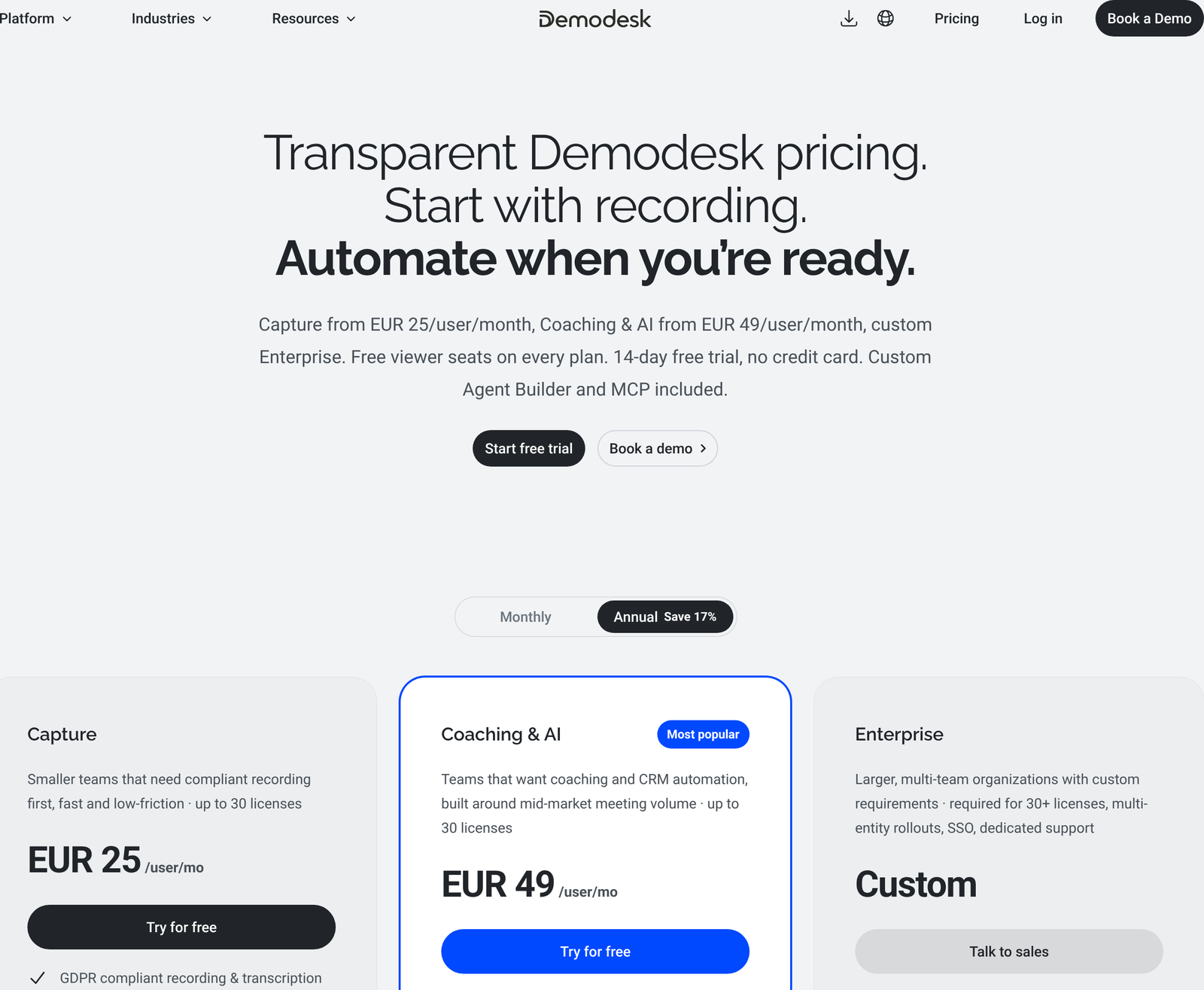
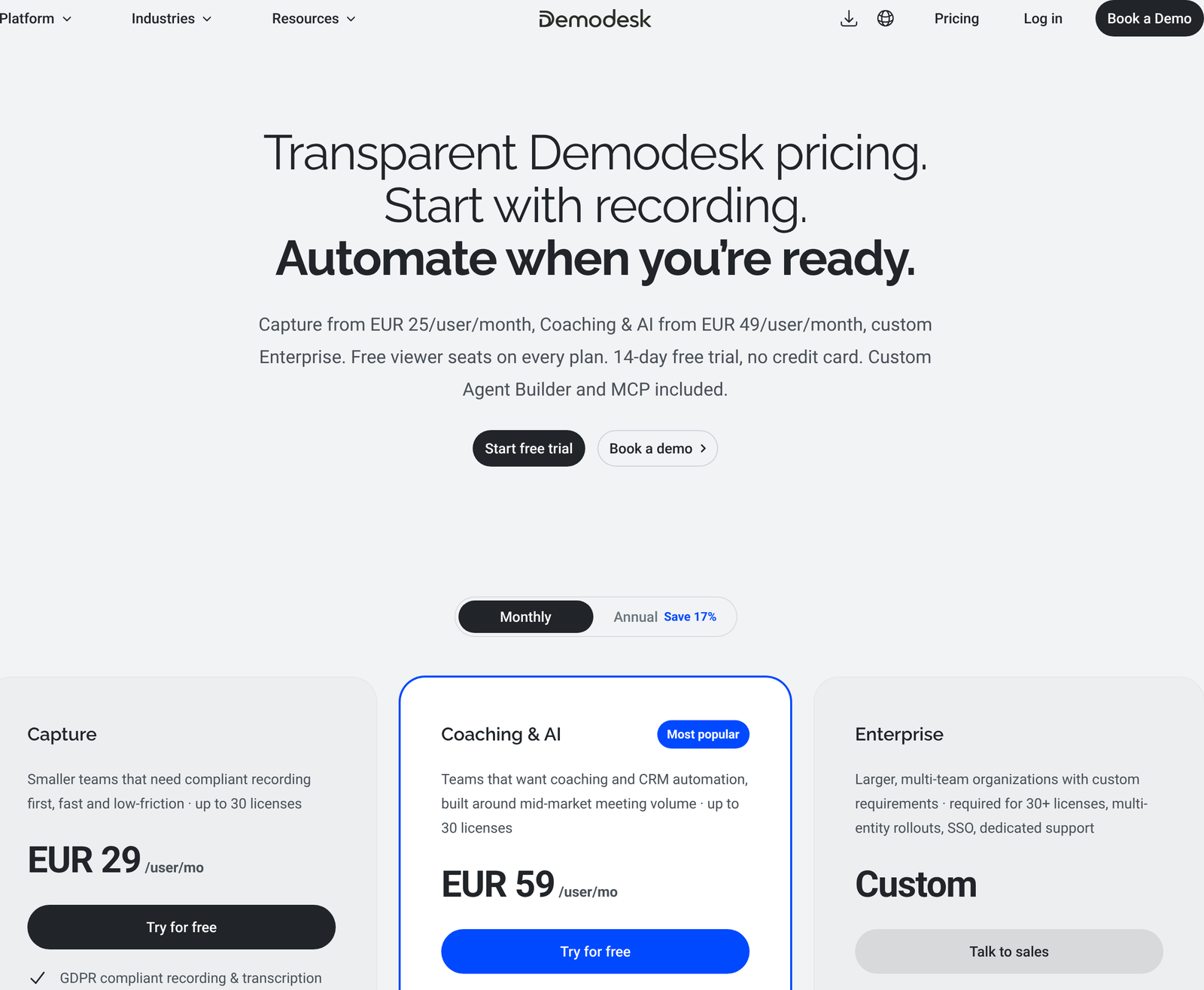
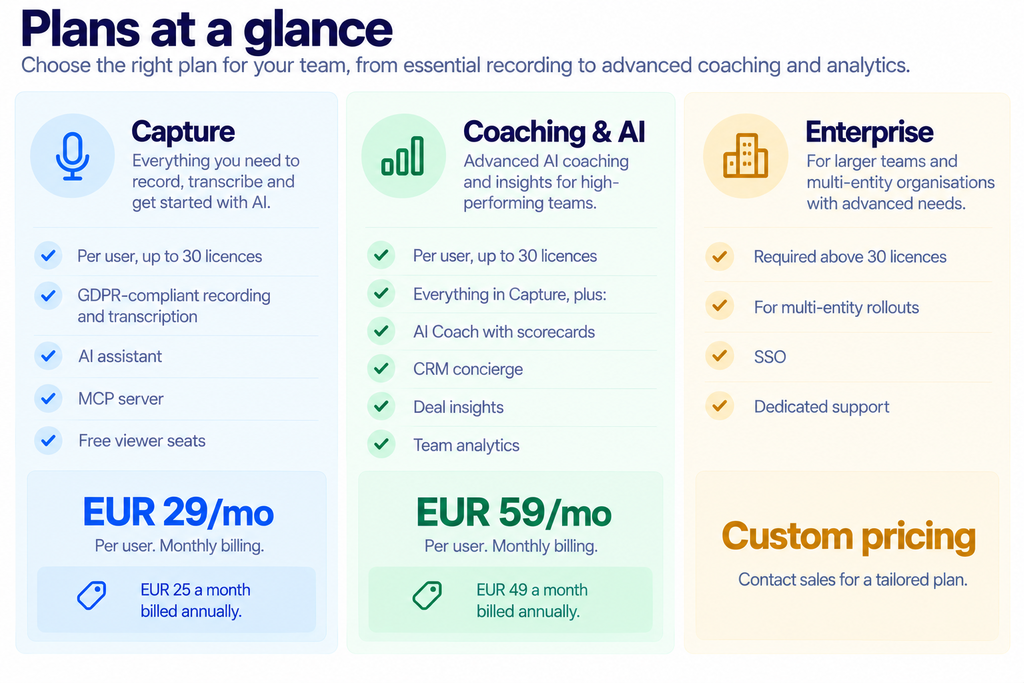
Demodesk advertises the prepay saving as 17%. On Coaching & AI, the real figure is 16.9%, close enough. On Capture it is 13.8%, so the headline flatters the cheaper tier.
Free viewer seats on every plan are a real advantage for managers who want to watch recordings without holding a licence. The hard 30-licence ceiling is the flip side: a growing team hits Enterprise sales whether it wants to or not.
Choose it if: your actual problem is that nobody reviews sales calls, not that prospects fail to join them.
Alternative 4: Surfly
Surfly does co-browsing rather than screen sharing, and the distinction matters. Instead of streaming pixels of your screen, it proxies a web page so both parties interact with the live site together. Nobody installs anything, fields can be masked, and control passes back and forth.
That suits support and guided onboarding far better than it suits a product demo of desktop software. Surfly names Intercom and Salesforce among its chat-widget integrations, so the natural home is a help desk rather than a sales floor.
Its pricing page carried no figures at all when we checked. Every route leads to a contact form, which means a quote, a sales call, and no way to compare before you commit.
Choose it if: you are guiding customers through your own web application and want them clicking the real thing.
Three team shapes, costed for a year
One rep, 40 demos a month
A single Zoom Pro seat covers this for $203.88 a year prepaid, or $16.99 monthly. CrankWheel Solo runs $348 a year at the monthly rate. The loyalty discount would cut that, though CrankWheel publishes only the percentage.
Zoom wins on price by a wide margin. The counter-argument is conversion: if removing the join step turns even one extra cold call into a demo each month, the $144 difference pays for itself several times over. That is a bet on your own funnel rather than a spreadsheet result.
Eight-person inside sales team, 90 meetings a month
Eight Zoom Pro seats cost $135.92 a month, or $1,359.36 a year prepaid at $14.16 each. One Team unit covers all eight for $99 a month, so $1,188 a year, with twelve meetings of headroom. Savings are modest at $171, and the no-download advantage comes free with them.
Push volume to 140 meetings and the picture changes. Two stacked Team units cost $194 a month against Zoom’s unchanged $135.92. Volume growth, not headcount growth, is what makes per-meeting pricing expensive.
Thirty-person team, each presenting three times a month
Ninety meetings again, but spread across thirty occasional presenters. Seat-based billing now costs $509.70 a month on Zoom Pro, or $5,097.60 a year prepaid. The same Team 100 unit still costs $99, since users are unlimited. Annual difference: $3,909.
This is the shape CrankWheel’s model is built for. Many people, each presenting rarely, is precisely the case where paying per seat wastes money. Field service teams, branch networks and partner channels all fit the pattern.
One caveat on all three figures. They assume steady volume, and sales volume is rarely steady. A team that averages 90 meetings will have months at 130, and those months either consume Never Over Limits tokens or force a second stacked unit. Budget against your busiest quarter rather than your average one, because the per-meeting model punishes spikes in a way that per-seat billing does not.
What you give up by leaving Zoom
A fair comparison has to name the losses, and there are several.
Video participant ceilings are much lower. CrankWheel allows 10 video participants on Solo, 25 on Team, and 50 on Enterprise. The Zoom Pro tier allows 100 participants, and Business allows 300. Any session where most attendees need cameras on belongs on Zoom.
Recording retention is finite. CrankWheel keeps recordings for one week on Free and six months on Solo. Zoom bundles 10 GB of cloud storage per Pro user with no comparable expiry on the plan page. Teams with retention obligations should read both policies closely.
Governance features sit behind an Enterprise quote. Forced recording of all sessions, restrictions on sharing types, the audit log, corporate SSO, and an SLA are all Enterprise-only on CrankWheel. Zoom puts SSO and managed domains on Business at $21.99 a user, which a mid-sized company can buy with a card rather than a procurement cycle.
Then there is the obvious one. Your prospects already know how Zoom works. Introducing an unfamiliar tool removes a download and adds a small amount of explaining, and whether that trade pays off depends on who you sell to.
The thing none of them copy
CrankWheel’s pitch rests on the viewer never installing or signing in to anything. Browsers have supported screen capture natively for years through the getDisplayMedia API, standardised by the W3C in the Screen Capture specification. The capability is table stakes. What differs is the friction a vendor chooses to put in front of the person on the other end.
Zoom and Meet both optimise for scheduled internal meetings, where everyone has the app and joining is routine. CrankWheel optimises for a cold prospect on a phone call who has never heard of you. Those are different products that happen to share a verb.
One more structural difference: CrankWheel puts API access, Zapier and CRM connectors on every paid tier including Solo, with named connectors for Salesforce, HubSpot, Zoho, HighLevel, Less Annoying CRM and Insites. Zoom reserves SSO and managed domains for Business. If you are a one-person operation that needs CRM logging, that gate matters more than the headline price. Our Getscreen.me alternatives roundup covers the adjacent remote-access category.
Picking one
- Choose Zoom if: five or fewer people present, or your meetings are scheduled with people who already expect them.
- Choose Google Meet if: you already pay for Workspace and your prospects are comfortable clicking a calendar link.
- Choose CrankWheel if: six or more people need to present occasionally, and the person on the other end is often a stranger on a phone call.
- Choose Demodesk if: call review and coaching is the gap, and you have fewer than 30 licences.
- Choose Surfly if: you are guiding people through your own web app rather than showing them yours.
Run your own crossover before committing. Count presenters, count monthly meetings, then compare the Team ladder against seat count multiplied by $16.99. Two numbers settle it.
FAQ
Is CrankWheel cheaper than Zoom?
Above roughly six presenters, yes, as long as your team stays within 100 meetings a month. Below that, Zoom Pro at $16.99 per user is cheaper.
What counts as a meeting on CrankWheel?
Hosting a session with at least one viewer for 40 seconds or longer, creating a share link or segment from a recording, or marking an Instant Demo request as having led to a phone call. Recording by yourself does not count.
Does Demodesk still do live demos?
Its published plans are now built around recording, transcription, and AI coaching. Anyone evaluating it as a live screen-sharing replacement should confirm current capability with the vendor rather than assume it from older reviews.
How much is CrankWheel annually?
CrankWheel publishes a 48% loyalty discount for paying twelve months at a time on Solo, but it publishes the percentage without the resulting figure. We have not reproduced a dollar amount here because the vendor does not state one.
Which alternatives need the viewer to install something?
None strictly require an install in a modern browser. Zoom and Meet do ask a prospect to click through a join flow, and Zoom prompts for its app by default, which is the friction CrankWheel and Surfly are built to remove.
What is a Never Over Limits token?
Team plans include 14 of them. They absorb occasional overruns past your meeting allowance rather than cutting a session off. Solo carries none.
Sources
- CrankWheel pricing, Zoom pricing, Demodesk pricing, Google Workspace pricing, and Surfly pricing, all captured 11 October 2026.
- W3C Screen Capture specification, the standard defining browser-native screen sharing.
- MDN documentation for getDisplayMedia, the browser API every tool on this page relies on.