


In this guide
Company And Challenge :
This Beautiful.ai case study is written the honest way, not the lazy way. That means no fake customer logo, no invented “327% ROI,” and no magical revenue number that appeared because a slide deck suddenly became more beautiful. The real value of Beautiful.ai is more practical: it helps teams build cleaner presentations faster, with less formatting chaos and more brand consistency.
Disclosure: Stack99 earns a commission if you buy through links on this page. It costs you nothing extra and never changes our assessment.
That challenge is very real in 2026.
A growing company usually hits the same wall:
- Founders build decks under pressure.
- Sales teams keep copying and tweaking old slides.
- Marketing wants everything on brand.
- Analysts keep updating charts at the last minute.
- Nobody wants to become the full-time slide police.
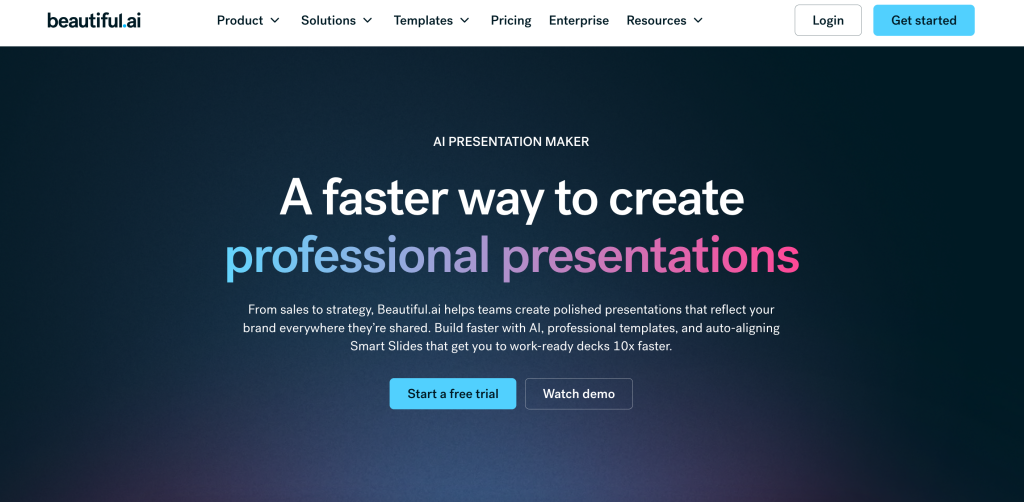
Beautiful.ai’s official site is clearly built for that problem. The public product pages emphasize Smart Slides, AI Presentations, brand control, data visualization, and faster presentation workflows for individuals and teams.
So the case study here is not about fictional hero numbers. It is about a realistic use case: a small growth team that needs investor-style, sales, and reporting decks to stop looking like they were assembled during mild panic.
If you want to inspect the product while you read, start with Beautiful.ai here.
Problem Before The Product :
Before a tool like Beautiful.ai, presentation work often broke down in three places.
First, the first draft takes too long. A blank deck is still a blank deck, even when the team roughly knows what it wants to say.
Second, formatting drifts constantly. One person changes font sizes, another moves objects by hand, someone pastes in a chart screenshot, and suddenly the deck looks like five people built five separate presentations.
Third, collaboration turns into cleanup. The more contributors you add, the more somebody has to spend time fixing alignment, colors, spacing, and visual consistency.
That is where Beautiful.ai’s official feature story matters. The pricing and product pages highlight:
- Smart Slides with auto-aligning layouts.
- AI-generated presentations.
- Over 300 Smart Slide layouts.
- Dynamic data visualizations.
- Custom branding and theme control.
- AI image generation and writing support.
In plain English, the platform is trying to move teams from manual slide assembly toward a more guided presentation workflow.
Implementation Process :
The best Beautiful.ai rollout starts small.
For this case study, imagine a five-person team that creates:
- Sales presentations.
- Monthly reporting decks.
- Startup pitch updates.
- Internal training slides.
The team does not need a giant transformation project. It needs a cleaner deck workflow.
A realistic implementation looks like this:
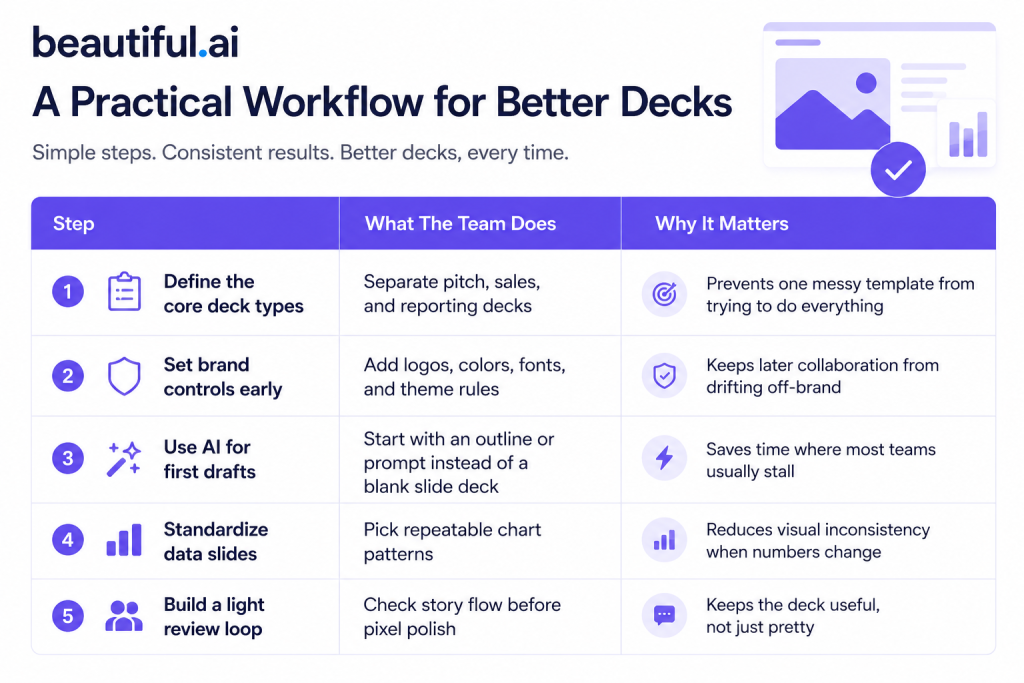
That rollout works because Beautiful.ai is not trying to replace strategic thinking. It is trying to reduce formatting friction and accelerate the first usable version.
Results And Metrics :
I am not going to invent outcome numbers and pretend they came from a public customer story that does not exist on the source pages reviewed. A smarter case study defines the results that should be measured.
The most useful metrics are:
- Time to first usable deck draft.
- Time spent on formatting corrections.
- Number of brand inconsistencies caught in review.
- Speed of updating recurring sales or reporting decks.
- Confidence level of presenters using the final deck.
That last one sounds soft, but it matters. Teams present differently when they trust the material in front of them.
Beautiful.ai is strongest when the results look like this:
- The first draft appears faster because AI handles more of the initial structure.
- Slides stay cleaner because Smart Slides do more layout work automatically.
- Data slides look less improvised because the visualization patterns are more consistent.
- Team collaboration produces less visual drift because branding is locked down earlier.
If your team is fighting exactly that problem, open Beautiful.ai here and compare one real deck workflow against your current process.
Important Features That Drove The Difference :
Smart Slides –
This is the feature that makes the rest of the story believable.
Beautiful.ai’s official product pages repeatedly emphasize Smart Slides because they auto-adjust layouts as content changes. That matters for reporting decks, sales updates, and investor slides where the content changes late but the deck still has to look intentional.
AI Presentations –
The official pricing page includes unlimited AI content generation on Pro and Team plans, plus AI image generation, AI writing assistance, and AI language translation. That is useful for the draft stage because the team can start from a prompt or rough outline instead of a blank presentation shell.
Brand Control –
The pricing page also highlights custom branding and a custom theme builder. This matters more than people think. Once the brand system is set, individual contributors have less room to accidentally make the deck look inconsistent.
Data Visualization –
Beautiful.ai publicly emphasizes dynamic data visualizations. That gives teams a better option than pasting screenshots from dashboards and hoping the slide still looks professional.
Lessons Learned :
The first lesson is simple: Beautiful.ai works best when the team already knows what the presentation is supposed to do.
If the story is confused, no slide platform will save it.
The second lesson is that the biggest gain comes from repeatability, not novelty. Teams get the most value when they reuse a branded system for recurring decks instead of rebuilding everything every time.
The third lesson is that AI should be used for acceleration, not blind trust. Beautiful.ai can create the first draft faster, but a real person still needs to tighten the logic, trim the noise, and make sure the narrative actually lands.
The fourth lesson is that formatting time is more expensive than most teams admit. It quietly eats hours that should be spent clarifying the message.
That is why tools like Beautiful.ai create value without needing some dramatic fake “transformation” story.
If your team has reached the point where deck cleanup feels like a recurring tax on smart people, open Beautiful.ai here and test one live sales or reporting deck instead of debating it in theory.
ROI Calculation :
The clean ROI model for Beautiful.ai is operational, not mystical.
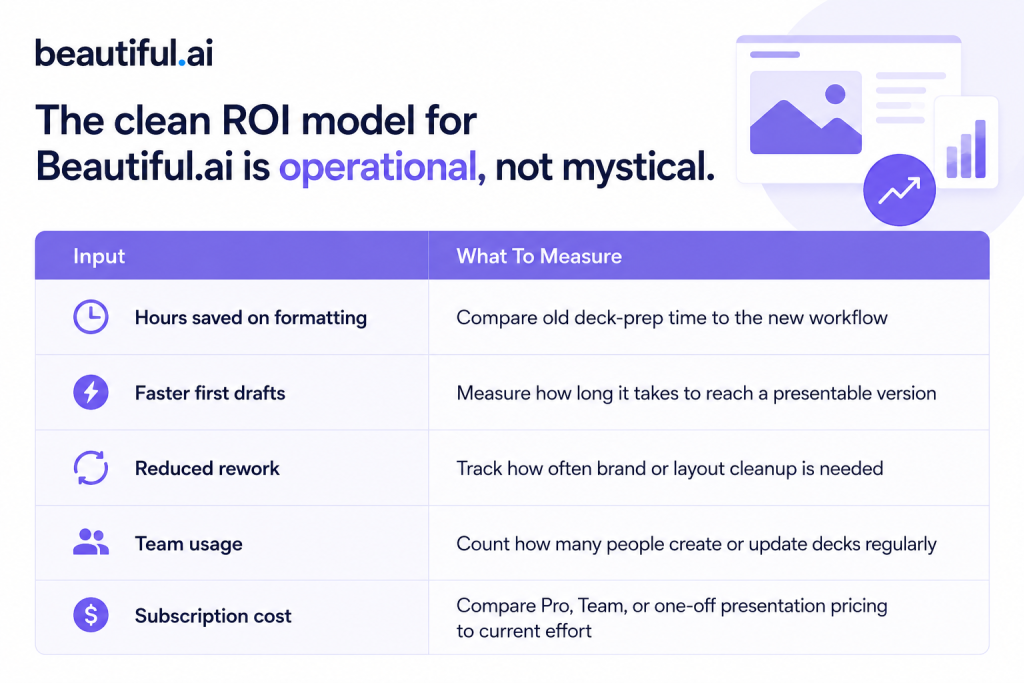
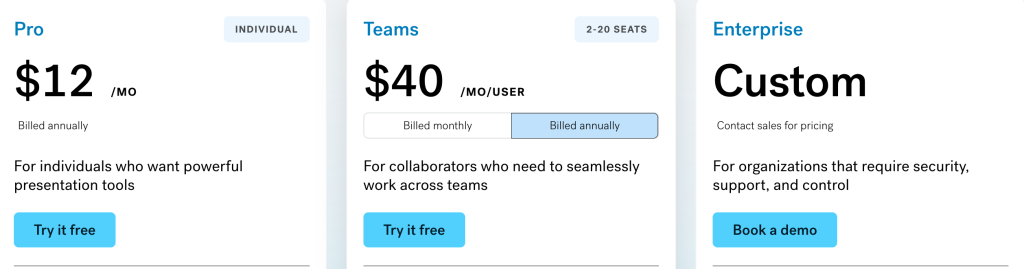
The public pricing anchors are strong enough to model against:
- Pro at
$12per month billed annually. - Team at
$40per user per month billed annually, or$50monthly billed monthly. - A one-off single presentation option at
$45.
That creates a practical buying decision.
If one operator saves a few hours a month on deck cleanup, Pro can be easy to justify. If a team repeatedly collaborates on high-stakes decks, the Team plan can be justified by reduced rework alone.
How To Replicate The Workflow :
If you want to reproduce the same kind of result, keep the rollout simple:
- Choose one recurring deck type first.
- Set your brand controls before inviting broad edits.
- Use AI to generate the first outline and slide structure.
- Replace weak generic content with your real message and numbers.
- Standardize a small set of favorite slide patterns for reuse.
- Review the story before spending time polishing details.
That sequence matters because a lot of teams do the opposite. They polish too early, then rewrite the logic later, which wastes time twice.
If you want to test that method directly, start with Beautiful.ai here and rebuild one real reporting or sales deck instead of starting with a fake sample project.
Expert Verdict :
Beautiful.ai is a strong fit in 2026 for teams that want presentation quality to improve without turning every deck into a manual design project.
Its real strength is not that it makes slides “look cool.” Its real strength is that it reduces formatting friction through Smart Slides, speeds up the first draft through AI, and keeps recurring team output more consistent through brand controls.
That is the kind of value that shows up quietly but repeatedly.
If your team builds decks often and keeps losing time to layout cleanup, Beautiful.ai is easier to justify than it may look at first glance.
FAQ :
Is Beautiful.ai Good For Teams In 2026?
Yes. The Team plan and official workflow features make it especially useful for collaborators who need faster, more consistent presentations.
Does Beautiful.ai Have AI Features?
Yes. The official pricing page highlights unlimited AI content generation, AI image generation, an AI writing assistant, and AI language translation.
What Is The Cheapest Beautiful.ai Plan?
The public pricing page lists Pro at $12 per month, billed annually.
Is Beautiful.ai Best For Designers?
Not necessarily. It is strongest for teams that want polished output without needing every contributor to act like a presentation designer.
What Is The Real ROI Driver?
The biggest practical ROI driver is time saved on first drafts, formatting cleanup, and recurring deck maintenance.
Before You Choose, Compare These
Hand-picked guides to help you choose the right tool — no fluff.
 ReviewsBeautiful.ai Review 2026Hands-on verdict with the pros, cons and who it fits best.
 Advanced GuidesBeautiful.ai Advanced Guide 2026Deeper workflows once the basics are in place.
 Use CasesWho Is Leadpages Best For? Use Cases & Fit (2026)Who gets the most out of it — and who should skip it.
 IntegrationsWegic Integrations Guide 2026What it connects to and how well each link holds up.