


In this guide
Pricing Overview
1Password is a password and secrets manager built for individuals, teams, and larger organizations. This guide walks through how its 2026 pricing actually works: what each published tier costs, how the per-user prices break down, and how to weigh the cost against the way your team would use it. If you are budgeting for a rollout, the tier you pick matters less than matching it to your real workflow.
Disclosure: Stack99 earns a commission if you buy through links on this page. It costs you nothing extra and never changes our assessment.
| Plan | Price | What you get |
|---|---|---|
| Individual | $2.99/mo | One person, unlimited items; intro rate, then $3.99, billed annually |
| Families | $4.49/mo | Up to 5 people; intro rate, then $5.99, billed annually |
| Teams Starter Pack | $24.95/mo | Up to 10 members, then $4.99/seat; billed annually |
| Business | $8.99/mo | Per user, unlimited seats, SSO & Watchtower; billed annually |
| Enterprise | Custom | Volume pricing, dedicated support; contact sales |
The most important thing to understand about 1Password pricing in 2026 is that every tier carries a fixed, published per-user or per-family price, so you can budget straight from the plan label.
If you want to inspect the official pricing path while you read, start with 1Password here.
What The Official Pages Emphasize
The official product and pricing pages repeatedly point toward:
- Pricing model
- Usage shape
- Plan complexity
- Operational cost
The official pages present a clear public pricing table, with a fixed monthly price for each Individual, Families, and Business tier; only Enterprise uses custom pricing.
Pricing Tiers And Cost Shape
1Password pricing follows a clear monthly-per-seat shape: $2.99/user for Individual, $4.49/month for a family of up to five, $8.99/user for Business, plus a $24.95/month Teams Starter Pack, with only Enterprise handled through sales. Match the tier to your team size and the cost is easy to predict.
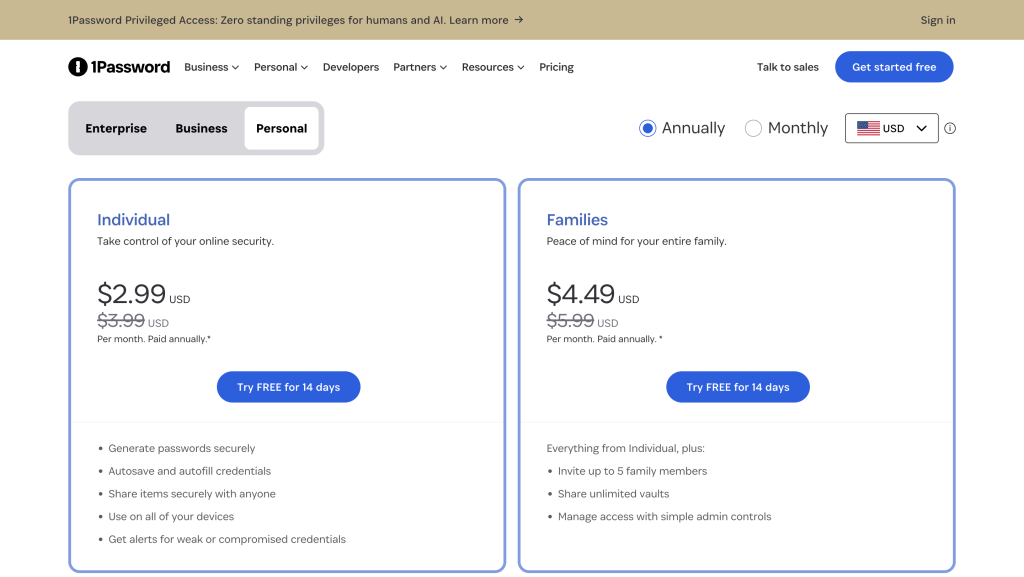
If you want to inspect the source pricing flow yourself, check 1Password here and compare the visible pricing logic against how your team would actually use the product.
Hidden Costs And Gotchas
The real hidden cost is usually not the visible plan number. It is mismatched usage. If a team buys 1Password before the workflow is ready, the tool may feel more expensive than it should be. If the team buys too late, the manual work around the tool can cost more than the subscription.
ROI Example
A realistic ROI question for 1Password is whether the product reduces enough manual friction, delay, or tool sprawl to justify the official cost path. That could mean faster execution, fewer side tools, cleaner operations, or less time spent coordinating work outside the product.
Cost Comparison
Broader alternatives may look cheaper at a glance, but that often happens because they push more operating effort back onto the team. 1Password becomes easier to justify when it removes enough friction that the working cost of “cheaper” tools starts to look less attractive.
If you want to test that the practical way, open 1Password here and compare the official pricing path against the workflow cost you already carry today.
Best Value Path
The best value path is usually the one that matches your real workload, team size, or operating pattern instead of the one with the flashiest feature headline. Buyers often get more value from the right entry point than from a bigger plan they barely use.
Discounts Or Billing Notes
1Password lists its prices on an annual-billing basis, and the intro rates ($2.99 Individual, $4.49 Families) apply to new customers for the first year. Every paid plan includes a 14-day free trial, so you can confirm fit before you are billed.
FAQ
Is 1Password Expensive In 2026?
That depends on the workflow. The better question is whether the official pricing path replaces enough manual cost or tool sprawl to justify itself.
Does 1Password Have Public Pricing?
Yes. 1Password publishes fixed prices for every tier: Individual from $2.99/user/month, Families $4.49/month, Business $8.99/user/month, and a $24.95/month Teams Starter Pack. Only Enterprise uses custom pricing.
What Matters More Than The Headline Price?
Operational fit usually matters more than the smallest number because tool mismatch can create hidden process cost fast.
How Should I Compare 1Password To Alternatives?
Compare the official pricing path against the real workflow cost your team already pays in time, complexity, and extra tools.
What Is The Best First Step?
Use the official pricing page and one real use case, not a generic spreadsheet, to decide whether the product value is strong enough.
Verdict
1Password pricing in 2026 makes the most sense when you judge it against workflow cost rather than against a shallow list of plan names. If the product removes enough friction, the pricing story usually becomes easier to justify.
If you want to evaluate that directly, try 1Password here and map the official pricing path against one real team workflow before you decide.
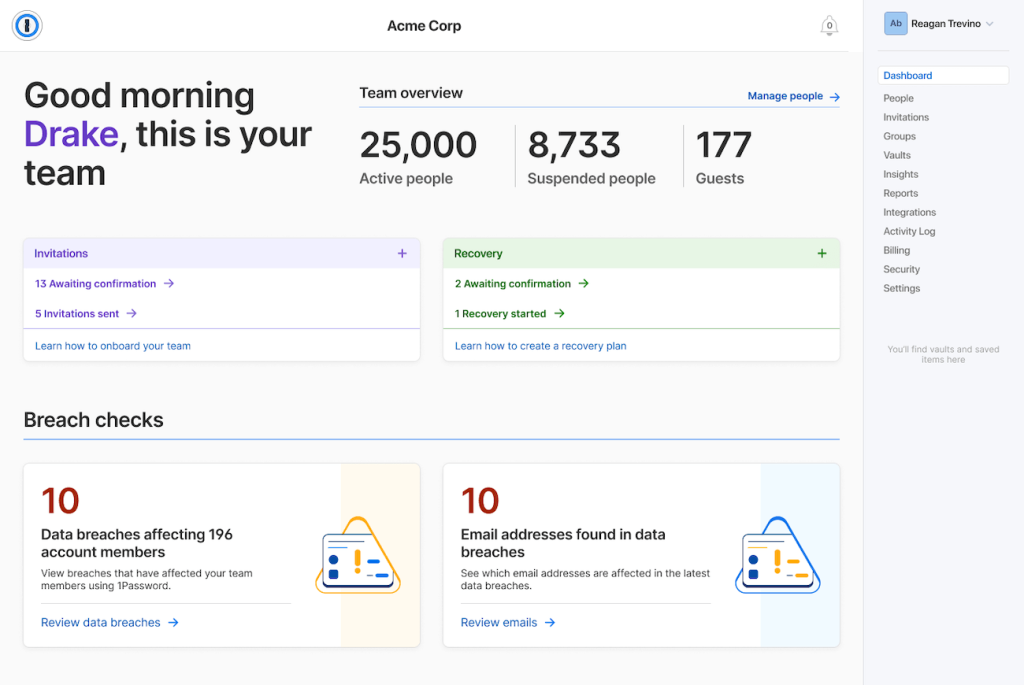
Buyer Lens
The most reliable way to evaluate 1Password in 2026 is to compare the official pricing pages against one live workflow your team already runs. That usually reveals product fit faster than a broad feature spreadsheet.
Operational Note
1Password is easiest to judge when you look at the repeated work around it, not just the trial experience. If the product reduces recurring friction, the value tends to become much clearer over time. That is why the safest evaluation path is usually one repeated live task instead of a broad artificial test.
Final Buying Note
In 2026, the smartest way to evaluate 1Password is still to use the official product pages, compare them against one real workflow, and decide whether the product reduces friction in a way your team will actually feel every week. That kind of grounded evaluation usually tells you more than another generic comparison spreadsheet.
More on 1Password
Hand-picked guides to help you choose the right tool — no fluff.
 Use CasesWho Is 1Password Best For? Use Cases & Fit (2026)Who gets the most out of it — and who should skip it.
 Alternatives1Password Alternatives 2026Credible alternatives and when each one wins.
 Use CasesWho Is EasyDMARC Best For? Use Cases & Fit (2026)Who gets the most out of it — and who should skip it.
 PricingairSlate Pricing 2026Real tier prices and what each plan actually includes.