


- Advanced Feature 1: Automation Accounting
- Advanced Feature 2: Synchronization With Accounting Software
- Advanced Feature 3: Real-Time Cashflow And Financial Control
- Advanced Feature 4: Cross-Module Operational Coverage
In this guide
- Power User Intro
- Advanced Feature 1: Automation Accounting
- Advanced Feature 2: Synchronization With Accounting Software
- Advanced Feature 3: Real-Time Cashflow And Financial Control
- Advanced Feature 4: Cross-Module Operational Coverage
- Automation Workflows That Make Sense
- Custom Integrations And API Reality
- Performance Optimization For Power Users
- Pricing Context For Advanced Buyers
- Verdict
Power User Intro
Pilim is European finance automation software for small businesses, built around Peppol e-invoicing, VAT handling and document capture. The vendor describes eight-plus years in market, more than 1,200 customers, over 3,000 active business users and a team of ten-plus staff. Treat those as company claims rather than audited figures.
This guide is for someone past the setup stage. You already send invoices through the product. The question now is which parts repay the effort of configuring them properly, and which sit behind a paywall you may not have noticed.
Disclosure: Stack99 earns a commission if you buy through links on this page. It costs you nothing extra and never changes our assessment.
Start with the structure. Pilim splits into four areas: Finance, HR and payroll, Compliance and asset management, and Business documents. Two capabilities sit apart from all of them under a heading the vendor labels Premium Features. Those two are where an advanced user spends their configuration time.

A thirty-day free trial runs fully unlocked with no card required, which matters more here than usual. Premium capabilities are the ones worth testing, and a crippled trial would tell you nothing about them.
Advanced Feature 1: Automation Accounting
Pilim’s answer to repetitive bookkeeping arrives in four concrete parts, each described on the vendor’s own premium features page.
- Recurring entries run themselves. Invoices that repeat are recorded automatically instead of being keyed each cycle.
- Records update in real time. Financial figures move as transactions occur rather than at a month-end rebuild.
- Batch imports handle volume. High-volume data entry goes in as a batch, which is the difference between an afternoon and a minute when you migrate a year of history.
- AI-driven insights sit on top. Pilim markets decision support alongside the automation, without defining what the model does.
Pair that with your accountant’s ledger and the picture gets clearer; our QuickBooks review covers the receiving end. Batch import is the one an advanced user should test first. Recurring entries are easy to verify in a week. Import accuracy on a messy real dataset is not, and it is the step that decides whether your opening balances are trustworthy.
Note the tier. This capability appears under Premium Features in Pilim’s own navigation, and under the Premium column in the plan comparison. Anyone evaluating on a cheaper plan is not evaluating this feature.
Advanced Feature 2: Synchronization With Accounting Software
The second Premium capability connects Pilim to your accountant’s ledger. Two names are published: QuickBooks and Xero. Everything else sits behind the phrase “and more”, which is unhelpfully vague for a buyer whose accountant runs something else.
Direction matters, and Pilim is clear about it. Entries made in Pilim, including income, expenses and credit notes, push into the connected accounting package automatically. Pilim describes this as eliminating duplicate entry.
One reassurance appears in the FAQ and deserves repeating: synchronization does not overwrite existing records. Instead it updates the accounting software in real time. Anyone who has watched a badly built connector flatten a chart of accounts will understand why that sentence is the first thing to verify rather than the last.
Setup is described as taking minutes. Build a sandbox company in QuickBooks or Xero before you believe it, push ten transactions, and reconcile both sides by hand. Thirty days of free trial is long enough to do that properly, and you can open a Pilim trial here without a card.

What Pilim does not publish is whether sync runs in the other direction. A bank feed or a journal posted directly in Xero may or may not appear back in Pilim’s cashflow view. Ask that question explicitly, because the answer changes which system holds the truth.
Advanced Feature 3: Real-Time Cashflow And Financial Control
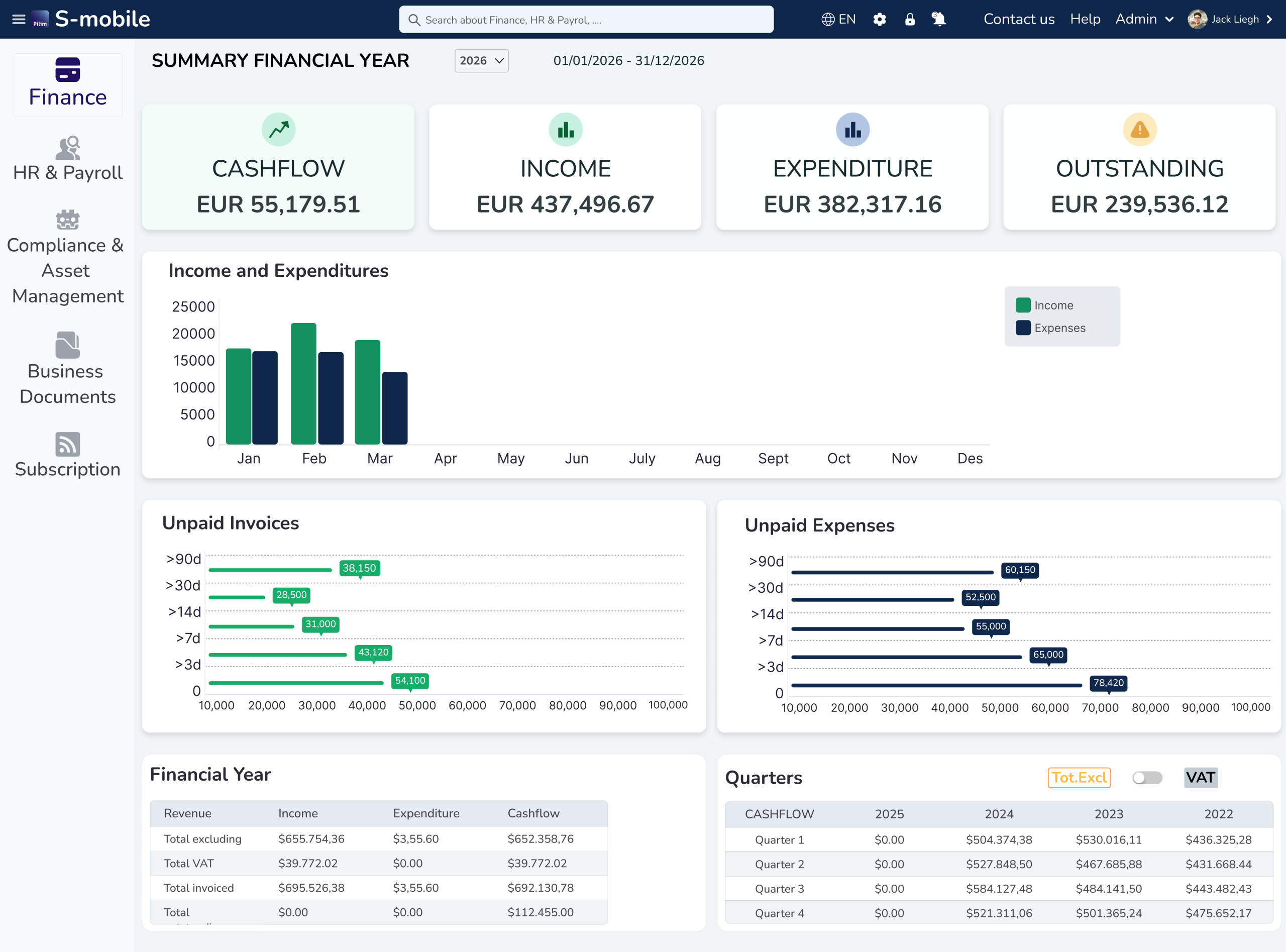
Cashflow is the layer that ties the rest together, and the plan comparison lists it in four separate rows: real-time cashflow management, generated cash flow statements, automated VAT calculations and reporting, and a financial dashboard with revenue and expense analytics.
VAT automation is the part European users should weigh hardest. Pilim markets live VAT tracking and forecasting rather than a quarterly scramble, which for a Belgian or Dutch SME is the difference between knowing your liability in March and discovering it in April.
Peppol sits underneath all of it. Pilim converts invoices into Peppol BIS 3 format and delivers them into the recipient’s accounting system over the network, with VAT number validation handled at setup. For public sector work across much of the EU, that is not a convenience feature. It is a condition of getting paid.
Three figures appear on the Peppol page: 30% time saved, two times faster, and 94% recommending the product. No sample size, no methodology and no third-party source accompany them, so read them as marketing rather than evidence.
Advanced Feature 4: Cross-Module Operational Coverage
Breadth is the fourth thing an advanced user exploits, and Pilim covers more ground than an invoicing tool normally does.
- Finance. Invoice and sales management, quotations, sales orders, credit notes, expenses, employee expense claims, automated accounting and VAT reporting.
- HR and payroll. Leave and holiday management, time tracking and attendance, payroll administration, employee and manager access roles, department management.
- Compliance and assets. Licence and certification management, insurance policy management, rental and lease management, each with renewal and expiry tracking.
- Documents. Import and categorise files, list them with action dates, and share securely with your accountant under role-based permissions.
Licence and insurance tracking is the quiet win. Most SMEs keep renewal dates in somebody’s calendar or nowhere at all, and a lapsed certification costs more than any software subscription. Putting those records next to the invoices that pay for them is sensible design.
Pilim also runs a separate consumer side, a Household app published on both the App Store and Google Play, covering personal income, expenses, assets and documents. Business users can ignore it, though its existence explains some of the asset-management vocabulary in the business product.
Automation Workflows That Make Sense
Four workflows are worth configuring deliberately. Each one is assembled from capabilities Pilim lists rather than invented here.
Recurring Invoice Workflow
Quotation, accepted quotation converted automatically into an invoice, recurring invoice automation for the ones that repeat, reminders for the ones that go unpaid, and a credit note when something has to be reversed. All five appear as named rows in the plan comparison, so the chain is buildable without leaving the product.
Configure the quotation-to-invoice conversion first. It removes the most common source of transcription error, which is a human retyping agreed numbers.
Accounting Sync Workflow
Entry made in Pilim, pushed to QuickBooks or Xero in real time, nothing re-keyed and nothing overwritten. Decide before you switch it on which system your accountant treats as authoritative, then write that decision down. Teams that skip this step end up reconciling two ledgers that both claim to be correct.
Cashflow Oversight Workflow
Real-time cashflow feeding a generated cash flow statement, with VAT calculated and forecast alongside it. The useful habit is reading the VAT forecast weekly rather than the revenue chart daily. Revenue flatters you. A VAT liability you have already spent does not.
Document And Compliance Workflow
Scan a receipt, let the AI extract and categorise it for VAT, file it against the right record, and let licence and insurance entries carry their own action dates. Pair that with secure accountant sharing and your year-end becomes a permission grant rather than a zip file.
Custom Integrations And API Reality
Here the guide has to be blunt, because the gap between what people expect and what Pilim publishes is wide.
No public API documentation appears anywhere on the site. There is no developer section, no endpoint reference, no webhook list and no published connector directory. Two integration names exist in public material, QuickBooks and Xero, plus an unspecified “and more”.
So if your plan involves pushing Pilim data into a warehouse or wiring it to a custom system, that plan needs a conversation with the vendor before it needs a developer. Ask whether an API exists at all, whether it is documented, and whether access depends on tier.
Peppol partly compensates, and it is a genuine strength. The network is a standards-based interoperability layer, so an invoice leaving Pilim in BIS 3 format arrives structured in a recipient’s system regardless of what software they run. That is a wider reach than most bilateral integrations achieve, and it needs no setup on your side.
Treat Peppol as the integration story and the accounting sync as the convenience layer. Anything beyond those two is unverified. To check how your own invoice flow behaves on the network, try Pilim here and send one real invoice to a client who already receives Peppol.
Performance Optimization For Power Users
Five habits get the most out of the product once it is live.
- Use batch processing deliberately. Batch expense processing and batch imports both exist. Weekly batches beat daily trickles for anyone handling volume.
- Set roles before you invite anyone. Secure user roles and permissions, plus separate employee and manager access, are listed capabilities. Retrofitting permissions after twenty people have full access is painful.
- Give your accountant a scoped login. Secure data sharing with accountants is a named row in the comparison, and it beats emailing exports.
- Fill in action dates on every compliance record. Licences, insurance and leases each carry one. An empty field is a missed renewal waiting to happen.
- Spend the trial on the hard cases. Setup is advertised at ten minutes. Use the remaining twenty-nine days on batch import accuracy and sync reconciliation rather than on making the dashboard look tidy.
Pricing Context For Advanced Buyers
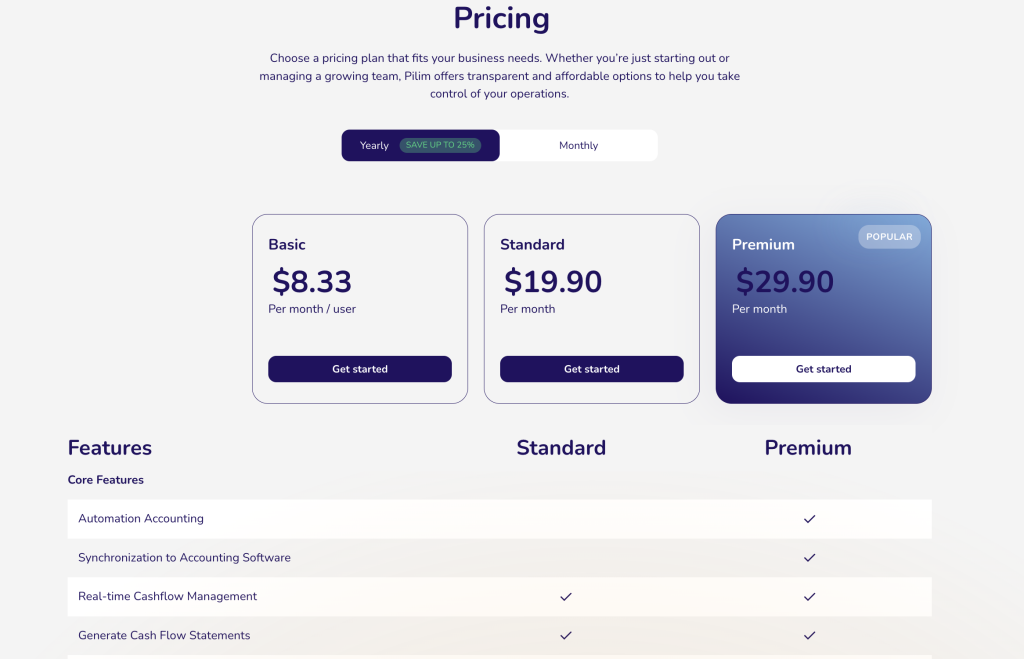
Read the toggle before you read the numbers. Pilim’s pricing page loads with Yearly preselected, carrying a “Save up to 25%” badge, so the first figures a visitor sees are prepaid annual rates expressed per month.
| Plan | Price | What you get |
|---|---|---|
| Basic | $9.90/mo | Per user, billed monthly. Falls to $8.33 per user per month when billed yearly, a real saving of 15.9%. |
| Standard | $24.90/mo | Billed monthly. Yearly billing takes it to $19.90, a real saving of 20.1%. Core finance, invoicing, HR and expense rows. |
| Premium | $39.90/mo | Billed monthly. Drops to $29.90 on yearly billing, a real saving of 25.1%. The only tier carrying Automation Accounting and accounting software synchronization. |
Work the arithmetic and the badge turns out to be honest. Premium saves 25.1%, which is where “up to 25%” comes from. Standard saves 20.1% and Basic 15.9%, so the headline applies to one tier out of three. Vendors phrase it that way deliberately, and “up to” is doing the work.
For an advanced buyer the decision collapses quickly. Both features this guide is about live on Premium. Standard does not carry them. Paying $39.90 monthly or $29.90 on an annual commitment is the entry price for the automation story, and the $10 monthly gap between Standard and Premium is small against the hours recurring entries consume.
One ambiguity to resolve before you sign. Basic is labelled per month per user, while Standard and Premium are labelled per month with no per-user qualifier. Whether those tiers include a seat allowance, and what extra seats cost, is not published. Ask.
If you want to compare against your own numbers, start a Pilim trial here and run one full VAT period through it.
Verdict
Pilim rewards a power user in two specific places and nowhere else. One removes recurring data entry. The other removes duplicate keying between your invoicing tool and your accountant’s ledger. Both sit on Premium, both are testable inside a thirty-day unlocked trial, and both are worth the configuration effort if your month-end currently runs on copy and paste.
Peppol is the genuinely differentiated piece. A small business sending BIS 3 invoices into client accounting systems across the EU is doing something most invoicing tools in this price band cannot do at all, and compliance deadlines make it less optional every year.
Anyone ready to test the two Premium capabilities can start with Pilim here. Where to stay sceptical: there is no public API documentation, the integration list names two products and stops, the performance statistics carry no methodology, and the seat model above Basic is unstated. None of that makes Pilim a bad choice for an EU SME. All of it belongs on your list of questions.
Our companion piece on how the product performs in a working business sits in the Pilim case study.
FAQ
What are Pilim’s most advanced features?
Automation Accounting and Synchronization to Accounting Software. Pilim groups both under Premium Features in its own navigation, and the plan comparison lists them under the Premium column.
Does Pilim integrate with QuickBooks and Xero?
Yes, both are named. Entries made in Pilim, including income, expenses and credit notes, update the connected package in real time, and Pilim states that existing records are not overwritten. Other platforms are referred to only as “and more”.
Is Pilim only for finance teams?
No. Alongside finance it carries HR and payroll modules covering leave, attendance and payslips, compliance tracking for licences, insurance and leases, and a document management area. A separate Household app exists for personal use.
Who should use Pilim’s advanced workflow features?
EU-based small businesses and freelancers who invoice regularly, carry a VAT obligation, and already work with an accountant on QuickBooks or Xero. Peppol compliance makes the case stronger for anyone selling into the public sector.
Before You Choose, Compare These
Hand-picked guides to help you choose the right tool — no fluff.
 Case StudiesPilim Case Study 2026What actually happened when teams rolled it out.
 FeaturesHubstaff Top Features 2026The standout features and whether they justify the price.
 ReviewsHello Bar Review 2026Hands-on verdict with the pros, cons and who it fits best.
 ComparisonsIncreff vs Unicommerce vs Zoho Inventory 2026The strongest competitors compared side by side.