


Trainual makes the most sense for small businesses that are trying to stop important company knowledge…
Imagine a 14-person services company with:
In this guide
Who This Post Is For :
Trainual makes the most sense for small businesses that are trying to stop important company knowledge from living inside one founder’s head, three Google Docs, and a random pile of Slack messages.
Disclosure: Stack99 earns a commission if you buy through links on this page. It costs you nothing extra and never changes our assessment.
That is a very real small-business problem.
The official Trainual positioning is built around onboarding, training, SOPs, searchable knowledge, and role-based clarity. In plain English, it is meant to help small teams document how work gets done, train people faster, and stop reinventing the same explanation every week.
This post is for:
- Small businesses onboarding new hires regularly.
- Founder-led teams trying to standardize operations.
- Service businesses that need process consistency.
- Multi-location teams that want one clear source of truth.
- Growing companies that need training without building a full corporate LMS bureaucracy.
If that sounds like your stage, start with Trainual here.

Why Trainual Fits Small Businesses :
Trainual fits small businesses especially well because its official product positioning does not assume you already have a giant learning-and-development department.
Instead, it speaks directly to the problems smaller teams actually feel:
- Training takes too long.
- New hires ask the same questions repeatedly.
- Processes are inconsistent.
- Company knowledge is scattered.
- Managers waste time repeating the basics.
That is where Trainual looks strong.
The homepage and onboarding-focused pages highlight structured learning paths, searchable process documentation, tests, role-based training, reporting, and knowledge access across web and mobile. That combination is useful because small businesses usually need training and documentation in the same place, not ten different tools duct-taped together.
Another good fit point is that the official pricing structure explicitly includes a Small plan for teams with 1 to 25 employees. That is a pretty direct signal that Trainual knows its small-business audience.
It also shows up in the tone of the product. Trainual is not pretending every buyer has a giant internal enablement department. It is much more aligned with businesses that need practical systems quickly.
Top Features For Small Businesses :
Role-Based Training Paths –
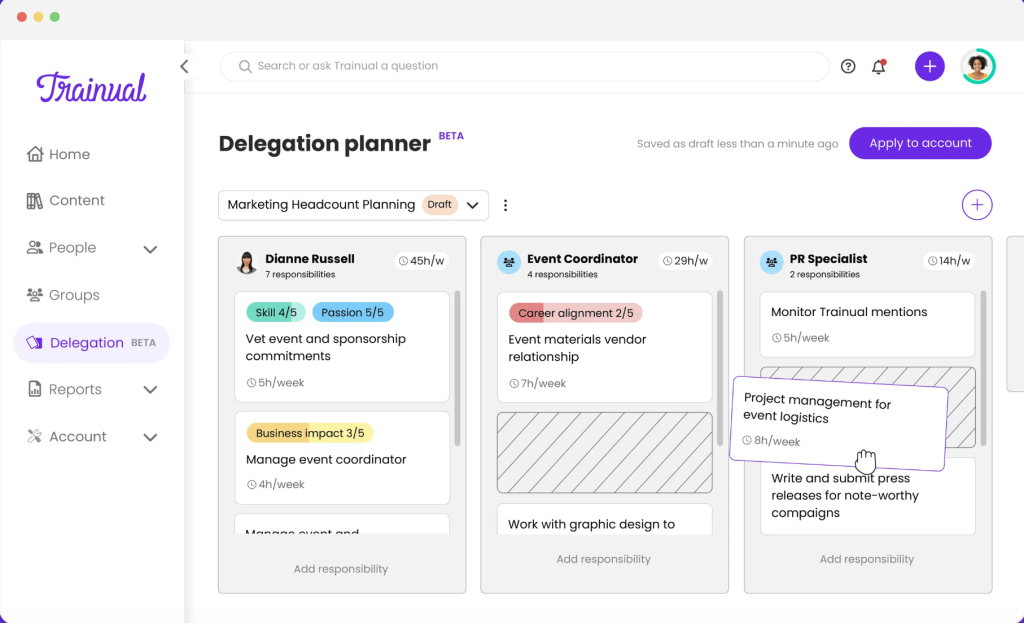
Trainual’s official onboarding pages emphasize assigning training by role, team, and responsibility. That is a big deal for small businesses because they usually cannot afford messy onboarding. A new hire needs the right information quickly, not a content dump with no order.
SOPs, Policies, And Process Documentation –
This is probably the core use case. Trainual lets teams centralize processes, policies, and responsibilities in one searchable playbook. For small businesses, that alone can remove a lot of friction.
Tests, Tracking, And Reporting –
The official solution pages make a strong point about completion tracking, quizzes, e-signatures, and reporting. That helps small businesses move from “I think people saw the training” to “I can prove they completed it.”
Templates And Faster Setup –
Trainual also pushes its library of templates and starter resources. That matters because small businesses usually do not have time to build every onboarding document from a blank page.
Mobile Access And Search-ability –
Small-business teams are often hybrid, field-based, or multi-location. The mobile app and searchable knowledge layer make the product more practical in day-to-day work.
Real-World Small Business Example :
Imagine a 14-person services company with:
- Two founders.
- One operations manager.
- A few account-facing staff.
- A few delivery staff.
- Constant pressure to onboard quickly without dropping quality.
Before a tool like Trainual, training usually looks like this:
- A founder explains the basics live.
- Someone sends a folder link.
- New hires ask the same questions again the next week.
- Policies and process changes spread unevenly.
- Managers assume people understand more than they actually do.
Trainual fits this situation because the business can create:
- A company overview path.
- Role-specific onboarding.
- Process documentation.
- Compliance or policy sign-off.
- Refresher training when systems change.
That is exactly the kind of operational cleanup small businesses need once they start growing beyond a handful of people.
Pricing In Context :
Trainual’s official onboarding solution page currently shows:
- Small plan for 1 to 25 employees at $299 per month billed monthly, or $249 per month billed yearly.
- Medium plan for 26 to 50 employees at $349 monthly, or $279 monthly on annual billing.
- Growth plan for 51 to 100 employees at $499 monthly, or $419 monthly on annual billing.
- Custom pricing for larger teams.
For small businesses, that means Trainual is not a bargain toy. It is an operations platform purchase.
So the real pricing question is not “is $249 or $299 cheap?” The better question is:
- How much manager time does bad onboarding waste?
- How much inconsistency costs you in service delivery?
- How much does one avoidable training mistake cost?
If the business is already feeling that pain, start with Trainual here and compare the seat-range cost to the hours your team loses repeating the same explanations manually.
Alternative Tools For Small Businesses :
Small businesses could also look at alternatives like Notion, Process Street, Guru, or other knowledge and process tools.
The difference is that Trainual’s official positioning is much more explicitly built around:
- Employee onboarding.
- Training assignments.
- SOP documentation.
- Tests and completion tracking.
- Role clarity.
That makes it more focused than a generic documentation tool.
If your main need is simply storing notes, a lighter alternative might be enough. If your main need is repeatable training and operational consistency, Trainual usually feels like a more direct fit.
That is the real dividing line. Small businesses do not always need more information storage. They usually need better operational follow-through.
Setup Steps For Small Businesses :
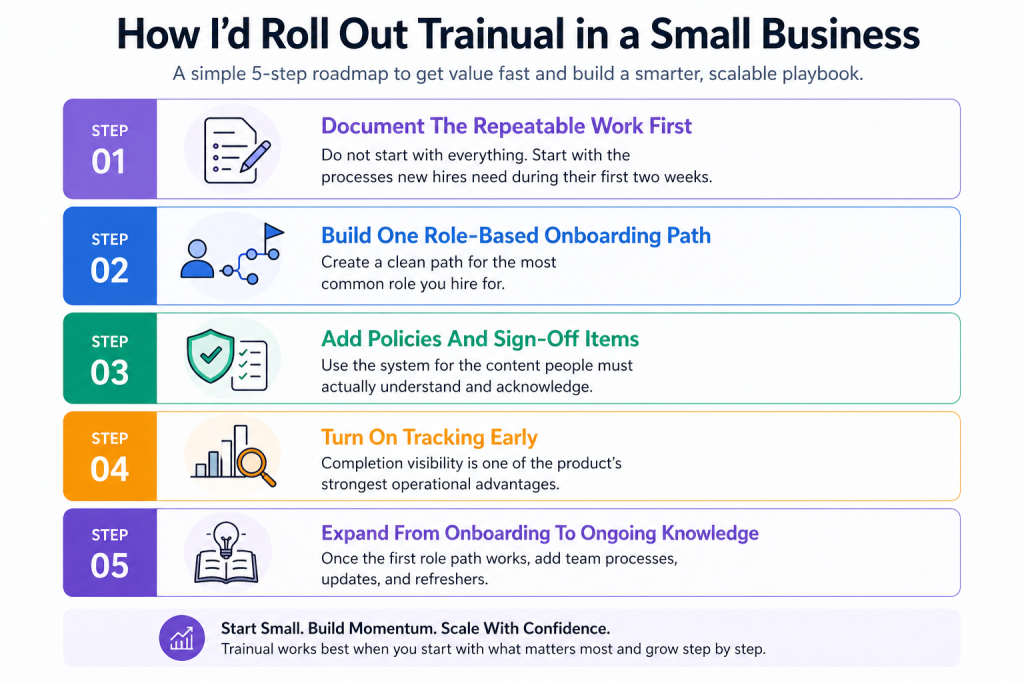
If I were rolling Trainual out to a small business, I would keep it simple:
Step 1: Document The Repeatable Work First
Do not start with everything. Start with the processes new hires need during their first two weeks.
Step 2: Build One Role-Based Onboarding Path
Create a clean path for the most common role you hire for.
Step 3: Add Policies And Sign-Off Items
Use the system for the content people must actually understand and acknowledge.
Step 4: Turn On Tracking Early
Completion visibility is one of the product’s strongest operational advantages.
Step 5: Expand From Onboarding To Ongoing Knowledge
Once the first role path works, add team processes, updates, and refreshers.
If you want to test that rollout path, start with Trainual here and map one live onboarding flow instead of trying to build a giant company encyclopedia in week one.
Where Small Businesses Get The Most Value :
The biggest value usually appears when the company has already outgrown founder-only training but has not yet built a formal operations or HR function.
That usually means:
- Teams with frequent hiring.
- Multi-location small businesses.
- Service businesses where process consistency matters.
- Companies that want faster ramp time.
- Founders who are tired of repeating the same instructions.
That is where Trainual can become more than a nice documentation tool. It becomes an operating system for consistency.
It also creates a second-order benefit: less dependency on memory. Small businesses are often fragile because too much knowledge sits with one or two people. A searchable, structured training system lowers that risk.
That is a big deal in 2026, when small teams are trying to grow faster without letting quality wobble.
It is also a leadership relief valve. When founders and managers stop answering the same onboarding questions over and over, they get time back for actual management and growth work.
Verdict :
Trainual looks like a strong fit for small businesses in 2026 because the official product and pricing structure align closely with the real needs of growing teams: onboarding, SOPs, process clarity, reporting, accountability, and reusable training.
It is not the cheapest possible way to store information. But it is much more focused than a generic note-taking setup, and that focus is exactly why it works.
If your business is already feeling operational repetition, start with Trainual here and test it against one live onboarding workflow, one role, and one process cluster first.
That is usually enough to tell whether the product will save real time or just become another tab nobody opens.
FAQ :
Is Trainual good for small businesses in 2026?
Yes. The official product is strongly aligned with small-business needs like onboarding, SOP documentation, training paths, and process consistency.
How much does Trainual cost for small businesses?
The official onboarding pricing shows the Small plan at $299 per month billed monthly, or $249 per month billed yearly, for teams with 1 to 25 employees.
What is Trainual best used for in a small business?
It is best used for documenting repeatable processes, standardizing onboarding, assigning training by role, and keeping company knowledge in one searchable place.
When does Trainual make more sense than a generic documentation tool?
It makes more sense when the company needs repeatable employee training, completion tracking, and clear accountability instead of just a place to store notes.
More on Trainual
Hand-picked guides to help you choose the right tool — no fluff.
 PricingTrainual Pricing 2026Real tier prices and what each plan actually includes.
 AlternativesTrainual Alternatives 2026Credible alternatives and when each one wins.
 Case StudiesWebydo Case Study 2026What actually happened when teams rolled it out.
 TutorialsCatalister Beginner's Guide 2026A clean start-here walkthrough with no jargon.