

Who This Is For :
Runpod is the kind of tool that makes sense the moment your team stops talking about AI in theory and starts shipping real workloads. The official product is built around on-demand GPUs, serverless GPU endpoints, multi-node clusters, and a Hub for templates and models. That combination is why it fits a very specific crowd: startups, agencies, freelancers, and small product teams that need real compute without building a full infrastructure team first.
If you are trying to launch an AI feature, fine-tune a model, run batch inference, or keep a GPU-backed workflow alive without paying for idle time, Runpod is worth a serious look. If you want to jump in early, start with Runpod here.

Why Runpod Fits This Niche So Well :
The reason Runpod stands out is simple. Most teams do not need a giant cloud contract on day one. They need the ability to spin up compute when work appears, turn it off when traffic drops, and scale in a way that does not feel like a puzzle every Monday morning.
Runpod’s official homepage highlights exactly that shape of value:
- Pods for on-demand GPUs across global regions.
- Serverless for API-based AI workloads.
- Clusters for multi-node workloads.
- Hub for open-source models and templates.
That mix is ideal for a niche that wants speed, flexibility, and a clean path from prototype to production. A startup can use Pods for testing, Serverless for live inference, and Clusters when the workload becomes bigger than a single machine. A solo builder can do the same thing, just with less ceremony and less budget.
The practical upside is that you do not have to replatform every time the project grows a little more serious. That matters more than people admit. Infrastructure churn is where good ideas go to die.
The Top Features That Matter Most :
1. Pods For Hands-On Work –
Pods are the classic “give me a GPU and let me build” option. They are the right fit when you want direct control, long-running sessions, notebook-style experimentation, or development environments that need a stable machine.
That makes Pods useful for:
- Model experimentation.
- Data preparation and preprocessing.
- Notebook work.
- QA environments for AI apps.
If your niche is a small team that still wants direct control over the box, Pods are the easiest place to start.
2. Serverless For Live Inference –
Runpod Serverless is where the product starts to feel like a real production platform. The official site emphasizes API-based workloads, auto-scaling workers, and low-latency inference. That is the sweet spot for startups shipping actual features.
The reason this matters is that a niche AI product usually has a very uneven traffic pattern. You might have one user or one thousand. You do not want to pay for a full GPU all night if nothing is running, but you also do not want to wait around for a cold machine to wake up.
3. Clusters For Heavy Jobs –
Clusters are the grown-up answer when a single GPU stops being enough. The official pricing page says you can launch multi-GPU clusters in minutes, attach shared storage, and scale up to 64 GPUs. That is the kind of feature a team uses when the workload is bursty, distributed, or simply too large for a one-box workflow.
This is especially good for:
- Training runs.
- Distributed experimentation.
- Large batch jobs.
- Teams that need reserved capacity without building custom orchestration.
4. Hub For Faster Starts –
The Hub is the underrated part of the story. If you are a small team, you do not always want to start with a blank slate. Templates and open-source models give you a faster path to testing and a better way to learn what the platform can actually do.
That matters because a lot of AI teams do not need more theory. They need one working starting point.
Pricing In Context :
Runpod does not really price like a classic SaaS product with one neat monthly box. It prices by workload, and that is the right model for the niche it serves.
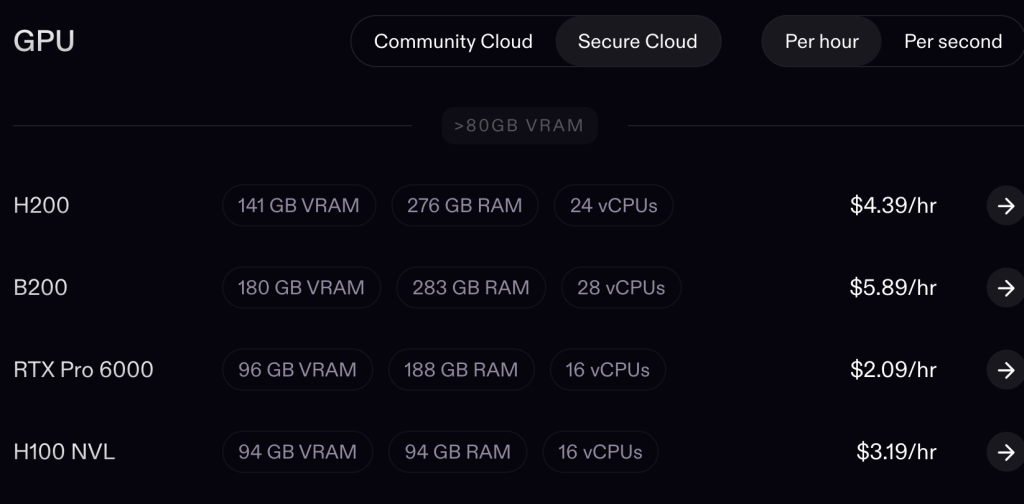
On the official pricing page, Pods include examples like:
- RTX Pro 6000 at $2.09 per hour.
- H100 PCIe at $2.89 per hour.
- A100 PCIe at $1.39 per hour.
- L4 at $0.39 per hour.
Serverless includes examples like:
- H100 at $4.18 per hour.
- A100 at $2.72 per hour.
- L4 / A5000 / 3090 at $0.69 per hour.
Clusters include examples like:
- H200 SXM at $4.31 per hour.
- A100 SXM at $1.79 per hour.
The bigger takeaway is not the exact number. It is the shape of the bill. If you are running a niche product that is still proving itself, pay-as-you-go compute usually feels a lot better than a giant always-on commitment.
If you want to check the platform before committing, view Runpod here.
Real-World Example :
Imagine a small AI studio that builds custom image-generation tools for e-commerce brands. During the week, the team tests prompts, fine-tunes styles, and prepares new deployments. On campaign days, the studio gets traffic spikes that are hard to predict.
Here is how Runpod fits that workflow:
- The team uses Pods for dev and experimentation.
- It moves inference workloads to Serverless so users can call the model through an API.
- It uses Clusters only when the workload becomes too large for a single node.
- It keeps the Hub nearby so new experiments can start from known-good templates.
That is a clean niche use case because the team is not buying infrastructure for vanity. It is buying just enough compute to keep a product moving.
What I Like And What I Would Watch :
The upside is obvious:
- Fast access to GPUs.
- Clear path from prototype to production.
- Multiple workload modes in one platform.
- Good fit for teams that need flexibility.
The tradeoff is just as real:
- You still need to know what type of workload you are running.
- Serverless is great, but it is not magic.
- A team that wants fully abstracted business tooling may find it more technical than they expected.
In other words, Runpod is not for people who want compute hidden behind a glossy dashboard and a lot of hand-holding. It is for people who want to build.
Setup Steps For This Niche :
If I were using Runpod for a startup, agency, or solo AI product, I would start in this order:
- Pick the workload type first, not the GPU.
- Use Pods for hands-on work and debugging.
- Move to Serverless when your API needs to scale on demand.
- Use Clusters only when the job really needs distributed compute.
- Keep an eye on the pricing page before every production launch.
That sequencing keeps you from overbuying infrastructure too early.
Alternatives Worth Thinking About :
If you are comparing options, the real alternatives are usually not just other GPU clouds. They are also “keep using the big cloud provider,” “rent a general-purpose VM,” or “delay the project until later.”
Runpod wins when you want:
- Faster GPU access.
- Less infrastructure overhead.
- A clearer serverless inference path.
- A more direct relationship between usage and cost.
It is a strong choice for the niche that wants to ship AI without becoming a cloud operations team.
A Practical Decision Framework :
When I think about Runpod for a small team, I like to keep the decision simple.
Use Pods if you still need a machine you can inspect and control directly. Use Serverless if your product already has an API or is about to have one. Use Clusters if your current jobs are starting to look like infrastructure instead of experiments.
That rule saves teams from overcomplicating the purchase. The wrong way to buy GPU infrastructure is to start with “what is the biggest machine?” The better way is to ask what kind of work is actually happening.
If you are a founder, agency lead, or independent builder, that distinction matters more than raw compute specs. A good platform should support the project you have today and the one you expect to have three months from now.
If you are still deciding, start with Runpod here and use the platform as a test bed rather than a grand infrastructure commitment.
Final Verdict :
Runpod is best for the people who want serious GPU compute without overbuilding the stack. Startups get speed. Agencies get flexibility. Freelancers get a practical way to test and launch AI work without a giant bill waiting at the end of the month.
If that sounds like your lane, start with Runpod here and keep the first version of the workflow lean.

FAQ :
Is Runpod only for big AI teams?
No. That is the nice part. The platform works for solo builders and small teams too, especially if you start with Pods before moving into Serverless or Clusters.
Does Runpod work better for training or inference?
Both, but the niche use case depends on the workload. Pods and Clusters are stronger for hands-on compute and heavier jobs. Serverless is the cleaner fit for API inference and bursty usage.
Is Runpod cheaper than keeping a GPU idle all day?
Usually, yes, if your workload is not constant. The official pricing model is usage-based, which is exactly why smaller teams like it.
Should I use Runpod for a client project?
If the client needs flexible GPU access, yes. It is a sensible choice when you need to move quickly without making infrastructure the headline of the project.