


Melio fits best when your business has outgrown spreadsheets but does not want a heavy finance system.
Imagine a design agency with four people on the core team, ten recurring contractors, and a founder who…
In this guide
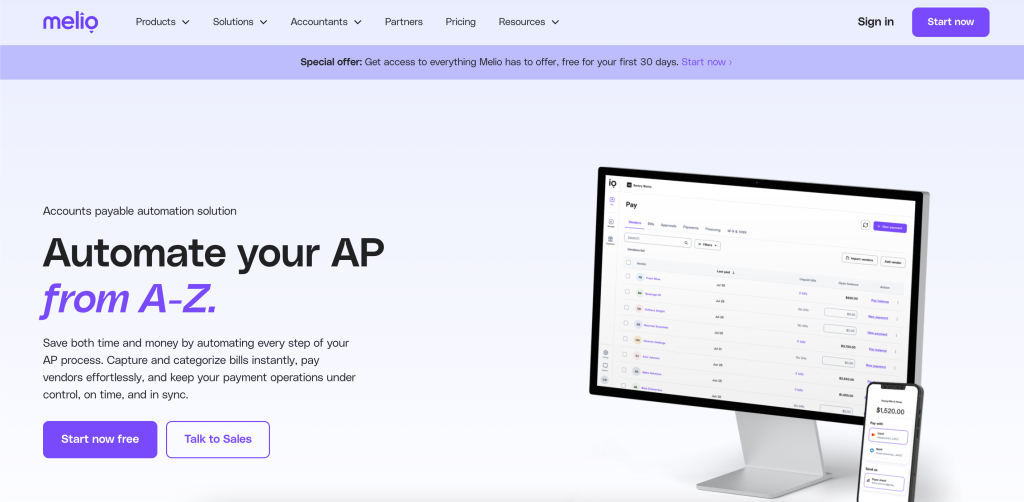
Melio is a good example of a product that becomes more useful the moment you stop asking it to do everything. The official site describes it as an accounts payable automation solution that automates bill capture, payment processing, and bookkeeping sync. That already tells you a lot: this is for businesses that want to pay bills more cleanly, not for teams looking for a giant ERP replacement. If you want to see the official AP flow while reading, start here.
Disclosure: Stack99 earns a commission if you buy through links on this page. It costs you nothing extra and never changes our assessment.
For the right niche, Melio can be a very practical win. Solo operators want fewer manual steps. Small teams want approvals without chaos. Agencies and accounting firms want repeatable workflows and visibility. That is why the best-for-specific-niche angle is useful here. Melio is not about flashy software. It is about reducing the friction around bills, payments, approvals, and vendor management.

Who This Post Is For :
Melio fits best when your business has outgrown spreadsheets but does not want a heavy finance system. That is usually the case for startups, agencies, small service businesses, and accountants managing multiple clients. The official site says it saves businesses 15+ hours monthly on AP tasks, which is a meaningful number if your current process involves manual bill entry, approval chasing, or one person holding the whole process in their head.
The product also has a very useful self-filter built into the official help docs. The Go plan is owner-only, while Core, Boost, and Unlimited add more team capability. That makes the niche pretty easy to see. If you are a solo founder, Go may be enough. If you need approvals, shared responsibility, or client workflows, Core and above become more relevant.
Why Melio Fits This Niche So Well :
The official feature set lines up with the pain points these teams actually feel. Automatic bill capture through OCR or email means less data entry. Payment flexibility means you can pay by card, ACH, instant transfers, and paper checks. Advanced workflows let you set multi-level approvals by team members, roles, payment amount, and vendor. Those are not vanity features; those are the exact building blocks that turn a messy payment process into a repeatable one.
Melio also matters because it does not force your team to be in one place. The mobile app lets you review, approve, pay, and manage AP on the move. That is a very real advantage for founders, consultants, and operators who are not always sitting at a finance desk. If you have ever needed to approve a bill while standing in an airport line, you already understand the niche.

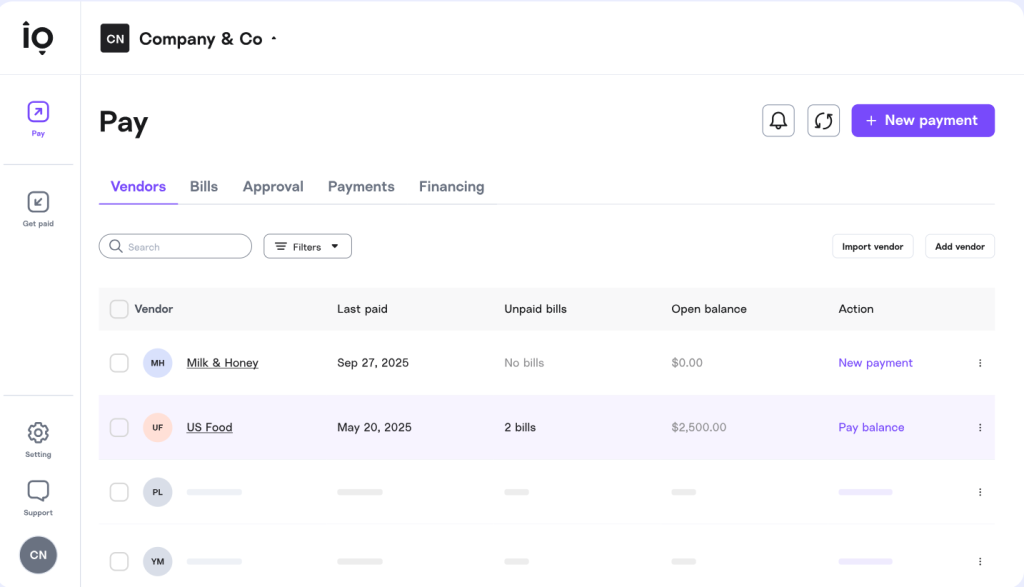
Another reason it fits this niche is the accounting sync story. The official product pages call out bookkeeping sync, and the help docs talk about sync with accounting software and Tax1099. For a small business, that means fewer duplicate steps and less fear that the books and the payment system are drifting apart.
Top Features For The Niche :
The features that matter most are the ones that reduce human effort without removing control.
- Automatic Bill Capture. Great for small teams that hate retyping invoices.
- Payment Flexibility. Card, ACH, instant transfers, and checks give you room to choose cash flow timing.
- Advanced Approvals. Helpful when the owner should not be the bottleneck forever.
- CSV Vendor Import. Useful when you are onboarding a batch of vendors.
- Mobile App. Handy when approval work cannot wait for desk time.
- Recurring Payments. A quiet time-saver for repeated bills.
The official site also highlights W-9 and 1099 support. That matters a lot for agencies and service businesses that work with contractors. If you are spending January chasing vendor paperwork, you know why that is valuable. It is not glamorous, but it is exactly the kind of work a good AP platform should simplify.
Real-World Example :
Imagine a design agency with four people on the core team, ten recurring contractors, and a founder who wants visibility without micromanaging every bill. The team receives invoices from freelancers, software vendors, and a hosting provider. Instead of emailing attachments around and wondering who approved what, they load the bills into Melio, route the larger ones for approval, and schedule payments based on due date and cash flow.
In that setup, the owner is not stuck inside an inbox. Contractors get paid on time. The bookkeeper can see the records more clearly. And the agency can scale the process without turning bill pay into a weekly emergency. That is the kind of workflow where Melio feels less like software and more like a relief valve.
Pricing In Context :
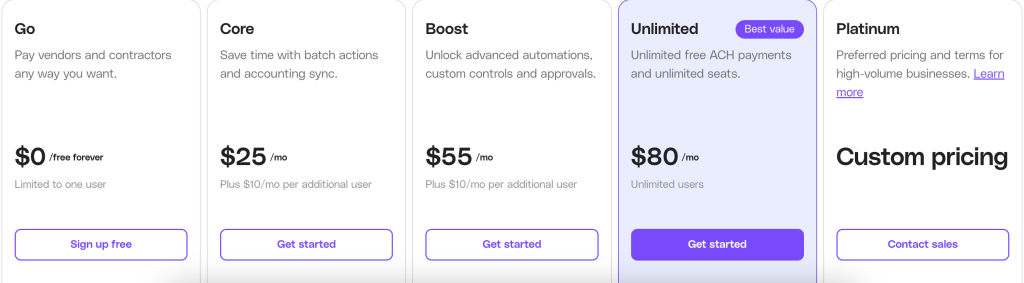
The official help docs show a pretty clear plan family: Go, Core, Boost, and Unlimited. Go is owner-only. Core and Boost show up in billing examples at $25 per month and $55 per month respectively. The same docs also show that unlimited team members are available on Unlimited, while Core and Boost have user pricing notes in the help center. There is also an official pricing discussion that points to free users in some plan structures.
For a niche buyer, this matters because the right plan is tied to the number of people who actually touch AP. If you are solo, you do not need to overbuy. If you are a small team, Core can be a sweet spot. If you are an agency or accounting firm with lots of user access, Unlimited starts to make more sense. That plan logic is exactly why Melio is easier to recommend for a specific niche than for every business under the sun.
Alternative Tools For The Niche :
If Melio is not the perfect fit, the alternatives usually fall into one of three buckets. The first bucket is manual payment workflows inside accounting software. The second is heavier AP automation for larger finance teams. The third is a bank-based or ERP-based payment process that gives you control but not much convenience.
Melio’s advantage over those buckets is balance. It is easier to adopt than heavy AP software, but more structured than a spreadsheet. That is why it is strongest for startups, agencies, freelancers, and bookkeepers who need repeatability without a massive implementation project. If you want the official product starting point, the AP page is the right place to sanity-check the fit.
Setup Steps :
A simple implementation usually goes like this:
- Connect your business account and sign in.
- Add vendors, either manually or with a CSV.
- Sync the accounting system you already use.
- Set approval rules for anyone who should review larger payments.
- Test one bill cycle before moving the whole team over.
The important part is not to overcomplicate the first run. The point of Melio is to make AP less chaotic. So the cleanest implementation is usually the one that starts small and grows with real usage.
Why The Plan Structure Matters :
One of the biggest reasons Melio works for a niche audience is that the plan family maps cleanly to business stage. Go is intentionally narrow and owner-only, which makes sense if you are early and do not want to invite a lot of people into the workflow yet. Core is the natural step when you want more structure and regular AP handling. Boost and Unlimited make more sense when your process includes multiple people, multiple approvals, or client-facing operations. That progression is simple enough to understand and practical enough to adopt.
The other part that makes the pricing logic sensible is that the official feature set scales with the plan. The help docs tie advanced approval workflows, accounting sync, and user access to the higher plans, which is exactly what a small but growing team needs. If you are still deciding whether Melio is the right fit, the official AP page is the cleanest place to compare the workflow against your current process. That usually tells you more than a generic feature checklist ever will.
For the niche audience we are talking about here, that is the whole game: buy the least complicated tool that still gives you the controls you actually need.
Pros And Cons :
The Upside –
- Great for small teams that want AP control without heavy software.
- Automatic bill capture saves time.
- Payment options are flexible.
- Mobile use is genuinely helpful.
- W-9 and 1099 support fit real business admin needs.
The Tradeoffs –
- Go is owner-only, so solo plans have limits.
- Core and Boost pricing is easy to understand, but still requires a real plan decision.
- Larger teams may want deeper enterprise controls.
- It is best when AP is a pain point, not when you just need occasional bill payment.
Verdict :
Melio is best for the niche that wants structure without pain. If you are a founder, agency operator, or accountant who needs to pay bills, get approvals, and keep records moving without a giant AP system, Melio makes a very strong case. The official feature set lines up with that use case almost perfectly.
If that sounds like your world, the next step is simple: review the plan structure, check how your team fits, and then test the workflow in the real world through the official AP automation page. For the right niche, it is an easy tool to like.
FAQ :
Who is Melio best for?
Small businesses, startups, agencies, and accounting firms that want a simpler AP process without a huge finance implementation.
Does Melio support approvals?
Yes. The official site highlights advanced approval workflows and role-based access.
Can Melio help with contractor paperwork?
Yes. The help docs reference W-9s and 1099 workflows.
Is there a mobile app?
Yes. The official site specifically calls out mobile access for reviewing and paying from your phone.
What is the biggest reason to choose Melio?
It removes manual AP work while staying manageable for smaller teams.
Before You Choose, Compare These
Hand-picked guides to help you choose the right tool — no fluff.
 PricingMelio Pricing 2026Real tier prices and what each plan actually includes.
 AlternativesMelio Alternatives 2026Credible alternatives and when each one wins.
 Advanced GuidesAircall Advanced Guide 2026Deeper workflows once the basics are in place.
 Use CasesLindy for Startups 2026A practical look at where it fits your stack.