


Why This Comparison Matters :
Calilio is interesting because it sits in a sweet spot between a basic VoIP tool and a serious call operations platform. The official site highlights IVR, call queueing, power dialing, ring strategy, live call monitoring, call recording, call analytics, AI call reports, and call transcription.
That means the real choice in 2026 is not just “Do I need a phone system?”
It is:
- Do I need a voice stack that can coach agents in real time?
- Do I need analytics and transcription built into the system?
- Do I want CRM integration without moving into an oversized contact-center suite?
- Or would a simpler call tool be enough?
If you want to review the voice stack while you read, start with Calilio here.
Quick Comparison Table :
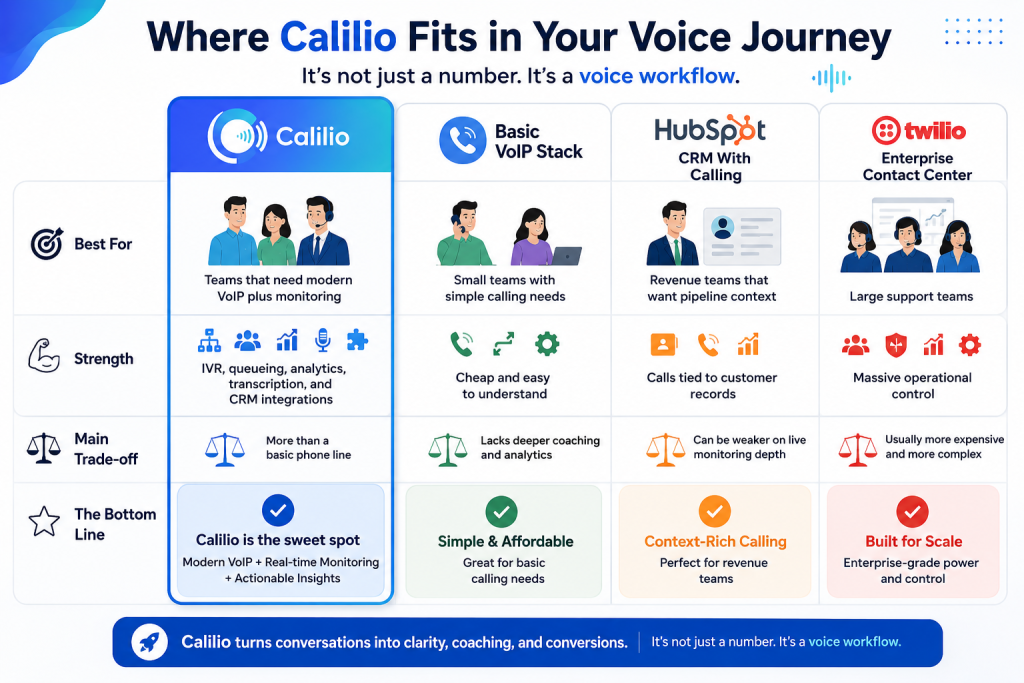
That is the simplest way to understand where Calilio fits.
It is not just a number. It is a voice workflow.
Calilio Deep Dive :
Calilio’s official pages show that it is built for teams that care about call quality as much as call volume.
The product highlights:
- Interactive Voice Response.
- Call queueing.
- Ring strategy.
- Power dialer.
- Live call monitoring.
- Call whispering and barging.
- Call recording and playback.
- Call analytics.
- AI call reports.
- AI transcription.
It also supports phone numbers from 100+ countries, and the official pages repeatedly note that the first US or Canada phone number is free.
That combination makes Calilio feel like a practical business phone system with enough operational depth to train a team properly.
If your phone workflow is starting to feel messy, start with Calilio here and test whether the dashboard actually makes the operation calmer.

Alternative 1: Basic VoIP Stack
The most obvious alternative is a simpler VoIP tool.
That works if you mainly need:
- A business number.
- Basic inbound and outbound calling.
- A small team inbox.
- Minimal setup.
This is the right choice when the operation is still small and you do not need live monitoring or AI reports yet.
The trade-off is that you lose the features that make Calilio more useful for coaching and control. If you need to know how calls were handled, who needs help, or what trends keep appearing, basic VoIP usually stops short.
In plain language: basic VoIP is enough to make calls. Calilio is enough to improve them.
Alternative 2: CRM With Calling
Another alternative is a CRM that includes calling.
That is often a smart choice for sales teams because the conversation lives next to the lead record. If the real problem is pipeline follow-up, this can be enough.
But CRM calling can feel narrow when the team actually needs:
- Live coaching.
- Queue management.
- Monitoring.
- More detailed call analytics.
That is where Calilio becomes more attractive.
If your team wants to coach agents, inspect live calls, and track performance with a dedicated voice dashboard, start with Calilio here and compare it to your current CRM calling setup.
Alternative 3: Enterprise Contact Center Suite
The heavyweight alternative is a full contact-center suite.
That option can make sense if you need deep routing, complex reporting, and broader support operations. But it can also be expensive, slower to implement, and harder for small teams to live with every day.
Calilio is often the better compromise when you want:
- Live monitoring.
- Call recording.
- Transcription and AI call summaries.
- IVR and queueing.
- CRM integration.
without buying an entire enterprise wall of software.
That is a pretty useful middle ground.
What Calilio Actually Feels Like :
The best way to describe Calilio is as a coaching-friendly VoIP system.
The official pages show a dashboard where supervisors can:
- Listen to live calls silently.
- Whisper advice to agents.
- Barge in when intervention is needed.
- Terminate calls in an emergency.
- Review recordings, transcripts, and call analytics later.
That matters because teams do not just need phones. They need supervision and repeatability.
Calilio also has AI call reports and AI transcription, which means you are not relying only on memory after the call ends. You can inspect the conversation later and use the result to coach better.

Pricing Comparison :
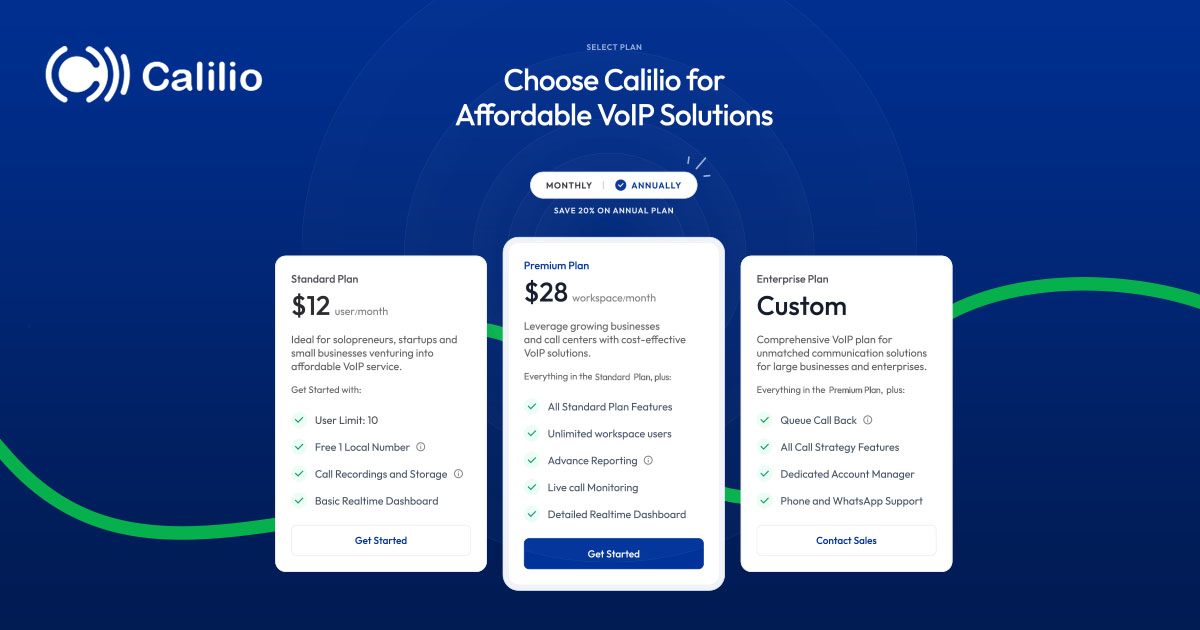
The pricing page keeps the decision simple:
- Standard: $12 per user per month billed annually at $144.
- Premium: $28 per user per month billed annually at $336.
- Custom: Tailored pricing for larger needs.
The official pages also show a wallet-based setup and note that phone numbers are billed separately. That means the subscription is only part of the real cost. You should also look at call usage, SMS usage, and any number-related charges.
That is not unusual for a VoIP system. It just means you should evaluate the whole bill, not the headline plan alone.
The good news is that the feature jump is easy to understand:
- Standard is the starter business-phone plan.
- Premium adds CRM integration, unlimited users, and live call monitoring.
- Custom is for larger or more specialized operations.
If you want to see whether the plan math fits your team, start with Calilio here and compare the annual price against what you are already spending on phone tools.
Use Case Recommendations :
Calilio is best for:
- Support teams that need live monitoring and coaching.
- Sales teams that want better call visibility.
- Small businesses that want IVR and queueing without a massive contact-center suite.
- Distributed teams that need phone numbers in multiple countries.
A basic VoIP stack is best for:
- Very small teams with simple call needs.
- Businesses that only need a number and voicemail.
A CRM with calling is best for:
- Pipeline-driven sales teams.
- Teams where call notes matter more than live supervision.
An enterprise contact-center suite is best for:
- Large support operations.
- Organizations with complicated routing and governance needs.
What Calilio Feels Like In Practice :
The real value of Calilio is how visible the call process becomes.
Instead of guessing whether someone answered well or whether the queue is healthy, you can watch the live call layer, review the recordings, inspect the analytics, and use the reports to coach the team.
That is a big deal for teams that have outgrown a basic phone number but do not want to buy an enterprise control tower.
The product also feels practical because it includes:
- Real-time coaching tools.
- AI transcription for follow-up.
- Number support across many countries.
- CRM integration on the Premium plan.
That mix is strong enough for both sales and support. It is also simple enough that a small team can actually live with it.
What To Watch Before Buying :
The cleanest way to buy Calilio is to be honest about your call volume and your need for supervision.
If you only need a number and voicemail, the product may be more than you need. If you need queueing, IVR, recordings, monitoring, or AI reports, the product starts to make a lot more sense.
The best buyers for Calilio are usually the teams that say:
- We need better call visibility.
- We need coaching and QA.
- We want one dashboard for the voice layer.
- We do not want a giant contact-center package yet.
That is where Calilio earns its keep.
Why The Alternatives Fall Short :
The problem with simpler alternatives is not that they are bad. It is that they usually stop at the first layer of the job.
A basic VoIP stack can give you a number, but it often leaves the team without enough supervision or reporting. A CRM with calling can help with context, but it may not give you the live coaching and call-level controls that support teams need. A large contact-center suite can do more, but it can also be too much software for a smaller team to absorb quickly.
Calilio sits in the middle of that spectrum. It gives you the call tools that matter most without making the stack feel like an enterprise migration project. That is why it can be a smart choice for businesses that are growing out of the basic-phone stage but are not ready for a giant support platform. That middle-ground position is the whole reason it deserves a serious look.
If you are choosing purely by complexity, Calilio is usually the option that gives you the most control before the stack becomes too heavy. If you are choosing by cost, the Standard tier is usually the easiest place to start. If you are choosing by coaching and monitoring, Premium is where the product starts to feel fully realized. That gives smaller teams a clear path without forcing them into the deep end on day one. That is why it often beats both the bare-bones option and the overbuilt enterprise one. It solves the right problem at the right size. That is the part buyers usually feel in week one. It is a good fit when you want a voice stack that can grow without getting clumsy. That is the balance most teams are really looking for. It keeps the operation steady without making the toolchain feel heavy. That steadiness is what helps teams scale without friction.
Verdict :
Calilio is a strong 2026 choice because it gives you more than a phone line without forcing you into the complexity of a giant enterprise stack.
The strongest points are IVR, queueing, live monitoring, transcription, AI reports, and the clean way the pricing maps to the feature jump.
If your team needs a voice-first system that can actually coach and improve the calls, start with Calilio here and compare the Standard and Premium plans against your current call workflow.
FAQ :
Does Calilio support live call monitoring?
Yes. The official features pages say Premium includes live call monitoring, whispering, and barging.
Does Calilio include call transcription?
Yes. The official transcription page says it provides AI transcription for calls with 99% accuracy.
How much does Calilio cost?
The official pricing page shows Standard at $12 per user per month billed annually at $144 and Premium at $28 per user per month billed annually at $336.
Is Calilio good for small businesses?
Yes. The Standard plan is clearly positioned for solopreneurs, startups, and small businesses that need an affordable VoIP service.