


In this guide
Why This Comparison Matters :
EasyDMARC is one of those products that looks simple from the outside and becomes much more practical once you are actually responsible for email authentication.
Disclosure: Stack99 earns a commission if you buy through links on this page. It costs you nothing extra and never changes our assessment.
The official site makes the value proposition clear:
- Manage DMARC, SPF, DKIM, and BIMI from one platform.
- Monitor reports in a readable dashboard instead of raw XML.
- Move toward enforcement safely.
- Use managed services if your team does not want to handle every DNS change itself.
That makes the main comparison pretty straightforward. EasyDMARC is for teams that want a guided authentication workflow. The main alternative is not always another software vendor. Sometimes the real alternative is manual DMARC management with your DNS host, your inbox team, and a pile of spreadsheet notes.
If you want the platform while you read, start with EasyDMARC here.
Quick Comparison Table
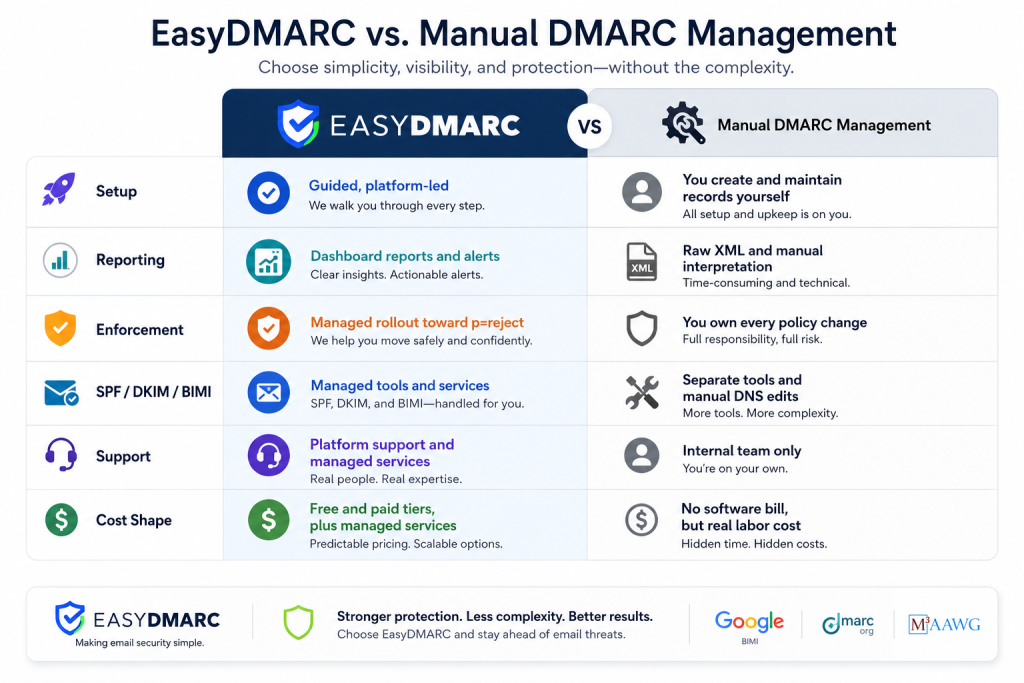
That is the core tradeoff. EasyDMARC costs money. Manual management costs time and risk.
EasyDMARC Deep Dive :
The official EasyDMARC pages show a platform that is built to reduce DNS friction and make authentication easier to operate.
The managed DMARC page explains the basic model:
- The platform helps create and manage the DMARC record.
- It avoids repeated DNS edits every time something changes.
- It guides the domain from monitoring to quarantine to reject.
- It tracks authentication activity in a readable dashboard.
That is the kind of setup teams need when email deliverability is important but internal security resources are limited.
The pricing page also makes the product clearly tiered:
- Free
- Plus
- Premium
- Enterprise
The business pricing page shows Plus at $35.99 per month billed annually, Premium at $71.99 per month billed annually, and Enterprise as custom. It also shows a 1,000 email / 1 domain / 14-day data history Free tier, which is a useful starting point for smaller domains.
The bigger value is not the tier list. It is the managed layer:
- Managed DMARC.
- Managed BIMI.
- EasySPF.
- Managed MTA-STS.
- Reporting and alerts.
- Reputation monitoring.
- Audit logs.
- SSO on enterprise plans.
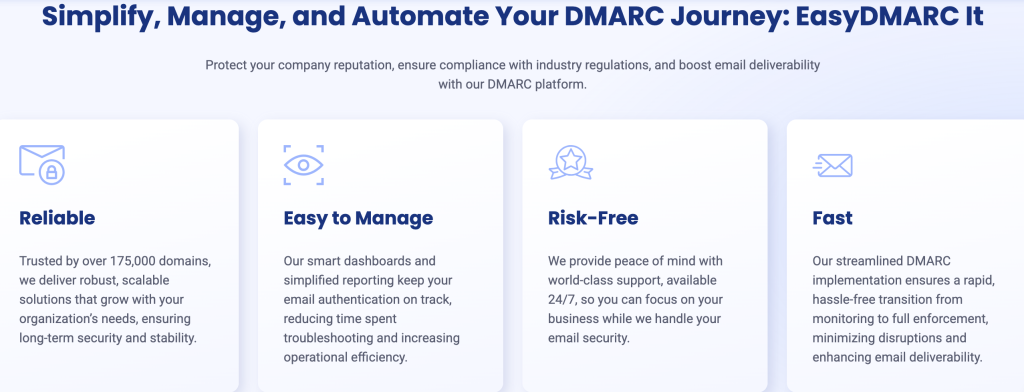
If your team needs help turning authentication into a managed process, start with EasyDMARC here.
Manual DMARC Management Deep Dive :
Manual DMARC management is the default fallback for a lot of teams. It means your security or operations team edits DNS records directly, reads aggregate reports, decodes failures, and decides when to move the policy forward.
That sounds free, but it is not really free.
The hidden costs usually show up as:
- Time spent reading raw reports.
- Time spent troubleshooting SPF alignment.
- Time spent fixing broken records after a sender changes.
- Time spent waiting on someone who understands DNS.
- Time spent guessing whether the policy is safe to tighten.
Manual management can work if your team is small, technically mature, and already comfortable with email authentication. But it is easy to stall in monitoring mode forever because nobody wants to break delivery.
That is the exact operational gap EasyDMARC is trying to close.
Feature Matrix :
Here is where EasyDMARC wins for most teams.
EasyDMARC Strengths –
- Managed DMARC setup.
- EasySPF and managed DKIM.
- Managed BIMI.
- Failure and TLS reports.
- Reputation monitoring.
- SSO, audit logs, and API on higher tiers.
- Clearer path to enforcement.
Manual Management Strengths –
- No vendor subscription.
- Full control over every DNS change.
- Good fit for teams with email security specialists.
Manual Management Weaknesses –
- Slow policy rollout.
- Higher chance of mistakes.
- Harder to interpret reports quickly.
- More dependence on internal expertise.
Pricing Comparison :
The official EasyDMARC pricing structure is public and simple enough to plan around:
- Free tier for basic visibility.
- Plus at $35.99 per month billed annually.
- Premium at $71.99 per month billed annually.
- Enterprise with custom pricing.
There is also an MSP plan for partners and managed providers.
Manual DMARC management has no software bill, but that is misleading. If a security engineer spends several hours a month interpreting reports and updating records, the labor cost can easily exceed a small subscription.
So the buying question is not whether EasyDMARC costs money. It is whether the platform saves enough security time and reduces enough deliverability risk to justify the spend.
If you are running a domain that matters to revenue, the answer is usually yes.
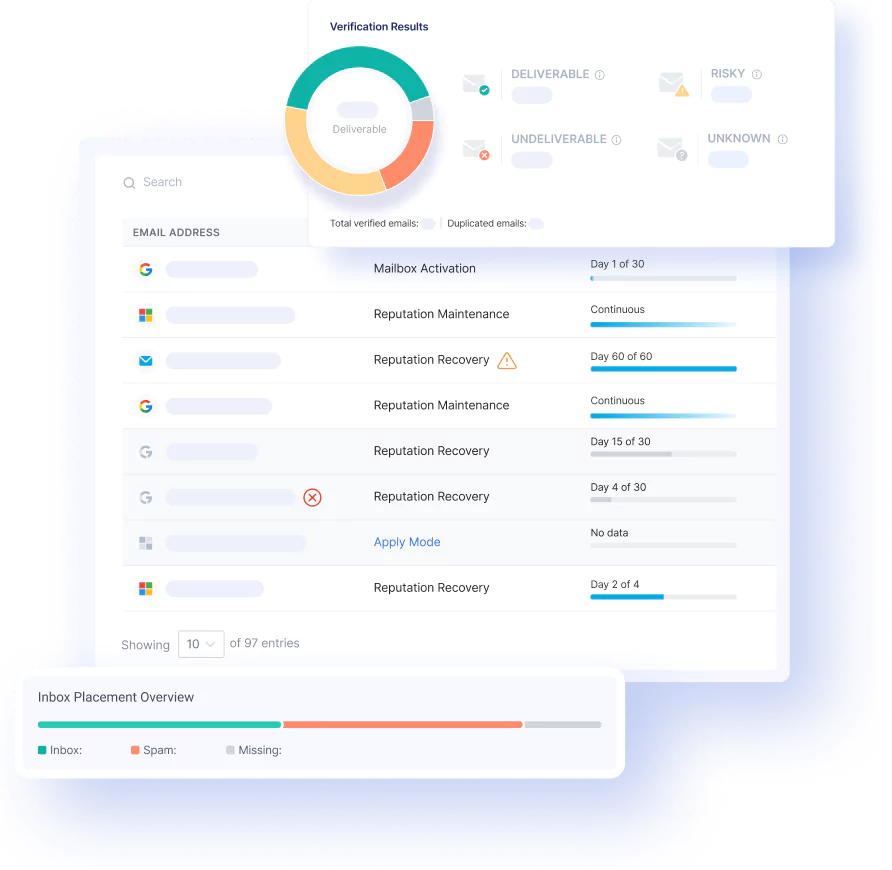
If you want the guided route instead of the manual one, start with EasyDMARC here.
Use Case Recommendations :
EasyDMARC is the stronger choice for:
- SMBs that want a safer path to DMARC enforcement.
- MSPs and agencies managing multiple domains.
- Marketing teams that need readable reports.
- Security teams that want managed SPF, DKIM, and BIMI support.
- Organizations that want fewer DNS touchpoints.
Manual management is the better choice for:
- Security teams with dedicated email authentication expertise.
- Very small setups with simple sender patterns.
- Organizations that do not want another vendor in the stack.
The practical edge is that EasyDMARC gives you a much cleaner operational story. If the person owning email deliverability is not also a DNS expert, the managed path is easier to sustain.
What To Watch Before You Buy :
There are three things to check.
1. Domain Count –
The plan you need depends on how many domains you manage. A single brand is a different problem from a multi-domain portfolio.
2. Email Volume –
The business pricing page ties plans to email volume. If you are growing quickly, the right tier matters more than the sticker price.
3. Ownership –
If nobody owns email authentication internally, you need a managed service more than you need another dashboard.
That is the real test. EasyDMARC is most valuable when it replaces a process that is currently too manual to trust.
What A Real Rollout Looks Like :
The cleanest EasyDMARC rollout usually starts with visibility.
First, you connect the domain and let the platform collect enough data to show where mail is coming from. Second, you review the authentication picture and identify the sources that are already aligned versus the ones that need attention. Third, you use the managed services to move toward a stronger policy without breaking legitimate mail.
That sequence matters because DMARC is not a switch you throw once and forget. It is a policy journey. If you skip the visibility step, the enforcement step becomes risky. If you skip the cleanup step, the policy becomes noisy. If you skip monitoring, you lose the whole point of the system.
EasyDMARC is helpful because it turns that journey into a structured workflow instead of a bunch of isolated DNS edits. That is what makes the product feel more operational than a one-time setup checklist.
First 30 Days After Launch :
The first month usually follows a predictable pattern.
Week one is discovery. The team learns which senders are authenticated, which domains need attention, and which records are missing or misaligned.
Week two is cleanup. The team fixes the obvious issues and reviews the reports again.
Week three is stabilization. The team watches for new failures as mail systems change or new senders are added.
Week four is policy planning. The team decides how aggressively to move the DMARC policy forward.
That timeline keeps expectations realistic. DMARC is a process, not a one-click feature. EasyDMARC is useful because it gives that process structure.
Operational Rule Of Thumb :
Use the platform in this order:
- Visibility first.
- Cleanup second.
- Enforcement third.
- Monitoring continuously.
If the team skips the first two steps, enforcement becomes risky. If the team skips the fourth, the whole setup loses value after launch.
Common Mistakes :
The most common mistakes are predictable:
- Pushing enforcement too fast.
- Forgetting to clean up SPF alignment issues.
- Leaving unauthorized senders in the stack.
- Treating reports as a compliance artifact instead of a working tool.
- Assuming the DNS record is the end of the job.
EasyDMARC helps, but it cannot make bad email governance disappear. Someone still needs to own the sender inventory and the policy timeline.
Simple Decision Rule :
Use EasyDMARC if:
- You want managed help with DMARC, SPF, DKIM, and BIMI.
- You need readable reporting and a safer path to reject.
- You manage multiple domains or act as an MSP.
- You want less DNS friction and less internal admin work.
Stick with manual management if:
- You already have a strong internal email security team.
- You prefer total control and do not mind the operational overhead.
- You are comfortable staying in monitoring mode for a long time.
Verdict :
EasyDMARC is a strong choice in 2026 for teams that want a managed DMARC workflow instead of a do-it-yourself DNS project.
Its strongest points are the managed setup, the clear pricing ladder, the useful reports, and the broader set of managed email security tools around DMARC. The main downside is that you are paying for a platform rather than relying on your own team to manage everything.
If you want less risk, less DNS friction, and a cleaner path to enforcement, start with EasyDMARC here.

FAQ :
Does EasyDMARC have a free tier?
Yes. The pricing page shows a Free plan with a limited domain count and basic data history.
What is the entry paid price?
The business pricing page shows Plus at $35.99 per month billed annually.
What does EasyDMARC manage for you?
The official site highlights managed DMARC, Managed BIMI, EasySPF, Managed MTA-STS, reporting, and monitoring.
Is manual DMARC management ever better?
Yes, if you have a strong internal email security team and you want full direct control. For most growing teams, the managed route is faster and safer.
Does EasyDMARC replace all email security work?
No. It reduces the operational burden of DMARC and related authentication tasks, but you still need someone who owns sender policy and governance.
Why do teams stay stuck in monitoring mode?
Because policy enforcement feels risky until the sender inventory is clean. That is exactly where a managed platform helps.
What is the biggest benefit of managed DMARC?
It turns authentication from a manual DNS project into a repeatable operational workflow.
Do MSPs get anything different?
Yes. The site shows an MSP plan for managed providers.
The practical result is that the platform is easier to operationalize across multiple domains than a manual process that depends on one person remembering every DNS change.
Before You Choose, Compare These
Hand-picked guides to help you choose the right tool — no fluff.
 Use CasesWho Is EasyDMARC Best For? Use Cases & Fit (2026)Who gets the most out of it – and who should skip it.
 PricingEasyDMARC Pricing 2026Real tier prices and what each plan actually includes.
 Case StudiesVektorOS Case Study 2026What actually happened when teams rolled it out.
 AlternativesLeadfeeder Alternatives 2026Credible alternatives and when each one wins.